ECO mode TOYOTA RAV4 PRIME 2021 User Guide
[x] Cancel search | Manufacturer: TOYOTA, Model Year: 2021, Model line: RAV4 PRIME, Model: TOYOTA RAV4 PRIME 2021Pages: 618, PDF Size: 24.18 MB
Page 97 of 618
972-1. Plug-in hybrid system
2
Plug-in hybrid system
When eco air conditioning mode
is used, the air conditioning con-
trol is switched automatically to
a lower setting. (P.397)
The heated steering wheel (if
equipped) and seat heaters are
efficient heating device that
directly warm the body using
less electric power.
When used togethe r with the air
conditioning system, a low tem-
perature setting can be used to
improve electrical and fuel effi-
ciency.
■Check the tire pressure
If the tire pressure is lower than
the specified value, it will
worsen the electrical and fuel
efficiency.
A pressure level 7 psi (50 kPa, 0.5
kgf/cm
2 or bar) lower than the spec-
ified value will cause a worsening of
several percentage points.
■When driving on highways,
use the EV/HV mode selec-
tion switch to drive in HV
mode
The power consumption will
increase significantly if the vehi-
cle is driven in EV mode on
highways.
■Do not load unnecessary
objects in the vehicle
Driving with objects weighing
220 lb. (100 kg) in the vehicle
will worsen the electrical and
fuel efficiency by approximately
3%. Air resistance also greatly
affects electrical and fuel effi-
ciency. Remove any exterior
accessories such as a roof lug-
gage carrier when they are not
being used.
The running resistance of snow
tires is high and they will worsen
electrical and fuel efficiency.
Replace them with standard
tires as soon as they are no lon-
ger needed.
■Know your vehicle’s electri-
cal and fuel efficiency
If you know your vehicle’s daily
electrical and fuel efficiency, you
will understand the benefits of
Eco drive.
Use the Power Consump-
tion/Fuel Economy, ECO Accel-
erator Guidance/“Eco Score”
and other data displayed on the
multi-information display.
The following indicate that
charging has been carried out
properly.
The charging indicator of the
charging port turns off
“Charging Complete” is dis-
played on the multi-informa-
tion display when a door is
opened with the power switch
off ( P.119)
Regardless of the type of power
Display when c harging is
completed
Page 115 of 618
1152-2. Charging
2
Plug-in hybrid system
( P.144), the time required for
charging to complete may be
longer or the charging may not
be completed.
*4: If equipped
■Charging time may increase
In the following si tuations, charging
time may become longer than nor-
mal:
●In very hot or very cold tempera-
tures.
●When the hybrid battery (traction
battery) becomes hot, such as
immediately after high-load driv-
ing.
●The vehicle is consuming a lot of
electricity, for example, when the
headlights are on etc.
●When using “My Room Mode”.
( P.144)
●There is a power outage during
charging.
●There is an interruption in the
electrical supply.
●There is a drop in the voltage of
external power source.
●The charge in the 12-volt battery
is low, for examp le due to the
vehicle being left unused for a
long period of time.
●The maximum charging current is
set to 8A or 16A* through “Vehicle
Settings”. ( P.112)
●When the “Battery Heater” oper-
ates. ( P.115)
●When the “Battery Cooler” is oper-
ated before charging. ( P.116)
●When the plug generates heat
due to a loose outlet connection
etc.
*: Vehicles with 6.6 kW onboard
traction battery charger only
■Using a DC Charger
DC Chargers cannot be used with this vehicle.
■Charging electricity
This vehicle can be charged up to
approximately 3. 3 kW or 6.6 kW
*.
However, depending on the used
charger or AC charging cable,
charging electrici ty may be limited.
*: Vehicles with 6.6 kW onboard
traction battery charger only
This vehicle is equipped with
several functions that are linked
with charging.
■“My Room Mode” ( P.144)
When the AC charging cable is
connected to the vehicle, electri-
cal components such as the air
conditioning system or audio
system can be used using the
external power source
*.
*: The power of the hybrid battery
(traction battery) may be used
depending on the situation.
■“Battery Heater”
When the outside temperature
is low and the AC charging
cable is connected to the vehi-
cle, this function automatically
warms the hybrid battery (trac-
tion battery) until it reaches or
exceeds a certain temperature.
“Battery Heater” will operate
when the “Battery Heater” of the
“Charging Settings” on the multi-
information display is on.
( P.178)
Charging-linked functions
Page 117 of 618

1172-2. Charging
2
Plug-in hybrid system
may start again to charge the
hybrid battery (traction battery).
• “Charging Stopped Due to Pulled
Charging Connector” may be
shown when the charging connec-
tor is removed while recharging.
( P.152)
■“Battery Cooler”
●The charging indicator is illumi-
nated while “Battery Cooler” is on
standby or operating.
●“Battery Cooler” is implemented
for a maximum of approximately
30 minutes. However, when the
“Departure” time is set ( P.130)
and there is not sufficient time
between the current time and the
time that chargin g will complete,
“Battery Cooler” operation time
may become shorter.
●When there is a small amount of
remaining charge in the hybrid
battery (traction battery), even if
the hybrid battery (traction battery)
is hot, “Battery Cooler” may not be
implemented.
●When the traction battery is
almost completely charged, “Bat-
tery Cooler” may not be imple-
mented.
●When the following operations are
performed while “Battery Cooler”
is operating, the hybrid battery
(traction battery) cooling operation
stops.
• The hood is opened
• The power switch is turned to any mode other than off
• The Remote Air Conditioning Sys- tem is operated ( P.405)
• “Charge Now” is implemented
( P.131)
●“Battery Cooler” uses the power of
the hybrid battery (traction battery)
and external power source.
• While “Battery Cooler” is operat- ing, the amount of the remaining
charge of the hybrid battery (trac-
tion battery) increases and
decreases in a certain range, and
does not increas e as in normal charging.
• The operation of “Battery Cooler” is recognized as charging by a
charger. The charger that calcu-
lates the fee according to charging
time causes a charging fee.
Page 122 of 618
1222-2. Charging
suppress battery capacity decline.
●Avoid parking the vehicle in areas
with a high temperature under
direct sunlight when the hybrid
battery (traction battery) is fully
charged.
●Avoid accelerating and decelerat-
ing frequently and suddenly when
EV driving.
●Avoid frequent driving near the top
speed for EV driving. (P.82)
●Leave a low level of charge in the
hybrid battery (traction battery)
when leaving the vehicle undriven
for a long period of time.
After confirming that EV mode or
AUTO EV/HV mode has switched
to HV mode, turn the power switch
off.
●Use the charging schedule func-
tion as much as possible in order
to fully charge the hybrid battery
(traction battery) immediately
before starting off. ( P.130)
Also, if the hybrid battery (traction
battery) capacity reduces, the dis-
tance that can be driven in EV mode
or AUTO EV/HV mode decreases.
H ow ev er , ve hic le p er fo rm an ce do e s
not significantly become worse.
■When the remaining charge of
the hybrid battery (traction bat-
tery) is low after charging
In the following situations, the
remaining charge of the hybrid bat-
tery (traction battery) after charging
completes may be less than normal
in order to protect the system (the
EV driving range after the battery is
fully charged may be shorter).
*
●Charging is carried out when the
outside temperature is low or high.
●Charging is carried out immedi-
ately after high-load driving or in
extreme heat.
When none of the above situations
apply and there is a drastic drop in
the remaining charge of the hybrid
battery (traction battery) after charging completes, have the vehi-
cle inspected by your Toyota dealer.
*: When this occurs, even if the
remaining charge display of the
hybrid battery (traction battery)
shows that it is f ully charged, the
remaining charge rapidly
decreases faster than normal.
■When the charging amount sent
to the hybrid battery (traction
battery) decreases
When the amount of power supplied
by the charger is low or operation of
the “Battery Heate r”, etc., reduces
the charging pow er sent to the
hybrid battery (trac tion battery), the
charging amount sent to the hybrid
battery (traction battery) may
decrease.
■Certification
This device complies with Part 15 of
the FCC Rules. Operation is subject
to the following two conditions:
(1) this device may not cause harm-
ful interference, and
(2) this device must accept any
interference received, including
interference that may cause unde-
sired operation.
Page 132 of 618
1322-2. Charging
■To make sure that the charging
schedule function operates cor-
rectly
Check the following items.
●A d j u s t t h e c l o c k t o t h e c o r r e c t t i m e
( P.169)
●The calendar is set to the correct
date ( P.177)
●Check that the power switch is
turned off
●After registering the charging
schedule, connect the AC
charging cable
The charging sta rt time is deter-
mined based on the charging
schedule at the time that the AC
charging cable was connected.
●After connecting the AC charging
cable, check that the charging
indicator of the charging port
flashes ( P.100)
●Do not use an ou tlet that has a
power cut off function (including a
timer function)
Use an outlet that constantly sup-
plies electricity. For outlets where
the power is cut off due to a timer
function, etc., charging may not be
carried out according to plan if the
power is cut off during the set
time.
■When the AC charging cable
remains connected to the vehi-
cle
Even if multiple consecutive
charging schedules are registered,
the next charge will not be carried
out according to the charging
schedule until the AC charging
cable is removed and reconnected
after charging completes. Also,
when the hybrid battery (traction
battery) is fully charged, charging
according to the charging schedule
will not be carried out.
■“Climate Prep”
●When the air conditioning-linked
setting is turned on, the air condi-
tioning operates until the set departure time. Therefore, the air
conditioning will co
nsume electric-
ity and charging may not complete
by the set departure time.
●If the hybrid batte ry (traction bat-
tery) is fully charged, charging will
not be carried o ut, even if the
charging schedule is set. How-
ever, if “Climate Prep” is turned
on, the air conditioning will oper-
ate only once when it nears the
time set in “Departure”. If this
occurs, the air conditioning will
consume electricity and the
remaining charge of the hybrid
battery (traction battery) when
departing may be decreased.
●When the doors are unlocked, the
air conditioning system does not
operate.
■Smartphone-linked operation
(vehicles with Premium Audio)
After applying to Toyota Apps, it is
possible to use the smartphone
application to change charging
schedule settings.
For details about Toyota Apps, refer
to
http://www.toyota.com/connectedse
rvices in the United States and
http://www.toyota.ca/connected
in
Canada.
■When charging schedules are
ignored
When the following operations are
performed while the charging
schedule is on standby, charging
schedule is temporarily canceled
and charging is started.
●When the Remote Air Condition-
ing System ( P.405) is operated
●When turning “My Room Mode”
on ( P.144)
●When turning “Charge Now” on
( P.137, 142)
●When an operation that temporar-
ily cancel charging using the
charging schedule ( P.125)
Page 145 of 618
1452-2. Charging
2
Plug-in hybrid system
To stop “My Room Mode”, turn
the power switch off.
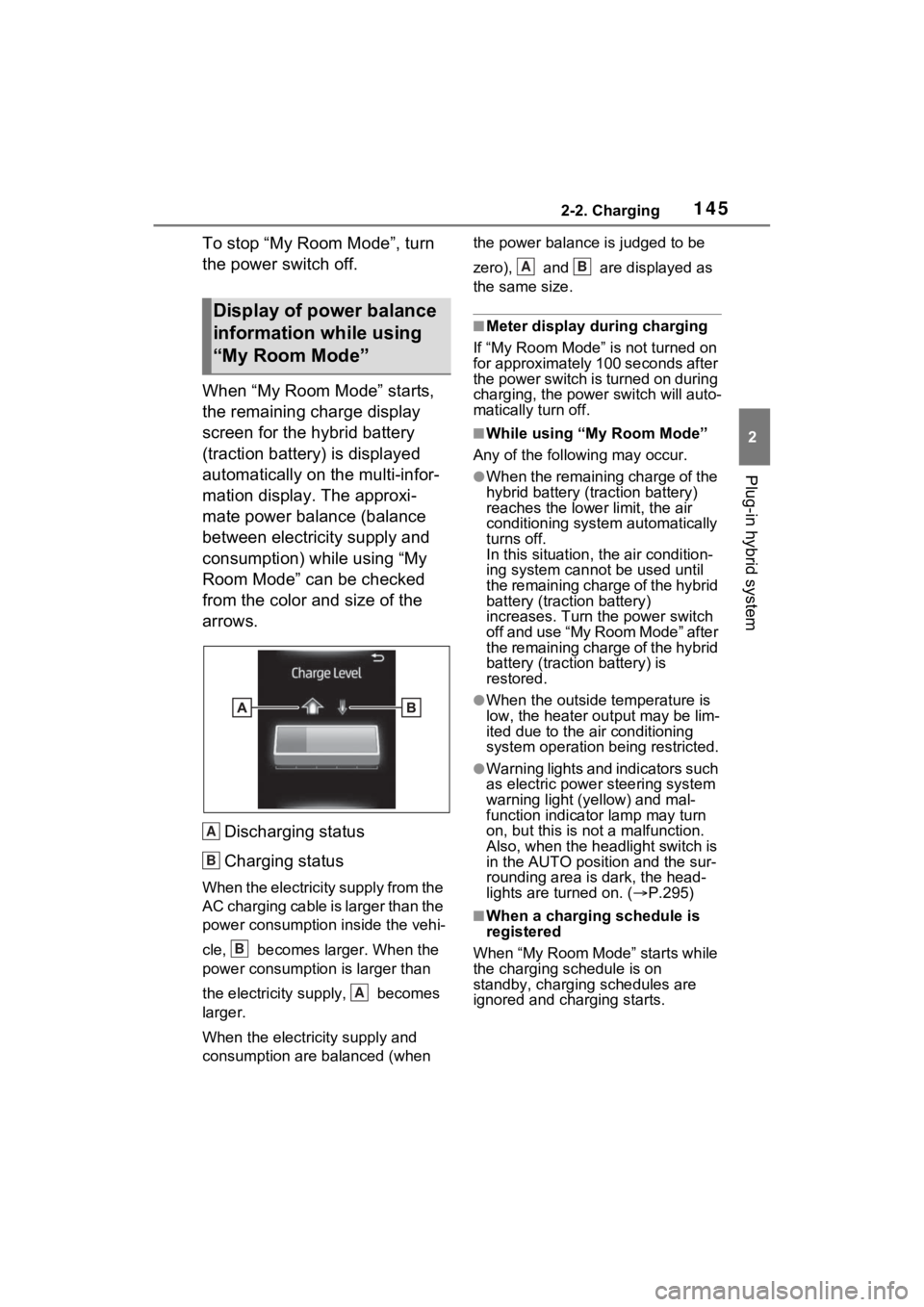
When “My Room Mode” starts,
the remaining charge display
screen for the hybrid battery
(traction battery) is displayed
automatically on the multi-infor-
mation display. The approxi-
mate power balance (balance
between electricity supply and
consumption) while using “My
Room Mode” can be checked
from the color and size of the
arrows.Discharging status
Charging status
When the electricity supply from the
AC charging cable is larger than the
power consumption inside the vehi-
cle, becomes larger. When the
power consumption is larger than
the electricity su pply, becomes
larger.
When the electricity supply and
consumption are balanced (when the power balance is judged to be
zero), and are displayed as
the same size.
■Meter display during charging
If “My Room Mode” is not turned on
for approximately 100 seconds after
the power switch is turned on during
charging, the power switch will auto-
matically turn off.
■While using “My Room Mode”
Any of the following may occur.
●When the remaining charge of the
hybrid battery (traction battery)
reaches the lowe r limit, the air
conditioning system automatically
turns off.
In this situation, the air condition-
ing system cannot be used until
the remaining charge of the hybrid
battery (traction battery)
increases. Turn the power switch
off and use “My Room Mode” after
the remaining charge of the hybrid
battery (traction battery) is
restored.
●When the outside temperature is
low, the heater ou tput may be lim-
ited due to the air conditioning
system operation being restricted.
●Warning lights and indicators such
as electric power steering system
warning light (yellow) and mal-
function indicator lamp may turn
on, but this is no t a malfunction.
Also, when the headlight switch is
in the AUTO position and the sur-
rounding area is dark, the head-
lights are turned on. ( P.295)
■When a charging schedule is
registered
When “My Room Mode” starts while
the charging schedule is on
standby, charging schedules are
ignored and charging starts.
Display of power balance
information while using
“My Room Mode”
A
B
B
A
AB
Page 146 of 618
1462-2. Charging
■When “My Room Mode” is used
while the hybrid battery (trac-
tion battery) is fully charged
When the power switch is turned on
while the hybrid battery (traction
battery) is fully charged and the
charging connector that supplies
power is connected, “Charging Port
Lid is Open” is displayed on the
multi-information display. In this
case, press on the meter control
switches to display the setting
screen of “My Room Mode”, and
then select “My Room Mode”.
When “My Room Mode” is used
while the hybrid battery (traction
battery) is fully charged, the electric
power of the hybrid battery (traction
battery) may be consumed. In this
case, charging may be performed
again.
■When a message related to “My
Room Mode” is displayed
When a message is displayed on
the multi-informat ion display while
using or attempting to start “My
Room Mode”, take the following cor-
rection procedures.
●“Traction battery is too low for “My
Room Mode””
There is insufficient remaining
charge in the hybrid battery (traction
battery) for starting “My Room
Mode”.
Wait until the char ge of the hybrid
battery (traction battery) increases,
then start “My Room Mode”.
●““My Room Mode” has stopped
due to low traction battery”
The remaining charge in the hybrid
battery (traction battery) is insuffi-
cient.
Stop using “My Room Mode” and
charge the hybrid battery (traction
battery).
●““My Room Mode” will stop when
traction battery is too low Reduce
power usage to continue using
“My Room Mode””
The power consumption inside the
vehicle is greater than the power
being charged to the hybrid battery
(traction battery), and the remaining
charge of the hybrid battery (traction
battery) is low.
*
• “My Room Mode” will end unless the power consumption inside the
vehicle is improved.
• To continue using “My Room Mode”, turn off the power of sys-
tems such as the air conditioning
system and audio system to
increase the remaining charge of
the hybrid battery (traction bat-
tery).
*: The power balance status during
“My Room Mode” can be checked
from the remaining charge dis-
play screen for the hybrid battery
(traction battery) displayed on the
multi-information display.
WARNING
■Cautions for using “My Room
Mode”
Make sure to observe the follow-
ing precautions.
Failure to do so may result in seri-
ous health problems or even
death.
●Do not leave children, people
who need assistance, or pets
inside the vehicle. The system
may turn off aut omatically and
the interior temperature may
become high or low, resulting in
heat stroke, dehydration or
hypothermia. Devices such as
the wipers can also be used,
which may lead to mistaken
operation and an accident.
●Check the safety around the
vehicle carefully before use.
Page 150 of 618
1502-2. Charging
■Cannot change charging schedule from smartphone applica-
tion (vehicles with Premium Audio)
*
*: In order to use the smartphone application, it is necessary to apply to
Toyota Apps. For details about Toyota Apps, refer to
http://www.toyota.com/connectedservices
in the United States and
http://www.toyota.ca/connected
in Canada.
■Charging starts, even though charging schedule is registered
AC charging cable i s not connected
to vehicleBefore using the charging schedule,
connect the AC charging cable.
Incorrect charging mode selected
Check the charging mode setting.
( P.130)
When the charging mode is “Start”,
charging starts at the set time, but
when it is “Departure”, charging is
completed by the set time. (The
charging start time is automatically
controlled by the system.)
Likely causeCorrection procedure
Smartphone is outsi de its coverage
area
Check the signal strength. If the
smartphone is outside its coverage
area, move to a pl ace with a better
signal.
Likely causeCorrection procedure
“Charge Now” is set to on
When charging according to the
charging schedule, set “Charge
Now” to off. ( P.137, 142)
Charging schedule is set to offCheck that charging schedule is not
set to off. ( P.135, 136)
Charging mode is set to “Departure”
and schedule departure time is close
to current time
When the system determines that
there is no time to finish charging by
the set scheduled departure time, it
starts charging. Check the charging
schedules.
Likely causeCorrection procedure
Page 151 of 618
1512-2. Charging
2
Plug-in hybrid system
■Charging ends earlier than time set in “Departure”
AC charging cable was removed and
reinserted while charging indicator of
the charging port was flashing
If the AC charging cable is removed
and reinserted while the charging
indicator is flash ing, the charging
schedule is canceled ( P.125).
Temporarily remove the AC charging
cable, and then reconnect it.
The Remote Air C onditioning Sys-
tem was operated
When the Remote Air Conditioning
System is operated, the system will
start charging, even if the charging
schedule is registered. To carry out
charging using the charging sched-
ule, stop the Remote Air Condition-
ing System, and then reconnect the
AC charging cable.
“Battery Heater” ( P.115) operated
When the charging mode is set to
“Departure”, “Battery Heater” may
operate before charging starts.
Check the status of the charging
indicator of the charging port.
( P.100)
Outside temperature is low and
hybrid battery (traction battery)
warming control ( P.116) operated
(Alaska and Canada only)
When hybrid battery (traction bat-
tery) warming control operates, the
charging schedules are ignored and
charging starts. In order to protect
the hybrid battery ( traction battery),
allow charging to continue.
Likely causeCorrection procedure
Charging end time does not match
estimated end time due to condition
of power source or outside tempera-
tureIf sudden changes in temperature or
changes in the condition of the
power source occur while charging,
charging may end earlier than the
time estimated by the system.
Likely causeCorrection procedure
Page 164 of 618
1643-1. Instrument cluster
*1: This light illuminates on the multi-informatio n display with a
message.
*2: Depending on the operating con- dition, the color and illuminat-
ing/flashing state of the light
change.
*3: The light comes on when the system is turned off.
*4: Intuitive parking assist OFF indi-cator turns on when the power
switch is turned to ON while the
Intuitive parking assist function is
on. It will turn off after a few sec-
onds.
*5: These lights turn on when the power switch is turned to ON to
indicate that a system check is
being performed. They will turn
off after the hybr id system is on,
or after a few seconds. There
may be a malfunction in a sys-
tem if the lights do not turn on, or
turn off. Have the vehicle
inspected by your Toyota dealer.
*6: This light illumi nates on the out-
side rear view mirrors.
*7: When the outside temperature is approximately 37°F (3°C) or
lower, the indicator will flash for approximately 10 seconds, then
stay on.
*8: The displayed indicator changes
according to the current plug-in
hybrid system operation mode.
*9: This light illuminates on the cen-ter panel.
■BSM (Blind Spot Monitor) out-
side rear view mirror indicators
In order to confirm operation, the
BSM outside rear view mirror indica-
tors illuminate when the power
switch is turned t o ON, or when the
BSM function/RCTA function is
enabled while the power switch is in
ON.
If the system is functioning correctly,
the BSM outside rear view mirror
indicators will turn off after a few
seconds.
If the BSM outside rear view mirror
indicators do not illuminate or do not
turn off, there may be a malfunction
in the system. If this occurs, have
the vehicle inspected by your
Toyota dealer.
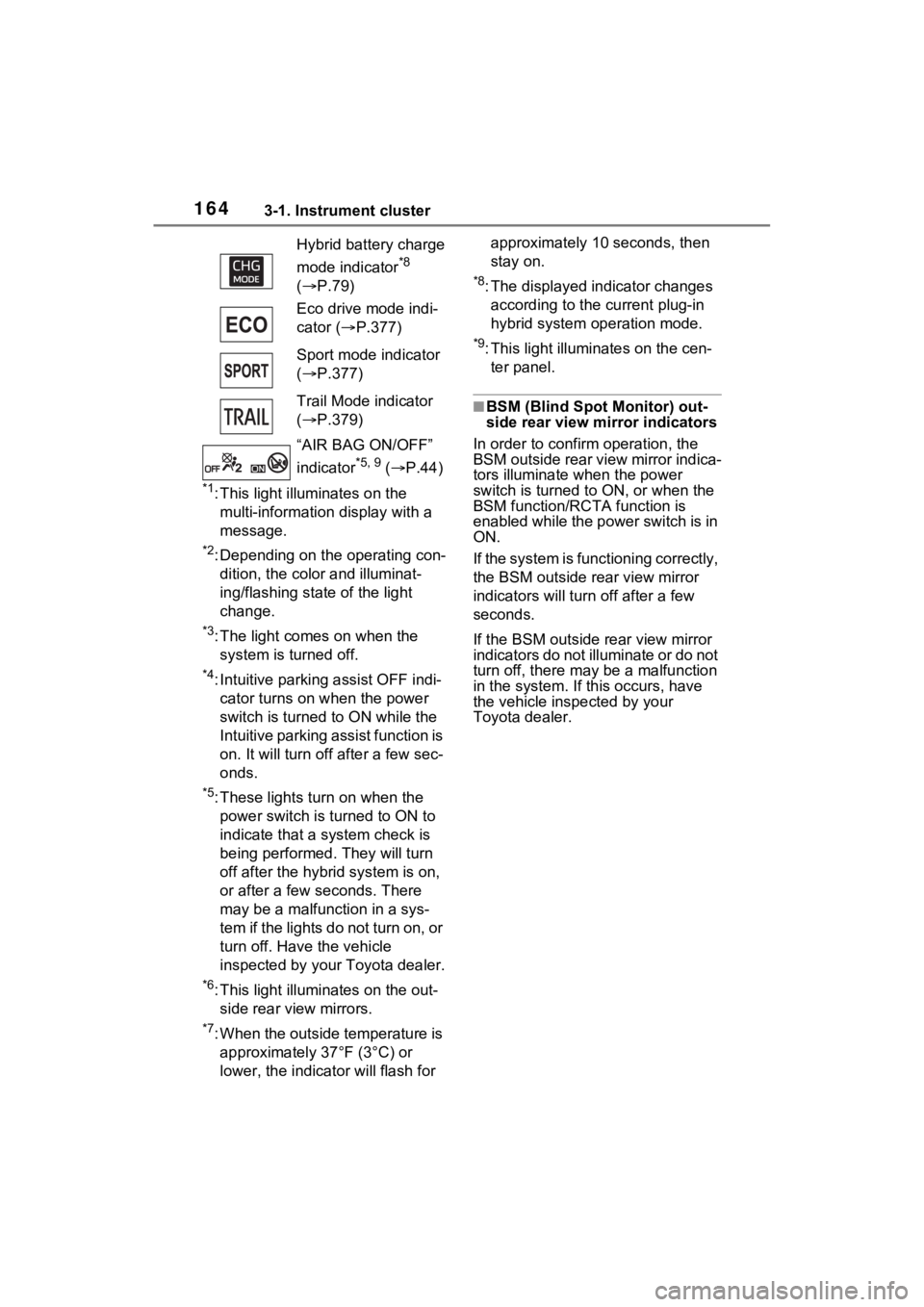
Hybrid battery charge
mode indicator
*8
( P.79)
Eco drive mode indi-
cator ( P.377)
Sport mode indicator
( P.377)
Trail Mode indicator
( P.379)
“AIR BAG ON/OFF”
indicator
*5, 9 ( P.44)