radio TOYOTA RAV4 PRIME 2021 User Guide
[x] Cancel search | Manufacturer: TOYOTA, Model Year: 2021, Model line: RAV4 PRIME, Model: TOYOTA RAV4 PRIME 2021Pages: 618, PDF Size: 24.18 MB
Page 219 of 618

2194-2. Opening, closing and locking the doors
4
Before driving
lowing metallic objects
• Cards to which al uminum foil is
attached
• Cigarette boxes that have alumi- num foil inside
• Metallic wallets or bags
• Coins
• Hand warmers made of metal
• Media such as CDs and DVDs
●When other wireless key (that
emits radio waves) is being used
nearby
●When carrying the electronic key
together with the following devices
that emit radio waves
• Portable radio, cellular phone,
cordless phone or other wireless
communication devices
• Another vehicle’s electronic key or
a wireless key that emits radio
waves
• Personal computers or personal
digital assistants (PDAs)
• Digital audio players
• Portable game systems
●If window tint with a metallic con-
tent or metallic objects are
attached to the rear window
●When the electronic key is placed
near a battery charger or elec-
tronic devices
●When the vehicle is parked in a
pay parking spot where radio
waves are emitted.
If the doors cannot be
locked/unlocked using the smart key
system, lock/unlock the doors by
performing any of the following:
●Bring the electronic key close to
either front door handle and oper-
ate the entry function.
●Operate the wireless remote con-
trol. If the doors cannot be
locked/unlocked us ing the above
methods, use the mechanical key.
( P.196)
If the hybrid system cannot be
started using the smart key system,
refer to P.538.
■Note for the entry function
●Even when the electronic key is
within the effective range (detec-
tion areas), the system may not
operate properly in the following
cases:
• The electronic key is too close to the window or outside door han-
dle, near the ground, or in a high
place when the doors are locked
or unlocked.
• The electronic key is on the instru- ment panel, luggage cover or
floor, or in the door pockets or
glove box when the hybrid system
is started or power switch modes
are changed.
●Do not leave the electronic key on
top of the instrument panel or near
the door pockets when exiting the
vehicle. Depending on the radio
wave reception conditions, it may
be detected by the antenna out-
side the cabin and the door will
become lockable from the outside,
possibly trapping the electronic
key inside the vehicle.
●As long as the electronic key is
within the effective range, the
doors may be locked or unlocked
by anyone. However, only the
doors detecting the electronic key
can be used to lo ck or unlock the
vehicle. (For vehicles equipped
with sensors on the rear door han-
dles, it is possible to lock (but not
unlock) all the doors using a door
handle that is not being detected
by the electronic key.)
●Even if the electro nic key is not
inside the vehicle, it may be possi-
ble to start the hybrid system if the
electronic key is near the window.
●The doors may unlock if a large
amount of water splashes on the
door handle, such as in the rain or
in a car wash when the electronic
key is within the effective range.
(The doors will au tomatically be
locked after approximately 60 sec-
onds if the doors are not opened
and closed.)
Page 223 of 618
2234-2. Opening, closing and locking the doors
4
Before driving
WARNING
■Caution regarding interfer-
ence with electronic devices
●People with implantable car-
diac pacemakers, cardiac
resynchronization therapy-
pacemakers or implantable car-
dioverter defibrillators should
keep away from the smart key
system antennas. (P.217)
The radio waves may affect the
operation of such devices. If
necessary, the entry function
can be disabled. Ask your
Toyota dealer for details, such
as the frequency of radio waves
and timing of the emitted radio
waves. Then, con sult your doc-
tor to see if you should disable
the entry function.
●User of any electrical medical
device other than implantable
cardiac pacemakers, cardiac
resynchronization therapy-
pacemakers or implantable car-
dioverter defibrillators should
consult the manufacturer of the
device for information about its
operation under the influence of
radio waves.
Radio waves could have unex-
pected effects on the operation
of such medical devices.
Ask your Toyota dealer for details
for disabling the entry function.
Page 241 of 618
2414-4. Adjusting the steering wheel and mirrors
4
Before driving
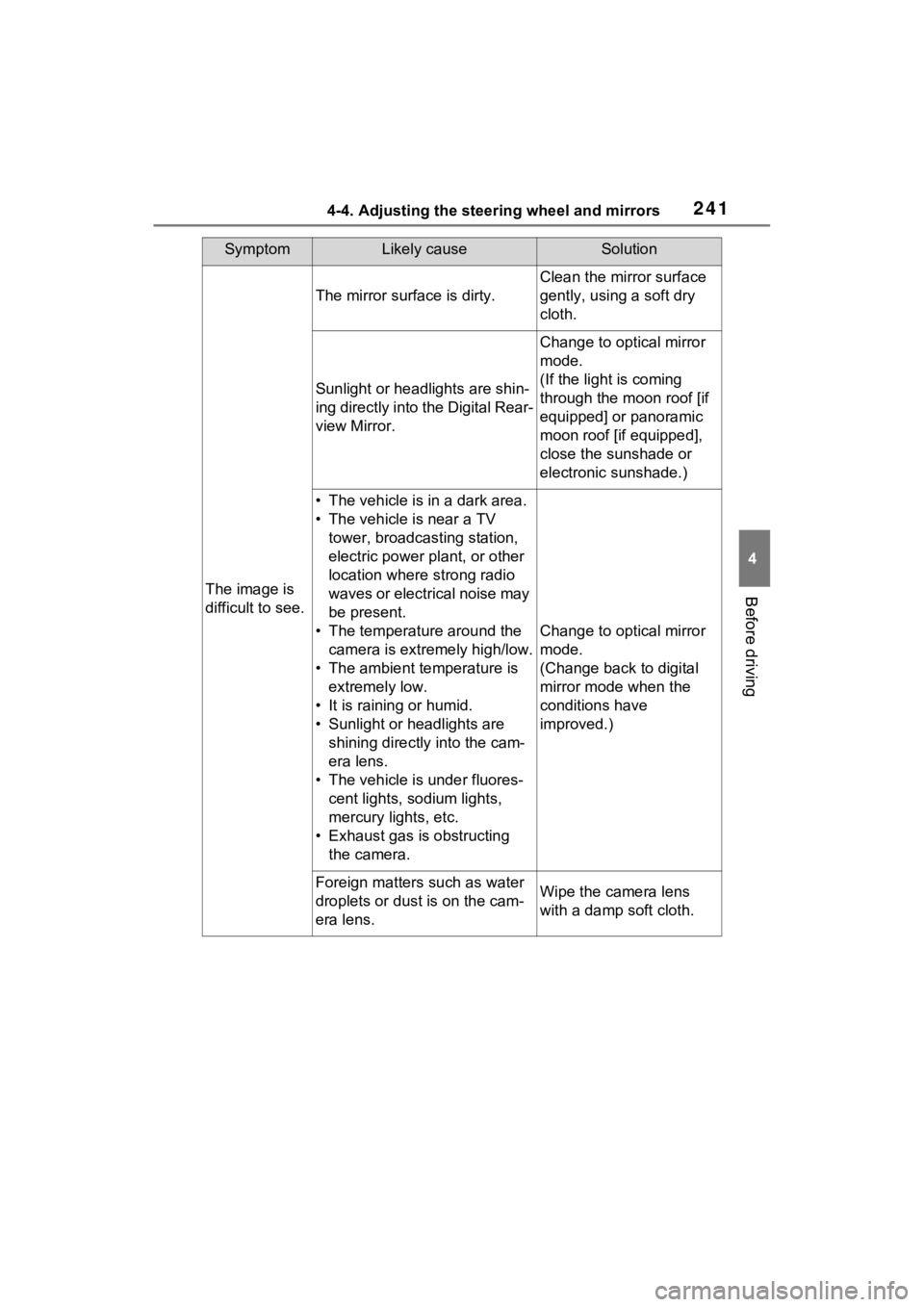
SymptomLikely causeSolution
The image is
difficult to see.
The mirror surface is dirty.
Clean the mirror surface
gently, using a soft dry
cloth.
Sunlight or headlights are shin-
ing directly into the Digital Rear-
view Mirror.
Change to optical mirror
mode.
(If the light is coming
through the moon roof [if
equipped] or panoramic
moon roof [if equipped],
close the sunshade or
electronic sunshade.)
• The vehicle is in a dark area.
• The vehicle is near a TV tower, broadcasting station,
electric power plant, or other
location where strong radio
waves or electrical noise may
be present.
• The temperature around the camera is extremely high/low.
• The ambient te mperature is
extremely low.
• It is raining or humid.
• Sunlight or headlights are shining directly into the cam-
era lens.
• The vehicle is under fluores- cent lights, sodium lights,
mercury lights, etc.
• Exhaust gas is obstructing the camera.
Change to optical mirror
mode.
(Change back to digital
mirror mode when the
conditions have
improved.)
Foreign matters such as water
droplets or dust is on the cam-
era lens.Wipe the camera lens
with a damp soft cloth.
Page 320 of 618
3205-5. Using the driving support systems
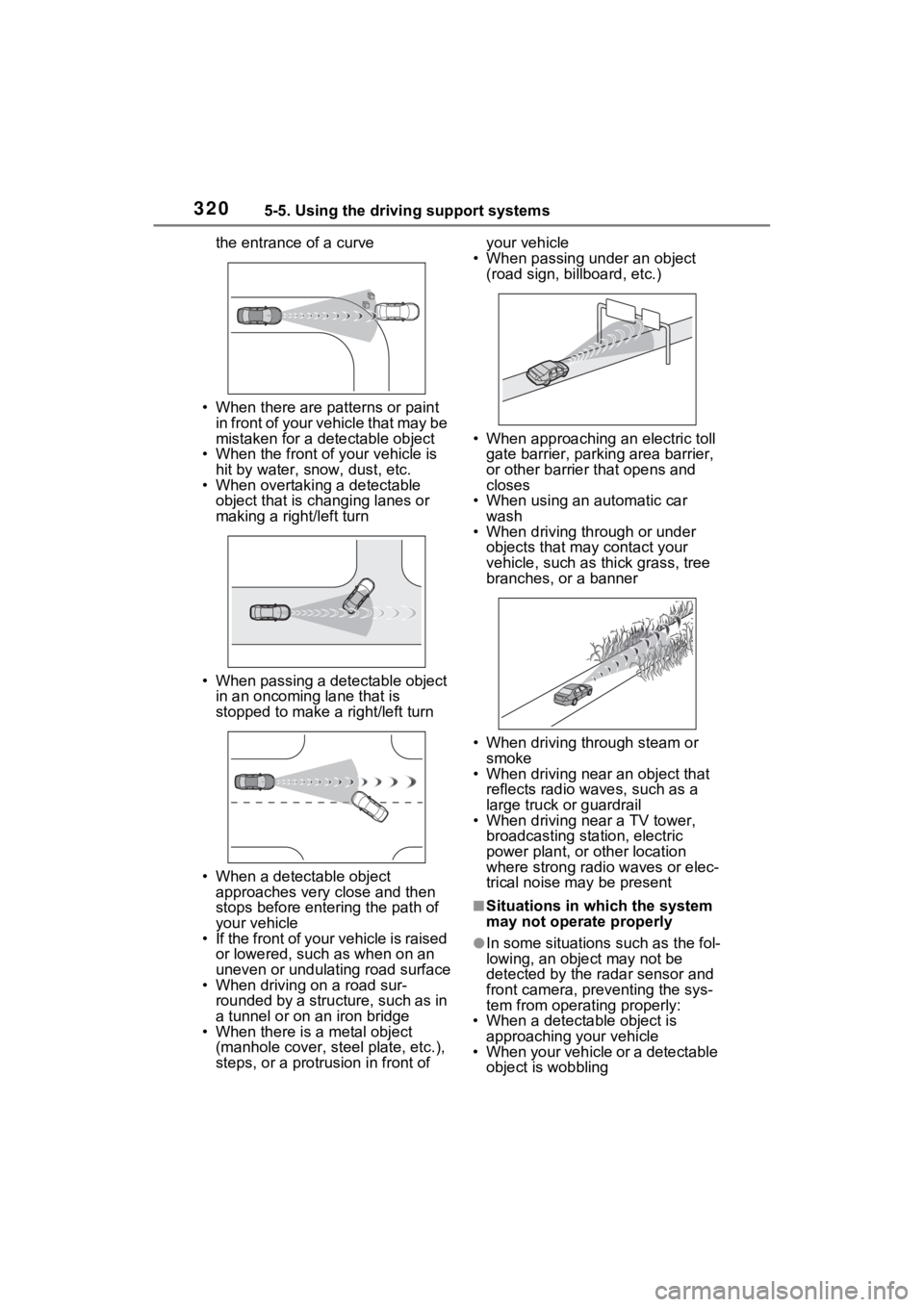
the entrance of a curve
• When there are patterns or paint in front of your vehicle that may be
mistaken for a detectable object
• When the front of your vehicle is
hit by water, snow, dust, etc.
• When overtaking a detectable object that is ch anging lanes or
making a right/left turn
• When passing a detectable object in an oncoming lane that is
stopped to make a right/left turn
• When a detectable object approaches very close and then
stops before entering the path of
your vehicle
• If the front of your vehicle is raised or lowered, such as when on an
uneven or undulating road surface
• When driving on a road sur- rounded by a structure, such as in
a tunnel or on an iron bridge
• When there is a metal object (manhole cover, steel plate, etc.),
steps, or a protrusion in front of your vehicle
• When passing under an object (road sign, billboard, etc.)
• When approaching an electric toll gate barrier, parking area barrier,
or other barrier that opens and
closes
• When using an automatic car
wash
• When driving through or under objects that may contact your
vehicle, such as thick grass, tree
branches, or a banner
• When driving through steam or smoke
• When driving near an object that
reflects radio waves, such as a
large truck or guardrail
• When driving near a TV tower,
broadcasting station, electric
power plant, or other location
where strong radio waves or elec-
trical noise may be present
■Situations in which the system
may not operate properly
●In some situations such as the fol-
lowing, an object may not be
detected by the radar sensor and
front camera, pre venting the sys-
tem from opera ting properly:
• When a detectable object is approaching your vehicle
• When your vehicle or a detectable object is wobbling
Page 422 of 618
4226-4. Using the other interior features
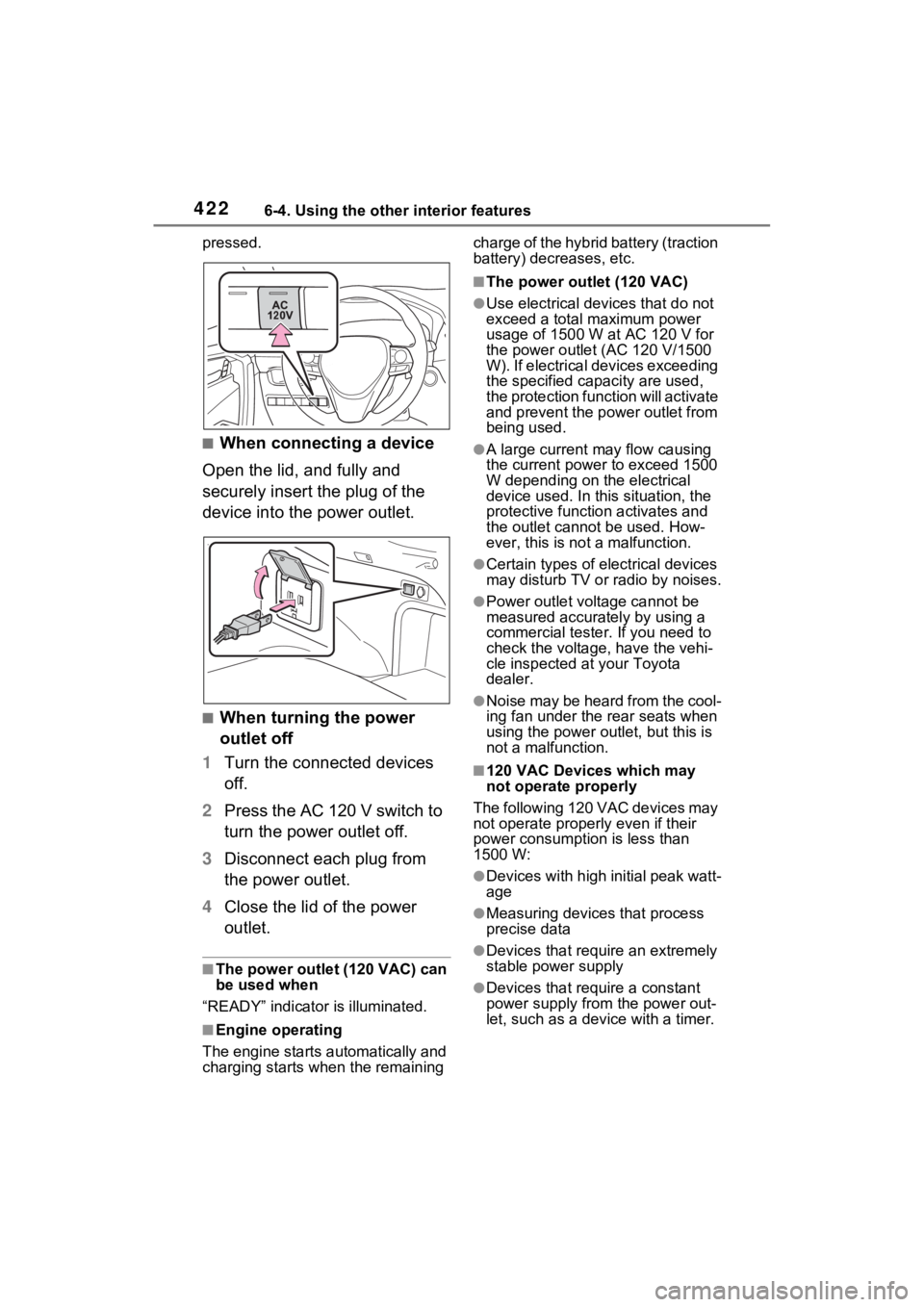
pressed.
■When connecting a device
Open the lid, and fully and
securely insert the plug of the
device into the power outlet.
■When turning the power
outlet off
1 Turn the connected devices
off.
2 Press the AC 120 V switch to
turn the power outlet off.
3 Disconnect each plug from
the power outlet.
4 Close the lid of the power
outlet.
■The power outlet (120 VAC) can
be used when
“READY” indicator is illuminated.
■Engine operating
The engine starts automatically and
charging starts w hen the remaining charge of the hybrid battery (traction
battery) decreases, etc.
■The power outlet (120 VAC)
●Use electrical dev
ices that do not
exceed a total maximum power
usage of 1500 W at AC 120 V for
the power outle t (AC 120 V/1500
W). If electrical devices exceeding
the specified capacity are used,
the protection function will activate
and prevent the power outlet from
being used.
●A large current may flow causing
the current power to exceed 1500
W depending on the electrical
device used. In this situation, the
protective function activates and
the outlet cannot be used. How-
ever, this is no t a malfunction.
●Certain types of electrical devices
may disturb TV or radio by noises.
●Power outlet voltage cannot be
measured accurat ely by using a
commercial tester. If you need to
check the voltage, have the vehi-
cle inspected at your Toyota
dealer.
●Noise may be heard from the cool-
ing fan under the rear seats when
using the power ou tlet, but this is
not a malfunction.
■120 VAC Devices which may
not operate properly
The following 120 VAC devices may
not operate properly even if their
power consumption is less than
1500 W:
●Devices with high initial peak watt-
age
●Measuring devices that process
precise data
●Devices that require an extremely
stable power supply
●Devices that require a constant
power supply from the power out-
let, such as a device with a timer.
Page 429 of 618
4296-4. Using the other interior features
6
Interior features
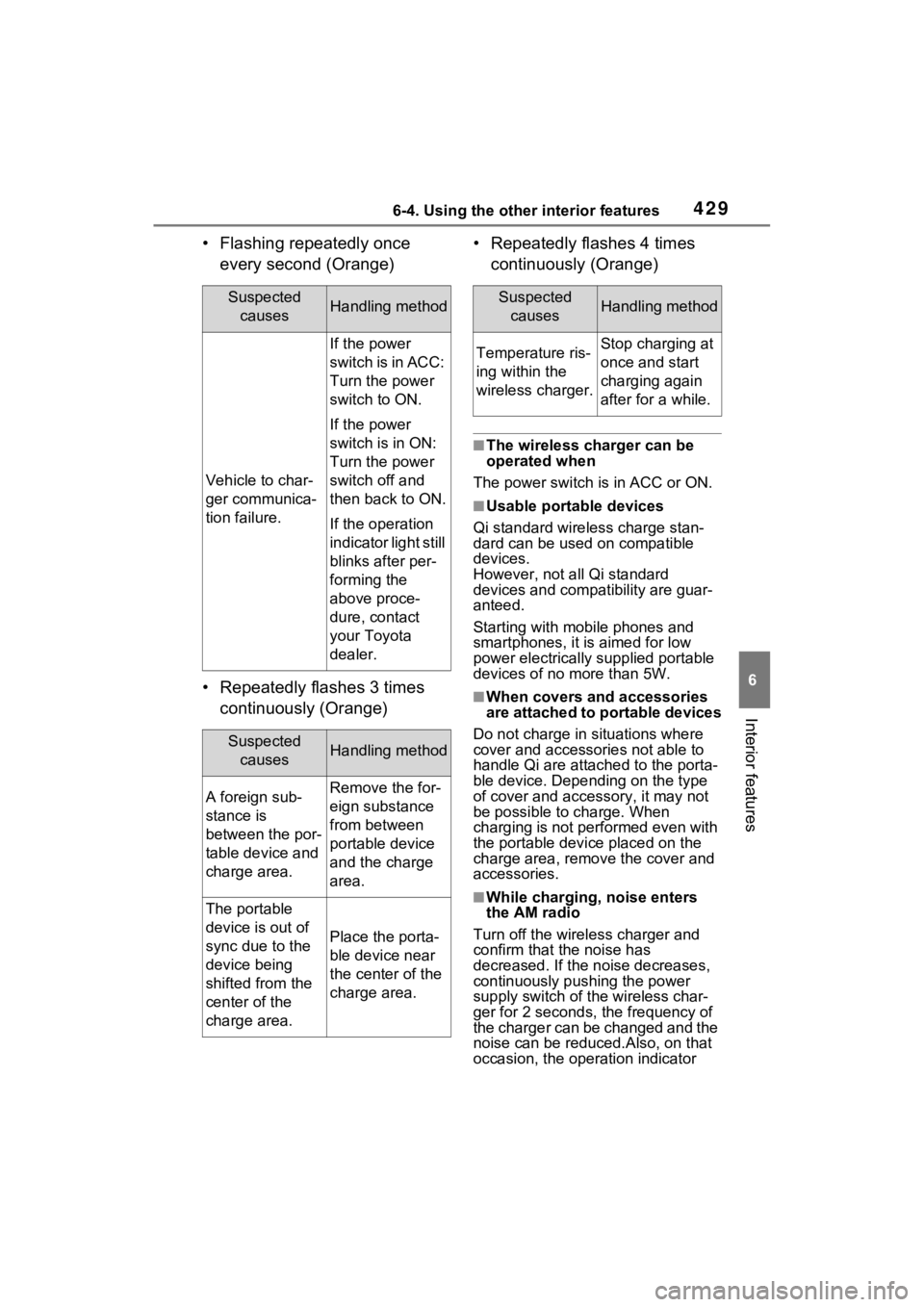
• Flashing repeatedly once every second (Orange)
• Repeatedly flashes 3 times continuously (Orange) • Repeatedly flashes 4 times
continuously (Orange)
■The wireless charger can be
operated when
The power switch is in ACC or ON.
■Usable portable devices
Qi standard wireless charge stan-
dard can be used on compatible
devices.
However, not all Qi standard
devices and compat ibility are guar-
anteed.
Starting with mobile phones and
smartphones, it is aimed for low
power electrically supplied portable
devices of no more than 5W.
■When covers and accessories
are attached to portable devices
Do not charge in situations where
cover and accessories not able to
handle Qi are attached to the porta-
ble device. Depending on the type
of cover and acce ssory, it may not
be possible to charge. When
charging is not performed even with
the portable devic e placed on the
charge area, remove the cover and
accessories.
■While charging, noise enters
the AM radio
Turn off the wireless charger and
confirm that the noise has
decreased. If the noise decreases,
continuously pushing the power
supply switch of the wireless char-
ger for 2 seconds, the frequency of
the charger can be changed and the
noise can be reduced.Also, on that
occasion, the operation indicator
Suspected causesHandling method
Vehicle to char-
ger communica-
tion failure.
If the power
switch is in ACC:
Turn the power
switch to ON.
If the power
switch is in ON:
Turn the power
switch off and
then back to ON.
If the operation
indicator light still
blinks after per-
forming the
above proce-
dure, contact
your Toyota
dealer.
Suspected causesHandling method
A foreign sub-
stance is
between the por-
table device and
charge area.Remove the for-
eign substance
from between
portable device
and the charge
area.
The portable
device is out of
sync due to the
device being
shifted from the
center of the
charge area.
Place the porta-
ble device near
the center of the
charge area.
Suspected causesHandling method
Temperature ris-
ing within the
wireless charger.Stop charging at
once and start
charging again
after for a while.
Page 433 of 618
4336-4. Using the other interior features
6
Interior features
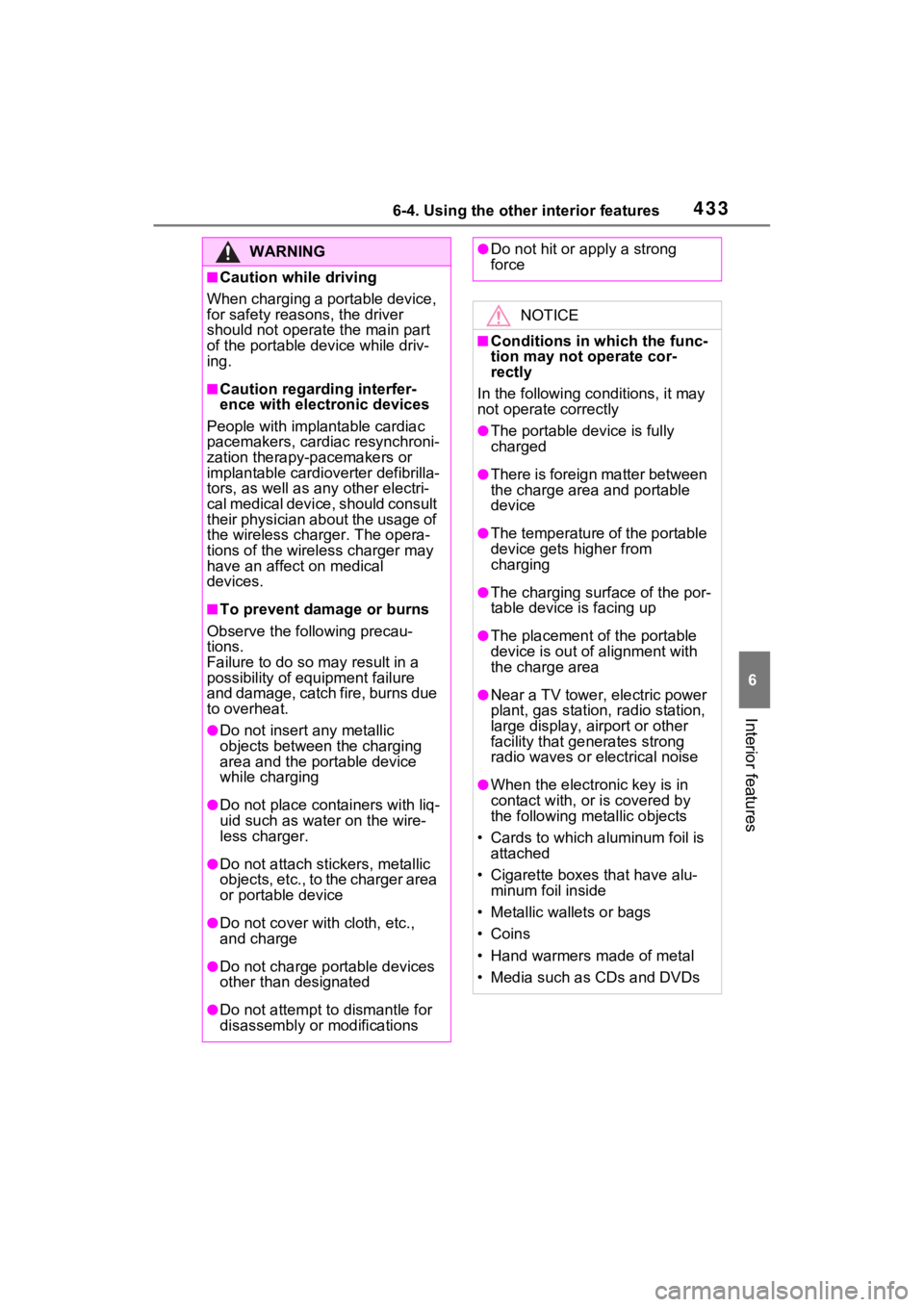
WARNING
■Caution while driving
When charging a portable device,
for safety reasons, the driver
should not operate the main part
of the portable device while driv-
ing.
■Caution regarding interfer-
ence with electronic devices
People with implantable cardiac
pacemakers, cardiac resynchroni-
zation therapy-pacemakers or
implantable cardioverter defibrilla-
tors, as well as any other electri-
cal medical device, should consult
their physician about the usage of
the wireless charger. The opera-
tions of the wireless charger may
have an affect on medical
devices.
■To prevent damage or burns
Observe the following precau-
tions.
Failure to do so m ay result in a
possibility of equ ipment failure
and damage, catch fire, burns due
to overheat.
●Do not insert any metallic
objects between the charging
area and the portable device
while charging
●Do not place con tainers with liq-
uid such as water on the wire-
less charger.
●Do not attach st ickers, metallic
objects, etc., to the charger area
or portable device
●Do not cover with cloth, etc.,
and charge
●Do not charge portable devices
other than designated
●Do not attempt t o dismantle for
disassembly or modifications
●Do not hit or apply a strong
force
NOTICE
■Conditions in which the func-
tion may not operate cor-
rectly
In the following co nditions, it may
not operate correctly
●The portable device is fully
charged
●There is foreign matter between
the charge area and portable
device
●The temperature of the portable
device gets higher from
charging
●The charging sur face of the por-
table device is facing up
●The placement of the portable
device is out of alignment with
the charge area
●Near a TV tower, electric power
plant, gas station, radio station,
large display, airport or other
facility that gen erates strong
radio waves or electrical noise
●When the electronic key is in
contact with, or is covered by
the following metallic objects
• Cards to which aluminum foil is attached
• Cigarette boxes that have alu- minum foil inside
• Metallic wallets or bags
• Coins
• Hand warmers made of metal
• Media such as CDs and DVDs
Page 434 of 618
4346-4. Using the other interior features
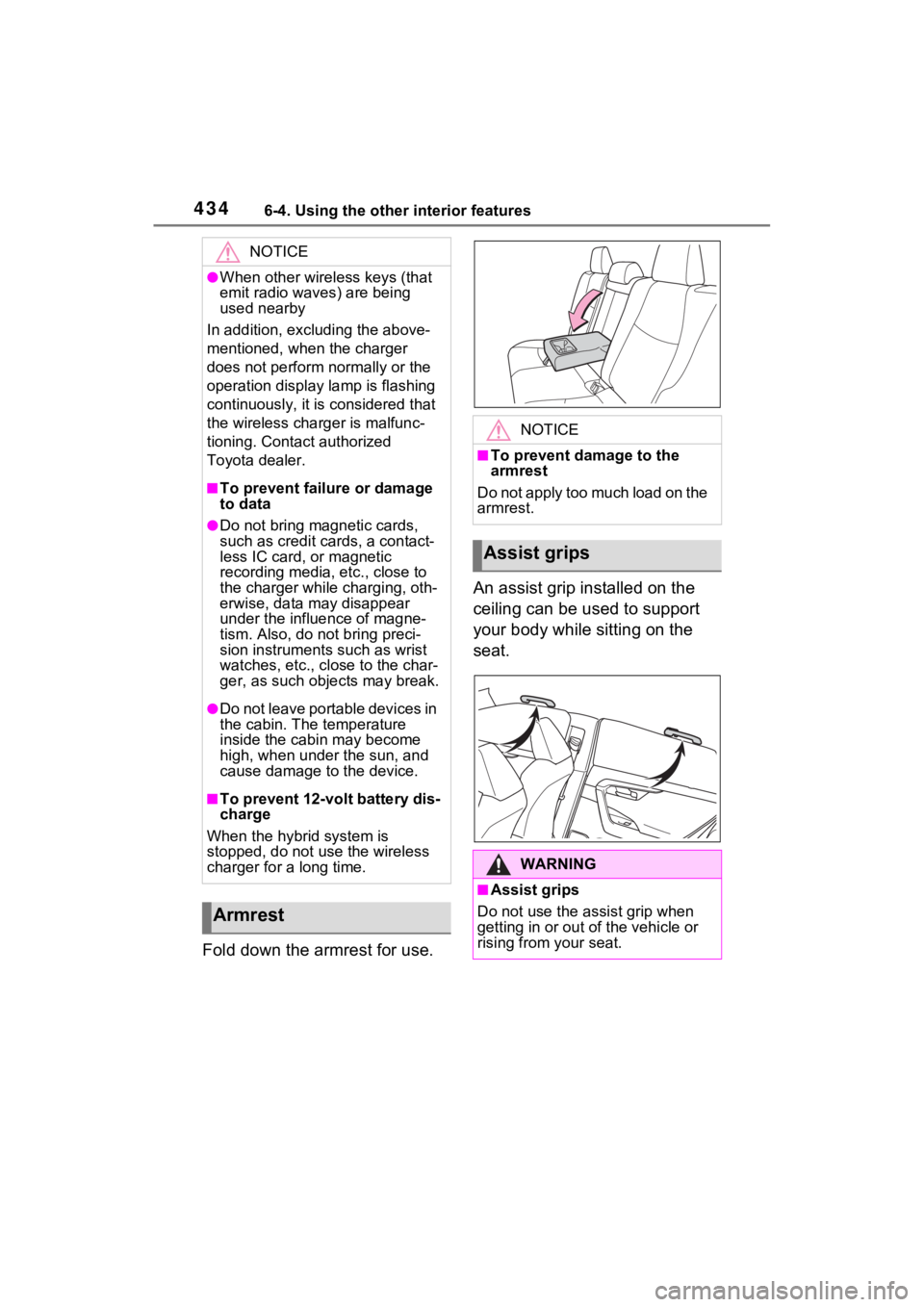
Fold down the armrest for use.An assist grip installed on the
ceiling can be used to support
your body while sitting on the
seat.
NOTICE
●When other wireless keys (that
emit radio waves) are being
used nearby
In addition, excl uding the above-
mentioned, when the charger
does not perform normally or the
operation display lamp is flashing
continuously, it is considered that
the wireless charger is malfunc-
tioning. Contact authorized
Toyota dealer.
■To prevent failure or damage
to data
●Do not bring magnetic cards,
such as credit cards, a contact-
less IC card, or magnetic
recording media, etc., close to
the charger while charging, oth-
erwise, data may disappear
under the influence of magne-
tism. Also, do no t bring preci-
sion instruments such as wrist
watches, etc., close to the char-
ger, as such objects may break.
●Do not leave portable devices in
the cabin. The temperature
inside the cabin may become
high, when under the sun, and
cause damage to the device.
■To prevent 12-volt battery dis-
charge
When the hybrid system is
stopped, do not use the wireless
charger for a long time.
Armrest
NOTICE
■To prevent damage to the
armrest
Do not apply too much load on the
armrest.
Assist grips
WARNING
■Assist grips
Do not use the assist grip when
getting in or out of the vehicle or
rising from your seat.
Page 472 of 618

4727-3. Do-it-yourself maintenance
6Press or to select
“Setting Unit”.
7 Press or to select the
desired unit and then press
.
■Routine tire inflation pressure
checks
The tire pressure warning system
does not replace routine tire inflation
pressure checks. Make sure to
check tire inflation pressure as part
of your routine of daily vehicle
checks.
■Tire inflation pressure
●It may take a few minutes to dis-
play the tire inflation pressure
after the power switch is turned to
ON. It may also take a few min-
utes to display the tire inflation
pressure after inflation pressure
has been adjusted.
●Tire inflation p ressure changes
with temperature.
The displayed values may also be
different from th e values mea-
sured using a tire pressure gauge.
■Situations in which the tire
pressure warning system may
not operate properly
●In the following cases, the tire
pressure warning system may not
operate properly.
• If non-genuine Toyota wheels are
used.
• A tire has been replaced with a tire that is not an OE (Original
Equipment) tire.
• A tire has been replaced with a tire that is not of the specified size.
• Tire chains, etc. are equipped.
• An auxiliary-supported run-flat tire is equipped.
• If a window tint that affects the radio wave signals is installed.
• If there is a lot of snow or ice on
the vehicle, particularly around the
wheels or wheel housings. • If the tire inflation pressure is
extremely higher than the speci-
fied level.
• If wheel withou t tire pressure
warning valves and transmitters
are used.
• If the ID code on the tire pressure warning valves and transmitters is
not registered in the tire pressure
warning computer.
●Performance may be affected in
the following situations.
• Near a TV tower, electric power plant, gas station, radio station,
large display, airpo rt or other facil-
ity that generates strong radio
waves or electrical noise
• When carrying a portable radio, cellular phone, cordless phone or
other wireless communication
device
If tire position information is not
correctly displayed due to the
radio wave conditions, the display
may be corrected by driving and
changing the radio wave condi-
tions.
●When the vehicle is parked, the
time taken for the warning to start
or go off could be extended.
●When tire inflation pressure
declines rapidly for example when
a tire has burst, the warning may
not function.
■Warning performance of the tire
pressure warning system
The warning of the tire pressure
warning system w ill change in
accordance with the conditions
under which it was initialized. For
this reason, the system may give a
warning even if th e tire pressure
does not reach a low enough level,
or if the pressure is higher than the
pressure that was adjusted to when
the system was initialized.
Page 563 of 618
5639-1. Specifications
9
Vehicle specifications
■Temperature A, B, C
The temperature grades are A
(the highest), B, and C, repre-
senting the tire’s resistance to
the generation of heat and its
ability to dissipate heat when
tested under controlled condi-
tions on a specified indoor labo-
ratory test wheel.
Sustained high temperature can
cause the material of the tire to
degenerate and reduce tire life, and
excessive temperature can lead to
sudden tire failure.
Grade C corresponds to a level of performance which all passenger
car tires must meet under the Fed-
eral Motor Vehicle Safety Standard
No. 109.
Grades B and A represent higher
levels of performance on the labo-
ratory test wheel than the minimum
required by law.
Warning: The temperature grades
of a tire assume tha
t it is properly
inflated and not overloaded.
Excessive speed, underinflation, or
excessive loading, either sepa-
rately or in combination, can cause
heat buildup and possible tire fail-
ure.
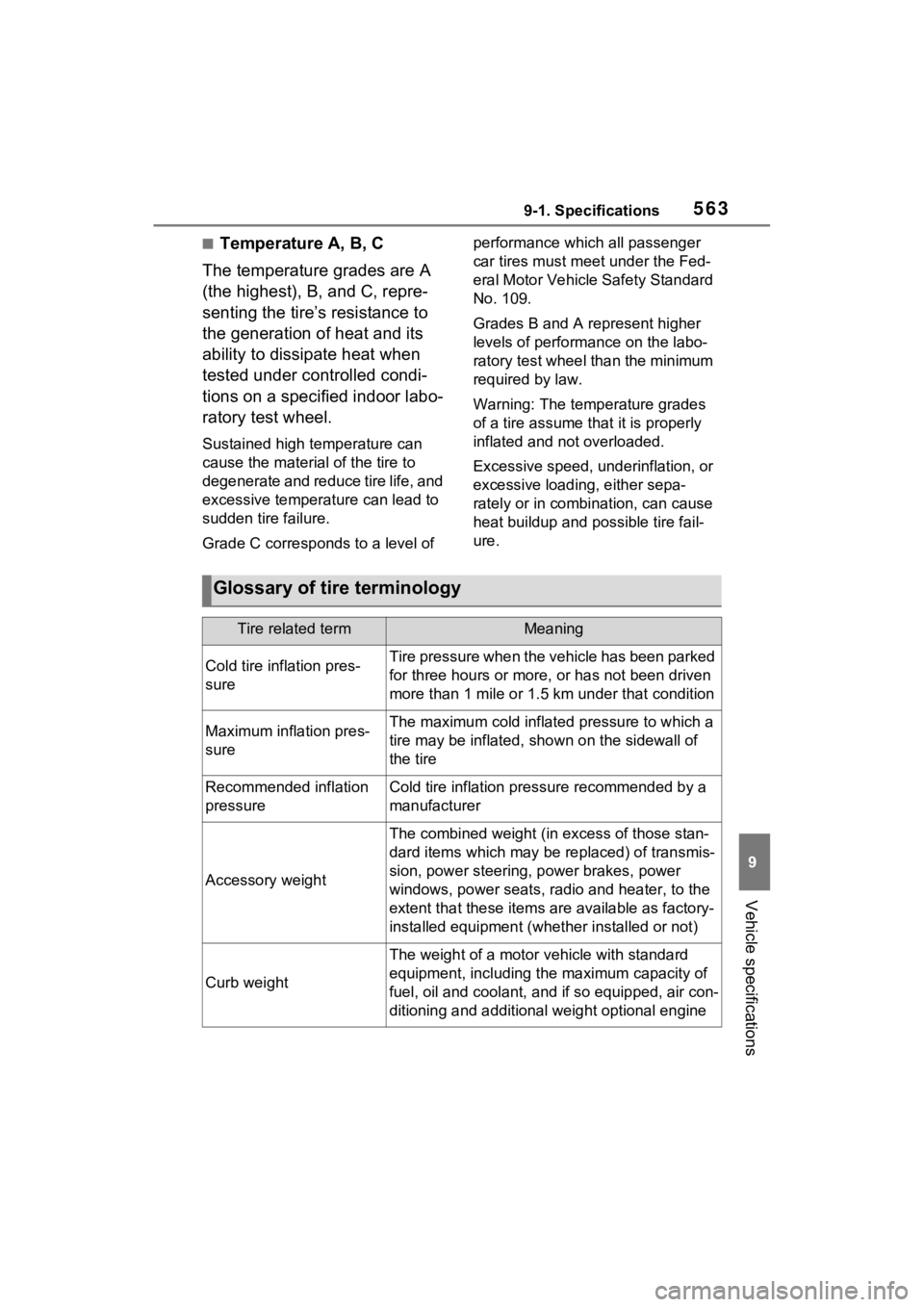
Glossary of tire terminology
Tire related termMeaning
Cold tire inflation pres-
sureTire pressure when the vehicle has been parked
for three hours or more, or has not been driven
more than 1 mile or 1.5 km under that condition
Maximum inflation pres-
sureThe maximum cold inflated pressure to which a
tire may be inflated, shown on the sidewall of
the tire
Recommended inflation
pressureCold tire inflation pressure recommended by a
manufacturer
Accessory weight
The combined weight (in excess of those stan-
dard items which may be replaced) of transmis-
sion, power steering, power brakes, power
windows, power seats, radio and heater, to the
extent that these items are available as factory-
installed equipment (whether installed or not)
Curb weight
The weight of a motor vehicle with standard
equipment, including th e maximum capacity of
fuel, oil and coolant, and if so equipped, air con-
ditioning and additional weight optional engine