warning TOYOTA RAV4 PRIME 2021 Owners Manual
[x] Cancel search | Manufacturer: TOYOTA, Model Year: 2021, Model line: RAV4 PRIME, Model: TOYOTA RAV4 PRIME 2021Pages: 618, PDF Size: 24.18 MB
Page 403 of 618
4036-1. Using the air conditioning system and defogger
6
Interior features
■To return to automatic airflow
control
1 With the indicator off, turn the
power switch off.
2 After 60 minutes or more elapse,
turn the power switch to ON.
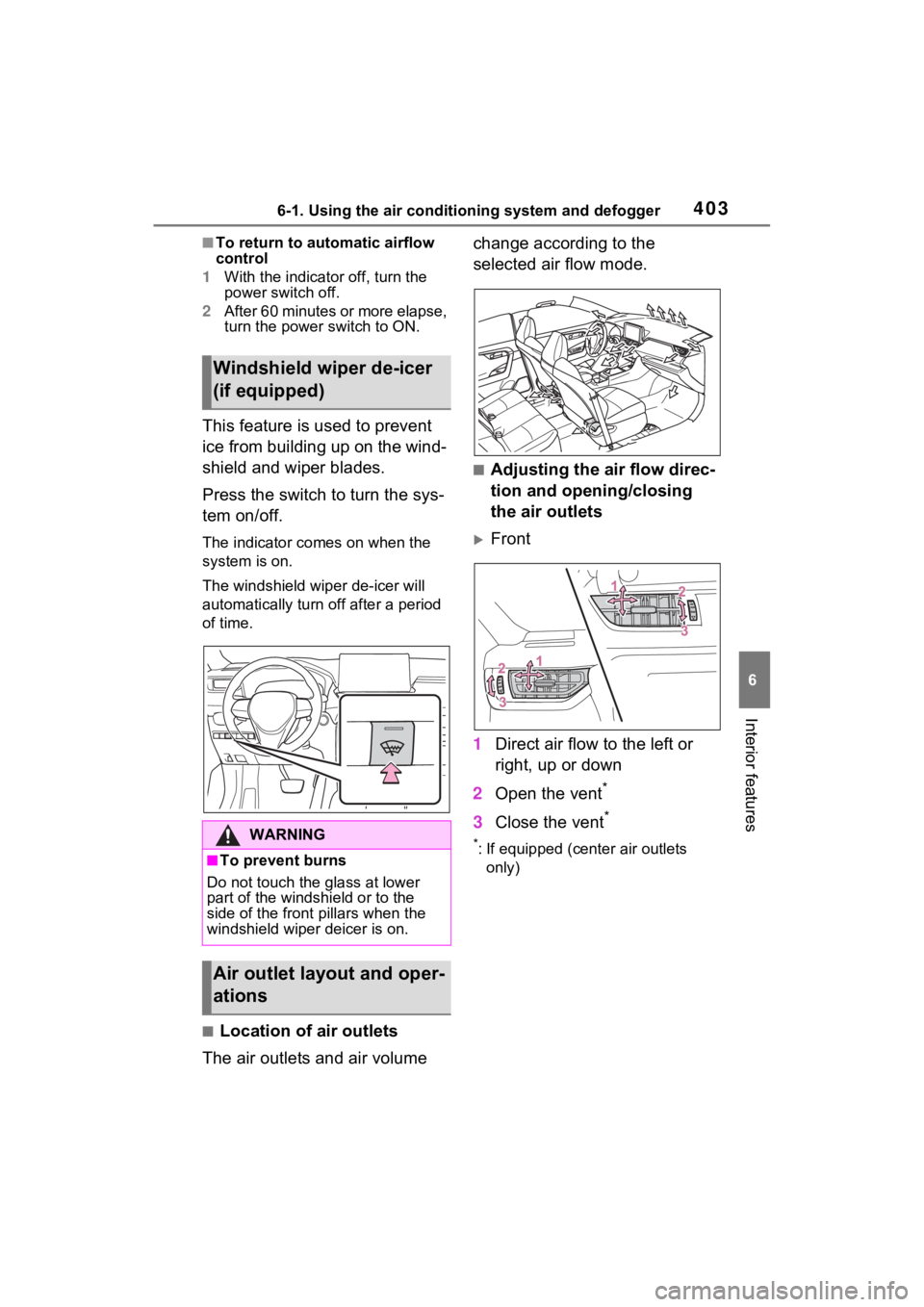
This feature is used to prevent
ice from building up on the wind-
shield and wiper blades.
Press the switch to turn the sys-
tem on/off.
The indicator co mes on when the
system is on.
The windshield wip er de-icer will
automatically turn off after a period
of time.
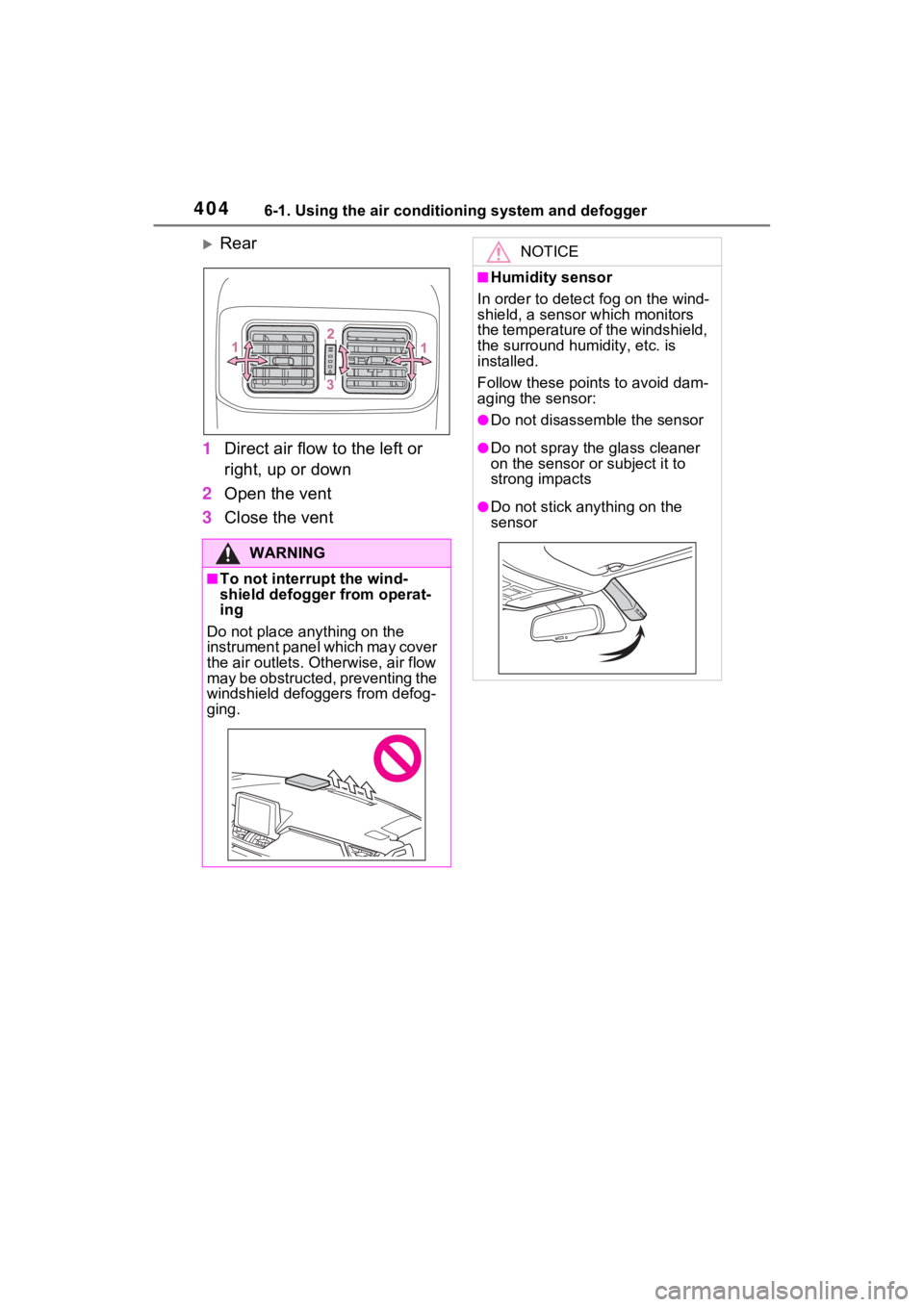
■Location of air outlets
The air outlets and air volume change according to the
selected air flow mode.
■Adjusting the air flow direc-
tion and opening/closing
the air outlets
Front
1 Direct air flow to the left or
right, up or down
2 Open the vent
*
3Close the vent*
*: If equipped (cent er air outlets
only)
Windshield wiper de-icer
(if equipped)
WARNING
■To prevent burns
Do not touch the glass at lower
part of the windshield or to the
side of the front pillars when the
windshield wiper deicer is on.
Air outlet layout and oper-
ations
Page 404 of 618
4046-1. Using the air conditioning system and defogger
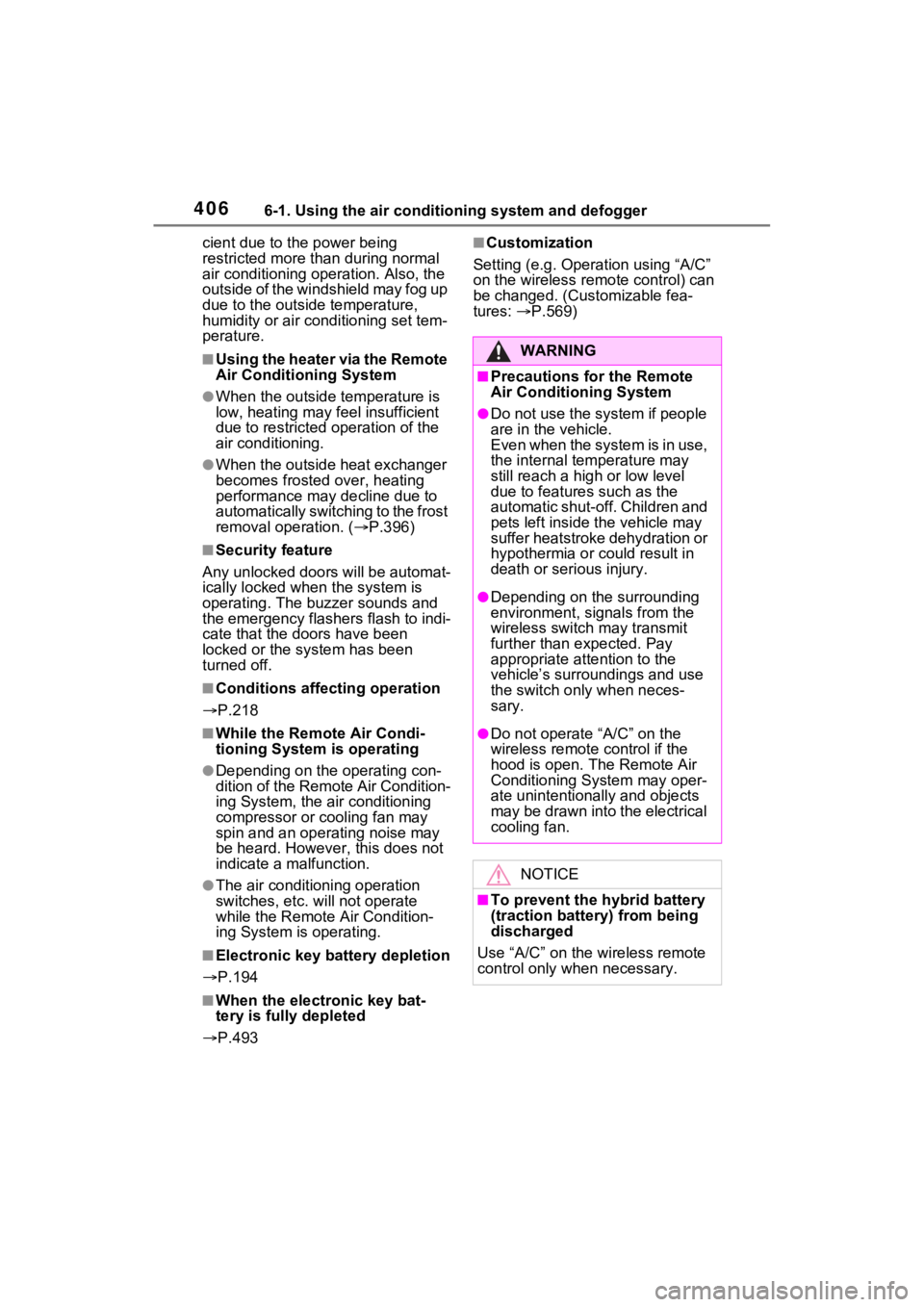
Rear
1 Direct air flow to the left or
right, up or down
2 Open the vent
3 Close the vent
WARNING
■To not interrupt the wind-
shield defogger from operat-
ing
Do not place anything on the
instrument panel which may cover
the air outlets. Otherwise, air flow
may be obstructed, preventing the
windshield defoggers from defog-
ging.
NOTICE
■Humidity sensor
In order to detect fog on the wind-
shield, a sensor which monitors
the temperature of the windshield,
the surround humidity, etc. is
installed.
Follow these points to avoid dam-
aging the sensor:
●Do not disassemble the sensor
●Do not spray the glass cleaner
on the sensor or subject it to
strong impacts
●Do not stick anything on the
sensor
Page 406 of 618
4066-1. Using the air conditioning system and defogger
cient due to the power being
restricted more than during normal
air conditioning operation. Also, the
outside of the windshield may fog up
due to the outside temperature,
humidity or air conditioning set tem-
perature.
■Using the heater via the Remote
Air Conditioning System
●When the outside temperature is
low, heating may feel insufficient
due to restricted operation of the
air conditioning.
●When the outside heat exchanger
becomes frosted over, heating
performance may decline due to
automatically switching to the frost
removal operation. ( P.396)
■Security feature
Any unlocked doors will be automat-
ically locked when the system is
operating. The buzzer sounds and
the emergency flashers flash to indi-
cate that the doors have been
locked or the system has been
turned off.
■Conditions affecting operation
P.218
■While the Remote Air Condi-
tioning System is operating
●Depending on the operating con-
dition of the Remote Air Condition-
ing System, the air conditioning
compressor or cooling fan may
spin and an operating noise may
be heard. However, this does not
indicate a malfunction.
●The air conditioning operation
switches, etc. will not operate
while the Remote Air Condition-
ing System is operating.
■Electronic key battery depletion
P.194
■When the electronic key bat-
tery is fully depleted
P.493
■Customization
Setting (e.g. Operation using “A/C”
on the wireless remote control) can
be changed. (Customizable fea-
tures: P.569)
WARNING
■Precautions for the Remote
Air Conditioning System
●Do not use the system if people
are in the vehicle.
Even when the system is in use,
the internal temperature may
still reach a high or low level
due to features such as the
automatic shut-off. Children and
pets left inside the vehicle may
suffer heatstroke dehydration or
hypothermia or could result in
death or serious injury.
●Depending on the surrounding
environment, signals from the
wireless switch may transmit
further than e xpected. Pay
appropriate attention to the
vehicle’s surroundings and use
the switch only when neces-
sary.
●Do not operate “A/C” on the
wireless remote control if the
hood is open. The Remote Air
Conditioning System may oper-
ate unintentionally and objects
may be drawn into the electrical
cooling fan.
NOTICE
■To prevent the hybrid battery
(traction battery) from being
discharged
Use “A/C” on the wireless remote
control only when necessary.
Page 407 of 618
4076-1. Using the air conditioning system and defogger
6
Interior features
*: If equipped
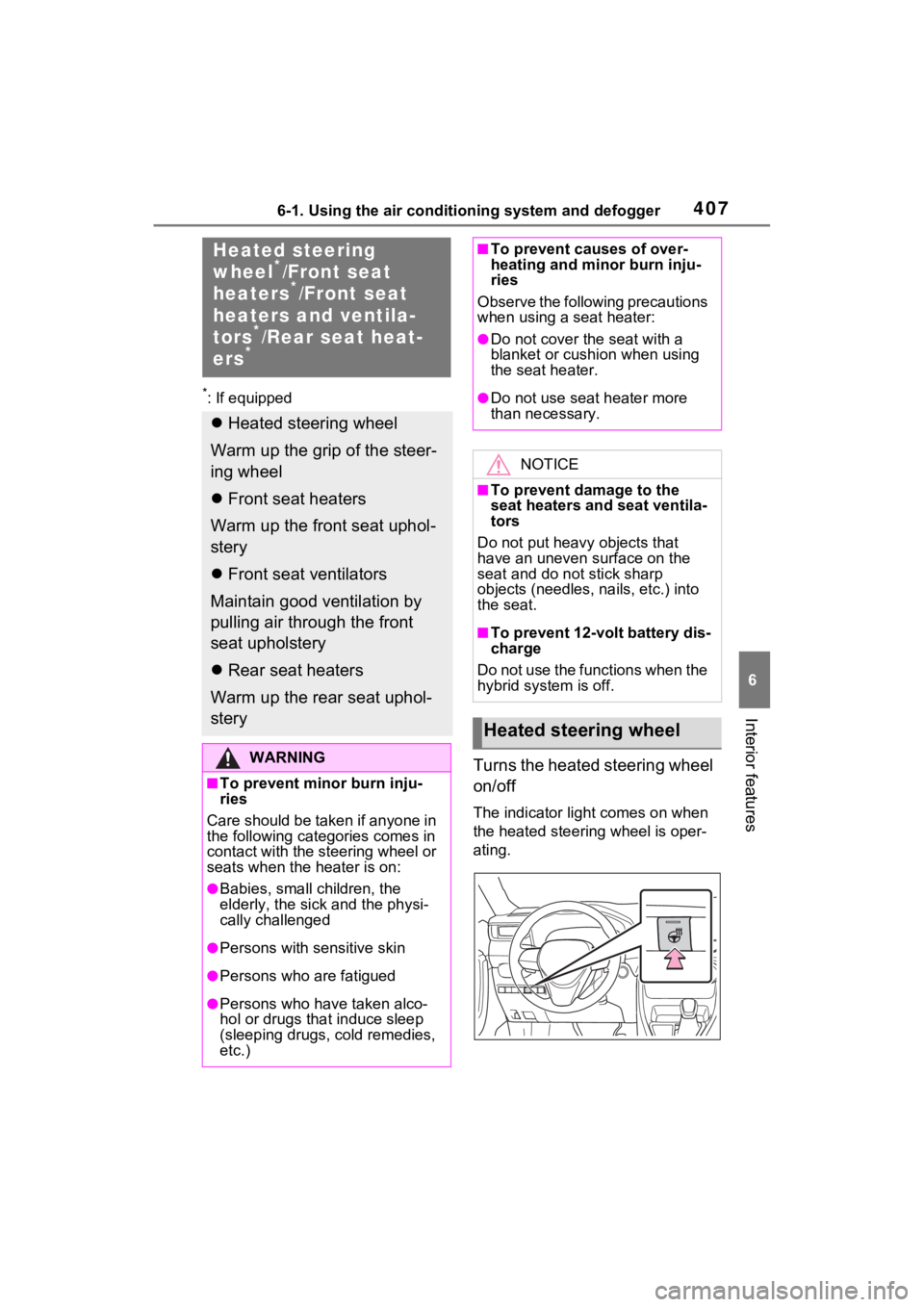
Turns the heated steering wheel
on/off
The indicator light comes on when
the heated steering wheel is oper-
ating.
Heated steering
wheel*/Front seat
heaters*/Front seat
heaters and ventila-
tors
*/Rear seat heat-
ers*
Heated steering wheel
Warm up the grip of the steer-
ing wheel
Front seat heaters
Warm up the front seat uphol-
stery
Front seat ventilators
Maintain good ventilation by
pulling air through the front
seat upholstery
Rear seat heaters
Warm up the rear seat uphol-
stery
WARNING
■To prevent minor burn inju-
ries
Care should be taken if anyone in
the following categories comes in
contact with the steering wheel or
seats when the heater is on:
●Babies, small children, the
elderly, the sick and the physi-
cally challenged
●Persons with sensitive skin
●Persons who are fatigued
●Persons who have taken alco-
hol or drugs that induce sleep
(sleeping drugs, cold remedies,
etc.)
■To prevent causes of over-
heating and minor burn inju-
ries
Observe the following precautions
when using a seat heater:
●Do not cover the seat with a
blanket or cushion when using
the seat heater.
●Do not use seat heater more
than necessary.
NOTICE
■To prevent damage to the
seat heaters and seat ventila-
tors
Do not put heavy objects that
have an uneven surface on the
seat and do not stick sharp
objects (needles, nails, etc.) into
the seat.
■To prevent 12-volt battery dis-
charge
Do not use the functions when the
hybrid system is off.
Heated steering wheel
Page 414 of 618
4146-3. Using the storage features
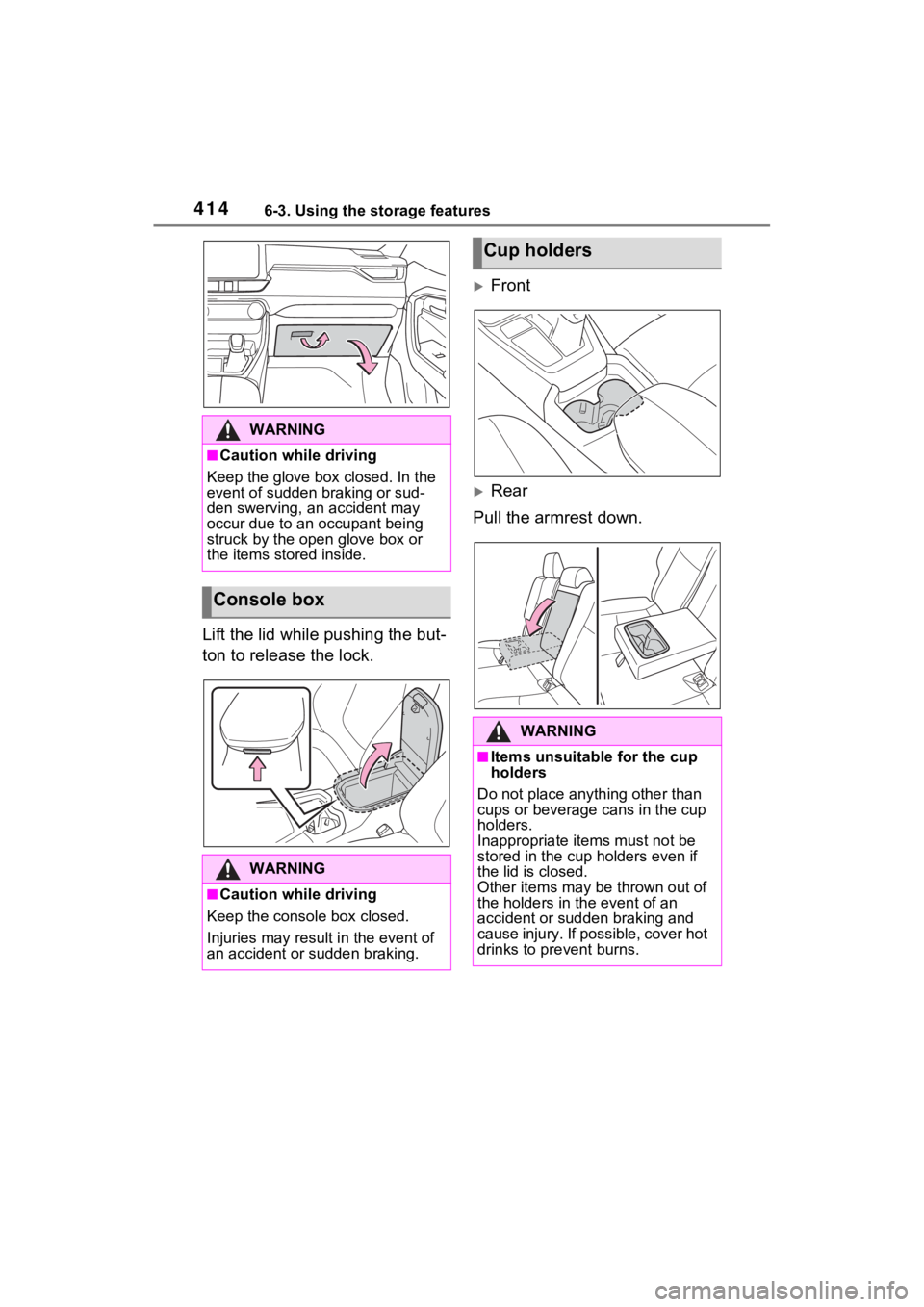
Lift the lid while pushing the but-
ton to release the lock.
Front
Rear
Pull the armrest down.
WARNING
■Caution while driving
Keep the glove box closed. In the
event of sudden braking or sud-
den swerving, an accident may
occur due to an occupant being
struck by the open glove box or
the items stored inside.
Console box
WARNING
■Caution while driving
Keep the console box closed.
Injuries may result in the event of
an accident or sudden braking.
Cup holders
WARNING
■Items unsuitable for the cup
holders
Do not place anyth ing other than
cups or beverage cans in the cup
holders.
Inappropriate items must not be
stored in the cup holders even if
the lid is closed.
Other items may be thrown out of
the holders in the event of an
accident or sudden braking and
cause injury. If possible, cover hot
drinks to pre vent burns.
Page 415 of 618
4156-3. Using the storage features
6
Interior features
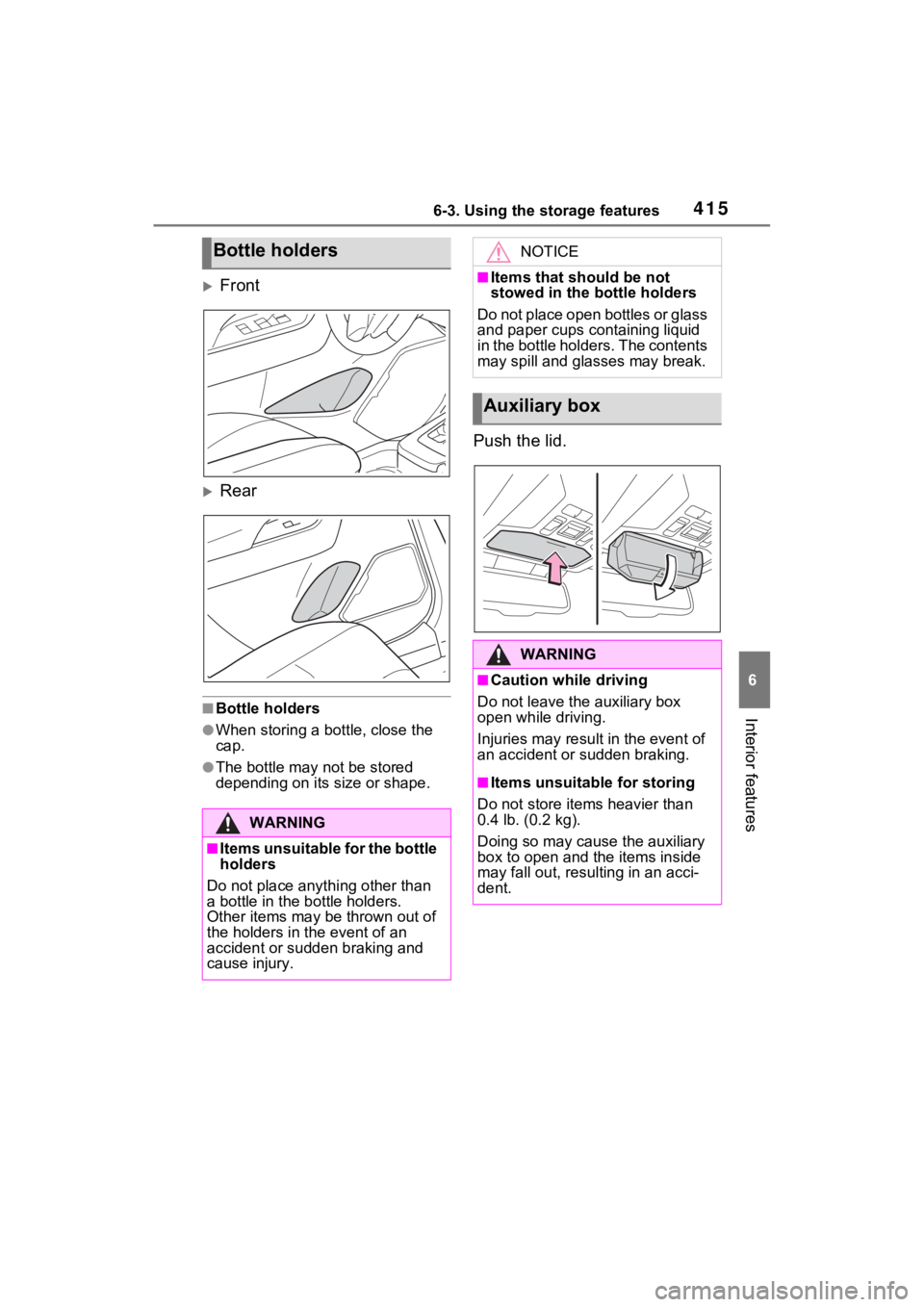
Front
Rear
■Bottle holders
●When storing a bottle, close the
cap.
●The bottle may not be stored
depending on its size or shape.
Push the lid.
Bottle holders
WARNING
■Items unsuitable for the bottle
holders
Do not place anything other than
a bottle in the bottle holders.
Other items may be thrown out of
the holders in the event of an
accident or sudden braking and
cause injury.
NOTICE
■Items that should be not
stowed in the bottle holders
Do not place open bottles or glass
and paper cups containing liquid
in the bottle holders. The contents
may spill and glasses may break.
Auxiliary box
WARNING
■Caution while driving
Do not leave the auxiliary box
open while driving.
Injuries may resul t in the event of
an accident or sudden braking.
■Items unsuitable for storing
Do not store items heavier than
0.4 lb. (0.2 kg).
Doing so may cause the auxiliary
box to open and the items inside
may fall out, resulting in an acci-
dent.
Page 416 of 618
4166-3. Using the storage features
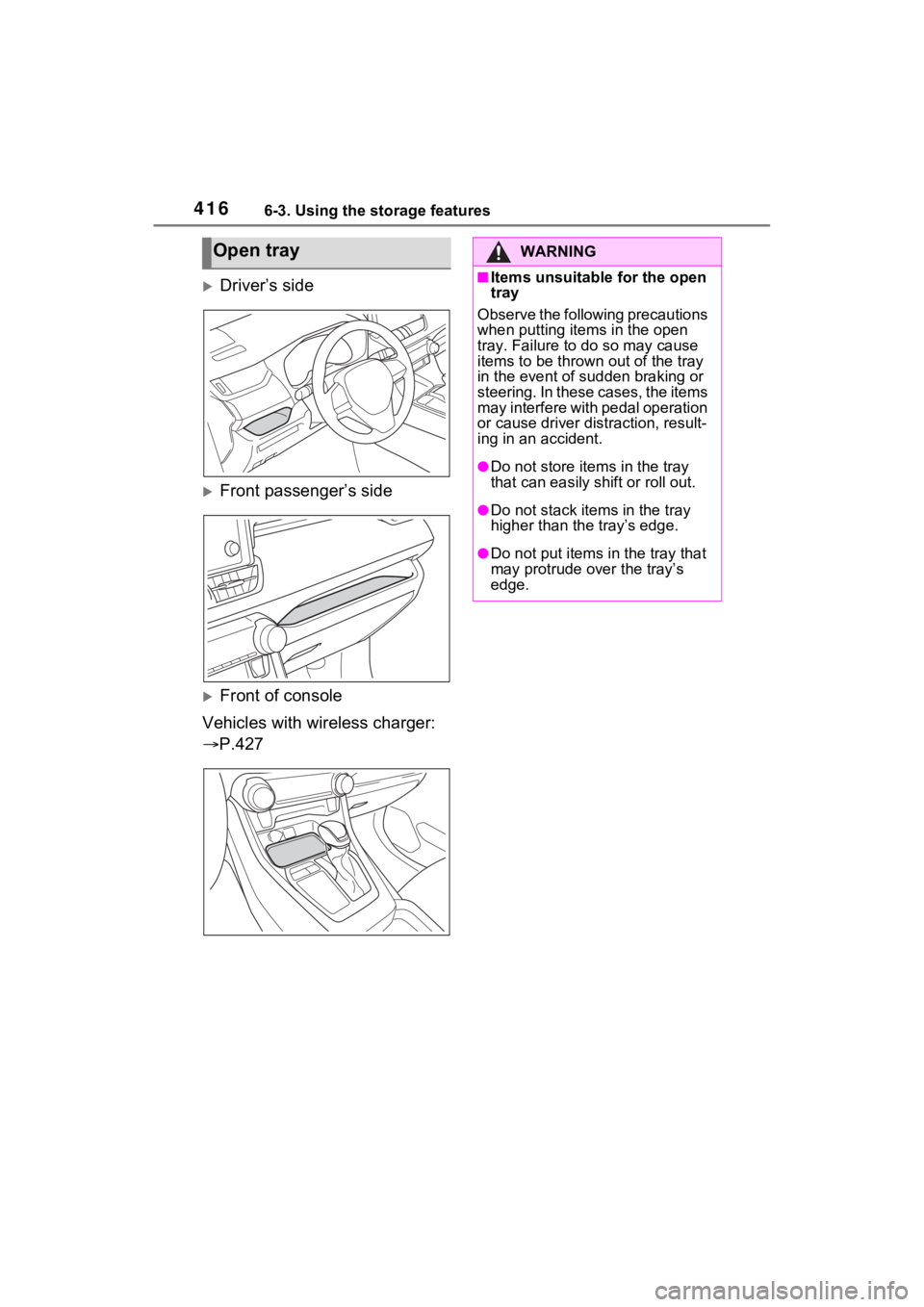
Driver’s side
Front passenger’s side
Front of console
Vehicles with wireless charger:
P.427
Open trayWARNING
■Items unsuitable for the open
tray
Observe the following precautions
when putting ite ms in the open
tray. Failure to d o so may cause
items to be thrown out of the tray
in the event of s udden braking or
steering. In these cases, the items
may interfere with pedal operation
or cause driver distraction, result-
ing in an accident.
●Do not store ite ms in the tray
that can easily shift or roll out.
●Do not stack items in the tray
higher than the tray’s edge.
●Do not put items in the tray that
may protrude over the tray’s
edge.
Page 417 of 618
4176-3. Using the storage features
6
Interior features
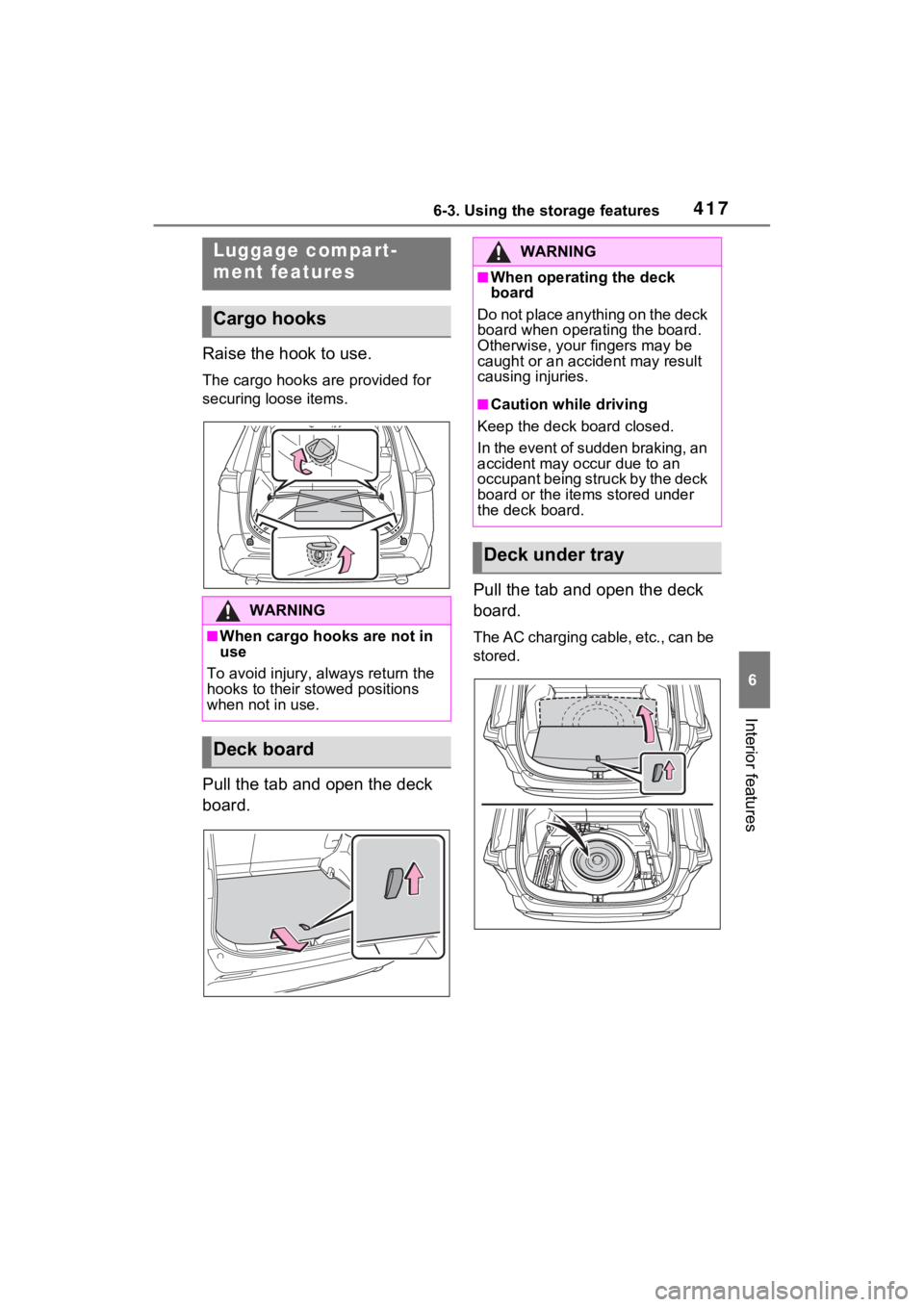
Raise the hook to use.
The cargo hooks are provided for
securing loose items.
Pull the tab and open the deck
board.Pull the tab and open the deck
board.
The AC charging cable, etc., can be
stored.
Luggage compart-
ment features
Cargo hooks
WARNING
■When cargo hooks are not in
use
To avoid injury, always return the
hooks to their stowed positions
when not in use.
Deck board
WARNING
■When operating the deck
board
Do not place anything on the deck
board when operating the board.
Otherwise, your fingers may be
caught or an accident may result
causing injuries.
■Caution while driving
Keep the deck board closed.
In the event of sudden braking, an
accident may occur due to an
occupant being struck by the deck
board or the items stored under
the deck board.
Deck under tray
Page 418 of 618
4186-3. Using the storage features
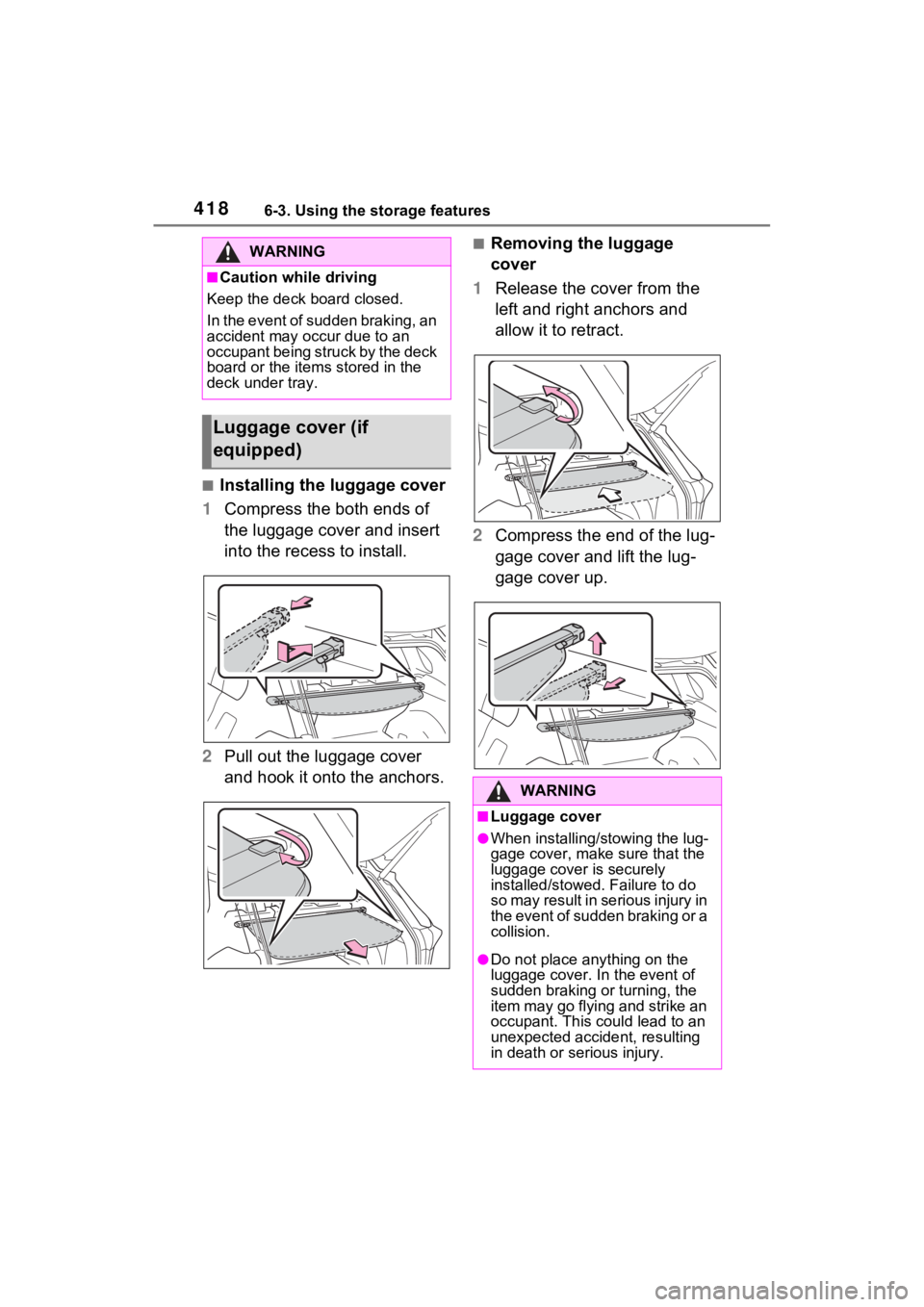
■Installing the luggage cover
1 Compress the both ends of
the luggage cover and insert
into the recess to install.
2 Pull out the luggage cover
and hook it onto the anchors.
■Removing the luggage
cover
1 Release the cover from the
left and right anchors and
allow it to retract.
2 Compress the end of the lug-
gage cover and lift the lug-
gage cover up.WARNING
■Caution while driving
Keep the deck board closed.
In the event of sudden braking, an
accident may occur due to an
occupant being struck by the deck
board or the items stored in the
deck under tray.
Luggage cover (if
equipped)
WARNING
■Luggage cover
●When installing/stowing the lug-
gage cover, make sure that the
luggage cover is securely
installed/stowed. Failure to do
so may result in serious injury in
the event of sudden braking or a
collision.
●Do not place anything on the
luggage cover. In the event of
sudden braking or turning, the
item may go flying and strike an
occupant. This could lead to an
unexpected accident, resulting
in death or se rious injury.
Page 419 of 618
4196-3. Using the storage features
6
Interior features
WARNING
●Do not allow children to climb
on the luggage cover. Climbing
on the luggage cover could
result in damage to the luggage
cover, possibly causing death or
serious injury to the child.
NOTICE
■To prevent damage to the lug-
gage cover
Do not place anything on top of
the luggage cover. When rolling
up the luggage cover, objects
may be caught in the cover, dam-
aging the cover and generating
noise.