warning TOYOTA RAV4 PRIME 2021 Owners Manual
[x] Cancel search | Manufacturer: TOYOTA, Model Year: 2021, Model line: RAV4 PRIME, Model: TOYOTA RAV4 PRIME 2021Pages: 618, PDF Size: 24.18 MB
Page 423 of 618
4236-4. Using the other interior features
6
Interior features
■When the 120 VAC power outlet
cannot be used
If the AC 120 V switch is pressed
but the switch indicator does not illu-
minate, the protection circuit may
have operated.
In this case, perform the appropriate
procedures as follows.
●Disconnect the plug of each
device from the power outlet,
check that the total power con-
sumption of all devices to be con-
nected to the power outlet is less
than 1500 W, reconnect the
devices and then press the AC
120 V switch again.
●Disconnect the plug of each
device from the power outlet,
check that the devices are not
malfunctioning, reconnect the
devices and then press the AC
120 V switch again.
●Check the charge of the hybrid
battery (traction battery)
( P.165). If the charge is low,
shift the shift leve r to P, allow the
engine to run to charge the hybrid
battery (traction battery), and then
press the AC 120 V switch again.
●If the temperature inside the vehi-
cle is high, such as after the vehi-
cle has been park ed in the sun,
use the air conditioning system to
sufficiently vent ilate or cool the
interior, and then press the AC
120 V switch again.
●If the vehicle has been stopped in
a cold area, to pro tect the hybrid
battery (traction battery), the
power outlet may not be able to be
used. In this case , drive the vehi-
cle for a while to warm up the
hybrid battery (traction battery),
and then press the AC 120 V
switch again.
If the power outlet cannot be used
even after performing the appropri-
ate procedures above, have the
vehicle inspected by your Toyota
dealer.
●If any electrical device has mal-
functioned, park the vehicle in a
safe location and turn the AC
inverter off.
●If the protection function activates
and power is cut, perform the fol-
lowing procedure.
1 Stop the vehicle in a safe place
and set the parking brake.
2 Ensure that the shift lever is in P
or N.
3 Check that the power consumed
by the electrical devices is within
1500 W and any device has not
malfunctioned.
4 Press the AC 120 V switch.
If the inside of the vehicle is hot,
open the windows t o lower the tem-
perature and turn the switch back on
once the inside of the vehicle
reaches a normal temperature. If
following the procedure above does
not restore power, have the vehicle
inspected at your Toyota dealer.
WARNING
■For safe use
Observe the following precau-
tions.
Failure to do so may lead to an
accident, resulting in death or
serious injury.
●Do not use devices such as the
following when driving. Also, do
not use a device if it cannot be
secured within the vehicle.
• Devices which may distract the driver and be a hinderance to
safe driving, such as a TV, DVD
player, etc.
• Unsecured devices or devices which generate heat, such as a
toaster, micro wave, electric
heater, electric kettle, coffee
maker, etc., as they may fly
around possibly causing injury,
burns or a fire in the case of
sudden braking or an accident.
Page 424 of 618
4246-4. Using the other interior features
WARNING
• Devices which may fall under the pedals and prevent the
brake pedal from being
depressed, such as a hair dryer,
AC adaptor, mouse, etc.
●Do not use devices which pro-
duce steam while the windows
are closed. Doing so may cause
the windows to fog up, reducing
visibility and making it difficult to
drive safely. Also, the steam
may damage or negatively
affect other devices. If the
device must be used, stop the
vehicle and open the windows
before use.
●Do not connect a malfunctioning
device to a power outlet, as
doing so may ca use the power
outlet to become inoperable.
●Do not disconnect the plug of a
device while your hands are wet
or insert a pin o r other object
into the pow er outlet. Also, if a
liquid or snow is on the power
outlet, dry the outlet before
using it.
●Be careful not to get pinched by
the power outlet lid.
●Do not attempt to modify, disas-
semble or repair a power outlet.
Also, do not replace the 120
VAC inverter with a commer-
cially available one. For infor-
mation on repairs, contact your
Toyota dealer.
●Do not let children touch the
power outlet.
●Keep the power outlet free of
foreign matter.
●Keep the power outlet free of
dust and foreign matter. Also,
make sure to clean the power
outlet periodically.
●If the plug of a device fits
loosely in a power outlet, even
though it is fully inserted,
replace the power outlet. For
information on replacement,
contact your Toyota dealer.
■Using the power outlet while
parked or stopped
Observe the following precau-
tions.
Failure to do so may lead to an
accident, possibly resulting in
death or serious injury.
●Make sure to securely engage
the parking brake and shift the
shift lever to P.
●Do not leave the vehicle unat-
tended while the READY indica-
tor is illuminated and a device is
connected to a power outlet.
●Make sure that the hood is
closed. As the engine will start
automatically depending on the
condition of the vehicle, make
sure that nothing is left near or
contacting the exhaust pipes.
Also, do not put your head or
hands anywhere inside the
engine compartment, as the
cooling fans may operate sud-
denly. Keep hands and clothing
(especially a tie, scarf, etc.)
away from the fans as they may
get caught in a fan.
●Do not stop the vehicle near
objects which burn easily. If the
exhaust system is extremely
hot, it may cause a fire.
Page 425 of 618
4256-4. Using the other interior features
6
Interior features
WARNING
●When using a power outlet in an
area with poor ventilation or an
enclosed area, such as a
garage, to prevent the exhaust
gasses from accumulating and
causing a lack of oxygen, make
sure to use a ventilation or
exhaust system.
The power outlet are for use in
directly connecting electrical
devices such as lights. Do not
use the power ou tlet as genera-
tors to supply power to a house,
etc.
●Do not use the p ower outlet if
the vehicle has a vehicle cover
installed.
●Do not sleep in the vehicle while
using devices such as an elec-
tric heater.
■Devices to be connected
Make sure to read any instruction
manual which came with a device
and observe any warnings on the
device. Do not connect a device
to a power outlet if the device is
malfunctioning or its plug is dam-
aged. Also, do not use the power
outlet to power the following
devices:
●Medical devices
Do not use a power outlet to
power these types of devices as
the output of the power outlet may
be cut, depending on the condi-
tion of the vehicle.
NOTICE
Observe the following precau-
tions.
Failure to do so m ay lead to the
power outlet no t operating cor-
rectly or damage to the vehicle or
a connected device.
■To avoid short circuit or mal-
function
●Do not set a toaster or other
device which generates heat
near the interior components or
on a seat. Heat may cause
these parts to melt or burn.
●Do not use devic es which are
sensitive to vibration or heat in
the vehicle.
These devices may malfunction
due to vibration while driving or
heat while the vehicle is parked
in the sun.
●When not using a power outlet,
make sure to close the cover. If
foreign matter or a liquid enters
the power outlet, it may cause a
malfunction or s hort circuit.
●Do not use a mul ti-point outlet
adaptor as doing so may over-
load the power outlet.
■When the ambient tempera-
ture is high
If the temperature inside the vehi-
cle is high, such as after the vehi-
cle has been parked in the sun,
use the air conditioning system to
sufficiently ventilate or cool the
interior.
■When the ambient tempera-
ture is low
If the vehicle has been stopped in
a cold area, to pro tect the hybrid
battery (traction battery), the
power outlet may not be able to
be used. In this case, drive the
vehicle for a while to warm up the
hybrid battery (traction battery).
■To prevent 12-volt battery dis-
charge
If using an electrical device that
consumes 100 W or more of
power for a period of time, turn off
the headlights, air conditioning
and all other electrical compo-
nents equipped to the vehicle.
Page 433 of 618
4336-4. Using the other interior features
6
Interior features
WARNING
■Caution while driving
When charging a portable device,
for safety reasons, the driver
should not operate the main part
of the portable device while driv-
ing.
■Caution regarding interfer-
ence with electronic devices
People with implantable cardiac
pacemakers, cardiac resynchroni-
zation therapy-pacemakers or
implantable cardioverter defibrilla-
tors, as well as any other electri-
cal medical device, should consult
their physician about the usage of
the wireless charger. The opera-
tions of the wireless charger may
have an affect on medical
devices.
■To prevent damage or burns
Observe the following precau-
tions.
Failure to do so m ay result in a
possibility of equ ipment failure
and damage, catch fire, burns due
to overheat.
●Do not insert any metallic
objects between the charging
area and the portable device
while charging
●Do not place con tainers with liq-
uid such as water on the wire-
less charger.
●Do not attach st ickers, metallic
objects, etc., to the charger area
or portable device
●Do not cover with cloth, etc.,
and charge
●Do not charge portable devices
other than designated
●Do not attempt t o dismantle for
disassembly or modifications
●Do not hit or apply a strong
force
NOTICE
■Conditions in which the func-
tion may not operate cor-
rectly
In the following co nditions, it may
not operate correctly
●The portable device is fully
charged
●There is foreign matter between
the charge area and portable
device
●The temperature of the portable
device gets higher from
charging
●The charging sur face of the por-
table device is facing up
●The placement of the portable
device is out of alignment with
the charge area
●Near a TV tower, electric power
plant, gas station, radio station,
large display, airport or other
facility that gen erates strong
radio waves or electrical noise
●When the electronic key is in
contact with, or is covered by
the following metallic objects
• Cards to which aluminum foil is attached
• Cigarette boxes that have alu- minum foil inside
• Metallic wallets or bags
• Coins
• Hand warmers made of metal
• Media such as CDs and DVDs
Page 434 of 618
4346-4. Using the other interior features
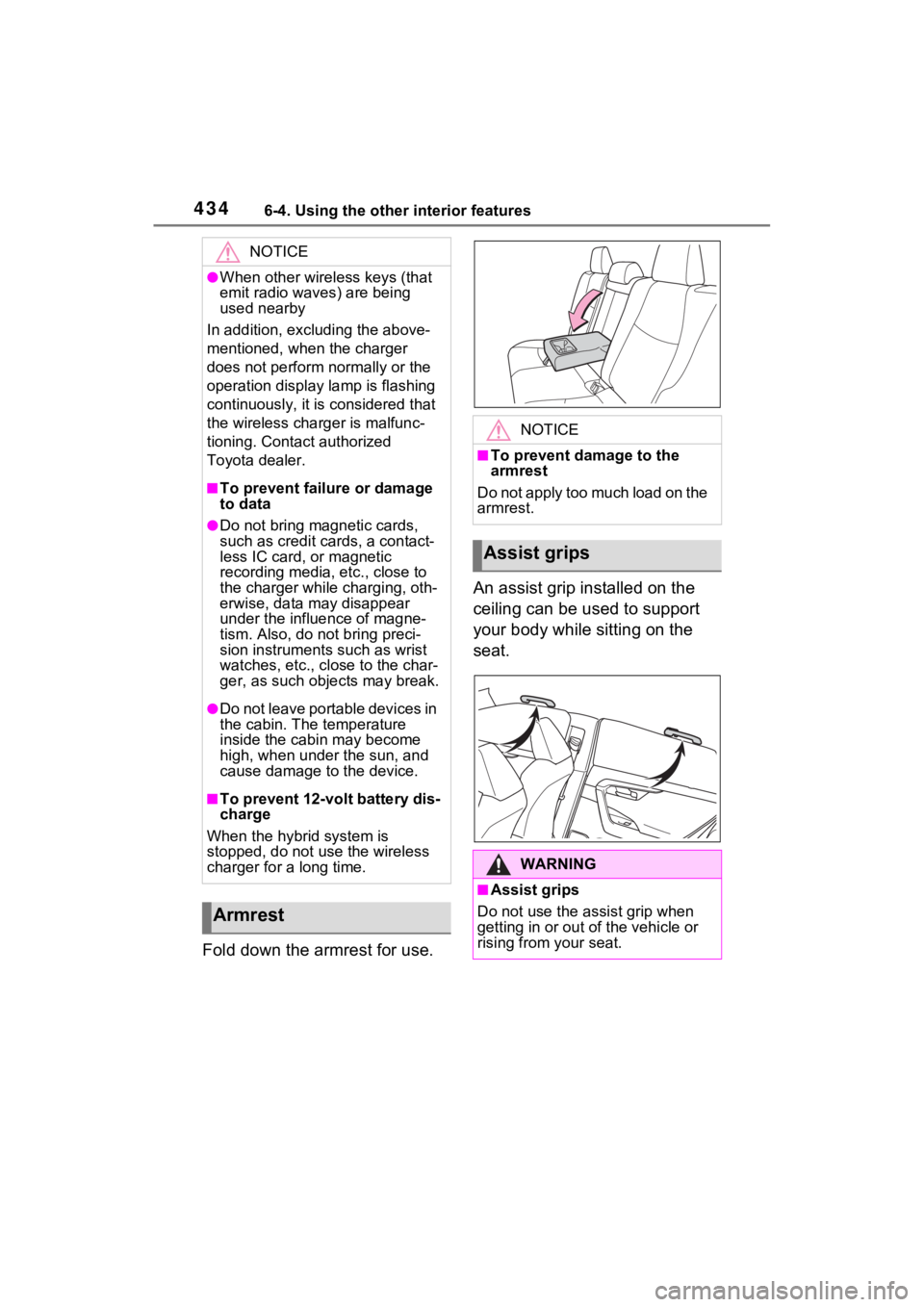
Fold down the armrest for use.An assist grip installed on the
ceiling can be used to support
your body while sitting on the
seat.
NOTICE
●When other wireless keys (that
emit radio waves) are being
used nearby
In addition, excl uding the above-
mentioned, when the charger
does not perform normally or the
operation display lamp is flashing
continuously, it is considered that
the wireless charger is malfunc-
tioning. Contact authorized
Toyota dealer.
■To prevent failure or damage
to data
●Do not bring magnetic cards,
such as credit cards, a contact-
less IC card, or magnetic
recording media, etc., close to
the charger while charging, oth-
erwise, data may disappear
under the influence of magne-
tism. Also, do no t bring preci-
sion instruments such as wrist
watches, etc., close to the char-
ger, as such objects may break.
●Do not leave portable devices in
the cabin. The temperature
inside the cabin may become
high, when under the sun, and
cause damage to the device.
■To prevent 12-volt battery dis-
charge
When the hybrid system is
stopped, do not use the wireless
charger for a long time.
Armrest
NOTICE
■To prevent damage to the
armrest
Do not apply too much load on the
armrest.
Assist grips
WARNING
■Assist grips
Do not use the assist grip when
getting in or out of the vehicle or
rising from your seat.
Page 435 of 618
4356-4. Using the other interior features
6
Interior features
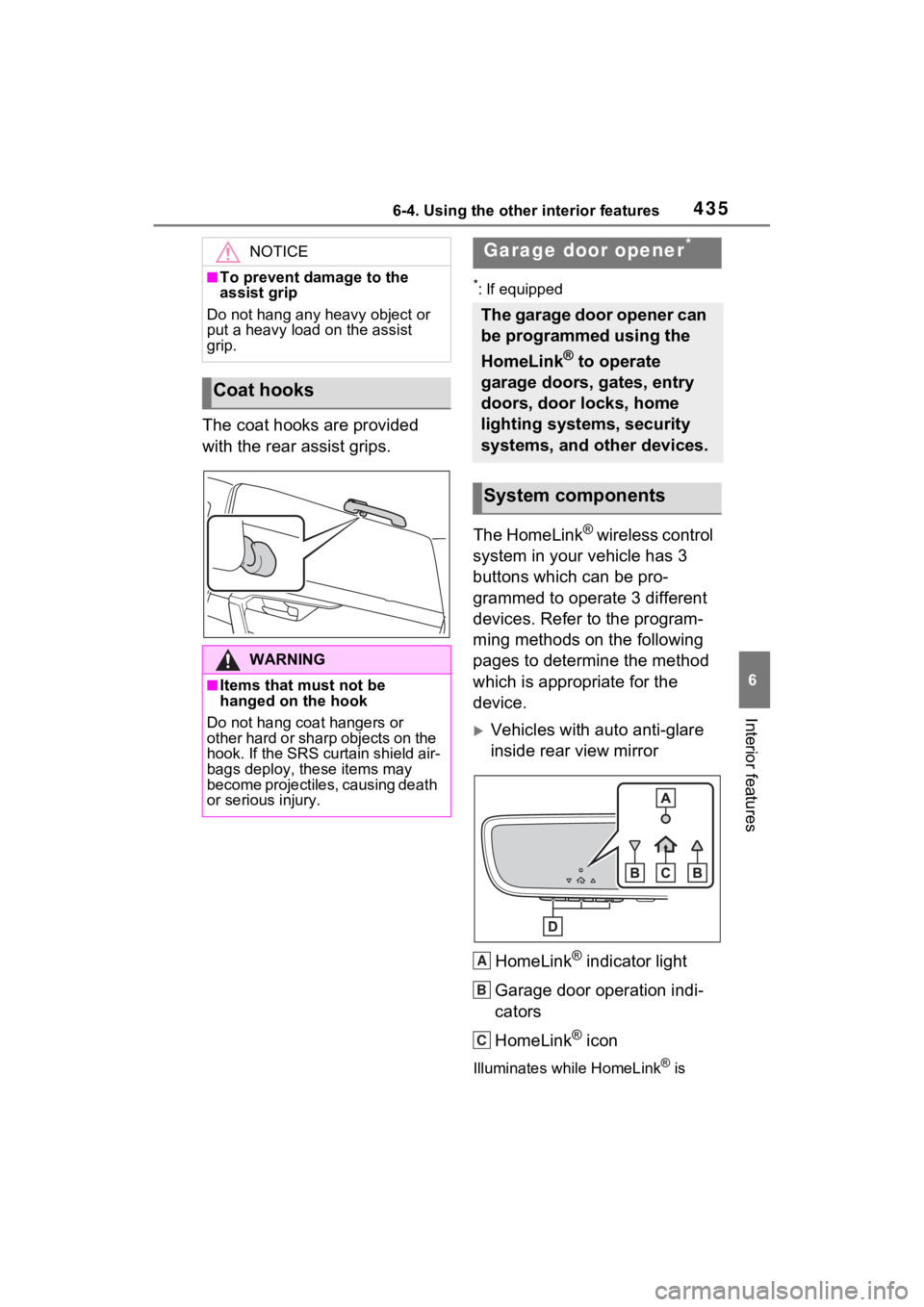
The coat hooks are provided
with the rear assist grips.
*: If equipped
The HomeLink® wireless control
system in your vehicle has 3
buttons which can be pro-
grammed to operate 3 different
devices. Refer to the program-
ming methods on the following
pages to determine the method
which is appropriate for the
device.
Vehicles with auto anti-glare
inside rear view mirror
HomeLink
® indicator light
Garage door operation indi-
cators
HomeLink
® icon
Illuminates while HomeLink® is
NOTICE
■To prevent damage to the
assist grip
Do not hang any heavy object or
put a heavy load on the assist
grip.
Coat hooks
WARNING
■Items that must not be
hanged on the hook
Do not hang coat hangers or
other hard or sharp objects on the
hook. If the SRS curtain shield air-
bags deploy, these items may
become projectiles, causing death
or serious injury.
Garage door opener*
The garage door opener can
be programmed using the
HomeLink
® to operate
garage doors, gates, entry
doors, door locks, home
lighting systems, security
systems, and other devices.
System components
A
B
C
Page 437 of 618
4376-4. Using the other interior features
6
Interior features
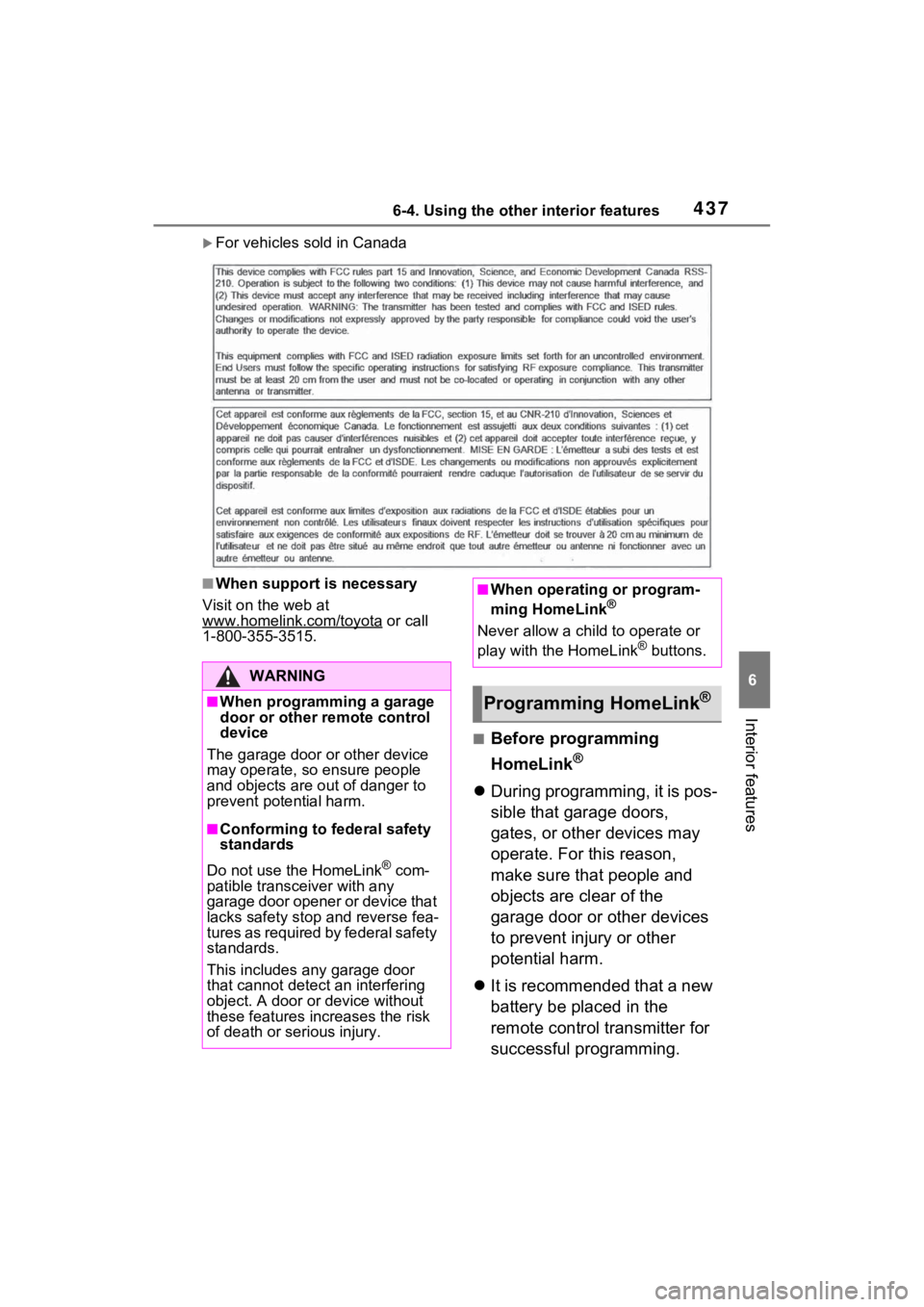
For vehicles sold in Canada
■When support is necessary
Visit on the web at
www.homelink.com/toyota
or call
1-800-355-3515.
■Before programming
HomeLink
®
During programming, it is pos-
sible that garage doors,
gates, or other devices may
operate. For this reason,
make sure that people and
objects are clear of the
garage door or other devices
to prevent injury or other
potential harm.
It is recommended that a new
battery be placed in the
remote control transmitter for
successful programming.
WARNING
■When programming a garage
door or other remote control
device
The garage door o r other device
may operate, so ensure people
and objects are out of danger to
prevent potential harm.
■Conforming to federal safety
standards
Do not use the HomeLink
® com-
patible transceiver with any
garage door opener or device that
lacks safety stop and reverse fea-
tures as required by federal safety
standards.
This includes any garage door
that cannot detect an interfering
object. A door or device without
these features increases the risk
of death or serious injury.
■When operating or program-
ming HomeLink®
Never allow a child to operate or
play with the HomeLink® buttons.
Programming HomeLink®
Page 445 of 618
4457-1. Maintenance and care
7
Maintenance and care
■Front side windows water-
repellent coating (except quar-
ter window)
●The following precautions can
extend the effectiveness of the
water-repellent coating.
• Remove any dirt, etc., from the front side windows regularly.
• Do not allow dirt and dust to accu- mulate on the windows for a long
period. Clean the windows with a
soft, damp cloth as soon as possi-
ble.
• Do not use wax or glass cleaners
that contain abrasives when
cleaning the windows.
• Do not use any metallic objects to
remove condensation build up.
■Bumpers
Do not scrub with abrasive cleaners.
■Plated portions
If dirt cannot be removed, clean the
parts as follows:
●Use a soft cloth dampened with
an approximately 5% solution of
neutral detergent and water to
clean the dirt off.
●Wipe the surface with a dry, soft
cloth to remove any remaining
moisture.
●To remove oily deposits, use alco-
hol wet wipes or a similar product.
WARNING
■When washing the vehicle
Do not apply water to the inside of
the engine compartment. Doing
so may cause the electrical com-
ponents, etc. to catch fire.
■When cleaning the windshield
(vehicles with rain-sensing
windshield wipers)
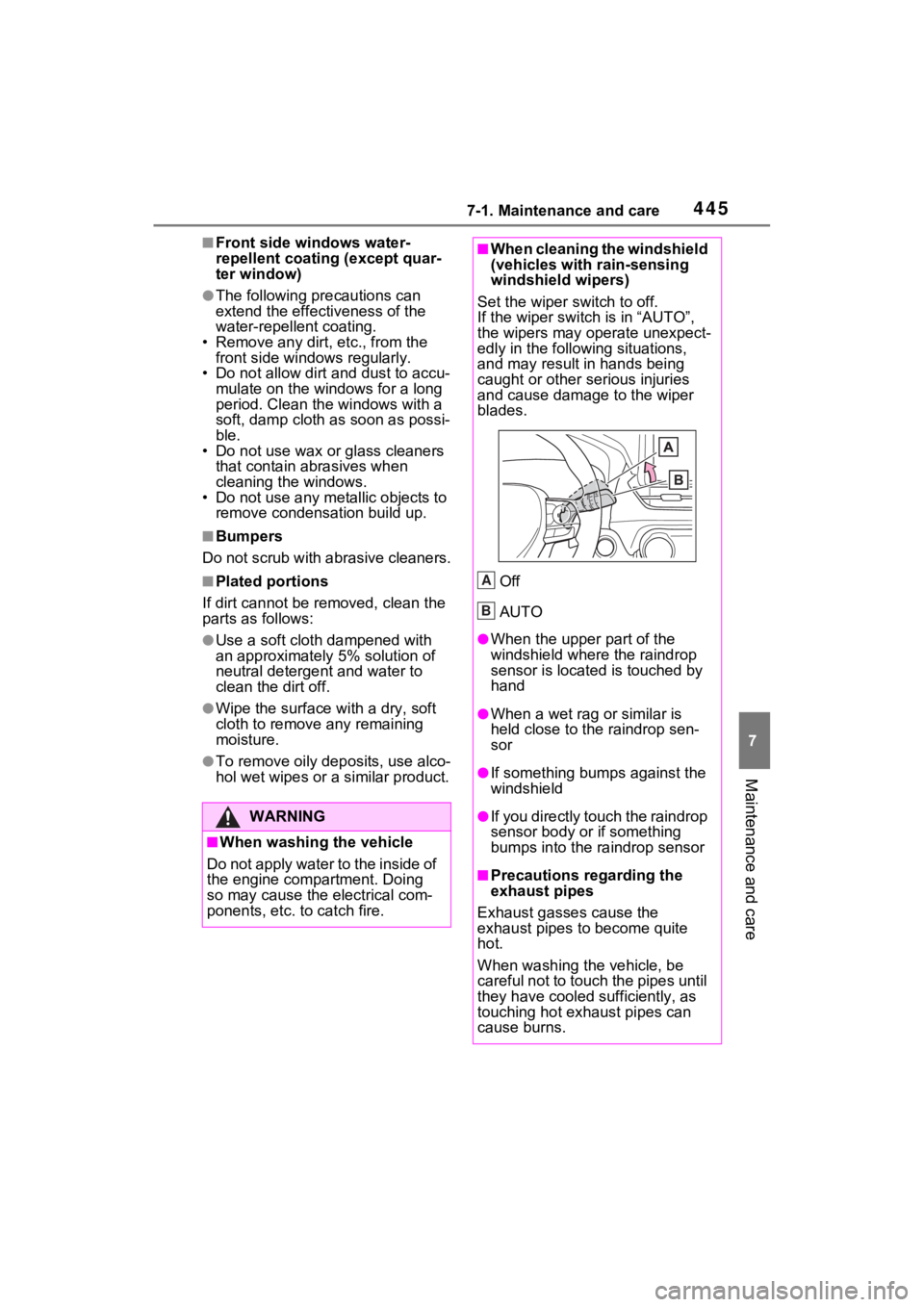
Set the wiper switch to off.
If the wiper switch is in “AUTO”,
the wipers may operate unexpect-
edly in the following situations,
and may result in hands being
caught or other serious injuries
and cause damage to the wiper
blades.
Off
AUTO
●When the upper part of the
windshield where the raindrop
sensor is located is touched by
hand
●When a wet rag or similar is
held close to the raindrop sen-
sor
●If something bumps against the
windshield
●If you directly touch the raindrop
sensor body or if something
bumps into the ra indrop sensor
■Precautions regarding the
exhaust pipes
Exhaust gasses cause the
exhaust pipes to become quite
hot.
When washing the vehicle, be
careful not to touch the pipes until
they have cooled sufficiently, as
touching hot exhaust pipes can
cause burns.
A
B
Page 446 of 618
4467-1. Maintenance and care
WARNING
■Precaution regarding the rear
bumper with Blind Spot Moni-
tor
If the paint of the rear bumper is
chipped or scratched, the system
may malfunction. If this occurs,
consult your Toyota dealer.
NOTICE
■To prevent paint deterioration
and corrosion on the body
and components (aluminum
wheels, etc.)
●Wash the vehicle immediately in
the following cases:
• After driving near the sea coast
• After driving on salted roads
• If coal tar or tre e sap is present
on the paint surface
• If dead insects, insect droppings or bird droppings are present on
the paint surface
• After driving in an area contami- nated with soot, oily smoke,
mine dust, iron powder or chem-
ical substances
• If the vehicle becomes heavily soiled with dust or mud
• If liquids such as benzene and gasoline are spilled on the paint
surface
●If the paint is chipped or
scratched, have it repaired
immediately.
●To prevent the wheels from cor-
roding, remove any dirt and
store in a place with low humid-
ity when storing the wheels.
■Cleaning the exterior lights
●Wash carefully. Do not use
organic substances or scrub
with a hard brush.
This may damage the surfaces
of the lights.
●Do not apply wax to the sur-
faces of the lights.
Wax may cause damage to the
lenses.
■When using an automatic car
wash (vehicles with rain-
sensing windshield wipers)
Set the wiper swit ch to off posi-
tion.
If the wiper switch is in “AUTO”,
the wipers may operate and the
wiper blades may be damaged.
■When using a high pressure
car wash
●When washing the vehicle, do
not let water from the high-pres-
sure washer directly hit the
camera or the area around the
camera. Due to the shock from
the high pressure water, it is
possible that the device may not
operate normally.
●Do not bring the nozzle tip close
to boots (rubber or resin manu-
factured cover), or connectors
or the following parts.
The parts may be damaged if
they come into contact with
high-pressure water.
• Traction battery
•Traction re lated parts
• Steering parts
• Suspension parts
• Brake parts
Page 448 of 618
4487-1. Maintenance and care
WARNING
■Water in the vehicle
●Do not splash or spill liquid in
the vehicle, such as on the floor,
on the rear seats, in the DC/DC
Converter air intake vent, junc-
tion box or in the luggage com-
partment. (P.91)
Doing so may cause the DC/DC
Converter, electrical compo-
nents, etc. to malfunction or
catch fire.
●Do not get any of the SRS com-
ponents or wiring in the vehicle
interior wet.
( P.35)
An electrical malfunction may
cause the airbags to deploy or
not function properly, resulting
in death or serious injury.
●Vehicles with wireless charger:
Do not let the wireless charger
( P.427) get wet. Failure to do
so may cause the charger to
become hot and cause burns or
could cause electric shock
resulting in dea th or serious
injury.
■Cleaning the interior (espe-
cially instrument panel)
Do not use a polis h wax or polish
cleaner. The instrument panel
may reflect off the windshield,
obstructing the dr iver’s view and
leading to an accident, resulting in
death or serious injury.
NOTICE
■Cleaning detergents
●Do not use the following types
of detergent, as they may dis-
color the vehicle interior or
cause streaks or damage to
painted surfaces:
• Non-seat portions: Organic sub- stances such as benzene or
gasoline, alkaline or acidic solu-
tions, dye, and bleach
• Seats: Alkaline or acidic solu- tions, such as thinner, benzene,
and alcohol
●Do not use a polish wax or pol-
ish cleaner. The instrument
panel’s or other interior part’s
painted surface may be dam-
aged.
■Preventing damage to leather
surfaces
Observe the following precautions
to avoid damage to and deteriora-
tion of leather surfaces:
●Remove any dust or dirt from
leather surfaces immediately.
●Do not expose the vehicle to
direct sunlight for extended peri-
ods of time. Park the vehicle in
the shade, especially during
summer.
●Do not place items made of
vinyl, plastic, or containing wax
on the upholstery, as they may
stick to the leather surface if the
vehicle interior heats up signifi-
cantly.