air conditioning TOYOTA RAV4 PRIME 2021 Owner's Guide
[x] Cancel search | Manufacturer: TOYOTA, Model Year: 2021, Model line: RAV4 PRIME, Model: TOYOTA RAV4 PRIME 2021Pages: 618, PDF Size: 24.18 MB
Page 314 of 618
3145-5. Using the driving support systems
●In the following situations, if the situation has changed (or the vehicle has
been driven for some time) and the normal operating conditions are
detected, the message will disappear and the system will become opera-
tional.
If the message does not disapp ear, contact your Toyota dealer.
• When the temperature around the radar sensor is outside of the opera-
tional range, such as when the vehicle is in the sun or in an e xtremely cold
environment
• When the front camera cannot d etect objects in front of the vehicle, such
as when driving in the dark, sno w, or fog, or when bright lights are shining
into the front camera
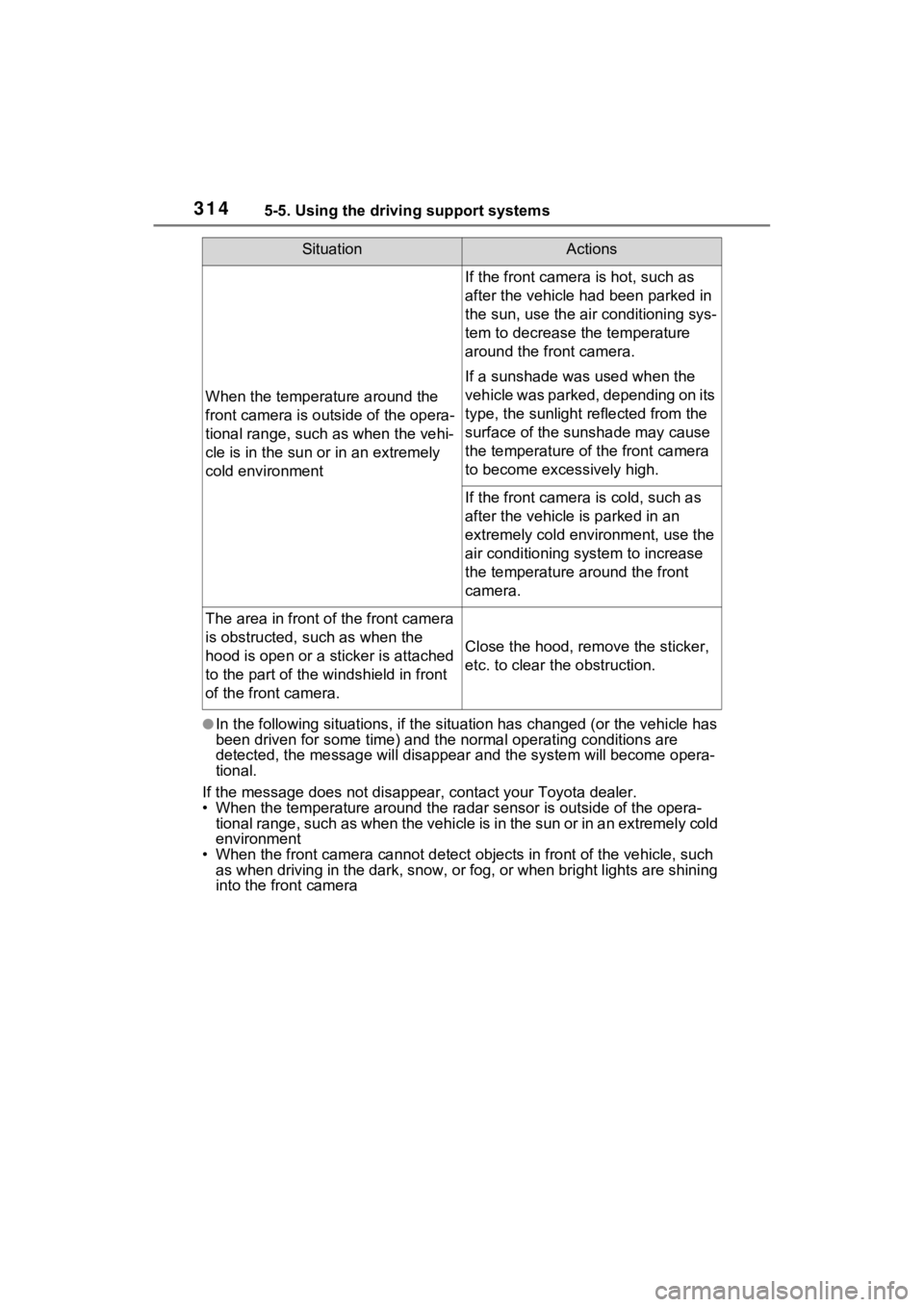
When the temperature around the
front camera is outside of the opera-
tional range, such as when the vehi-
cle is in the sun or in an extremely
cold environment
If the front camera is hot, such as
after the vehicle had been parked in
the sun, use the air conditioning sys-
tem to decrease the temperature
around the front camera.
If a sunshade was used when the
vehicle was parked, depending on its
type, the sunlight reflected from the
surface of the sunshade may cause
the temperature of the front camera
to become excessively high.
If the front camera is cold, such as
after the vehicle is parked in an
extremely cold environment, use the
air conditioning system to increase
the temperature around the front
camera.
The area in front o f the front camera
is obstructed, such as when the
hood is open or a sticker is attached
to the part of the win dshield in front
of the front camera.
Close the hood, rem ove the sticker,
etc. to clear the obstruction.
SituationActions
Page 360 of 618

3605-5. Using the driving support systems
detection distance may shorten,
or detection may be impossible.
• Detection may be impossible if
static objects draw too close to the
sensor.
• There will be a short delay
between static object detection
and display (warning buzzer
sounds). Even at low speeds,
there is a possibilit y that the object
will come within 9.8 in. (25 cm)
before the display is shown and
the warning buzzer sounds.
• It might be difficult to hear the buzzer due to the volume of the
audio system or air flow noise of
the air conditioning system.
• It may be difficult to hear the
sound of this system due to the
buzzers of other systems.
■Conditions under which the
function may not function cor-
rectly
Certain vehicle conditions and the
surrounding environment may affect
the ability of a sensor to correctly
detect objects. Particular instances
where this may occur are listed
below.
●There is dirt, snow or ice on a sen-
sor. (Cleaning the sensors will
resolve this problem.)
●A sensor is frozen. (Thawing the
area will resolve this problem.)
In especially cold weather, if a
sensor is frozen the sensor dis-
play may be displayed abnor-
mally, or objects, such as a wall,
may not be detected.
●A sensor is covered in any way.
●When a sensor or the area around
a sensor is extremely hot or cold.
●On an extremely bumpy road, on
an incline, on gravel, or on grass.
●The vicinity of the vehicle is noisy
due to vehicle horns, motorcycle
engines, air brakes of large vehi-
cles, or other l oud noises produc-
ing ultrasonic waves.
●There is another vehicle equipped with parking assist
sensors in the
vicinity.
●A sensor is coated with a sheet of
spray or heavy rain.
●If a sensor is hit by a large amount
of water, such as when driving on
a flooded road.
●If the vehicle is significantly tilted.
●The vehicle is approaching a tall
or curved curb.
●If objects draw too close to the
sensor.
■Objects which may not be prop-
erly detected
The shape of the object may pre-
vent the sensor from detecting it.
Pay particular atte ntion to the fol-
lowing objects:
●Wires, fences, ropes, etc.
●Cotton, snow and other materials
that absorb sound waves
●Sharply-angled objects
●Low objects
●Tall objects with upper sections
projecting outwards in the direc-
tion of your vehicle
People may not be detected if they
are wearing certain types of cloth-
ing.
■Certification (Canada only)
This ISM device complies with
Canadian ICES-001.
Page 376 of 618
3765-5. Using the driving support systems
●When the distance between your
vehicle and metal objects, such as
a guardrail, wall, sign, or parked
vehicle, which may reflect electri-
cal waves toward the rear of the
vehicle, is short
●When there are spinning objects
near your vehicle such as the fan
of an air conditioning unit
●When water is splashed or
sprayed toward t he rear bumper,
such as from a sprinkler
■Situations in which the Parking
Support Brake function (rear-
crossing vehicles) may not
operate properly
In some situations, such as the fol-
lowing, the radar sensors may not
detect an object and this function
may not operate properly
●Stationary objects
●When a sensor or the area around
a sensor is extremely hot or cold
●If the rear bumper is covered with
ice, snow, dirt, etc.
●When it is raining heavily or water
strikes the vehicle
●When the detecti on area of a
radar sensor is obstructed by an
adjacent vehicle
●If the vehicle is s ignificantly tilted
●When equipment that may
obstruct a sensor is installed, such
as a towing eyelet, bumper pro-
tector (an additional trim strip,
etc.), bicycle carrier, or snow plow
●If the suspension has been modi-
fied or tires of a size other than
specified are installed
●If the front of the v ehicle is raised
or lowered due to the carried load
●If a sticker or an electronic compo-
nent, such as a backlit license
plate (especially fluorescent type),
fog lights, fender pole or wireless
antenna is installed near a radar
sensor
●If the orientation of a radar sensor
has been changed
●When multiple vehicles are
approaching with only a small gap
between each vehicle
●If a vehicle is approaching the rear
of your vehicle rapidly
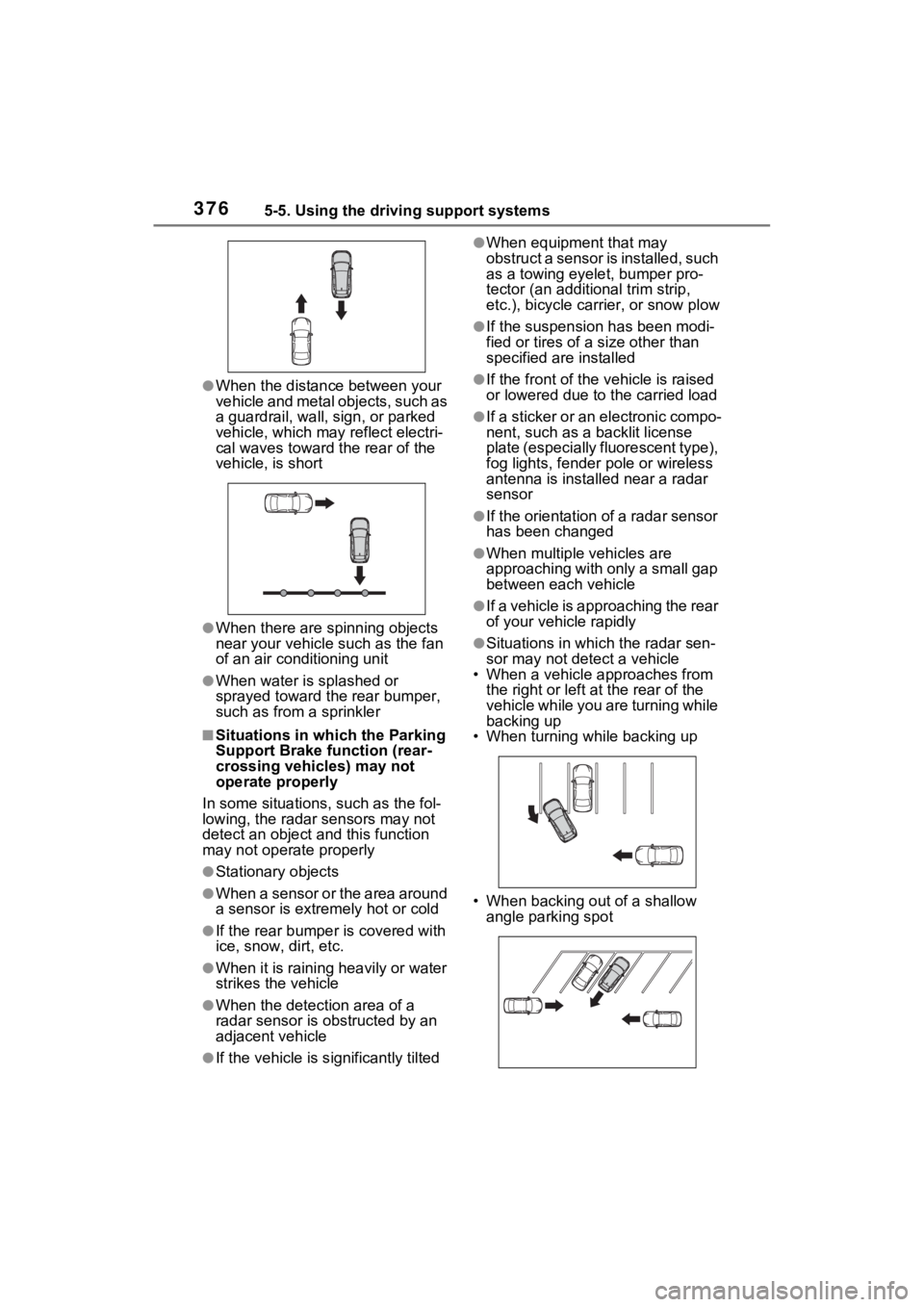
●Situations in which the radar sen-
sor may not detect a vehicle
• When a vehicle approaches from
the right or left at the rear of the
vehicle while you are turning while
backing up
• When turning while backing up
• When backing out of a shallow angle parking spot
Page 377 of 618
3775-5. Using the driving support systems
5
Driving
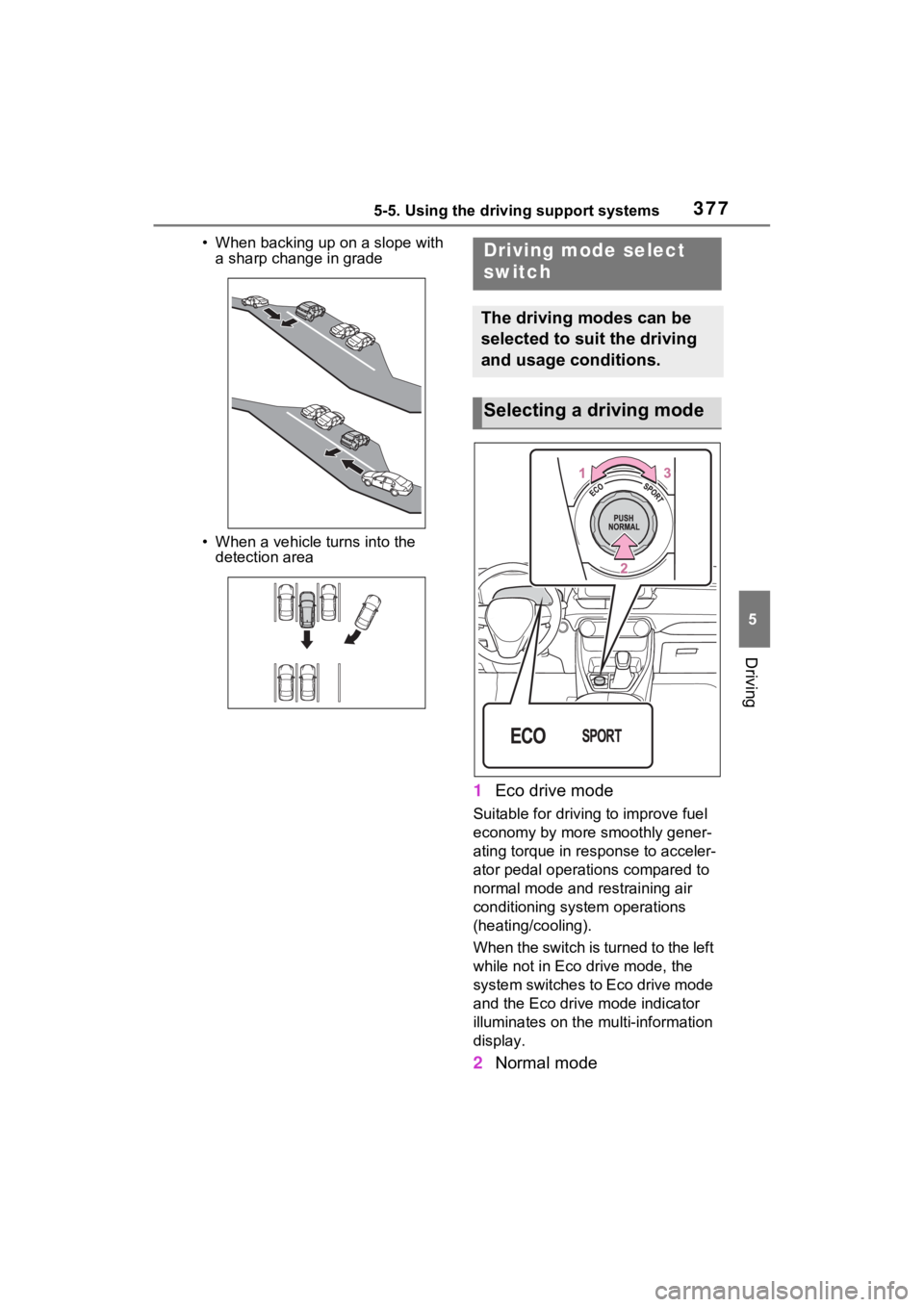
• When backing up on a slope with a sharp change in grade
• When a vehicle turns into the detection area
1 Eco drive mode
Suitable for drivi ng to improve fuel
economy by more smoothly gener-
ating torque in response to acceler-
ator pedal operations compared to
normal mode and restraining air
conditioning system operations
(heating/cooling).
When the switch is turned to the left
while not in Eco drive mode, the
system switches to Eco drive mode
and the Eco drive mode indicator
illuminates on the mu lti-information
display.
2 Normal mode
Driving mode select
switch
The driving modes can be
selected to suit the driving
and usage conditions.
Selecting a driving mode
Page 378 of 618

3785-5. Using the driving support systems
Suitable for normal driving.
The driving mode returns to normal
mode if the switch is pressed while
in Eco drive mode or sport mode.
3Sport mode
Controls the steering feeling and
hybrid system to create an acceler-
ation response tha t is suitable for
sporty driving. Suitable for when
crisp handling is desired, such as
when driving on mountainous
roads.
When the switch is turned to the
right while not in sport mode, the
system switches to sport mode and
the sport mode indicator illuminates
on the multi-info rmation display.
■When changing to a driving
mode other than normal mode
●The background color of the multi-
information display changes
according to the selected driving
mode.
●When the speedometer is set to
analog display, the speedometer
display color also changes.
●The color of the switch changes
according to the selected driving
mode. (On some models)
■Air conditioning system opera-
tion in Eco drive mode
In Eco drive mode, heating/cooling
operations and the fan speed is con-
trolled to improve fuel efficiency.
Perform the following procedures to
increase the air conditioning perfor-
mance.
●Turn eco air conditioning mode off
( P.397)
●Adjust the fan speed ( P.397)
●Cancel Eco drive mode
■Canceling a driving mode
●Sport mode is automatically can-
celed and the driving mode returns to normal mode when the
power switch is turned off.
●Normal mode and Eco drive mode
are not canceled until another
driving mode is selected. (Even if
the power switch is turned off, nor-
mal mode and Eco
drive mode will
not be automatically canceled).
Page 395 of 618
395
6
6
Interior features
Interior features
6-1. Using the air conditioning system and defogger
Automatic air conditioning system ....................... 396
Remote Air Conditioning System ...................... 405
Heated steering wheel/Front seat heaters/Front seat
heaters and ventila-
tors/Rear seat heaters 407
6-2. Using the interior lights Interior lights list .......... 410
6-3. Using the storage features List of storage features 413
Luggage compartment fea- tures .......................... 417
6-4. Using the other interior features
Other interior features . 420
Garage door opener.... 435
Page 396 of 618
3966-1. Using the air conditioning system and defogger
6-1.Using the air conditioning system and defogger
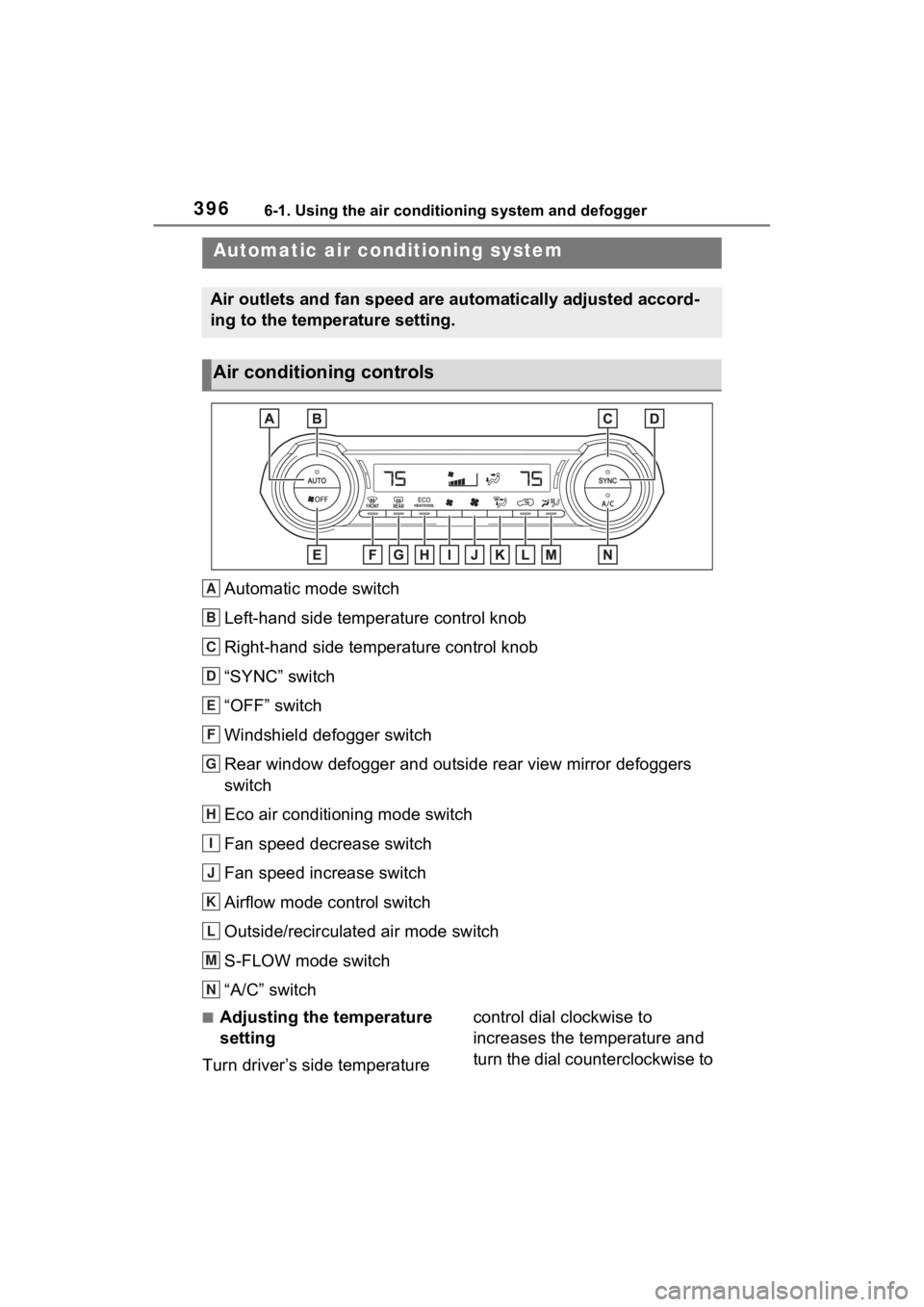
Automatic mode switch
Left-hand side temperature control knob
Right-hand side temperature control knob
“SYNC” switch
“OFF” switch
Windshield defogger switch
Rear window defogger and outside rear view mirror defoggers
switch
Eco air conditioning mode switch
Fan speed decrease switch
Fan speed increase switch
Airflow mode control switch
Outside/recirculated air mode switch
S-FLOW mode switch
“A/C” switch
■Adjusting the temperature
setting
Turn driver’s side temperature control dial clockwise to
increases the temperature and
turn the dial counterclockwise to
Automatic air co
nditioning system
Air outlets and fan speed are automatically adjusted accord-
ing to the temperature setting.
Air conditioning controls
A
B
C
D
E
F
G
H
I
J
K
L
M
N
Page 397 of 618
3976-1. Using the air conditioning system and defogger
6
Interior features
decreases the temperature.
The air conditioning system
switches between individual and
simultaneous modes each time the
“SYNC” switch is pressed.
Simultaneous mode (the indicator
on the “SYNC” switch is on):
The driver’s side temperature con-
trol dial can be used to adjust the
temperature for the driver’s and
passenger’s side. At this time,
operate the passenger’s side tem-
perature control dial to enter indi-
vidual mode.
Individual mode (t he indicator on
the “SYNC” switch is off):
The temperature for the driver’s
and passenger’s side can be
adjusted separately.
■Setting the fan speed
Press the fan speed increase
switch to increase the fan speed
and the fan speed decrease
switch to decrease the fan
speed.
Pressing the “OFF” switch turns off
the fan.
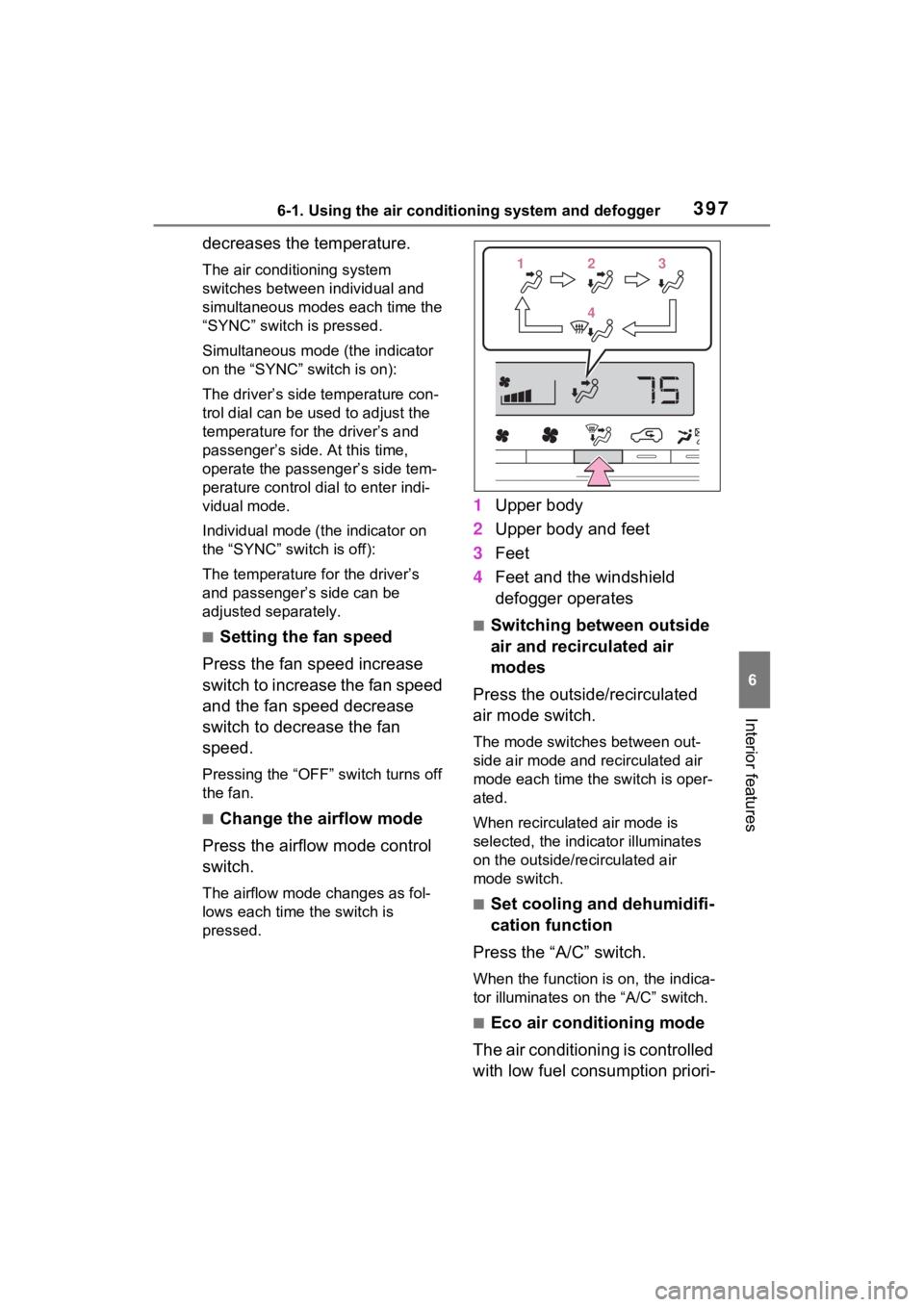
■Change the airflow mode
Press the airflow mode control
switch.
The airflow mode changes as fol-
lows each time the switch is
pressed.
1 Upper body
2 Upper body and feet
3 Feet
4 Feet and the windshield
defogger operates
■Switching between outside
air and recirculated air
modes
Press the outside/recirculated
air mode switch.
The mode switches between out-
side air mode and recirculated air
mode each time the switch is oper-
ated.
When recirculated air mode is
selected, the indicator illuminates
on the outside/recirculated air
mode switch.
■Set cooling and dehumidifi-
cation function
Press the “A/C” switch.
When the function is on, the indica-
tor illuminates on the “A/C” switch.
■Eco air conditioning mode
The air conditioning is controlled
with low fuel consumption priori-
112233
44
Page 398 of 618

3986-1. Using the air conditioning system and defogger
tized such as reducing fan
speed, etc.
Press the eco air conditioning
mode switch.
When the eco air conditioning
mode is on, the indicator illumi-
nates on the eco air conditioning
mode switch.
■Defogging the windshield
Defoggers are used to defog the
windshield and front side win-
dows.
Press the windshield defogger
switch.
Set the outside/recirculated air
mode switch to outside air mode if
t h e r e c i r c u l a t e d a i r m o d e i s u s e d . ( I t
may switch automatically.)
To defog the windshield and the
side windows quickly, turn the air
flow and temperature up.
To return to the previous mode,
press the windshield defogger
switch again when the windshield is
defogged.
When the windshield defogger
switch is on, the indicator illumi-
nates on the windshield defogger
switch.
■Defogging the rear window
and outside rear view mir-
rors
Defoggers are used to defog the
rear window and to remove rain-
drops, dew and frost from the
outside rear view mirrors.
Press the rear window defogger
and outside rear view mirror
defoggers switch.
The defoggers will automatically
turn off after 15 minutes.
When the rear window defogger
and outside rear view mirror defog-
gers switch is on, the indicator illu-
minates on the rear window
defogger and outside rear view mir-
ror defoggers switch.
■Heating
●In HV mode, the gasoline engine
may operate in order to extract
heat from the engine coolant via
the heater.
●In EV mode, heating is done by a
heat pump system.
• When the outside temperature is low or it is snowing, compared to
conventional vehicles, heating
may be less effective and warm
air may not come out.
• When the outside heat exchanger is frosted over, fan speed declines
and it may become harder to heat
the interior.
However, it is not a malfunction. In
this situation, the air temperature
from the outlets may not change
even though the set temperature is
raised.
• If frost has formed of the outside heat exchanger, the heating per-
formance will decline. The frost
can be removed from the outside
heat exchanger by operating the
Remote Air Conditioning System
before driving ( P.405). When
frosted over, the heating operation
of the Remote Air Conditioning
System starts after defrosting.
• When “AUTO” switch is turned on,
the heating is controlled opti-
mally. Therefore, the set heating
performance may not be achieved
even if the fan speed setting is
increased.
Page 399 of 618
3996-1. Using the air conditioning system and defogger
6
Interior features
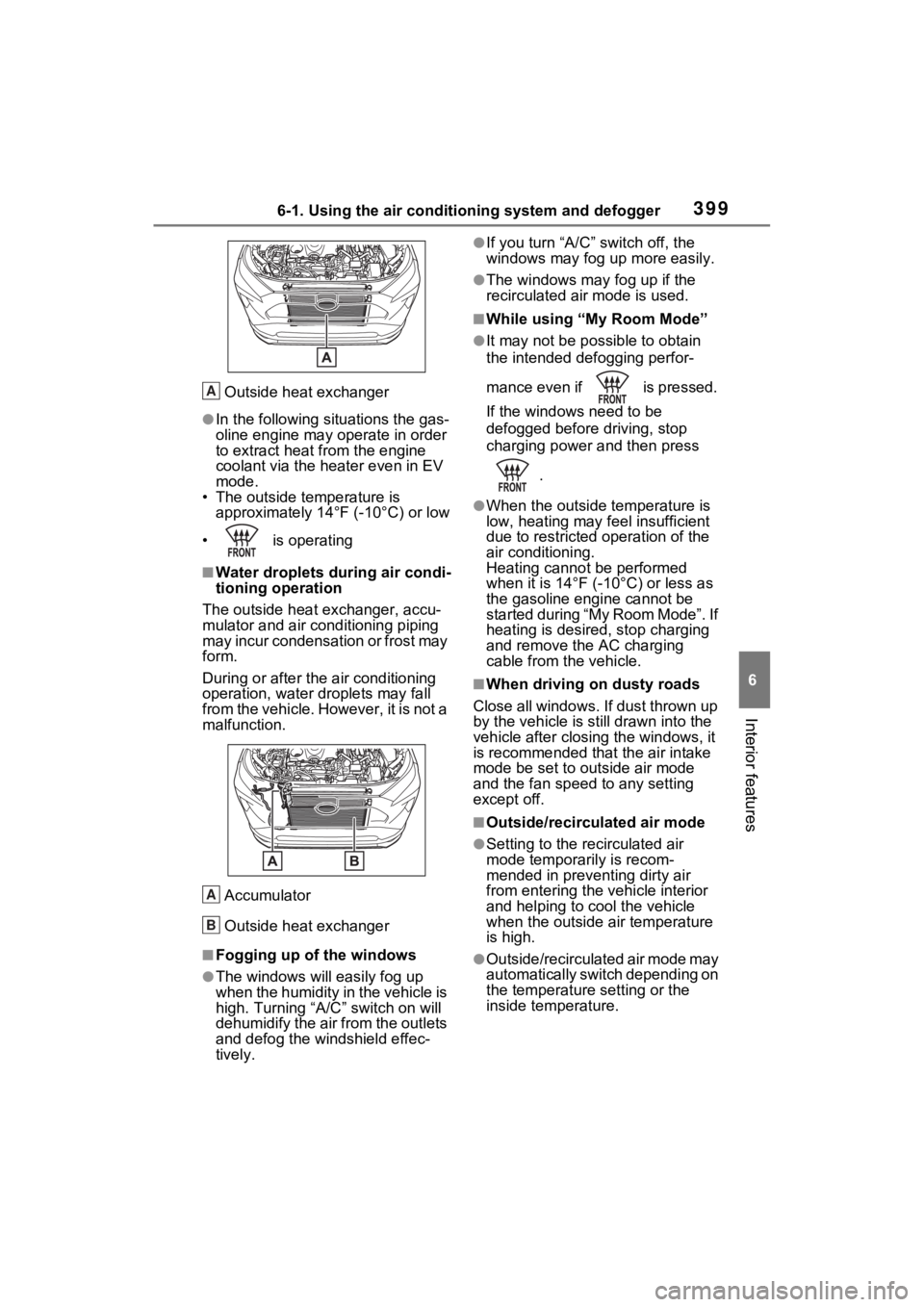
Outside heat exchanger
●In the following situations the gas-
oline engine may operate in order
to extract heat from the engine
coolant via the heater even in EV
mode.
• The outside temperature is approximately 14° F (-10°C) or low
• is operating
■Water droplets during air condi-
tioning operation
The outside heat exchanger, accu-
mulator and air conditioning piping
may incur condensation or frost may
form.
During or after the air conditioning
operation, water droplets may fall
from the vehicle. However, it is not a
malfunction.
Accumulator
Outside heat exchanger
■Fogging up of the windows
●The windows will easily fog up
when the humidity in the vehicle is
high. Turning “A/C ” switch on will
dehumidify the air from the outlets
and defog the windshield effec-
tively.
●If you turn “A/C” switch off, the
windows may fog up more easily.
●The windows may fog up if the
recirculated air mode is used.
■While using “My Room Mode”
●It may not be possible to obtain
the intended defogging perfor-
mance even if is pressed.
If the windows need to be
defogged before driving, stop
charging power and then press
.
●When the outside temperature is
low, heating may feel insufficient
due to restricted operation of the
air conditioning.
Heating cannot be performed
when it is 14°F (- 10°C) or less as
the gasoline engine cannot be
started during “My Room Mode”. If
heating is desired, stop charging
and remove the AC charging
cable from the vehicle.
■When driving on dusty roads
Close all windows. If dust thrown up
by the vehicle is still drawn into the
vehicle after closing the windows, it
is recommended that the air intake
mode be set to outside air mode
and the fan speed to any setting
except off.
■Outside/recirculated air mode
●Setting to the recirculated air
mode temporarily is recom-
mended in preventing dirty air
from entering the vehicle interior
and helping to c ool the vehicle
when the outside air temperature
is high.
●Outside/recirculated air mode may
automatically switch depending on
the temperature setting or the
inside temperature.
A
A
B