air conditioning TOYOTA RAV4 PRIME 2021 User Guide
[x] Cancel search | Manufacturer: TOYOTA, Model Year: 2021, Model line: RAV4 PRIME, Model: TOYOTA RAV4 PRIME 2021Pages: 618, PDF Size: 24.18 MB
Page 96 of 618

962-1. Plug-in hybrid system
of occupants.
The distance that EV driving is
possible can be extended if the
following is performed:
■When starting off, depress
the accelerator pedal
smoothly to accelerate
As a guide, accelerate up to
approximately 12mph (20 km/h)
in the first 5 seconds.
Electrical and fuel efficiency can
be improved just by using the
ECO Accelerator Guidance dis-
played on the multi-information
display and taking care to start
off gently. ( P.173)
When the driving mode is set to
Eco drive mode, depressing the
accelerator pedal generates
smooth torque that makes it easier
to operate the accelerator gently.
At the same time, the air condition-
ing control is switched to eco air
conditioning mode ( P.397) to
reduce the strength of the air condi-
tioning operation.
■Maintain sufficient vehicle-
to-vehicle distance and do
not accelerate or decelerate
unnecessarily
Try to maintain a fixed speed
while driving. Driving at a short
vehicle-to-vehicle distance will
result in repeating wasteful
acceleration and deceleration,
which will worsen the electrical
and fuel efficiency.
■Release the accelerator
pedal early before stopping
the vehicle, such as at a
traffic light
The regenerative brake will
operate to convert the kinetic
energy of the vehicle into electri-
cal energy, which will charge the
hybrid battery (traction battery).
The regeneration status can be
checked from the Hybrid Sys-
tem Indicator. ( P.167)
When the brake pedal is
depressed lightly during decel-
eration, the regeneration
amount increases, enabling
more electrical energy to be
recovered.
If the brake pedal is depressed too
strongly, the recovered amount
indicator will reac h the maximum
level and the upper limit of the
recoverable energy will be
exceeded. Theref ore, be sure to
operate the brak e pedal early.
■Use the air conditioning
system appropriately, and
also utilize the heated steer-
ing wheel (if equipped) and
seat heaters
In EV mode, the vehicle is
cooled and heated by electrical
energy. (Except in extremely
cold temperatures of approxi-
mately 14°F (-10°C) or less.)
Preventing excessive cooling or
heating of the vehicle will reduce
power consumption and
improve electrical efficiency.
Page 97 of 618
972-1. Plug-in hybrid system
2
Plug-in hybrid system
When eco air conditioning mode
is used, the air conditioning con-
trol is switched automatically to
a lower setting. (P.397)
The heated steering wheel (if
equipped) and seat heaters are
efficient heating device that
directly warm the body using
less electric power.
When used togethe r with the air
conditioning system, a low tem-
perature setting can be used to
improve electrical and fuel effi-
ciency.
■Check the tire pressure
If the tire pressure is lower than
the specified value, it will
worsen the electrical and fuel
efficiency.
A pressure level 7 psi (50 kPa, 0.5
kgf/cm
2 or bar) lower than the spec-
ified value will cause a worsening of
several percentage points.
■When driving on highways,
use the EV/HV mode selec-
tion switch to drive in HV
mode
The power consumption will
increase significantly if the vehi-
cle is driven in EV mode on
highways.
■Do not load unnecessary
objects in the vehicle
Driving with objects weighing
220 lb. (100 kg) in the vehicle
will worsen the electrical and
fuel efficiency by approximately
3%. Air resistance also greatly
affects electrical and fuel effi-
ciency. Remove any exterior
accessories such as a roof lug-
gage carrier when they are not
being used.
The running resistance of snow
tires is high and they will worsen
electrical and fuel efficiency.
Replace them with standard
tires as soon as they are no lon-
ger needed.
■Know your vehicle’s electri-
cal and fuel efficiency
If you know your vehicle’s daily
electrical and fuel efficiency, you
will understand the benefits of
Eco drive.
Use the Power Consump-
tion/Fuel Economy, ECO Accel-
erator Guidance/“Eco Score”
and other data displayed on the
multi-information display.
The following indicate that
charging has been carried out
properly.
The charging indicator of the
charging port turns off
“Charging Complete” is dis-
played on the multi-informa-
tion display when a door is
opened with the power switch
off ( P.119)
Regardless of the type of power
Display when c harging is
completed
Page 101 of 618
1012-2. Charging
2
Plug-in hybrid system
*: Flashes for a certain period of time, and then turns off.
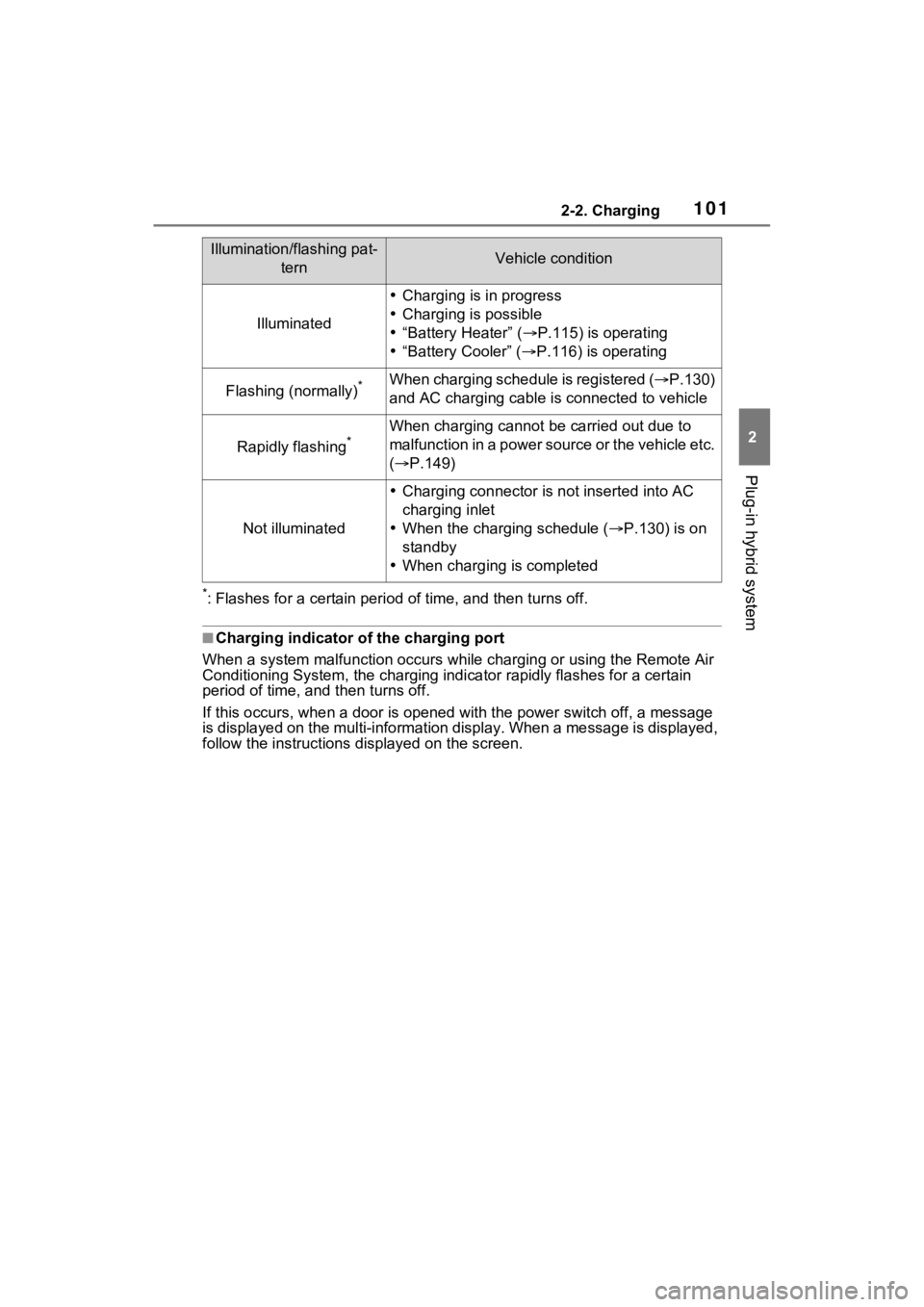
■Charging indicator of the charging port
When a system malfunction occurs while charging or using the Remote Air
Conditioning System, the charging indicator rapidly flashes for a certain
period of time, and t hen turns off.
If this occurs, when a door is o pened with the power switch off , a message
is displayed on the multi-informa tion display. When a message is displayed,
follow the instructions d isplayed on the screen.
Illumination/flashing pat-
ternVehicle condition
Illuminated
Charging is in progress
Charging is possible
“Battery Heater” ( P.115) is operating
“Battery Cooler” ( P.116) is operating
Flashing (normally)*When charging schedule is registered ( P.130)
and AC charging cable is connected to vehicle
Rapidly flashing*When charging cannot be carried out due to
m a lfu nct ion in a p ow er so ur ce or th e v eh icle et c.
( P.149)
Not illuminated
Charging connector is not inserted into AC
charging inlet
When the charging schedule ( P.130) is on
standby
When charging is completed
Page 115 of 618
1152-2. Charging
2
Plug-in hybrid system
( P.144), the time required for
charging to complete may be
longer or the charging may not
be completed.
*4: If equipped
■Charging time may increase
In the following si tuations, charging
time may become longer than nor-
mal:
●In very hot or very cold tempera-
tures.
●When the hybrid battery (traction
battery) becomes hot, such as
immediately after high-load driv-
ing.
●The vehicle is consuming a lot of
electricity, for example, when the
headlights are on etc.
●When using “My Room Mode”.
( P.144)
●There is a power outage during
charging.
●There is an interruption in the
electrical supply.
●There is a drop in the voltage of
external power source.
●The charge in the 12-volt battery
is low, for examp le due to the
vehicle being left unused for a
long period of time.
●The maximum charging current is
set to 8A or 16A* through “Vehicle
Settings”. ( P.112)
●When the “Battery Heater” oper-
ates. ( P.115)
●When the “Battery Cooler” is oper-
ated before charging. ( P.116)
●When the plug generates heat
due to a loose outlet connection
etc.
*: Vehicles with 6.6 kW onboard
traction battery charger only
■Using a DC Charger
DC Chargers cannot be used with this vehicle.
■Charging electricity
This vehicle can be charged up to
approximately 3. 3 kW or 6.6 kW
*.
However, depending on the used
charger or AC charging cable,
charging electrici ty may be limited.
*: Vehicles with 6.6 kW onboard
traction battery charger only
This vehicle is equipped with
several functions that are linked
with charging.
■“My Room Mode” ( P.144)
When the AC charging cable is
connected to the vehicle, electri-
cal components such as the air
conditioning system or audio
system can be used using the
external power source
*.
*: The power of the hybrid battery
(traction battery) may be used
depending on the situation.
■“Battery Heater”
When the outside temperature
is low and the AC charging
cable is connected to the vehi-
cle, this function automatically
warms the hybrid battery (trac-
tion battery) until it reaches or
exceeds a certain temperature.
“Battery Heater” will operate
when the “Battery Heater” of the
“Charging Settings” on the multi-
information display is on.
( P.178)
Charging-linked functions
Page 116 of 618

1162-2. Charging
■Hybrid battery (traction bat-
tery) warming control
(Alaska and Canada only)
This control operates after the
AC charging cable remains con-
nected to the vehicle for 3 days
and “Battery Heater” automati-
cally stops. It automatically insu-
lates the hybrid battery (traction
battery) in extremely low tem-
peratures.
This control stops 31 days
after the AC charging cable is
connected, even if it is still
connected to the vehicle.
When this control operates,
charging schedule settings
are ignored and charging
starts.
■“Battery Cooler”
When the hybrid battery (trac-
tion battery) is hot and the AC
charging cable is connected to
the vehicle, this function cools
the hybrid battery (traction bat-
tery) before charging is carried
out.
“Battery Cooler” will operate
when the “Battery Cooler” of
the “Charging Settings” on the
multi-information display is
on. ( P.178)
When the charging voltage is
120 V, the function does not
operate.
■Traction battery heating and
cooling system (“Battery
Heater” and “Battery Cooler”)
●The system ope rates when the
hybrid battery (traction battery) is
below or above a certain tempera-
ture.
●The system may operate when
charging is not being performed.
●When the charging schedule is
used ( P.130), this function will
operate according to the charging
schedule.
■“Battery Heater”
●When “Battery Heater” is operat-
ing, the charging indicator illumi-
nates.
●When the AC charging cable is
removed from the vehicle or
remains connected to the vehicle
for approximately 3 days, the sys-
tem automatically stops.
●When “Battery Heater” is operat-
ing during charging, the charging
time may be longer than normal.
●If the outside temperature
becomes high w hile “Battery
Heater” is operating, charging
may complete ear lier than the
“Departure” time set. ( P.130)
●When the following operations are
performed while “Battery Heater”
is operating, the hybrid battery
(traction battery) heating opera-
tion stops.
• The shift lever is changed to any position other than P
• The Remote Air Conditioning Sys-
tem is operated ( P.405)
●“Battery Heater” may operate
even when the hybrid battery
(traction battery) is fully charged
depending on the temperature of
the hybrid battery (traction bat-
tery).
• The remaining charge of the
hybrid battery (traction battery)
decreases when “Battery Heater”
operates. The charging operation
Page 117 of 618

1172-2. Charging
2
Plug-in hybrid system
may start again to charge the
hybrid battery (traction battery).
• “Charging Stopped Due to Pulled
Charging Connector” may be
shown when the charging connec-
tor is removed while recharging.
( P.152)
■“Battery Cooler”
●The charging indicator is illumi-
nated while “Battery Cooler” is on
standby or operating.
●“Battery Cooler” is implemented
for a maximum of approximately
30 minutes. However, when the
“Departure” time is set ( P.130)
and there is not sufficient time
between the current time and the
time that chargin g will complete,
“Battery Cooler” operation time
may become shorter.
●When there is a small amount of
remaining charge in the hybrid
battery (traction battery), even if
the hybrid battery (traction battery)
is hot, “Battery Cooler” may not be
implemented.
●When the traction battery is
almost completely charged, “Bat-
tery Cooler” may not be imple-
mented.
●When the following operations are
performed while “Battery Cooler”
is operating, the hybrid battery
(traction battery) cooling operation
stops.
• The hood is opened
• The power switch is turned to any mode other than off
• The Remote Air Conditioning Sys- tem is operated ( P.405)
• “Charge Now” is implemented
( P.131)
●“Battery Cooler” uses the power of
the hybrid battery (traction battery)
and external power source.
• While “Battery Cooler” is operat- ing, the amount of the remaining
charge of the hybrid battery (trac-
tion battery) increases and
decreases in a certain range, and
does not increas e as in normal charging.
• The operation of “Battery Cooler” is recognized as charging by a
charger. The charger that calcu-
lates the fee according to charging
time causes a charging fee.
Page 130 of 618
1302-2. Charging
■Calendar settings
Current date and time information is
automatically set using GPS. How-
ever, if GPS calibra tion of clock is
turned off in the multimedia system
settings, the date needs to be set on
the multi-inform ation display.
If the calendar settings check
screen is displayed when an
attempt was made to register a
charge schedule, check that the cor-
rect date is set. If it is incorrect, be
sure to correct it.
If the calendar information is wrong,
the charging sche dule function will
not operate normally.
When registering the charging
schedule, the following settings
can be changed.
■Select the charging mode
One of the two following
charging modes can be
selected.
“Start”
Starts charging at the set time
*1
and finishes charging when fully
charged.
*2
“Departure”
Starts charging to finish at the
set time.
*3, 4
When this setting is selected,
the air conditioning-linked func-
tion can be used.
*1: Charging schedule function is performed in accordance with
the clock in the multi-information
display. Before registering the
charging schedule, check the
clock settings to the proper time.
*2: There might be a slight error in the timing when charging starts
due to the state of the hybrid bat-
tery (traction battery).
*3: When the system determines that there is no time to finish
charging by the set scheduled
departure time, it starts charging.
Check the charging schedules.
*4: If sudden changes in tempera-ture or changes in the condition
of the power source occur while
charging, charging may not end
exactly at the time estimated by
the system.
■Repeated setting
The periodic charging schedule
can be set by selecting your
desired day of the week. (If no
days are selected, charging is
only carried out once.)
Using the charging
schedule function
Charging can be carried out
at the desired time by regis-
tering the charging sched-
ule. Also, it is possible to
set the charging schedule to
one’s preferences, such as
having charging complete
by a certain departure time
or be carried out at the
same time on certain days.
Settings of the charging
schedule function
Page 131 of 618
1312-2. Charging
2
Plug-in hybrid system
■Air conditioning-linked set-
ting (“Climate Prep”)
When the charging mode is set
to “Departure”, the vehicle air
conditioning system ( P.396)
can be set to automatically oper-
ate
* according to the set time.
By adjusting the cabin temperature
in advance, passengers can enjoy
a pleasant interior immediately after
entering the vehicle.
*: Operation starts approximately 20 minutes before the set depar-
ture time.
■Turning “Charge Now” on
and off
If even one charging schedule is
registered, charging does not
start until the set time, even if
the AC charging cable is con-
nected to the vehicle. To start
charging without changing the
charging schedule setting, turn
“Charge Now” on to temporarily
cancel the charging schedule
and enable charging after con-
necting the AC charging cable.
■Changing “Next Event”*1
It is possible to temporarily set
the time of the next charging
schedule without changing the
registered repeated setting.
*2
*1: The “Next Event” refers to the closest charging schedule from
the current time among the regis-
tered charging schedules.
Charging schedule is performed
based on the “Next Event”.
*2: When “Next Event” is changed, the current charging schedule
will be temporarily ignored and
charging will not be carried out
until the time specified by “Next
Event”. (For example, when
“Next Event” is set for 2 days
later, even if items are registered
on the charging schedule,
charging will not be carried out
until the time specified by “Next
Event”.)
The charging schedule can be
registered on the multi-informa-
tion display or audio system
screen (vehicles with Premium
Audio).
Multi-information display
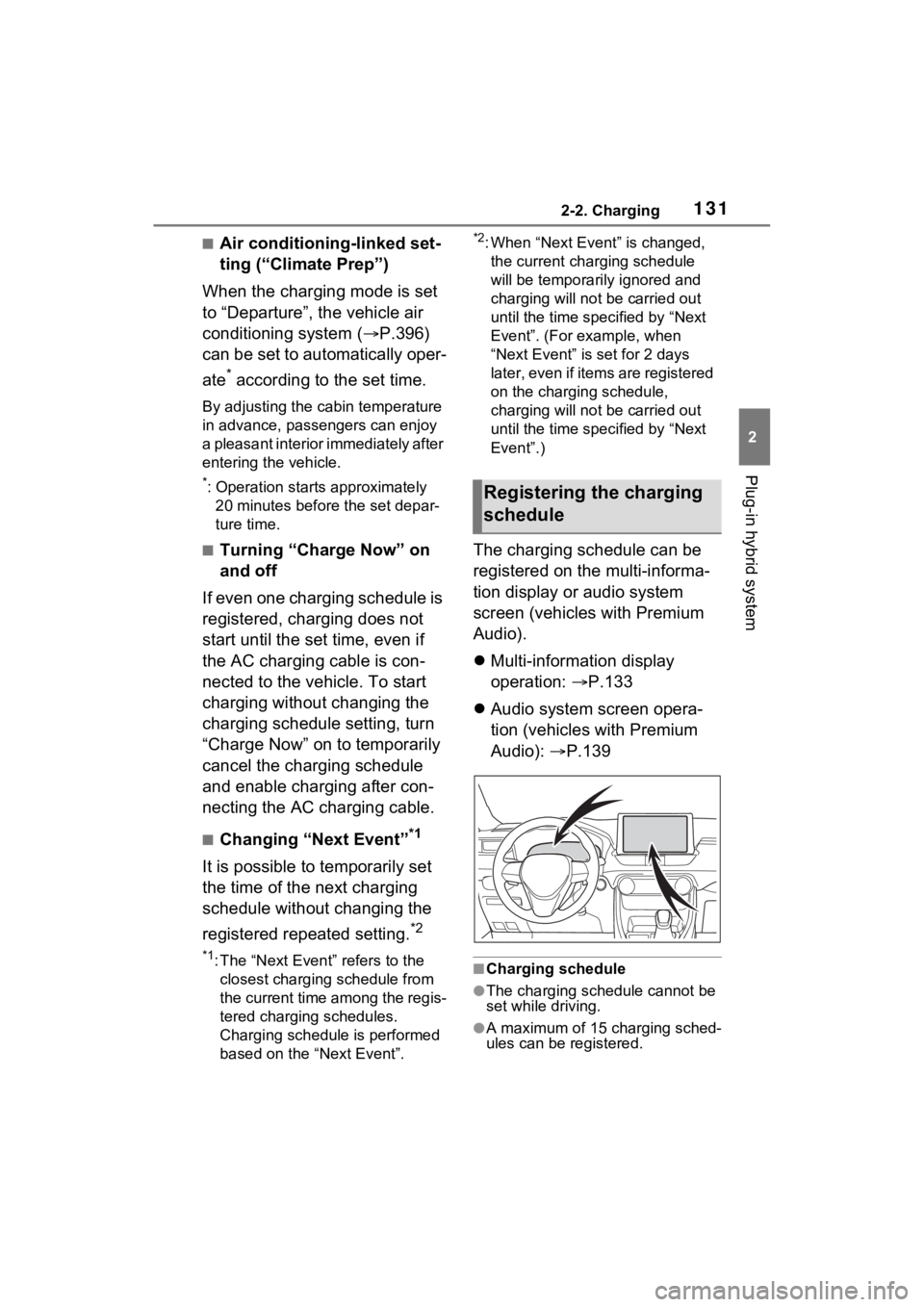
operation: P.133
Audio system screen opera-
tion (vehicles with Premium
Audio): P.139
■Charging schedule
●The charging schedule cannot be
set while driving.
●A maximum of 15 charging sched-
ules can be registered.
Registering the charging
schedule
Page 132 of 618

1322-2. Charging
■To make sure that the charging
schedule function operates cor-
rectly
Check the following items.
●A d j u s t t h e c l o c k t o t h e c o r r e c t t i m e
( P.169)
●The calendar is set to the correct
date ( P.177)
●Check that the power switch is
turned off
●After registering the charging
schedule, connect the AC
charging cable
The charging sta rt time is deter-
mined based on the charging
schedule at the time that the AC
charging cable was connected.
●After connecting the AC charging
cable, check that the charging
indicator of the charging port
flashes ( P.100)
●Do not use an ou tlet that has a
power cut off function (including a
timer function)
Use an outlet that constantly sup-
plies electricity. For outlets where
the power is cut off due to a timer
function, etc., charging may not be
carried out according to plan if the
power is cut off during the set
time.
■When the AC charging cable
remains connected to the vehi-
cle
Even if multiple consecutive
charging schedules are registered,
the next charge will not be carried
out according to the charging
schedule until the AC charging
cable is removed and reconnected
after charging completes. Also,
when the hybrid battery (traction
battery) is fully charged, charging
according to the charging schedule
will not be carried out.
■“Climate Prep”
●When the air conditioning-linked
setting is turned on, the air condi-
tioning operates until the set departure time. Therefore, the air
conditioning will co
nsume electric-
ity and charging may not complete
by the set departure time.
●If the hybrid batte ry (traction bat-
tery) is fully charged, charging will
not be carried o ut, even if the
charging schedule is set. How-
ever, if “Climate Prep” is turned
on, the air conditioning will oper-
ate only once when it nears the
time set in “Departure”. If this
occurs, the air conditioning will
consume electricity and the
remaining charge of the hybrid
battery (traction battery) when
departing may be decreased.
●When the doors are unlocked, the
air conditioning system does not
operate.
■Smartphone-linked operation
(vehicles with Premium Audio)
After applying to Toyota Apps, it is
possible to use the smartphone
application to change charging
schedule settings.
For details about Toyota Apps, refer
to
http://www.toyota.com/connectedse
rvices in the United States and
http://www.toyota.ca/connected
in
Canada.
■When charging schedules are
ignored
When the following operations are
performed while the charging
schedule is on standby, charging
schedule is temporarily canceled
and charging is started.
●When the Remote Air Condition-
ing System ( P.405) is operated
●When turning “My Room Mode”
on ( P.144)
●When turning “Charge Now” on
( P.137, 142)
●When an operation that temporar-
ily cancel charging using the
charging schedule ( P.125)
Page 141 of 618
1412-2. Charging
2
Plug-in hybrid system
is possible to turn more than one
day on.
If no buttons are turned on,
charging is only carried out once
according to the charging schedule
for the next 24 hours.
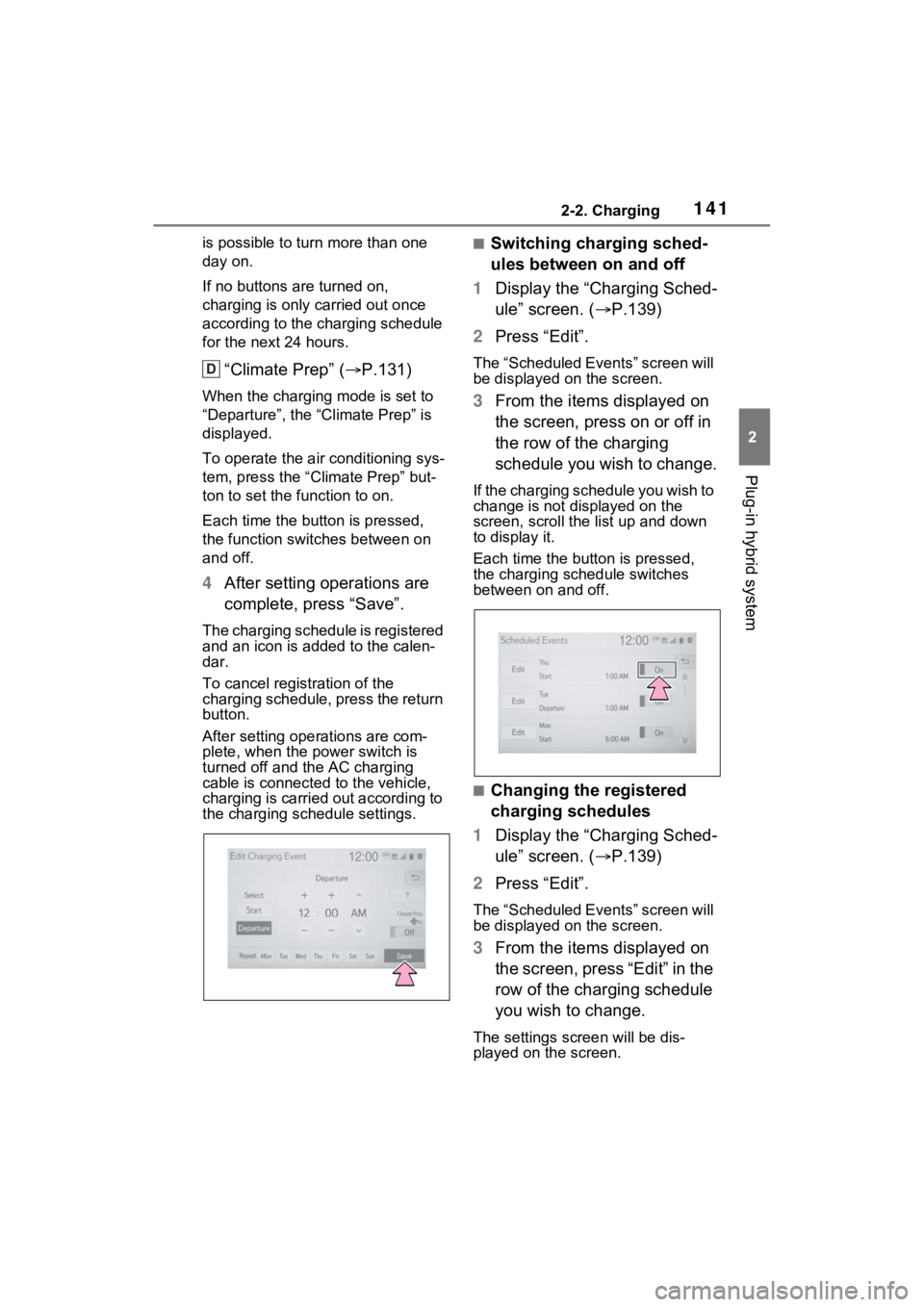
“Climate Prep” ( P.131)
When the charging mode is set to
“Departure”, the “Climate Prep” is
displayed.
To operate the air conditioning sys-
tem, press the “ Climate Prep” but-
ton to set the function to on.
Each time the butt on is pressed,
the function switches between on
and off.
4 After setting operations are
complete, press “Save”.
The charging schedule is registered
and an icon is added to the calen-
dar.
To cancel registration of the
charging schedule, press the return
button.
After setting operations are com-
plete, when the power switch is
turned off and the AC charging
cable is connected to the vehicle,
charging is carried out according to
the charging schedule settings.
■Switching charging sched-
ules between on and off
1 Display the “Charging Sched-
ule” screen. ( P.139)
2 Press “Edit”.
The “Scheduled Events” screen will
be displayed on the screen.
3From the items displayed on
the screen, press on or off in
the row of the charging
schedule you wish to change.
If the charging schedule you wish to
change is not displayed on the
screen, scroll the list up and down
to display it.
Each time the butt on is pressed,
the charging schedule switches
between on and off.
■Changing the registered
charging schedules
1 Display the “Charging Sched-
ule” screen. ( P.139)
2 Press “Edit”.
The “Scheduled Events” screen will
be displayed on the screen.
3From the items displayed on
the screen, press “Edit” in the
row of the charging schedule
you wish to change.
The settings screen will be dis-
played on the screen.
D