ECU TOYOTA RAV4 PRIME 2021 Manual PDF
[x] Cancel search | Manufacturer: TOYOTA, Model Year: 2021, Model line: RAV4 PRIME, Model: TOYOTA RAV4 PRIME 2021Pages: 618, PDF Size: 24.18 MB
Page 353 of 618
3535-5. Using the driving support systems
5
Driving
when driving on the edge of a
lane, and the vehicle in an adja-
cent lane is far away from your
vehicle
• When an accessory (such as a bicycle carrier) is installed to the
rear of the vehicle
• When there is a significant differ- ence in height between your vehi-
cle and the vehicle that enters the
detection area
• Immediately after the BSM func-
tion/RCTA function are turned on
• When towing a trailer
●Instances of the BSM function
unnecessarily detecting a vehicle
and/or object may increase in the
following situations:
• When the sensor is misaligned
due to a strong impact to the sen-
sor or its surrounding area
• When the distanc e between your
vehicle and a guar drail, wall, etc.
that enters the detection area is
short
• When driving up and down con-
secutive steep inclines, such as
hills, dips in the road, etc.
• When vehicle lanes are narrow, or
when driving on the edge of a
lane, and a vehicle traveling in a
lane other than the adjacent lanes
enters the detection area
• When driving on roads with sharp bends, consecutive curves, or
uneven surfaces
• When the tires are slipping or spinning
• When the distanc e between your
vehicle and a following vehicle is
short
• When an accessory (such as a bicycle carrier) is installed to the
rear of the vehicle
• When the vehicle throws up water or snow behind.
■Operation of the RCTA
function
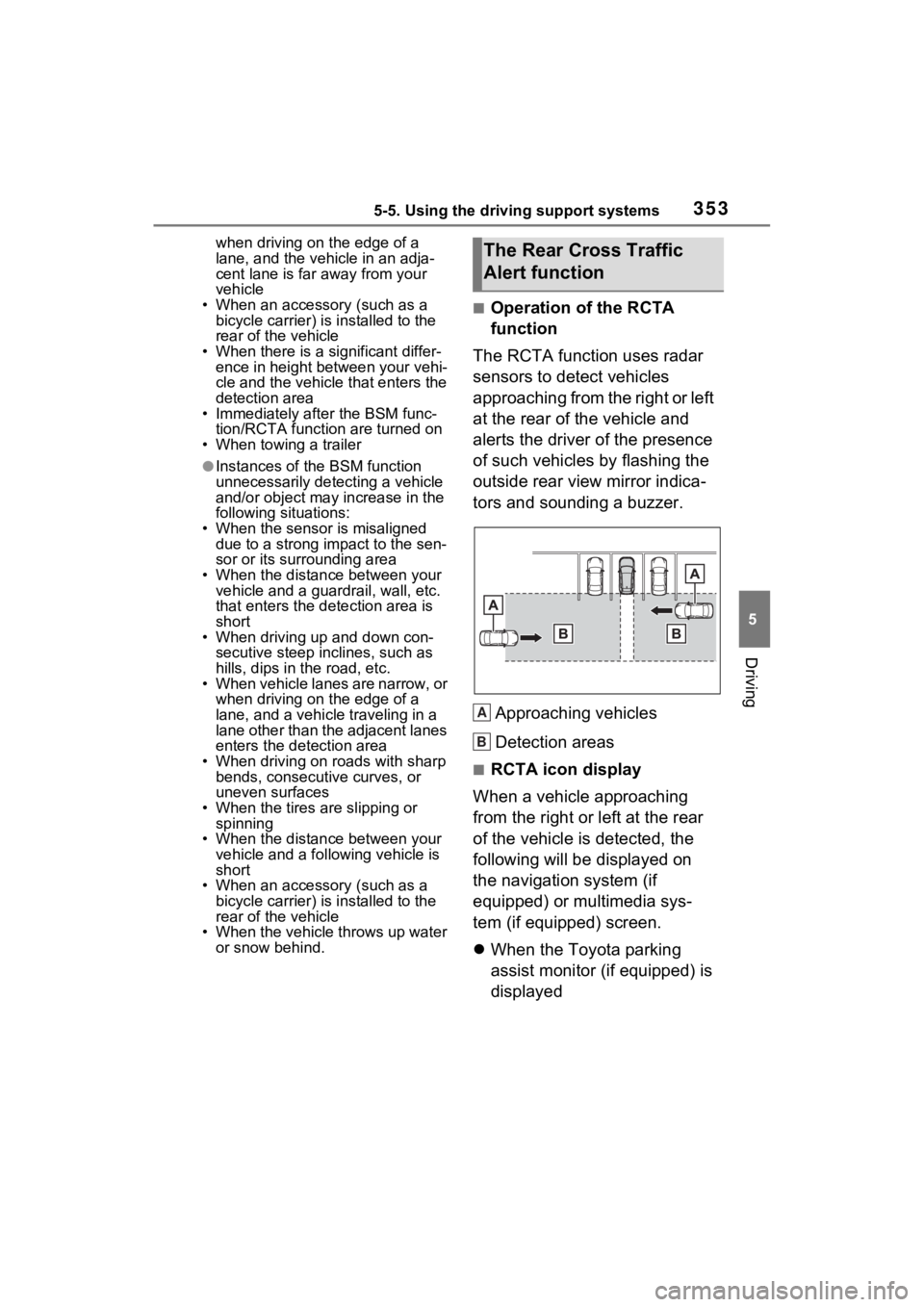
The RCTA function uses radar
sensors to detect vehicles
approaching from the right or left
at the rear of the vehicle and
alerts the driver of the presence
of such vehicles by flashing the
outside rear view mirror indica-
tors and sounding a buzzer.
Approaching vehicles
Detection areas
■RCTA icon display
When a vehicle approaching
from the right or left at the rear
of the vehicle is detected, the
following will be displayed on
the navigation system (if
equipped) or multimedia sys-
tem (if equipped) screen.
When the Toyota parking
assist monitor (if equipped) is
displayed
The Rear Cross Traffic
Alert function
A
B
Page 406 of 618
4066-1. Using the air conditioning system and defogger
cient due to the power being
restricted more than during normal
air conditioning operation. Also, the
outside of the windshield may fog up
due to the outside temperature,
humidity or air conditioning set tem-
perature.
■Using the heater via the Remote
Air Conditioning System
●When the outside temperature is
low, heating may feel insufficient
due to restricted operation of the
air conditioning.
●When the outside heat exchanger
becomes frosted over, heating
performance may decline due to
automatically switching to the frost
removal operation. ( P.396)
■Security feature
Any unlocked doors will be automat-
ically locked when the system is
operating. The buzzer sounds and
the emergency flashers flash to indi-
cate that the doors have been
locked or the system has been
turned off.
■Conditions affecting operation
P.218
■While the Remote Air Condi-
tioning System is operating
●Depending on the operating con-
dition of the Remote Air Condition-
ing System, the air conditioning
compressor or cooling fan may
spin and an operating noise may
be heard. However, this does not
indicate a malfunction.
●The air conditioning operation
switches, etc. will not operate
while the Remote Air Condition-
ing System is operating.
■Electronic key battery depletion
P.194
■When the electronic key bat-
tery is fully depleted
P.493
■Customization
Setting (e.g. Operation using “A/C”
on the wireless remote control) can
be changed. (Customizable fea-
tures: P.569)
WARNING
■Precautions for the Remote
Air Conditioning System
●Do not use the system if people
are in the vehicle.
Even when the system is in use,
the internal temperature may
still reach a high or low level
due to features such as the
automatic shut-off. Children and
pets left inside the vehicle may
suffer heatstroke dehydration or
hypothermia or could result in
death or serious injury.
●Depending on the surrounding
environment, signals from the
wireless switch may transmit
further than e xpected. Pay
appropriate attention to the
vehicle’s surroundings and use
the switch only when neces-
sary.
●Do not operate “A/C” on the
wireless remote control if the
hood is open. The Remote Air
Conditioning System may oper-
ate unintentionally and objects
may be drawn into the electrical
cooling fan.
NOTICE
■To prevent the hybrid battery
(traction battery) from being
discharged
Use “A/C” on the wireless remote
control only when necessary.
Page 417 of 618
4176-3. Using the storage features
6
Interior features
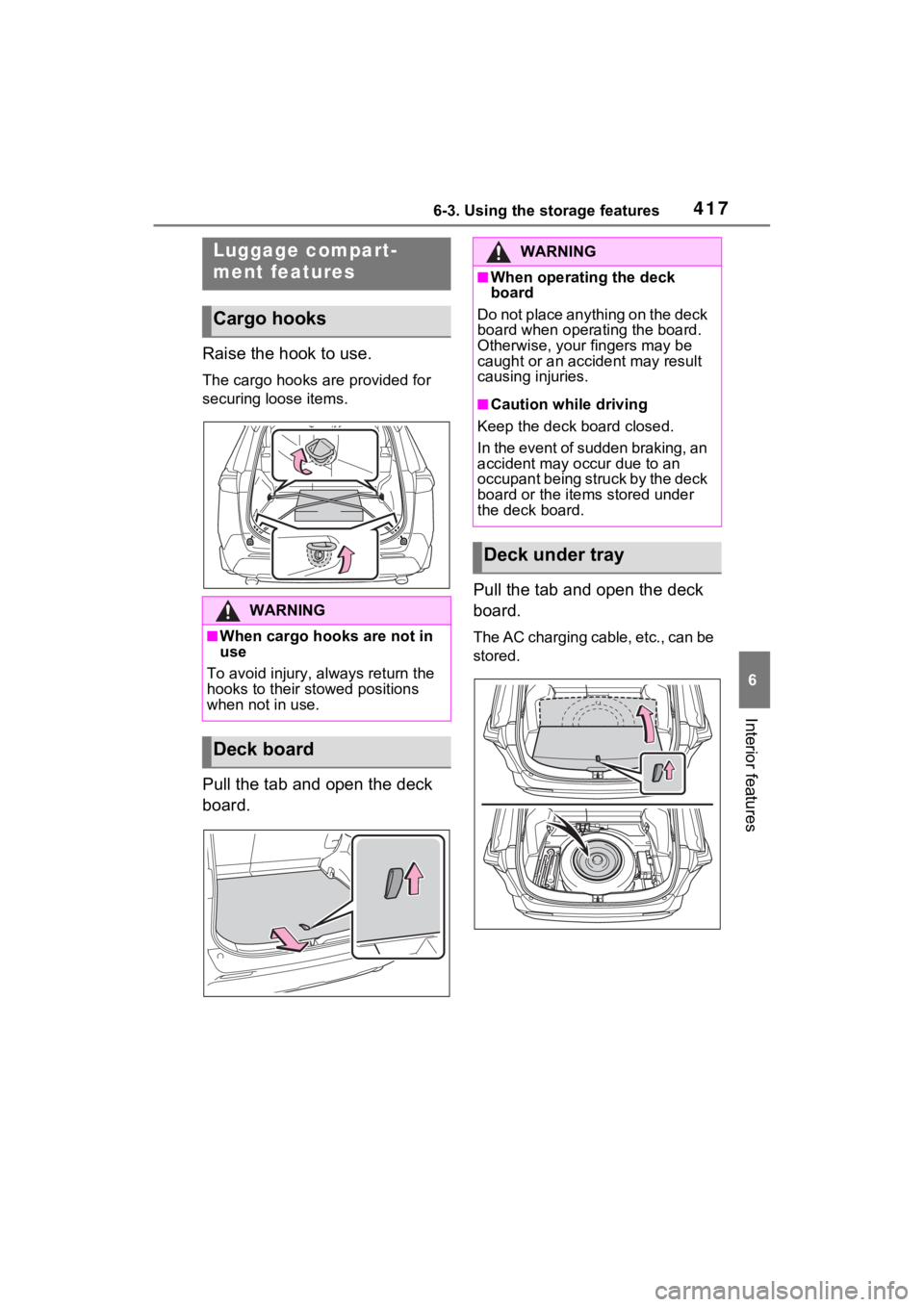
Raise the hook to use.
The cargo hooks are provided for
securing loose items.
Pull the tab and open the deck
board.Pull the tab and open the deck
board.
The AC charging cable, etc., can be
stored.
Luggage compart-
ment features
Cargo hooks
WARNING
■When cargo hooks are not in
use
To avoid injury, always return the
hooks to their stowed positions
when not in use.
Deck board
WARNING
■When operating the deck
board
Do not place anything on the deck
board when operating the board.
Otherwise, your fingers may be
caught or an accident may result
causing injuries.
■Caution while driving
Keep the deck board closed.
In the event of sudden braking, an
accident may occur due to an
occupant being struck by the deck
board or the items stored under
the deck board.
Deck under tray
Page 418 of 618
4186-3. Using the storage features
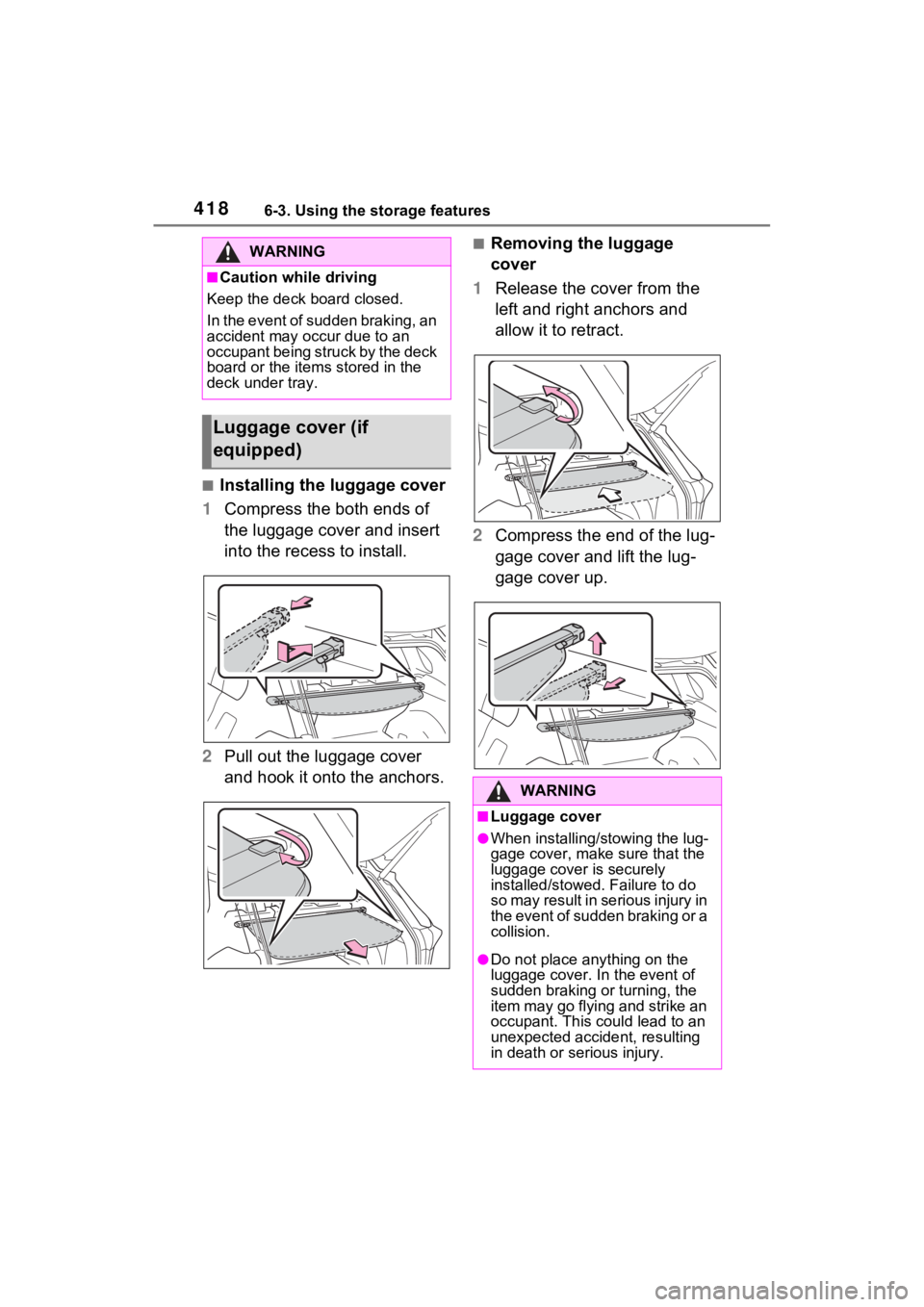
■Installing the luggage cover
1 Compress the both ends of
the luggage cover and insert
into the recess to install.
2 Pull out the luggage cover
and hook it onto the anchors.
■Removing the luggage
cover
1 Release the cover from the
left and right anchors and
allow it to retract.
2 Compress the end of the lug-
gage cover and lift the lug-
gage cover up.WARNING
■Caution while driving
Keep the deck board closed.
In the event of sudden braking, an
accident may occur due to an
occupant being struck by the deck
board or the items stored in the
deck under tray.
Luggage cover (if
equipped)
WARNING
■Luggage cover
●When installing/stowing the lug-
gage cover, make sure that the
luggage cover is securely
installed/stowed. Failure to do
so may result in serious injury in
the event of sudden braking or a
collision.
●Do not place anything on the
luggage cover. In the event of
sudden braking or turning, the
item may go flying and strike an
occupant. This could lead to an
unexpected accident, resulting
in death or se rious injury.
Page 421 of 618
4216-4. Using the other interior features
6
Interior features
■The power outlet can be used
when
The power switch i s in ACC or ON.
■When stopping the hybrid sys-
tem
Disconnect electrical devices with
charging functions, such as mobile
battery packs.
If such devices are left connected,
the hybrid system may not stop nor-
mally.
Please use a power supply for
electronic goods that use less
than 120 VAC (power consump-
tion of 1500 W).
When using electronic goods,
make sure that the power con-
sumption of all the connected
power outlets is less than 1500
W.
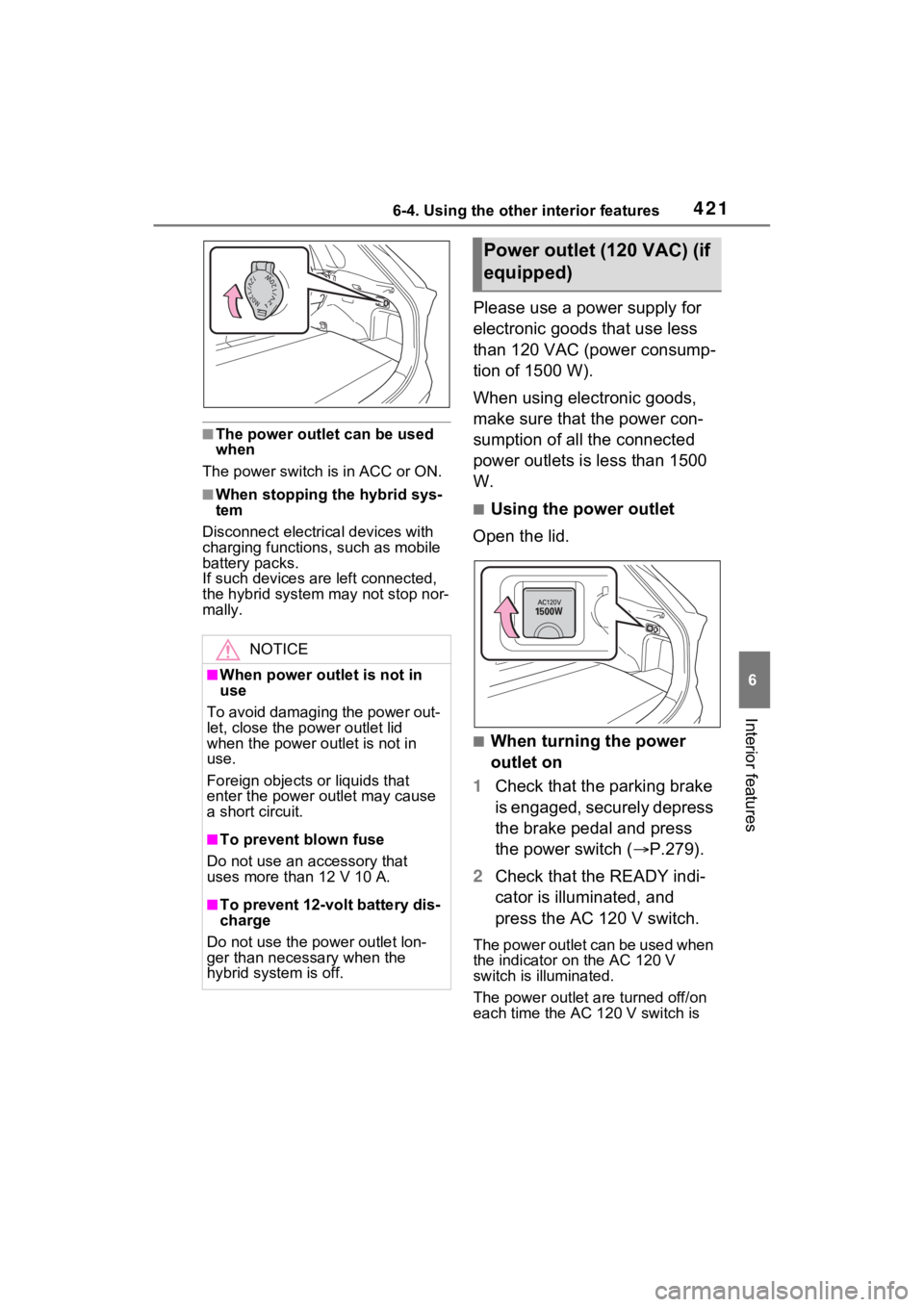
■Using the power outlet
Open the lid.
■When turning the power
outlet on
1 Check that the parking brake
is engaged, securely depress
the brake pedal and press
the power switch ( P.279).
2 Check that the READY indi-
cator is illuminated, and
press the AC 120 V switch.
The power outlet can be used when
the indicator on the AC 120 V
switch is illuminated.
The power outlet are turned off/on
each time the AC 120 V switch is
NOTICE
■When power outlet is not in
use
To avoid damaging the power out-
let, close the p ower outlet lid
when the power outlet is not in
use.
Foreign objects or liquids that
enter the power outlet may cause
a short circuit.
■To prevent blown fuse
Do not use an accessory that
uses more than 12 V 10 A.
■To prevent 12-volt battery dis-
charge
Do not use the power outlet lon-
ger than necessary when the
hybrid system is off.
Power outlet (120 VAC) (if
equipped)
Page 422 of 618
4226-4. Using the other interior features
pressed.
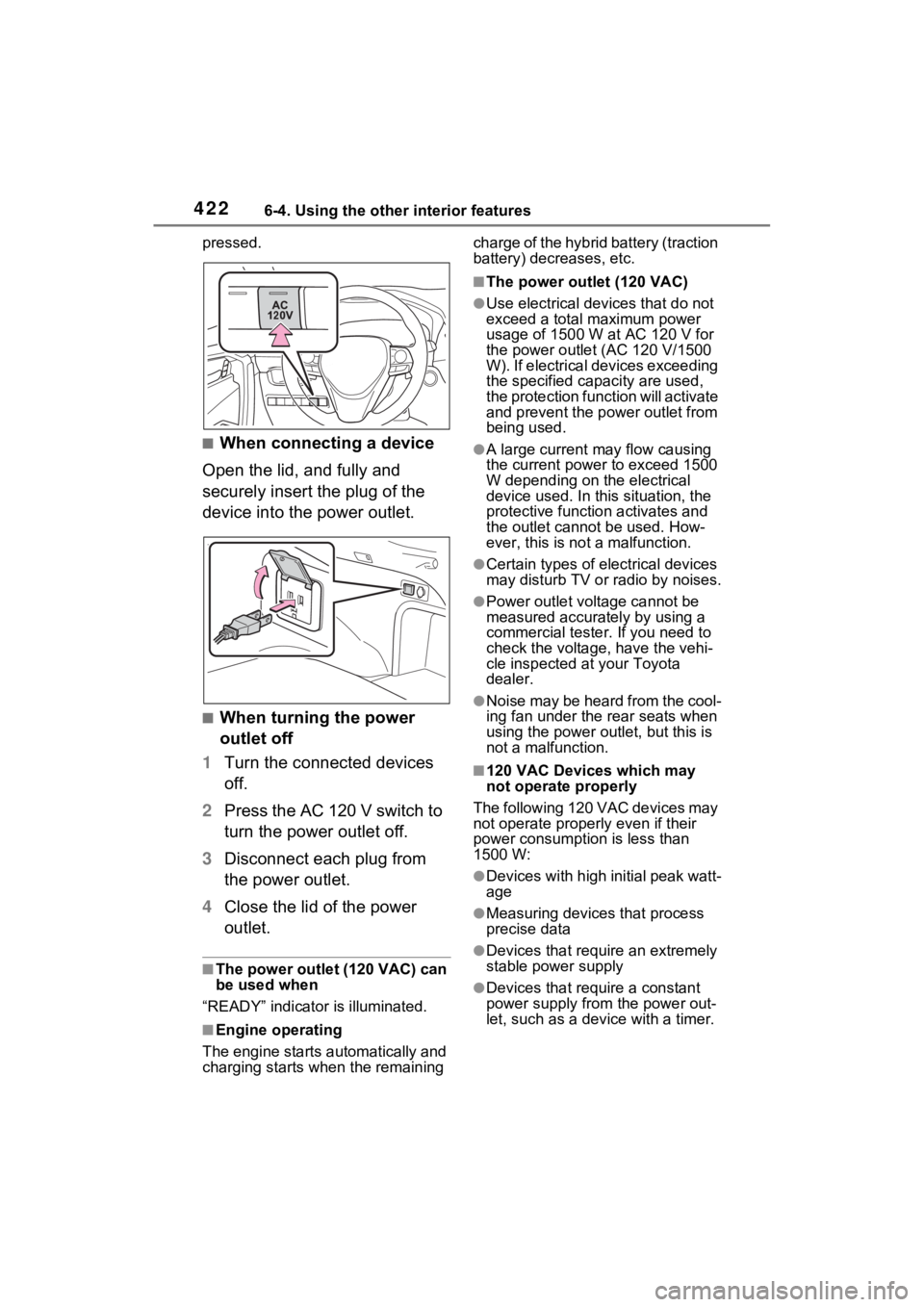
■When connecting a device
Open the lid, and fully and
securely insert the plug of the
device into the power outlet.
■When turning the power
outlet off
1 Turn the connected devices
off.
2 Press the AC 120 V switch to
turn the power outlet off.
3 Disconnect each plug from
the power outlet.
4 Close the lid of the power
outlet.
■The power outlet (120 VAC) can
be used when
“READY” indicator is illuminated.
■Engine operating
The engine starts automatically and
charging starts w hen the remaining charge of the hybrid battery (traction
battery) decreases, etc.
■The power outlet (120 VAC)
●Use electrical dev
ices that do not
exceed a total maximum power
usage of 1500 W at AC 120 V for
the power outle t (AC 120 V/1500
W). If electrical devices exceeding
the specified capacity are used,
the protection function will activate
and prevent the power outlet from
being used.
●A large current may flow causing
the current power to exceed 1500
W depending on the electrical
device used. In this situation, the
protective function activates and
the outlet cannot be used. How-
ever, this is no t a malfunction.
●Certain types of electrical devices
may disturb TV or radio by noises.
●Power outlet voltage cannot be
measured accurat ely by using a
commercial tester. If you need to
check the voltage, have the vehi-
cle inspected at your Toyota
dealer.
●Noise may be heard from the cool-
ing fan under the rear seats when
using the power ou tlet, but this is
not a malfunction.
■120 VAC Devices which may
not operate properly
The following 120 VAC devices may
not operate properly even if their
power consumption is less than
1500 W:
●Devices with high initial peak watt-
age
●Measuring devices that process
precise data
●Devices that require an extremely
stable power supply
●Devices that require a constant
power supply from the power out-
let, such as a device with a timer.
Page 423 of 618
4236-4. Using the other interior features
6
Interior features
■When the 120 VAC power outlet
cannot be used
If the AC 120 V switch is pressed
but the switch indicator does not illu-
minate, the protection circuit may
have operated.
In this case, perform the appropriate
procedures as follows.
●Disconnect the plug of each
device from the power outlet,
check that the total power con-
sumption of all devices to be con-
nected to the power outlet is less
than 1500 W, reconnect the
devices and then press the AC
120 V switch again.
●Disconnect the plug of each
device from the power outlet,
check that the devices are not
malfunctioning, reconnect the
devices and then press the AC
120 V switch again.
●Check the charge of the hybrid
battery (traction battery)
( P.165). If the charge is low,
shift the shift leve r to P, allow the
engine to run to charge the hybrid
battery (traction battery), and then
press the AC 120 V switch again.
●If the temperature inside the vehi-
cle is high, such as after the vehi-
cle has been park ed in the sun,
use the air conditioning system to
sufficiently vent ilate or cool the
interior, and then press the AC
120 V switch again.
●If the vehicle has been stopped in
a cold area, to pro tect the hybrid
battery (traction battery), the
power outlet may not be able to be
used. In this case , drive the vehi-
cle for a while to warm up the
hybrid battery (traction battery),
and then press the AC 120 V
switch again.
If the power outlet cannot be used
even after performing the appropri-
ate procedures above, have the
vehicle inspected by your Toyota
dealer.
●If any electrical device has mal-
functioned, park the vehicle in a
safe location and turn the AC
inverter off.
●If the protection function activates
and power is cut, perform the fol-
lowing procedure.
1 Stop the vehicle in a safe place
and set the parking brake.
2 Ensure that the shift lever is in P
or N.
3 Check that the power consumed
by the electrical devices is within
1500 W and any device has not
malfunctioned.
4 Press the AC 120 V switch.
If the inside of the vehicle is hot,
open the windows t o lower the tem-
perature and turn the switch back on
once the inside of the vehicle
reaches a normal temperature. If
following the procedure above does
not restore power, have the vehicle
inspected at your Toyota dealer.
WARNING
■For safe use
Observe the following precau-
tions.
Failure to do so may lead to an
accident, resulting in death or
serious injury.
●Do not use devices such as the
following when driving. Also, do
not use a device if it cannot be
secured within the vehicle.
• Devices which may distract the driver and be a hinderance to
safe driving, such as a TV, DVD
player, etc.
• Unsecured devices or devices which generate heat, such as a
toaster, micro wave, electric
heater, electric kettle, coffee
maker, etc., as they may fly
around possibly causing injury,
burns or a fire in the case of
sudden braking or an accident.
Page 424 of 618
4246-4. Using the other interior features
WARNING
• Devices which may fall under the pedals and prevent the
brake pedal from being
depressed, such as a hair dryer,
AC adaptor, mouse, etc.
●Do not use devices which pro-
duce steam while the windows
are closed. Doing so may cause
the windows to fog up, reducing
visibility and making it difficult to
drive safely. Also, the steam
may damage or negatively
affect other devices. If the
device must be used, stop the
vehicle and open the windows
before use.
●Do not connect a malfunctioning
device to a power outlet, as
doing so may ca use the power
outlet to become inoperable.
●Do not disconnect the plug of a
device while your hands are wet
or insert a pin o r other object
into the pow er outlet. Also, if a
liquid or snow is on the power
outlet, dry the outlet before
using it.
●Be careful not to get pinched by
the power outlet lid.
●Do not attempt to modify, disas-
semble or repair a power outlet.
Also, do not replace the 120
VAC inverter with a commer-
cially available one. For infor-
mation on repairs, contact your
Toyota dealer.
●Do not let children touch the
power outlet.
●Keep the power outlet free of
foreign matter.
●Keep the power outlet free of
dust and foreign matter. Also,
make sure to clean the power
outlet periodically.
●If the plug of a device fits
loosely in a power outlet, even
though it is fully inserted,
replace the power outlet. For
information on replacement,
contact your Toyota dealer.
■Using the power outlet while
parked or stopped
Observe the following precau-
tions.
Failure to do so may lead to an
accident, possibly resulting in
death or serious injury.
●Make sure to securely engage
the parking brake and shift the
shift lever to P.
●Do not leave the vehicle unat-
tended while the READY indica-
tor is illuminated and a device is
connected to a power outlet.
●Make sure that the hood is
closed. As the engine will start
automatically depending on the
condition of the vehicle, make
sure that nothing is left near or
contacting the exhaust pipes.
Also, do not put your head or
hands anywhere inside the
engine compartment, as the
cooling fans may operate sud-
denly. Keep hands and clothing
(especially a tie, scarf, etc.)
away from the fans as they may
get caught in a fan.
●Do not stop the vehicle near
objects which burn easily. If the
exhaust system is extremely
hot, it may cause a fire.
Page 435 of 618
4356-4. Using the other interior features
6
Interior features
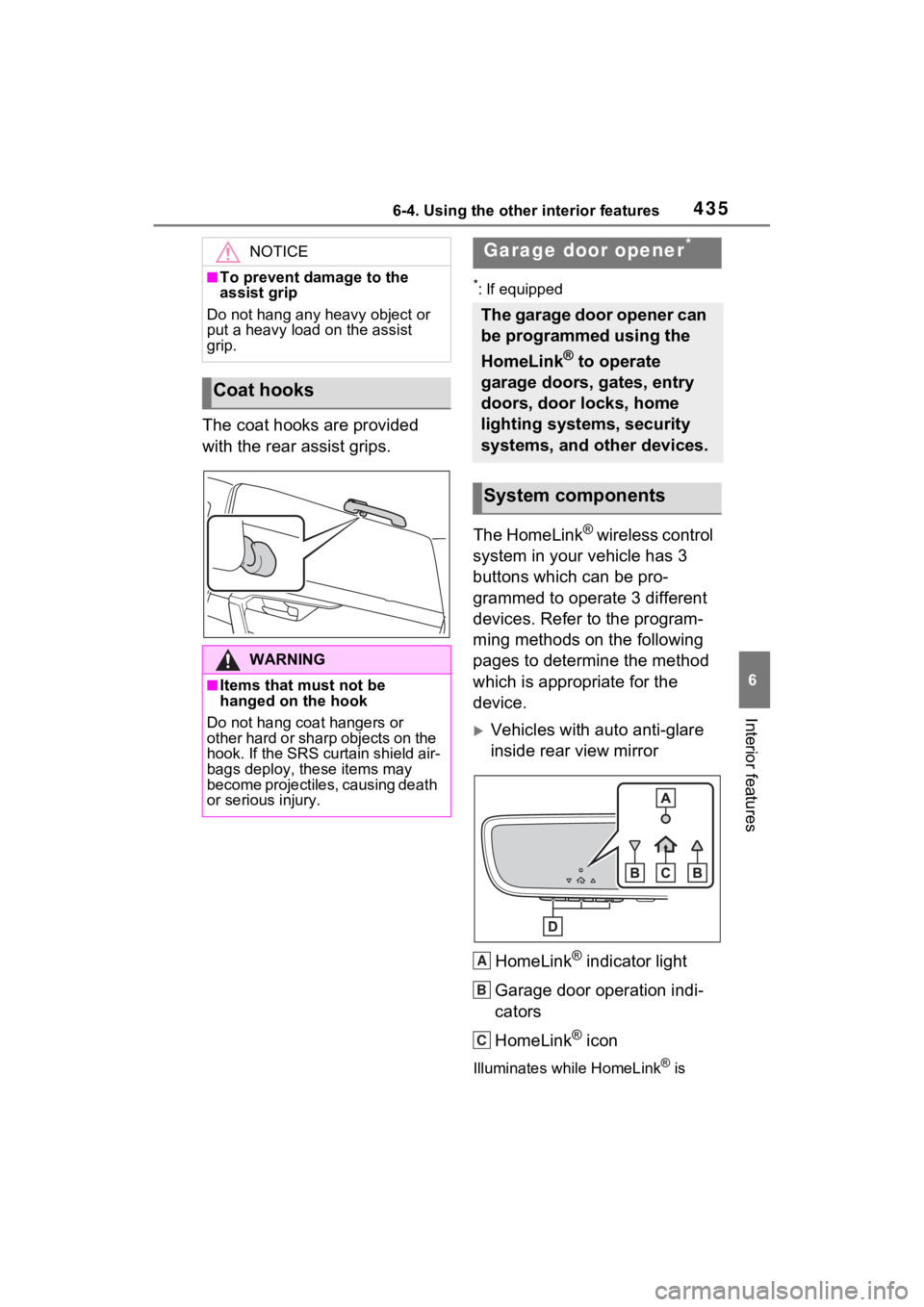
The coat hooks are provided
with the rear assist grips.
*: If equipped
The HomeLink® wireless control
system in your vehicle has 3
buttons which can be pro-
grammed to operate 3 different
devices. Refer to the program-
ming methods on the following
pages to determine the method
which is appropriate for the
device.
Vehicles with auto anti-glare
inside rear view mirror
HomeLink
® indicator light
Garage door operation indi-
cators
HomeLink
® icon
Illuminates while HomeLink® is
NOTICE
■To prevent damage to the
assist grip
Do not hang any heavy object or
put a heavy load on the assist
grip.
Coat hooks
WARNING
■Items that must not be
hanged on the hook
Do not hang coat hangers or
other hard or sharp objects on the
hook. If the SRS curtain shield air-
bags deploy, these items may
become projectiles, causing death
or serious injury.
Garage door opener*
The garage door opener can
be programmed using the
HomeLink
® to operate
garage doors, gates, entry
doors, door locks, home
lighting systems, security
systems, and other devices.
System components
A
B
C
Page 452 of 618
4527-2. Maintenance
Exhaust sys-
temThere should not
be any fumes or
strange sounds.
Radiator/con-
denser
The radiator and
condenser should
be free from for-
eign objects.
( P.463)
Washer fluid
Is there sufficient
washer fluid?
( P.465)
Luggage compartment
ItemsCheck points
12-volt batteryCheck the connec-
tions. ( P.466)
Vehicle interior
ItemsCheck points
Accelerator
pedal
• The accelerator
pedal should
move smoothly
(without uneven
pedal effort or
catching).
Hybrid trans-
mission “Park”
mechanism
• When parked on a slope and the
shift position is in
P, is the vehicle
securely
stopped?
ItemsCheck points
Brake pedal
• Does the brake pedal move
smoothly?
• Does the brake pedal have
appropriate
clearance from
the floor?
• Does the brake pedal have the
correct amount
of free play?
Brakes
• The vehicle should not pull to
one side when
the brakes are
applied.
• The brakes should work
effectively.
• The brake pedal should not feel
spongy.
• The brake pedal should not get
too close to the
floor when the
brakes are
applied.
Head
restraints
• Do the head restraints move
smoothly and
lock securely?
Indica-
tors/buzzers
• Do the indica-tors and buzzers
function prop-
erly?
Lights• Do all the lights come on?
ItemsCheck points