ECU TOYOTA RAV4 PRIME 2021 Service Manual
[x] Cancel search | Manufacturer: TOYOTA, Model Year: 2021, Model line: RAV4 PRIME, Model: TOYOTA RAV4 PRIME 2021Pages: 618, PDF Size: 24.18 MB
Page 106 of 618
1062-2. Charging
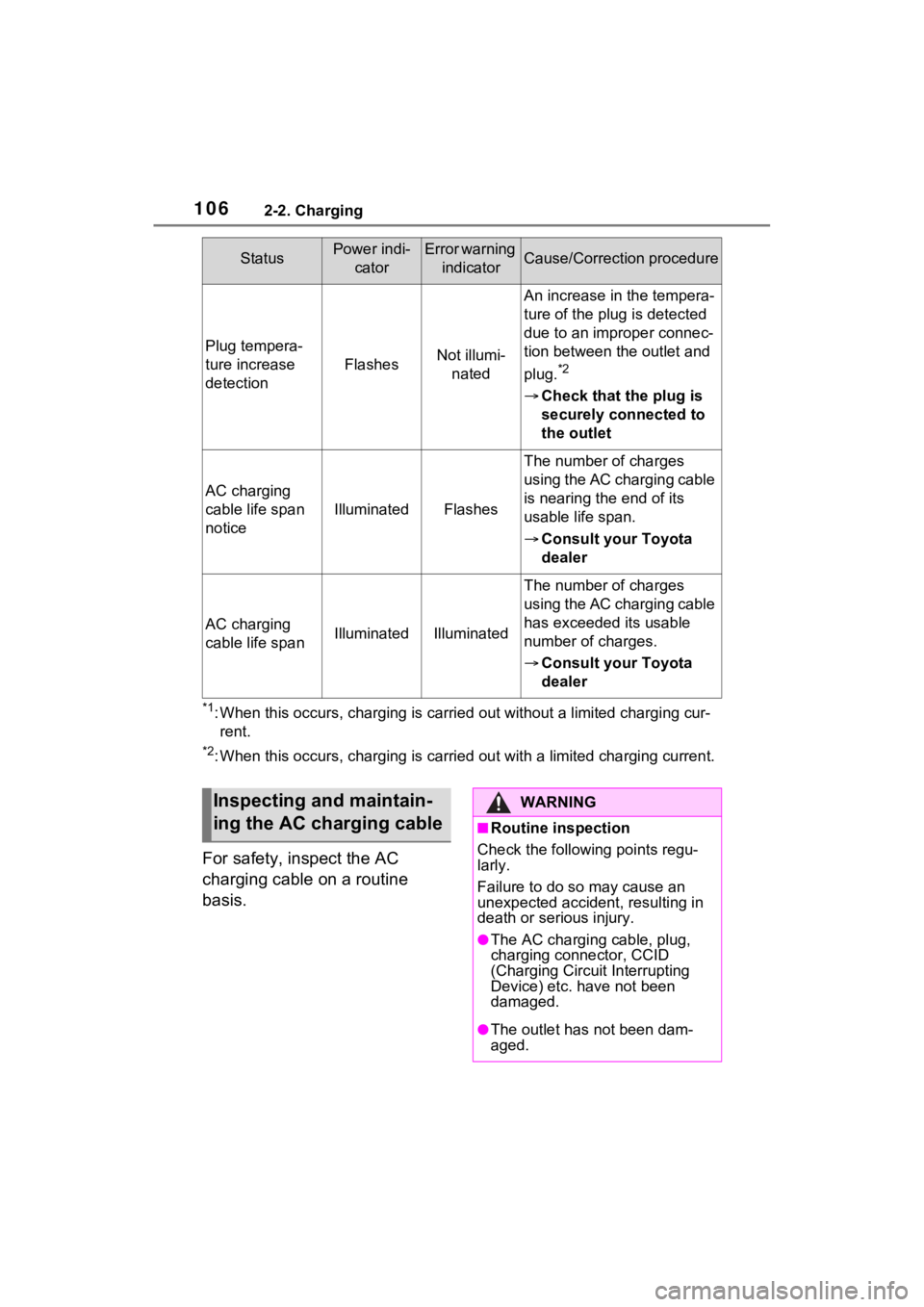
*1: When this occurs, charging is carried out without a limited charging cur-
rent.
*2: When this occurs, charging is c arried out with a limited charging current.
For safety, inspect the AC
charging cable on a routine
basis.
Plug tempera-
ture increase
detection
FlashesNot illumi-
nated
An increase in the tempera-
ture of the plug is detected
due to an improper connec-
tion between the outlet and
plug.
*2
Check that the plug is
securely connected to
the outlet
AC charging
cable life span
notice
IlluminatedFlashes
The number of charges
using the AC charging cable
is nearing the end of its
usable life span.
Consult your Toyota
dealer
AC charging
cable life spanIlluminatedIlluminated
The number of charges
using the AC charging cable
has exceeded its usable
number of charges.
Consult your Toyota
dealer
StatusPower indi-
catorError warning indicatorCause/Correction procedure
Inspecting and maintain-
ing the AC charging cableWARNING
■Routine inspection
Check the following points regu-
larly.
Failure to do so may cause an
unexpected accident, resulting in
death or serious injury.
●The AC charging cable, plug,
charging connector, CCID
(Charging Circuit Interrupting
Device) etc. h ave not been
damaged.
●The outlet has not been dam-
aged.
Page 107 of 618
1072-2. Charging
2
Plug-in hybrid system
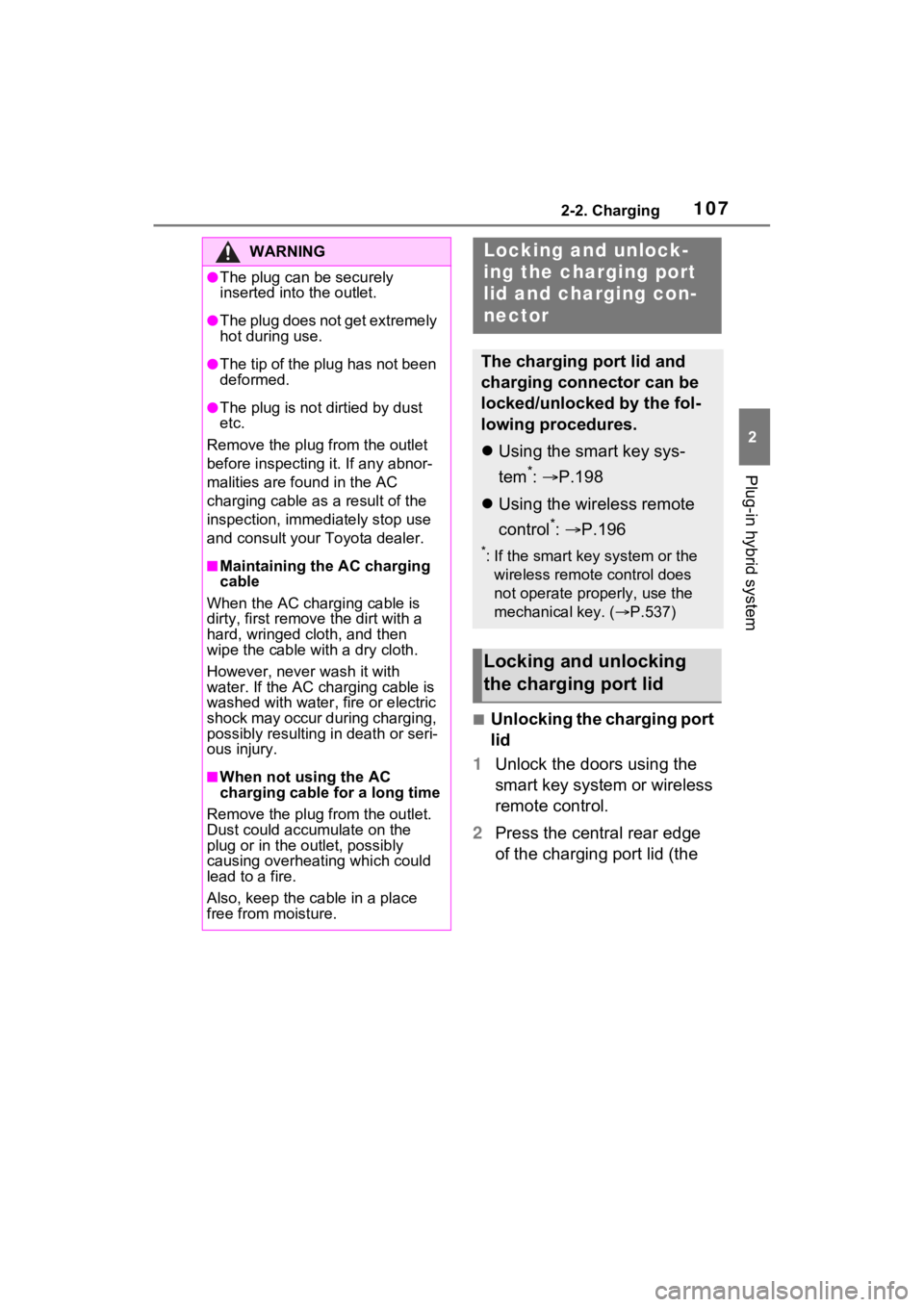
■Unlocking the charging port
lid
1 Unlock the doors using the
smart key system or wireless
remote control.
2 Press the central rear edge
of the charging port lid (the
WARNING
●The plug can be securely
inserted into the outlet.
●The plug does not get extremely
hot during use.
●The tip of the plug has not been
deformed.
●The plug is not dirtied by dust
etc.
Remove the plug from the outlet
before inspecting it. If any abnor-
malities are fo und in the AC
charging cable as a result of the
inspection, immediately stop use
and consult your Toyota dealer.
■Maintaining the AC charging
cable
When the AC charging cable is
dirty, first remove the dirt with a
hard, wringed cloth, and then
wipe the cable with a dry cloth.
However, never wash it with
water. If the AC charging cable is
washed with water , fire or electric
shock may occur during charging,
possibly resulting in death or seri-
ous injury.
■When not using the AC
charging cable for a long time
Remove the plug from the outlet.
Dust could accumulate on the
plug or in the outlet, possibly
causing overheating which could
lead to a fire.
Also, keep the ca ble in a place
free from moisture.
Locking an d unlock-
ing the charging port
lid and cha rging con-
nector
The charging port lid and
charging connector can be
locked/unlocked by the fol-
lowing procedures.
Using the smart key sys-
tem
*: P.198
Using the wireless remote
control
*: P.196
*: If the smart key system or the
wireless remote control does
not operate properly, use the
mechanical key. ( P.537)
Locking and unlocking
the charging port lid
Page 108 of 618
1082-2. Charging
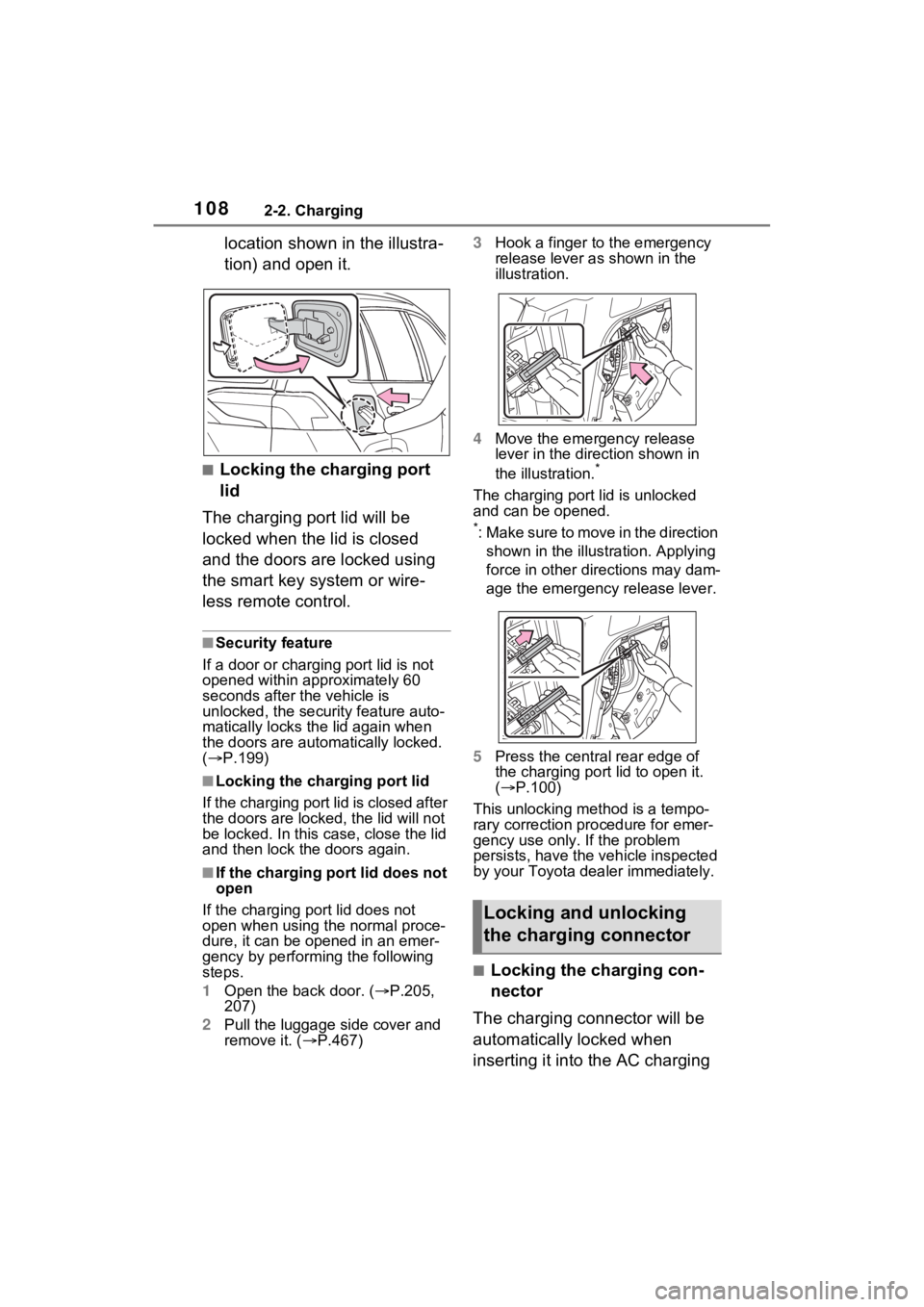
location shown in the illustra-
tion) and open it.
■Locking the charging port
lid
The charging port lid will be
locked when the lid is closed
and the doors are locked using
the smart key system or wire-
less remote control.
■Security feature
If a door or charging port lid is not
opened within approximately 60
seconds after the vehicle is
unlocked, the security feature auto-
matically locks the lid again when
the doors are autom atically locked.
( P.199)
■Locking the char ging port lid
If the charging port lid is closed after
the doors are lock ed, the lid will not
be locked. In this case, close the lid
and then lock the doors again.
■If the charging port lid does not
open
If the charging port lid does not
open when using the normal proce-
dure, it can be ope ned in an emer-
gency by performing the following
steps.
1 Open the back door. ( P.205,
207)
2 Pull the luggage side cover and
remove it. ( P.467) 3
Hook a finger to the emergency
release lever as shown in the
illustration.
4 Move the emergency release
lever in the direction shown in
the illustration.
*
The charging port lid is unlocked
and can be opened.
*: Make sure to move in the direction
shown in the illust ration. Applying
force in other directions may dam-
age the emergency release lever.
5 Press the central rear edge of
the charging port lid to open it.
( P.100)
This unlocking method is a tempo-
rary correction procedure for emer-
gency use only. If the problem
persists, have the vehicle inspected
by your Toyota dea ler immediately.
■Locking the charging con-
nector
The charging connector will be
automatically locked when
inserting it into the AC charging
Locking and unlocking
the charging connector
Page 109 of 618
1092-2. Charging
2
Plug-in hybrid system
inlet. (The setting can be
changed: P.109)
■Unlocking the charging
connector
The charging connector will be
unlocked when the doors are
unlocked using the smart key
system or wireless remote con-
trol.
■Changing the charging con-
nector lock settings
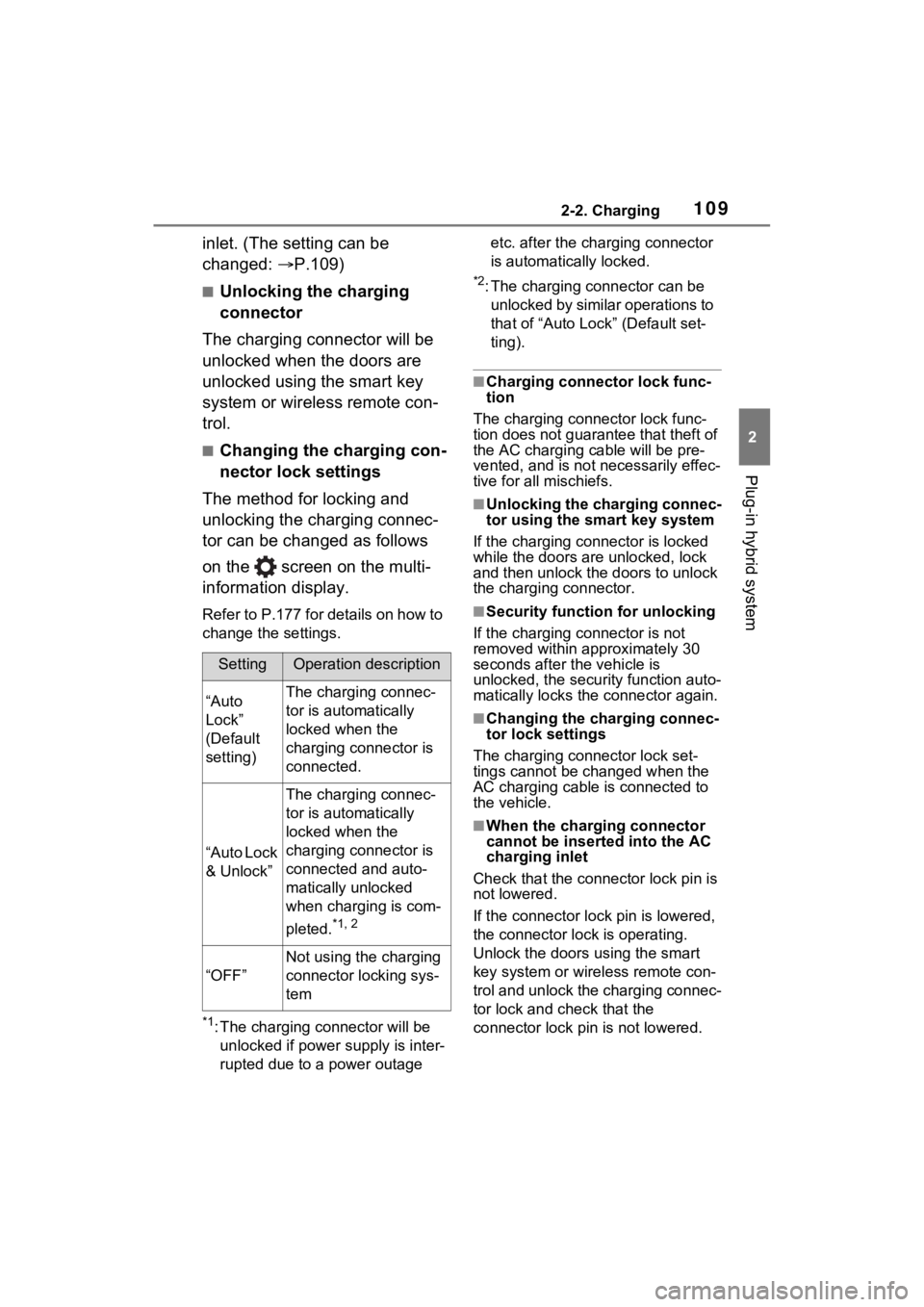
The method for locking and
unlocking the charging connec-
tor can be changed as follows
on the screen on the multi-
information display.
Refer to P.177 for details on how to
change the settings.
*1: The charging co nnector will be
unlocked if power supply is inter-
rupted due to a power outage etc. after the charging connector
is automatically locked.
*2: The charging connector can be
unlocked by similar operations to
that of “Auto Loc k” (Default set-
ting).
■Charging connector lock func-
tion
The charging connector lock func-
tion does not guarantee that theft of
the AC charging cable will be pre-
vented, and is not necessarily effec-
tive for all mischiefs.
■Unlocking the charging connec-
tor using the smart key system
If the charging connector is locked
while the doors are unlocked, lock
and then unlock the doors to unlock
the charging connector.
■Security function for unlocking
If the charging connector is not
removed within approximately 30
seconds after the vehicle is
unlocked, the security function auto-
matically locks the connector again.
■Changing the charging connec-
tor lock settings
The charging co nnector lock set-
tings cannot be changed when the
AC charging cable is connected to
the vehicle.
■When the charging connector
cannot be inserted into the AC
charging inlet
Check that the connector lock pin is
not lowered.
If the connector lock pin is lowered,
the connector lock is operating.
Unlock the doors u sing the smart
key system or wirel ess remote con-
trol and unlock the charging connec-
tor lock and check that the
connector lock pin is not lowered.
SettingOperation description
“Auto
Lock”
(Default
setting)The charging connec-
tor is automatically
locked when the
charging connector is
connected.
“Auto Lock
& Unlock”
The charging connec-
tor is automatically
locked when the
charging connector is
connected and auto-
matically unlocked
when charging is com-
pleted.
*1, 2
“OFF”
Not using the charging
connector locking sys-
tem
Page 124 of 618
1242-2. Charging
Device) on a hook or equivalent.
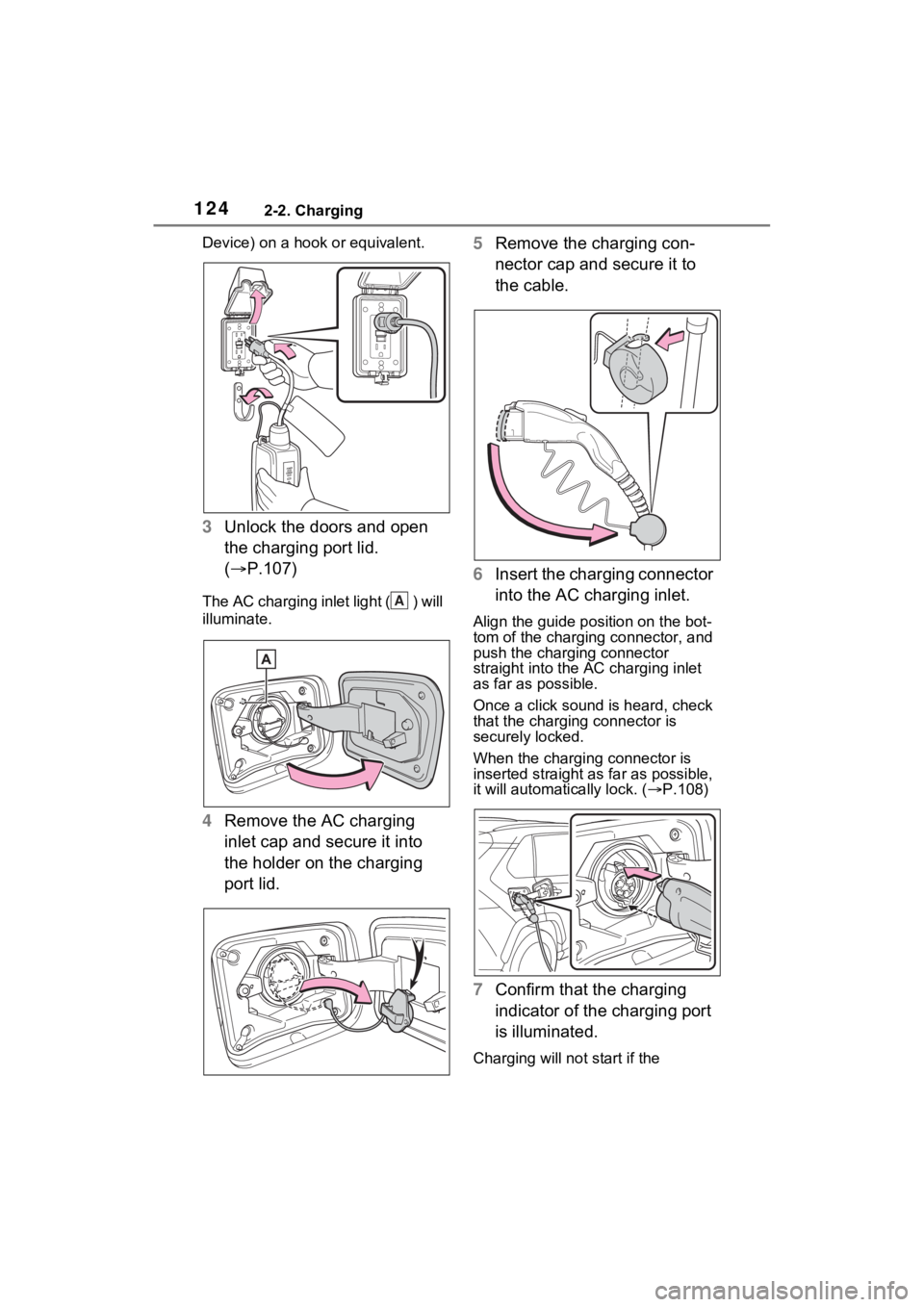
3Unlock the doors and open
the charging port lid.
( P.107)
The AC charging inlet light ( ) will
illuminate.
4Remove the AC charging
inlet cap and secure it into
the holder on the charging
port lid. 5
Remove the charging con-
nector cap and secure it to
the cable.
6 Insert the charging connector
into the AC charging inlet.
Align the guide position on the bot-
tom of the charging connector, and
push the charging connector
straight into the AC charging inlet
as far as possible.
Once a click sound is heard, check
that the charging connector is
securely locked.
When the charging connector is
inserted straight as far as possible,
it will automatically lock. ( P.108)
7 Confirm that the charging
indicator of the charging port
is illuminated.
Charging will not start if the
A
Page 126 of 618
1262-2. Charging
WARNING
■When charging
Observe the following precau-
tions.
Failure to do so may cause an
unexpected accident, resulting in
death or serious injury.
●Connect to a power source suit-
able for charging. ( P.111)
●Check that the AC charging
cable, plug and outlet are free of
foreign matter.
●Before charging, check that the
AC charging inlet is not
deformed, damaged or cor-
roded, and check that the inlet
is free of foreign matter such as
dirt, snow and ice.
If there is dirt or dust in these
areas, remove completely
before inserting the charging
connector.
●Do not get the terminals of the
AC charging inlet wet.
●Only use outlets where the plug
can be securely inserted.
●Do not bundle or wind the AC
charging cable while charging,
as doing so may result in over-
heating.
●Do not touch the terminals of
the charging connector and AC
charging inlet with a sharp metal
objects (needles etc.) or hands,
or short them with foreign
objects.
●When charging outdoors, make
sure to connect to a weather-
proof outlet for outdoor use.
Ensure the weatherproof outlet
cover closes completely. If the
weatherproof outlet cover can-
not be closed, install a weather-
proof outlet cover that will close.
●In order to stop charging at the
charging station, follow the
instructions of the charger.
●If any heat, smoke, odors, noise
or other abnormalities are
noticed during charging, stop
charging immediately.
●Do not insert the plug if the out-
let is submerge d in water or
snow.
●When charging while it is raining
or snowing, do not connect or
disconnect the plug if your
hands are wet. Also, do not get
the plug or outlet wet.
●Do not charge the vehicle
during a lightning storm.
●Prevent the AC charging cable
from being caught in the door or
back door.
●Do not let the wheels on the AC
charging cable, plug, charging
connector and CCID (Charging
Circuit Interru pting Device).
●Firmly insert the plug into the
outlet.
●Do not use an ex tension cord
and converting adaptor.
●Close the hood before using the
charging system. The cooling
fan may start operating sud-
denly. Touching or getting close
to rotating parts such as the fan
may cause your hands or
clothes (especially a necktie or
scarf) to becom e caught and
result in a serious injury.
●If the power indicator on the
CCID (Charging Circuit Inter-
rupting Device) does not illumi-
nate after plugging the AC
charging cable into the socket-
outlet, unplug it immediately.
Page 132 of 618
1322-2. Charging
■To make sure that the charging
schedule function operates cor-
rectly
Check the following items.
●A d j u s t t h e c l o c k t o t h e c o r r e c t t i m e
( P.169)
●The calendar is set to the correct
date ( P.177)
●Check that the power switch is
turned off
●After registering the charging
schedule, connect the AC
charging cable
The charging sta rt time is deter-
mined based on the charging
schedule at the time that the AC
charging cable was connected.
●After connecting the AC charging
cable, check that the charging
indicator of the charging port
flashes ( P.100)
●Do not use an ou tlet that has a
power cut off function (including a
timer function)
Use an outlet that constantly sup-
plies electricity. For outlets where
the power is cut off due to a timer
function, etc., charging may not be
carried out according to plan if the
power is cut off during the set
time.
■When the AC charging cable
remains connected to the vehi-
cle
Even if multiple consecutive
charging schedules are registered,
the next charge will not be carried
out according to the charging
schedule until the AC charging
cable is removed and reconnected
after charging completes. Also,
when the hybrid battery (traction
battery) is fully charged, charging
according to the charging schedule
will not be carried out.
■“Climate Prep”
●When the air conditioning-linked
setting is turned on, the air condi-
tioning operates until the set departure time. Therefore, the air
conditioning will co
nsume electric-
ity and charging may not complete
by the set departure time.
●If the hybrid batte ry (traction bat-
tery) is fully charged, charging will
not be carried o ut, even if the
charging schedule is set. How-
ever, if “Climate Prep” is turned
on, the air conditioning will oper-
ate only once when it nears the
time set in “Departure”. If this
occurs, the air conditioning will
consume electricity and the
remaining charge of the hybrid
battery (traction battery) when
departing may be decreased.
●When the doors are unlocked, the
air conditioning system does not
operate.
■Smartphone-linked operation
(vehicles with Premium Audio)
After applying to Toyota Apps, it is
possible to use the smartphone
application to change charging
schedule settings.
For details about Toyota Apps, refer
to
http://www.toyota.com/connectedse
rvices in the United States and
http://www.toyota.ca/connected
in
Canada.
■When charging schedules are
ignored
When the following operations are
performed while the charging
schedule is on standby, charging
schedule is temporarily canceled
and charging is started.
●When the Remote Air Condition-
ing System ( P.405) is operated
●When turning “My Room Mode”
on ( P.144)
●When turning “Charge Now” on
( P.137, 142)
●When an operation that temporar-
ily cancel charging using the
charging schedule ( P.125)
Page 148 of 618
1482-2. Charging
■The error warning indicator on the CCID (Charging Circuit
Interrupting Device) flashes.
■Charging indicator of the charging port does not illuminate,
even though charging connector is connected.
Likely causeCorrection procedure
Electrical leakage detection function
or self-diagnostic function operates
and power is cut off
When the voltage is insufficient, the
error warning indi cator may flash
when there is noise interference.
Perform a reset and connect to a
proper power source. ( P.105)
If charging does not start, immedi-
ately stop charging and contact your
Toyota dealer.
Likely causeCorrection procedure
The plug is not properly connected to
the outletCheck whether the plug is properly
connected to the outlet.
Charging connector is not securely
connected to AC charging inlet
Check the connection status of the
charging connector.
When connecting the charging
connector, make su re not to touch
the latch release button. Insert the
charging connector securely until
you hear a click. The charging con-
nector may not be connected cor-
rectly if the latch release button is
pressed while inserting.
After connecting the charging con-
nector, check that the latch release
button is not pressed and the
charging indicator of the charging
port is turned on.
If the charging indicator of the
charging port does not illuminate,
even though the charging connector
is securely connec ted, there may be
a malfunction in the system. Immedi-
ately stop charging and contact your
Toyota dealer.
Page 153 of 618
1532-2. Charging
2
Plug-in hybrid system
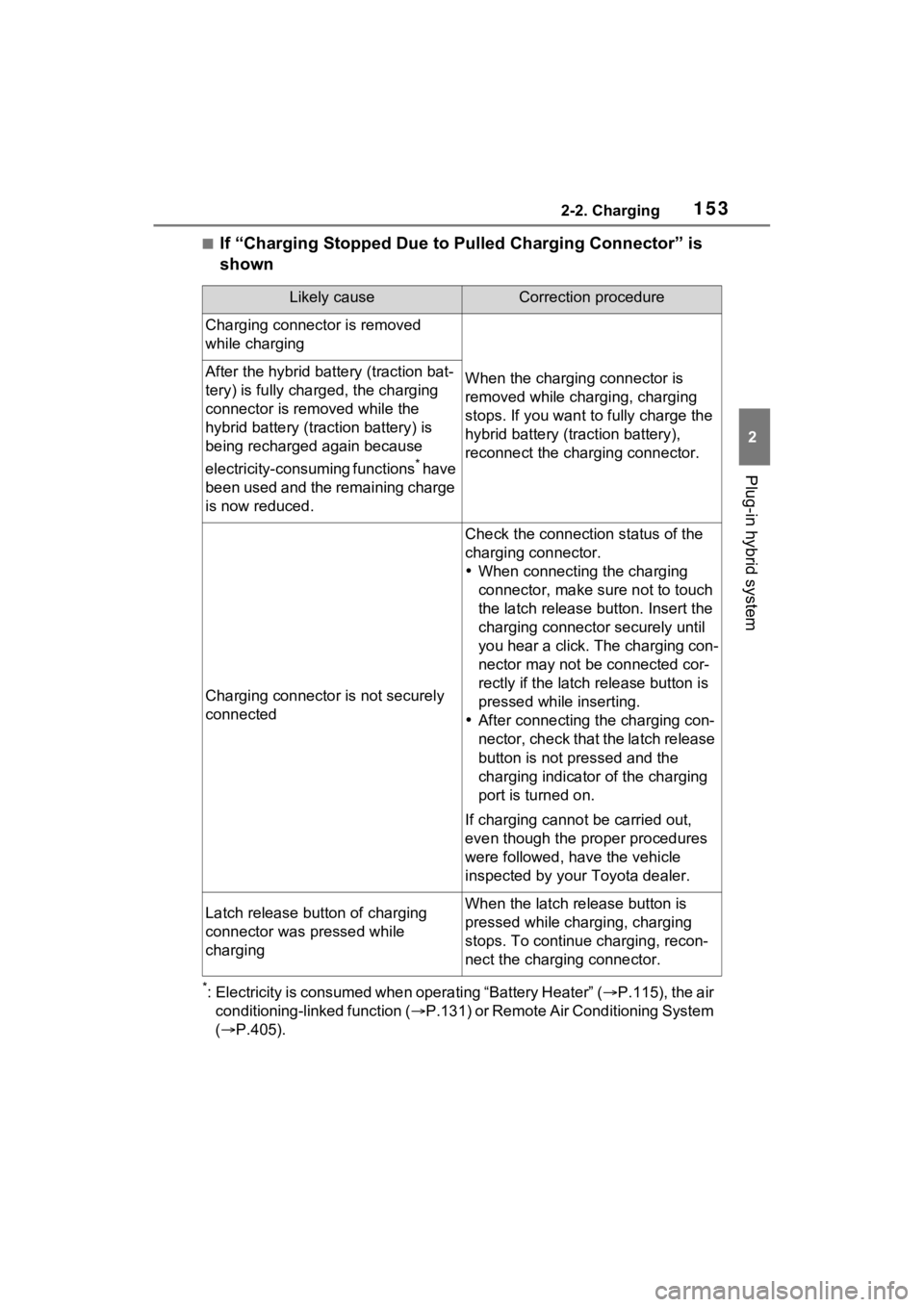
■If “Charging Stopped Due to Pulled Charging Connector” is
shown
*: Electricity is consumed when operating “Battery Heater” (P.115), the air
conditioning-linked function ( P.131) or Remote Air Conditioning System
( P.405).
Likely causeCorrection procedure
Charging connector is removed
while charging
When the charging connector is
removed while charging, charging
stops. If you want t o fully charge the
hybrid battery (traction battery),
reconnect the charging connector.After the hybrid battery (traction bat-
tery) is fully charged, the charging
connector is removed while the
hybrid battery (traction battery) is
being recharged again because
electricity-consuming functions
* have
been used and the remaining charge
is now reduced.
Charging connector is not securely
connected
Check the connection status of the
charging connector.
When connecting the charging
connector, make su re not to touch
the latch release button. Insert the
charging connector securely until
you hear a click. The charging con-
nector may not be connected cor-
rectly if the latch release button is
pressed while inserting.
After connecting the charging con-
nector, check that the latch release
button is not pressed and the
charging indicator of the charging
port is turned on.
If charging cannot be carried out,
even though the proper procedures
were followed, h ave the vehicle
inspected by your Toyota dealer.
Latch release button of charging
connector was pressed while
chargingWhen the latch release button is
pressed while charging, charging
stops. To continue charging, recon-
nect the charging connector.
Page 156 of 618
1562-2. Charging
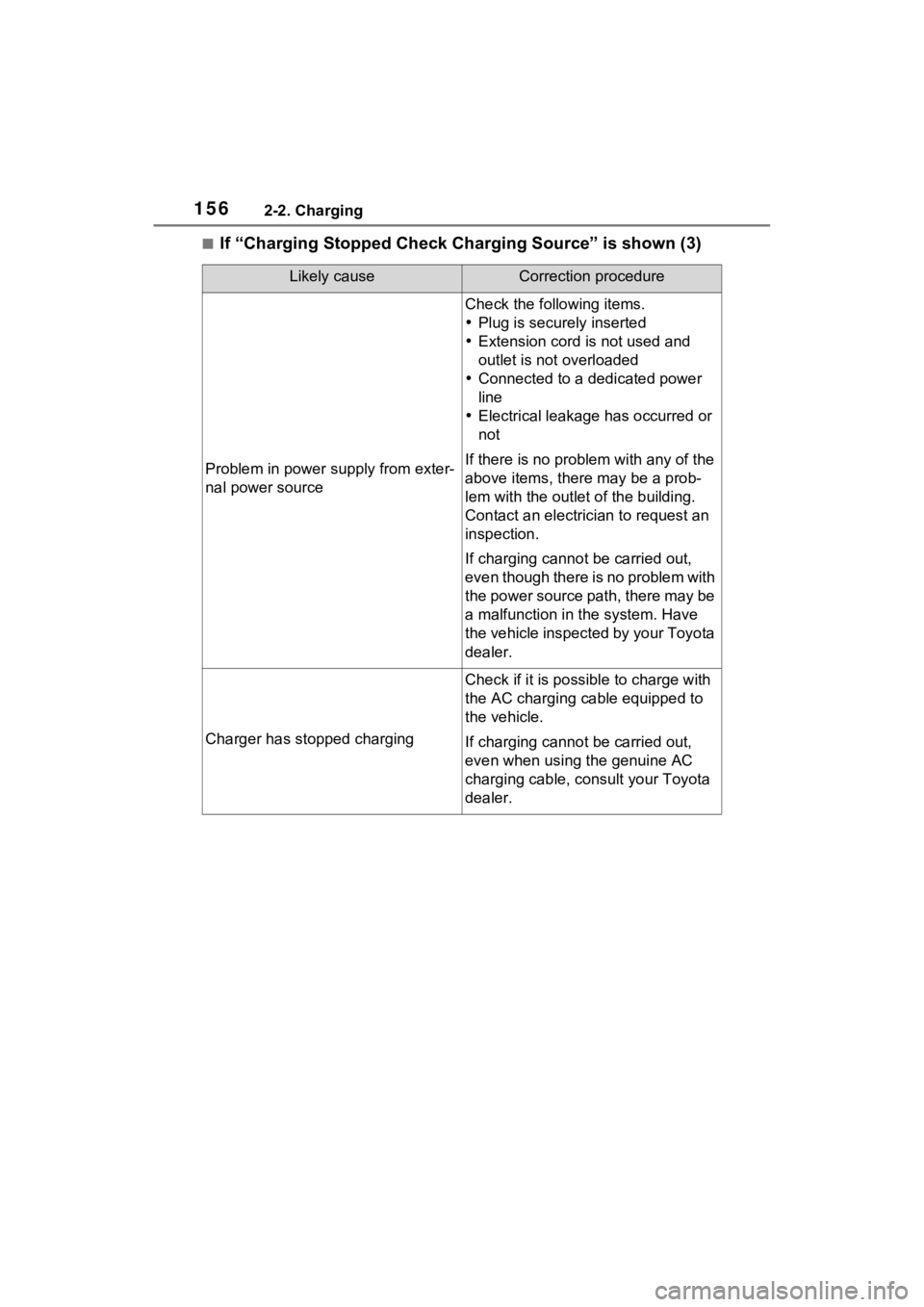
■If “Charging Stopped Check Charging Source” is shown (3)
Likely causeCorrection procedure
Problem in power supply from exter-
nal power source
Check the following items.
Plug is securely inserted
Extension cord is not used and
outlet is not overloaded
Connected to a dedicated power
line
Electrical leakage has occurred or
not
If there is no problem with any of the
above items, the re may be a prob-
lem with the outlet of the building.
Contact an electrician to request an
inspection.
If charging cannot be carried out,
even though there is no problem with
the power source path, there may be
a malfunction in the system. Have
the vehicle inspected by your Toyota
dealer.
Charger has stopped charging
Check if it is possible to charge with
the AC charging cable equipped to
the vehicle.
If charging cannot be carried out,
even when using the genuine AC
charging cable, consult your Toyota
dealer.