display TOYOTA SEQUOIA 2008 2.G Owner's Manual
[x] Cancel search | Manufacturer: TOYOTA, Model Year: 2008, Model line: SEQUOIA, Model: TOYOTA SEQUOIA 2008 2.GPages: 596, PDF Size: 12.93 MB
Page 169 of 596
169
2-2. Instrument cluster
2
When driving
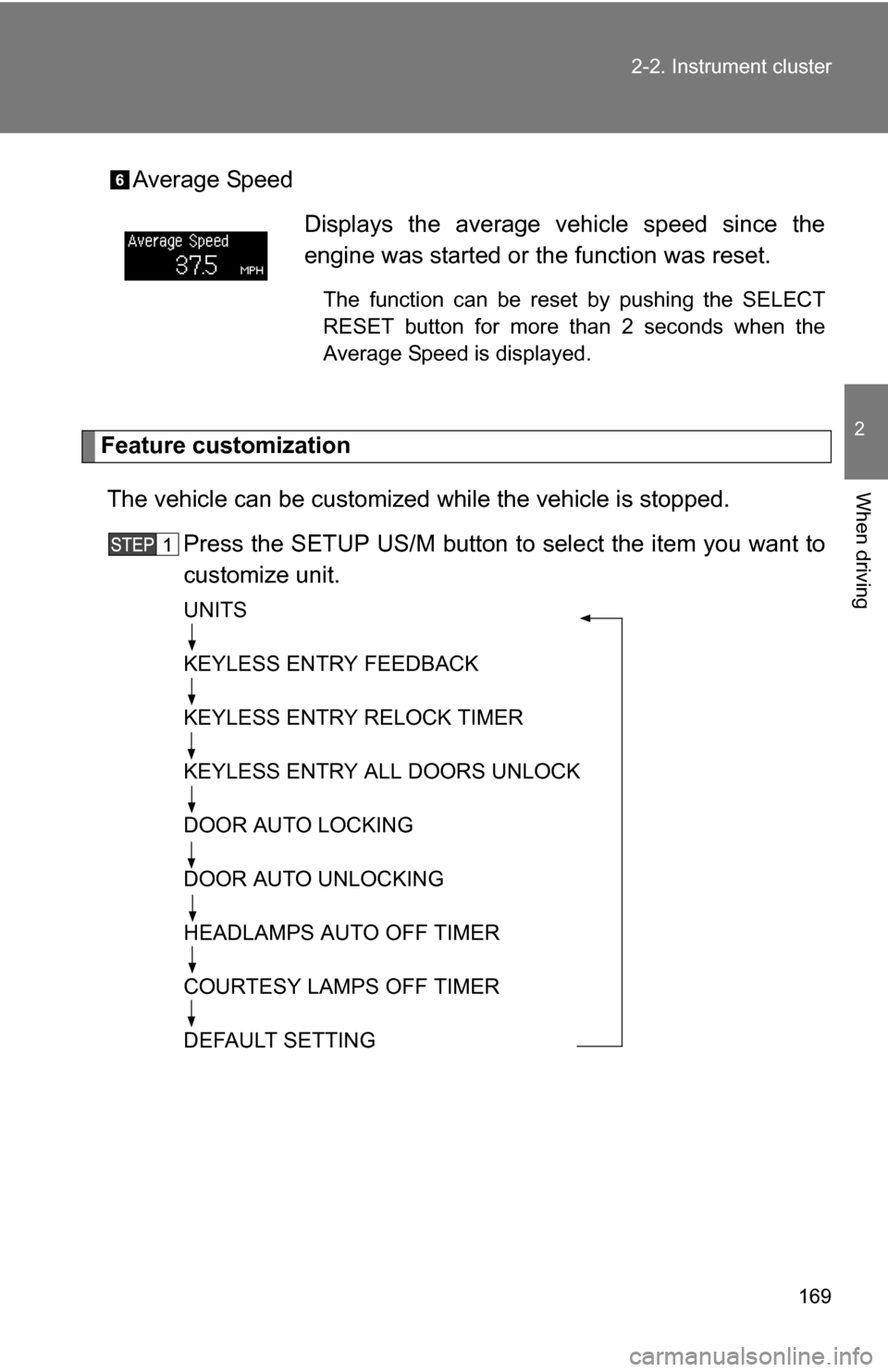
Average Speed
Feature customization
The vehicle can be customized while the vehicle is stopped.
Press the SETUP US/M button to select the item you want to
customize unit.
UNITS
KEYLESS ENTRY FEEDBACK
KEYLESS ENTRY RELOCK TIMER
KEYLESS ENTRY ALL DOORS UNLOCK
DOOR AUTO LOCKING
DOOR AUTO UNLOCKING
HEADLAMPS AUTO OFF TIMER
COURTESY LAMPS OFF TIMER
DEFAULT SETTING
Displays the average vehicle speed since the
engine was started or the function was reset.
The function can be reset by pushing the SELECT
RESET button for more than 2 seconds when the
Average Speed is displayed.
Page 171 of 596
171
2-2. Instrument cluster
2
When driving
After customize is complete, press the SETUP US/M button to
set the selected item.
If the customization fails, the previously setting will be displayed.
If no button is pressed for 10 seconds, the display change to normal
display.
■
Feature customization error
• If SYSTEM ERROR message is indicated, turn the engine switch off and
then on again.
• If SYSTEM ERROR message is indicated again, contact your Toyota dealer.
CAUTION
■Caution while driving
Do not adjust the display.
Doing so may cause the driver to mishandle the vehicle and an accident,
resulting in death or serious injury.
NOTICE
■The multi-information disp lay at low temperatures
Allow the interior of the vehicle to warm up before using the liquid crystal
information display. At extremely low temperatures, the information display
monitor may respond slowly, and display changes may be delayed.
Page 172 of 596
172
2-2. Instrument cluster
Accessor y meter
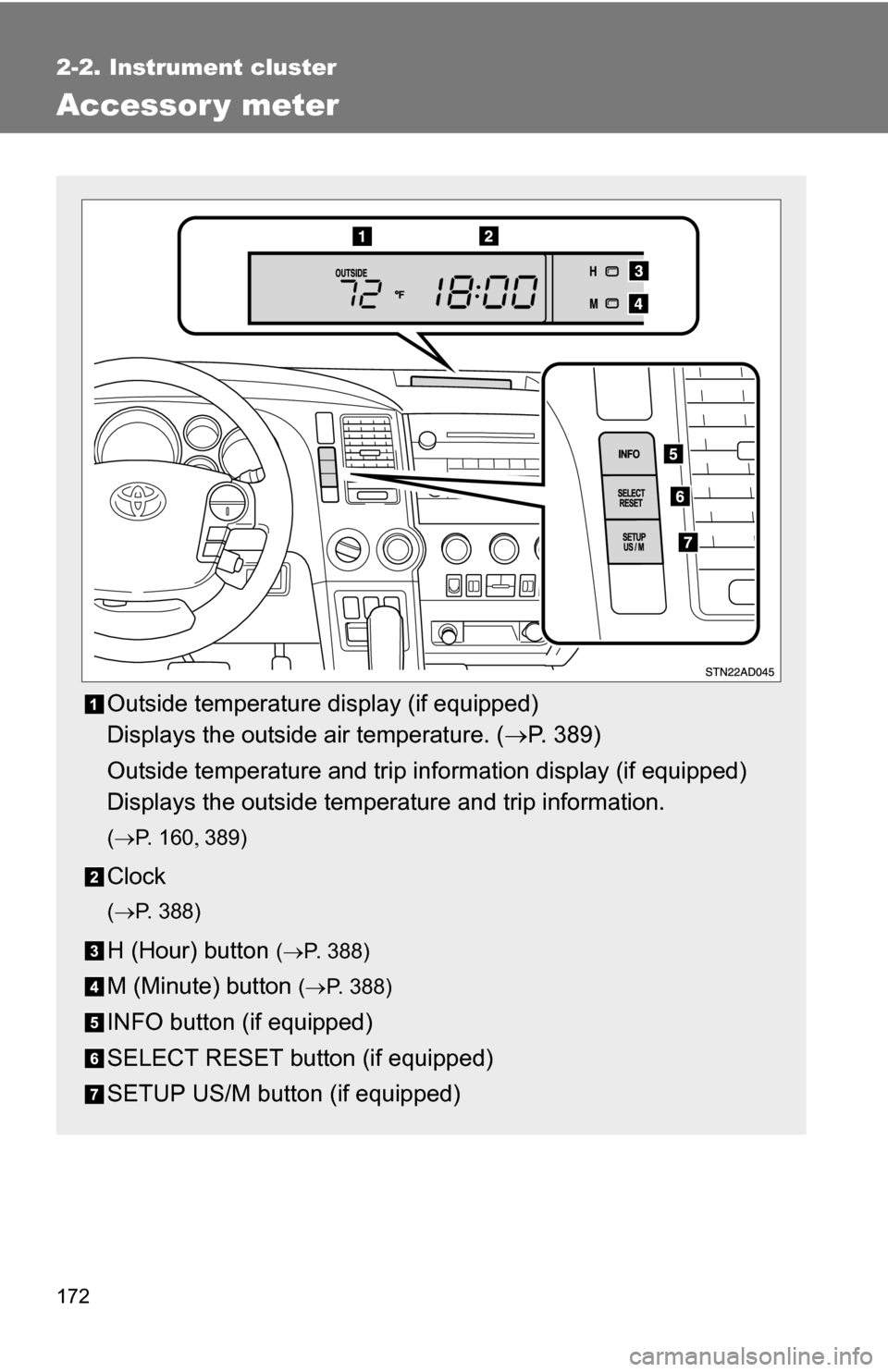
Outside temperature display (if equipped)
Displays the outside air temperature. (P. 389)
Outside temperature and trip information display (if equipped)
Displays the outside temperature and trip information.
( P. 1 6 0 389)
Clock
(P. 388)
H (Hour) button (P. 388)
M (Minute) button ( P. 388)
INFO button (if equipped)
SELECT RESET button (if equipped)
SETUP US/M button (if equipped)
Page 173 of 596
173
2-2. Instrument cluster
2
When driving
Outside temperature and trip in
formation display (if equipped)
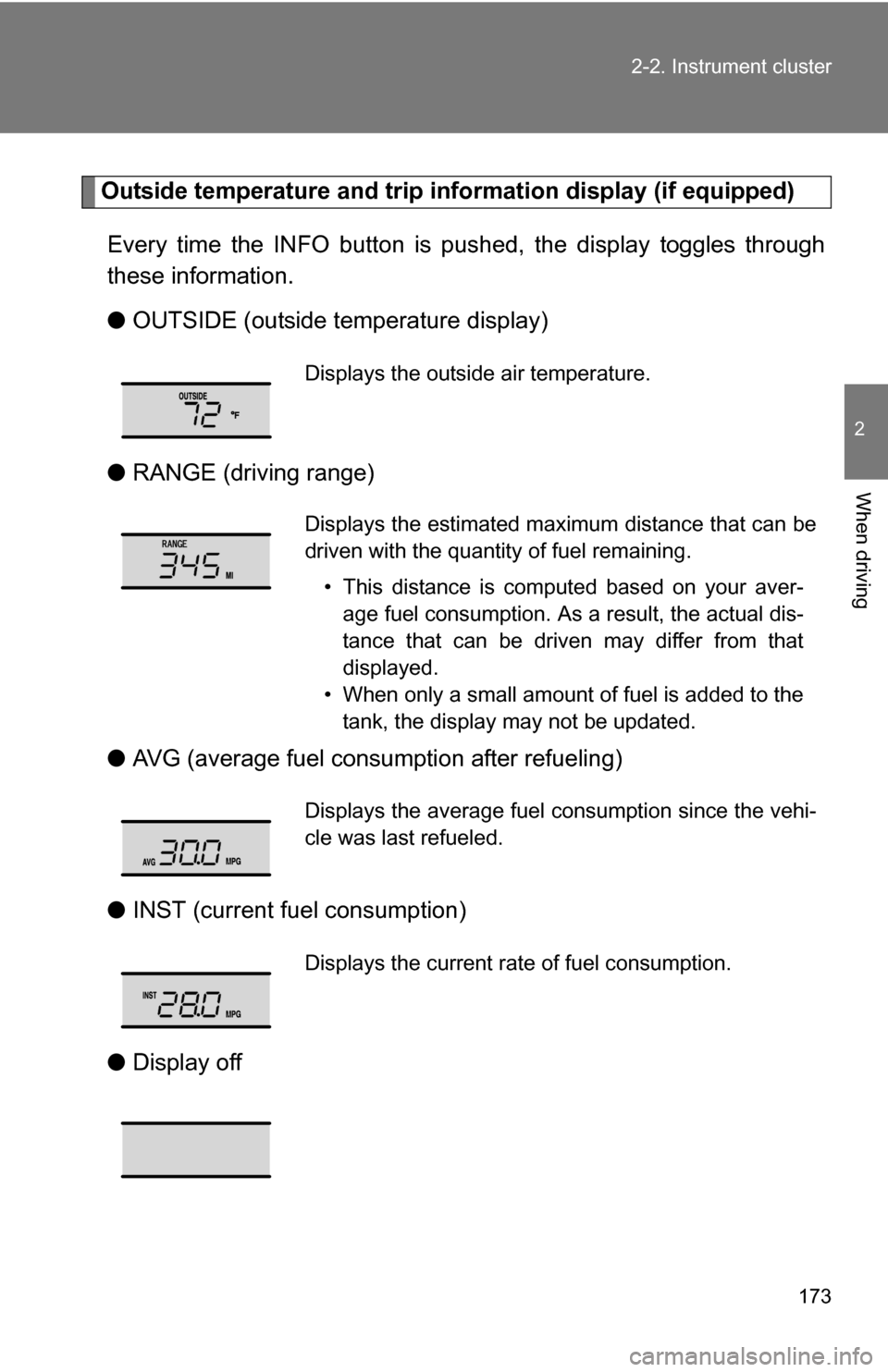
Every time the INFO button is pushed, the display toggles through
these information.
● OUTSIDE (outside temperature display)
● RANGE (driving range)
● AVG (average fuel consumption after refueling)
● INST (current fu el consumption)
● Display off
Displays the outside air temperature.
Displays the estimated maximum distance that can be
driven with the quantity of fuel remaining.
• This distance is computed based on your aver-age fuel consumption. As a result, the actual dis-
tance that can be driven may differ from that
displayed.
• When only a small amount of fuel is added to the tank, the display may not be updated.
Displays the average fuel consumption since the vehi-
cle was last refueled.
Displays the current rate of fuel consumption.
Page 174 of 596
174 2-2. Instrument cluster
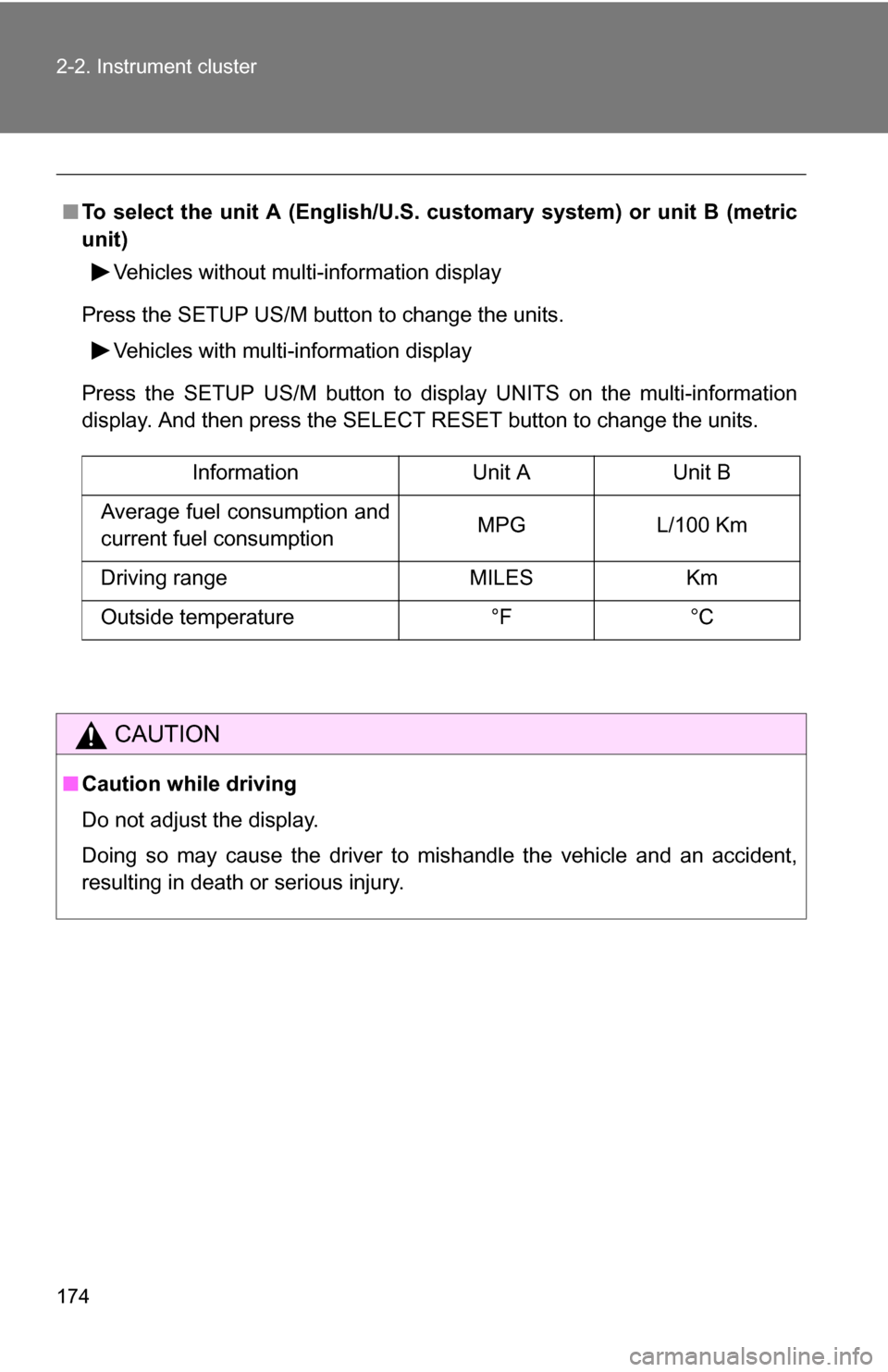
■To select the unit A (English/U.S. customary system) or unit B (metric
unit)
Vehicles without multi-information display
Press the SETUP US/M button to change the units. Vehicles with multi-information display
Press the SETUP US/M button to display UNITS on the multi-information
display. And then press the SELECT RESET button to change the units.
CAUTION
■ Caution while driving
Do not adjust the display.
Doing so may cause the driver to mishandle the vehicle and an accident,
resulting in death or serious injury.
Information Unit AUnit B
Average fuel consumption and
current fuel consumption MPG
L/100 Km
Driving range MILESKm
Outside temperature °F°C
Page 176 of 596
176 2-3. Operating the lights and wipers
■Daytime running light system (if equipped)
To make your vehicle more visible to other drivers, the front turn signal lights
turn on automatically whenever the engine is started and the parking brake
is released. Daytime running lights are not designed for use at night.
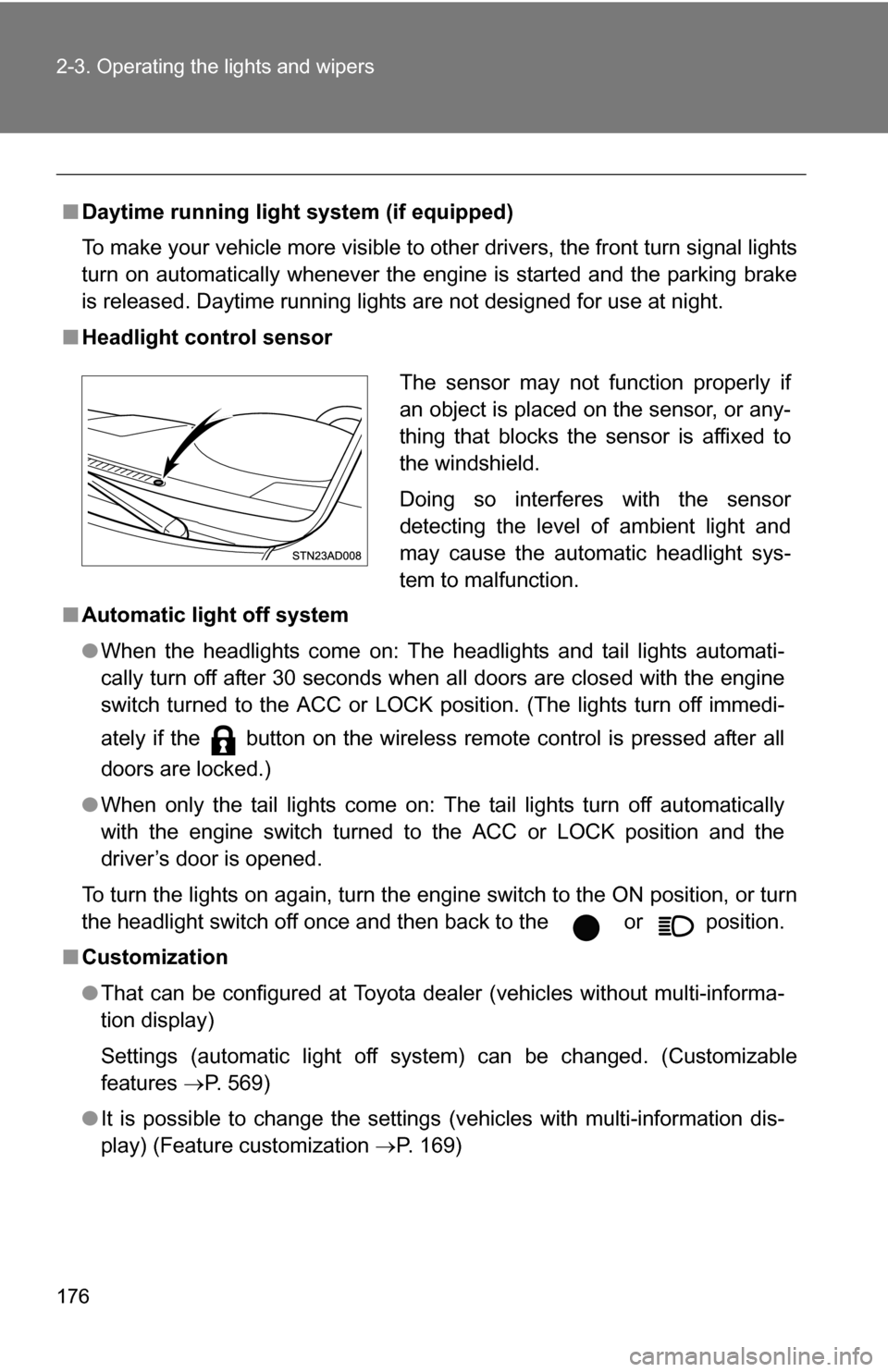
■ Headlight control sensor
■ Automatic light off system
●When the headlights come on: The headlights and tail lights automati-
cally turn off after 30 seconds when all doors are closed with the engine
switch turned to the ACC or LOCK position. (The lights turn off immedi-
ately if the button on the wireless remote control is pressed after all
doors are locked.)
● When only the tail lights come on: The tail lights turn off automatically
with the engine switch turned to the ACC or LOCK position and the
driver’s door is opened.
To turn the lights on again, turn the engine switch to the ON position, or turn
the headlight switch off once and then back to the or position.
■ Customization
●That can be configured at Toyota dealer (vehicles without multi-informa-
tion display)
Settings (automatic light off system) can be changed. (Customizable
features P. 569)
● It is possible to change the settings (vehicles with multi-information dis-
play) (Feature customization P. 169)
The sensor may not function properly if
an object is placed on the sensor, or any-
thing that blocks the sensor is affixed to
the windshield.
Doing so interferes with the sensor
detecting the level of ambient light and
may cause the automatic headlight sys-
tem to malfunction.
Page 187 of 596
187
2-4. Using other
driving systems
2
When driving
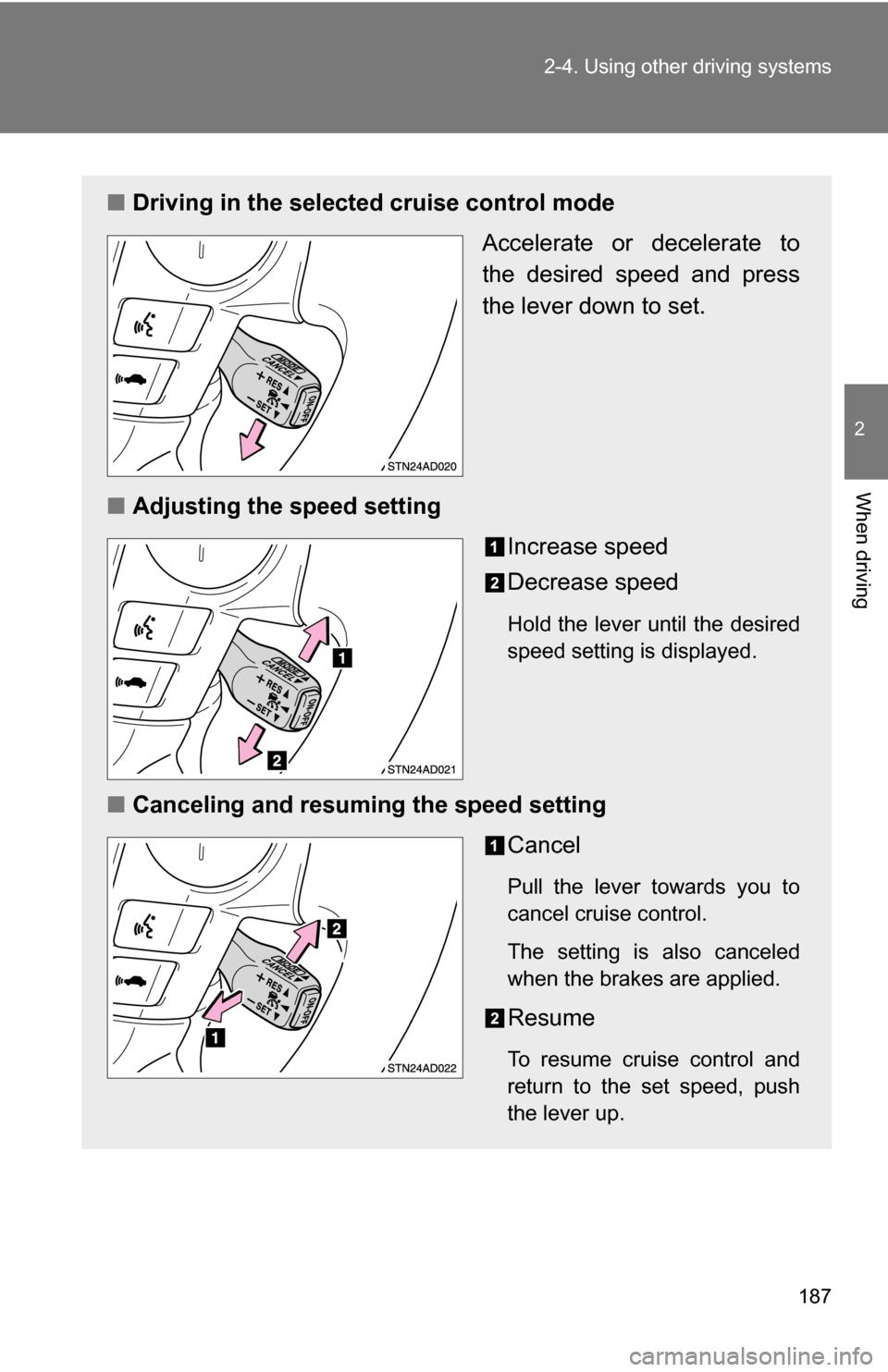
■Driving in the selected cruise control mode
Accelerate or decelerate to
the desired speed and press
the lever down to set.
■ Adjusting the speed setting
Increase speed
Decrease speed
Hold the lever until the desired
speed setting is displayed.
■Canceling and resuming the speed setting
Cancel
Pull the lever towards you to
cancel cruise control.
The setting is also canceled
when the brakes are applied.
Resume
To resume cruise control and
return to the set speed, push
the lever up.
Page 190 of 596
190 2-4. Using other driving systems
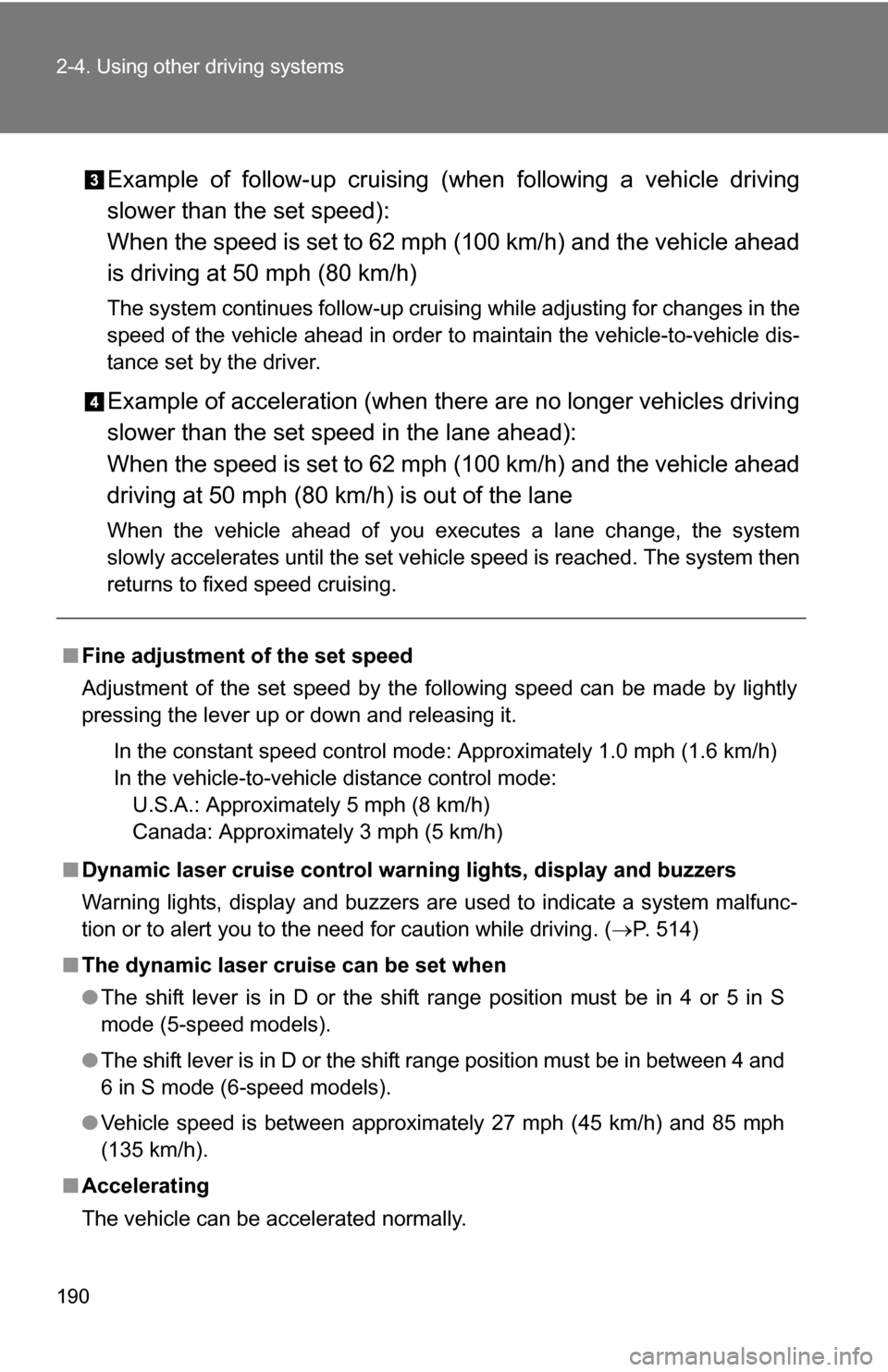
Example of follow-up cruising (when following a vehicle driving
slower than the set speed):
When the speed is set to 62 mph (100 km/h) and the vehicle ahead
is driving at 50 mph (80 km/h)
The system continues follow-up cruising while adjusting for changes in the
speed of the vehicle ahead in order to maintain the vehicle-to-vehicle dis-
tance set by the driver.
Example of acceleration (when there are no longer vehicles driving
slower than the set speed in the lane ahead):
When the speed is set to 62 mph (100 km/h) and the vehicle ahead
driving at 50 mph (80 km/h) is out of the lane
When the vehicle ahead of you executes a lane change, the system
slowly accelerates until the set vehicle speed is reached. The system then
returns to fixed speed cruising.
■Fine adjustment of the set speed
Adjustment of the set speed by the following speed can be made by lightly
pressing the lever up or down and releasing it.
In the constant speed control mode: Approximately 1.0 mph (1.6 km/h)
In the vehicle-to-vehicle distance control mode:U.S.A.: Approximately 5 mph (8 km/h)
Canada: Approximately 3 mph (5 km/h)
■ Dynamic laser cruise control warning lights, display and buzzers
Warning lights, display and buzzers are used to indicate a system malfunc-
tion or to alert you to the need for caution while driving. ( P. 514)
■ The dynamic laser cruise can be set when
●The shift lever is in D or the shift range position must be in 4 or 5 in S
mode (5-speed models).
● The shift lever is in D or the shift range position must be in between 4 and
6 in S mode (6-speed models).
● Vehicle speed is between approximately 27 mph (45 km/h) and 85 mph
(135 km/h).
■ Accelerating
The vehicle can be accelerated normally.
Page 208 of 596
208
2-4. Using other driving systems
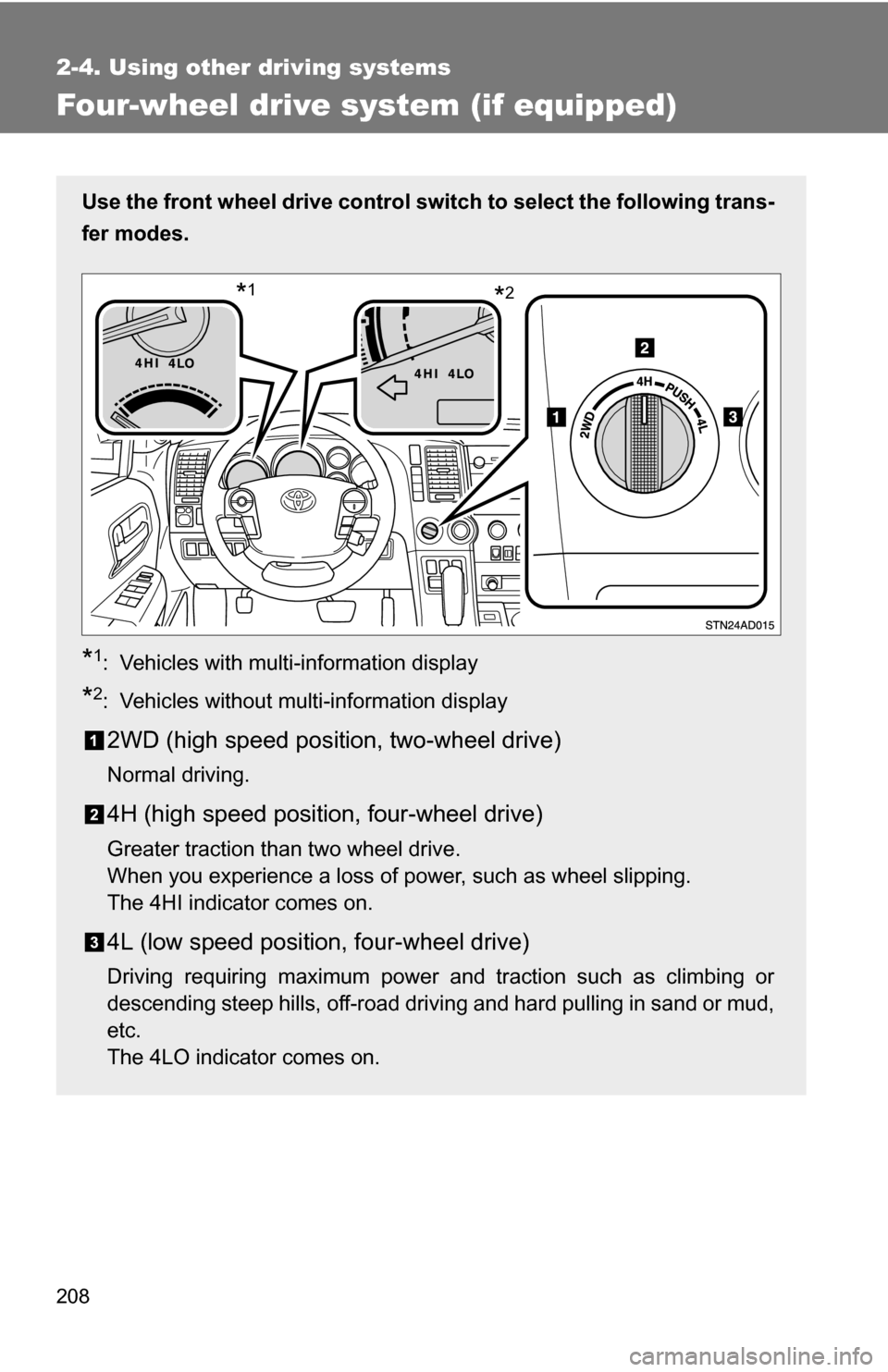
Four-wheel drive system (if equipped)
Use the front wheel drive control switch to select the following trans-
fer modes.
*1: Vehicles with multi-information display
*2: Vehicles without multi-information display
2WD (high speed position, two-wheel drive)
Normal driving.
4H (high speed position, four-wheel drive)
Greater traction than two wheel drive.
When you experience a loss of power, such as wheel slipping.
The 4HI indicator comes on.
4L (low speed position, four-wheel drive)
Driving requiring maximum power and traction such as climbing or
descending steep hills, off-road driving and hard pulling in sand or mud,
etc.
The 4LO indicator comes on.
*2*1
Page 249 of 596
Interior features3
249
3-5. Using the interior lights ............................. 362
Interior lights list ............... 362
• Personal/interior light main switch .................... 363
• Personal/interior lights ... 364
• Interior light .................... 365
3-6. Using the storage features ......................... 366
List of storage features .... 366
• Glove boxes ................... 367
• Coin holder .................... 368
• Front console box .......... 368
• Card holder .................... 370
• Map holder ..................... 371
• Pen holder ..................... 372
• Tissue pocket................. 373
• Rear console box ........... 373
• Overhead console.......... 376
• Cup holders ................... 377
• Bottle holders ................. 381
• Auxiliary boxes............... 382
• Seatback table ............... 384 3-7. Other interior features ... 386
Sun visors ........................ 386
Vanity mirrors ................... 387
Clock ................................ 388
Outside temperature display............................ 389
Portable ashtray ............... 390
Cigarette lighter................ 391
Conversation mirror ......... 392
Power outlets ................... 393
Seat heaters..................... 397
Seat heaters and ventilators ...................... 400
Armrests........................... 402
Rear side sunshades ....... 403
Floor mat .......................... 405
Luggage compartment features .......................... 406
Garage door opener......... 411
Compass .......................... 416