audio TOYOTA SEQUOIA 2009 2.G User Guide
[x] Cancel search | Manufacturer: TOYOTA, Model Year: 2009, Model line: SEQUOIA, Model: TOYOTA SEQUOIA 2009 2.GPages: 612
Page 279 of 612
279
3-2. Using the audio system
3
Interior features
Using the radio
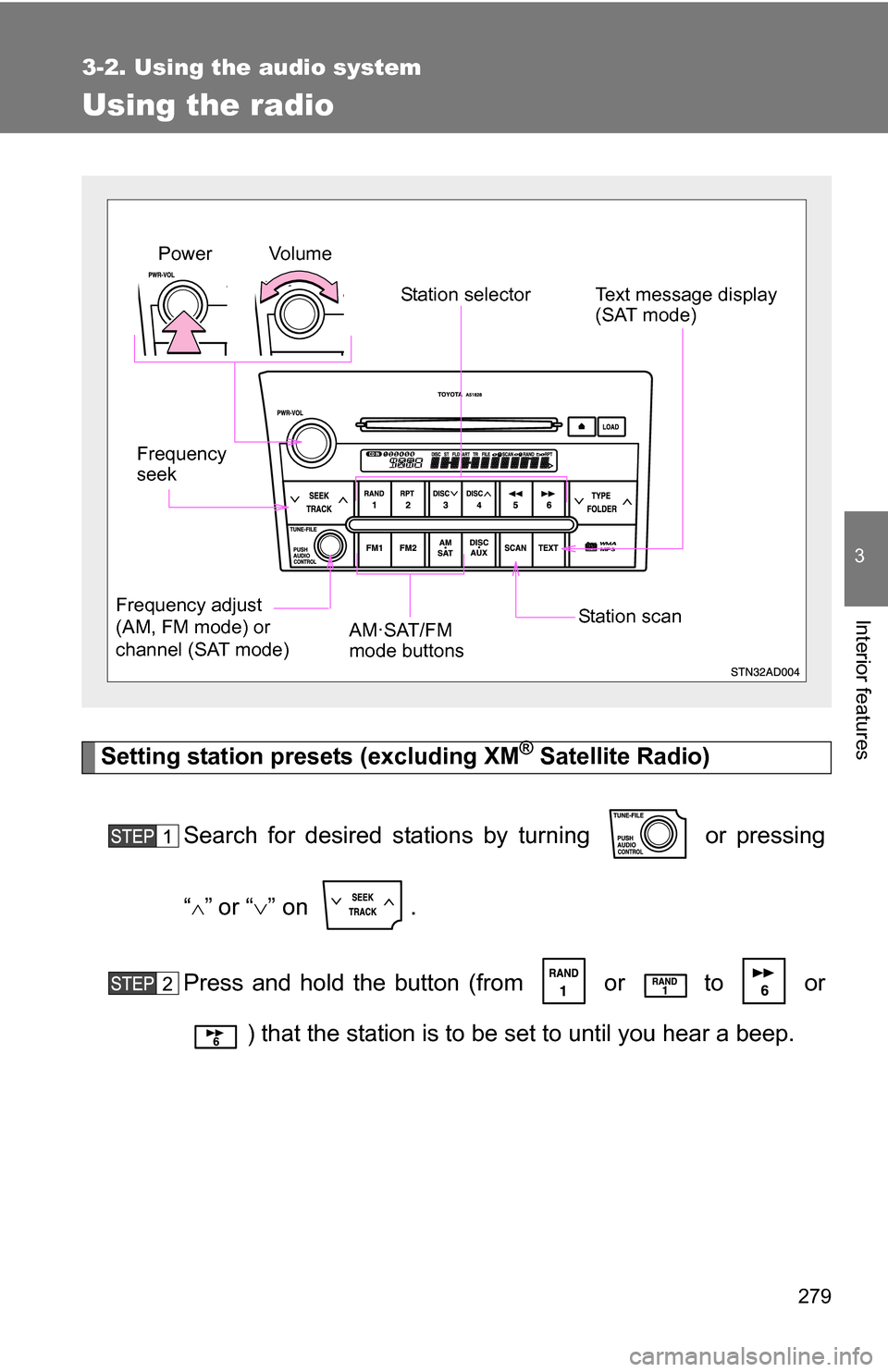
Setting station presets (excluding XM® Satellite Radio)
Search for desired stations by turning or pressing
“
”or “ ” on .
Press and hold the button (from or
to or
) that the station is to be set to until you hear a beep.
Vol u m e Station selector
Frequency
seek
Frequency adjust
(AM, FM mode) or
channel (SAT mode) AM·SAT/FM
mode buttonsPower
Station scanText message display
(SAT mode)
Page 280 of 612
280 3-2. Using the audio system
Scanning radio stations (excluding XM® Satellite Radio)
■ Scanning the preset radio stations
Press and hold until you hear a beep.
Preset stations will be played for 5 seconds each.
When the desired station is reached, press the button once
again to stop scanning.
■ Scanning all radio stations within range
Press .
All stations with reception will be played for 5 seconds each.
When the desired station is reached, press the button once
again to stop scanning.
XM® Satellite Radio (type B and C)
■ Receiving XM
® Satellite Radio
Press and select the XM
® band.
The display changes as follows each time is pressed.
AM SAT1 SAT2 SAT3
Turn to select the desired channel in all categories
or press “
”or “ ” on to select the desired channel in
the current category.
Page 281 of 612
281
3-2. Using the audio system
3
Interior features
■
Setting XM® Satellite Radio channel presets
Select the desired channel. Press and hold the button (from
or to or ) that the channel is to be set to until
you hear a beep.
■ Changing the channel category
Press “
”or “ ” on the .
■ Scanning XM
® Satellite Radio channels
● Scanning channels in the current category
Press .
When the desired channel is reached, press againto stop scanning.
● Scanning preset channels
Press and hold until you hear a beep.
When the desired channel is reached, press againto stop scanning.
■ Displaying text information
Press .
The display will show up to 10 characters.
Page 282 of 612
282 3-2. Using the audio system
The display changes as follows each time the button is pressed.
●CH NAME
● TITLE (SONG/PROGRAM TITLE)
● NAME (ARTIST NAME/FEATURE)
● CH NUMBER
■When the battery is disconnected
Stations presets are erased.
■ Reception sensitivity
●Cargo loaded on the roof luggage carrier, especially metal objects, may
adversely affect the reception of XM
® Satellite Radio.
● Maintaining stable radio reception at all times is difficult due to the contin-
ually changing position of the antenna and differences in signal strength
and surrounding objects, such as trains, transmitters, etc.
● The radio antenna is mounted inside the rear quarter windows. To main-
tain clear radio reception, do not attach metallic window tinting or other
metallic objects to the antenna wire mounted inside the rear quarter win-
dows.
■ XM
® Satellite Radio (type B and C)
An XM
® Satellite Radio is a tuner designed exclusively to receive broadcasts
provided under a separate subscription. Availability is limited to the 48 con-
tiguous states and 10 Canadian provinces.
● XM
® subscriptions
For detailed information about XM® Satellite Radio or to subscribe:
U.S.A.—
Visit on the web at www.xmradio.com
or call 1-800-967-2346.
Canada—
Visit on the web at www.xmradio.ca
or call 1-877-438-9677.
Page 283 of 612
283
3-2. Using the audio system
3
Interior features
●
Radio ID
You will need the radio ID when activating XM® service or reporting a
problem. Select “CH000” using , and the receiver’s 8-character
ID number will appear.
● Satellite tuner
The tuner supports only Audio Services (Music and Talk) and the accom-
panying Text Information of XM
® Satellite Radio.
*:Terms and services provided by XM® Satellite Radio are subject to change
without notice.
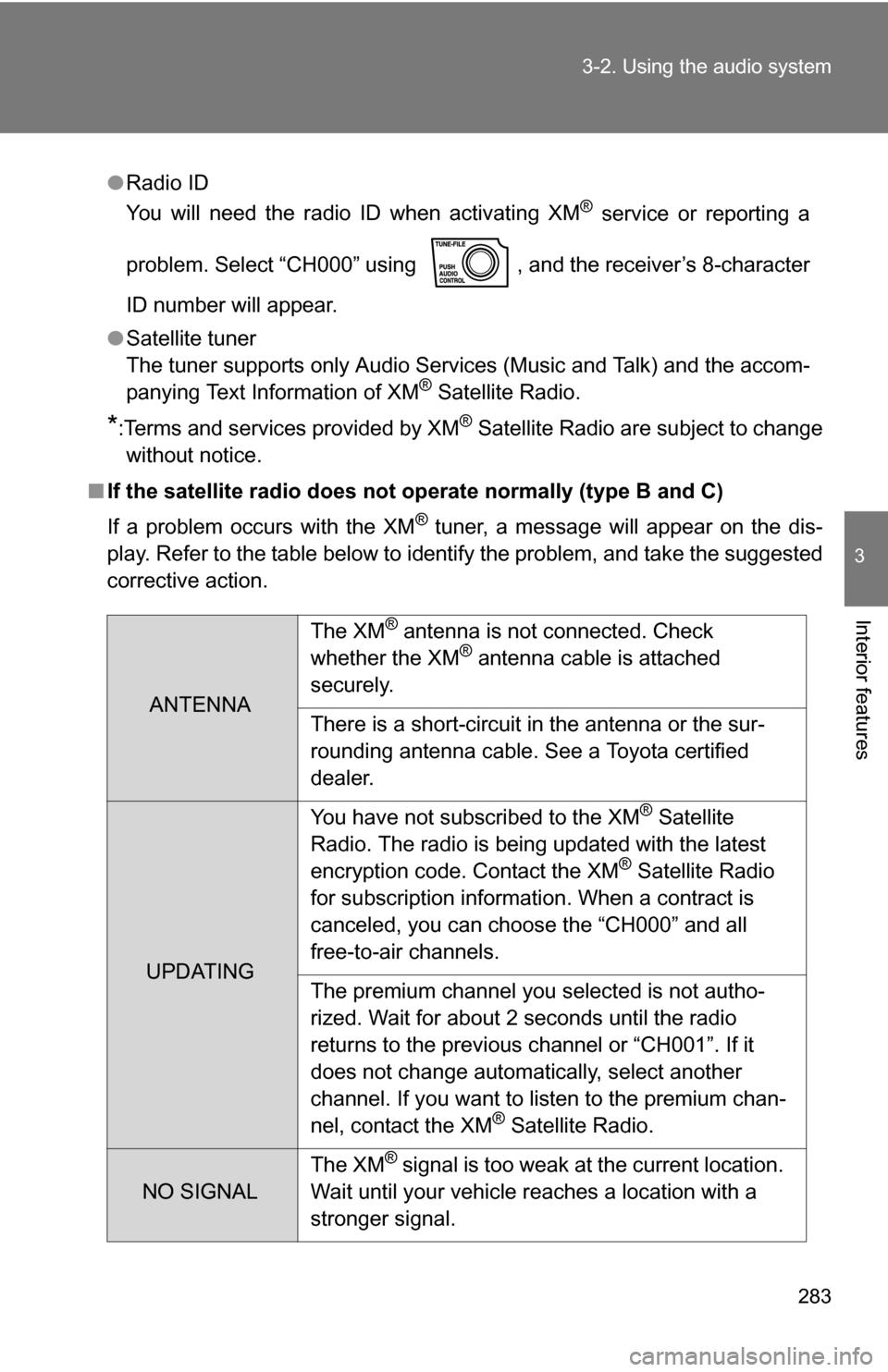
■ If the satellite radio does not operate normally (type B and C)
If a problem occurs with the XM
® tuner, a message will appear on the dis-
play. Refer to the table below to identify the problem, and take the suggested
corrective action.
ANTENNA The XM
® antenna is not connected. Check
whether the XM® antenna cable is attached
securely.
There is a short-circuit in the antenna or the sur-
rounding antenna cable. See a Toyota certified
dealer.
UPDATING You have not subscribed to the XM
® Satellite
Radio. The radio is being updated with the latest
encryption code. Contact the XM
® Satellite Radio
for subscription information. When a contract is
canceled, you can choose the “CH000” and all
free-to-air channels.
The premium channel you selected is not autho-
rized. Wait for about 2 seconds until the radio
returns to the previous channel or “CH001”. If it
does not change automatically, select another
channel. If you want to listen to the premium chan-
nel, contact the XM
® Satellite Radio.
NO SIGNAL The XM
® signal is too weak at the current location.
Wait until your vehicle reaches a location with a
stronger signal.
Page 284 of 612
284 3-2. Using the audio system
Contact the XM® Listener Care Center at 1-800-967-2346 (U.S.A.) or
1-877-438-9677 (Canada).
■ Certifications for the radio tuner
This equipment has been tested and found to comply with the limits for a
class B digital device, pursuant to Part 15 of the FCC Rules. These limits are
designed to provide reasonable protection against harmful interference in a
residential installation. This equipment generates, uses and can radiate
radio frequency energy and, if not installed and used in accordance with the
instructions, may cause harmful interference to radio communications. How-
ever, there is no guarantee that interference will not occur in a particular
installation.
If this equipment does cause harmful interference to radio or television
reception, which can be determined by turning the equipment off and on, the
user is encouraged to try to correct the interference by trying one or more of
the following:
●Reorienting or relocating the receiving antenna.
● Increasing the separation between the equipment and receiver.
● Connecting the equipment into an outlet on a circuit different from that to
which the receiver is connected.
● Consulting the dealer or an experienc ed radio/TV technician for help.
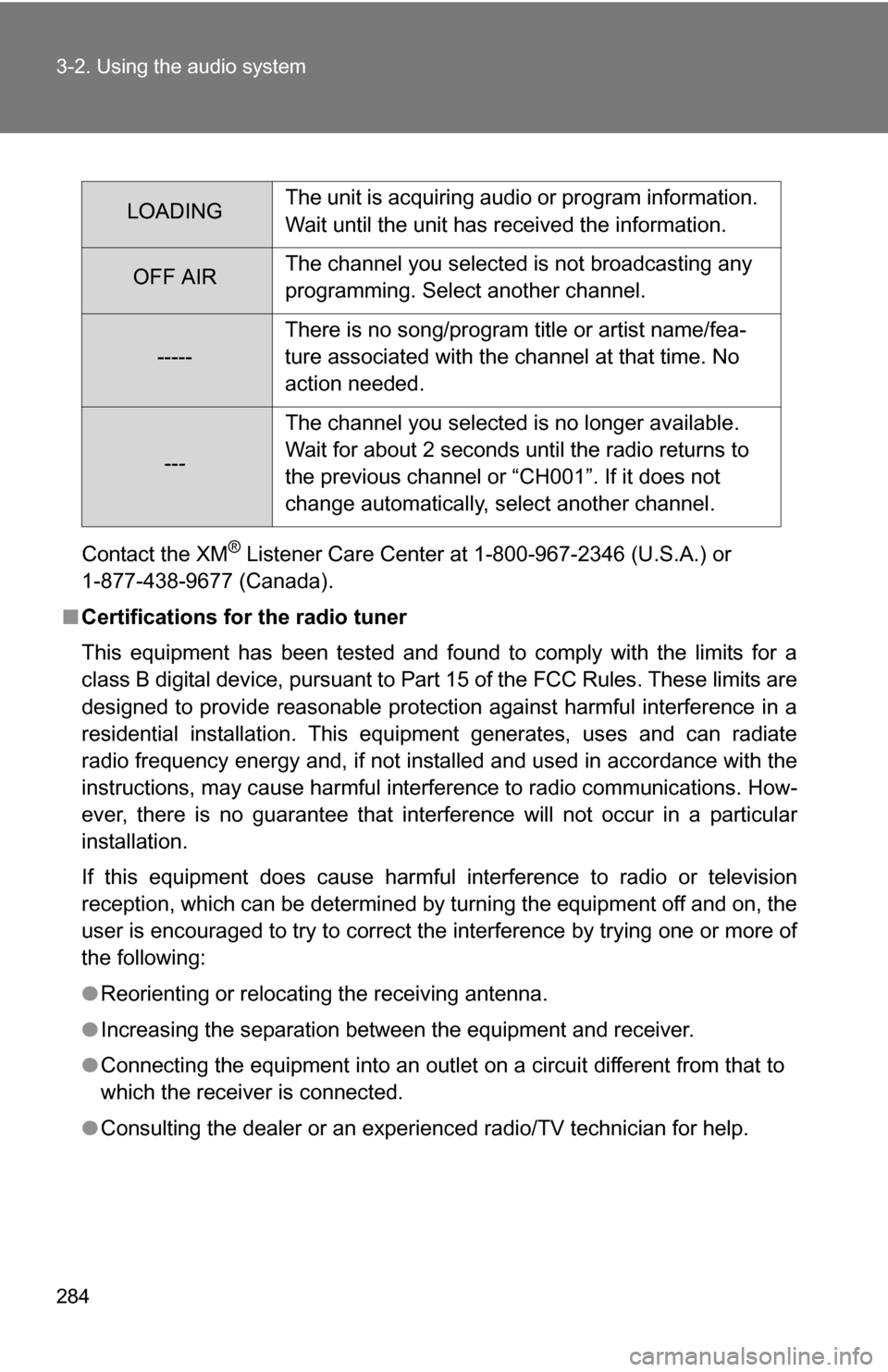
LOADINGThe unit is acquiring audio or program information.
Wait until the unit has received the information.
OFF AIRThe channel you selected is not broadcasting any
programming. Select another channel.
-----There is no song/program title or artist name/fea-
ture associated with the channel at that time. No
action needed.
---The channel you selected is no longer available.
Wait for about 2 seconds until the radio returns to
the previous channel or “CH001”. If it does not
change automatically, select another channel.
Page 285 of 612
285
3-2. Using the audio system
3
Interior features
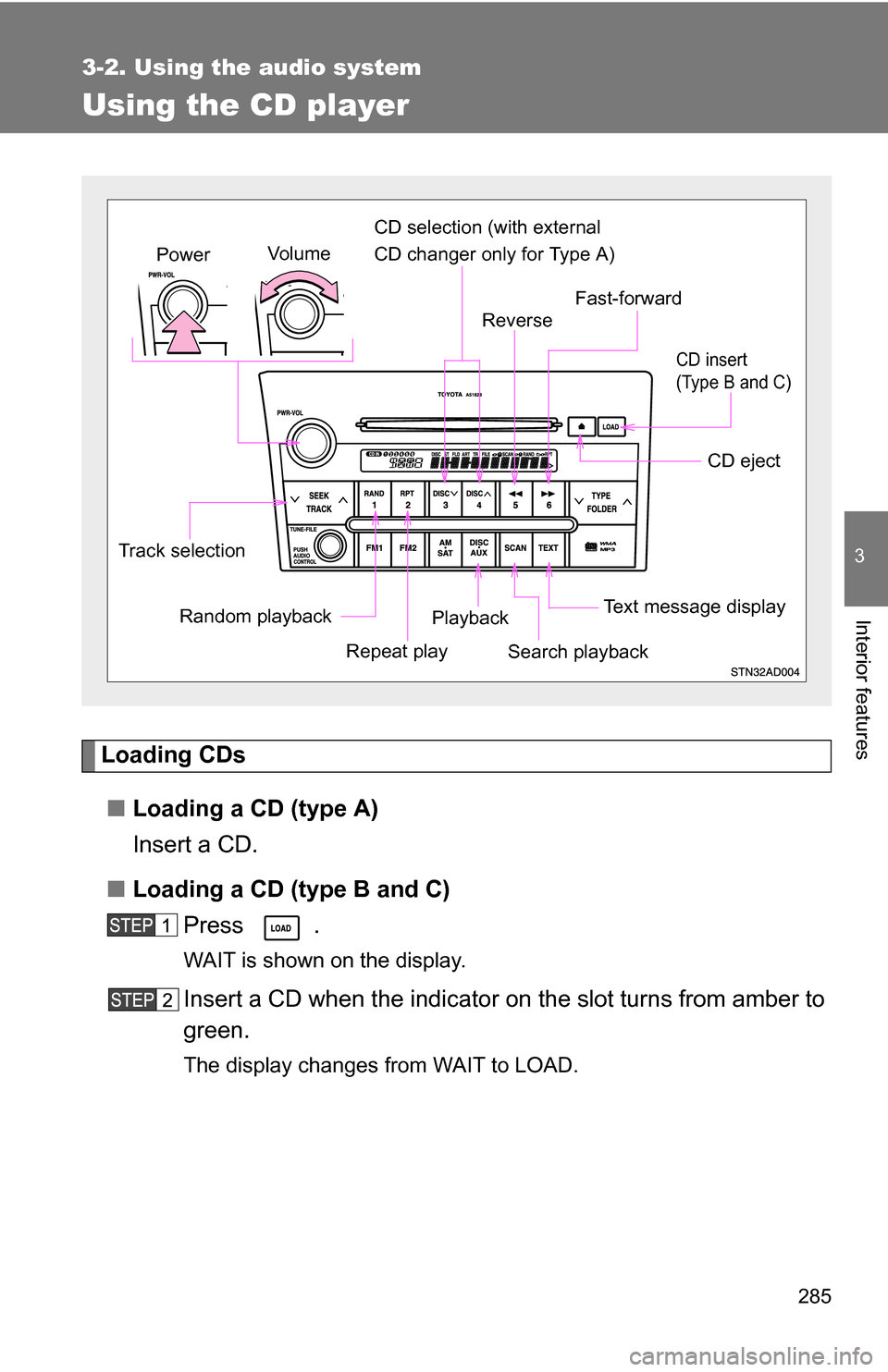
Using the CD player
Loading CDs■ Loading a CD (type A)
Insert a CD.
■ Loading a CD (type B and C)
Press .
WAIT is shown on the display.
Insert a CD when the indicator on the slot turns from amber to
green.
The display changes from WAIT to LOAD.
Random playback
Track selection
Repeat playPlayback
CD eject
Text message display
CD selection (with external
CD changer only for Type A)
Fast-forward
Search playback
Reverse
Vo l u m e
Power
CD insert
(Type B and C)
Page 286 of 612
286 3-2. Using the audio system
■Loading multiple CDs (type B and C)
Press and hold until you hear a beep.
WAIT is shown on the display.
Insert a CD when the indicator on the slot turns from amber to
green.
The display changes from WAIT to LOAD.
The indicator on the slot turns to amber when the CD is inserted.
Insert the next CD when the indicator on the slot turns from
amber to green again.
Repeat the procedure for the remaining CDs.
To stop the operation, press .
Ejecting CDs
■ Ejecting a CD (type A)
Press and remove the CD.
■ Ejecting a CD (type B and C)
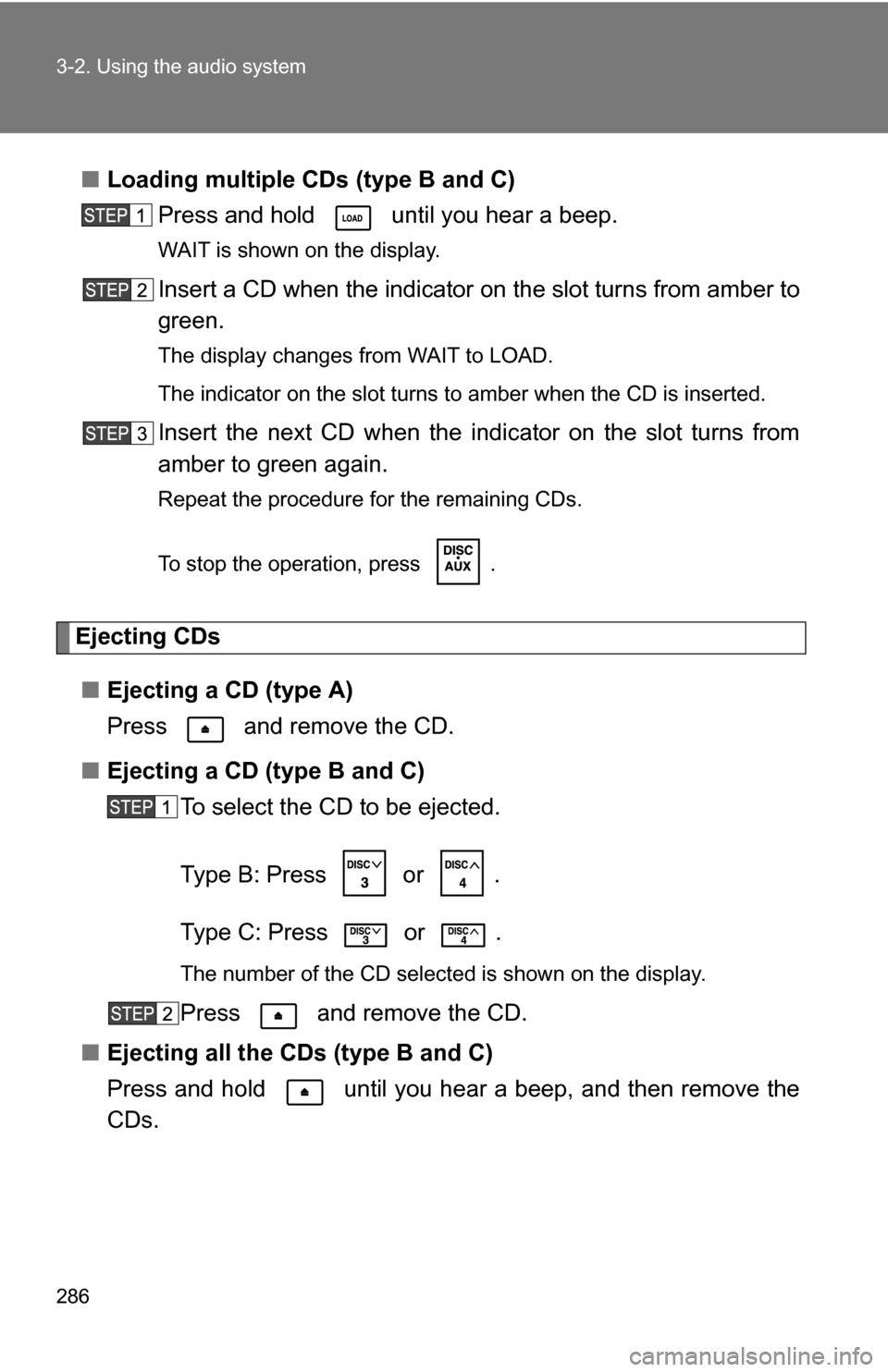
To select the CD to be ejected.
Type B: Press
or .
Type C: Press
or .
The number of the CD selected is shown on the display.
Press and remove the CD.
■ Ejecting all the CDs (type B and C)
Press and hold until you hear a beep, and then remove the
CDs.
Page 287 of 612
287
3-2. Using the audio system
3
Interior features
Selecting and scanning CDs (with CD changer only)
■ Selecting the desired CD
Type A and B: Press
or .
Type C: Press
or .
■ Scanning loaded CDs
Press and hold until you hear a beep.
The first 10 seconds of the first track on each CD will be played.
Press the button again when the desired CD is reached.
Selecting and scanning tracks■ Selecting a track
Press “
” to move up or “ ” to move down using until the
desired track number is displayed.
■ Scanning tracks
Press .
The first 10 seconds of each track will be played.
Press the button again when the desired track is reached.
Fast-forwarding and reversing tracksTo fast-forward or reverse.
Type A and B: Press and hold or .
Type C: Press and hold or .
Page 288 of 612
288 3-2. Using the audio system
Repeat play■ Repeating a track
Press or .
■ Repeating all of the tracks on a CD (with CD changer only)
Press and hold or until you hear a beep.
Random playback
■ Current CD
Press or .
Tracks are played in random order until the button is pressed once more.
■All CDs (with CD changer only)
Press and hold or until you hear a beep.
Tracks on all loaded CDs are played in random order until the button is
pressed once more.
Switching the display
Press .
Each time the button is pressed, the display changes in the order of Track
no./Elapsed time CD titleTrack name.