engine TOYOTA SEQUOIA 2009 2.G User Guide
[x] Cancel search | Manufacturer: TOYOTA, Model Year: 2009, Model line: SEQUOIA, Model: TOYOTA SEQUOIA 2009 2.GPages: 612
Page 62 of 612
62 1-3. Adjustable components (seats, mirrors, steering wheel)
Linking driving position memory with door unlock operation
Memorized driving positions can be recalled when you unlock the
driver’s door using the wireless remote control and open the driver’s
door.
■ Setting the linked door unlock operation
Set the driving positions into the memory system using the “1”
or “2” buttons. ( P. 6 1 )
Turn the engine switch off then, close the driver’s door.
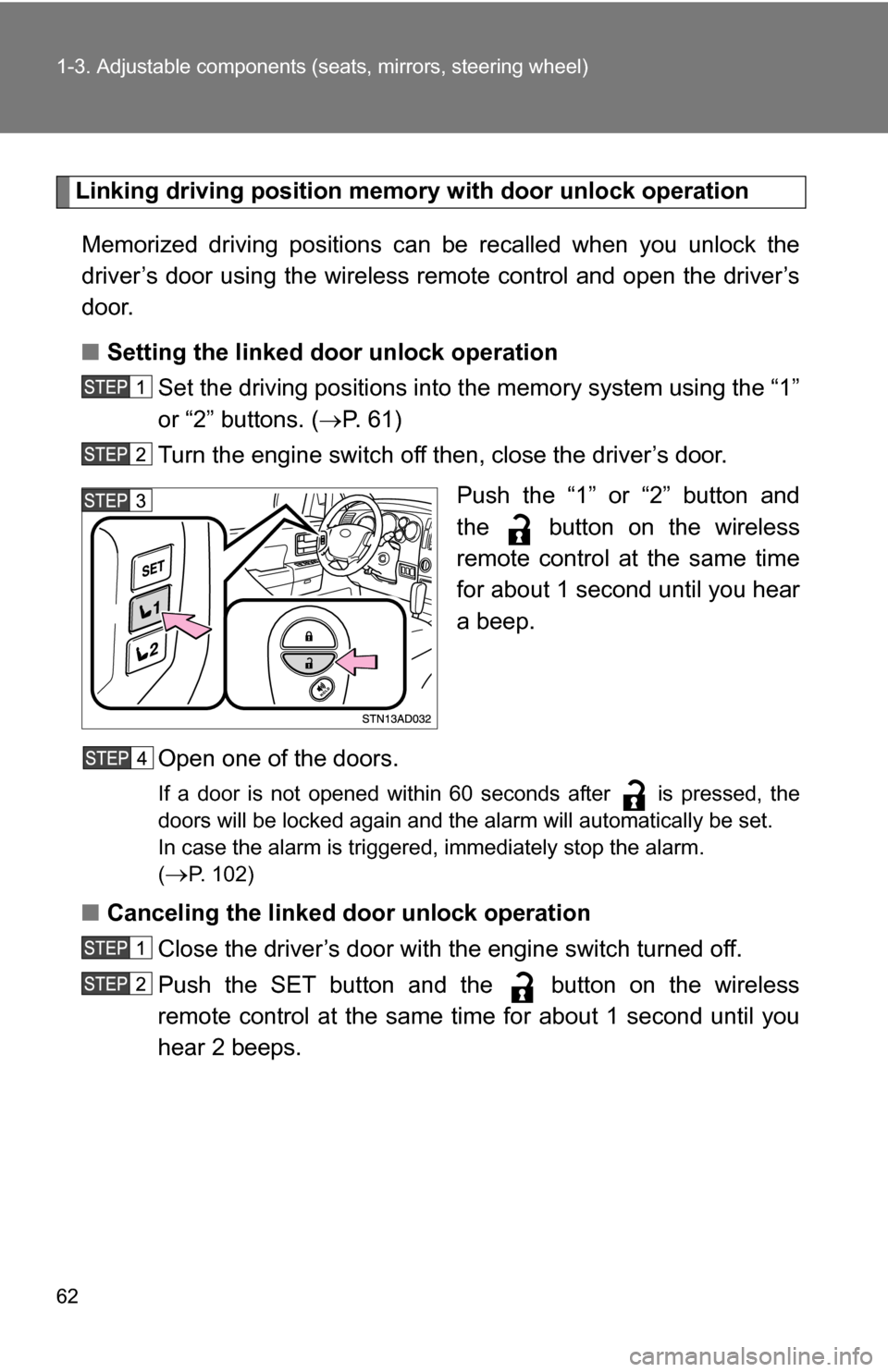
Push the “1” or “2” button and
the button on the wireless
remote control at the same time
for about 1 second until you hear
a beep.
Open one of the doors.
If a door is not opened within 60 seconds after is pressed, the
doors will be locked again and the alarm will automatically be set.
In case the alarm is triggered, immediately stop the alarm.
(
P. 102)
■ Canceling the linked door unlock operation
Close the driver’s door with the engine switch turned off.
Push the SET button and the button on the wireless
remote control at the same time for about 1 second until you
hear 2 beeps.
Page 63 of 612
63
1-3. Adjustable components (s
eats, mirrors, steering wheel)
1
Before driving
■Retained accessory power
Each memorized position (except for the tilt and telescopic steering column)
can be activated within 30 seconds after the driver’s door is opened, even if
the key is not in the engine switch.
■ If any position memory button is pushed while the adjustments are
being made
The operation will stop. To reactivate the system, push the button (“1” or “2”)
again.
■ If the battery is disconnected
The memorized positions must be reset because the computer’s memory is
erased when the battery is disconnected.
CAUTION
■Seat adjustment caution
Take care during seat adjustment that the seat does not strike the rear pas-
senger or squeeze your body against the steering wheel.
If this happens, you can stop the movement by pressing another seat posi-
tion memory button.
Page 78 of 612
78
1-3. Adjustable components (seats, mirrors, steering wheel)
Steering wheel (power-adjustable type)
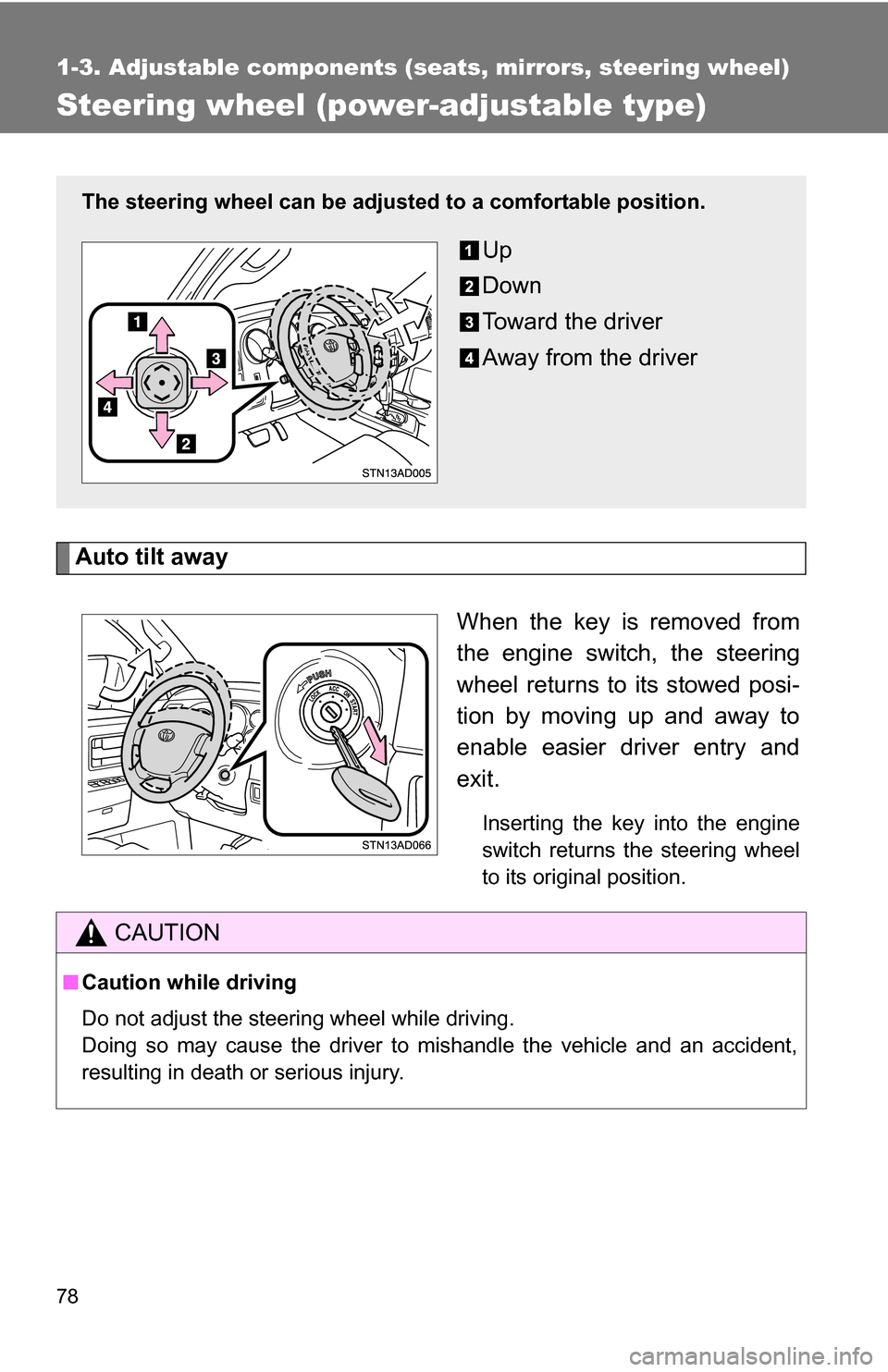
Auto tilt awayWhen the key is removed from
the engine switch, the steering
wheel returns to its stowed posi-
tion by moving up and away to
enable easier driver entry and
exit.
Inserting the key into the engine
switch returns the steering wheel
to its original position.
The steering wheel can be adjusted to a comfortable position.
Up
Down
Toward the driver
Away from the driver
CAUTION
■Caution while driving
Do not adjust the steering wheel while driving.
Doing so may cause the driver to mishandle the vehicle and an accident,
resulting in death or serious injury.
Page 80 of 612
80 1-3. Adjustable components (seats, mirrors, steering wheel)
■To prevent sensor error (veh icles with auto anti-glare inside rear view
mirror)
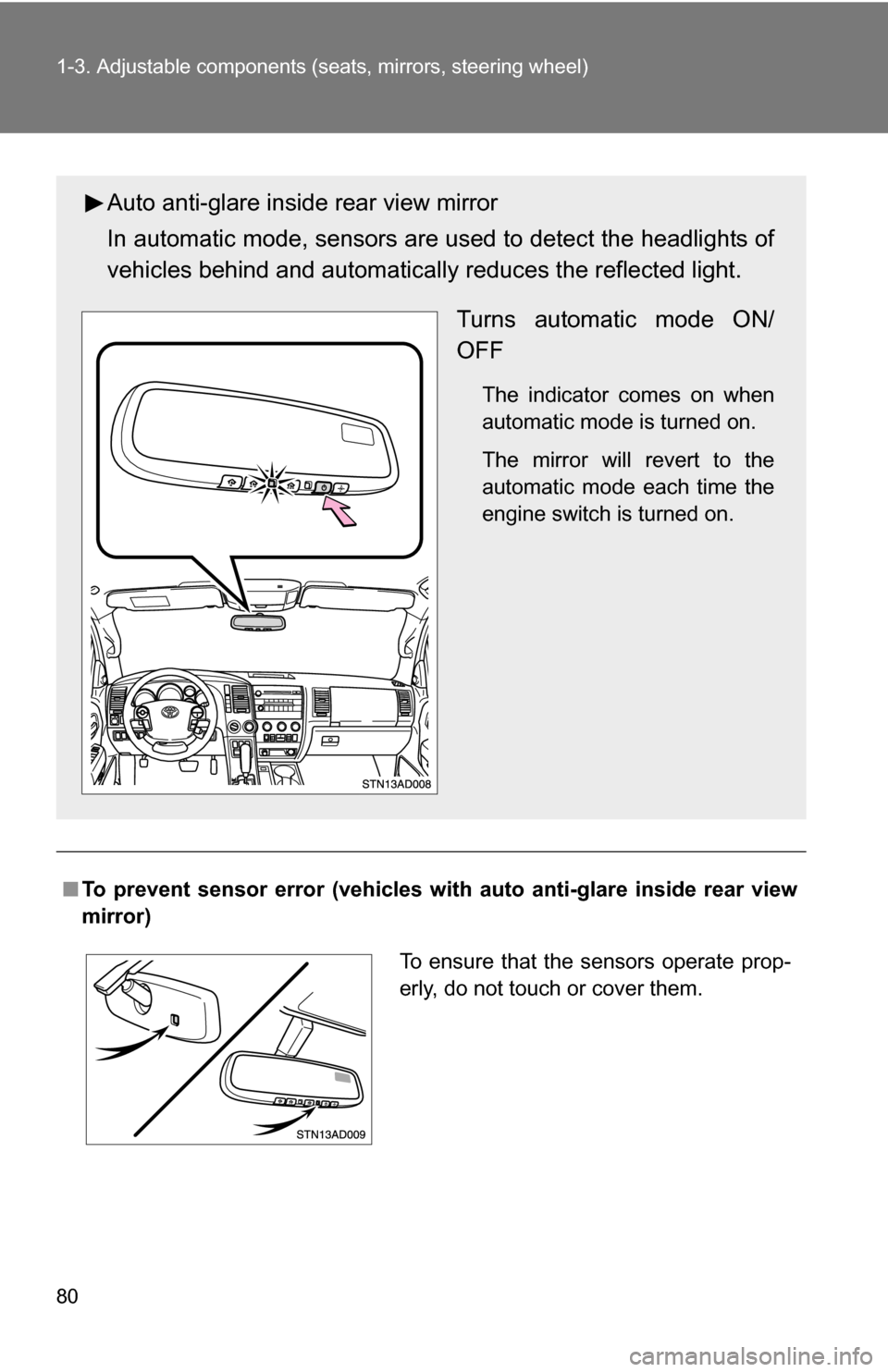
Auto anti-glare inside rear view mirror
In automatic mode, sensors are used to detect the headlights of
vehicles behind and automatical ly reduces the reflected light.
Turns automatic mode ON/
OFF
The indicator comes on when
automatic mode is turned on.
The mirror will revert to the
automatic mode each time the
engine switch is turned on.
To ensure that the sensors operate prop-
erly, do not touch or cover them.
Page 82 of 612
82
1-3. Adjustable components (seats, mirrors, steering wheel)
Outside rear view mirrors
Folding back the mirrorsFrom outside Push backward to fold the mir-
rors.
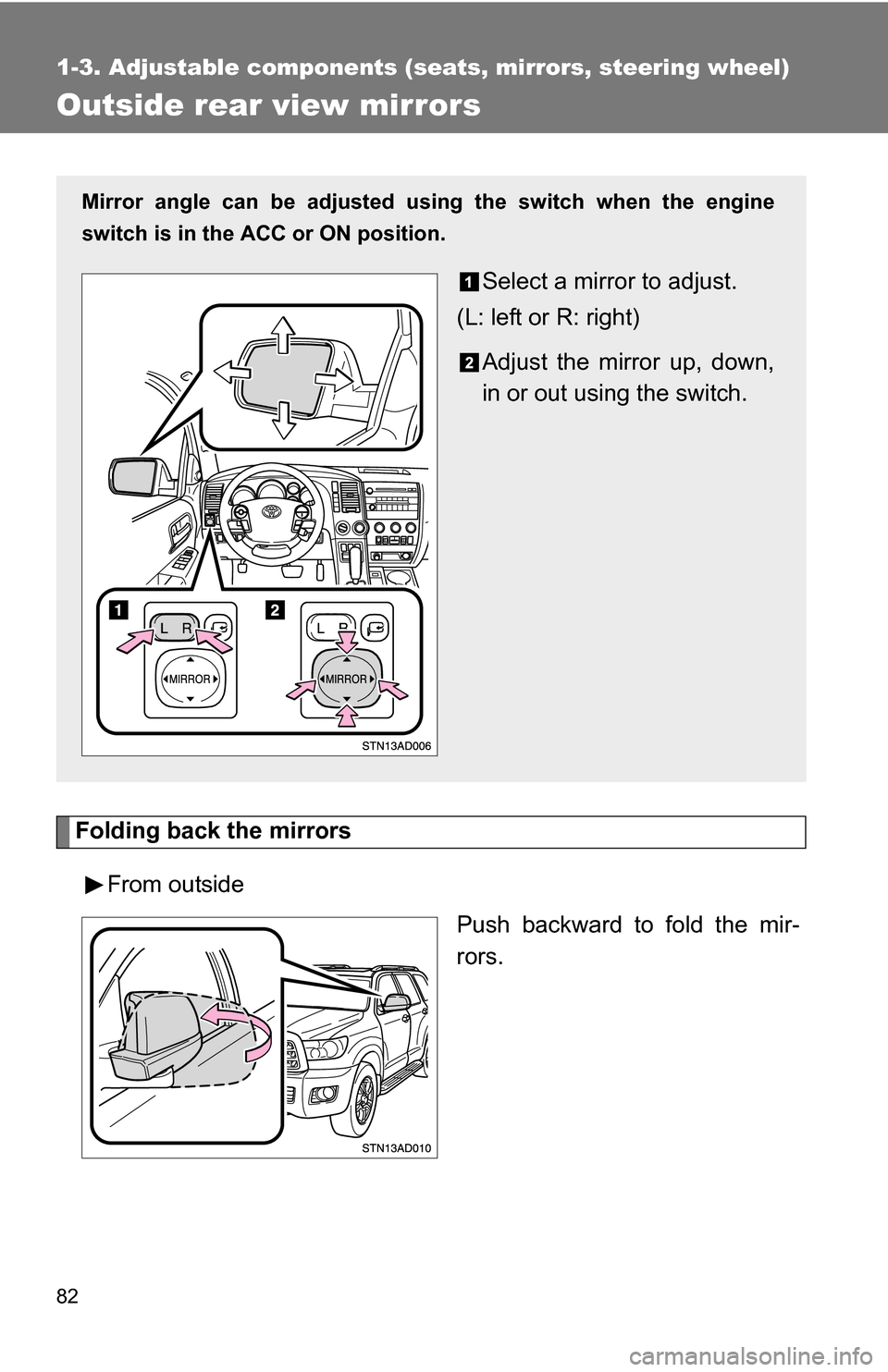
Mirror angle can be adjusted using the switch when the engine
switch is in the ACC or ON position.
Select a mirror to adjust.
(L: left or R: right)
Adjust the mirror up, down,
in or out using the switch.
Page 89 of 612
89
1-4. Opening and closing the windows and moon roof
1
Before driving
■
The power windows can be operated when
The engine switch is in the ON position.
■ Door lock linked power windows operation
The power windows can be opened and closed using the key. ( P. 37)
■ Operating the power windows after turning the engine switch off
The power windows can be operated for approximately 43 seconds even
after the engine switch is turned to the ACC position or turned off. They can-
not, however, be operated once either front door is opened.
■ Jam protection function
If an object becomes caught between the window and the window frame,
window travel is stopped and the window is opened slightly.
■ Customization that can be co nfigured at Toyota dealer
Settings (e.g. power windows) can be changed.
(Customizable features P. 584)
CAUTION
■Closing the windows
Observe the following precautions.
Failing to do so may result in death or serious injury.
●Check to make sure that all passengers do not have any part of their body
in a position where it could be caught when a window is being operated.
● Do not allow children to operate the power windows.
Closing a power window on someone can cause serious injury, and in
some instances, even death.
■ Jam protection function
●Never try jamming any part of your body to activate the jam protection
function intentionally.
● The jam protection function may not work if something gets caught just
before the window fully closes.
Page 91 of 612
91
1-4. Opening and closing the windows and moon roof
1
Before driving
■
The power back window can be operated when
● The engine switch is in the ON position.
● The power back window can be opened when the rear window wiper is
working. At that time, the wiper stops working until the window is closed
again.
If the rear window is not fully closed, the rear window wiper, washer, and
defogger will not work.
■ Operating the power back window after turning the engine switch off
The power back window can be operated for approximately 43 seconds
even after the engine switch is turned to the ACC position or turned off. It
cannot, however, be operated once either front door is opened.
■ Jam protection function
If an object becomes caught between the window and the window frame,
window travel is stopped and the window is opened slightly.
■ Customization that can be co nfigured at Toyota dealer
Settings (e.g. rear window) can be changed.
(Customizable features P. 584)
CAUTION
■Closing the power back window
Observe the following precautions.
Failing to do so may result in death or serious injury.
●Check to make sure that all passengers do not have any part of their body
in a position where it could be caught when a window is being operated.
● Do not allow children to operate the power back window.
Closing a power back window on someone can cause serious injury, and
in some instances, even death.
■ Jam protection function
●Never try jamming any part of your body to activate the jam protection
function intentionally.
● The jam protection function may not work if something gets caught just
before the window fully closes.
Page 93 of 612
93
1-4. Opening and closing the windows and moon roof
1
Before driving
■
The moon roof can be operated when
The engine switch is in the ON position.
■ Door lock linked moon roof operation
The moon roof can be opened and closed using the key. ( P. 37)
■ Operating the moon roof after turning the engine switch off
The moon roof can be operated for approximately 43 seconds even after the
engine switch is turned to the ACC or turned off. It cannot, however, be oper-
ated once either front door is opened.
■ Jam protection function
If an object is detected between the moon roof and the frame while closing
or tilting down, travel is stopped and the moon roof opens slightly.
■ If the moon roof cannot be closed
If the moon roof cannot be closed automatically, such as when the jam pro-
tection function activates accidentally due to a malfunction, pressing and
holding the switch closes the moon roof.
■ To reduce wind noise
Drive with the moon roof opened to slightly before the fully open position as
driving with the moon roof opened fully will cause wind noise.
■ Sunshade
The sunshade can be opened and closed manually. However, the sunshade
will open automatically when the moon roof is opened.
■ Moon roof open reminder function
An alarm will sound when the driver’s door is opened with the moon roof not
fully closed and the engine switch off.
■ Customization that can be co nfigured at Toyota dealer
Settings (e.g. moon roof) can be changed.
(Customizable features P. 584)
Page 95 of 612
95
1
Before driving
1-5. Refueling
Opening the fuel tank cap
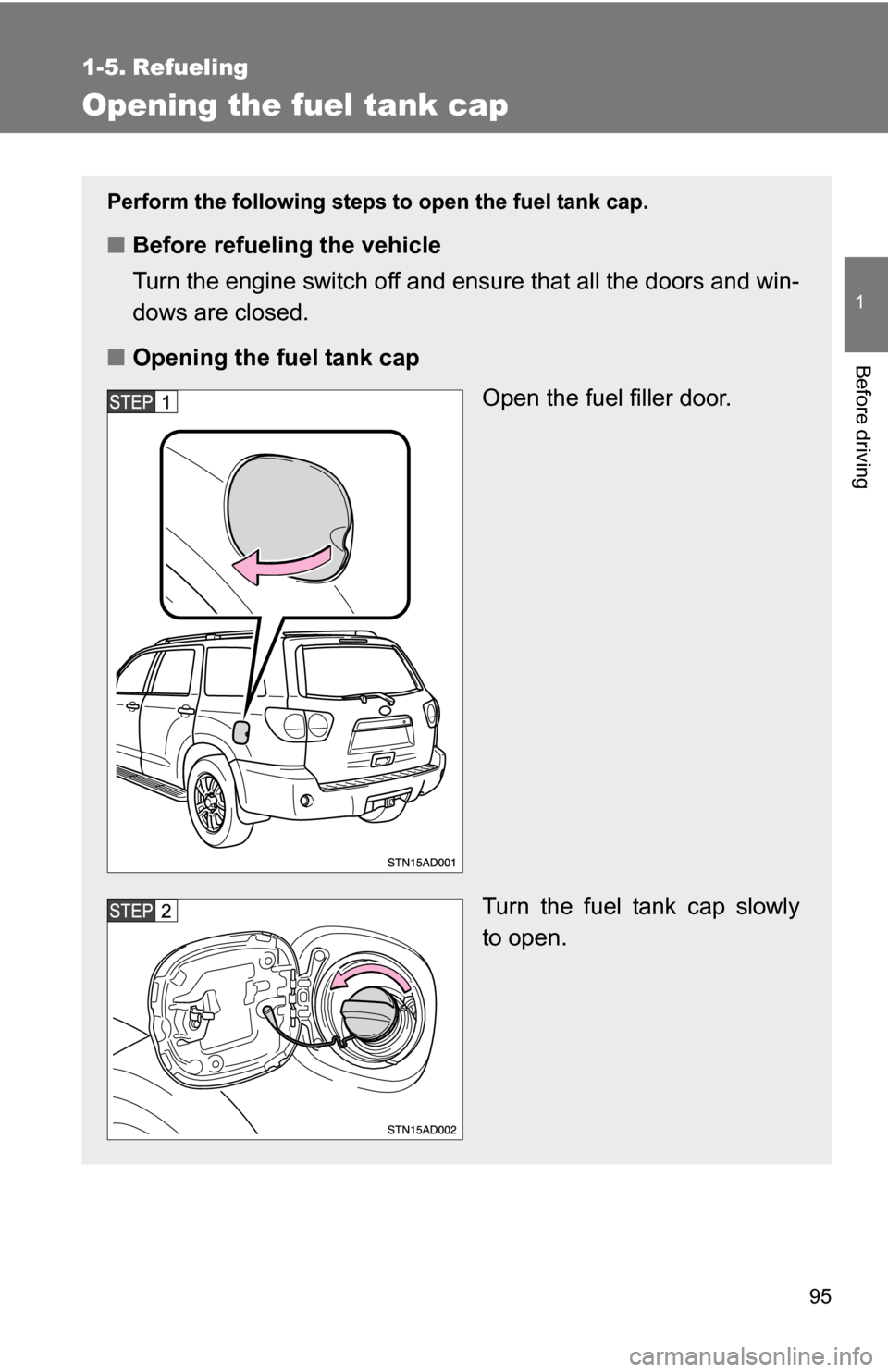
Perform the following steps to open the fuel tank cap.
■Before refueling the vehicle
Turn the engine switch off and ensure that all the doors and win-
dows are closed.
■ Opening the fuel tank cap
Open the fuel filler door.
Turn the fuel tank cap slowly
to open.
Page 96 of 612
96 1-5. Refueling
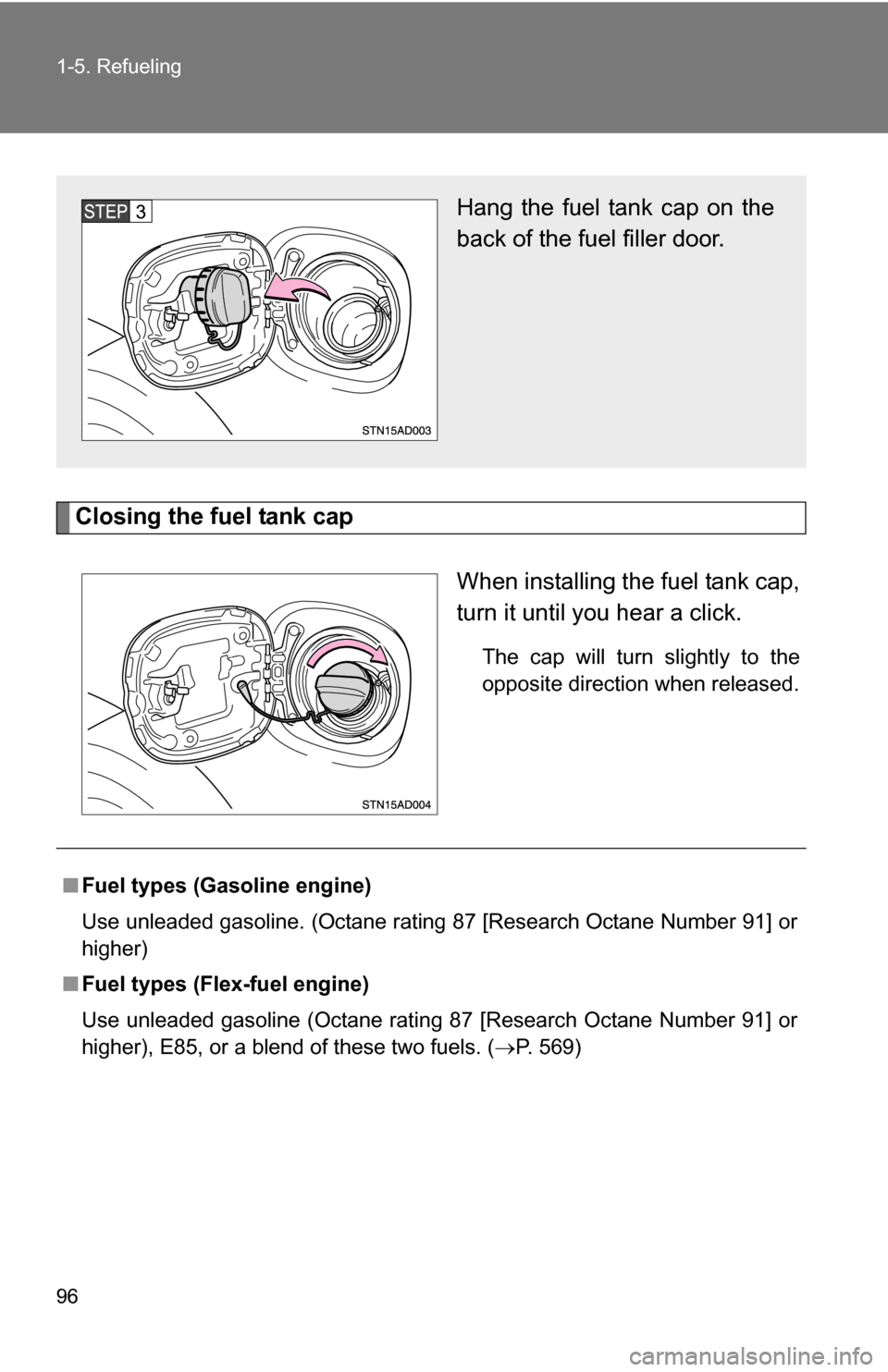
Closing the fuel tank capWhen installing the fuel tank cap,
turn it until you hear a click.
The cap will turn slightly to the
opposite direction when released.
Hang the fuel tank cap on the
back of the fuel filler door.
■Fuel types (Gasoline engine)
Use unleaded gasoline. (Octane rating 87 [Research Octane Number 91] or
higher)
■ Fuel types (Flex-fuel engine)
Use unleaded gasoline (Octane rating 87 [Research Octane Number 91] or
higher), E85, or a blend of these two fuels. ( P. 569)