light TOYOTA SEQUOIA 2009 2.G Repair Manual
[x] Cancel search | Manufacturer: TOYOTA, Model Year: 2009, Model line: SEQUOIA, Model: TOYOTA SEQUOIA 2009 2.GPages: 612
Page 196 of 612
196 2-4. Using other driving systems
Example of follow-up cruising (when following a vehicle driving
slower than the set speed):
When the speed is set to 62 mph (100 km/h) and the vehicle ahead
is driving at 50 mph (80 km/h)
The system continues follow-up cruising while adjusting for changes in the
speed of the vehicle ahead in order to maintain the vehicle-to-vehicle dis-
tance set by the driver.
Example of acceleration (when there are no longer vehicles driving
slower than the set speed in the lane ahead):
When the speed is set to 62 mph (100 km/h) and the vehicle ahead
driving at 50 mph (80 km/h) is out of the lane
When the vehicle ahead of you executes a lane change, the system
slowly accelerates until the set vehicle speed is reached. The system then
returns to fixed speed cruising.
■Fine adjustment of the set speed
Adjustment of the set speed by the following speed can be made by lightly
pressing the lever up or down and releasing it.
In the constant speed control mode: Approximately 1.0 mph (1.6 km/h)
In the vehicle-to-vehicle distance control mode:U.S.A.: Approximately 5 mph (8 km/h)
Canada: Approximately 3 mph (5 km/h)
■ Dynamic laser cruise control warning lights, display and buzzers
Warning lights, display and buzzers are used to indicate a system malfunc-
tion or to alert you to the need for caution while driving. ( P. 527)
■ The dynamic laser cruise can be set when
●The shift lever is in D or the shift range position must be in 4 or 5 in S
mode (5-speed models).
● The shift lever is in D or the shift range position must be in between 4 and
6 in S mode (6-speed models).
● Vehicle speed is between approximately 27 mph (45 km/h) and 85 mph
(135 km/h).
■ Accelerating
The vehicle can be accelerated normally.
Page 199 of 612
199
2-4. Using other
driving systems
2
When driving
CAUTION
■To avoid bodily injury
●Do not look into the aperture window.
● Use of controls or adjustment or performance of procedures other than
those specified herein may result in hazardous radiation exposure.
■ Before using dynamic laser cruise control
Do not overly rely on vehicle-to-vehicle distance control.
Be aware of the set vehicle speed. If automatic deceleration/acceleration is
not appropriate, adjust the vehicle speed, as well as the distance between
your vehicle and vehicles ahead by applying the brakes, etc.
■ To avoid inadvertent cruise control activation
Turn off the system when not in use.
■ Situations unsuitable for dynamic laser cruise control
Do not use dynamic laser cruise control in any of the following situations.
Doing so may result in inappropriate control of speed and could cause seri-
ous or fatal accident.
●In heavy traffic
● On roads with sharp bends
● On winding roads
● On slippery roads, such as those covered with rain, ice or snow
● Where there are sudden changes between sharp up and down gradients
● At entrances to expressways
● When weather conditions are bad enough that they may prevent the sen-
sors from functioning correctly (fog, rain, snow, sandstorm, direct sunlight,
etc.)
● Where buzzer can be heard often
■ When the laser radar sensor may not be correctly detecting the vehicle
ahead
Apply the brakes as necessary when any of the following types of vehicles
are in front of you.
As the sensor may not be able to correctly detect these types of vehicles,
the proximity alarm ( P. 527) will not be activated, and an accident may
result.
Page 201 of 612
201
2-4. Using other
driving systems
2
When driving
CAUTION
■To ensure the laser radar sensor functions correctly
Do not do the following to the sensor as doing so may cause the sensor not
to function correctly and could result in an accident.
●Stick or attach anything to them
● Leave them dirty
● Disassemble, subject them to strong shocks
● Modify or paint them
● Replace them with non-genuine parts
NOTICE
■Handling the laser radar sensor
Observe the following to ensure the cruise control system can function effec-
tively.
●Keep the sensor clean at all times.
Clean the sensor with a soft cloth so you do not mark or damage them.
● Do not subject the sensor or surrounding area to a strong impact.
If the sensor moves even slightly off position, the system may malfunction.
If the sensor or surrounding area is subject to a strong impact, always
have the area inspected and adjusted by a Toyota dealer.
● Do not disassemble the sensor.
● Do not attach accessories or stickers to the sensor, surrounding area.
Page 206 of 612
206 2-4. Using other driving systems
■Sensor detection information
●Certain vehicle conditions and the surrounding environment may affect
the ability of a sensor to correctly detect an obstacle. Particular instances
where this may occur are listed below.
• There is dirt, snow or ice on a sensor.
• A sensor is frozen.
• A sensor is covered in any way.
• The vehicle is leaning considerably to one side.
• On an extremely bumpy road, on an incline, on gravel, or on grass.
• The vicinity of the vehicle is noisy due to vehicle horns, motorcycle
engines, air brakes of large vehicles, or other loud noises producing
ultrasonic waves.
• There is another vehicle equipped with parking assist sensors in the vicinity.
• A sensor is coated with a sheet of spray or heavy rain.
• The vehicle is equipped with a fender pole or radio antenna.
• A bumper or sensor receives a strong impact.
• The vehicle is approaching a tall or right-angled curb.
• In harsh sunlight or intense cold weather.
• The area directly under the bumpers is not detected. Objects lower than the sensors or thin stakes etc. may be detected ini-
tially, but as they draw closer, they may cease to be detected.
• A towing hitch is mounted to the vehicle.
• A non-genuine Toyota suspension (lowered suspension etc.) is installed.
• When attaching a two-way radio antenna.
• When a towing eyelet is mounted on your vehicle.
• When the bumper is damaged.
In addition to the examples above, there are instances in which, because of
their shapes, signs and other objects may be judged by a sensor to be closer
than they are.
● The shape of the obstacle may prevent a sensor from detecting it. Pay
particular attention to the following obstacles:
• Wires, fences, ropes, etc.
• Cotton, snow and other materials that absorb radio waves
• Sharply-angled objects
Page 224 of 612
224 2-4. Using other driving systems
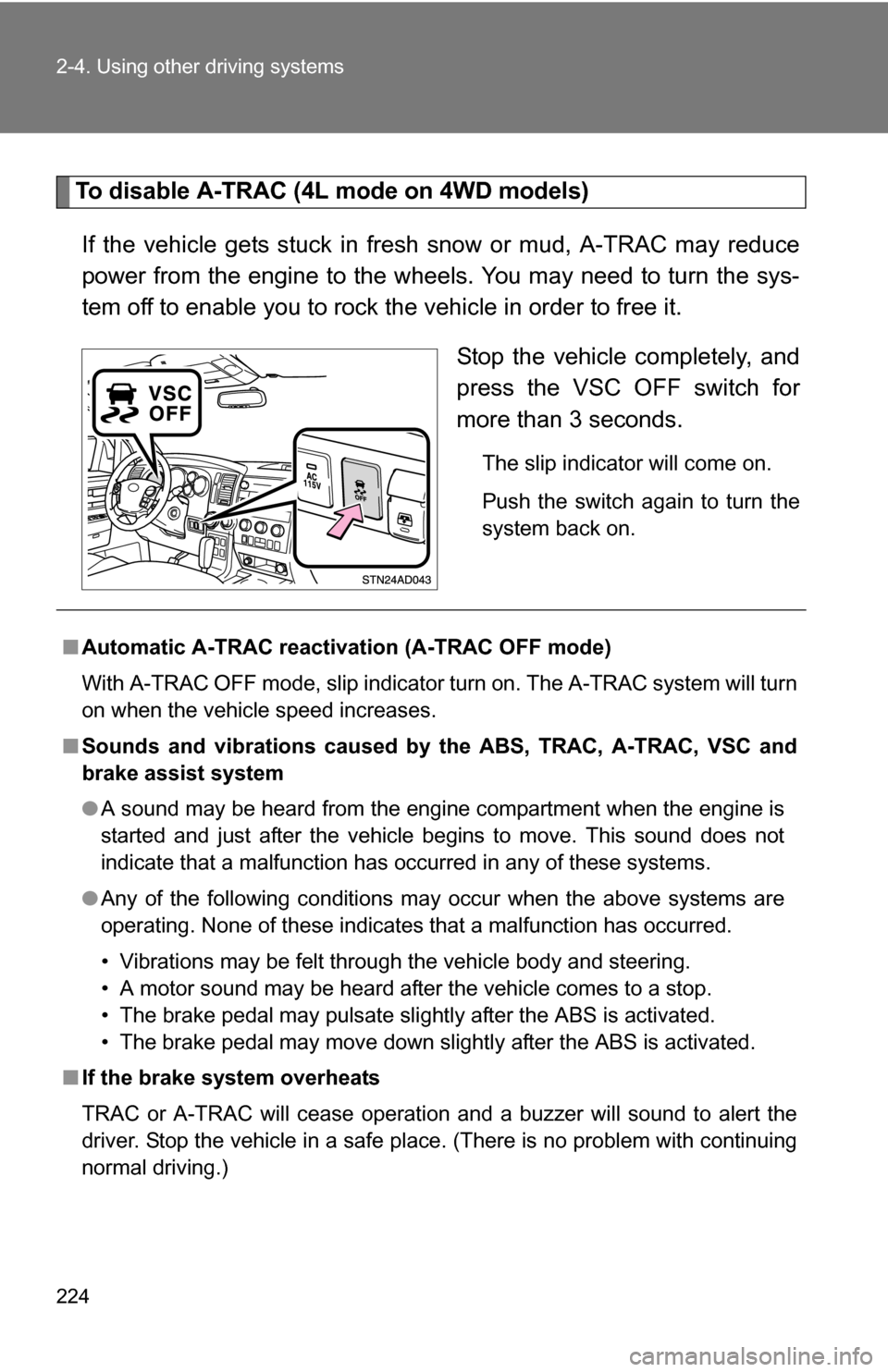
To disable A-TRAC (4L mode on 4WD models)If the vehicle gets stuck in fresh snow or mud, A-TRAC may reduce
power from the engine to the wheels. You may need to turn the sys-
tem off to enable you to rock the vehicle in order to free it. Stop the vehicle completely, and
press the VSC OFF switch for
more than 3 seconds.
The slip indicator will come on.
Push the switch again to turn the
system back on.
■Automatic A-TRAC reactivat ion (A-TRAC OFF mode)
With A-TRAC OFF mode, slip indicator turn on. The A-TRAC system will turn
on when the vehicle speed increases.
■ Sounds and vibrations caused by the ABS, TRAC, A-TRAC, VSC and
brake assist system
● A sound may be heard from the engine compartment when the engine is
started and just after the vehicle begins to move. This sound does not
indicate that a malfunction has occurred in any of these systems.
● Any of the following conditions may occur when the above systems are
operating. None of these indicates that a malfunction has occurred.
• Vibrations may be felt through the vehicle body and steering.
• A motor sound may be heard after the vehicle comes to a stop.
• The brake pedal may pulsate slightly after the ABS is activated.
• The brake pedal may move down slightly after the ABS is activated.
■ If the brake system overheats
TRAC or A-TRAC will cease operation and a buzzer will sound to alert the
driver. Stop the vehicle in a safe place. (There is no problem with continuing
normal driving.)
Page 246 of 612
246 2-5. Driving information
Hitch● If you wish to install a trailer hitch, contact your Toyota dealer.
● Use only a hitch that c onforms to the gross trailer weight require-
ment.
● Follow the directions supplied by the hitch manufacturer.
● Lubricate the hitch ball with a light coat of grease.
● Remove the trailer hitch whenever you are not towing a trailer.
After removing the hitch, seal any mounting hole in the vehicle
body to prevent entry of any substances into the vehicle.
Page 248 of 612
248 2-5. Driving information
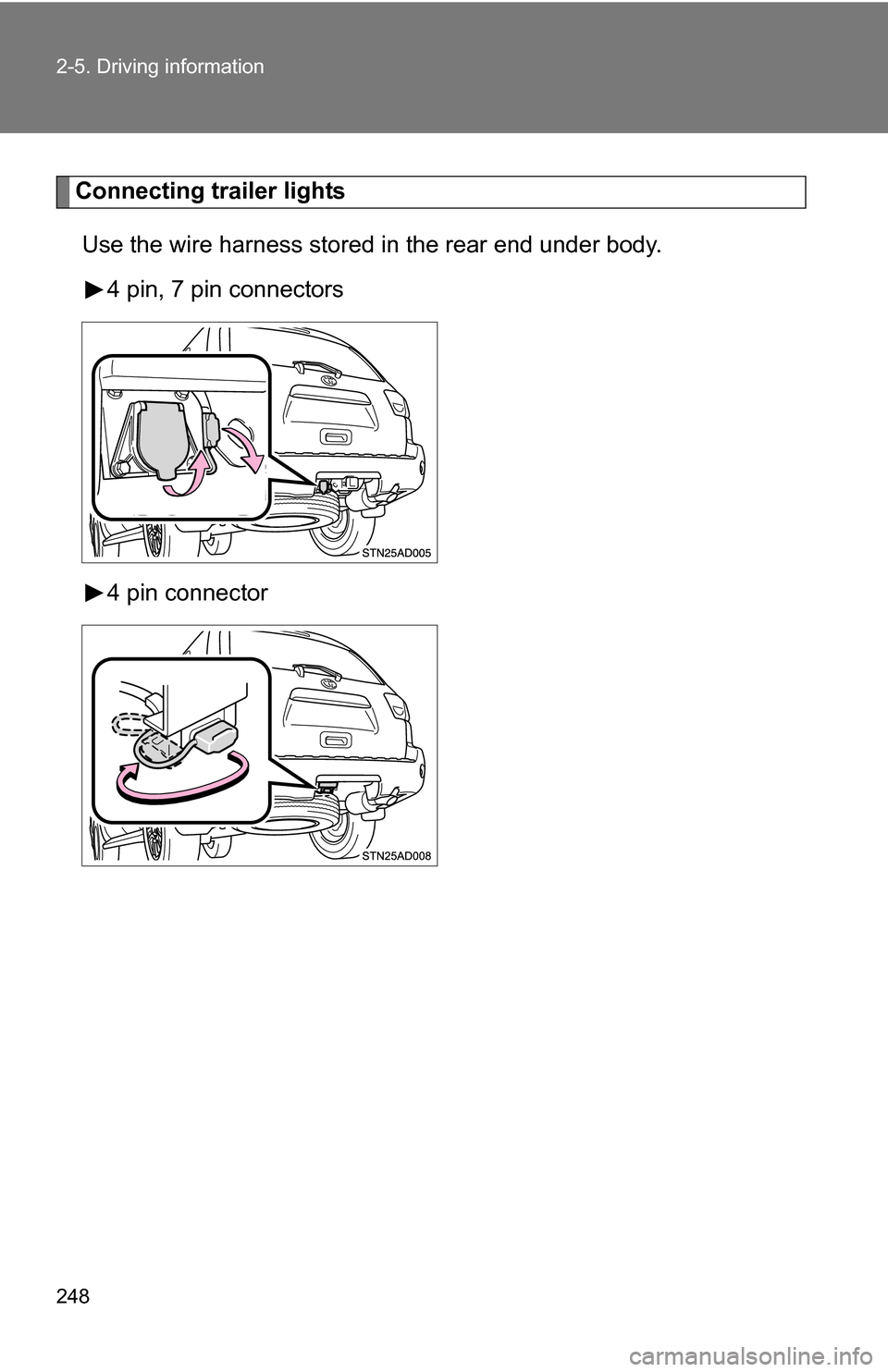
Connecting trailer lightsUse the wire harness stored in the rear end under body. 4 pin, 7 pin connectors
4 pin connector
Page 249 of 612
249
2-5. Driving information
2
When driving
Trailer towing tips
Your vehicle will handle differently when towing a trailer. The three
main causes of vehicle-trailer ac cidents are driver error, excessive
speed and improper trailer loading. Keep the following in mind when
towing.
● Speed limits for towing a trailer vary by state or province. Do not
exceed the posted towing speed limit.
● Before starting out, check the trailer’s light and the vehicle-trailer
connections. Recheck after driving a short distance.
● Practice turning, stopping and reve rsing with the trailer attached in
an area away from traffic until you become accustomed to the feel
of the vehicle.
● Reversing with a trailer attached is difficult and requires practice.
Grip the bottom of the steering wheel and move your hand to the
left to move the trailer to the left. Move your hand to the right to
move the trailer to the right. (Thi s is generally opposite to reversing
without a trailer attached.) Avoid sharp or prolonged turning. Have
someone guide you when reversing to reduce the risk of an acci-
dent.
● As stopping distance is increased when towing a trailer, vehicle-to-
vehicle distance should be increased. For each 10 mph (16 km/h)
of speed, allow at least o ne vehicle and trailer length.
● Avoid sudden braking as you may skid, resulting in jackknifing and
loss of control. This is especiall y true on wet or slippery surfaces.
● Avoid jerky starts or sudden acceleration.
● Avoid jerky steering and sharp turns, and slow down before mak-
ing a turn.
● Note that when making a turn, th e trailer wheels will be closer than
the vehicle wheels to the inside of the turn. Compensate by making
a larger than normal turning radius.
Page 252 of 612
252 2-5. Driving information
■Before towing
Check that the following conditions are met:
●Ensure that your vehicle’s tires are properly inflated. ( P. 567)
● Trailer tires should be inflated according to the trailer manufacturer’s rec-
ommendation.
● All trailer lights work to be legal.
● All lights work each time you connect them.
● The trailer ball is set up at the proper height for the coupler on the t\
railer.
● The vehicle remains level when a loaded or unloaded trailer is hitched.
Do not drive if the vehicle is not level, and check for improper tongue
load, overloading, worn suspension, or other possible causes.
● The trailer cargo is securely loaded.
● The rear view mirrors conform to all applicable federal, state/provincial or
local regulations. If they do not, install rear view mirrors appropriate for
towing purposes.
● Depress TOW/HAUL button (if equipped)
■ When connecting and disconnecting a trailer
Set the electronically modulated air suspension system to MAN., or turn off
the engine, when the system is in N mode. (if equipped)
■ AVS (adaptive variable suspension system) (if equipped)
The suspension can be switched for improvement in driveability. ( P. 213)
■ Break-in schedule
If your vehicle is new or equipped with any new power train components
(such as an engine, transmission, differential and wheel bearing), Toyota
recommends that you do not tow a trailer until it has been driven for over 500
miles (800 km).
However, avoid full throttle acceleration.
■ Maintenance
●If you tow a trailer, your vehicle will require more frequent maintenance
due to the additional load. (See “Scheduled Maintenance Guide” or
“Owner’s Manual Supplement”.)
● Retighten the fixing bolts of the towing ball and bracket after approxi-
mately 600 miles (1000 km).
Page 256 of 612
256 2-5. Driving information
NOTICE
■When installing a trailer hitch
●Use only the position recommended by your Toyota dealer. Do not install
the trailer hitch on the bumper; this may cause body damage.
● Do not use axle-mounted hitches, as they can cause damage to the axle
housing, wheel bearing, wheels or tires.
■ Safety chain
A safety chain must always be used between the towing vehicle and the
trailer. Leave sufficient slack in the chain for turns. The chain should cross
under the trailer tongue to prevent the tongue from dropping to the ground in
the case that it becomes damaged or separated. For the correct safety chain
installation procedure, ask your Toyota dealer.
■ Do not directly splice trailer lights
Directly splicing trailer lights may damage your vehicle’s electrical system
and cause a malfunction.