lock TOYOTA SEQUOIA 2009 2.G Repair Manual
[x] Cancel search | Manufacturer: TOYOTA, Model Year: 2009, Model line: SEQUOIA, Model: TOYOTA SEQUOIA 2009 2.GPages: 612
Page 160 of 612
160
2-1. Driving procedures
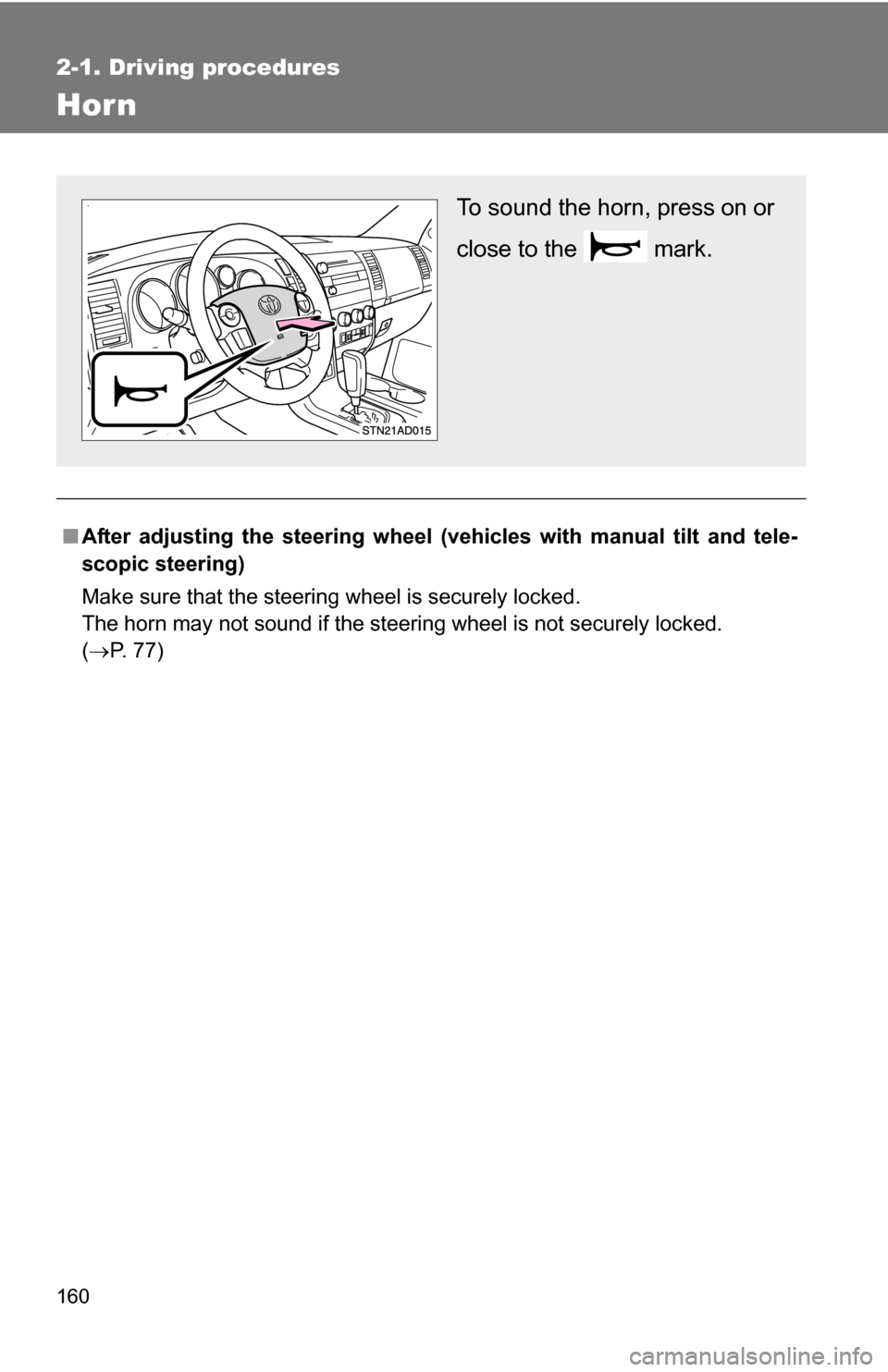
Hor n
■After adjusting the steering wheel (veh icles with manual tilt and tele-
scopic steering)
Make sure that the steering wheel is securely locked.
The horn may not sound if the steering wheel is not securely locked.
( P. 77)
To sound the horn, press on or
close to the mark.
Page 168 of 612
168 2-2. Instrument cluster
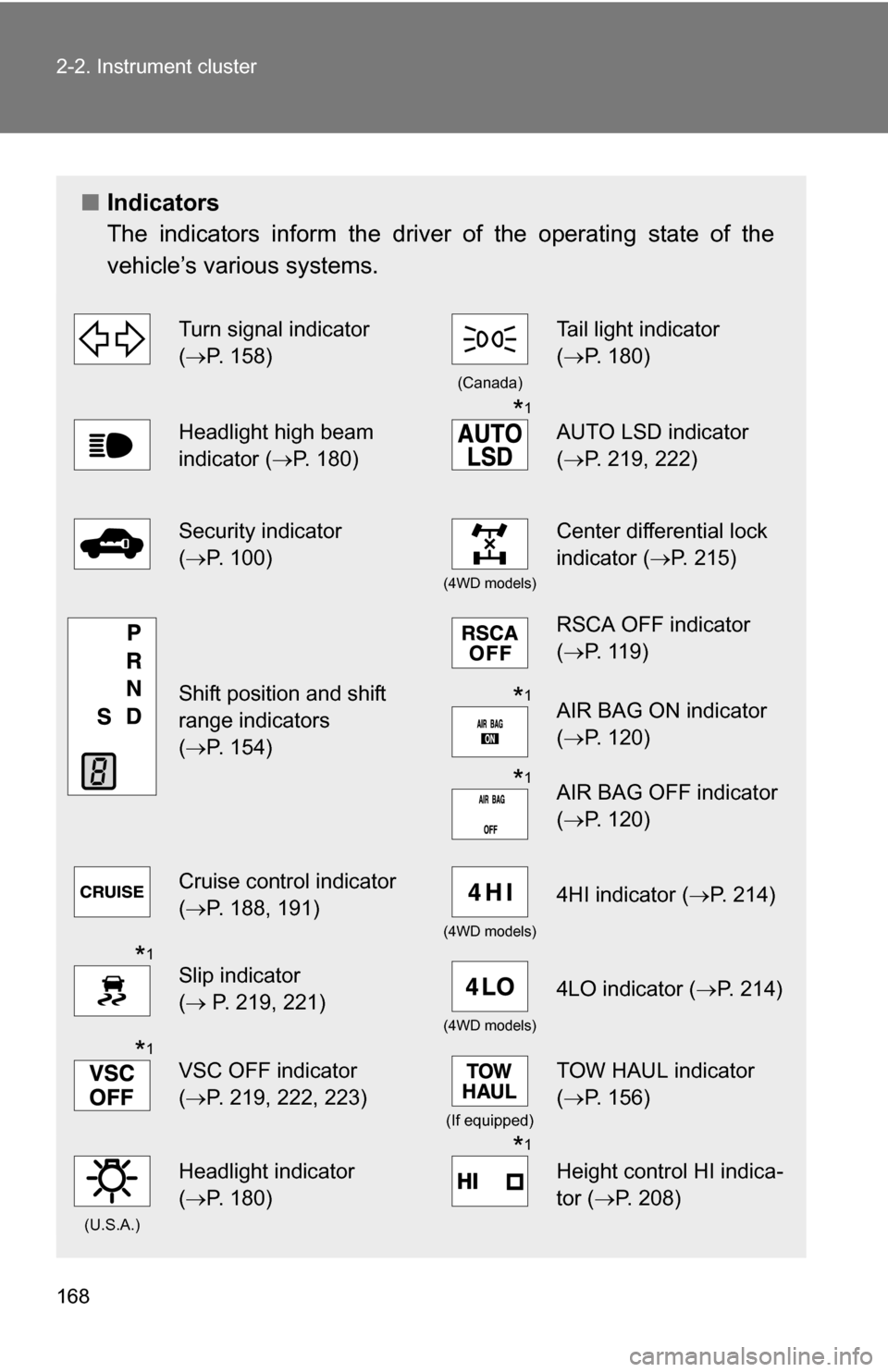
■Indicators
The indicators inform the driver of the operating state of the
vehicle’s various systems.
Turn signal indicator
(P. 158)
(Canada)
Tail light indicator
( P. 180)
Headlight high beam
indicator ( P. 180)*1
AUTO LSD indicator
(P. 219, 222)
Security indicator
(P. 100)
(4WD models)
Center differential lock
indicator ( P. 215)
Shift position and shift
range indicators
(P. 154)
RSCA OFF indicator
( P. 119)
*1AIR BAG ON indicator
(P. 120)
*1AIR BAG OFF indicator
(P. 120)
Cruise control indicator
(P. 188, 191)
(4WD models)
4HI indicator ( P. 214)
*1
Slip indicator
( P. 219, 221)
(4WD models)
4LO indicator ( P. 214)
*1
VSC OFF indicator
(P. 219, 222, 223)
(If equipped)
TOW HAUL indicator
( P. 156)
(U.S.A.)
Headlight indicator
(P. 180)*1
Height control HI indica-
tor (P. 208)
Page 173 of 612
173
2-2. Instrument cluster
2
When driving
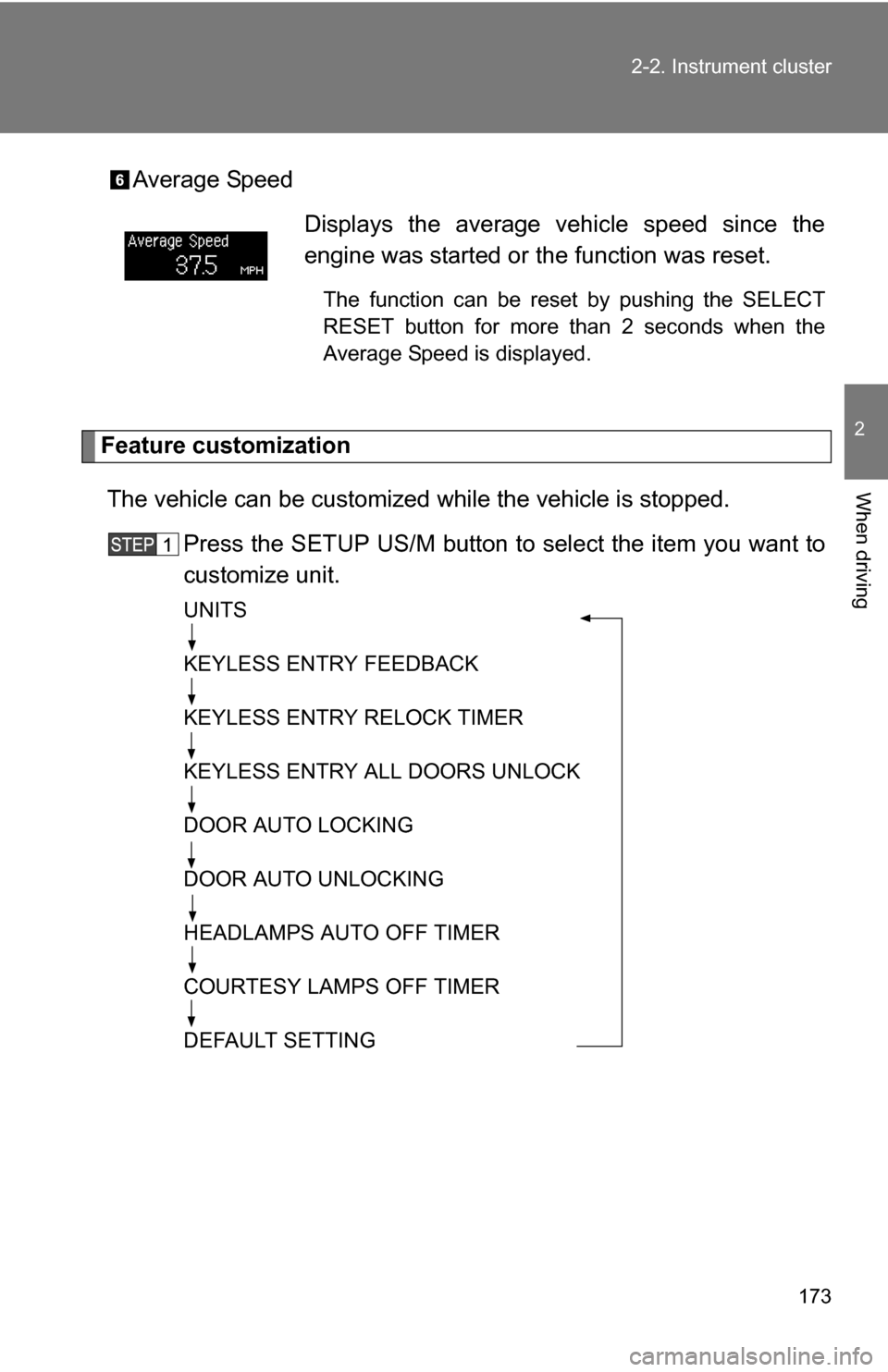
Average Speed
Feature customization
The vehicle can be customized while the vehicle is stopped.
Press the SETUP US/M button to select the item you want to
customize unit.
UNITS
KEYLESS ENTRY FEEDBACK
KEYLESS ENTRY RELOCK TIMER
KEYLESS ENTRY ALL DOORS UNLOCK
DOOR AUTO LOCKING
DOOR AUTO UNLOCKING
HEADLAMPS AUTO OFF TIMER
COURTESY LAMPS OFF TIMER
DEFAULT SETTING
Displays the average vehicle speed since the
engine was started or the function was reset.
The function can be reset by pushing the SELECT
RESET button for more than 2 seconds when the
Average Speed is displayed.
Page 174 of 612
174 2-2. Instrument cluster
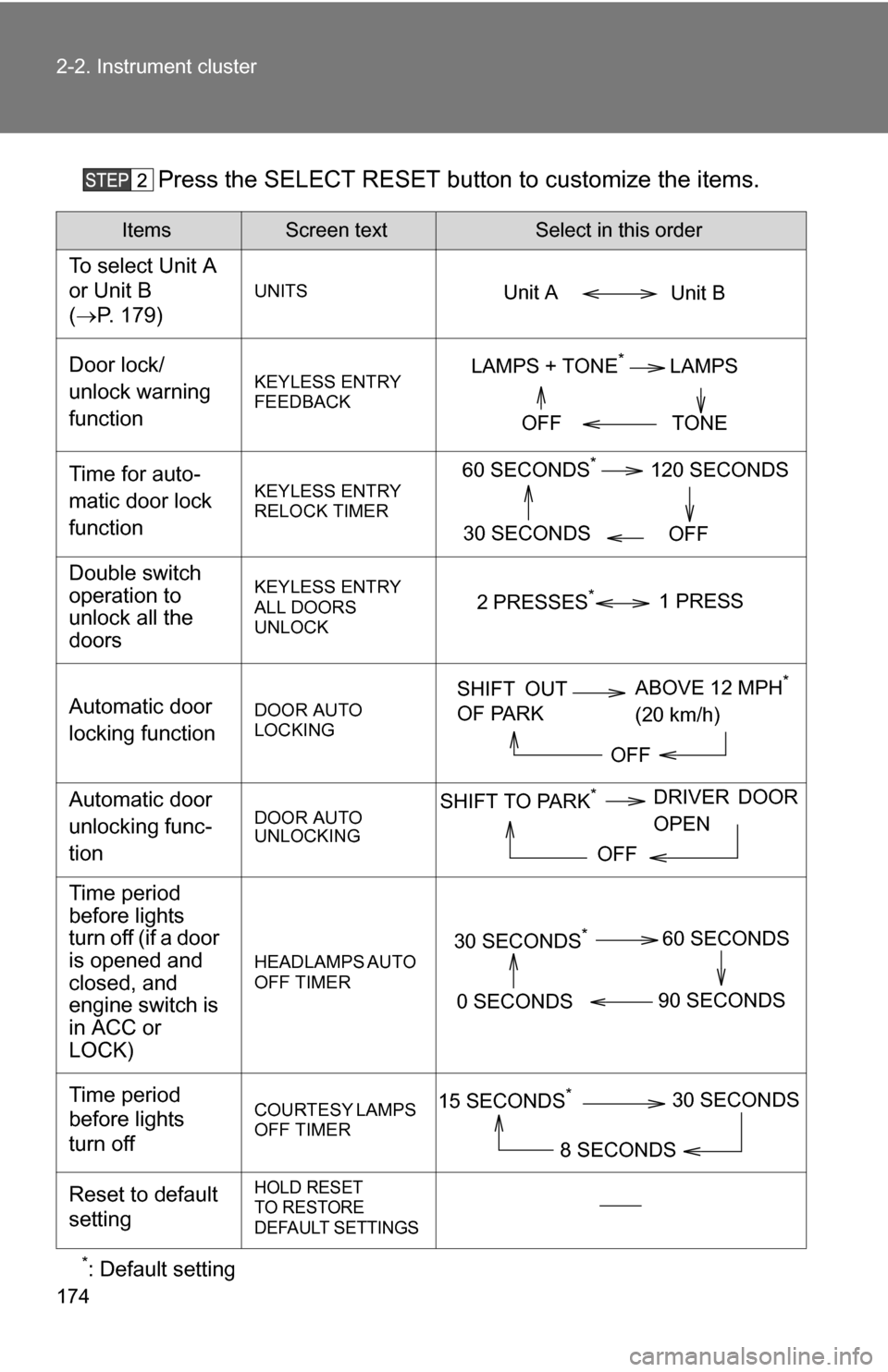
Press the SELECT RESET button to customize the items.
*: Default setting
ItemsScreen textSelect in this order
To select Unit A
or Unit B
(P. 179)
UNITS
Door lock/
unlock warning
functionKEYLESS ENTRY
FEEDBACK
Time for auto-
matic door lock
functionKEYLESS ENTRY
RELOCK TIMER
Double switch
operation to
unlock all the
doorsKEYLESS ENTRY
ALL DOORS
UNLOCK
Automatic door
locking functionDOOR AUTO
LOCKING
Automatic door
unlocking func-
tionDOOR AUTO
UNLOCKING
Time period
before lights
turn off (if a door
is opened and
closed, and
engine switch is
in ACC or
LOCK)
HEADLAMPS AUTO
OFF TIMER
Time period
before lights
turn offCOURTESY LAMPS
OFF TIMER
Reset to default
settingHOLD RESET
TO RESTORE
DEFAULT SETTINGS
Unit B
Unit A
LAMPS + TONE*LAMPS
TONE
OFF
60 SECONDS*120 SECONDS
30 SECONDS OFF
2 PRESSES*1 PRESS
SHIFT OUT
OF PARKABOVE 12 MPH*
(20 km/h)
OFF
SHIFT TO PARK*DRIVER DOOR
OPEN
OFF
30 SECONDS*60 SECONDS
90 SECONDS
0 SECONDS
15 SECONDS*30 SECONDS
8 SECONDS
Page 177 of 612
177
2-2. Instrument cluster
2
When driving
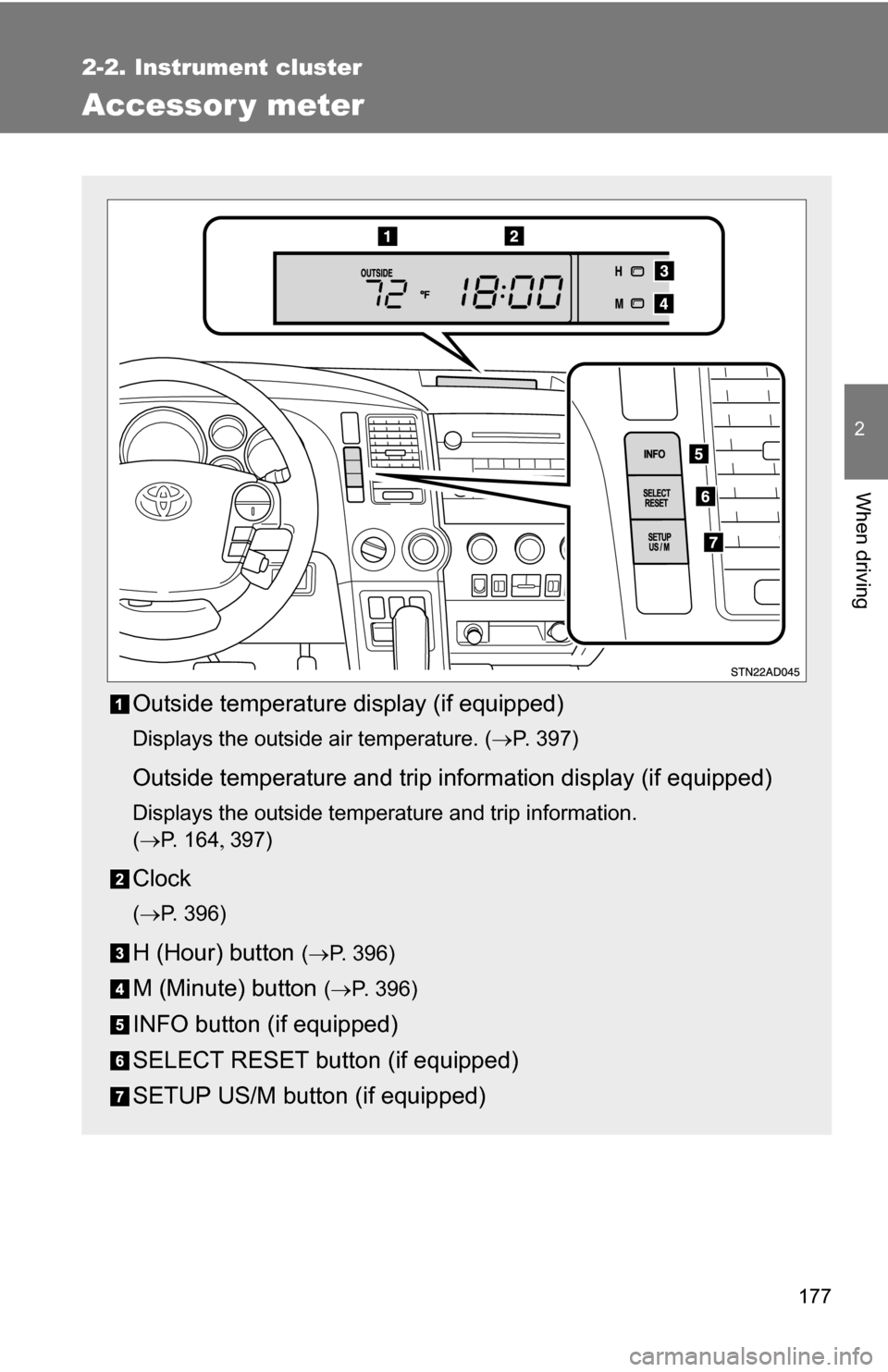
Accessor y meter
Outside temperature display (if equipped)
Displays the outside air temperature. (P. 397)
Outside temperature and trip information display (if equipped)
Displays the outside temperature and trip information.
(P. 1 6 4 397)
Clock
(P. 396)
H (Hour) button (P. 396)
M (Minute) button ( P. 396)
INFO button (if equipped)
SELECT RESET button (if equipped)
SETUP US/M button (if equipped)
Page 181 of 612
181
2-3. Operating the lights and wipers
2
When driving
■
Daytime running light system (if equipped)
To make your vehicle more visible to other drivers, the front turn signal lights
turn on automatically whenever the engine is started and the parking brake
is released. Daytime running lights are not designed for use at night.
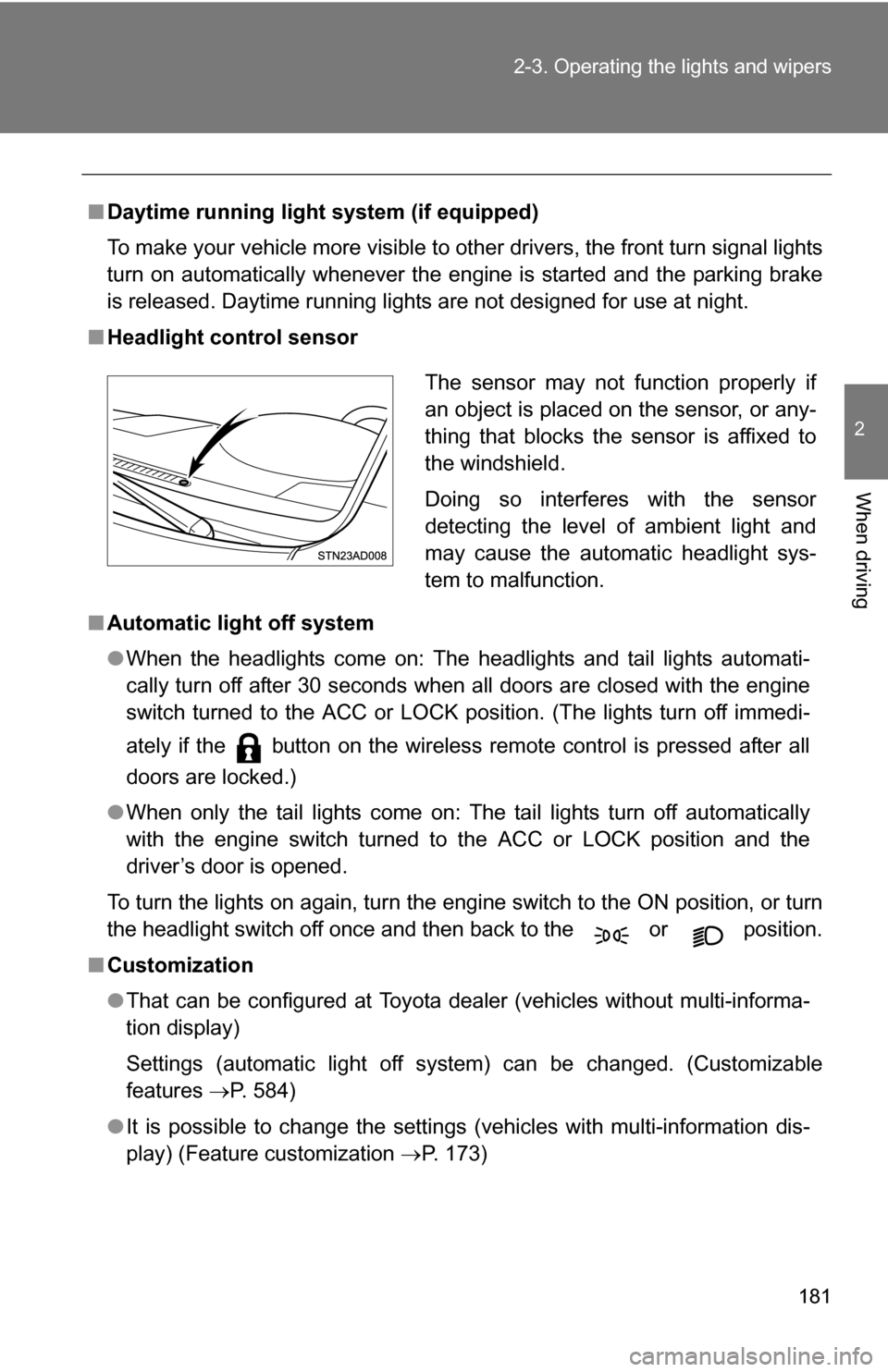
■ Headlight control sensor
■ Automatic light off system
●When the headlights come on: The headlights and tail lights automati-
cally turn off after 30 seconds when all doors are closed with the engine
switch turned to the ACC or LOCK position. (The lights turn off immedi-
ately if the button on the wireless remote control is pressed after all
doors are locked.)
● When only the tail lights come on: The tail lights turn off automatically
with the engine switch turned to the ACC or LOCK position and the
driver’s door is opened.
To turn the lights on again, turn the engine switch to the ON position, or turn
the headlight switch off once and then back to the or position.
■ Customization
●That can be configured at Toyota dealer (vehicles without multi-informa-
tion display)
Settings (automatic light off system) can be changed. (Customizable
features P. 584)
● It is possible to change the settings (vehicles with multi-information dis-
play) (Feature customization P. 173)
The sensor may not function properly if
an object is placed on the sensor, or any-
thing that blocks the sensor is affixed to
the windshield.
Doing so interferes with the sensor
detecting the level of ambient light and
may cause the automatic headlight sys-
tem to malfunction.
Page 185 of 612
185
2-3. Operating the lights and wipers
2
When driving
■
The windshield wiper and washer can be operated when
The engine switch must be in the ON position.
■ If no windshield washer fluid sprays
Check that the washer nozzles are not blocked and if there is washer fluid in
the windshield washer fluid reservoir.
NOTICE
■When the windshield is dry
Do not use the wipers, as they may damage the windshield.
■ When there is no washer fluid spray from the nozzle
Damage to the washer fluid pump may be caused if the lever is pulled
toward you and held continually.
■ When a nozzle becomes block
Do not try to clear it with a pin or other object. The nozzle will be damaged.
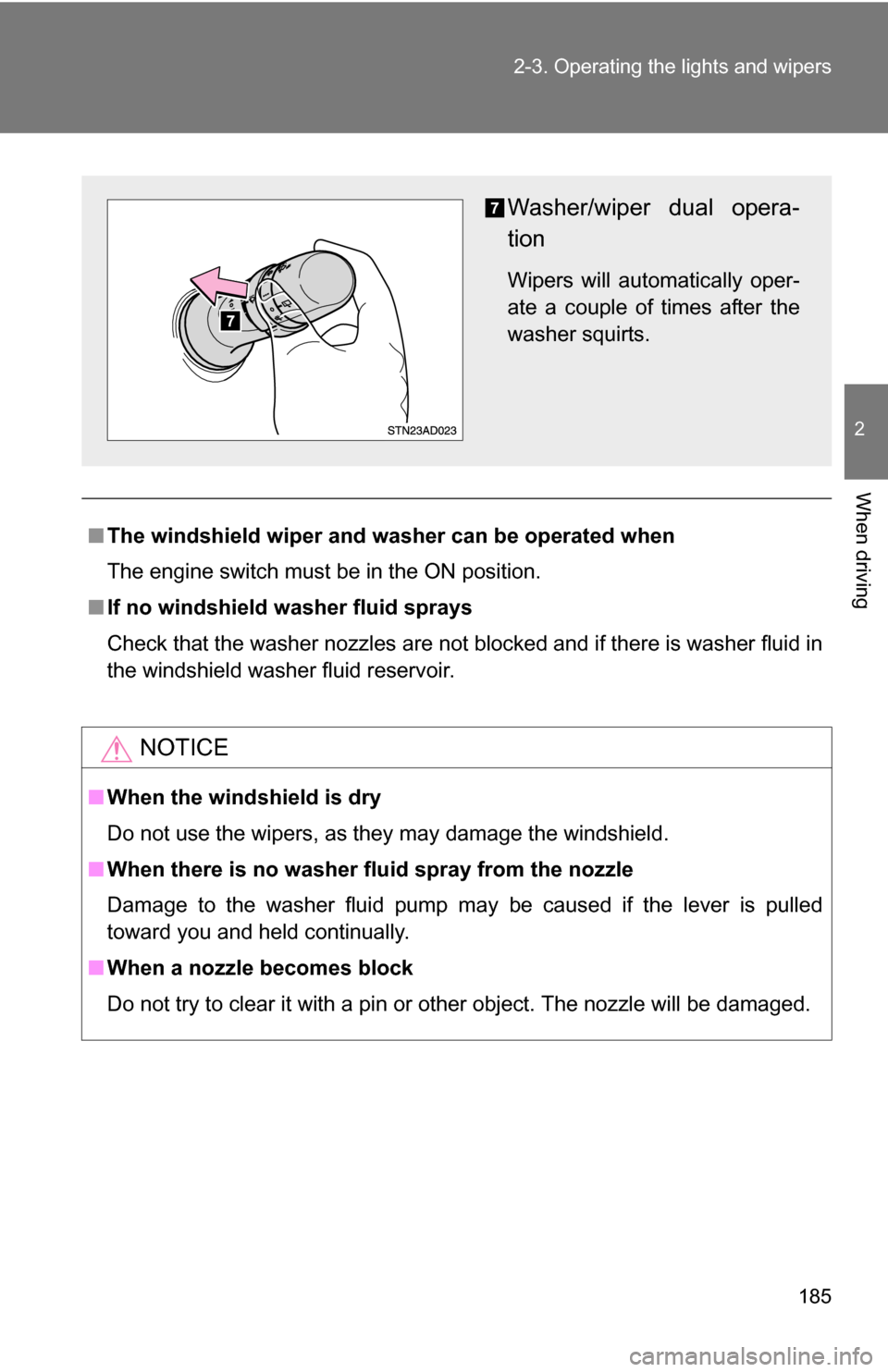
Washer/wiper dual opera-
tion
Wipers will automatically oper-
ate a couple of times after the
washer squirts.
Page 190 of 612
190 2-4. Using other driving systems
■Automatic cruise control cancellation
The set speed is automatically canceled in any of the following situations.
●Actual vehicle speed falls more than 10 mph (16 km/h) below the preset
vehicle speed.
At this time, the memorized set speed is not retained.
● Actual vehicle speed is below 25 mph (40 km/h).
● VSC is activated.
● The operation cannot be switched for 5 seconds or more after operating
the front wheel drive control switch or the center differential lock switch.
■ If the cruise control indicator flashes
Press the ON-OFF button to turn the cruise control off, and then reactivate
the system.
If the cruise control speed cannot be set or if the cruise control cancels
immediately after being activated, there may be a malfunction in the cruise
control system. Have the vehicle inspected by your Toyota dealer.
CAUTION
■To avoid operating the cruise control by mistake
Keep the ON-OFF button off when not in use.
■ Situations unsuitable for cruise control
Do not use cruise control in any of the following situations.
Doing so may result in control of the vehicle being lost and could cause seri-
ous or fatal accident.
●In heavy traffic
● On roads with sharp bends
● On winding roads
● On slippery roads, such as those covered with rain, ice or snow
● On steep hills
Page 197 of 612
197
2-4. Using other
driving systems
2
When driving
■Automatically canceling vehicle-to-vehicle distance control
Vehicle-to-vehicle distance control driving is automatically canceled in the
following situations.
●Vehicle speed falls below 25 mph (40 km/h)
● VSC is activated
● The sensor cannot operate correctly because it is covered in some way.
*
●The windshield wipers are operating at high or low speed.*
●The operation cannot be switched for 5 seconds or more after operating
the front wheel drive control switch or the center differential lock switch.
*: Vehicle-to-vehicle distance control driving must be reset by pressing the
ON-OFF button again.
If vehicle-to-vehicle distance control driving is automatically canceled for any
other reason, there may be a malfunction in the system. Contact your Toyota
dealer.
■ Automatically canceling constant speed control
The set speed is automatically canceled in the following situations.
●Actual vehicle speed is more than 10 mph (16 km/h) below the preset
vehicle speed
At this time, the memorized set speed is not retained.
● Vehicle speed falls below 25 mph (40 km/h)
● VSC is activated
● The operation cannot be switched for 5 seconds or more after operating
the front wheel drive control switch or the center differential lock switch.
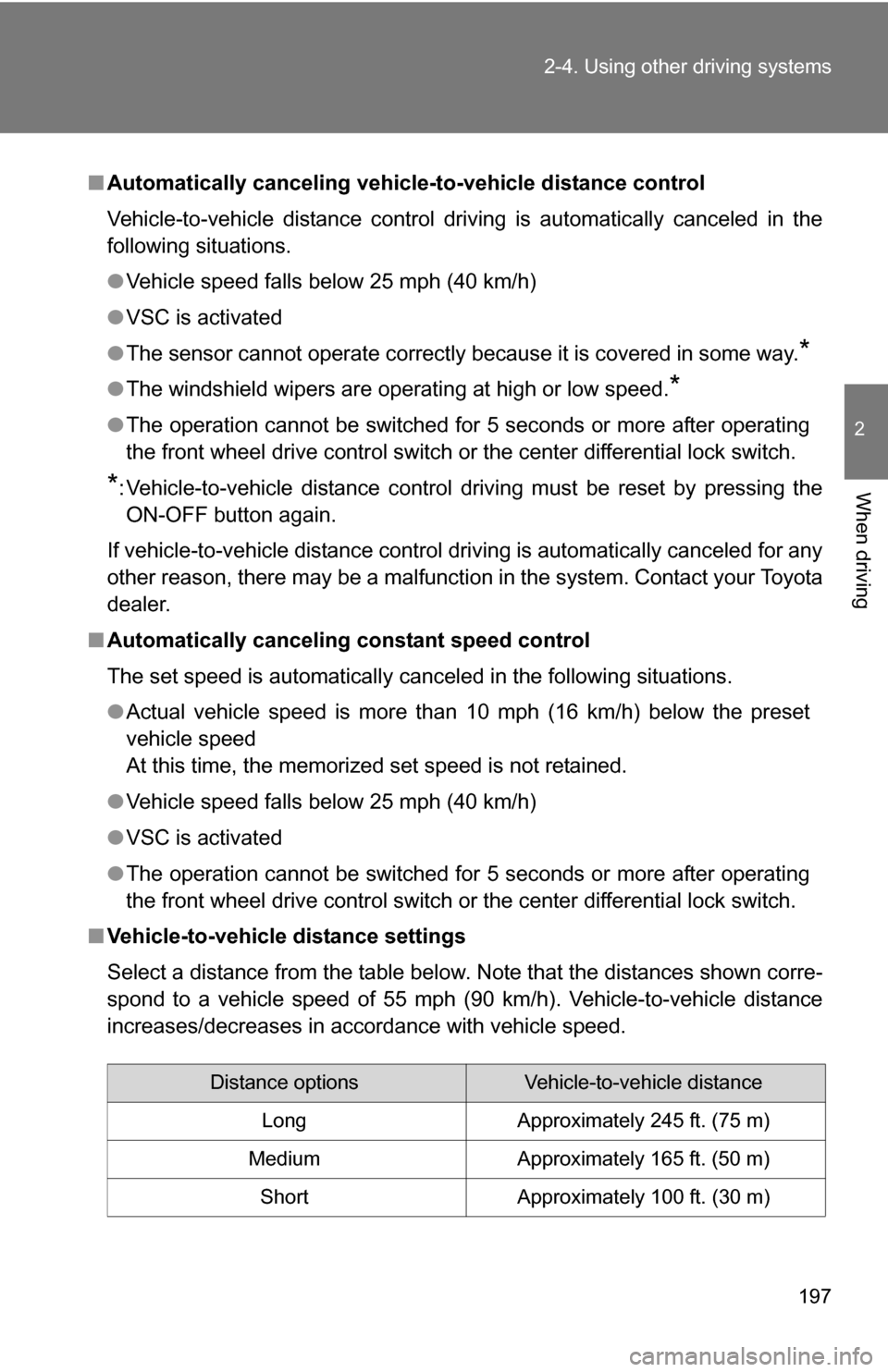
■ Vehicle-to-vehicle distance settings
Select a distance from the table below. Note that the distances shown corre-
spond to a vehicle speed of 55 mph (90 km/h). Vehicle-to-vehicle distance
increases/decreases in accordance with vehicle speed.
Distance optionsVehicle-to-vehicle distance
Long Approximately 245 ft. (75 m)
Medium Approximately 165 ft. (50 m) Short Approximately 100 ft. (30 m)
Page 215 of 612
215
2-4. Using other
driving systems
2
When driving
Shifting between 4H and 4L
■ Shifting from 4H to 4L
Stop the vehicle completely.
Shift the shift lever to N.
Push and turn the front wheel dr ive control switch fully clock-
wise.
Maintain this condition until the 4LO indicator turns on.
■ Shifting from 4L to 4H
Stop the vehicle completely.
Shift the shift lever to N.
Turn the front wheel drive cont rol switch fully counterclock-
wise.
Maintain this condition until the 4LO indicator turns off.
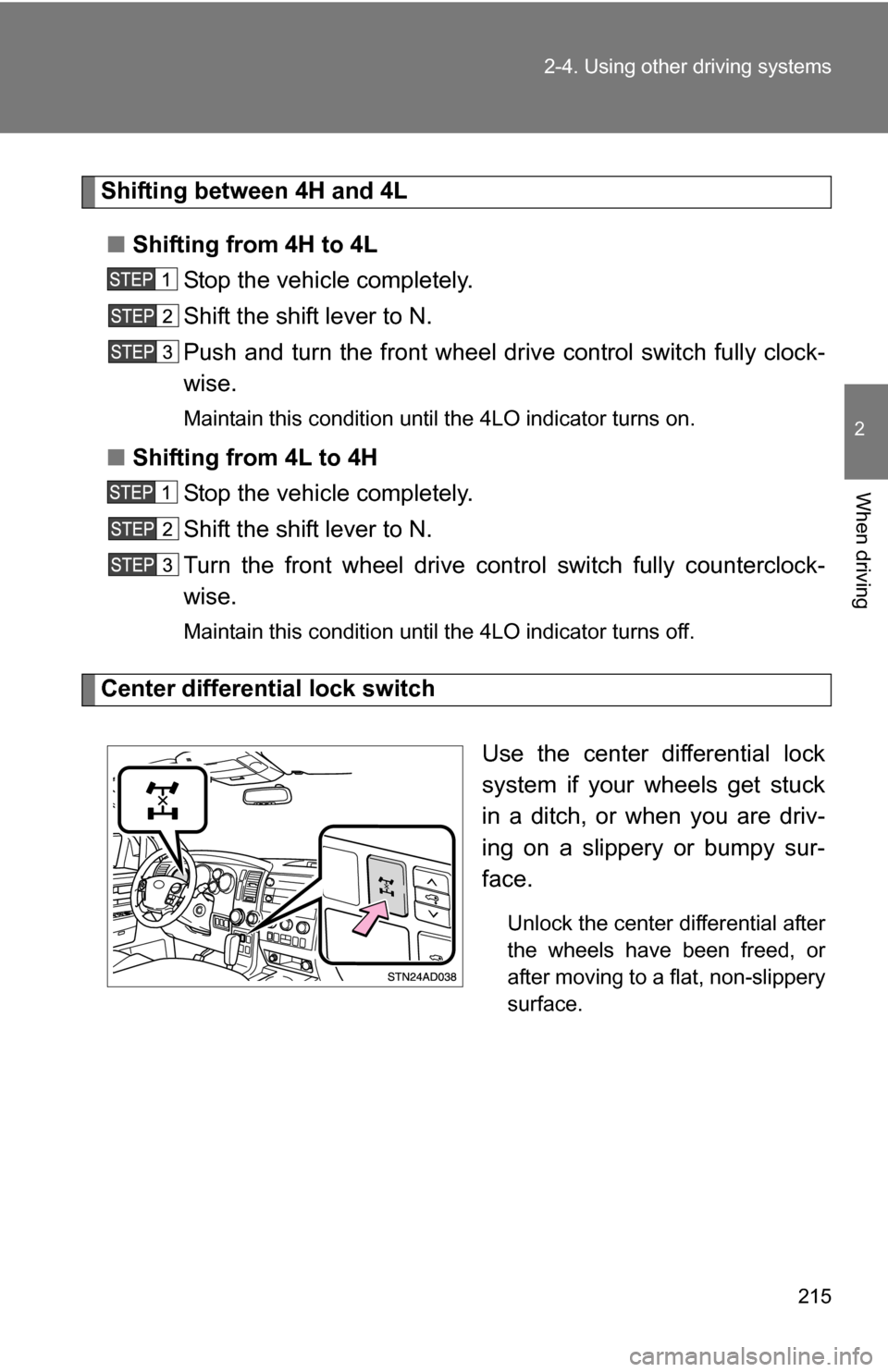
Center differential lock switch
Use the center differential lock
system if your wheels get stuck
in a ditch, or when you are driv-
ing on a slippery or bumpy sur-
face.
Unlock the center differential after
the wheels have been freed, or
after moving to a flat, non-slippery
surface.