language TOYOTA SEQUOIA 2009 2.G Owners Manual
[x] Cancel search | Manufacturer: TOYOTA, Model Year: 2009, Model line: SEQUOIA, Model: TOYOTA SEQUOIA 2009 2.GPages: 612
Page 318 of 612
318 3-3. Using the rear audio/video system
Returning to the previous screenSelect to return to the previous screen. For the operation of the
menu screen, see the separate manual for the DVD disc.
Searching for a title
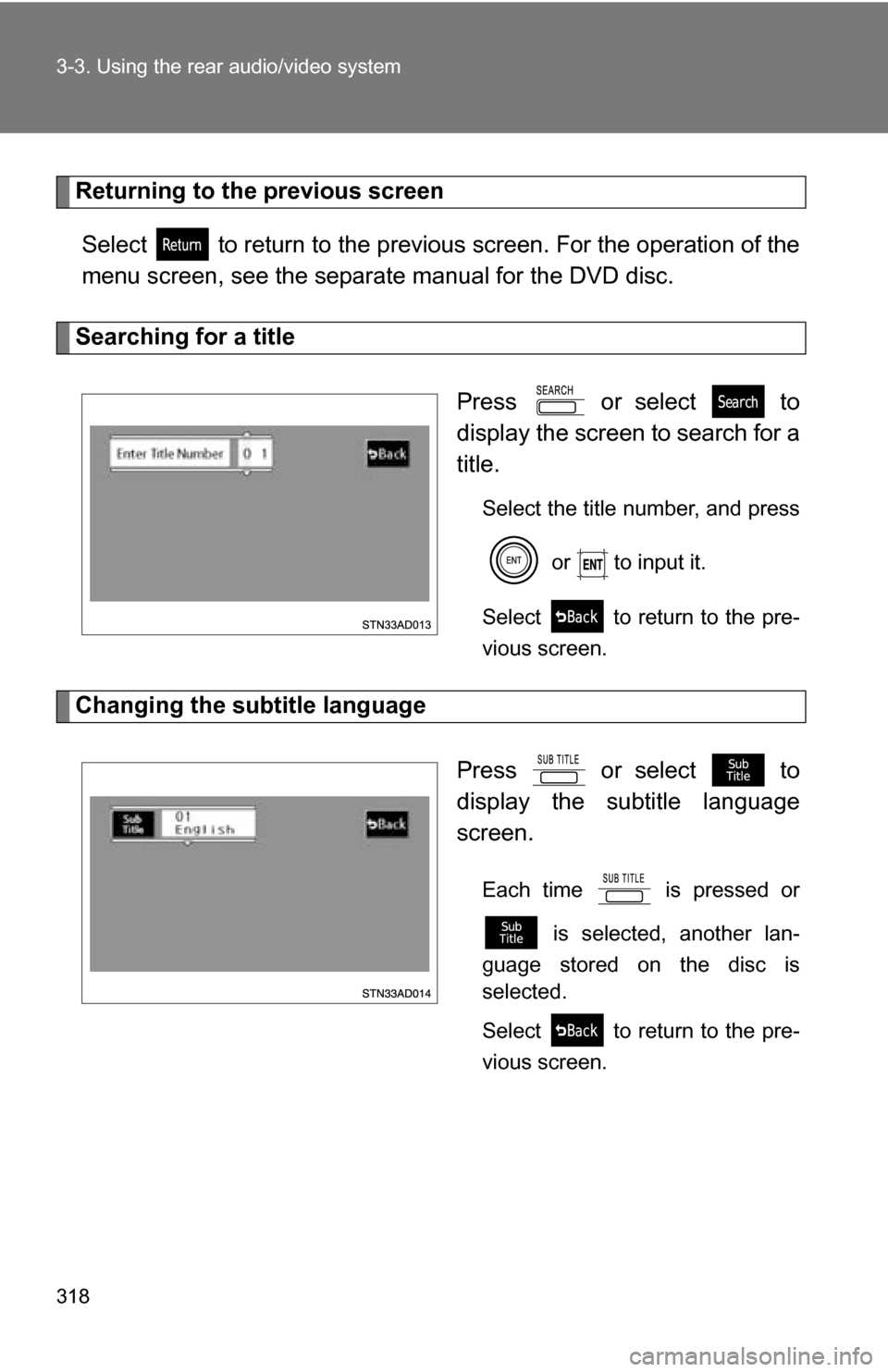
Press or select to
display the screen to search for a
title.
Select the title number, and press or to input it.
Select to return to the pre-
vious screen.
Changing the subtitle language
Press or select to
display the subtitle language
screen.
Each time is pressed or is selected, another lan-
guage stored on the disc is
selected.
Select to return to the pre-
vious screen.
Page 319 of 612
319
3-3. Using the rear audio/video system
3
Interior features
Changing the audio language
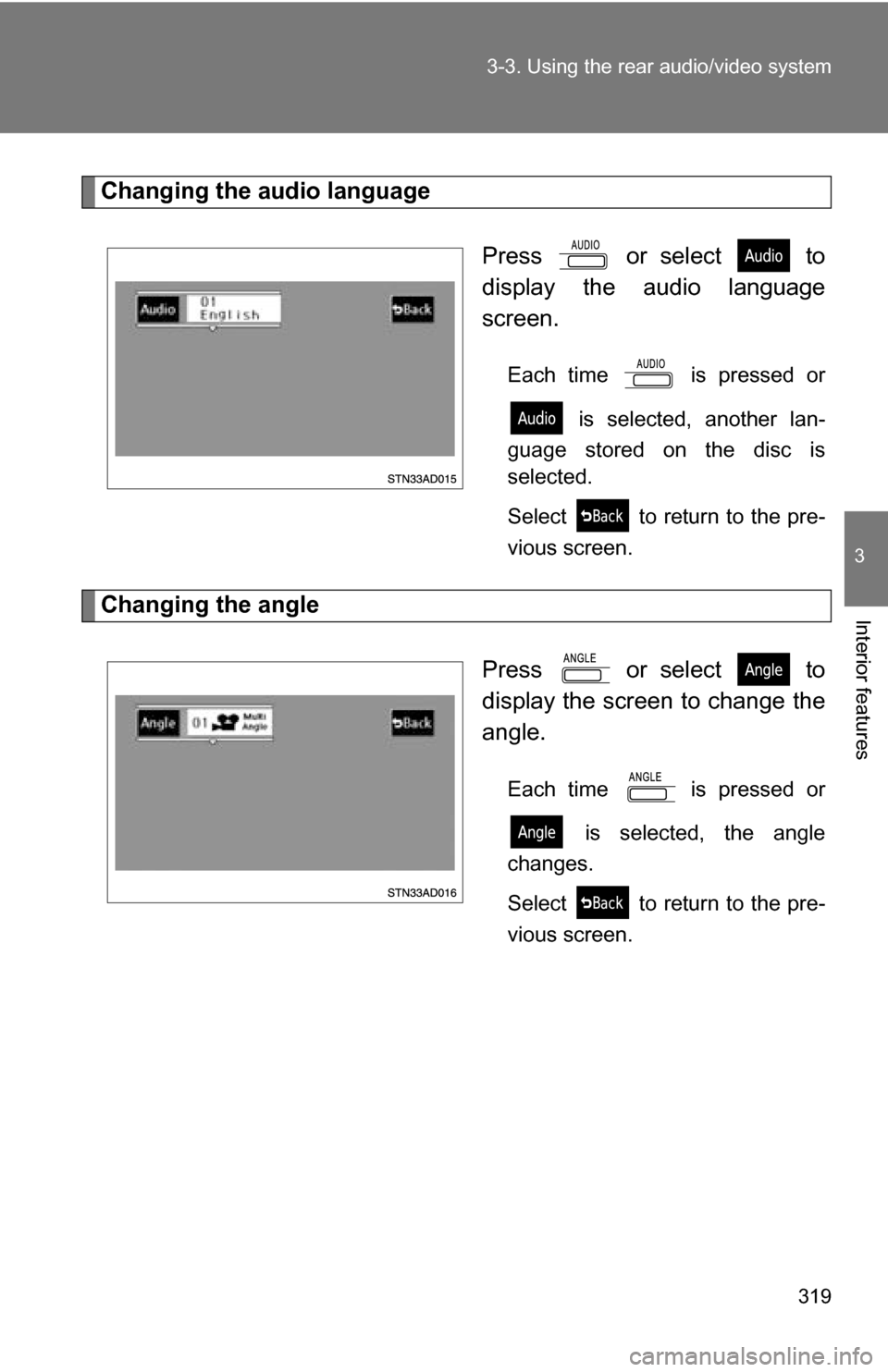
Press or select to
display the audio language
screen.
Each time is pressed or is selected, another lan-
guage stored on the disc is
selected.
Select to return to the pre-
vious screen.
Changing the angle
Press or select to
display the screen to change the
angle.
Each time is pressed or is selected, the angle
changes.
Select to return to the pre-
vious screen.
Page 320 of 612
320 3-3. Using the rear audio/video system
■DVD player and DVD video discs
This DVD player is compatible with NTSC color TV formats. DVD video discs
conforming to other formats such as PAL or SECAM cannot be used.
■ Region codes
Some DVD video discs have a region code indicating where you can use
them. If the DVD video disc is not labeled “ALL” or “1”, you cannot use it in
this DVD player. If you attempt to play an inappropriate DVD video disc in
this player, “REGION CODE ERROR” appears on the screen. Even if the
DVD video disc does not have a region code, in some cases you cannot use
it.
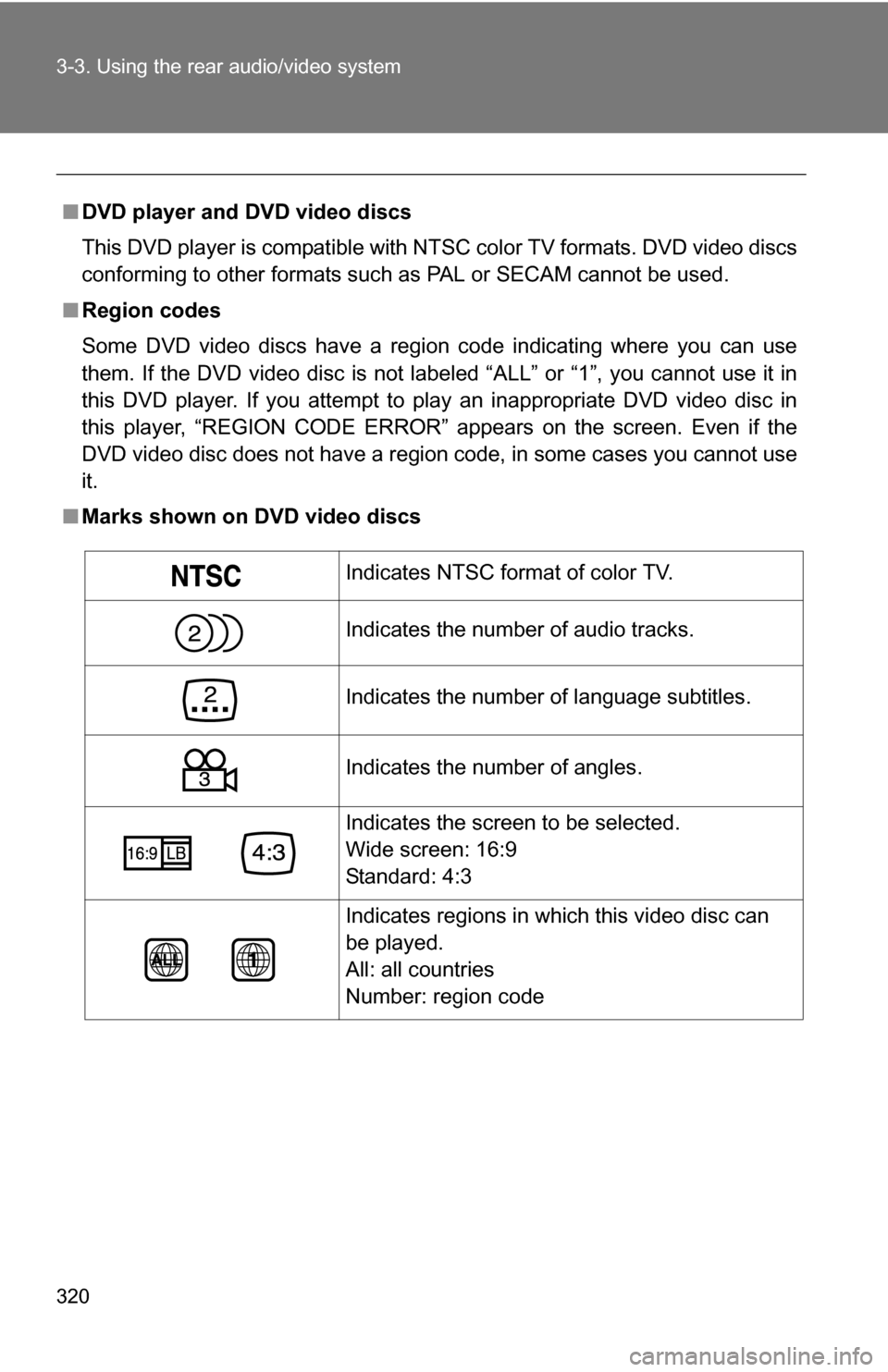
■ Marks shown on DVD video discs
Indicates NTSC format of color TV.
Indicates the number of audio tracks.
Indicates the number of language subtitles.
Indicates the number of angles.
Indicates the screen to be selected.
Wide screen: 16:9
Standard: 4:3
Indicates regions in which this video disc can
be played.
All: all countries
Number: region code
Page 321 of 612
321
3-3. Using the rear audio/video system
3
Interior features
■
DVD video disc glossary
●DVD video discs: Digital Versatile Discs that hold world’s standard video.
DVD video discs have adopted “MPEG2”, one of the world standards of
digital compression technologies. The picture data is compressed by 1/
40 on average and stored. Variable rate encoded technology has been
adopted in which the volume of data assigned to the picture is changed
depending on the picture format. Audio data is stored using PCM and
Dolby digital, which enables higher sound. Furthermore, multi-angle and
multi-language features will also help you enjoy the more advanced tech-
nology of DVD video.
● Viewer restrictions: This feature limits what can be viewed in conformity
with the level of restrictions of the country. The level of restrictions varies
depending on the DVD video disc. Some DVD video discs cannot be
played at all, or violent scenes are skipped or replaced with other scenes.
• Level 1: DVD video discs for children can be played.
• Level 2 - 7: DVD video discs for children and G-rated movies can be
played.
• Level 8: All types of DVD video discs can be played.
● Multi-angle feature: Allows you to enjoy the same scene at different
angles.
● Multi-language feature: Allows you to select the language of the subtitles
and audio.
● Region codes: Region codes are provided on DVD players and DVD
discs. If the DVD video disc does not have the same region code as the
DVD player, you cannot play the disc on the DVD player.
● Audio: This DVD player can play li ner PCM, Dolby digital, dts and MPEG
audio format DVD. Other decoded type cannot be played.
● Title and chapter: Video and audio programs stored on DVD video discs
are divided into sections by title and chapter.
● Title: The largest unit of the video and audio programs stored on DVD
video discs. Usually, one piece of a movie, one album, or one audio pro-
gram is assigned as a title.
● Chapter: A unit smaller than a title. A title comprises multiple chapters.
Page 330 of 612
330
3-3. Using the rear audio/video system
Changing the Setup Menu settings
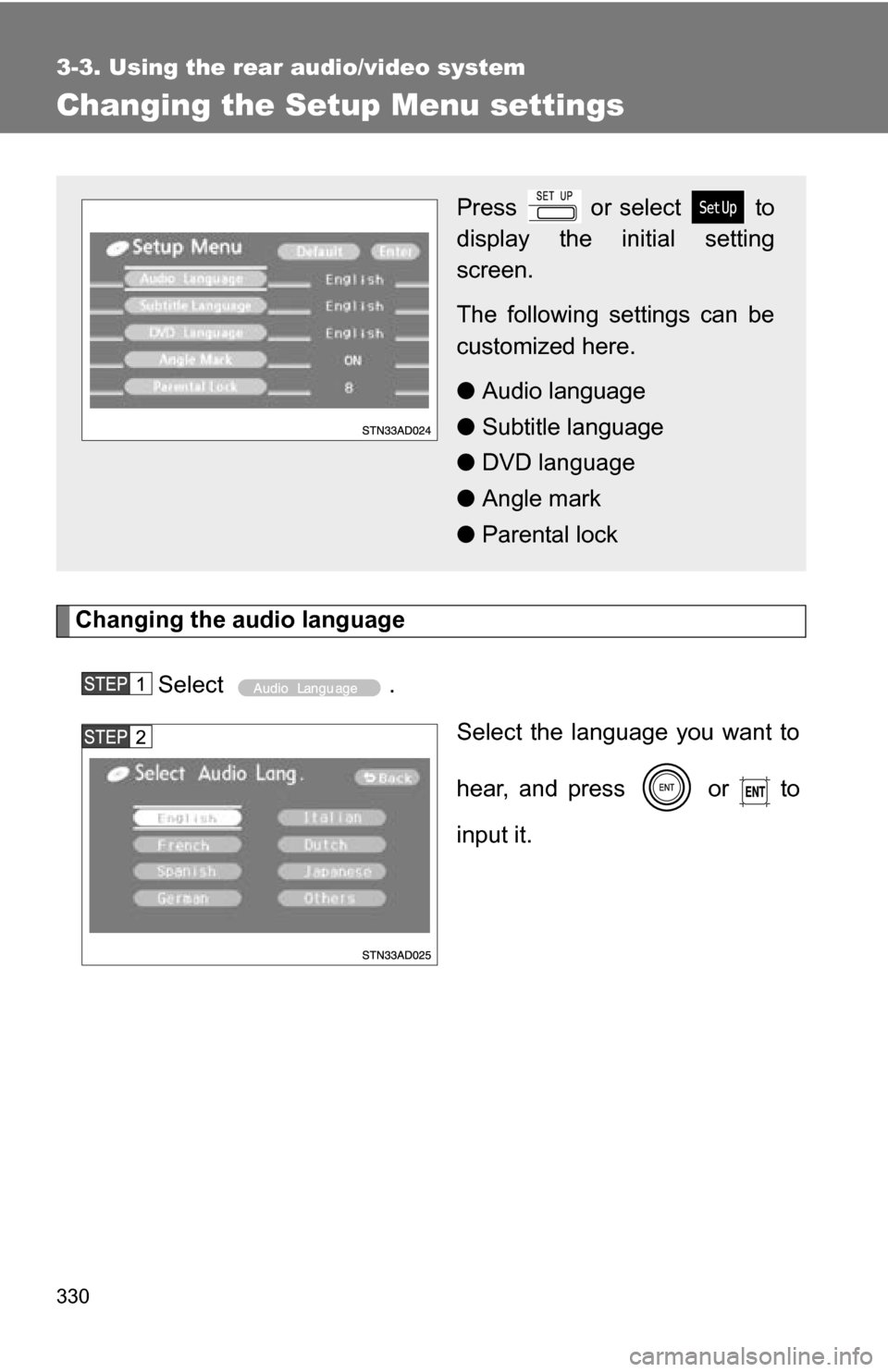
Changing the audio languageSelect . Select the language you want to
hear, and press or to
input it.
Press or select to
display the initial setting
screen.
The following settings can be
customized here.
●Audio language
● Subtitle language
● DVD language
● Angle mark
● Parental lock
Page 331 of 612
331
3-3. Using the rear audio/video system
3
Interior features
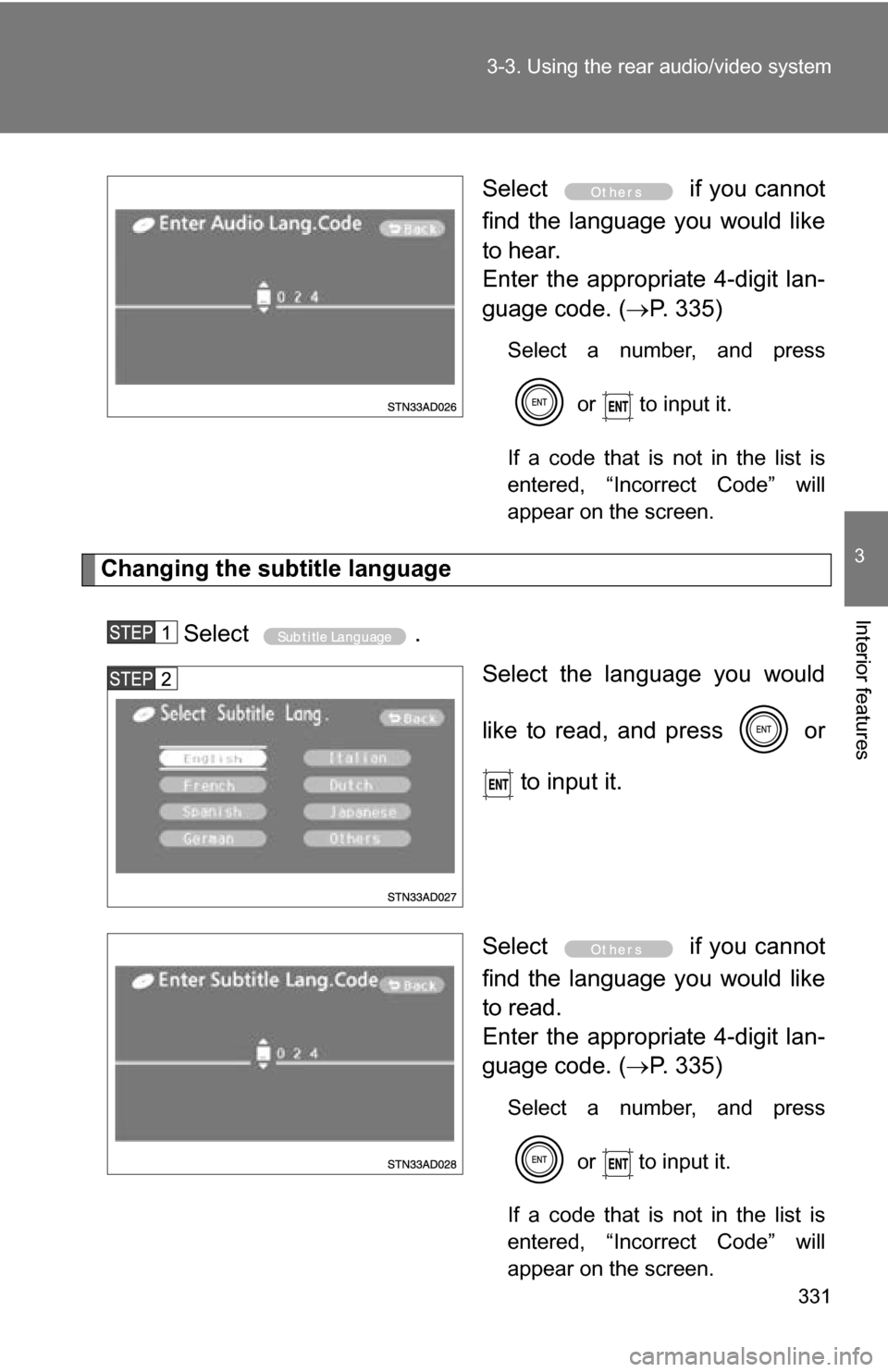
Select
if you cannot
find the language you would like
to hear.
Enter the appropriate 4-digit lan-
guage code. ( P. 335)
Select a number, and press
or to input it.
If a code that is not in the list is
entered, “Incorrect Code” will
appear on the screen.
Changing the subtitle language
Select . Select the language you would
like to read, and press or
to input it.
Select if you cannot
find the language you would like
to read.
Enter the appropriate 4-digit lan-
guage code. ( P. 335)
Select a number, and press
or
to input it.
If a code that is not in the list is
entered, “Incorrect Code” will
appear on the screen.
Page 332 of 612
332 3-3. Using the rear audio/video system
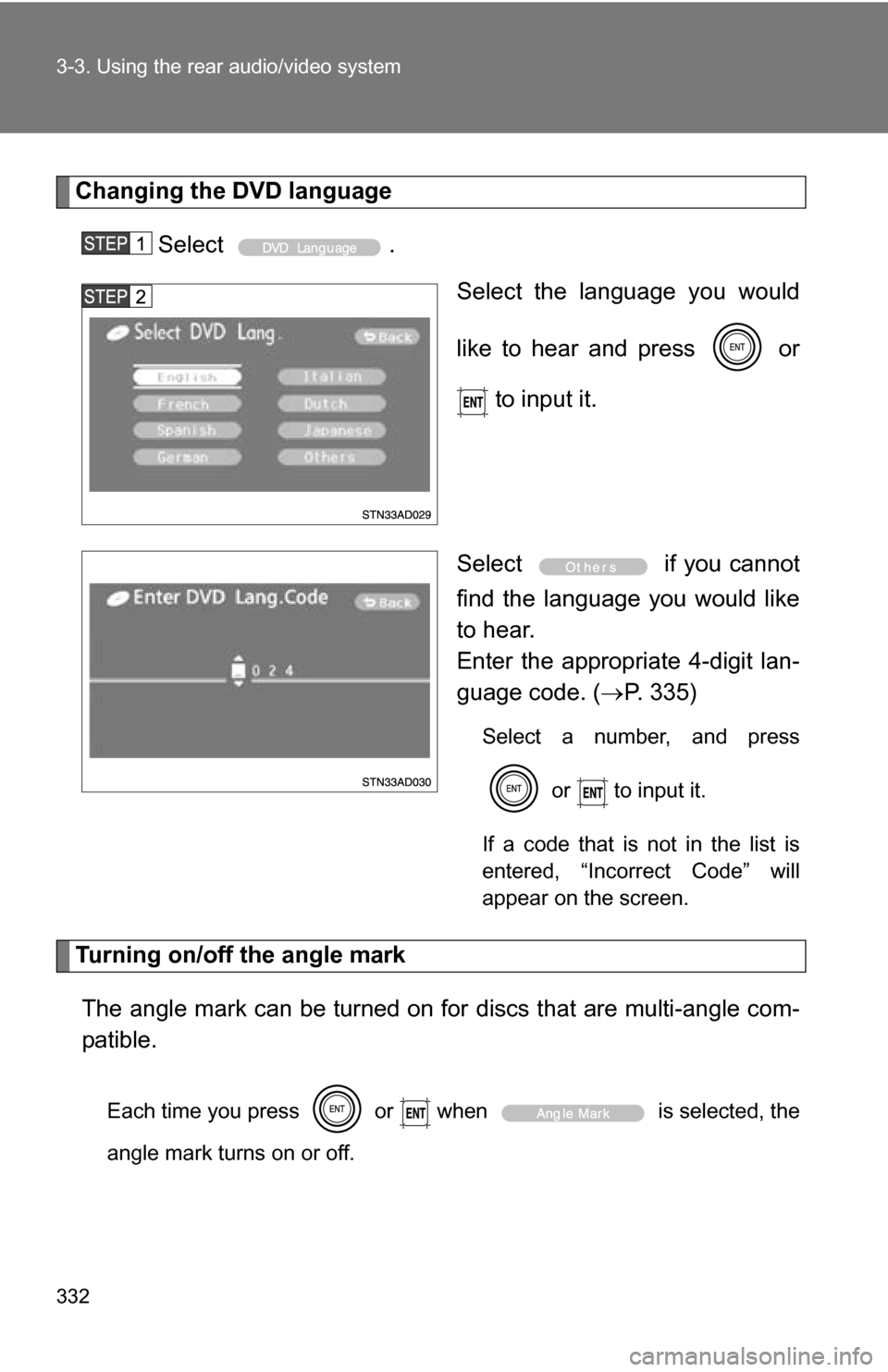
Changing the DVD languageSelect . Select the language you would
like to hear and press or
to input it.
Select if you cannot
find the language you would like
to hear.
Enter the appropriate 4-digit lan-
guage code. ( P. 335)
Select a number, and press
or to input it.
If a code that is not in the list is
entered, “Incorrect Code” will
appear on the screen.
Turning on/off the angle mark The angle mark can be turned on for discs that are multi-angle com-
patible.
Each time you press or when is selected, the
angle mark turns on or off.
Page 335 of 612
335
3-3. Using the rear audio/video system
3
Interior features
■
To initialize the password
Press on the remote controller or unit ten times when the Enter Personal
Code screen is displayed.
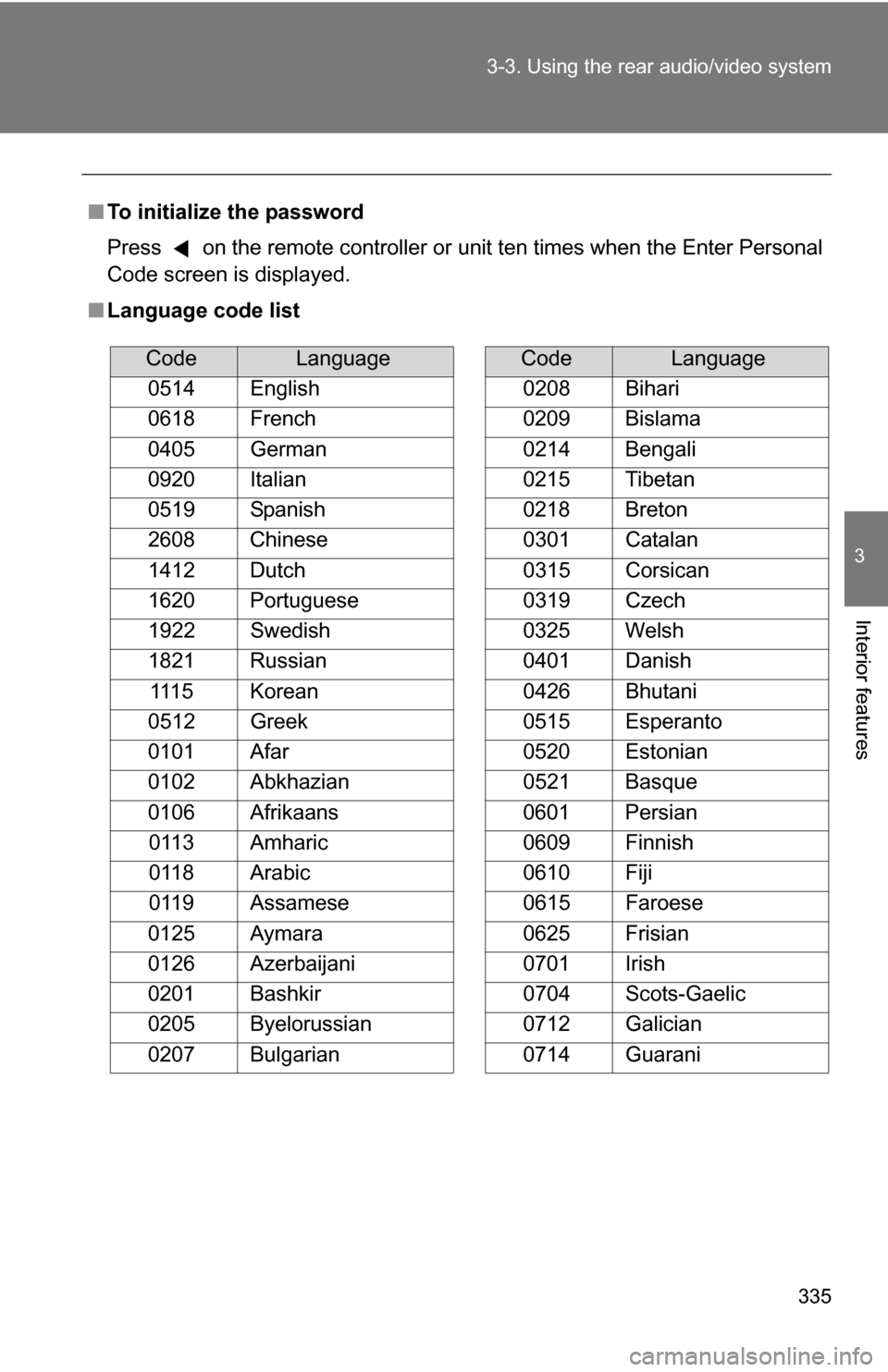
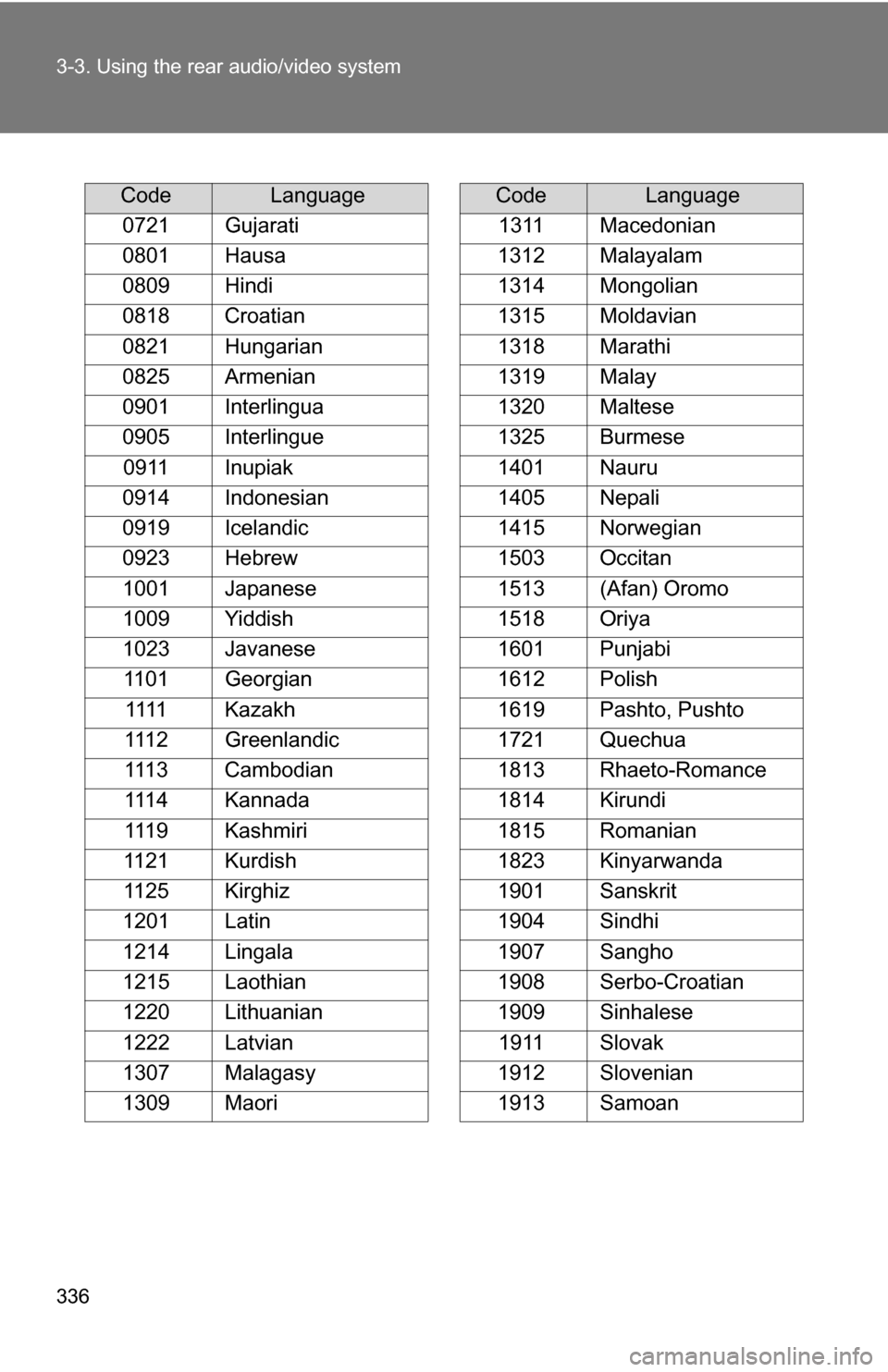
■ Language code list
CodeLanguage
0514 English
0618 French
0405 German
0920 Italian
0519 Spanish
2608 Chinese
1412 Dutch
1620 Portuguese
1922 Swedish
1821 Russian 1115 Korean
0512 Greek
0101 Afar
0102 Abkhazian
0106 Afrikaans 0113 Amharic
0118 Arabic
0119 Assamese
0125 Aymara
0126 Azerbaijani
0201 Bashkir
0205 Byelorussian
0207 Bulgarian
0208 Bihari
0209 Bislama
0214 Bengali
0215 Tibetan
0218 Breton
0301 Catalan
0315 Corsican
0319 Czech
0325 Welsh
0401 Danish
0426 Bhutani
0515 Esperanto
0520 Estonian
0521 Basque
0601 Persian
0609 Finnish
0610 Fiji
0615 Faroese
0625 Frisian
0701 Irish
0704 Scots-Gaelic
0712 Galician
0714 Guarani
CodeLanguage
Page 336 of 612
336 3-3. Using the rear audio/video system
CodeLanguage
0721 Gujarati
0801 Hausa
0809 Hindi
0818 Croatian
0821 Hungarian
0825 Armenian
0901 Interlingua
0905 Interlingue 0911 Inupiak
0914 Indonesian
0919 Icelandic
0923 Hebrew
1001 Japanese
1009 Yiddish
1023 Javanese 1101 Georgian 1111 Kazakh
1112 Greenlandic
1113 Cambodian
1114 Kannada
1119 Kashmiri
1121 Kurdish
1125 Kirghiz
1201 Latin
1214 Lingala
1215 Laothian
1220 Lithuanian
1222 Latvian
1307 Malagasy
1309 Maori
1311 Macedonian
1312 Malayalam
1314 Mongolian
1315 Moldavian
1318 Marathi
1319 Malay
1320 Maltese
1325 Burmese
1401 Nauru
1405 Nepali
1415 Norwegian
1503 Occitan
1513 (Afan) Oromo
1518 Oriya
1601 Punjabi
1612 Polish
1619 Pashto, Pushto
1721 Quechua
1813 Rhaeto-Romance
1814 Kirundi
1815 Romanian
1823 Kinyarwanda
1901 Sanskrit
1904 Sindhi
1907 Sangho
1908 Serbo-Croatian
1909 Sinhalese
1911 Slovak
1912 Slovenian
1913 Samoan
CodeLanguage
Page 337 of 612
337
3-3. Using the rear audio/video system
3
Interior features
■
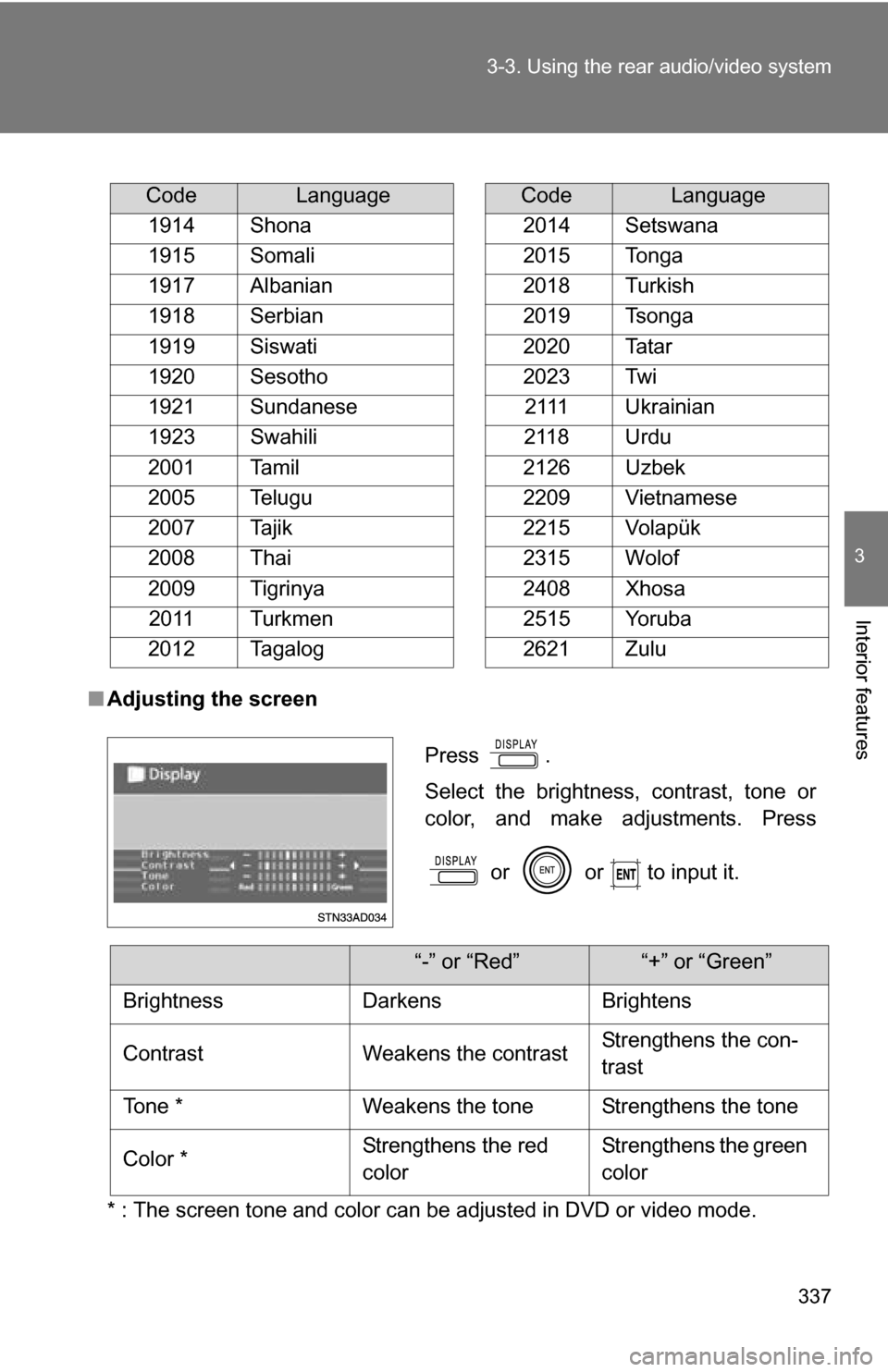
Adjusting the screen
* : The screen tone and color can be adjusted in DVD or video mode.
CodeLanguage
1914 Shona
1915 Somali
1917 Albanian
1918 Serbian
1919 Siswati
1920 Sesotho
1921 Sundanese
1923 Swahili
2001 Tamil
2005 Telugu
2007 Tajik
2008 Thai
2009 Tigrinya 2011 Turkmen
2012 Tagalog
2014 Setswana
2015 Tonga
2018 Turkish
2019 Tsonga
2020 Tatar
2023 Twi 2111 Ukrainian
2118 Urdu
2126 Uzbek
2209 Vietnamese
2215 Volapük
2315 Wolof
2408 Xhosa
2515 Yoruba
2621 Zulu
CodeLanguage
Press .
Select the brightness, contrast, tone or
color, and make adjustments. Press
or or to input it.
“-” or “Red”“+” or “Green”
Brightness Darkens Brightens
Contrast Weakens the contrast Strengthens the con-
trast
Tone * Weakens the tone Strengthens the tone
Color * Strengthens the red
colorStrengthens the green
color