ad blue TOYOTA SEQUOIA 2013 2.G Navigation Manual
[x] Cancel search | Manufacturer: TOYOTA, Model Year: 2013, Model line: SEQUOIA, Model: TOYOTA SEQUOIA 2013 2.GPages: 328, PDF Size: 8.3 MB
Page 275 of 328
275
2. ENTUNE OPERATION
8
APPS
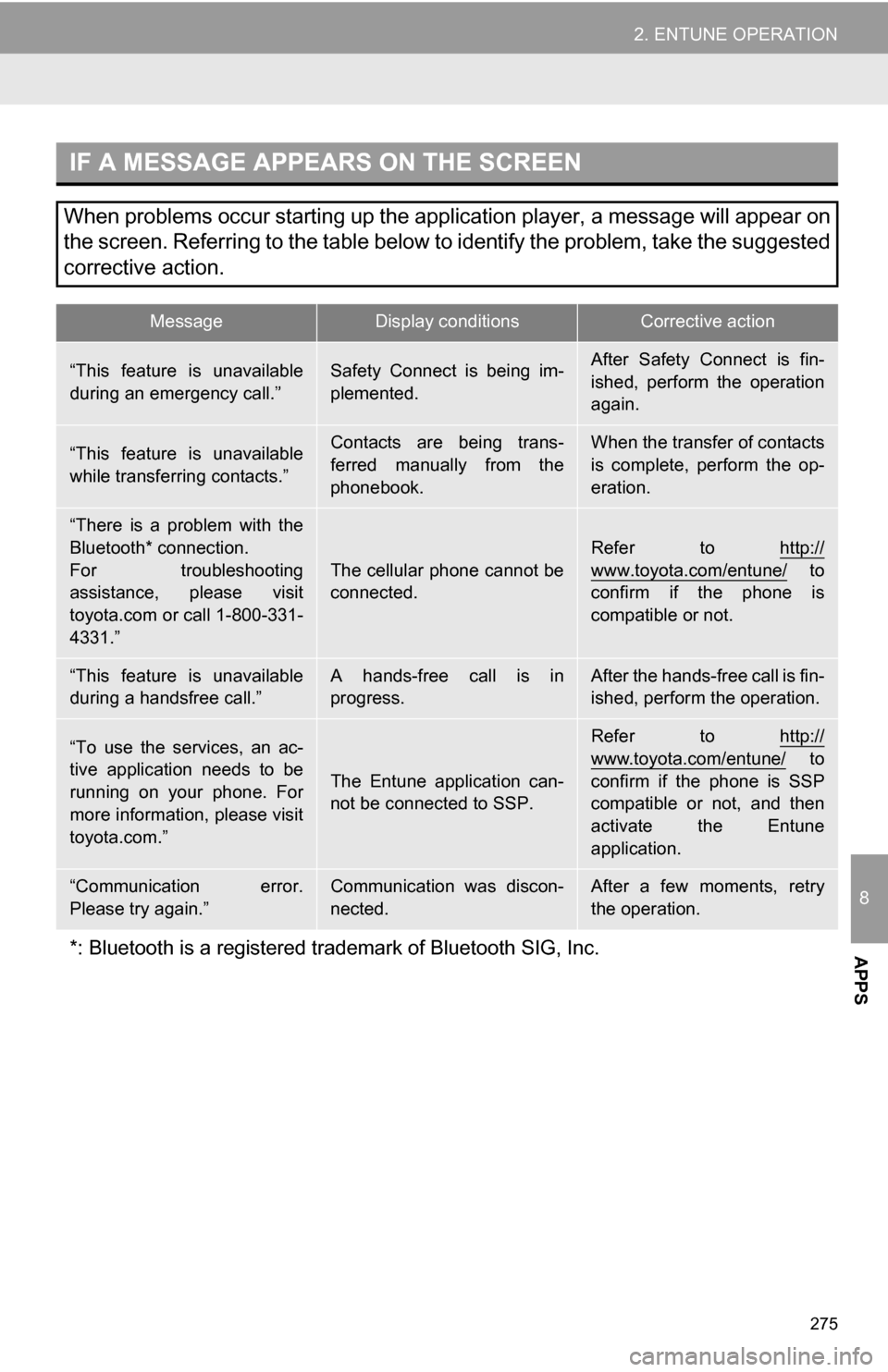
IF A MESSAGE APPEARS ON THE SCREEN
When problems occur starting up the application player, a message will appear on
the screen. Referring to the table below to identify the problem, take the suggested
corrective action.
MessageDisplay conditionsCorrective action
“This feature is unavailable
during an emergency call.”Safety Connect is being im-
plemented.After Safety Connect is fin-
ished, perform the operation
again.
“This feature is unavailable
while transferring contacts.”Contacts are being trans-
ferred manually from the
phonebook.When the transfer of contacts
is complete, perform the op-
eration.
“There is a problem with the
Bluetooth* connection.
For troubleshooting
assistance, please visit
toyota.com or call 1-800-331-
4331.”
The cellular phone cannot be
connected.
Refer to http://
www.toyota.com/entune/ to
confirm if the phone is
compatible or not.
“This feature is unavailable
during a handsfree call.”A hands-free call is in
progress.After the hands-free call is fin-
ished, perform the operation.
“To use the services, an ac-
tive application needs to be
running on your phone. For
more information, please visit
toyota.com.”
The Entune application can-
not be connected to SSP.
Refer to http://
www.toyota.com/entune/ to
confirm if the phone is SSP
compatible or not, and then
activate the Entune
application.
“Communication error.
Please try again.”Communication was discon-
nected.After a few moments, retry
the operation.
*: Bluetooth is a registered tr ademark of Bluetooth SIG, Inc.
Page 277 of 328
277
2. ENTUNE OPERATION
8
APPS
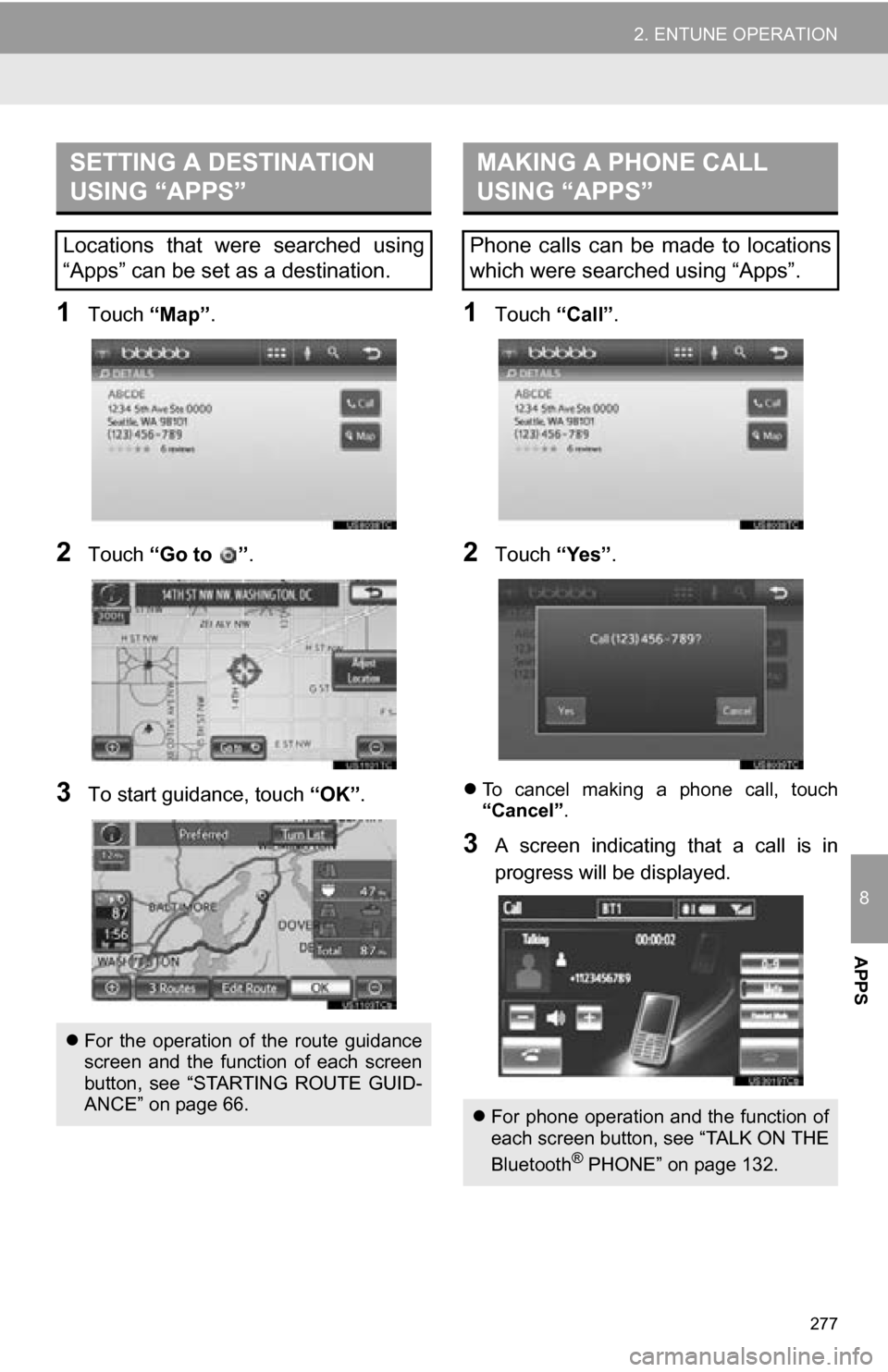
1Touch “Map”.
2Touch “Go to ” .
3To start guidance, touch “OK”.
1Touch “Call”.
2Touch “Yes”.
To cancel making a phone call, touch
“Cancel” .
3A screen indicating that a call is in
progress will be displayed.
SETTING A DESTINATION
USING “APPS”
Locations that were searched using
“Apps” can be set as a destination.
For the operation of the route guidance
screen and the function of each screen
button, see “STARTING ROUTE GUID-
ANCE” on page 66.
MAKING A PHONE CALL
USING “APPS”
Phone calls can be made to locations
which were searched using “Apps”.
For phone operation and the function of
each screen button, see “TALK ON THE
Bluetooth
® PHONE” on page 132.
Page 284 of 328
284
1. REAR VIEW MONITOR SYSTEM
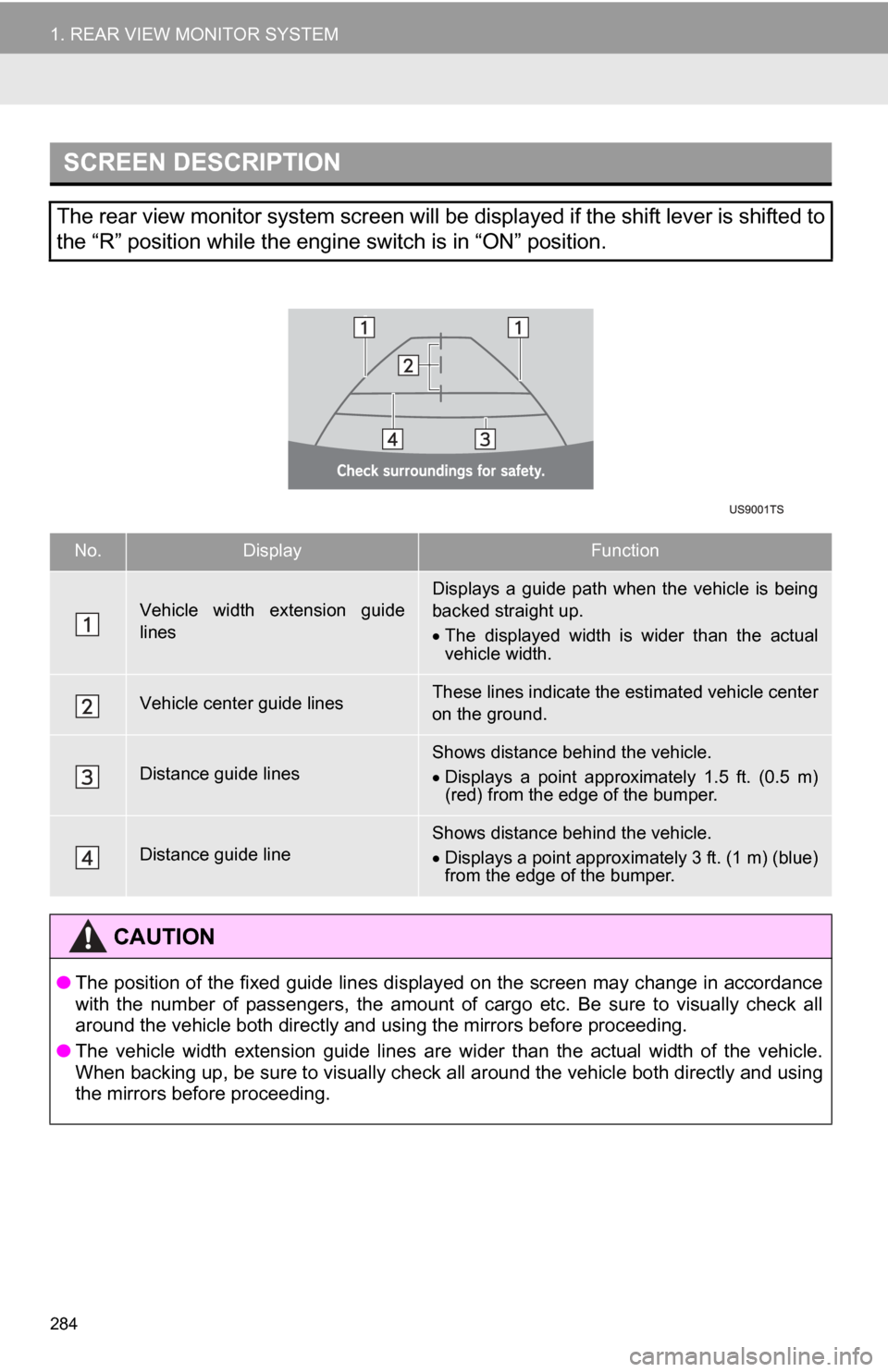
SCREEN DESCRIPTION
The rear view monitor system screen will be displayed if the shift lever is shifted to
the “R” position while the engine switch is in “ON” position.
No.DisplayFunction
Vehicle width extension guide
linesDisplays a guide path when the vehicle is being
backed straight up.
The displayed width is wider than the actual
vehicle width.
Vehicle center guide linesThese lines indicate the estimated vehicle center
on the ground.
Distance guide linesShows distance behind the vehicle.
Displays a point approximately 1.5 ft. (0.5 m)
(red) from the edge of the bumper.
Distance guide lineShows distance behind the vehicle.
Displays a point approximately 3 ft. (1 m) (blue)
from the edge of the bumper.
CAUTION
● The position of the fixed guide lines displayed on the screen may change in accordance
with the number of passengers, the amount of cargo etc. Be sure to visually check all
around the vehicle both directly and using the mirrors before proceeding.
● The vehicle width extension guide lines are wider than the actual width of the vehicle.
When backing up, be sure to visually check all around the vehicle both directly and using
the mirrors before proceeding.
Page 294 of 328

294
ALPHABETICAL INDEX
A
Adding destinations.................................. 76
Address book ............................................ 91
Address book entries ................................ 91
AM........................................................... 175
Apps ........................................................ 270
Audio ....................................................... 168
Audio language code .............................. 200
Audio settings ........................................ 234HD Radio system settings .. ............. 234
iPod settings ........................................ 235
Audio/video remote controls (steering switches) ............................. 223
Audio/video system ......... ..................... ... 168
Audio/video system operating hints ....... 225 Caring for your DVD player and disc .......................................... 226
CD-R and CD-RW discs ..................... 230
iPod .................................................... 226
MP3/WMA files ................................... 229
Radio reception .................................. 225
Terms ................................................. 231
USB memory ...................................... 226
Automatic Sound Levelizer (ASL) ........... 172
AUX port ................................................ 174
B
Basic function ............................................26
Bluetooth®...............................................114
Bluetooth® audio .....................................213
Connecting a Bluetooth®
audio player .................................... 216
Playing Bluetooth
® audio.................... 218
Bluetooth® phone ....................................121
Bluetooth® phone message function...... 134
Checking messages ........................... 134
New message notification................... 136
Replying (quick reply) ......................... 135
Bluetooth
® settings ................................ 156
Detailed Bluetooth® settings............... 162
Registered devices ............................. 156
Selecting a Bluetooth
® phone ............ 159
Selecting portable player .................... 161
Brightness .........................................31, 198
C
Call on the Bluetooth® phone................. 125
By call history ..................................... 127
By dial ................................................. 125
By phonebook..................................... 125
By POI call .......................................... 130
By speed dial ...................................... 127
By voice recognition ........................... 128
Calling using an SMS/MMS message ......................................... 130
CD ...........................................................188
CLOSE button .........................................168
Color..................................................43, 198
Command list ......................................... 246
Contrast.............................................31, 198
Current position calibration .....................104
Current position display............................ 32
Page 297 of 328

297
R
Radio ..................................................... 175Listening to the radio .......................... 175
Presetting a station ............................ 175
Radio broadcast data system............. 176
Selecting a station .............................. 176
Traffic announcement ........................ 177
Radio broadcast data system ................. 176
RADIO button ......................................... 168
Rear view monitor system ..................... 282
Receive on the Bluetooth
® phone ......... 131
Register a Bluetooth® phone ................. 121
Connecting a Bluetooth® phone......... 122
Reconnecting the Bluetooth®
phone.............................................. 124
Registering home..................................... 12
Registering preset destinations ............... 14
Reordering destinations ........................... 76
Resuming guidance ................................. 81
Route guidance......................................... 66
Route guidance screen ............................ 69
Route overview ........................................ 79
Route preference ..................................... 80
Route trace .............................................. 85
S
Satellite radio (SAT) ................................ 171
Screen adjustment ................................... 30
Screen Off ................................................. 30
Screen scroll operation ............................ 32
Screen settings adjustment...................... 30
Screens for navigation settings ................ 86
SEEK/TRACK button .............................. 168
Setting home as the destination............... 17
Setting up the “Address Book” ................. 91
Setting up the “Areas to Avoid” ................ 95
Setting up the “Home” .............................. 86
Setting up the “Preset Destinations” ........ 88
SETUP button ................................... 10, 168
“Setup” screen ......................................... 22
Show on map ........................................... 82
SMS/MMS message ....................... 130, 134
Speed dial ............................................... 127
Standard map icons ................................. 39
Starting route guidance ............................ 66
Steering switches .................... 118, 223, 238
Surround ................................................. 172
Switching the screens .............................. 36
T
Talk on the Bluetooth® phone ................ 132
Incoming call waiting .......................... 133
Time zone ................................................. 41
Tire change calibration............................ 104
Tone ........................................................ 198
Tone and balance .................................. 172
Touch screen operation ........................... 27
Traffic incidents ....................................... 264
TUNE·SCROLL knob .............................. 168
Typical voice guidance prompts............... 72