navigation system TOYOTA SEQUOIA 2013 2.G Navigation Manual
[x] Cancel search | Manufacturer: TOYOTA, Model Year: 2013, Model line: SEQUOIA, Model: TOYOTA SEQUOIA 2013 2.GPages: 328, PDF Size: 8.3 MB
Page 239 of 328
239
1. VOICE COMMAND SYSTEM OPERATION
6
VOICE COMMAND SYSTEM
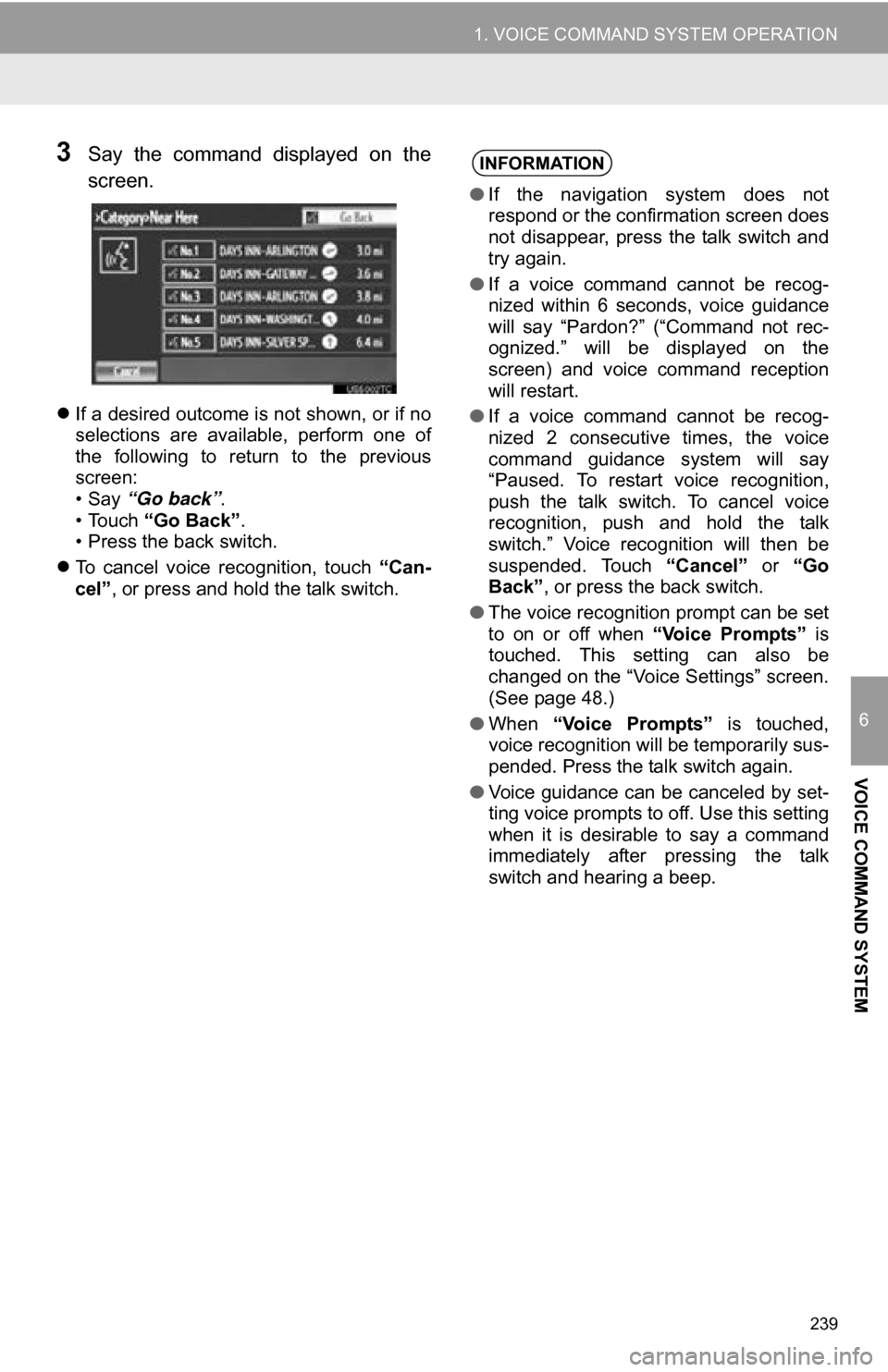
3Say the command displayed on the
screen.
If a desired outcome is not shown, or if no
selections are available, perform one of
the following to return to the previous
screen:
•Say “Go back” .
• Touch “Go Back” .
• Press the back switch.
To cancel voice recognition, touch “Can-
cel”, or press and hold the talk switch.
INFORMATION
● If the navigation system does not
respond or the confirmation screen does
not disappear, press the talk switch and
try again.
● If a voice command cannot be recog-
nized within 6 seconds, voice guidance
will say “Pardon?” (“Command not rec-
ognized.” will be displayed on the
screen) and voice command reception
will restart.
● If a voice command cannot be recog-
nized 2 consecutive times, the voice
command guidance system will say
“Paused. To restart voice recognition,
push the talk switch. To cancel voice
recognition, push and hold the talk
switch.” Voice recognition will then be
suspended. Touch “Cancel” or “Go
Back” , or press the back switch.
● The voice recognition prompt can be set
to on or off when “Voice Prompts” is
touched. This setting can also be
changed on the “Voice Settings” screen.
(See page 48.)
● When “Voice Prompts” is touched,
voice recognition will be temporarily sus-
pended. Press the talk switch again.
● Voice guidance can be canceled by set-
ting voice prompts to off. Use this setting
when it is desirable to say a command
immediately after pressing the talk
switch and hearing a beep.
Page 246 of 328
246
1. VOICE COMMAND SYSTEM OPERATION
4. COMMAND LIST
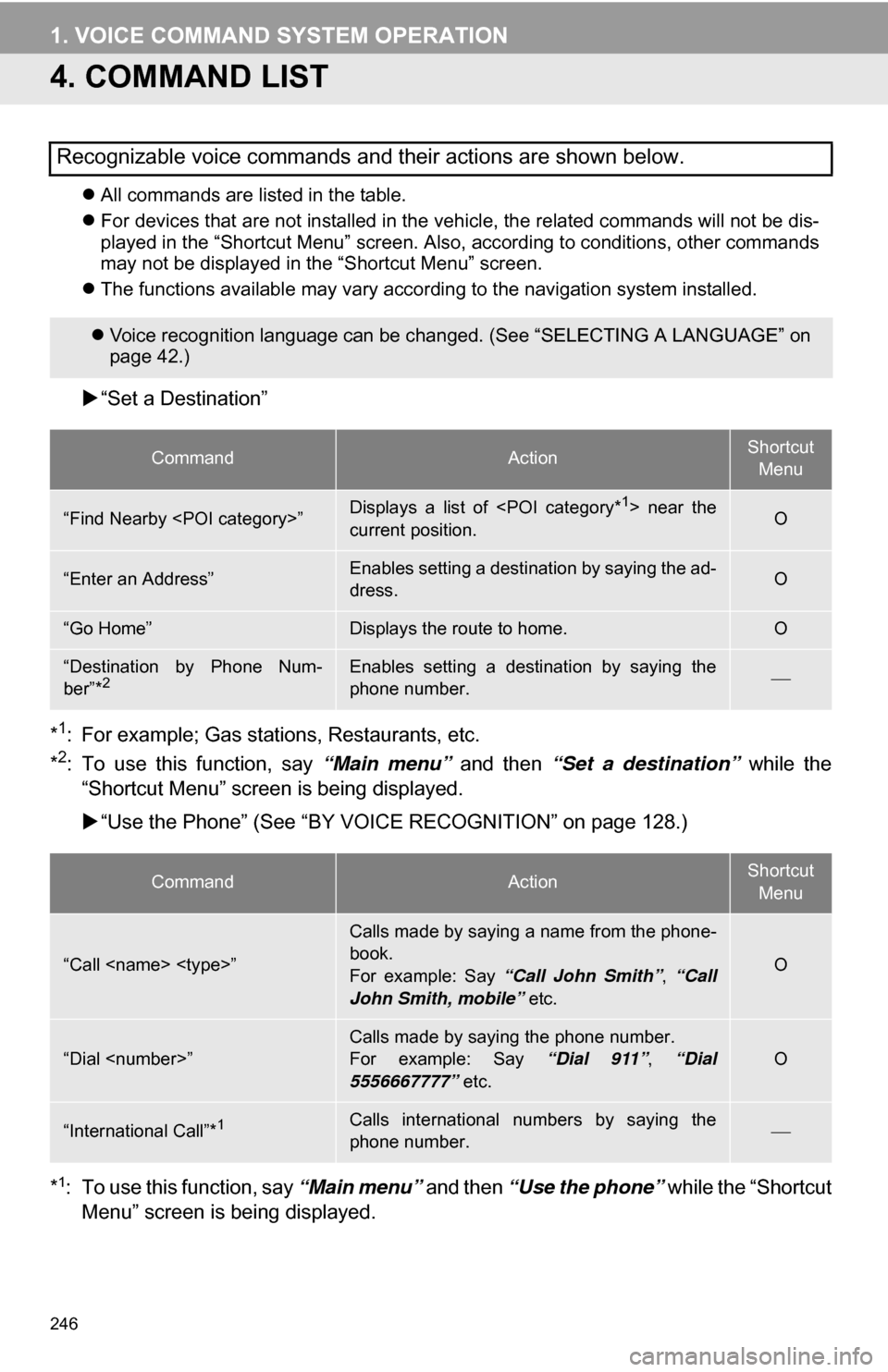
All commands are listed in the table.
For devices that are not installed in the vehicle, the related commands will not be dis-
played in the “Shortcut Menu” screen. Also, according to conditions, other commands
may not be displayed in the “Shortcut Menu” screen.
The functions available may vary according to the navigation system installed.
“Set a Destination”
*
1: For example; Gas stations, Restaurants, etc.
*2: To use this function, say “Main menu” and then “Set a destination” while the
“Shortcut Menu” screen is being displayed.
“Use the Phone” (See “BY VOIC E RECOGNITION” on page 128.)
*
1: To use this function, say “Main menu” and then “Use the phone” while the “Shortcut
Menu” screen is being displayed.
Recognizable voice commands and their actions are shown below.
Voice recognition language can be changed. (See “SELECTING A LANGUAGE” on
page 42.)
CommandActionShortcut
Menu
“Find Nearby
current position.O
“Enter an Address”Enables setting a destination by saying the ad-
dress.O
“Go Home”Displays the route to home.O
“Destination by Phone Num-
ber”*2Enables setting a destination by saying the
phone number.
CommandActionShortcut Menu
“Call
Calls made by saying a name from the phone-
book.
For example: Say “Call John Smith” , “Call
John Smith, mobile” etc.
O
“Dial
For example: Say “Dial 911”, “Dial
5556667777” etc.O
“International Call”*1Calls international numbers by saying the
phone number.
Page 253 of 328
253
7
INFORMATION
3. XM FUNCTION OPERATION
1. XM Sports
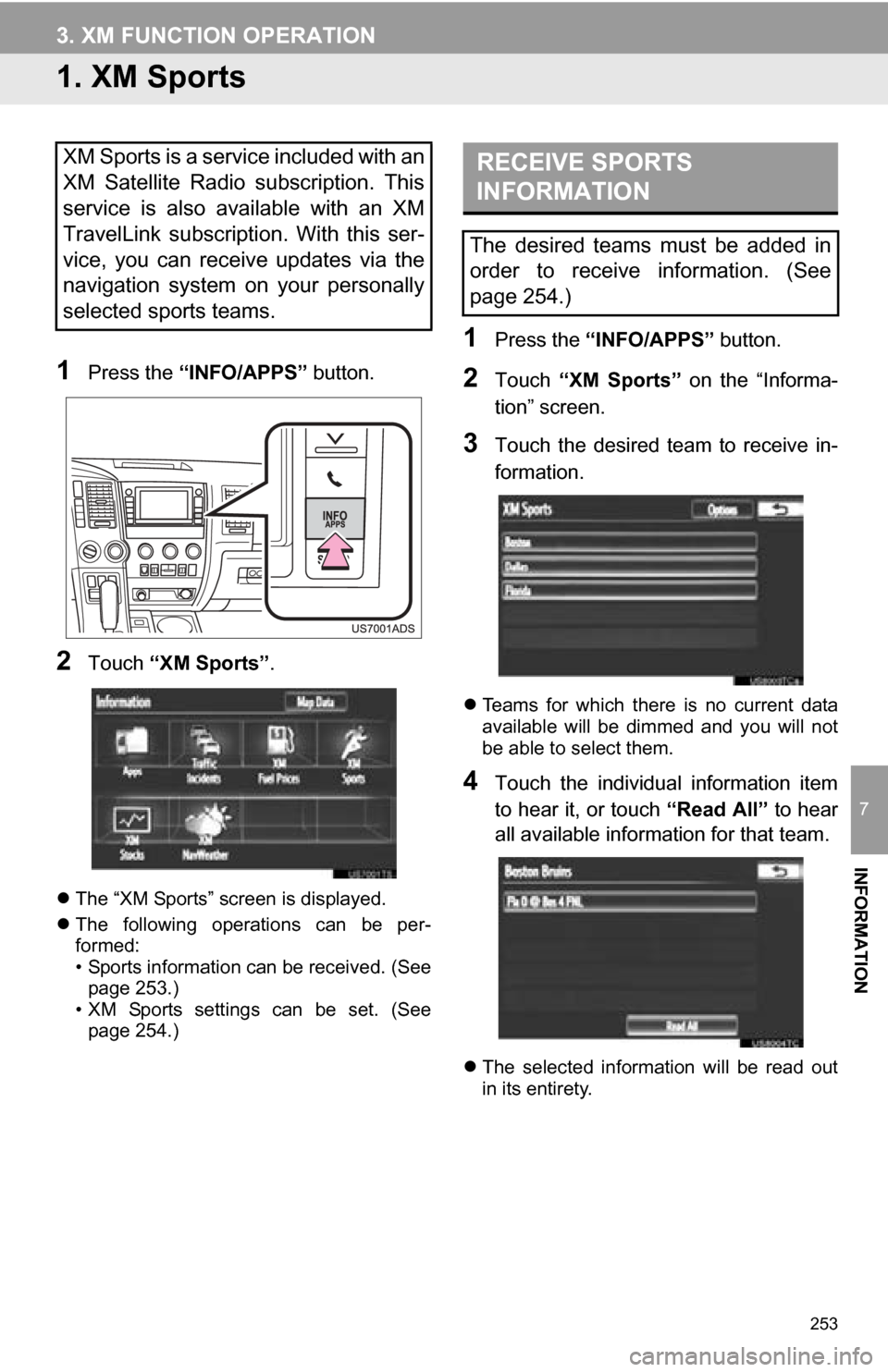
1Press the “INFO/APPS” button.
2Touch “XM Sports”.
The “XM Sports” screen is displayed.
The following operations can be per-
formed:
• Sports information can be received. (See
page 253.)
• XM Sports settings can be set. (See page 254.)
1Press the “INFO/APPS” button.
2Touch “XM Sports” on the “Informa-
tion” screen.
3Touch the desired team to receive in-
formation.
Teams for which there is no current data
available will be dimmed and you will not
be able to select them.
4Touch the individual information item
to hear it, or touch “Read All” to hear
all available information for that team.
The selected information will be read out
in its entirety.
XM Sports is a service included with an
XM Satellite Radio subscription. This
service is also available with an XM
TravelLink subscription. With this ser-
vice, you can receive updates via the
navigation system on your personally
selected sports teams.RECEIVE SPORTS
INFORMATION
The desired teams must be added in
order to receive information. (See
page 254.)
Page 256 of 328
256
3. XM FUNCTION OPERATION
2. XM Stocks
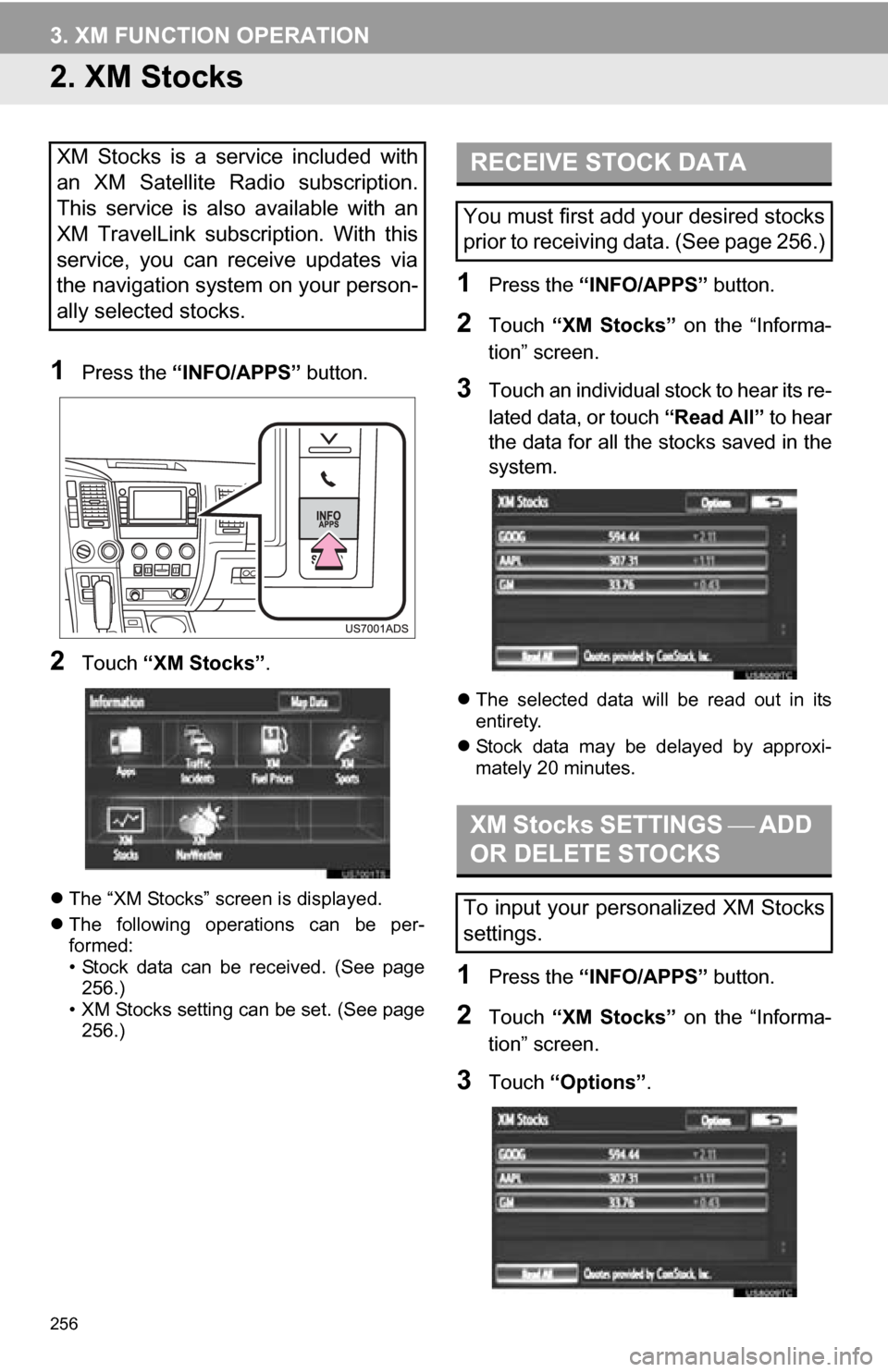
1Press the “INFO/APPS” button.
2Touch “XM Stocks” .
The “XM Stocks” screen is displayed.
The following operations can be per-
formed:
• Stock data can be received. (See page
256.)
• XM Stocks setting can be set. (See page 256.)
1Press the “INFO/APPS” button.
2Touch “XM Stocks” on the “Informa-
tion” screen.
3Touch an individual stock to hear its re-
lated data, or touch “Read All” to hear
the data for all the stocks saved in the
system.
The selected data will be read out in its
entirety.
Stock data may be delayed by approxi-
mately 20 minutes.
1Press the “INFO/APPS” button.
2Touch “XM Stocks” on the “Informa-
tion” screen.
3Touch “Options” .
XM Stocks is a service included with
an XM Satellite Radio subscription.
This service is also available with an
XM TravelLink subscription. With this
service, you can receive updates via
the navigation system on your person-
ally selected stocks.RECEIVE STOCK DATA
You must first add your desired stocks
prior to receiving data. (See page 256.)
XM Stocks SETTINGS ADD
OR DELETE STOCKS
To input your personalized XM Stocks
settings.
Page 258 of 328
258
3. XM FUNCTION OPERATION
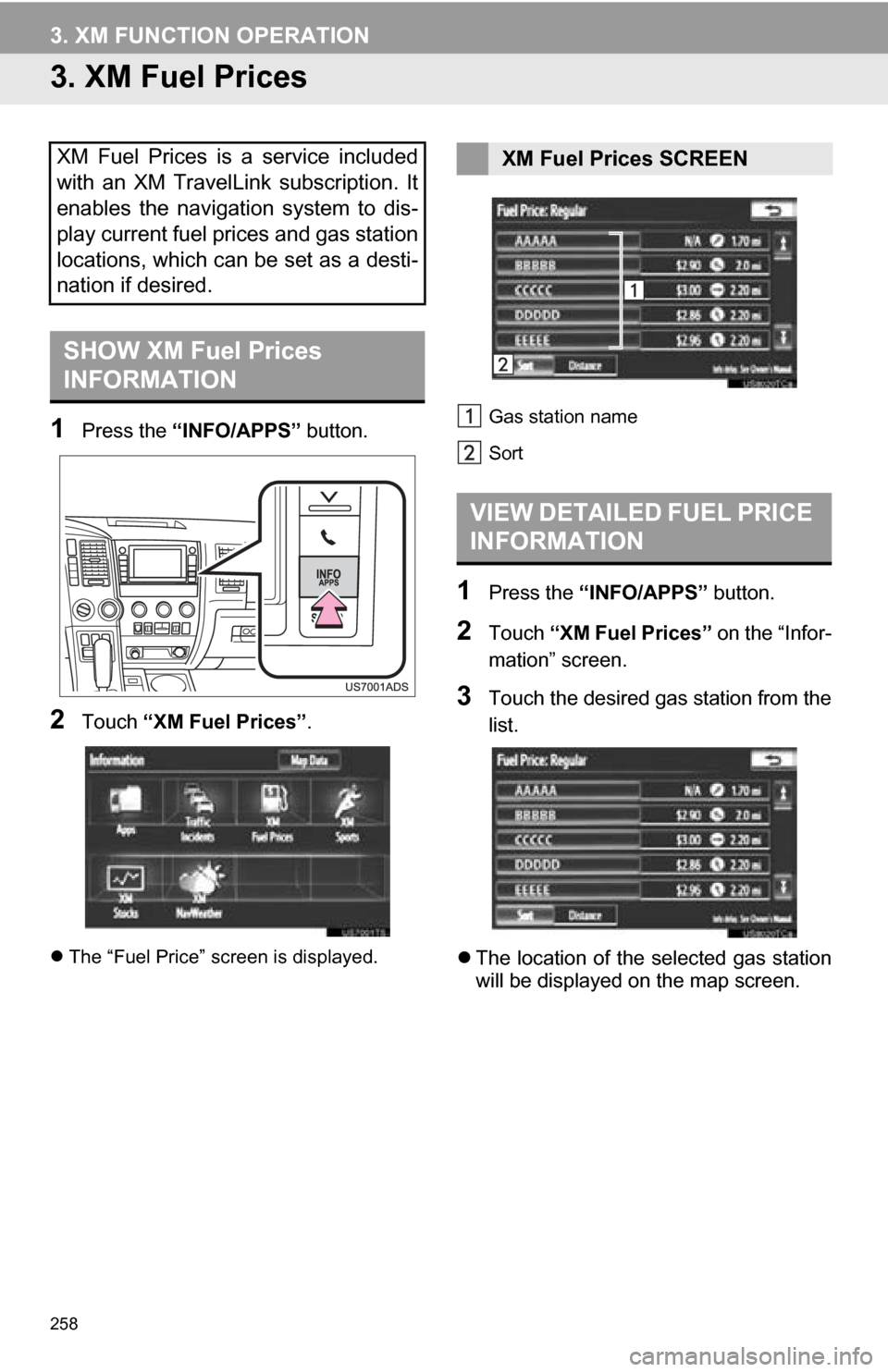
3. XM Fuel Prices
1Press the “INFO/APPS” button.
2Touch “XM Fuel Prices” .
The “Fuel Price” screen is displayed. Gas station name
Sort
1Press the
“INFO/APPS” button.
2Touch “XM Fuel Prices” on the “Infor-
mation” screen.
3Touch the desired gas station from the
list.
The location of the selected gas station
will be displayed on the map screen.
XM Fuel Prices is a service included
with an XM TravelLink subscription. It
enables the navigation system to dis-
play current fuel prices and gas station
locations, which can be set as a desti-
nation if desired.
SHOW XM Fuel Prices
INFORMATION
XM Fuel Prices SCREEN
VIEW DETAILED FUEL PRICE
INFORMATION
Page 270 of 328
270
1. ENTUNE-OVERVIEW
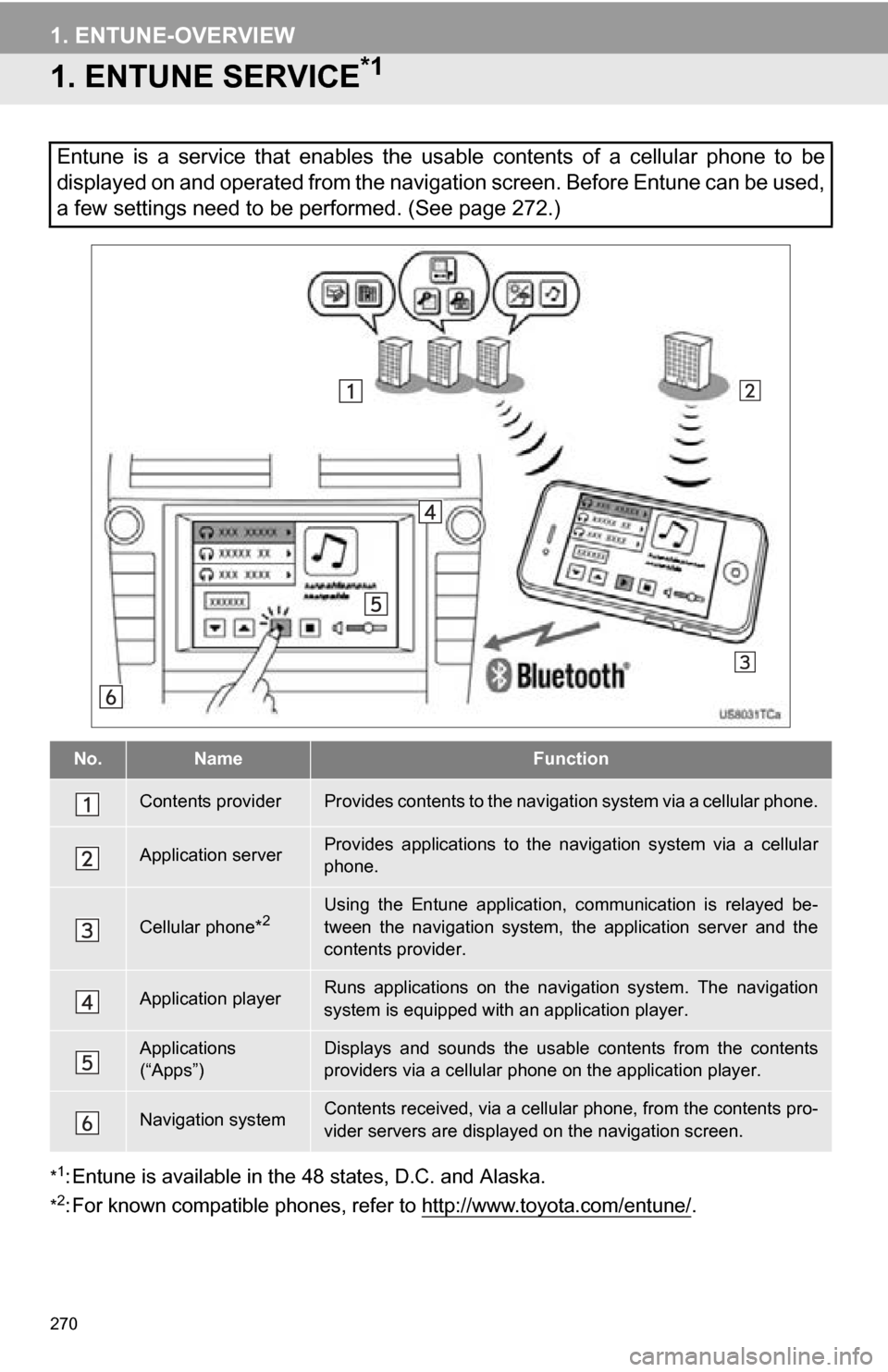
1. ENTUNE SERVICE*1
*1: Entune is available in the 48 states, D.C. and Alaska.
*2: For known compatible phones, refe r to http://www.toyota.com/entune/.
Entune is a service that enables the usable contents of a cellular phone to be
displayed on and operated from the navigation screen. Before Entune can be used,
a few settings need to be performed. (See page 272.)
No.NameFunction
Contents providerProvides contents to the navigation system via a cellular phone.
Application serverProvides applications to the nav igation system via a cellular
phone.
Cellular phone*2Using the Entune application, communication is relayed be-
tween the navigation system, the application server and the
contents provider.
Application playerRuns applications on the navigation system. The navigation
system is equipped with an application player.
Applications
(“Apps”)Displays and sounds the usabl e contents from the contents
providers via a cellular p hone on the application player.
Navigation systemContents received, via a cellular phone, from the contents pro-
vider servers are display ed on the navigation screen.
Page 271 of 328
8
APPS
271
1. ENTUNE-OVERVIEW
Entune will be available on a 3 year trial
period included upon purchase of a new
vehicle. User registration is required to
start using the service. (See page 272.)
When 3 years have elapsed after purchas-
ing a new vehicle, a fee will be charged to
renew the contract.*
Services requiring a separate contract can
also be used.*
*: For details, refer to http://
www.toyota.com/entune/ or call 1-800-
331-4331.
Entune is available in the 48 states, D.C.
and Alaska.
The following personal data can be
deleted and returned to their default set-
tings:
• Downloaded contents
• Radio stations that were listened to
• Input history
SUBSCRIPTION
AVAILABILITY OF SERVICE
INFORMATION
● When using Entune, depending on the
details of your cellular phone contract,
data usage fees may apply. Confirm
data usage fees before using this ser-
vice.
● In this section, the required operations
to activate “Apps”, connect a cellular
phone to the navigation system and reg-
istration steps for Entune are explained.
For details regarding Entune operations
and each of the “Apps”, refer to http://
www.toyota.com/entune/.
INITIALIZING PERSONAL
DATA
The personal data used in “Apps” can
be reset. (See “DELETING PERSON-
AL DATA” on page 47.)
INFORMATION
●Once initialized, data will be erased. Pay
close attention when initializing the data.
Page 272 of 328
272
1. ENTUNE-OVERVIEW
2. BEFORE USING ENTUNE
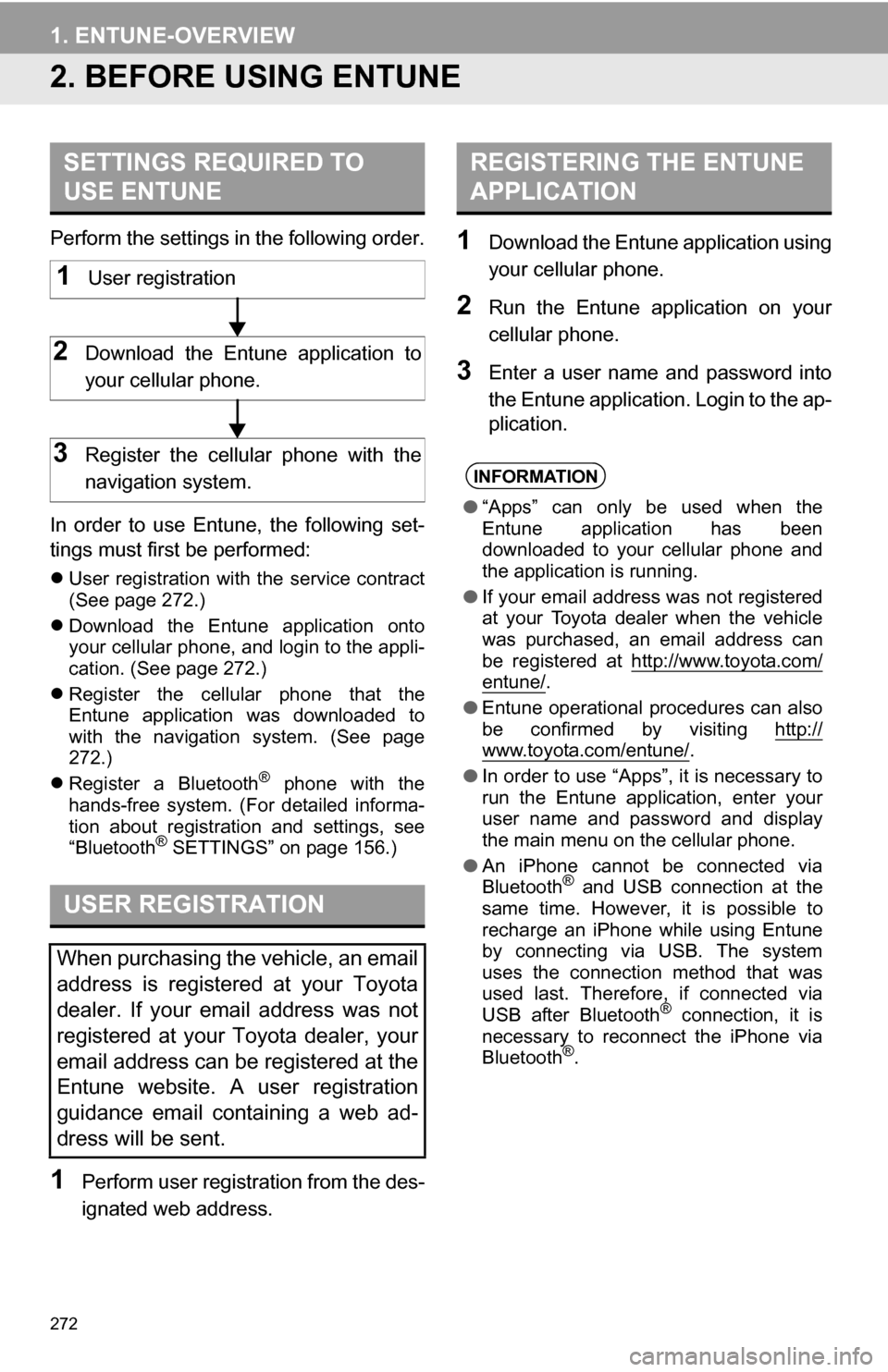
Perform the settings in the following order.
In order to use Entune, the following set-
tings must first be performed:
User registration with the service contract
(See page 272.)
Download the Entune application onto
your cellular phone, and login to the appli-
cation. (See page 272.)
Register the cellular phone that the
Entune application was downloaded to
with the navigation system. (See page
272.)
Register a Bluetooth
® phone with the
hands-free system. (For detailed informa-
tion about registration and settings, see
“Bluetooth
® SETTINGS” on page 156.)
1Perform user registration from the des-
ignated web address.
1Download the Entune application using
your cellular phone.
2Run the Entune application on your
cellular phone.
3Enter a user name and password into
the Entune application. Login to the ap-
plication.
SETTINGS REQUIRED TO
USE ENTUNE
USER REGISTRATION
When purchasing the vehicle, an email
address is registered at your Toyota
dealer. If your email address was not
registered at your Toyota dealer, your
email address can be registered at the
Entune website. A user registration
guidance email containing a web ad-
dress will be sent.
1User registration
2Download the Entune application to
your cellular phone.
3Register the cellular phone with the
navigation system.
REGISTERING THE ENTUNE
APPLICATION
INFORMATION
● “Apps” can only be used when the
Entune application has been
downloaded to your cellular phone and
the application is running.
● If your email address was not registered
at your Toyota dealer when the vehicle
was purchased, an email address can
be registered at http://www.toyota.com/
entune/.
● Entune operational procedures can also
be confirmed by visiting http://
www.toyota.com/entune/.
● In order to use “Apps”, it is necessary to
run the Entune application, enter your
user name and password and display
the main menu on the cellular phone.
● An iPhone cannot be connected via
Bluetooth
® and USB connection at the
same time. However, it is possible to
recharge an iPhone while using Entune
by connecting via USB. The system
uses the connection method that was
used last. Therefore, if connected via
USB after Bluetooth
® connection, it is
necessary to reconnect the iPhone via
Bluetooth
®.
Page 276 of 328
276
2. ENTUNE OPERATION
2. LINKING “APPS” AND NAVIGATION LOCAL FUNCTION
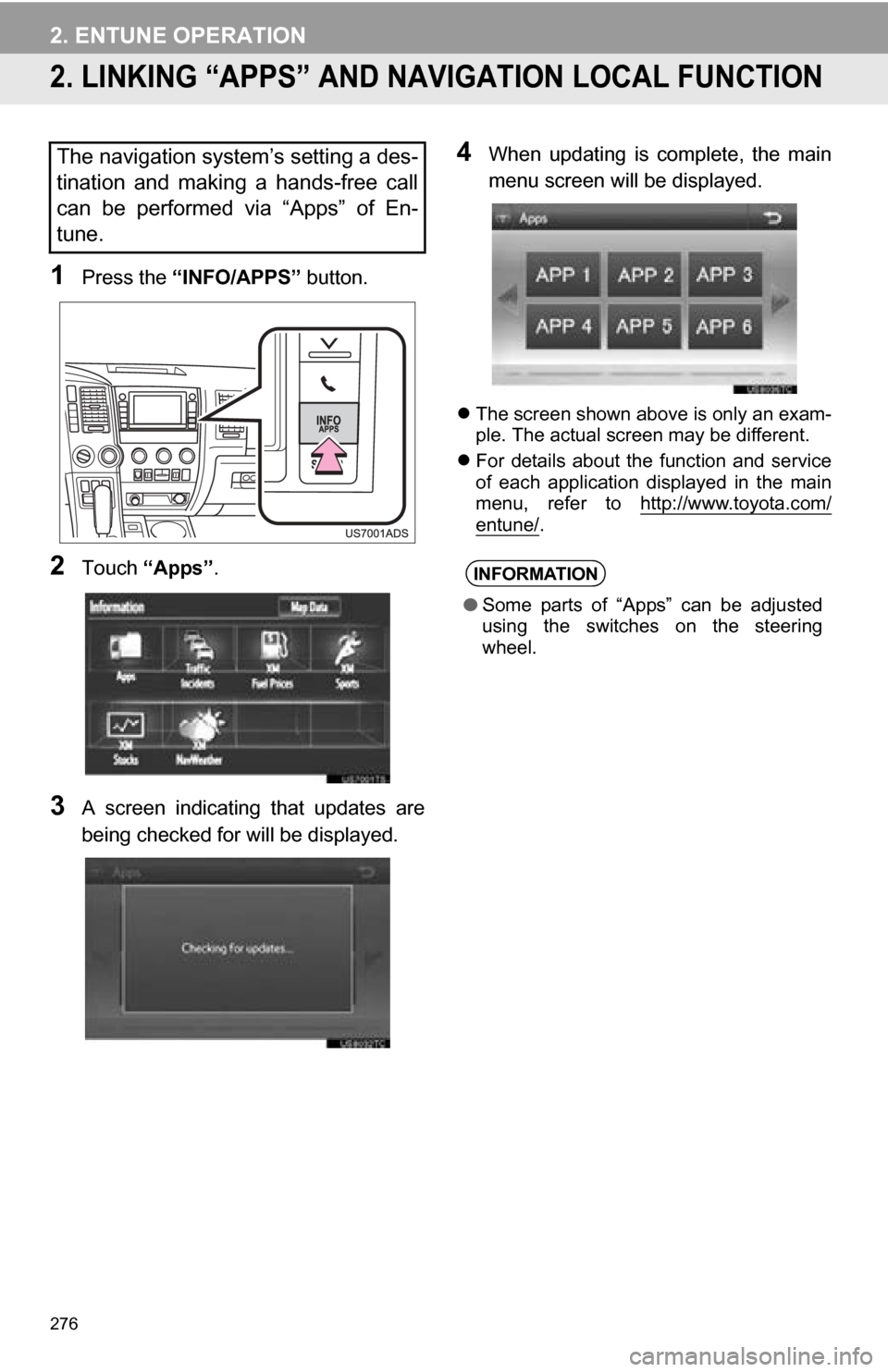
1Press the “INFO/APPS” button.
2Touch “Apps” .
3A screen indicating that updates are
being checked for will be displayed.
4When updating is complete, the main
menu screen will be displayed.
The screen shown above is only an exam-
ple. The actual screen may be different.
For details about the function and service
of each application displayed in the main
menu, refer to http://www.toyota.com/
entune/.
The navigation system’s setting a des-
tination and making a hands-free call
can be performed via “Apps” of En-
tune.
INFORMATION
●Some parts of “Apps” can be adjusted
using the switches on the steering
wheel.
Page 286 of 328
286
1. REAR VIEW MONITOR SYSTEM
2. REAR VIEW MONITOR SYSTEM PRECAUTIONS
The image adjustment procedure for the
rear view monitor system screen is the
same as the procedure for adjusting the
navigation screen. (See page 30.)
AREA DISPLAYED ON
SCREEN
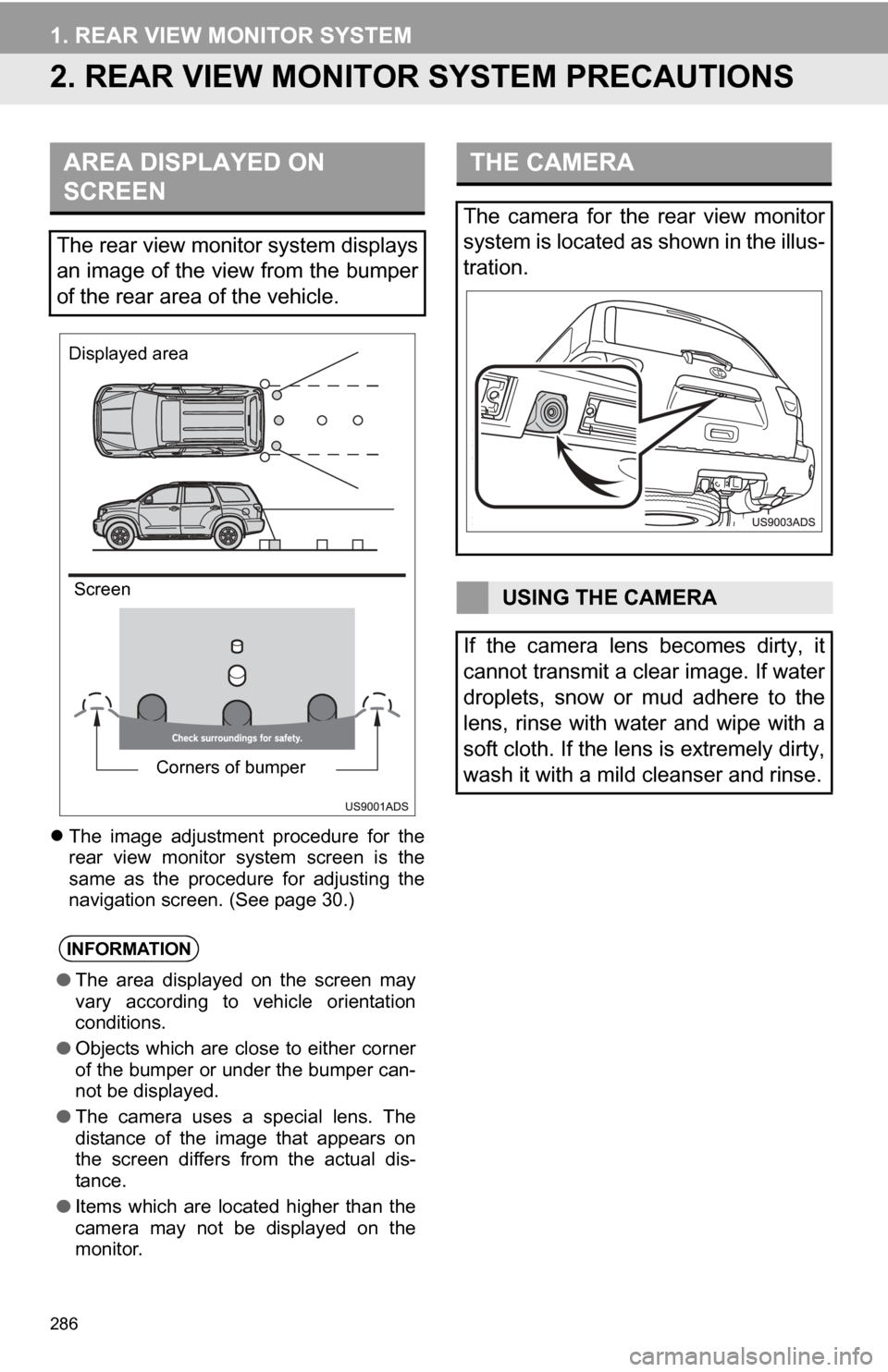
The rear view monitor system displays
an image of the view from the bumper
of the rear area of the vehicle.
INFORMATION
● The area displayed on the screen may
vary according to vehicle orientation
conditions.
● Objects which are close to either corner
of the bumper or under the bumper can-
not be displayed.
● The camera uses a special lens. The
distance of the image that appears on
the screen differs from the actual dis-
tance.
● Items which are located higher than the
camera may not be displayed on the
monitor.
Corners of bumper
Displayed area
Screen
THE CAMERA
The camera for the rear view monitor
system is located as shown in the illus-
tration.
USING THE CAMERA
If the camera lens becomes dirty, it
cannot transmit a clear image. If water
droplets, snow or mud adhere to the
lens, rinse with water and wipe with a
soft cloth. If the lens is extremely dirty,
wash it with a mild cleanser and rinse.