display TOYOTA SEQUOIA 2014 2.G Repair Manual
[x] Cancel search | Manufacturer: TOYOTA, Model Year: 2014, Model line: SEQUOIA, Model: TOYOTA SEQUOIA 2014 2.GPages: 668, PDF Size: 13.86 MB
Page 359 of 668
359
3-2. Using the multimedia system
3
Interior features
Registering and connecting from
the “Bluetooth Setup” screen
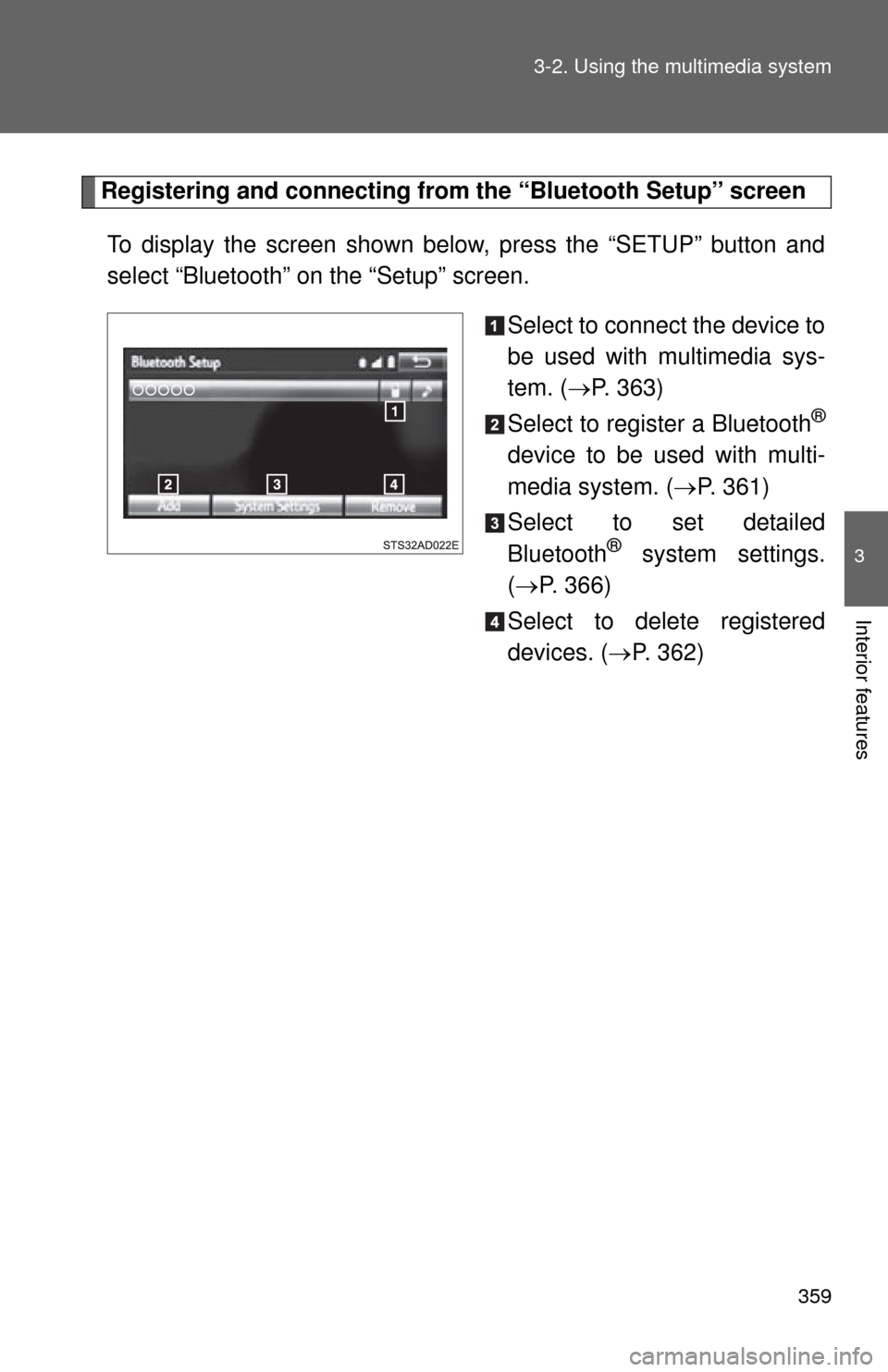
To display the screen shown below, press the “SETUP” button and
select “Bluetooth” on the “Setup” screen.
Select to connect the device to
be used with multimedia sys-
tem. (P. 363)
Select to register a Bluetooth
®
device to be used with multi-
media system. ( P. 361)
Select to set detailed
Bluetooth
® system settings.
( P. 366)
Select to delete registered
devices. ( P. 362)
Page 361 of 668
361
3-2. Using the multimedia system
3
Interior features
Registering a Bluetooth® device
Bluetooth
® compatible phones (HFP) and portable audio players
(AVP) can be registered simultaneously. You can register up to 5
Bluetooth
® devices.
■ How to register a Bluetooth
® device
Display the “Bluetooth Setup” screen. ( P. 359)
Select “Add”.
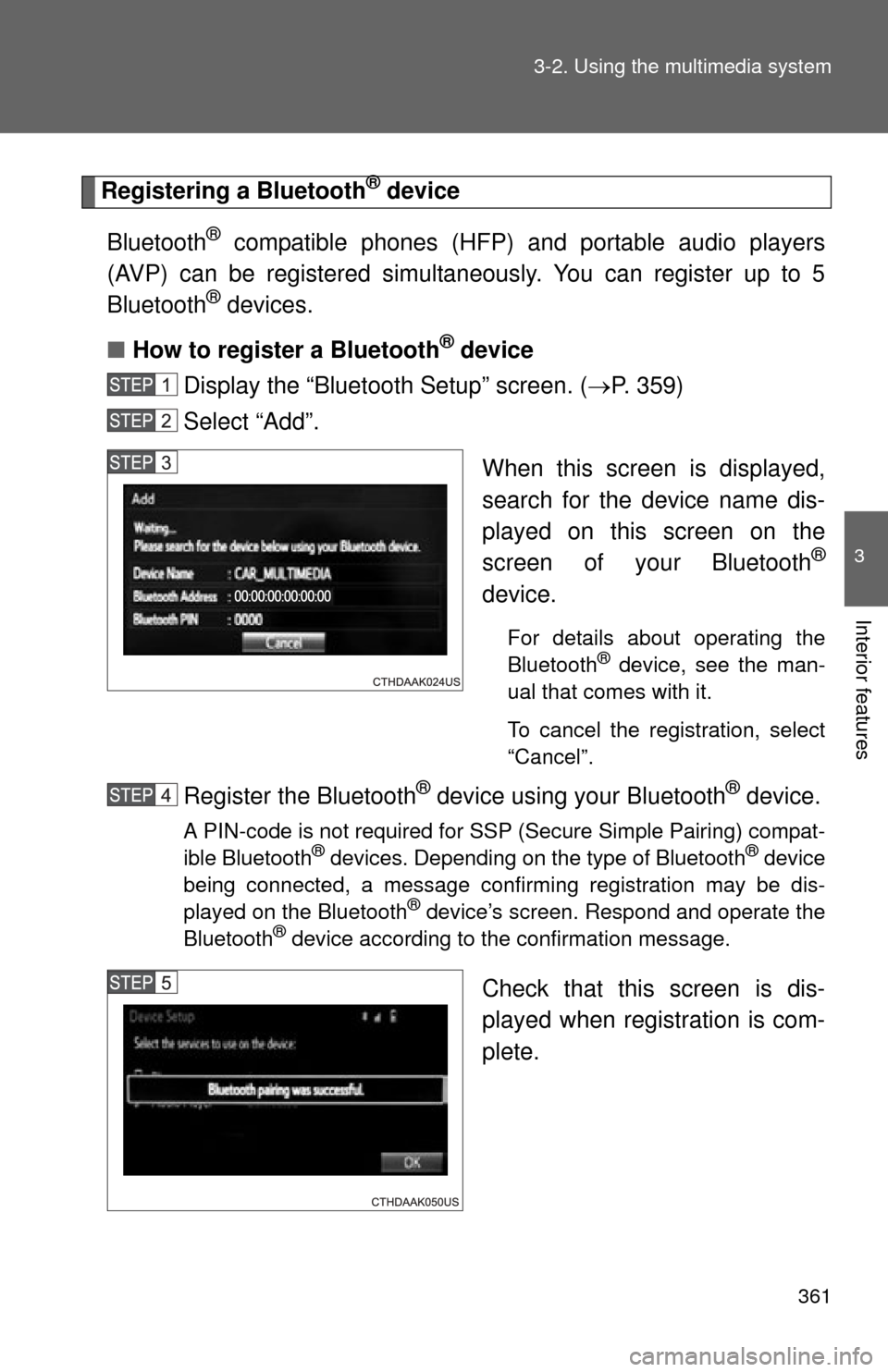
When this screen is displayed,
search for the device name dis-
played on this screen on the
screen of your Bluetooth
®
device.
For details about operating the
Bluetooth® device, see the man-
ual that comes with it.
To cancel the registration, select
“Cancel”.
Register the Bluetooth® device using your Bluetooth® device.
A PIN-code is not required for SSP (Secure Simple Pairing) compat-
ible Bluetooth® devices. Depending on the type of Bluetooth® device
being connected, a message confirming registration may be dis-
played on the Bluetooth
® device’s screen. Respond and operate the
Bluetooth® device according to the confirmation message.
Check that this screen is dis-
played when registration is com-
plete.
Page 362 of 668
362 3-2. Using the multimedia system
Select “OK” when the connection status changes from “Con-
necting...” to “Connected”.
If an error message is displayed, follow the guidance on the screen
to try again.
Registration can be performed from screens other than the
“Bluetooth Setup” screen.
■When registering from th e “Bluetooth Audio” screen
Display the “Bluetooth Audio” screen. ( P. 332)
Select “Select Device”.
Follow the steps in “How to registering a Bluetooth
® device”
from “STEP 2”. ( P. 361)
■ Deleting a Bluetooth
® device
Display the “Bluetooth Setup” screen. ( P. 359)
Select “Remove”.
Select the desired device.
A confirmation message will be displayed, select “Yes” to
delete the device.
Check that a confirmation screen is displayed when the oper-
ation is complete.
Page 363 of 668
363
3-2. Using the multimedia system
3
Interior features
Connecting a Bluetooth® device
Up to 5 Bluetooth
® devices (Phones (HFP) and audio players (AVP))
can be registered.
If more than 1 Bluetooth
® device has been registered, select which
device to connect to.
Press the “SETUP” button.
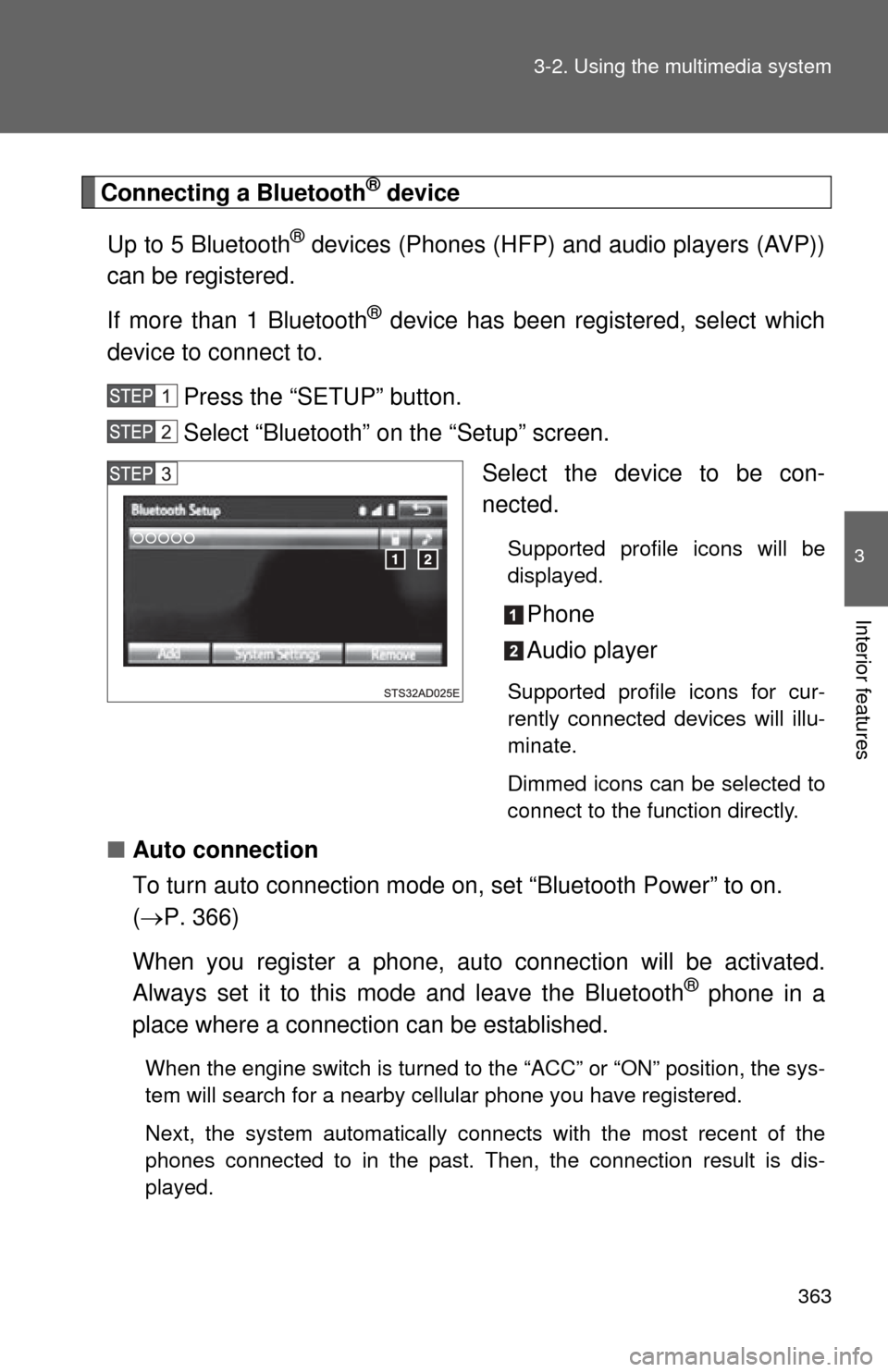
Select “Bluetooth” on the “Setup” screen. Select the device to be con-
nected.
Supported profile icons will be
displayed.
Phone
Audio player
Supported profile icons for cur-
rently connected devices will illu-
minate.
Dimmed icons can be selected to
connect to the function directly.
■Auto connection
To turn auto connection mode on, set “Bluetooth Power” to on.
( P. 366)
When you register a phone, au to connection will be activated.
Always set it to this mode and leave the Bluetooth
® phone in a
place where a connection can be established.
When the engine switch is turned to the “ACC” or “ON” position, the sys-
tem will search for a nearby cellular phone you have registered.
Next, the system automatically connects with the most recent of the
phones connected to in the past. Then, the connection result is dis-
played.
Page 365 of 668
365
3-2. Using the multimedia system
3
Interior features
Displaying a Bluetooth® device details
You can confirm and change the registered device details.
■ Bluetooth
® device registration status
Display the “Bluetooth Setup” screen. ( P. 359)
Select the device.
Select “Device Info”.
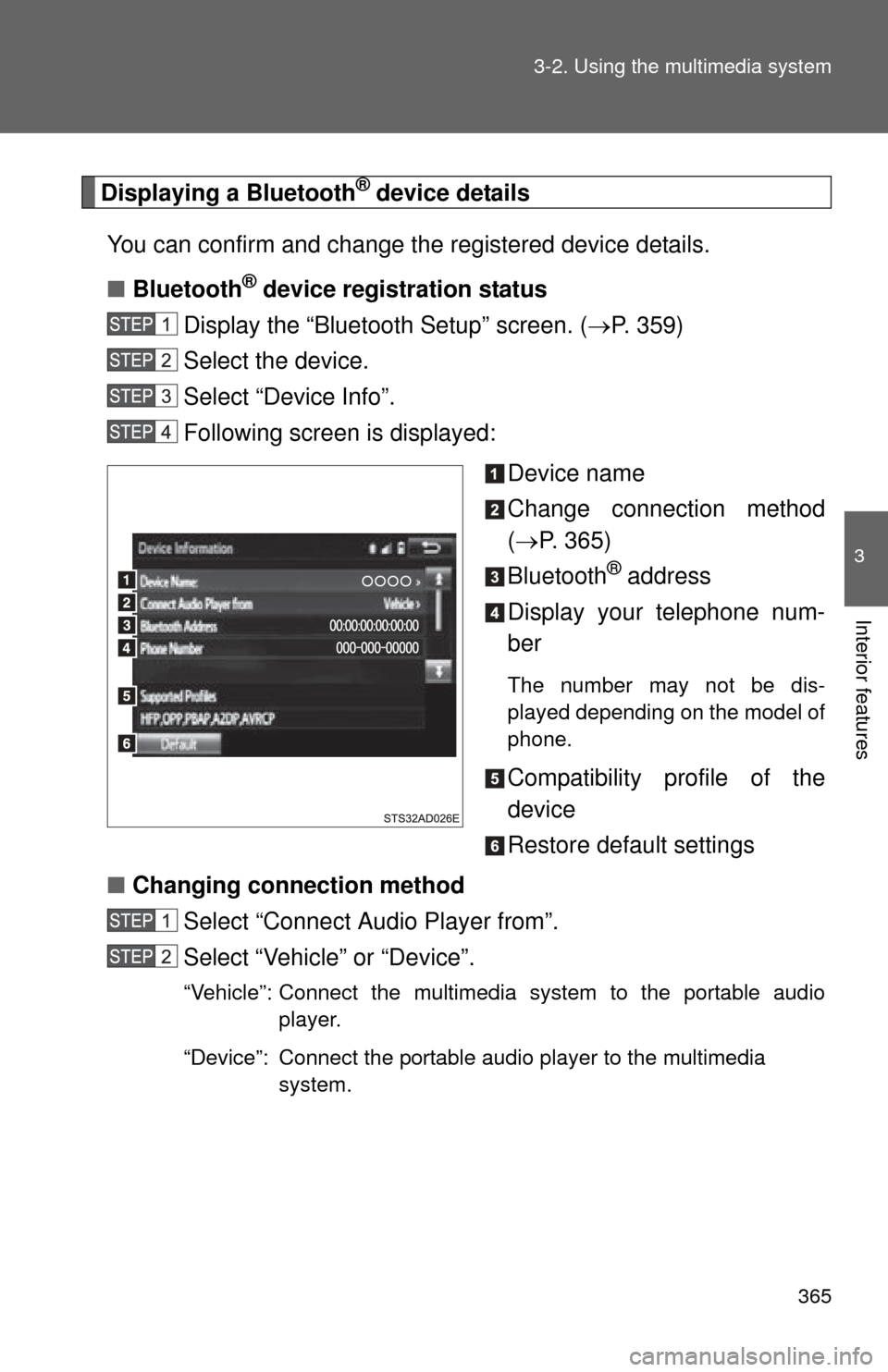
Following screen is displayed:
Device name
Change connection method
( P. 365)
Bluetooth
® address
Display your telephone num-
ber
The number may not be dis-
played depending on the model of
phone.
Compatibility profile of the
device
Restore default settings
■ Changing connection method
Select “Connect Audio Player from”.
Select “Vehicle” or “Device”.
“Vehicle”: Connect the multimedia system to the portable audio player.
“Device”: Connect the portable audio player to the multimedia system.
Page 366 of 668
366 3-2. Using the multimedia system
Detailed Bluetooth® system settings
You can confirm and change the detailed Bluetooth
® settings.
■ How to check and change detailed Bluetooth
® settings
Display the “Bluetooth Setup” screen. ( P. 359)
Select “System Settings”.
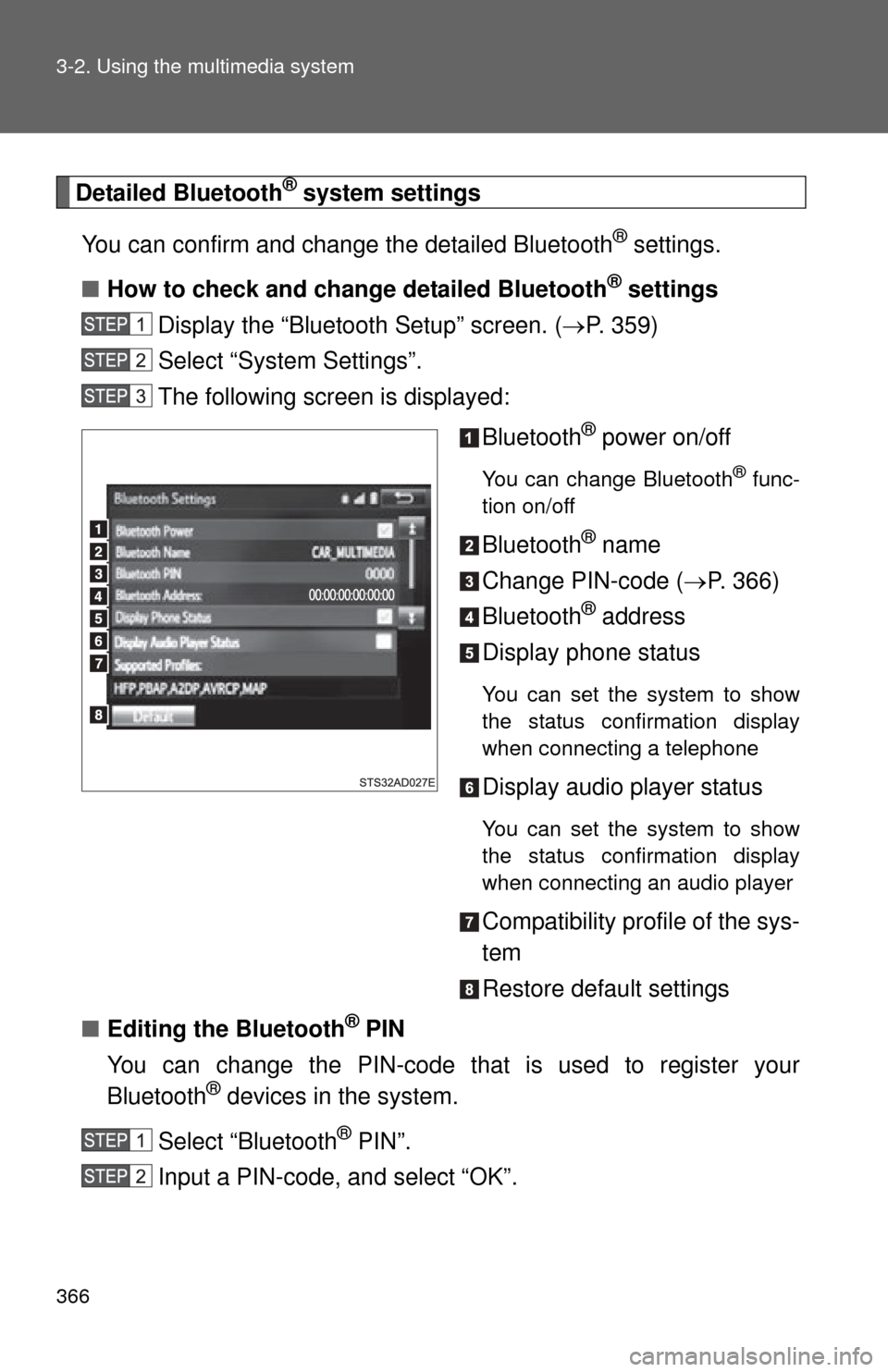
The following screen is displayed:
Bluetooth
® power on/off
You can change Bluetooth® func-
tion on/off
Bluetooth® name
Change PIN-code ( P. 366)
Bluetooth
® address
Display phone status
You can set the system to show
the status confirmation display
when connecting a telephone
Display audio player status
You can set the system to show
the status confirmation display
when connecting an audio player
Compatibility profile of the sys-
tem
Restore default settings
■ Editing the Bluetooth
® PIN
You can change the PIN-code that is used to register your
Bluetooth
® devices in the system.
Select “Bluetooth
® PIN”.
Input a PIN-code, and select “OK”.
Page 368 of 668
368 3-2. Using the multimedia system
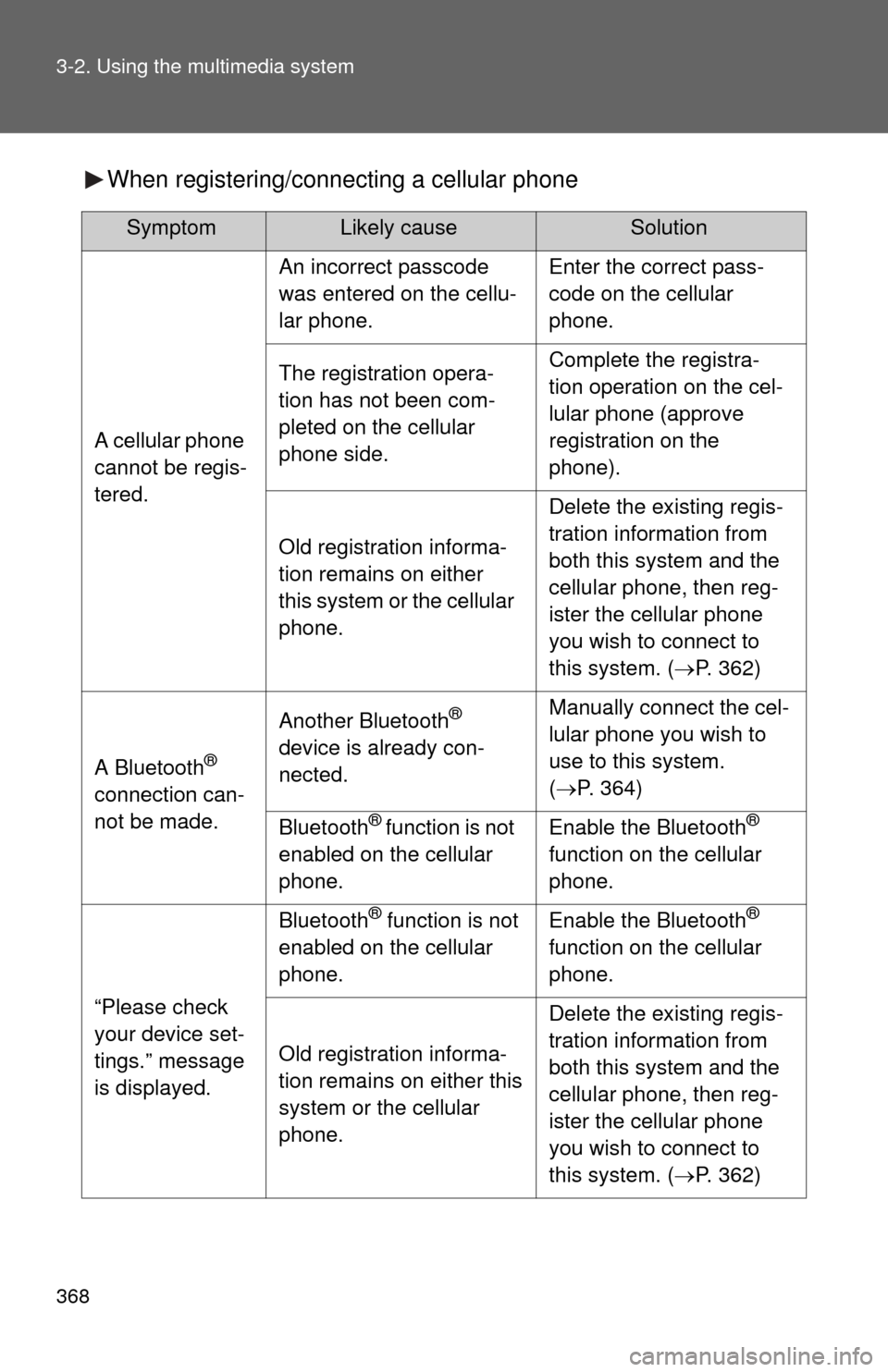
When registering/connecting a cellular phone
SymptomLikely causeSolution
A cellular phone
cannot be regis-
tered.
An incorrect passcode
was entered on the cellu-
lar phone.Enter the correct pass-
code on the cellular
phone.
The registration opera-
tion has not been com-
pleted on the cellular
phone side.Complete the registra-
tion operation on the cel-
lular phone (approve
registration on the
phone).
Old registration informa-
tion remains on either
this system or the cellular
phone.
Delete the existing regis-
tration information from
both this system and the
cellular phone, then reg-
ister the cellular phone
you wish to connect to
this system. (P. 362)
A Bluetooth®
connection can-
not be made.
Another Bluetooth®
device is already con-
nected.Manually connect the cel-
lular phone you wish to
use to this system.
( P. 364)
Bluetooth® function is not
enabled on the cellular
phone.Enable the Bluetooth®
function on the cellular
phone.
“Please check
your device set-
tings.” message
is displayed.
Bluetooth® function is not
enabled on the cellular
phone.Enable the Bluetooth®
function on the cellular
phone.
Old registration informa-
tion remains on either this
system or the cellular
phone.
Delete the existing regis-
tration information from
both this system and the
cellular phone, then reg-
ister the cellular phone
you wish to connect to
this system. ( P. 362)
Page 369 of 668
369
3-2. Using the multimedia system
3
Interior features
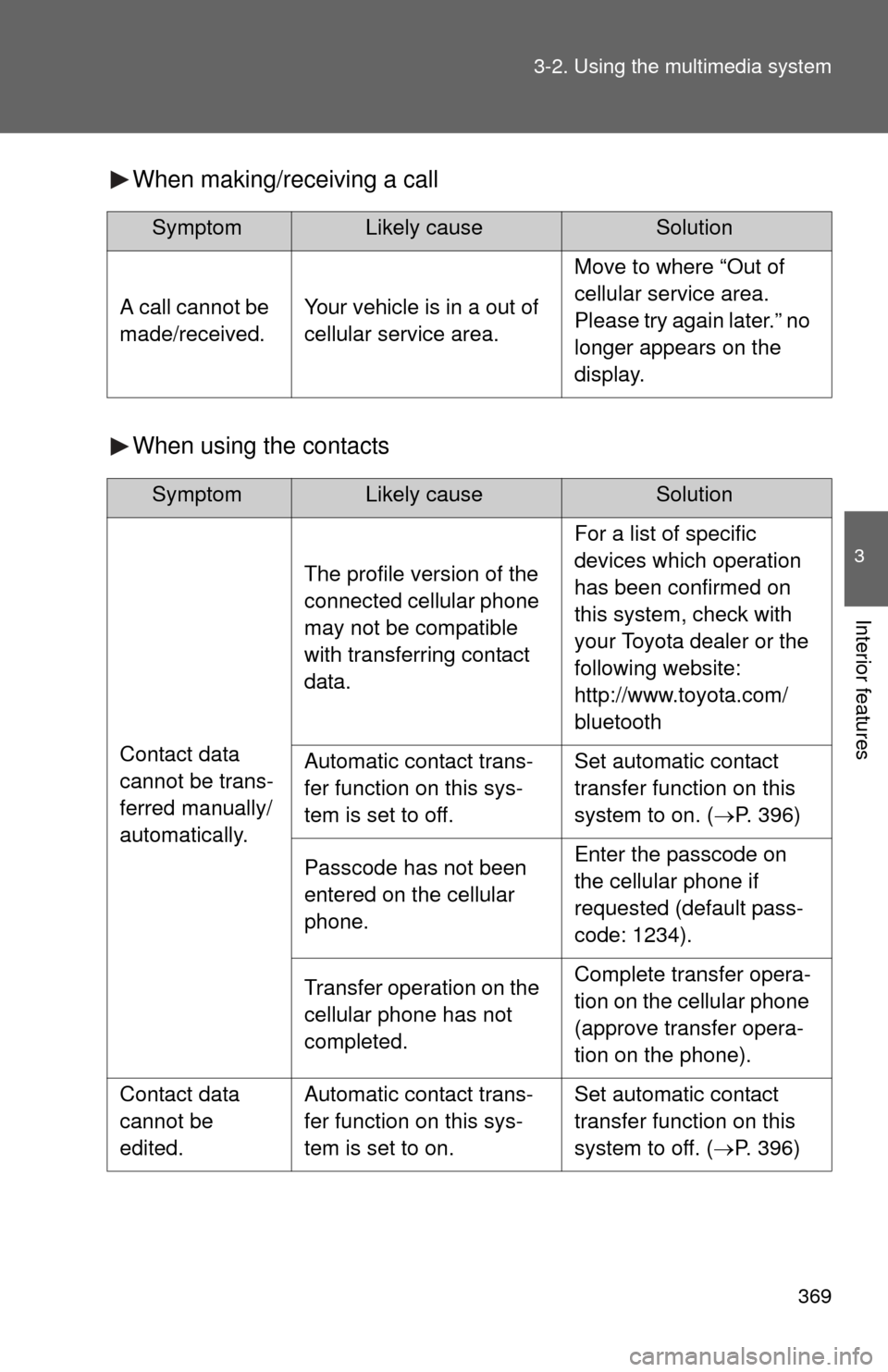
When making/receiving a call
When using the contacts
SymptomLikely causeSolution
A call cannot be
made/received.Your vehicle is in a out of
cellular service area.
Move to where “Out of
cellular service area.
Please try again later.” no
longer appears on the
display.
SymptomLikely causeSolution
Contact data
cannot be trans-
ferred manually/
automatically.
The profile version of the
connected cellular phone
may not be compatible
with transferring contact
data.
For a list of specific
devices which operation
has been confirmed on
this system, check with
your Toyota dealer or the
following website:
http://www.toyota.com/
bluetooth
Automatic contact trans-
fer function on this sys-
tem is set to off.Set automatic contact
transfer function on this
system to on. (
P. 396)
Passcode has not been
entered on the cellular
phone.Enter the passcode on
the cellular phone if
requested (default pass-
code: 1234).
Transfer operation on the
cellular phone has not
completed.Complete transfer opera-
tion on the cellular phone
(approve transfer opera-
tion on the phone).
Contact data
cannot be
edited.Automatic contact trans-
fer function on this sys-
tem is set to on.Set automatic contact
transfer function on this
system to off. (P. 396)
Page 370 of 668
370 3-2. Using the multimedia system
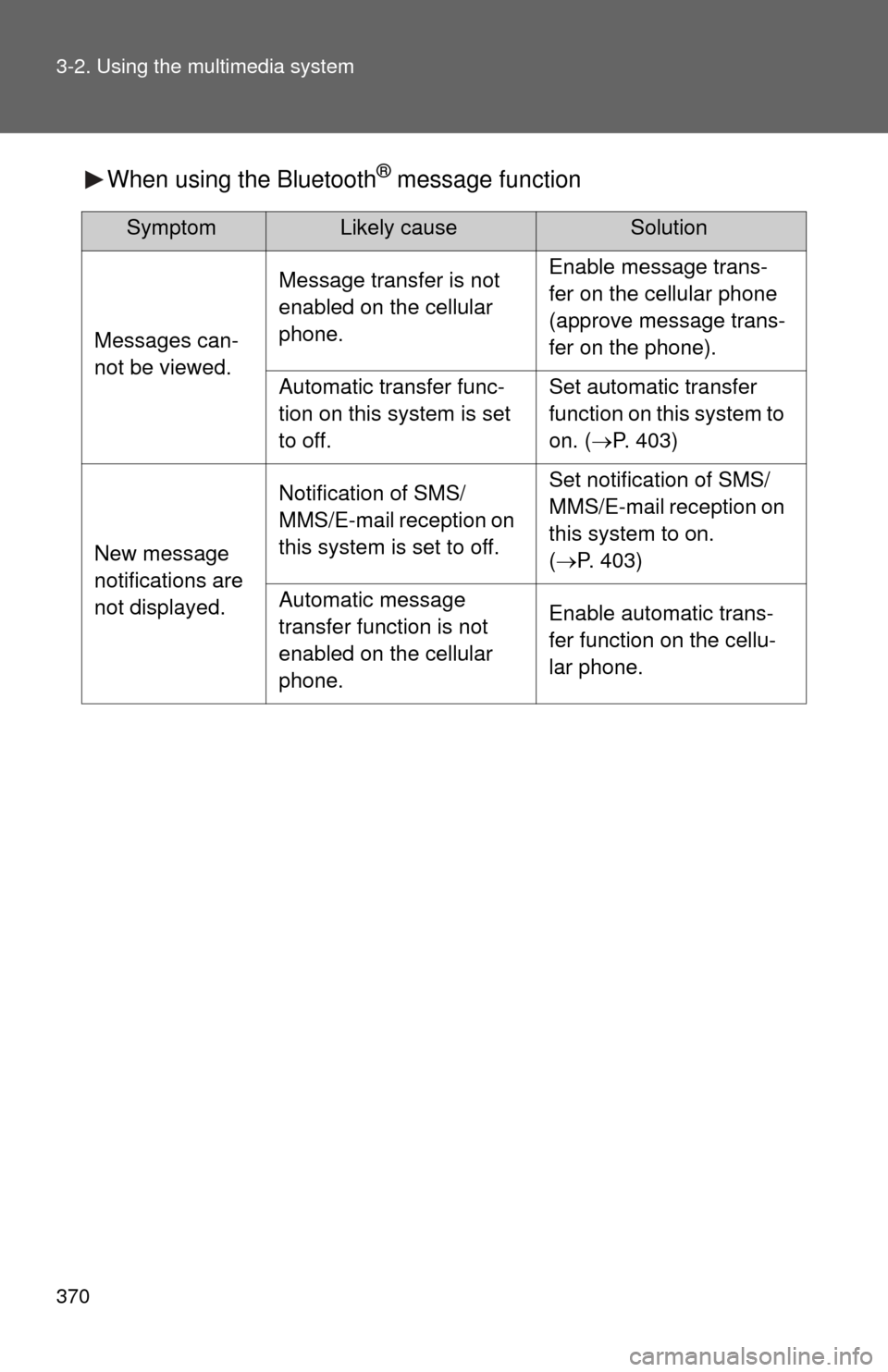
When using the Bluetooth® message function
SymptomLikely causeSolution
Messages can-
not be viewed.
Message transfer is not
enabled on the cellular
phone.Enable message trans-
fer on the cellular phone
(approve message trans-
fer on the phone).
Automatic transfer func-
tion on this system is set
to off.Set automatic transfer
function on this system to
on. (P. 403)
New message
notifications are
not displayed.
Notification of SMS/
MMS/E-mail reception on
this system is set to off.Set notification of SMS/
MMS/E-mail reception on
this system to on.
(P. 403)
Automatic message
transfer function is not
enabled on the cellular
phone.Enable automatic trans-
fer function on the cellu-
lar phone.
Page 373 of 668
373
3-2. Using the multimedia system
3
Interior features
■
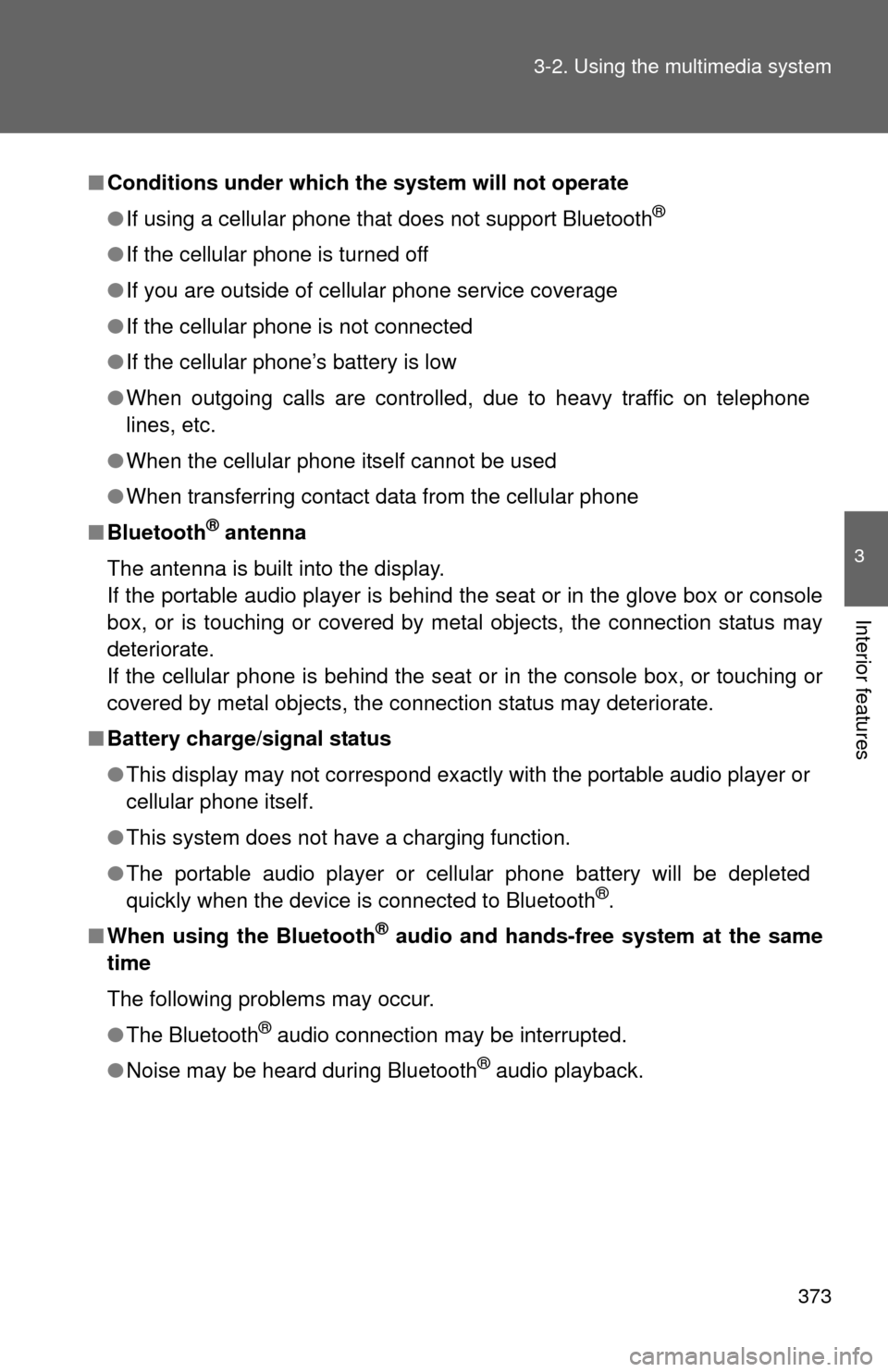
Conditions under which th e system will not operate
● If using a cellular phone that does not support Bluetooth
®
●If the cellular phone is turned off
● If you are outside of cellular phone service coverage
● If the cellular phone is not connected
● If the cellular phone’s battery is low
● When outgoing calls are controlled, due to heavy traffic on telephone
lines, etc.
● When the cellular phone itself cannot be used
● When transferring contact data from the cellular phone
■ Bluetooth
® antenna
The antenna is built into the display.
If the portable audio player is behind the seat or in the glove box or console
box, or is touching or covered by metal objects, the connection status may
deteriorate.
If the cellular phone is behind the seat or in the console box, or touching or
covered by metal objects, the connection status may deteriorate.
■ Battery charge/signal status
●This display may not correspond exactly with the portable audio player or
cellular phone itself.
● This system does not have a charging function.
● The portable audio player or cellular phone battery will be depleted
quickly when the device is connected to Bluetooth
®.
■ When using the Bluetooth
® audio and hands-free system at the same
time
The following problems may occur.
● The Bluetooth
® audio connection may be interrupted.
● Noise may be heard during Bluetooth
® audio playback.