phone TOYOTA SEQUOIA 2015 2.G Owners Manual
[x] Cancel search | Manufacturer: TOYOTA, Model Year: 2015, Model line: SEQUOIA, Model: TOYOTA SEQUOIA 2015 2.GPages: 664, PDF Size: 13.16 MB
Page 3 of 664

1
2
3
4
5
6
7
3
2-3. Operating the lights and wipers
Headlight switch .................. 185
Fog light switch ................... 191
Windshield wipers and washer .............................. 193
Rear window wiper and washer .............................. 197
Headlight cleaner switch ..... 199
2-4. Using other driving systems Cruise control ...................... 200
Dynamic laser cruise control ............................... 204
Intuitive parking assist......... 218
Rear view monitor system .............................. 225
BSM (Blind Spot Monitor) ... 236
Electronically modulated air suspension................... 242
AVS (Adaptive Variable Suspension System) ......... 247
Four-wheel drive system ..... 248
AUTO LSD system.............. 253
Driving assist systems ........ 255
2-5. Driving information Off-road precautions ........... 263
Cargo and luggage ............. 268
Vehicle load limits ............... 273
Winter driving tips ............... 275
Trailer towing ...................... 279
Dinghy towing ..................... 299 3-1. Using the air conditioning
system and defogger
Front air conditioning system .............................. 302
Rear air conditioning system .............................. 311
Rear window and outside rear view
mirror defoggers ............... 315
Windshield wiper de-icer .... 317
3-2. Using the multimedia system Multimedia system types .... 318
Entune Audio ...................... 320
USB port/AUX port ............. 324
Setup menu ........................ 325
Basic audio operations ....... 329
Using the radio ................... 334
Playing an audio CD and MP3/WMA/AAC discs ...... 336
Listening to an iPod ............ 343
Listening to a USB memory device ................. 349
Using the AUX port............. 354
Connecting Bluetooth
®....... 355
Listening to Bluetooth®
audio ................................ 377
Using a Bluetooth
®
phone ............................... 378
3Interior features
Page 14 of 664
14
Pictorial indexInterior
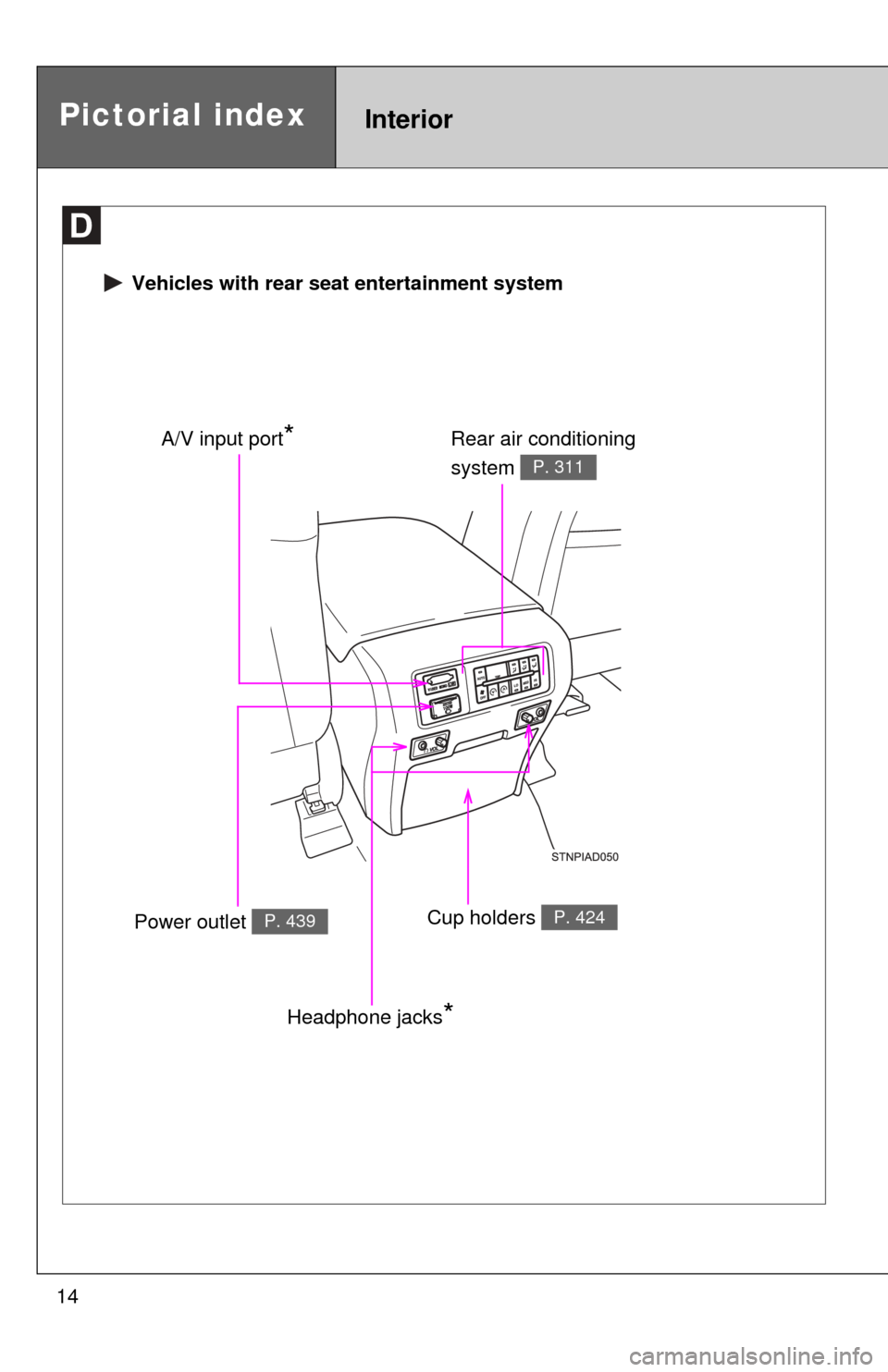
Vehicles with rear seat entertainment system
Rear air conditioning
system
P. 311
Power outlet P. 439Cup holders P. 424
A/V input port*
Headphone jacks*
Page 20 of 664
20
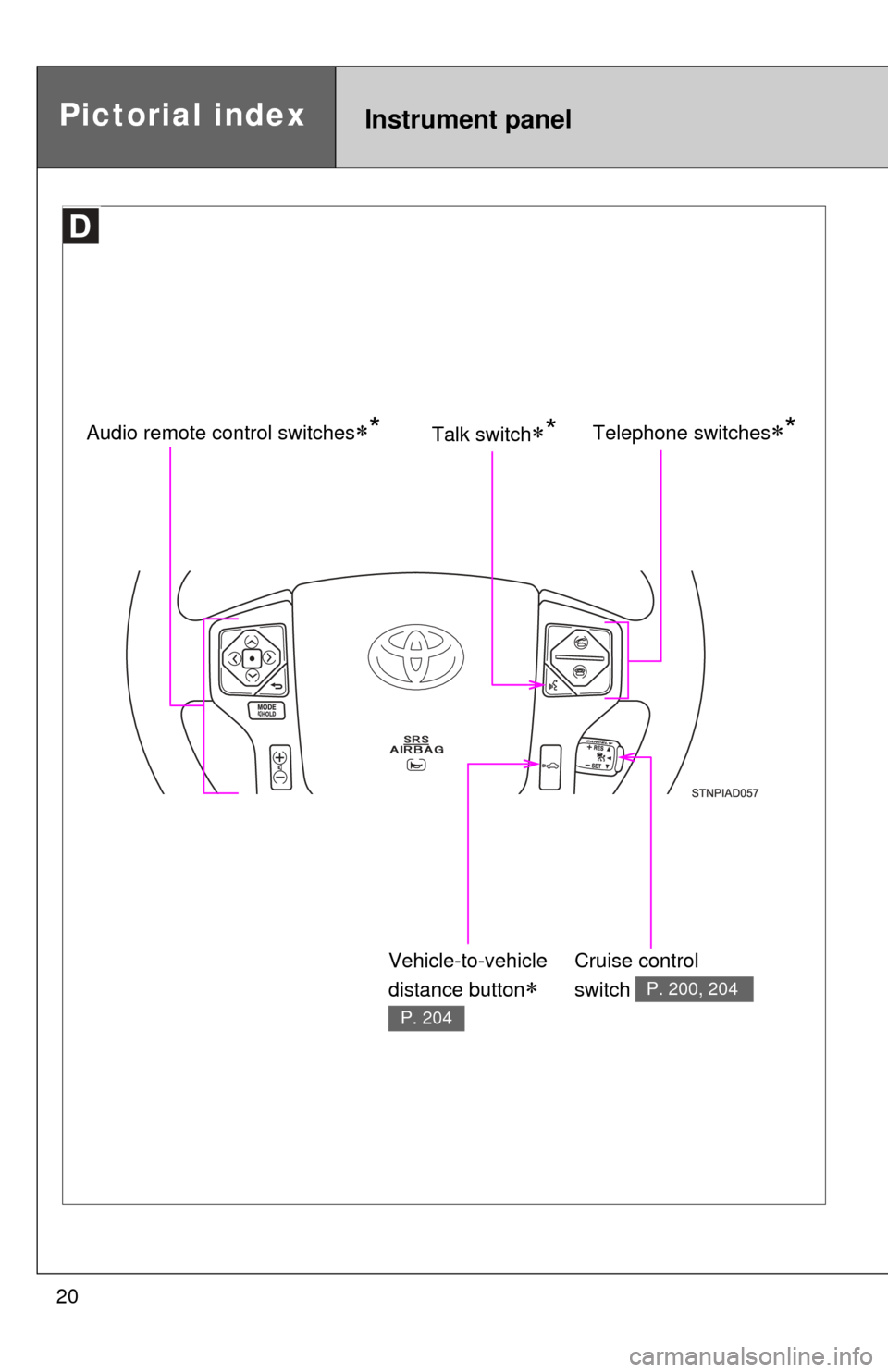
Instrument panelPictorial index
Telephone switches*Audio remote control switches*
Cruise control
switch
P. 200, 204
Talk switch*
Vehicle-to-vehicle
distance button
P. 204
Page 27 of 664

27
CAUTION
■General precautions while driving
Driving under the influence: Never drive your vehicle when under the influ-
ence of alcohol or drugs that have impaired your ability to operate your vehi-
cle. Alcohol and certain drugs delay reaction time, impair judgment and
reduce coordination, which could lead to an accident that could result in
death or serious injury.
Defensive driving: Always drive defensively. Anticipate mistakes that other
drivers or pedestrians might make and be ready to avoid accidents.
Driver distraction: Always give your full attention to driving. Anything that dis-
tracts the driver, such as adjusting controls, talking on a cellular phone or
reading can result in a collision with resulting death or serious injury to you,
your occupants or others.
■ General precaution regarding children’s safety
Never leave children unattended in the vehicle, and never allow children to
have or use the key.
Children may be able to start the vehicle or shift the vehicle into neutral.
There is also a danger that children may injure themselves by playing with
the cigarette lighter, the windows, the moon roof, or other features of the
vehicle. In addition, heat build-up or ex tremely cold temperatures inside the
vehicle can be fatal to children.
Page 33 of 664

33
1-2. Opening, closing and locking the doors
1
Before driving
■
Conditions affecting operation
The wireless remote control function may not operate normally in the follow-
ing situations.
●Near a TV tower, radio station, electr ic power plant, airport or other facil-
ity that generates strong radio waves
● When carrying a portable radio, cell ular phone or other wireless commu-
nication device
● When multiple wireless keys are in the vicinity
● When the wireless key has come into contact with, or is covered by a
metallic object
● When a wireless key (that emits radio waves) is being used nearby
● When the wireless key has been left near an electrical appliance such as
a personal computer
■ When riding in an aircraft
When bringing a wireless remote control onto an aircraft, make sure you do
not press any buttons on the wireless remote control while inside the aircraft
cabin. If you are carrying a wireless remote control in your bag etc., ensure
that the buttons are not likely to be pressed accidentally. Pressing a button
may cause the wireless remote control to emit radio waves that could inter-
fere with the operation of the aircraft.
■ Customization
●That can be configured at Toyota dealer (vehicles without multi-informa-
tion display)
Settings (e.g. wireless remote control) can be changed.
(Customizable features P. 627)
● It is possible to change the settings (vehicles with multi-information dis-
play) (Feature customization P. 179)
Page 300 of 664
300
3-1. Using the air conditioning system and defogger
Front air conditioning system ........................... 302
Rear air conditioning system ........................... 311
Rear window and outside rear view
mirror defoggers ............ 315
Windshield wiper de-icer ............................ 317
3-2. Using the multimedia system Multimedia system types .............................. 318
Entune Audio ................... 320
USB port/AUX port ........... 324
Setup menu...................... 325
Basic audio operations..... 329
Using the radio ................. 334
Playing an audio CD and MP3/WMA/AAC discs .... 336
Listening to an iPod ......... 343
Listening to a USB memory device .............. 349
Using the AUX port .......... 354
Connecting Bluetooth
®..... 355
Listening to Bluetooth®
audio .............................. 377
Using a Bluetooth
®
phone ............................. 378
Interior features3
Page 320 of 664
320
3-2. Using the multimedia system
Entune Audio
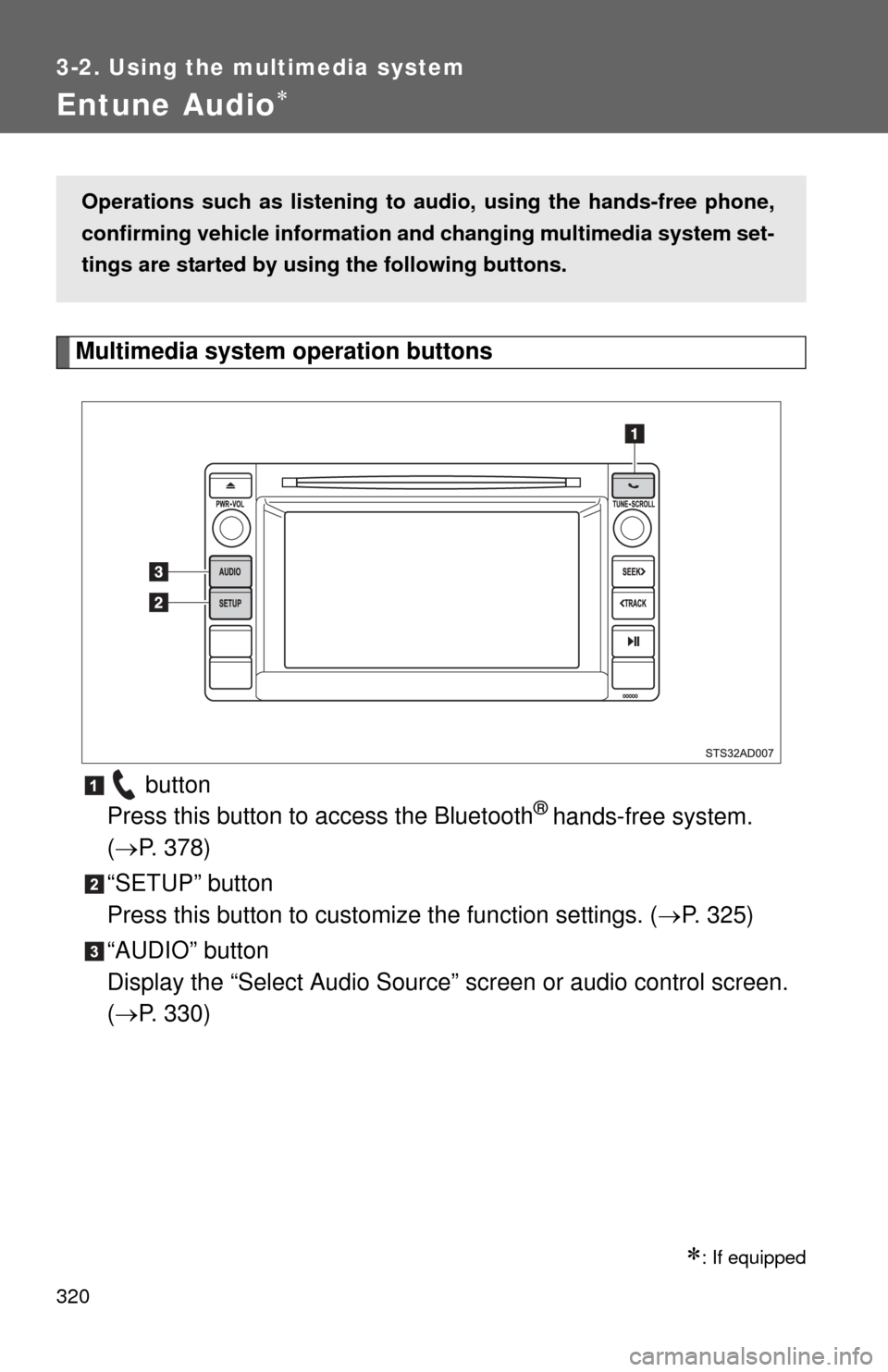
Multimedia system operation buttons button
Press this button to access the Bluetooth
® hands-free system.
( P. 378)
“SETUP” button
Press this button to custom ize the function settings. (P. 325)
“AUDIO” button
Display the “Select Audio Source” screen or audio control screen.
( P. 330)
: If equipped
Operations such as listening to audio, using the hands-free phone,
confirming vehicle information and changing multimedia system set-
tings are started by using the following buttons.
Page 321 of 664
321
3-2. Using the multimedia system
3
Interior features
Operating the touch screen
By touching the screen with your finger, you can control the Audio,
hands-free system, etc.
■ Drag
*
Touch the screen with your finger and move the screen to the
desired position.
●Scrolling the lists
● Using scroll bar in lists
■ Flick
*
Touch the screen with your finger and then quickly move the
screen.
●Scrolling the main screen page
● Returning to the menu scr een from the sub-menu screen
(screen one level below)
*: The above operations may not be performed on all screens.
■ When using the touch screen
●If the screen is cold, the display may be dark, or the system may seem to
be operating slightly slower than normal.
● The screen may seem dark and hard to see when viewed through sun-
glasses. Change your angle of viewing, adjust the display on the “Dis\
play
Settings” screen ( P. 328) or remove your sunglasses.
■ Using cellular phones
Interference may be heard through the multimedia system’s speakers if a
cellular phone is being used inside or close to the vehicle while the multime-
dia system is operating.
Page 325 of 664
325
3-2. Using the multimedia system
3
Interior features
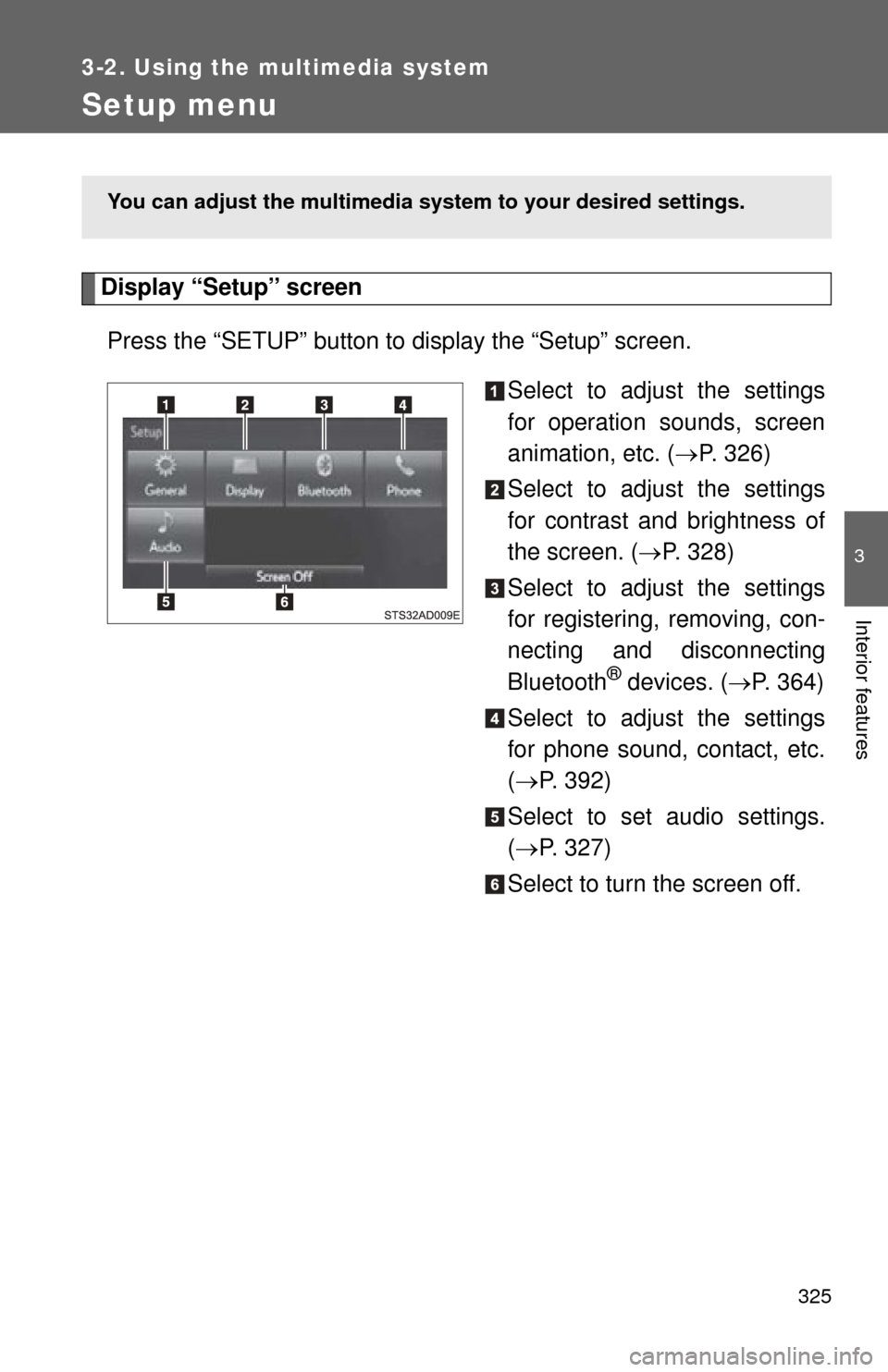
Setup menu
Display “Setup” screenPress the “SETUP” button to display the “Setup” screen. Select to adjust the settings
for operation sounds, screen
animation, etc. (P. 326)
Select to adjust the settings
for contrast and brightness of
the screen. ( P. 328)
Select to adjust the settings
for registering, removing, con-
necting and disconnecting
Bluetooth
® devices. ( P. 364)
Select to adjust the settings
for phone sound, contact, etc.
( P. 392)
Select to set audio settings.
( P. 327)
Select to turn the screen off.
You can adjust the multimedia s ystem to your desired settings.
Page 327 of 664
327
3-2. Using the multimedia system
3
Interior features
■
Delete personal data
Select “Delete Personal Data” on the “General Settings”
screen.
Select “Delete”.
Check carefully beforehand, as data cannot be retrieved once
deleted.
A confirmation screen will be displayed. Select “Yes”.
The following personal data will be deleted or changed to its
default settings.
• General settings
• Audio settings
• Phone settings
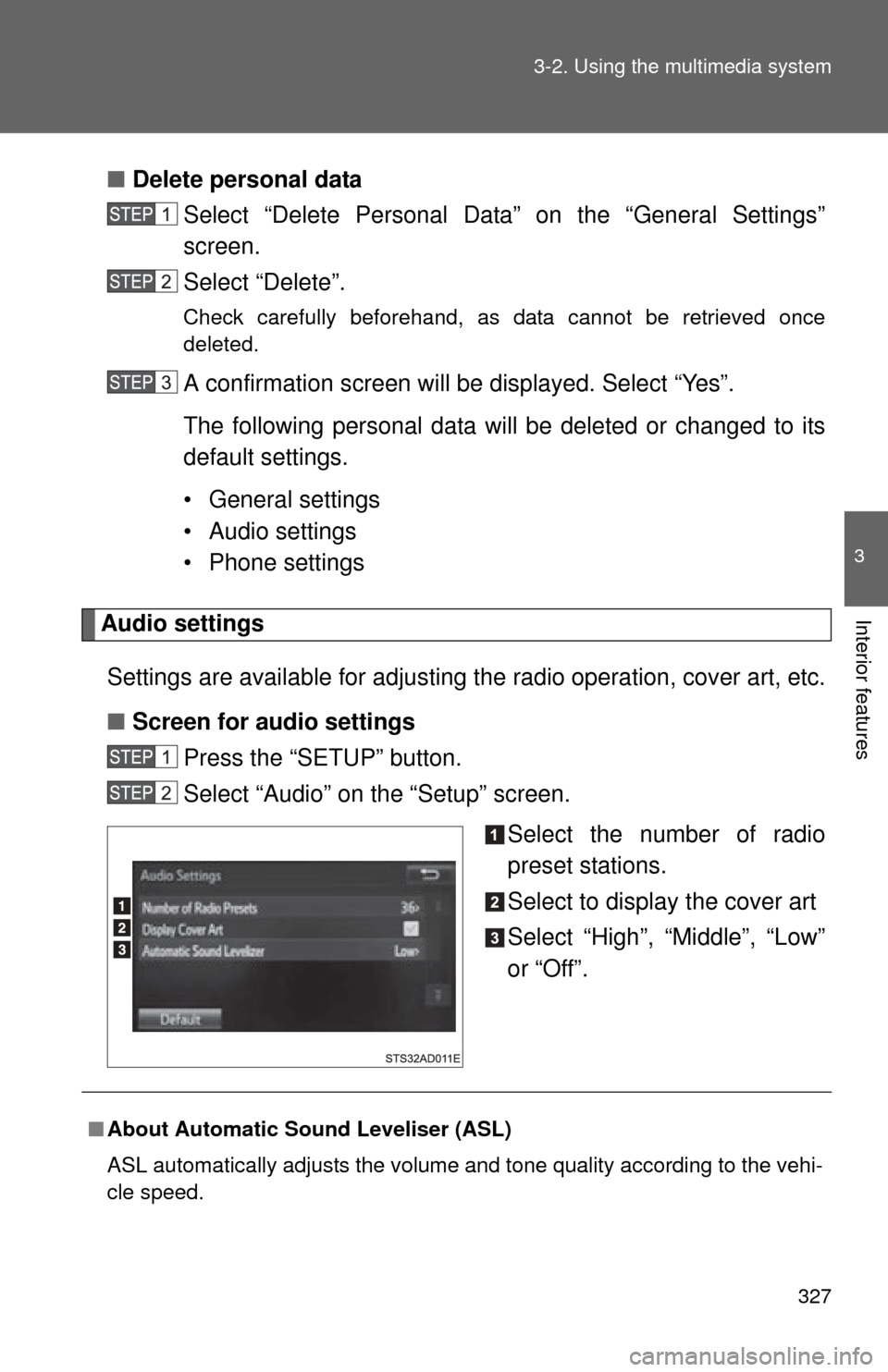
Audio settings
Settings are available for adjusting the radio operation, cover art, etc.
■ Screen for audio settings
Press the “SETUP” button.
Select “Audio” on the “Setup” screen.
Select the number of radio
preset stations.
Select to display the cover art
Select “High”, “Middle”, “Low”
or “Off”.
■About Automatic Sound Leveliser (ASL)
ASL automatically adjusts the volume and tone quality according to the vehi-
cle speed.