ignition TOYOTA SEQUOIA 2020 Owners Manual (in English)
[x] Cancel search | Manufacturer: TOYOTA, Model Year: 2020, Model line: SEQUOIA, Model: TOYOTA SEQUOIA 2020Pages: 56, PDF Size: 5.2 MB
Page 14 of 56
 12
FEATURES & OPERATIONSAutomatic transmission
* The engine switch must be in the “IGNITION ON” mode and the brak\
e pedal
depressed to shift from Park.
Shift the shift lever to “S” position")
12
FEATURES & OPERATIONSAutomatic transmission
* The engine switch must be in the “IGNITION ON” mode and the brak\
e pedal
depressed to shift from Park.
Shift the shift lever to “S” position from “D” position.
+: Upshift (push and release)
-: Downshift (pull and release)
Downshifting increases power going uphill, or provides engine braking do\
wnhill.
For best fuel economy during normal driving conditions, always drive wit\
h the shift
lever in the “D” position.
Park*
Reverse
Neutral
Drive
“S” mode“S”“D”
“S” (SEQUENTIAL) MODE
Auto lock/unlock
Automatic door locks can be programmed to operate in different modes, or\
turned
OFF.
Shift position linked door locking/unlocking function
-Doors lock when shifting from Park.
-Doors unlock when shifting into Park.
Speed linked door locking function
-Doors lock when the vehicle speed goes above approximately 12 mph (20 \
km/h).
Driver’s door linked door unlocking function
-Doors unlock when the engine switch is set from “ON” to “ACC”\
or “OFF” within 10 seconds of opening the driver’s door.
Refer to the Owner’s Manual for more details.
Page 25 of 56
 23
OpenTilt
CloseClose
PushPush
(1)
(2)
(1)
You can save up to two driving positions to memory and recall it with th\
e touch of
a button. Make sure shift lever is in “P” position and ignition sw")
23
OpenTilt
CloseClose
PushPush
(1)
(2)
(1)
You can save up to two driving positions to memory and recall it with th\
e touch of
a button. Make sure shift lever is in “P” position and ignition sw\
itch is in the “ON”
position.
Refer to the Owner‘s Manual for more details on this system.
To save
Adjust driver’s seat, steering wheel, and
outside rear view mirrors.Press “1” or “2” to recall until buzzer sounds.
Push “SET” and “1” or “2” buttons to save
until buzzer sounds.
To recall
SLIDING OPERATIONTILTING OPERATION
DRIVER’S SEAT
OVERVIEW
FEATURES & OPERATIONS
TOYOTA SAFETY SENSE
SAFETY & EMERGENCY FEATURES
Lightly press either side of the moonroof switch while opening/tilting i\
s in progress,
the moonroof stops partway.
Push once to open partway; again to open
completely. Push once to open completely.
Moonroof
Driving position memory (if equipped)
Page 27 of 56
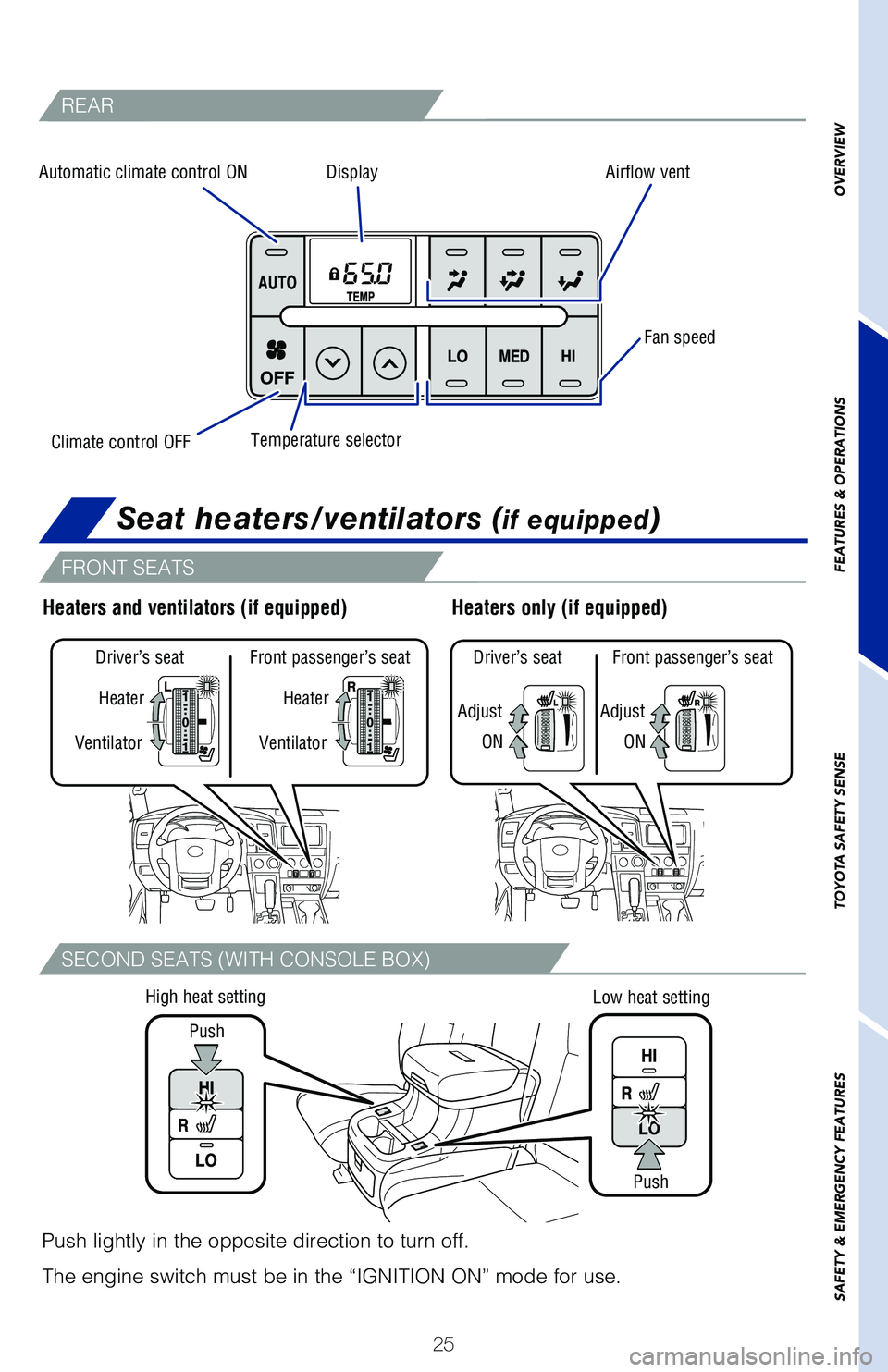
25
OVERVIEW
FEATURES & OPERATIONS
TOYOTA SAFETY SENSE
SAFETY & EMERGENCY FEATURES
REAR
FRONT SEATS
SECOND SEATS (WITH CONSOLE BOX)
Climate control OFF
Driver’s seat Front passenger’s seat
Ventilator
Ventilator Heater
Heater
Adjust
Driver’s seat Front passenger’s seat
ON
Adjust
ON
Heaters only (if equipped)Heaters and ventilators (if equipped)
Push
Push
Low heat setting
High heat setting
Push lightly in the opposite direction to turn off.
The engine switch must be in the “IGNITION ON” mode for use.
Automatic climate control ON
DisplayAirflow vent
Fan speed
Temperature selector
Seat heaters/ventilators (if equipped)
Page 28 of 56
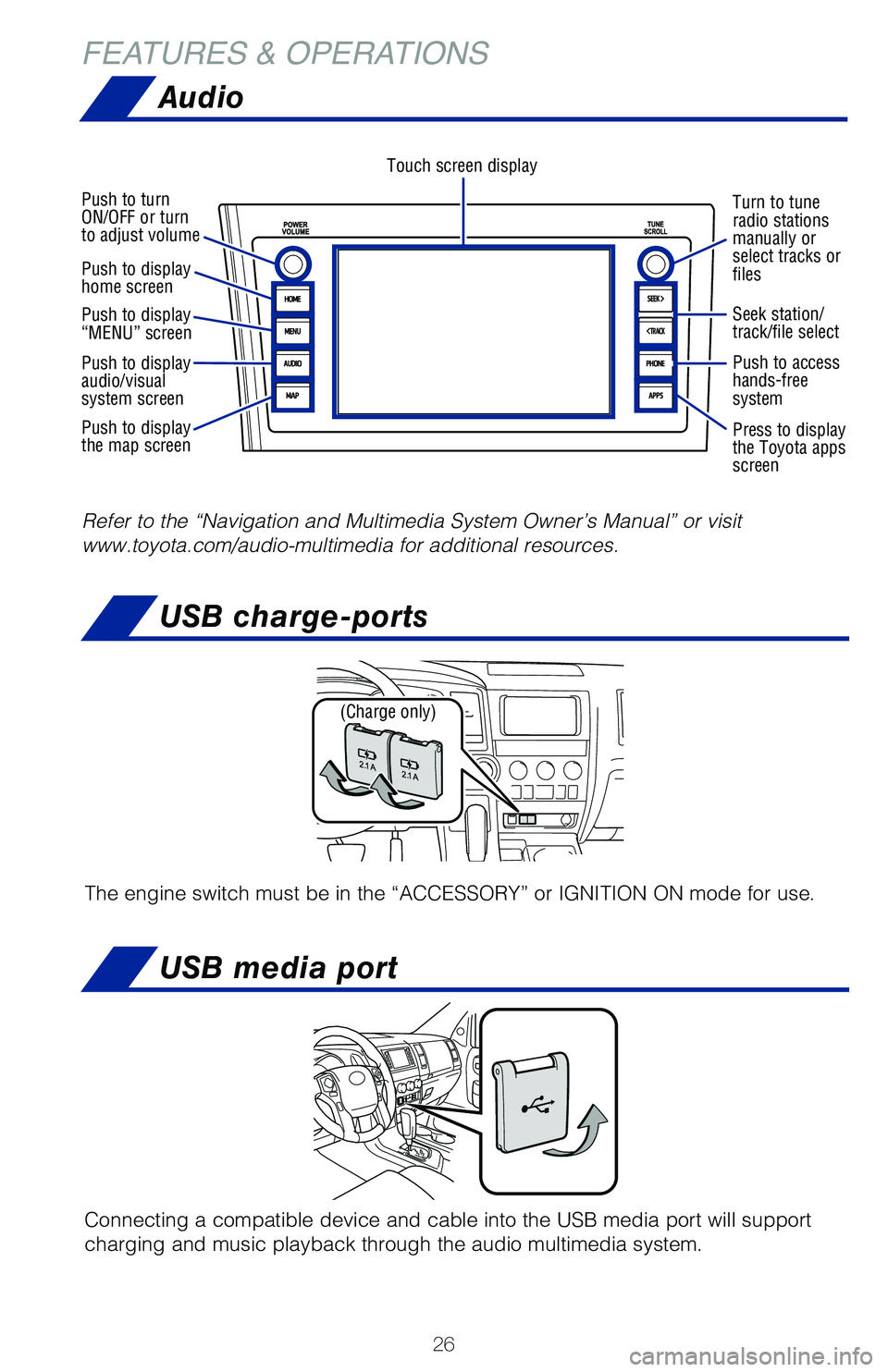
26
FEATURES & OPERATIONS
Turn to tune
radio stations
manually or
select tracks or
files
Touch screen display
Push to turn
ON/OFF or turn
to adjust volume
Push to display
home screen
Push to display
“MENU” screen
Push to display
audio/visual
system screen
Push to display
the map screen
USB media port
USB charge-ports
Connecting a compatible device and cable into the USB media port will su\
pport
charging and music playback through the audio multimedia system.
Refer to the “Navigation and Multimedia System Owner’s Manual” \
or visit
www.toyota.com/audio-multimedia for additional resources.
Seek station/
track/file select
Push to access
hands-free
system
Press to display
the Toyota apps
screen
(Charge only)
The engine switch must be in the “ACCESSORY” or IGNITION ON mode f\
or use.
Audio
Page 29 of 56
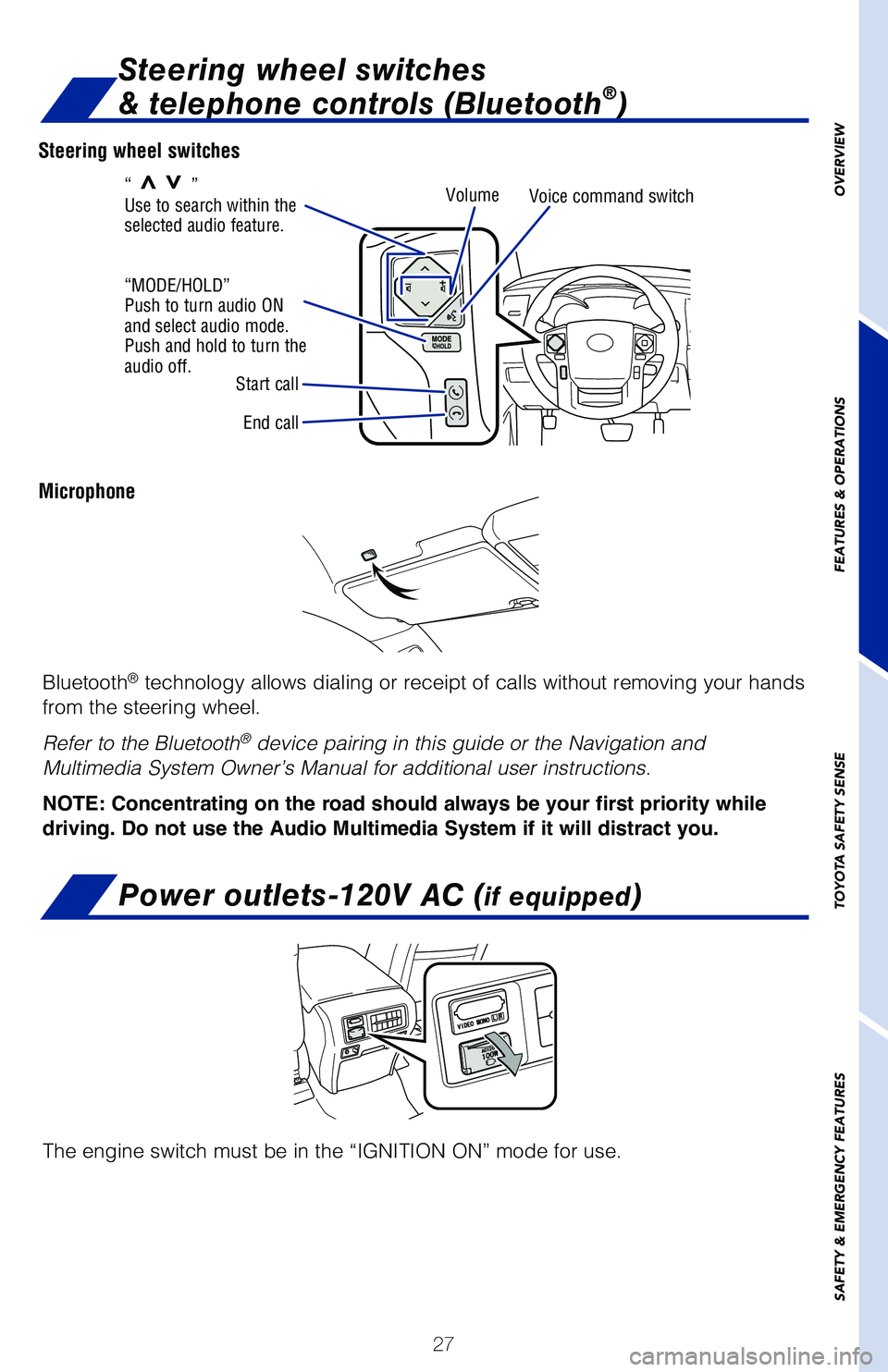
27
OVERVIEW
FEATURES & OPERATIONS
TOYOTA SAFETY SENSE
SAFETY & EMERGENCY FEATURES
Steering wheel switches
Microphone
End call Volume
Voice command switch
Start call
“MODE/HOLD”
Push to turn audio ON
and select audio mode.
Push and hold to turn the
audio off. “
>>”
Use to search within the
selected audio feature.
Steering wheel switches
& telephone controls (Bluetooth®)
Bluetooth® technology allows dialing or receipt of calls without removing your han\
ds
from the steering wheel.
Refer to the Bluetooth
® device pairing in this guide or the Navigation and
Multimedia System Owner’s Manual for additional user instructions.
NOTE: Concentrating on the road should always be your first priority while
driving. Do not use the Audio Multimedia System if it will distract you.
The engine switch must be in the “IGNITION ON” mode for use.
Power outlets-120V AC (if equipped)
Page 30 of 56
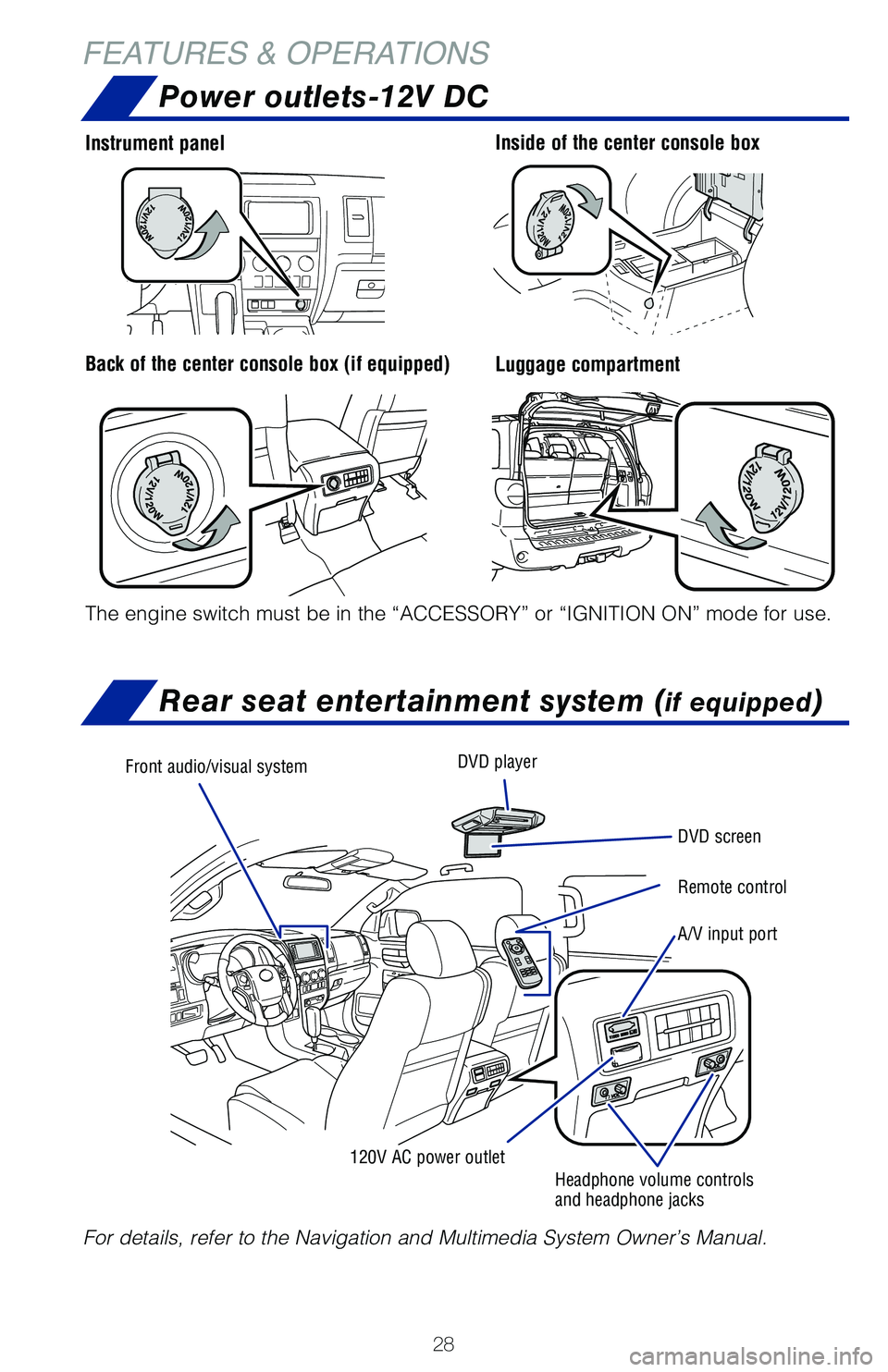
28
FEATURES & OPERATIONSPower outlets-12V DC
Luggage compartment
Instrument panelInside of the center console box
Back of the center console box (if equipped)
The engine switch must be in the “ACCESSORY” or “IGNITION ON”\
mode for use.
Rear seat entertainment system (if equipped)
For details, refer to the Navigation and Multimedia System Owner’s Ma\
nual.
Front audio/visual system DVD player
DVD screen
Remote control
A/V input port
120V AC power outlet Headphone volume controls
and headphone jacks
Page 38 of 56
36
TOYOTA SAFETY SENSE™
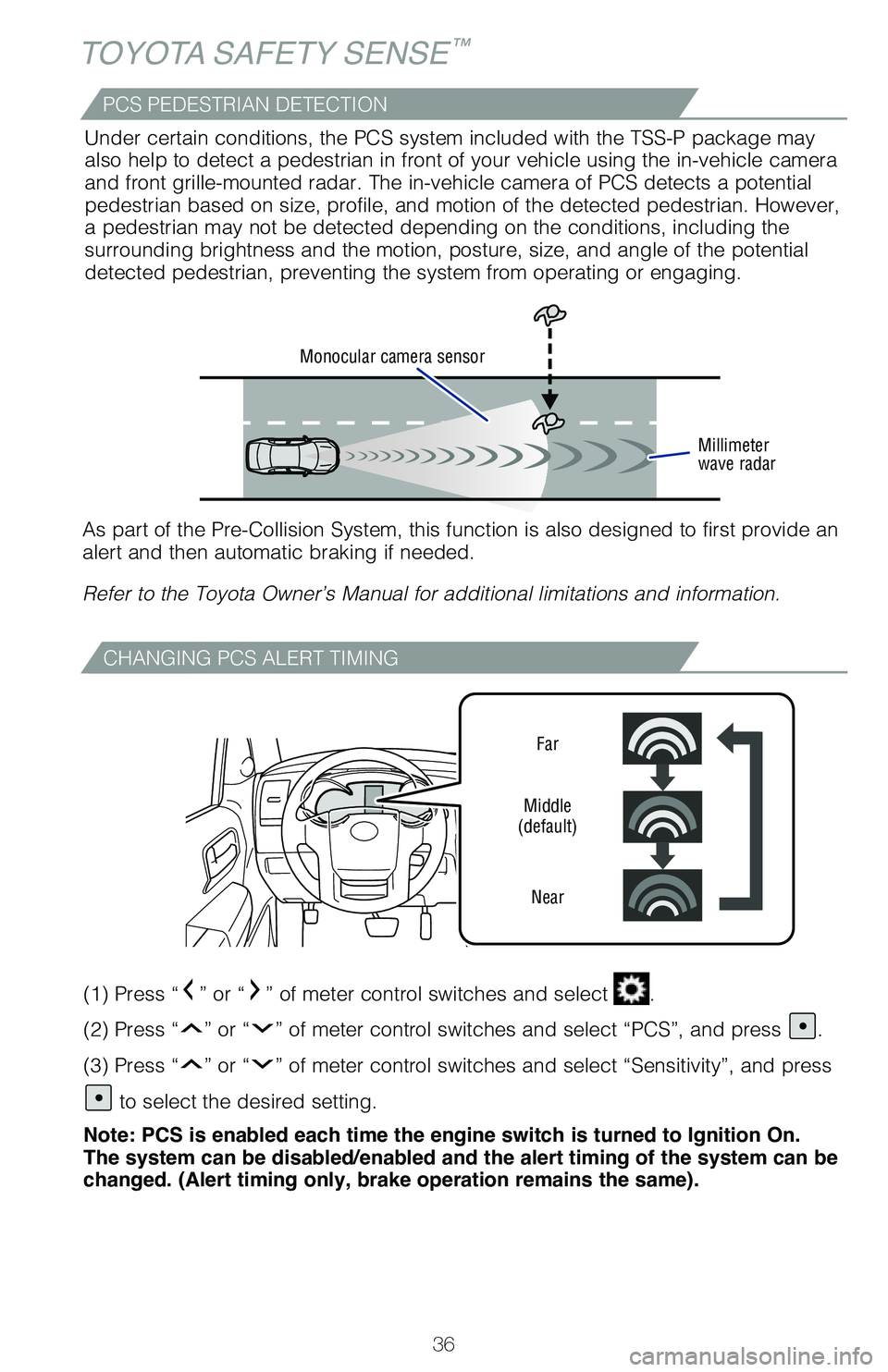
CHANGING PCS ALERT TIMING
Far
Middle
(default)
Near
(1) Press “” or “” of meter control switches and select .
(2) Press “
” or “” of meter control switches and select “PCS”, and press .
(3) Press “
” or “” of meter control switches and select “Sensitivity”, and press\
to select the desired setting.
Note: PCS is enabled each time the engine switch is turned to Ignition On.
The system can be disabled/enabled and the alert timing of the system can be
changed. (Alert timing only, brake operation remains the same).
Monocular camera sensor
Millimeter
wave radar
As part of the Pre-Collision System, this function is also designed to f\
irst provide an
alert and then automatic braking if needed.
Refer to the Toyota Owner’s Manual for additional limitations and inf\
ormation.Under certain conditions, the PCS system included with the TSS-P package\
may
also help to detect a pedestrian in front of your vehicle using the in-v\
ehicle camera
and front grille-mounted radar. The in-vehicle camera of PCS detects a p\
otential
pedestrian based on size, profile, and motion of the detected pedestrian\
. However,
a pedestrian may not be detected depending on the conditions, including \
the
surrounding brightness and the motion, posture, size, and angle of the p\
otential
detected pedestrian, preventing the system from operating or engaging.
PCS PEDESTRIAN DETECTION
Page 42 of 56
40
TOYOTA SAFETY SENSE™
(1) Press “” or “” of meter control switches and select .
(2) Press “
” or “” of meter control switches and select “LDA”, and press .
(3) Press “
” or “” of meter control switches and select “Sway Warning
Sensitivity”, and press
to select the desired setting.
(1) Press “
” or “” of meter control switches and select .
(2) Press “
” or “” of meter control switches and select “LDA”, and press .
(3) Press “
” or “” of meter control switches and select “Sway Warning”, and
press
to select the desired setting.
Note: Operation of the LDA system and setting adjustments continues in the
same condition regardless of Ignition cycle until changed by the driver or the
system is reset.
ADJUSTING SWAY ALERT SENSITIVITY
DISABLING LDA SWAY WARNING SYSTEM
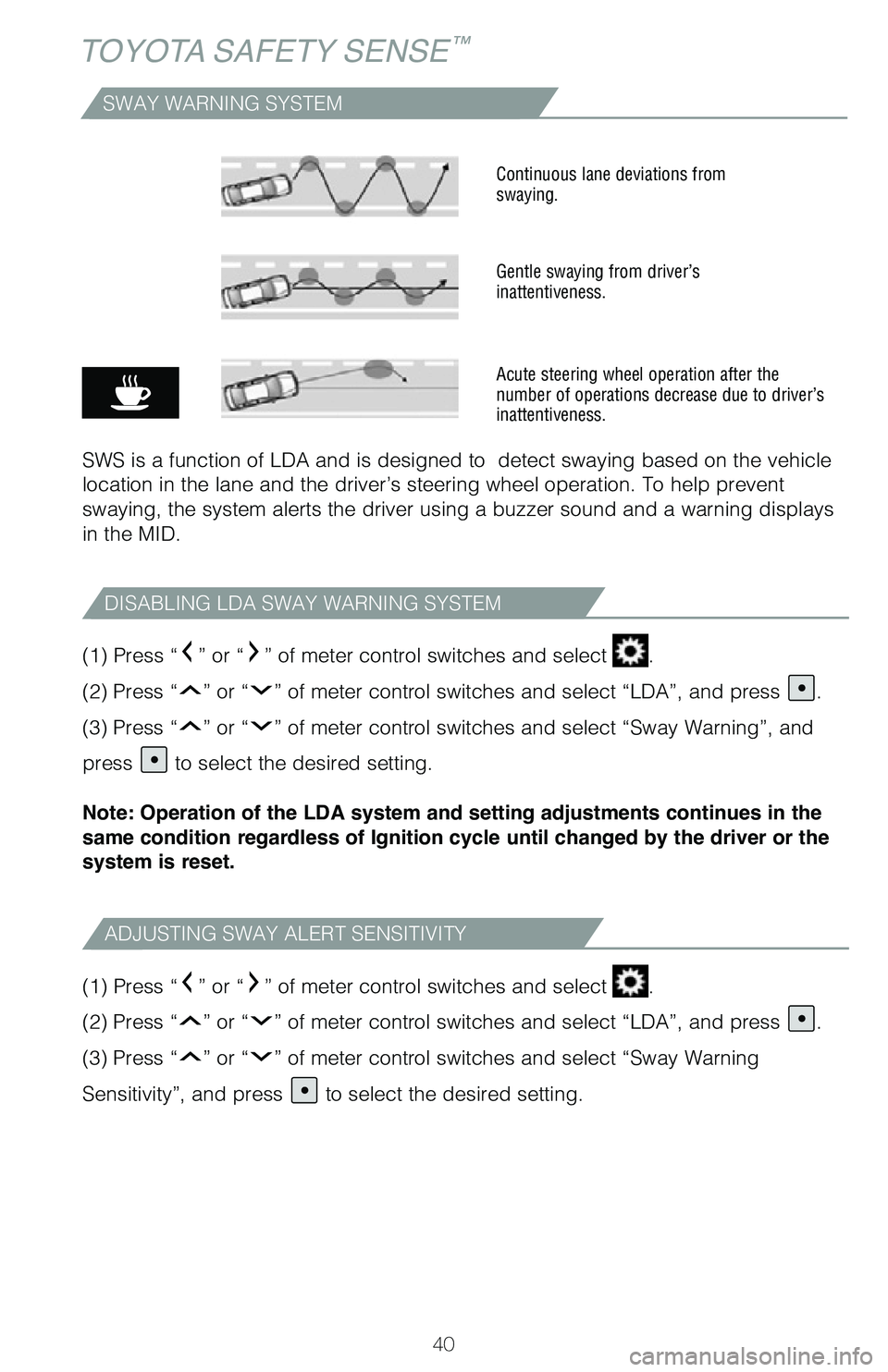
SWAY WARNING SYSTEM
SWS is a function of LDA and is designed to detect swaying based on the\
vehicle
location in the lane and the driver’s steering wheel operation. To he\
lp prevent
swaying, the system alerts the driver using a buzzer sound and a warning\
displays
in the MID.
Continuous lane deviations from
swaying.
Gentle swaying from driver’s
inattentiveness.
Acute steering wheel operation after the
number of operations decrease due to driver’s
inattentiveness.
Page 46 of 56
 44
TOYOTA SAFETY SENSE™
AHB is a safety system designed to help drivers see more of what’s ah\
ead at
nighttime while reducing glare for oncoming drivers. When enabled, AHB u\
ses an
in-vehicle")
44
TOYOTA SAFETY SENSE™
AHB is a safety system designed to help drivers see more of what’s ah\
ead at
nighttime while reducing glare for oncoming drivers. When enabled, AHB u\
ses an
in-vehicle camera to help detect the headlights of oncoming vehicles and\
tail lights
of preceding vehicles, then automatically switches between high and low \
beams
as appropriate to provide the most light possible and enhance forward vi\
sibility.
By using high beams more frequently, the system may allow earlier detect\
ion of
pedestrians and obstacles.
Refer to the Toyota Owner’s Manual for additional information on AHB \
operation,
settings adjustments, limitations, and precautions before attempting to \
use it.
Automatic High Beams (AHB)
(1) With the engine switch in IGNITION ON mode, turn the headlight swi\
tch to
or “AUTO” position.
(2) Push lever away from you.
(3) Press the
switch.
The AHB indicator will come on when the headlights are turned on automat\
ically
to indicate that the system is active.
Note: Pull the lever back toward you, press the AHB switch to turn the AHB
system off.
The AHB indicator will turn off. To turn switch to “
” position and the manual
high beam indicator “
” turns on.
When all of these conditions are met, high beams will be automatically t\
urned on
(after approximately 1 second): • Vehicle speed is above approximately 21 mph (34 km/h.)
• The area ahead of the vehicle is dark.
• There are no oncoming or preceding vehicles with headlights or tail lights turned on.
• There are few street lights on the road ahead.
If any of these conditions occur, the system is designed to automaticall\
y turn off
high beams: • Vehicle speed drops below approximately 17 mph (27 km/h.)
• The area ahead of the vehicle is not dark.
• Oncoming or preceding vehicles have headlights or tail lights turned on.
• There are many streetlights on the road ahead.
ACTIVATING THE AHB SYSTEM
CONDITIONS WHERE AHB WILL TURN ON/OFF AUTOMATICALLY
(1) (2)
Page 47 of 56
45
OVERVIEW
FEATURES & OPERATIONS
TOYOTA SAFETY SENSE
SAFETY & EMERGENCY FEATURES
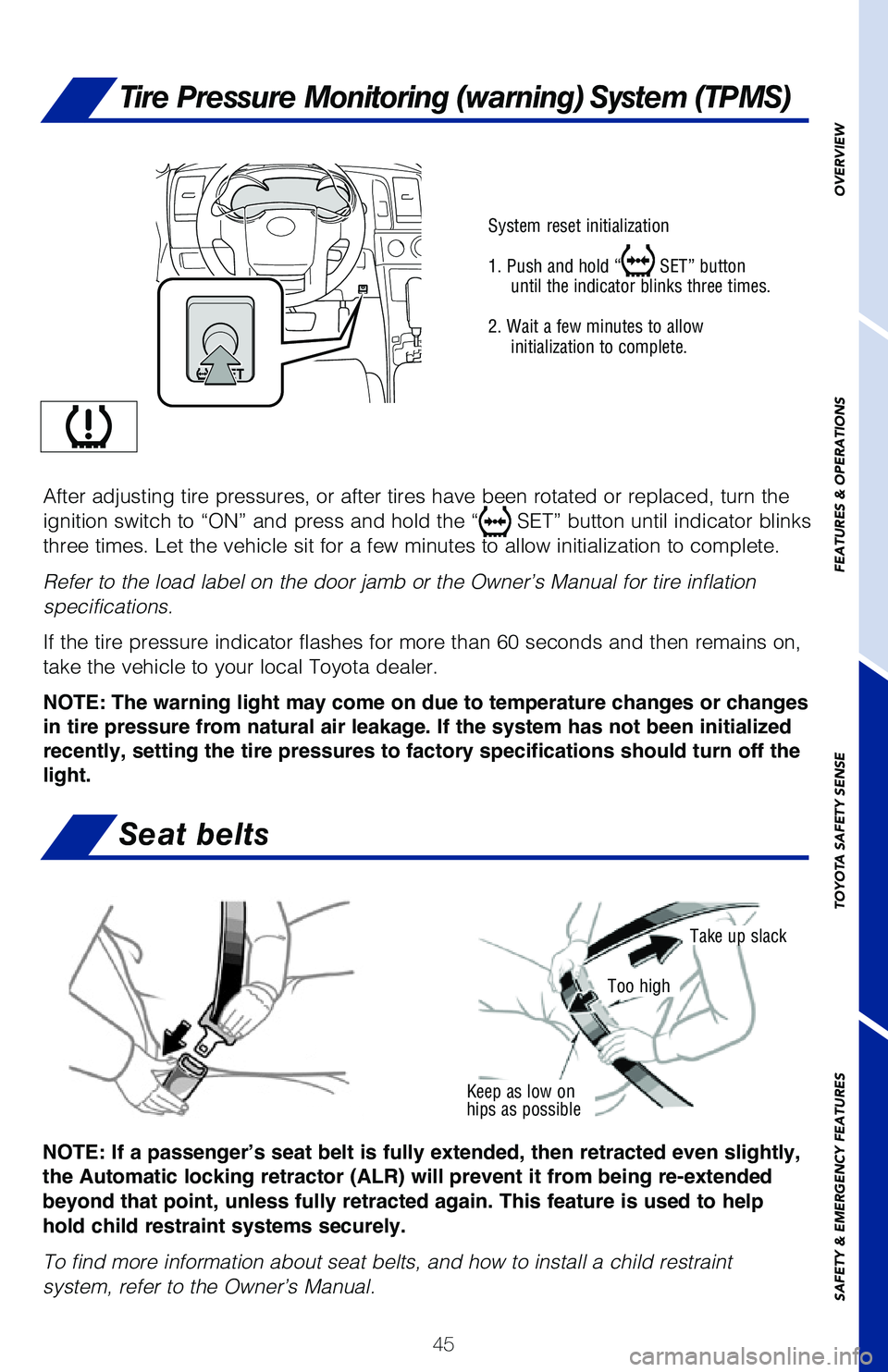
Keep as low on
hips as possible
Take up slack
Too high
System reset initialization
1. Push and hold “
SET” button
until the indicator blinks three times.
2. Wait a few minutes to allow initialization to complete.
After adjusting tire pressures, or after tires have been rotated or repl\
aced, turn the
ignition switch to “ON” and press and hold the “
SET” button until indicator blinks
three times. Let the vehicle sit for a few minutes to allow initializati\
on to complete.
Refer to the load label on the door jamb or the Owner’s Manual for tire inflation
specifications.
If the tire pressure indicator flashes for more than 60 seconds and then\
remains on,
take the vehicle to your local Toyota dealer.
NOTE: The warning light may come on due to temperature changes or changes
in tire pressure from natural air leakage. If the system has not been initialized
recently, setting the tire pressures to factory specifications should turn off the
light.
NOTE: If a passenger’s seat belt is fully extended, then retracted even slightly,
the Automatic locking retractor (ALR) will prevent it from being re-extended
beyond that point, unless fully retracted again. This feature is used to help
hold child restraint systems securely.
To find more information about seat belts, and how to install a child re\
straint
system, refer to the Owner’s Manual.
Tire Pressure Monitoring (warning) System (TPMS)
Seat belts