flat tire TOYOTA SEQUOIA HYBRID 2023 User Guide
[x] Cancel search | Manufacturer: TOYOTA, Model Year: 2023, Model line: SEQUOIA HYBRID, Model: TOYOTA SEQUOIA HYBRID 2023Pages: 628, PDF Size: 14.27 MB
Page 252 of 628
2524-5. Using the driving support systems
Owners Manual_USA_M0C043_en
WARNING
●Emergency steering assist may
not operate or may be cancel in
the following cases as the sys-
tem may determine the driver is
taking actions.
• If the accelerato r pedal is being
depressed strongly, the steering
wheel is being operated sharply,
the brake pedal is being
depressed or the turn signal
lever is being ope rated. In this
case, the system may deter-
mine that the driver is taking
evasive action and the emer-
gency steering assist may not
operate.
• The emergency steering assist will be disabled automatically
when the system judges that a
trailer is connected.
• In some situations, while the emergency steering assist is
operating, operation of the func-
tion may be canceled if the
accelerator peda l is depressed
strongly, the st eering wheel is
operated sharply or the brake
pedal is being depressed and
the system determines that the
driver is taking evasive action.
• When the emergency steering assist is operating, if the steer-
ing wheel is held firmly or is
operated in the opposite direc-
tion to that which the system is
generating torque, the function
may be canceled.
■When to disable the pre-colli-
sion system
In the following situations, disable
the system, as it may not operate
properly, possibly leading to an
accident resulting in death or seri-
ous injury:
●When the vehicle is being towed
●When your vehicles is towing a
trailer or another vehicle, except
when the followin g conditions
are all met
• When the other vehicle is a trailer properly attached and
connected to Toyota’s official
TBC ECU. ( P.198)
• When the vehicle is not being driven on a slippery surface
such as an icy road or a very
wet road.
●When transporting the vehicle
via truck, boat, train or similar
means of transportation
●When the vehicle is raised on a
lift with the hybrid system on
and the tires are allowed to
rotate freely
●When inspecting the vehicle
using a drum tester such as a
chassis dynamometer or speed-
ometer tester, or when using an
on vehicle wheel balancer
●When a strong impact is applied
to the front bumper or front
grille, due to an accident or
other reasons
●If the vehicle cannot be driven in
a stable manner, such as when
the vehicle has been in an acci-
dent or is malfunctioning
●When the vehicle is driven in a
sporty manner or off-road
●When the tires are not properly
inflated
●When the tires are very worn
●When tires of a size other than
specified are installed
●When tire chains are installed
●When a compact spare tire or
an emergency tire puncture
repair kit is used
Page 260 of 628

2604-5. Using the driving support systems
Owners Manual_USA_M0C043_en
●In addition to the above, in some
situations, such as the following,
the emergency steering assist
may not operate.
• When the white (yellow) lane lines are difficult to see, such as when
they are faint, di verging/merging,
or a shadow is cast upon them
• When the lane is wider or nar-
rower than normal
• When there is a light and dark pat- tern on the road surface, such as
due to road repairs
• When a pedestrian is detected near the centerline of the vehicle
• When the target is too close
• When there is insufficient safe or unobstructed space for the vehicle
to be steered into
• If oncoming vehicle is present
• If VSC function is operating
●In some situations such as the fol-
lowing, sufficient braking force or
steering force may not be
obtained, preventing the system
from performing properly:
• If the braking functions cannot operate to their full extent, such as
when the brake parts are
extremely cold, extremely hot, or
wet
• If the vehicle is not properly main-
tained (brakes or tires are exces-
sively worn, improper tire inflation
pressure, etc.)
• When the vehicle is being driven on a gravel road or other slippery
surface
• When the road surface has deep wheel tracks
• When driving o n a hill road
• When driving on a road that has inclines to the left or right
• When your vehicles is towing a
trailer or another vehicle
• When your vehicle is lifted up
■If VSC is disabled
●If VSC is disabled ( P.384), the
pre-collision brake assist and pre-
collision braking functions are also
disabled.
●The PCS warning light will turn on
and “VSC Turned OFF Pre-Colli-
sion Brake System Unavailable”
will be displayed on the multi-
information display.
Page 262 of 628
2624-5. Using the driving support systems
Owners Manual_USA_M0C043_en
WARNING
●This vehicle has Automatic
Trailer Detection feature that
can detect certain trailers under
certain conditions. After trailer is
detected, lane centering func-
tion will be disabled. In certain
conditions, there is a possibility
of falsely detecting trailer when
there is no actual trailer. In that
case, lane centering function
will be disabled. To activate lane
centering function, turn power
switch to off and then turn it on
again.
●Following scenes has possibility
of false detection of trailer:
Crowded environments such as
parking lots or camping
grounds, closely following vehi-
cles such traffic jam, drive
through, parallel parking, etc.
●Do not use the lane centering
system and steering assist func-
tion when the vehicle is lifted
unless using a Toyota official lift
up kit up to 4 in. (101 mm),
including tire height. Aftermar-
ket lift kits may degrade system
performance.
■Situations unsuitable for LTA
system
In the following situations, use the
LTA switch to turn the system off.
Failure to do so may lead to an
accident, resulting in death or
serious injury.
●Vehicle is driven on a road sur-
face which is slippery due to
rainy weather, fallen snow,
freezing, etc.
●Vehicle is driven on a snow-cov-
ered road.
●White (yellow) lines are difficult
to see due to rain, snow, fog,
dust, etc.
●Vehicle is driven in a temporary
lane or restricted lane due to
construction work.
●Vehicle is driven in a construc-
tion zone.
●A spare tire, tire chains, etc.,
are equipped.
●When the tires have been
excessively worn, or when the
tire inflation p ressure is low.
●When your vehicles is towing a
trailer or another vehicle, except
when the followin g condition is
met.
• When the other vehicle is a trailer properly attached and
connected to Toyota’s official
TBC ECU. ( P.198)
●When the vehicle is lifted up,
except in the following cases.
• When using a Toyota official lift kit up to 4 in. (101 mm), includ-
ing tire height. Aftermarket lift
kits may degrade system perfor-
mance.
■Preventing LTA system mal-
functions and operations per-
formed by mistake
●Do not modify the headlights or
place stickers, etc., on the sur-
face of the lights.
●Do not modify the suspension,
etc. If the suspension, etc.,
needs to be replaced, contact
your Toyota dealer.
●Do not install or place anything
on the hood or grille. Also, do
not install a gr ille guard (bull
bars, kangaroo bar, etc.).
●If your windshield needs
repairs, contact your Toyota
dealer.
Page 295 of 628
2954-5. Using the driving support systems
Owners Manual_USA_M0C043_en
4
Driving
2 Press or to select
and then press .
When the intuitive parking assist
function is disabled, the intuitive
parking assist OFF indicator
( P.91) illuminates.
To re-enable the system when it
was disabled, select on the
multi-information display, select and then On. If disabled using
this method, the system will not be
re-enabled by turning the power
switch off and then to ON.
■When towing a trailer
When the 7-pin connector is con-
nected and Auto Trailer Detection
(ATD) ( P.289) is activated, the
rear sensor automatically turns off.
WARNING
■Cautions regarding the use of
the system
There is a limit to the degree of
recognition accuracy and control
performance that this system can
provide, do not ov erly rely on this
system. The driver is always
responsible for paying attention to
the vehicle’ surroundings and
driving safely.
■To ensure the system can
operate properly
Observe the following precau-
tions.
Failing to do so may result in the
vehicle being unable to be driven
safely and possibly cause an acci-
dent.
●Do not damage the sensors,
and always keep them clean.
●Do not attach a sticker or install
an electronic component, such
as a backlit licen se plate (espe-
cially fluorescent type), fog
lights, fender po le or wireless
antenna near a radar sensor.
●Do not subject the surrounding
area of the sensor to a strong
impact. If subjected to an
impact, have the vehicle
inspected by your Toyota
dealer. If the front or rear
bumper needs to be
removed/installed or replaced,
contact your Toyota dealer.
●Do not modify, disassemble or
paint the sensors.
●Do not attach a license plate
cover.
●Keep your tires properly
inflated.
■When to disable the function
In the following situations, disable
the function as it may operate
even though there is no possibility
of a collision.
●Failing to observe the warnings
above.
●A non-genuine Toyota suspen-
sion (lowered suspension, etc.)
is installed.
■Notes when washing the vehi-
cle
Do not apply intensive bursts of
water or steam to the sensor
area.
Doing so may result in the sensor
malfunctioning.
Page 308 of 628
3084-5. Using the driving support systems
Owners Manual_USA_M0C043_en
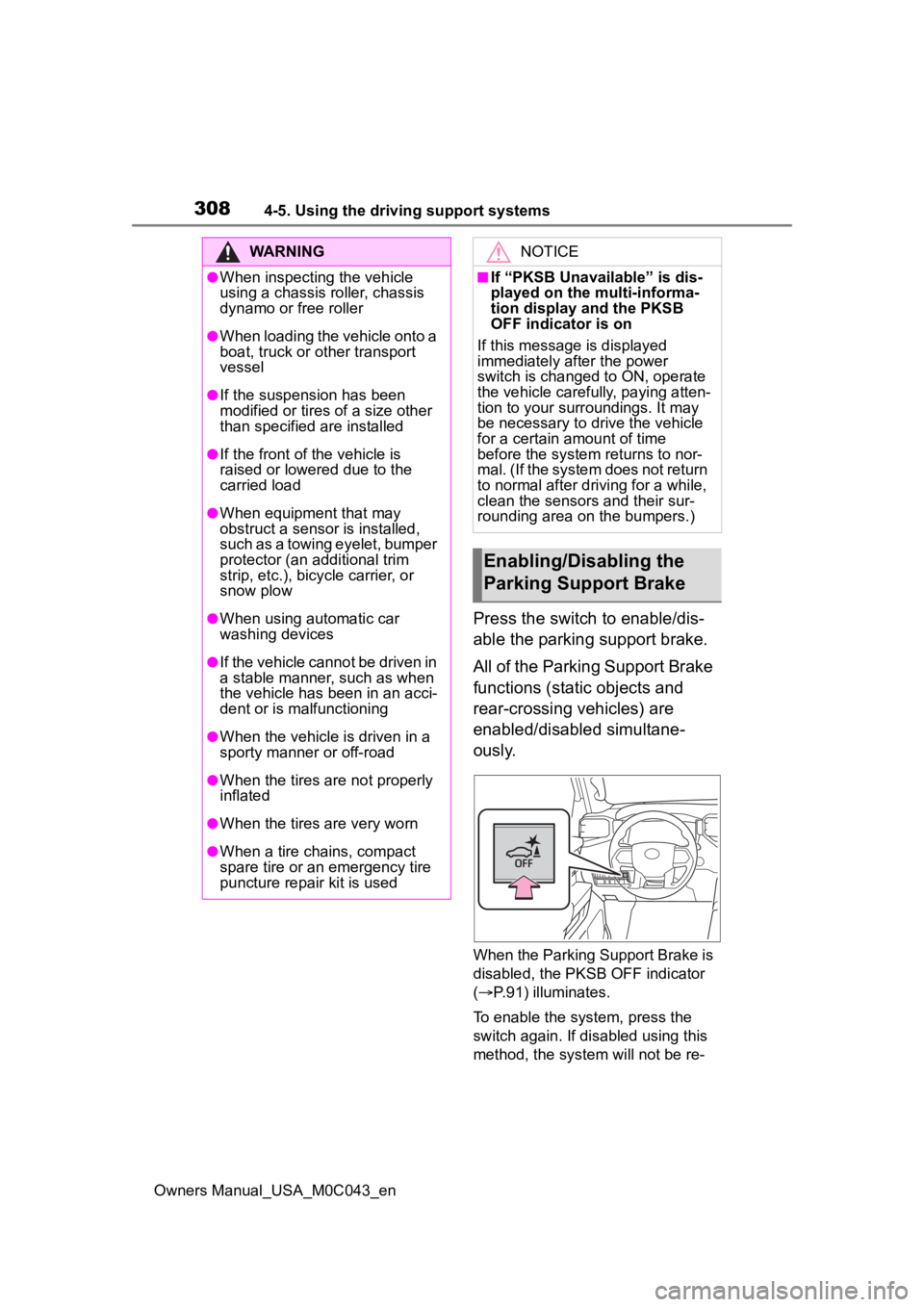
Press the switch to enable/dis-
able the parking support brake.
All of the Parking Support Brake
functions (static objects and
rear-crossing vehicles) are
enabled/disabled simultane-
ously.
When the Parking Support Brake is
disabled, the PKSB OFF indicator
( P.91) illuminates.
To enable the system, press the
switch again. If disabled using this
method, the system will not be re-
WARNING
●When inspecting the vehicle
using a chassis roller, chassis
dynamo or free roller
●When loading the vehicle onto a
boat, truck or other transport
vessel
●If the suspension has been
modified or tires of a size other
than specified are installed
●If the front of the vehicle is
raised or lowered due to the
carried load
●When equipment that may
obstruct a sensor is installed,
such as a towing eyelet, bumper
protector (an additional trim
strip, etc.), bicycle carrier, or
snow plow
●When using automatic car
washing devices
●If the vehicle cannot be driven in
a stable manner, such as when
the vehicle has been in an acci-
dent or is malfunctioning
●When the vehicle is driven in a
sporty manner or off-road
●When the tires are not properly
inflated
●When the tires are very worn
●When a tire chains, compact
spare tire or an emergency tire
puncture repair kit is used
NOTICE
■If “PKSB Unavailable” is dis-
played on the multi-informa-
tion display and the PKSB
OFF indicator is on
If this message is displayed
immediately after the power
switch is changed to ON, operate
the vehicle carefully, paying atten-
tion to your surroundings. It may
be necessary to drive the vehicle
for a certain amount of time
before the system returns to nor-
mal. (If the system does not return
to normal after dr iving for a while,
clean the sensors and their sur-
rounding area on the bumpers.)
Enabling/Disabling the
Parking Support Brake
Page 313 of 628

3134-5. Using the driving support systems
Owners Manual_USA_M0C043_en
4
Driving
■When the vehicle moves in
the unintended direction
due to the wrong shift posi-
tion being selected
P.294
Types of sensors
WARNING
■To ensure the system can
operate properly
Observe the following precau-
tions.
Failing to do so may result in the
vehicle being unable to be driven
safely and possibly cause an acci-
dent.
●Do not damage the sensors,
and always keep them clean.
●Do not attach a sticker or install
an electronic component, such
as a backlit licen se plate (espe-
cially fluorescent type), fog
lights, fender po le or wireless
antenna near a radar sensor.
●Do not subject the surrounding
area of the sensor to a strong
impact. If subjected to an
impact, have the vehicle
inspected by your Toyota
dealer. If the front or rear
bumper needs to be
removed/installed or replaced,
contact your Toyota dealer.
●Do not modify, disassemble or
paint the sensors.
●Do not attach a license plate
cover.
●Keep your tires properly
inflated.
■Handling the suspension
Do not modify the suspension, as
changes to the height or inclina-
tion of the vehic le may prevent
the sensors from detecting
objects correctly or cause the sys-
tem to not operate or operate
unnecessarily.
■If the Parking Support Brake
function (static objects) oper-
ates unnecessarily, such as
at a railroad crossing
In the event that the Parking Sup-
port Brake function (static objects)
operates unnecessarily, such as
at a railroad crossing, brake con-
trol will be canceled after approxi-
mately 2 seconds, allowing you to
proceed forward and leave the
area, brake control can also be
canceled by depressing the brake
pedal. Depressing the accelera-
tor pedal after brake control is
canceled will allow you to proceed
forward and leave the area.
Page 318 of 628
3184-5. Using the driving support systems
Owners Manual_USA_M0C043_en
WARNING
●Do not use the panoramic view
monitor system in the following
cases:
• On icy or slick road surfaces, or in snow
• When using tire chains or emer- gency tires
• When the front door or the back door is not clo sed completely
• On roads that are not flat or straight, such as curves or
slopes
• If the suspension has been modified or tires of a size other
than specified are installed
●In low temperatures, the screen
may darken or the image may
become faint. The image could
distort when the vehicle is mov-
ing, or you may become unable
to see the image on the screen.
Be sure to visually check all
around the vehicle both directly
and using the mirrors before
proceeding.
●If the tire sizes are changed, the
position of the guide lines dis-
played on the screen may
change.
●The camera uses a special lens.
The distances between objects
and pedestrians that appear in
the image displayed on the
screen will differ from the actual
distances. ( P.344)
●When an aftermarket part is
installed in the display area of
the screen.
NOTICE
●In panoramic view/moving
view/see-through view, the sys-
tem combines images taken
from the front, back, left and
right side cameras into a single
image. There are limits to the
range and content that can be
displayed. Familiarize yourself
with the characteristics of the
panoramic view monitor system
before using it.
●Image clarity may decline at the
four corners of t he panoramic
view/moving view/see-through
view. However, this is not a mal-
function, as these are the
regions along the border of
each camera image where the
images are combined.
●Depending on lighting condi-
tions near each of the cameras,
bright and dark patches may
appear on the panoramic
view/moving view/see-through
view.
●The panoramic view/moving
view/see-through view display
does not extend higher than the
installation pos ition and image
capture range o f each camera.
●There are blind spots around
the vehicle. Accordingly, there
are regions not displayed in
panoramic view.
●Three-dimensional objects dis-
played in wide fr ont view, rear
view or side view may not be
displayed in panoramic
view/moving view/see-through
view.
Page 365 of 628
3654-5. Using the driving support systems
Owners Manual_USA_M0C043_en
4
Driving
be displayed, have your vehicle
inspected by your Toyota dealer as
soon as possible.
■When the indicator turns on
Indicates a malfunction in the air
suspension system.
Have the vehicle inspected by your
Toyota dealer immediately. ( P.89,
516)
WARNING
■The electronically modulated
air suspension must be
turned off in the following cir-
cumstances:
Otherwise, the automatic leveling
function may cause the vehicle’s
height to change, and you may
catch part of yo ur body in the
vehicle, resulting in an unex-
pected accident or injury:
●When driving through water
such as shallow streams (Put
the vehicle height in “HI” mode
and turn off the electronically
modulated air suspension. Drive
at 18 mph [30 km/h] or slower.)
●When jacking up the vehicle,
installing tire chains or tying the
vehicle with chains/wires for
transportation via flat bed truck
(Turn the system to the manual
mode and stop the hybrid sys-
tem.)
●When the vehicle must be
towed (Put the vehicle height in
“N” mode and turn the system to
the manual mode.)
●When the vehicle gets stuck
(Turn the system to the manual
mode.)
●When disconnecting a trailer
(Put the vehicle height in “N”
mode and turn the system to the
manual mode.)
■Selecting the correct height
mode
Observe the following precautions
to prevent accidents or injury.
Failure to do so may cause dam-
age to parts of the vehicle, as well
as dangerous handling character-
istics, which may lead to fatal or
injury accidents.
●Before you lower the vehicle’s
height, check under the vehicle
to make sure that no one is
there.
●“HI” mode should only be used
when driving on rough roads, for
example when driving off-road.
Because the vehicle’s center of
gravity will become higher when
in the mode, the vehicle may
become unstable when turning
abruptly, resulting in an acci-
dent.
●Do not select “HI” mode when
you load cargo on the roof lug-
gage carrier.
Because the vehicle’s center of
gravity will become higher when
in the mode, the vehicle may
become unstable when turning
abruptly, resulting in an acci-
dent.
NOTICE
■Be careful in any place where
overhead space is limited.
When changing to a higher mode
or after unloading, the vehicle
height will rise. This may cause
damage to the vehicle.
■Do not select “LO” mode
when driving on bumpy
roads.
If the underbody of the vehicle
touches a rugged road surface,
the vehicle ma y be damaged.
Page 387 of 628
3874-5. Using the driving support systems
Owners Manual_USA_M0C043_en
4
Driving
WARNING
■Replacing tires
Make sure that all tires are of the
specified size, brand, tread pat-
tern and total load capacity. In
addition, make sure that the tires
are inflated to the recommended
tire inflation pressure level.
The ABS, TRAC, Trailer Sway
Control and VSC systems will not
function correctly if different tires
are installed on the vehicle.
Contact your Toyota dealer for fur-
ther information when replacing
tires or wheels.
■Handling of tires and the sus-
pension
Using tires with any kind of prob-
lem or modifying the suspension
will affect the driving assist sys-
tems, and may cause a system to
malfunction.
■Trailer Sway Control precau-
tion
The Trailer Sway Control system
is not able to reduce trailer sway
in all situations . Depending on
many factors such as the condi-
tions of the vehicle, trailer, road
surface and driving environment,
the Trailer Sway Control system
may not be effec tive. Refer to
your trailer owner’s manual for
information on how to tow your
trailer properly.
■If trailer sway occurs
Observe the following precau-
tions.
Failing to do so may cause death
or serious injury.
●Firmly grip the steering wheel.
Steer straight ahead. Do not try
to control trailer sway by turning
the steering wheel.
●Begin releasing the accelerator
pedal immediately but very
gradually to reduce speed.
Do not increase speed. Do not
apply vehicle brakes.
If you make no extreme correction
with the steering or brakes, your
vehicle and traile r should stabi-
lize. ( P.198)
■Secondary Collision Brake
Do not rely solely upon the Sec-
ondary Collision Brake. This sys-
tem is designed to help reduce
the possibility of further damage
due to a secondary collision, how-
ever, that effect changes accord-
ing to various conditions. Overly
relying on the system may result
in death or serious injury.
Page 397 of 628
3974-6. Driving tips
Owners Manual_USA_M0C043_en
4
Driving
overuse of the accelerator
pedal. Doing so can help control
excessive gasoline consump-
tion.
Control and maintain the vehicle
at a constant speed. Before
stopping at a toll booth or simi-
lar, allow plenty of time to
release the accelerator and gen-
tly apply the brakes. A greater
amount of electrical energy can
be regenerated when slowing
down.
Use the air conditioning only
when necessary. Doing so can
help reduce excessive gasoline
consumption.
In summer: When the ambient
temperature is high, use the
recirculated air mode. Doing so
will help to reduce the burden on
the air conditioning system and
reduce fuel consumption as
well.
In winter: Because the gasoline
engine will not automatically cut
out until it and the interior of the
vehicle are warm, it will con-
sume fuel. Also, fuel consump-
tion can be improved by
avoiding overuse of the heater. Make sure to check the tire infla-
tion pressure frequently.
Improper tire inflation pressure
can cause poor fuel economy.
Also, as snow tires can cause
large amounts of friction, their
use on dry roads can lead to
poor fuel economy. Use tires
that are appropriate for the sea-
son.
Carrying heavy luggage will lead
to poor fuel economy. Avoid car-
rying unnecessary luggage.
Installing a large roof rack will
also cause poor fuel economy.
Since the gasoline engine starts
up and cuts out automatically
when cold, warming up the
engine is unnecessary. More-
over, frequently driving short
distances will cause the engine
to repeatedly warm up, which
can lead to excess fuel con-
sumption.
Highway driving
Air conditioning
Checking tire inflation
pressure
Luggage
Warming up before driv-
ing