parking brake TOYOTA SEQUOIA HYBRID 2023 Service Manual
[x] Cancel search | Manufacturer: TOYOTA, Model Year: 2023, Model line: SEQUOIA HYBRID, Model: TOYOTA SEQUOIA HYBRID 2023Pages: 628, PDF Size: 14.27 MB
Page 313 of 628

3134-5. Using the driving support systems
Owners Manual_USA_M0C043_en
4
Driving
■When the vehicle moves in
the unintended direction
due to the wrong shift posi-
tion being selected
P.294
Types of sensors
WARNING
■To ensure the system can
operate properly
Observe the following precau-
tions.
Failing to do so may result in the
vehicle being unable to be driven
safely and possibly cause an acci-
dent.
●Do not damage the sensors,
and always keep them clean.
●Do not attach a sticker or install
an electronic component, such
as a backlit licen se plate (espe-
cially fluorescent type), fog
lights, fender po le or wireless
antenna near a radar sensor.
●Do not subject the surrounding
area of the sensor to a strong
impact. If subjected to an
impact, have the vehicle
inspected by your Toyota
dealer. If the front or rear
bumper needs to be
removed/installed or replaced,
contact your Toyota dealer.
●Do not modify, disassemble or
paint the sensors.
●Do not attach a license plate
cover.
●Keep your tires properly
inflated.
■Handling the suspension
Do not modify the suspension, as
changes to the height or inclina-
tion of the vehic le may prevent
the sensors from detecting
objects correctly or cause the sys-
tem to not operate or operate
unnecessarily.
■If the Parking Support Brake
function (static objects) oper-
ates unnecessarily, such as
at a railroad crossing
In the event that the Parking Sup-
port Brake function (static objects)
operates unnecessarily, such as
at a railroad crossing, brake con-
trol will be canceled after approxi-
mately 2 seconds, allowing you to
proceed forward and leave the
area, brake control can also be
canceled by depressing the brake
pedal. Depressing the accelera-
tor pedal after brake control is
canceled will allow you to proceed
forward and leave the area.
Page 314 of 628
3144-5. Using the driving support systems
Owners Manual_USA_M0C043_en
■The Parking Support Brake
function (static object) will
operate when
The function will operate when the
PKSB OFF indicator is not illumi-
nated or flashing ( P.91, 512) and
all of the followin g conditions are
met:
●Hybrid system output restriction
control
• The Parking Support Brake is enabled.
• The vehicle speed is approxi-
mately 9 mph (15 km/h) or less.
• There is a static object in the trav- eling direction o f the vehicle and
approximately 6 to 13 ft. (2 to 4 m)
away.
• The Parking Support Brake deter-
mines that a stronger-than-nor-
mal brake operation is necessary
to avoid a collision.
●Brake control
• Hybrid system output restriction
control is operating.
• The Parking Support Brake deter- mines that an immediate brake
operation is necessary to avoid a
collision.
■The Parking Support Brake
function (static objects) will
stop operating when
The function will stop operating if
any of the following conditions are
met:
●Hybrid system output restriction
control
• The Parking Support Brake is dis- abled.
• The system determines that the collision has become avoidable
with normal brake operation.
• The static object is no longer approximately 6 to 13 ft. (2 to 4 m)
away from the vehicle or in the
traveling direction of the vehicle.
●Brake control
• The Parking Support Brake is dis- abled.
• Approximately 2 seconds have
elapsed since the vehicle was
stopped by brake control.
• The brake pedal is depressed
after the vehicle is stopped by
brake control.
• The static object is no longer
approximately 6 to 13 ft. (2 to 4 m)
away from the vehicle or in the
traveling direction of the vehicle.
■Detection range of the Parking
Support Brake function (static
objects)
The detection range of the Parking
Support Brake function (static
objects) differs from the detection
range of the intuitive parking assist.
( P.299) Therefore, even if the intu-
itive parking assist detects an object
and provides a warning, the Parking
Support Brake function (static
objects) may not start operating.
■Situations in which the system
may not operate properly
P.297
■Situations in which the system
may operate even if there is no
possibility of a collision
P.297
WARNING
■Notes when washing the vehi-
cle
Do not apply intensive bursts of
water or steam to the sensor
area.
Doing so may result in the sensor
malfunctioning.
●When using a high pressure
washer to wash the vehicle, do
not spray the sensors directly,
as doing so may cause a sensor
to malfunction.
●When using steam to clean the
vehicle, do not direct steam too
close to the sensors as doing so
may cause a sens or to malfunc-
tion.
Page 315 of 628
3154-5. Using the driving support systems
Owners Manual_USA_M0C043_en
4
Driving
*: If equipped
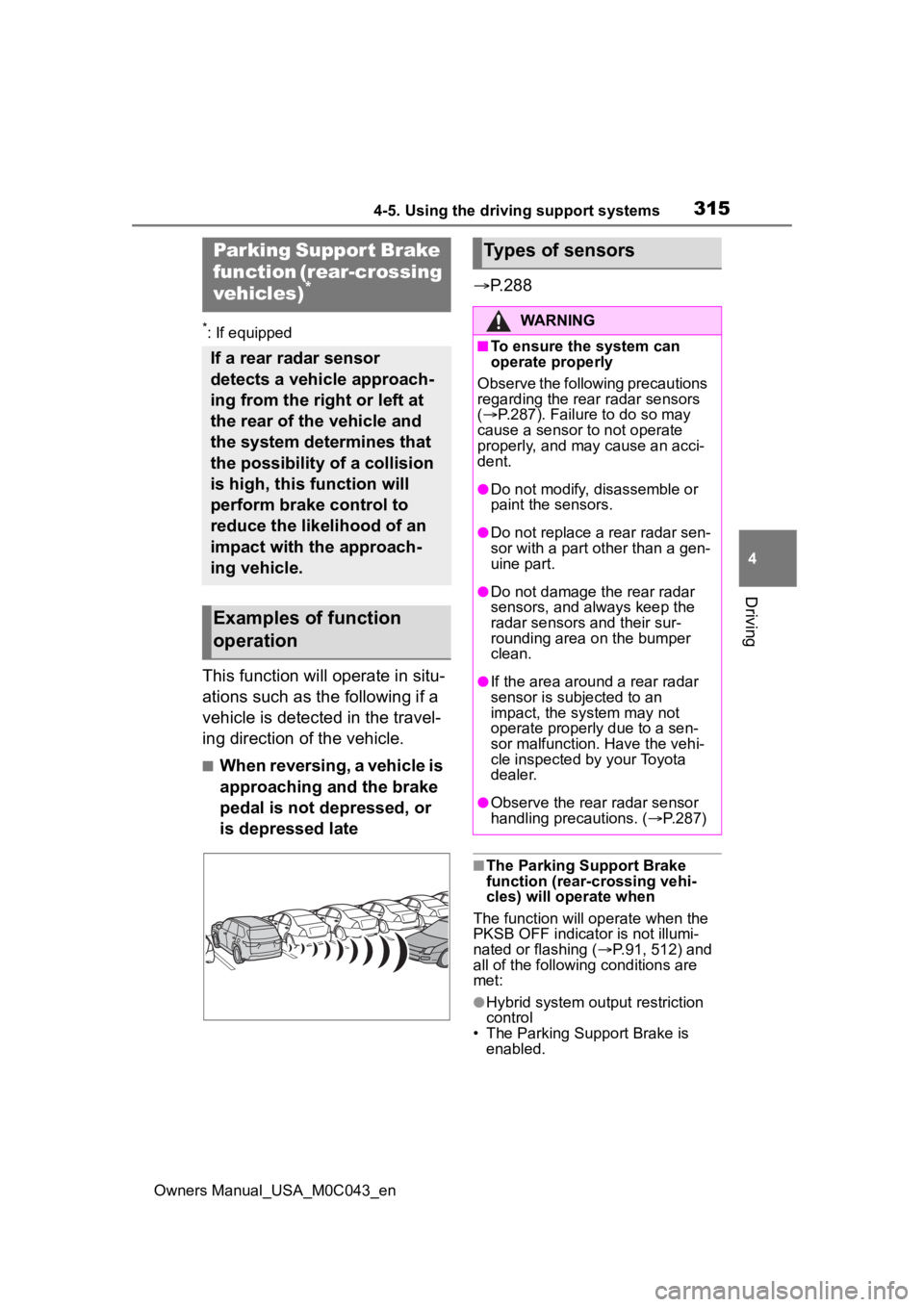
This function will operate in situ-
ations such as the following if a
vehicle is detected in the travel-
ing direction of the vehicle.
■When reversing, a vehicle is
approaching and the brake
pedal is not depressed, or
is depressed late
P.288
■The Parking Support Brake
function (rear-crossing vehi-
cles) will operate when
The function will op erate when the
PKSB OFF indicator is not illumi-
nated or flashing ( P.91, 512) and
all of the followin g conditions are
met:
●Hybrid system output restriction
control
• The Parking Support Brake is
enabled.
Parking Suppor t Brake
function (rear-crossing
vehicles)
*
If a rear radar sensor
detects a vehicle approach-
ing from the right or left at
the rear of the vehicle and
the system determines that
the possibility of a collision
is high, this function will
perform brake control to
reduce the likelihood of an
impact with the approach-
ing vehicle.
Examples of function
operation
Types of sensors
WARNING
■To ensure the system can
operate properly
Observe the following precautions
regarding the rear radar sensors
( P.287). Failure to do so may
cause a sensor t o not operate
properly, and may cause an acci-
dent.
●Do not modify, disassemble or
paint the sensors.
●Do not replace a rear radar sen-
sor with a part o ther than a gen-
uine part.
●Do not damage the rear radar
sensors, and always keep the
radar sensors and their sur-
rounding area on the bumper
clean.
●If the area around a rear radar
sensor is subjected to an
impact, the system may not
operate properly due to a sen-
sor malfunction. Have the vehi-
cle inspected by your Toyota
dealer.
●Observe the rear radar sensor
handling precautions. ( P.287)
Page 316 of 628

3164-5. Using the driving support systems
Owners Manual_USA_M0C043_en• The vehicle speed is approxi-
mately 9 mph (15 km/h) or less.
• Vehicles are approaching from the
right or left at the rear of the vehi-
cle at a traveling speed of approx-
imately 5 mph (8 km/h) or more.
• The shift position is in R.
• The Parking Support Brake deter- mines that a stronger than normal
brake operation is necessary to
avoid a collision with an approach-
ing vehicle.
●Brake control
• Hybrid system output restriction
control is operating.
• The Parking Support Brake deter- mines that an emergency brake
operation is necessary to avoid a
collision with an approaching vehi-
cle.
■The Parking Support Brake
function (rear-crossing vehi-
cles) will stop operating when
The function will st op operating if
any of the following conditions are
met:
●Hybrid system output restriction
control
• The Parking Support Brake is dis- abled.
• The collision becomes avoidable
with normal brake operation.
• A vehicle is no longer approaching from the right or left at the rear of
the vehicle.
●Brake control
• The Parking Support Brake is dis- abled.
• Approximately 2 seconds have
elapsed since the vehicle was
stopped by brake control.
• The brake pedal is depressed
after the vehicle is stopped by
brake control.
• A vehicle is no longer approaching from the right or left at the rear of
the vehicle.
■Detection area of the Parking
Support Brake function (rear-
crossing vehicles)
The detection area of the Parking
Support Brake function (rear-cross-
ing vehicles) differs from the detec-
tion area of the RCTA function
( P.303). Therefor e, even if the
RCTA function detects a vehicle and
provides an alert, the Parking Sup-
port Brake function (rear-crossing
vehicles) may not start operating.
■Situations in which the system
may not operate properly
P.304
■Situations in which the system
may operate even if there is no
possibility of a collision
P.305
Page 384 of 628
3844-5. Using the driving support systems
Owners Manual_USA_M0C043_en
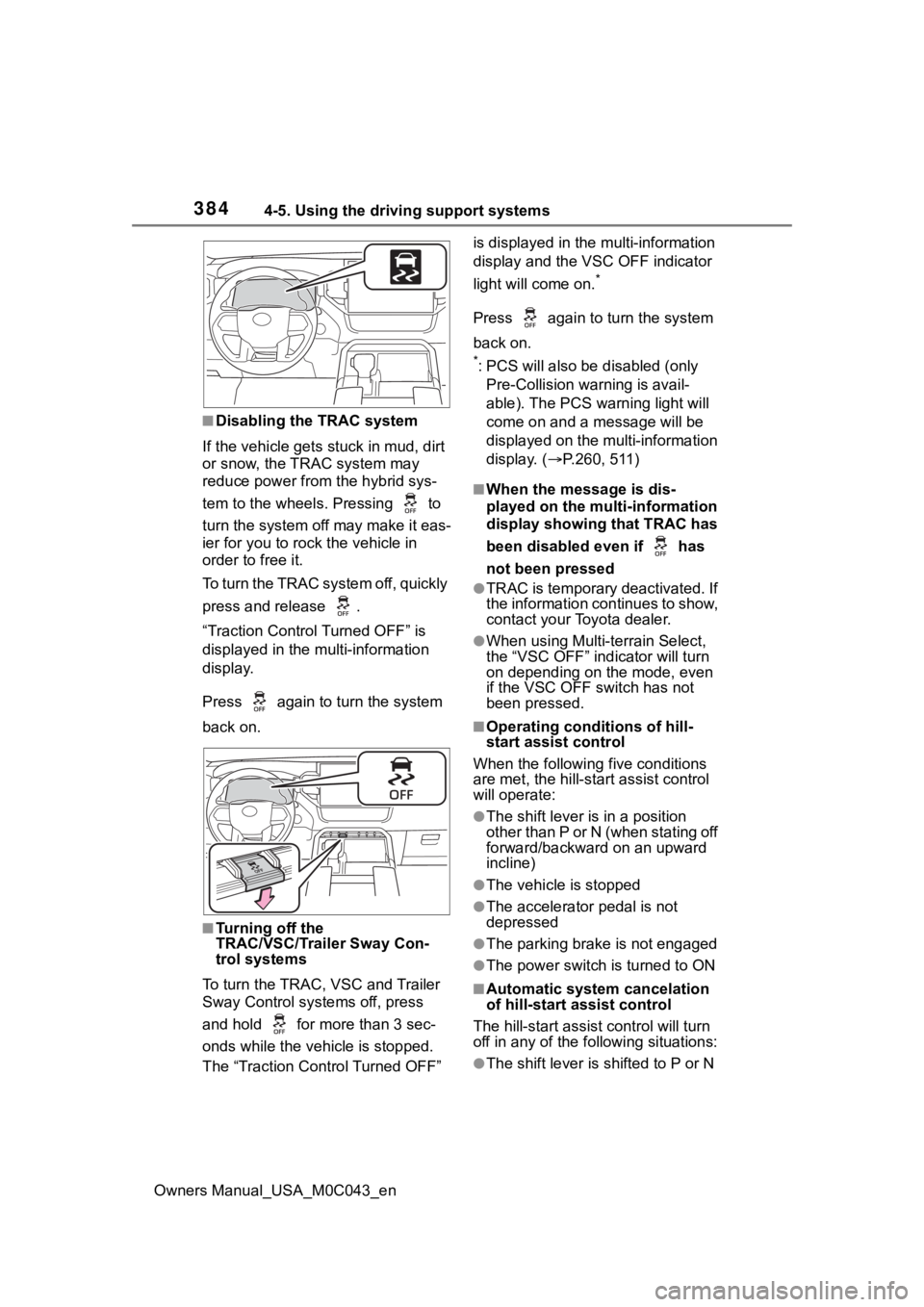
■Disabling the TRAC system
If the vehicle gets stuck in mud, dirt
or snow, the TRAC system may
reduce power from the hybrid sys-
tem to the wheels. Pressing to
turn the system off may make it eas-
ier for you to rock the vehicle in
order to free it.
To turn the TRAC system off, quickly
press and release .
“Traction Control Turned OFF” is
displayed in the multi-information
display.
Press again to t urn the system
back on.
■Turning off the
TRAC/VSC/Trailer Sway Con-
trol systems
To turn the TRAC, VSC and Trailer
Sway Control systems off, press
and hold for more than 3 sec-
onds while the vehicle is stopped.
The “Traction Control Turned OFF” is displayed in the
multi-information
display and the VSC OFF indicator
light will come on.
*
Press again to turn the system
back on.
*: PCS will also be disabled (only
Pre-Collision warning is avail-
able). The PCS warning light will
come on and a message will be
displayed on the multi-information
display. ( P.260, 511)
■When the message is dis-
played on the multi-information
display showing that TRAC has
been disabled even if has
not been pressed
●TRAC is temporary deactivated. If
the information continues to show,
contact your Toyota dealer.
●When using Multi-terrain Select,
the “VSC OFF” indicator will turn
on depending on the mode, even
if the VSC OFF switch has not
been pressed.
■Operating conditions of hill-
start assist control
When the following five conditions
are met, the hill-star t assist control
will operate:
●The shift lever is in a position
other than P or N (when stating off
forward/backward on an upward
incline)
●The vehicle is stopped
●The accelerator pedal is not
depressed
●The parking brake is not engaged
●The power switch is turned to ON
■Automatic system cancelation
of hill-start assist control
The hill-start assist control will turn
off in any of the fo llowing situations:
●The shift lever is shifted to P or N
Page 385 of 628
3854-5. Using the driving support systems
Owners Manual_USA_M0C043_en
4
Driving
●The accelerator pedal is
depressed
●The parking brake is engaged
●A maximum of 2 seconds have
elapsed after the brake pedal is
released
●The power switch is turned to OFF
■Sounds and vibrations caused
by the ABS, brake assist, VSC,
Trailer Sway Control, TRAC and
hill-start assist control systems
●A sound may be heard from the
hybrid system compartment when
the brake pedal is depressed
repeatedly, when the hybrid sys-
tem is started or just after the vehi-
cle begins to move. This sound
does not indicate that a malfunc-
tion has occurred in any of these
systems.
●Any of the following conditions
may occur when t he above sys-
tems are operating. None of these
indicates that a malfunction has
occurred.
• Vibrations may be felt through the
vehicle body and steering.
• A motor sound may be heard also after the vehicle comes to a stop.
■ECB operating sound
ECB operating sound may be heard
in the following cases, but it does
not indicate that a malfunction has
occurred.
●Operating sound heard from the
engine compartment when the
brake pedal is operated.
●Motor sound of the brake system
heard from the front part of the
vehicle when the driver’ door is
opened.
●Operating sound heard from the
engine compartment when one or
two minutes passed after the stop
of the hybrid system.
■EPS operation sound
When the steering wheel is oper-
ated, a motor sou nd (whirring sound) may be heard. This does not
indicate a malfunction.
■Automatic reactivation of
TRAC, Trailer Sway Control and
VSC systems
After turning the TRAC, Trailer
Sway Control and VSC systems off,
the systems will be a utomatically re-
enabled in the following situations:
●When the power switch is turned
off
●If only the TRAC sy stem is turned
off, the TRAC will turn on when
vehicle speed increases
If both the TRAC and VSC sys-
tems are turned of f, automatic re-
enabling will not occur when vehi-
cle speed increases.
■Reduced effectiveness of the
EPS system
The effectiveness of the EPS sys-
tem is reduced to prevent the sys-
tem from overheating when there is
frequent steering input over an
extended period o f time. The steer-
ing wheel may f eel heavy as a
result. Should this occur, refrain
from excessive steering input or
stop the vehicle a nd turn the hybrid
system off. The EPS system should
return to normal within 10 minutes.
■Secondary Collision Brake
operating conditions
The system operates when the SRS
airbag sensor de tects a collision
while the vehicle is in motion. How-
ever, the system does not operate
when the components are dam-
aged.
■Secondary Collision Brake
automatic cancelation
The system is automatically can-
celed in any of th e following situa-
tions.
●The vehicle speed drops to
approximately 0 mph (0 km/h).
●A certain amount of time elapses
during operation
Page 386 of 628
3864-5. Using the driving support systems
Owners Manual_USA_M0C043_en
●The accelerator pedal is
depressed a large amount
WARNING
■The ABS does not operate
effectively when
●The limits of tire gripping perfor-
mance have been exceeded
(such as excessively worn tires
on a snow covered road).
●The vehicle hydroplanes while
driving at high speed on wet or
slick roads.
■Stopping distance when the
ABS is operating may exceed
that of normal conditions
The ABS is not designed to
shorten the vehicle’s stopping dis-
tance. Always maintain a safe dis-
tance from the vehicle in front of
you, especially in the following sit-
uations:
●When driving on d irt, gravel or
snow-covered roads
●When driving with tire chains
●When driving over bumps in the
road
●When driving over roads with
potholes or uneven surfaces
■TRAC/VSC may not operate
effectively when
Directional control and power may
not be achievable while driving on
slippery road surfaces, even if the
TRAC/VSC system is operating.
Drive the vehicle carefully in con-
ditions where stability and power
may be lost.
■Hill-start assist control does
not operate effectively when
●Do not overly rely on hill-start
assist control. Hill-start assist
control may not operate effec-
tively on steep inclines and
roads covered with ice.
●Unlike the parking brake, hill-
start assist control is not
intended to hold the vehicle sta-
tionary for an extended period
of time. Do not attempt to use
hill-start assist control to hold
the vehicle on an incline, as
doing so may lead to an acci-
dent.
■When the TRAC/VSC/Trailer
Sway Control is activated
The slip indicator light flashes.
Always drive carefully. Reckless
driving may cause an accident.
Exercise particula r care when the
indicator light flashes.
■When the TRAC/VSC/Trailer
Sway Control systems are
turned off
Be especially careful and drive at
a speed appropriate to the road
conditions. As these are the sys-
tems to help ensure vehicle stabil-
ity and driving force, do not turn
the TRAC/VSC/Trailer Sway Con-
trol systems off unless necessary.
Trailer Sway Control is part of the
VSC system and will not operate
if VSC is turned off or experiences
a malfunction.
Page 396 of 628
3964-6. Driving tips
Owners Manual_USA_M0C043_en
4-6.Driving tips
When using Eco drive mode, the
torque corresponding to the
accelerator pedal depression
amount can be generated more
smoothly than it is in normal
conditions. In addition, the oper-
ation of the air conditioning sys-
tem (heating/cooling) will be
minimized, improving the fuel
economy. (P.366)
The Eco-friendly driving is pos-
sible by keeping the indicate of
Hybrid System Indicator within
Eco area. ( P.99)
Shift the shift lever to D when
stopped at a traffic light, or driv-
ing in heavy traffic etc. Shift the
shift lever to P when parking.
When using the N, there is no
positive effect on fuel consump-
tion. When using the air condi-
tioning system, etc., the hybrid
battery (traction battery) power
is consumed.
Drive your vehicle smoothly.
Avoid abrupt acceleration and
deceleration. Gradual accel-
eration and deceleration will
make more effective use of
the electric motor (traction
motor) without having to use
gasoline engine power.
Avoid repeated acceleration.
Repeated acceleration con-
sumes hybrid battery (trac-
tion battery) power, resulting
in poor fuel consumption. Bat-
tery power can be restored by
driving with the accelerator
pedal slightly released.
Make sure to operate the brakes
gently and in a timely manner. A
greater amount of electrical
energy can be regenerated
when slowing down.
Repeated acceleration and
deceleration, as well as long
waits at traffic lights, will lead to
bad fuel economy. Check traffic
reports before leaving and avoid
delays as much as possible.
When driving in a traffic jam,
gently release the brake pedal
to allow the vehicle to move for-
ward slightly while avoiding
Hybrid Electric Vehi-
cle driving tips
For economical and ecolog-
ical driving, pay attention to
the following points:
Using Eco drive mode
Use of Hybrid System
Indicator
Shift lever operation
Accelerator pedal/brake
pedal operation
When braking
Delays
Page 402 of 628
4024-6. Driving tips
Owners Manual_USA_M0C043_en
Perform the following according
to the driving conditions:
Do not try to forcibly open a
window or move a wiper that
is frozen. Pour warm water
over the frozen area to melt
the ice. Wipe away the water
immediately to prevent it from
freezing.
To ensure proper operation of
the climate control system
fan, remove any snow that
has accumulated on the air
inlet vents in front of the wind-
shield.
Check for and remove any
excess ice or snow that may
have accumulated on the
exterior lights, vehicle’s roof,
chassis, around the tires or on
the brakes.
Remove any snow or mud
from the bottom of your shoes
before getting in the vehicle. Accelerate the vehicle slowly,
keep a safe distance between
you and the vehicle ahead, and
drive at a reduced speed suit-
able to road conditions.
Turn automatic mode of the
parking brake off.
Otherwise, the parking brake
may freeze and not be able to
be released automatically.
Also, avoid using the following
as the parking brake may
operate automatically, even if
automatic mode is off.
• Brake hold system
Park the vehicle and move
the shift lever to P without set-
ting the parking brake. The
parking brake may freeze up,
preventing it from being
released. If the vehicle is
parked without setting the
parking brake, make sure to
block the wheels.
Failure to do so may be dan-
gerous because it may cause
the vehicle to move unexpect-
edly, possibly leading to an
accident.
When the parking brake is in
automatic mode, release the
parking brake after shifting
the shift lever to P.( P.223)
NOTICE
■Repairing or replacing snow
tires
Request repairs or replacement of
snow tires from Toyota dealers or
legitimate tire retailers.
This is because the removal and
attachment of snow tires affects
the operation of the tire pressure
warning valves and transmitters.
Before driving the vehicle
When driving the vehicle
When parking the vehicle
Page 403 of 628
4034-6. Driving tips
Owners Manual_USA_M0C043_en
4
Driving
If the vehicle is parked without
setting the parking brake,
confirm that the shift lever
cannot be moved out of P.
If the vehicle is left parked
with the brakes damp in cold
temperatures, there is a pos-
sibility of the brakes freezing.
Vehicles without 285/65R18
tires
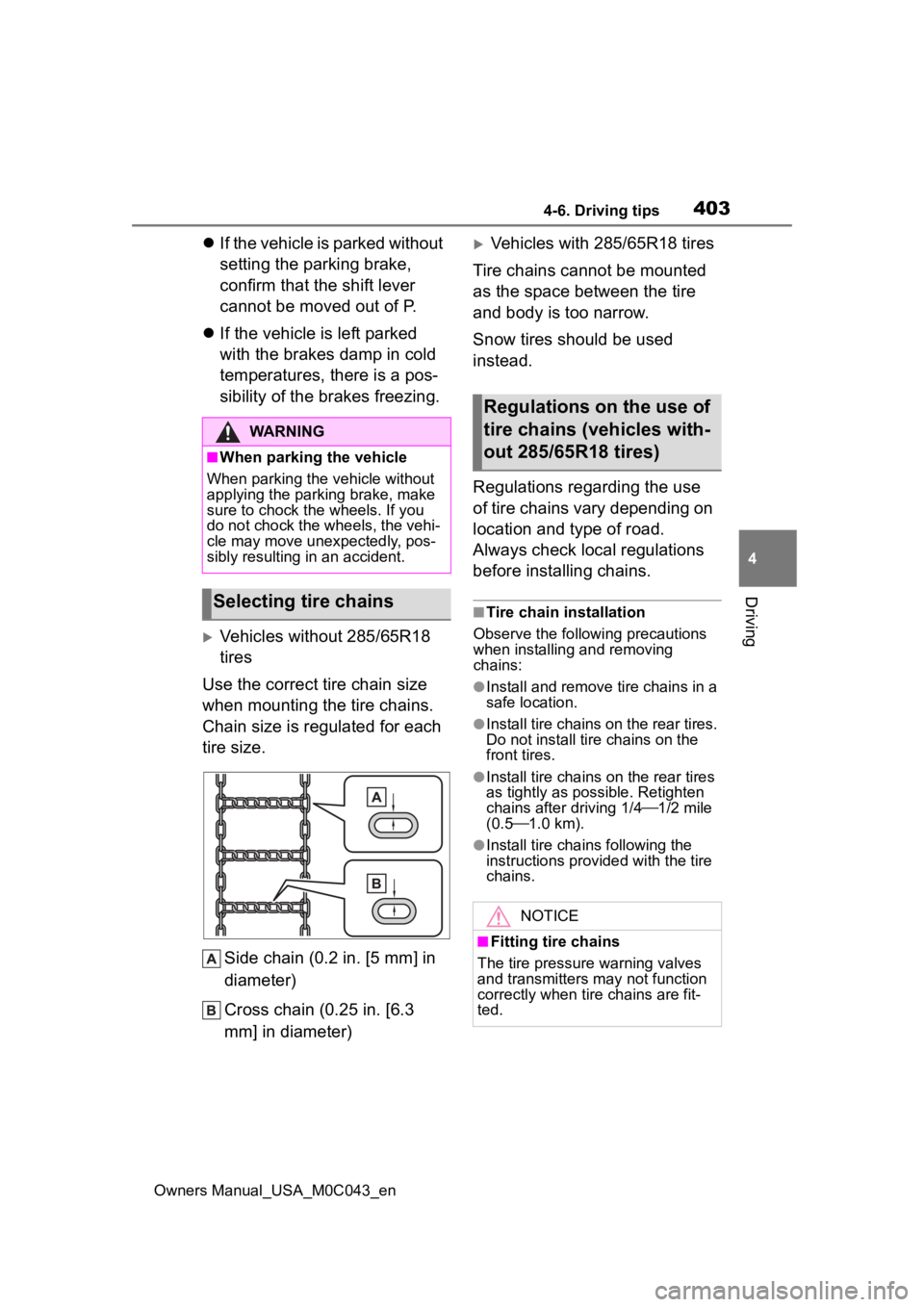
Use the correct tire chain size
when mounting the tire chains.
Chain size is regulated for each
tire size.
Side chain (0.2 in. [5 mm] in
diameter)
Cross chain (0.25 in. [6.3
mm] in diameter)
Vehicles with 285/65R18 tires
Tire chains cannot be mounted
as the space between the tire
and body is too narrow.
Snow tires should be used
instead.
Regulations regarding the use
of tire chains vary depending on
location and type of road.
Always check local regulations
before installing chains.
■Tire chain installation
Observe the followi ng precautions
when installing and removing
chains:
●Install and remove tire chains in a
safe location.
●Install tire chains on the rear tires.
Do not install ti re chains on the
front tires.
●Install tire chains on the rear tires
as tightly as possible. Retighten
chains after driving 1/4 1/2 mile
(0.5 1.0 km).
●Install tire chains following the
instructions provided with the tire
chains.
WARNING
■When parking the vehicle
When parking the v ehicle without
applying the parking brake, make
sure to chock the wheels. If you
do not chock the wheels, the vehi-
cle may move une xpectedly, pos-
sibly resulting in an accident.
Selecting tire chains
Regulations on the use of
tire chains (vehicles with-
out 285/65R18 tires)
NOTICE
■Fitting tire chains
The tire pressure warning valves
and transmitters may not function
correctly when tire chains are fit-
ted.