engine TOYOTA SIENNA 2007 Service Manual Online
[x] Cancel search | Manufacturer: TOYOTA, Model Year: 2007, Model line: SIENNA, Model: TOYOTA SIENNA 2007Pages: 3000, PDF Size: 52.26 MB
Page 238 of 3000

THEFT DETERRENT – THEFT DETERRENT SYSTEMTD–5
TD
3. PASSIVE ARMING MODE
HINT:
• Passive arming mode starts the alarm control after
the key is removed from the ignition key cylinder and
doors are closed.
• Passive arming mode can be switched ON/OFF by
the specified method.
• The alarm is initially set (when shipped from factory)
to active arming mode (not passive arming mode).
• During passive arming mode, the theft deterrent
system goes into the armed state even if the doors
are not locked.
• Detecting that the doors are unlocked does not set off
the alarm during passive arming mode.
• A forced door lock signal is not output during passive
arming mode (see FORCED DOOR LOCK
CONTROL).
• Although the theft deterrent system detects that the
doors are opened during passive arming mode, the
alarm will not go off immediately because an entry
delay time is set.
• If any of the following conditions is met during passive
arming mode, the theft deterrent system will switch to
active arming mode.
– With all doors and engine hood closed, lock all
doors by key operation.
– With all doors and engine hood closed, lock all
doors by wireless operation.
– With any door or the engine hood open, lock all
doors and close all doors and engine hood.
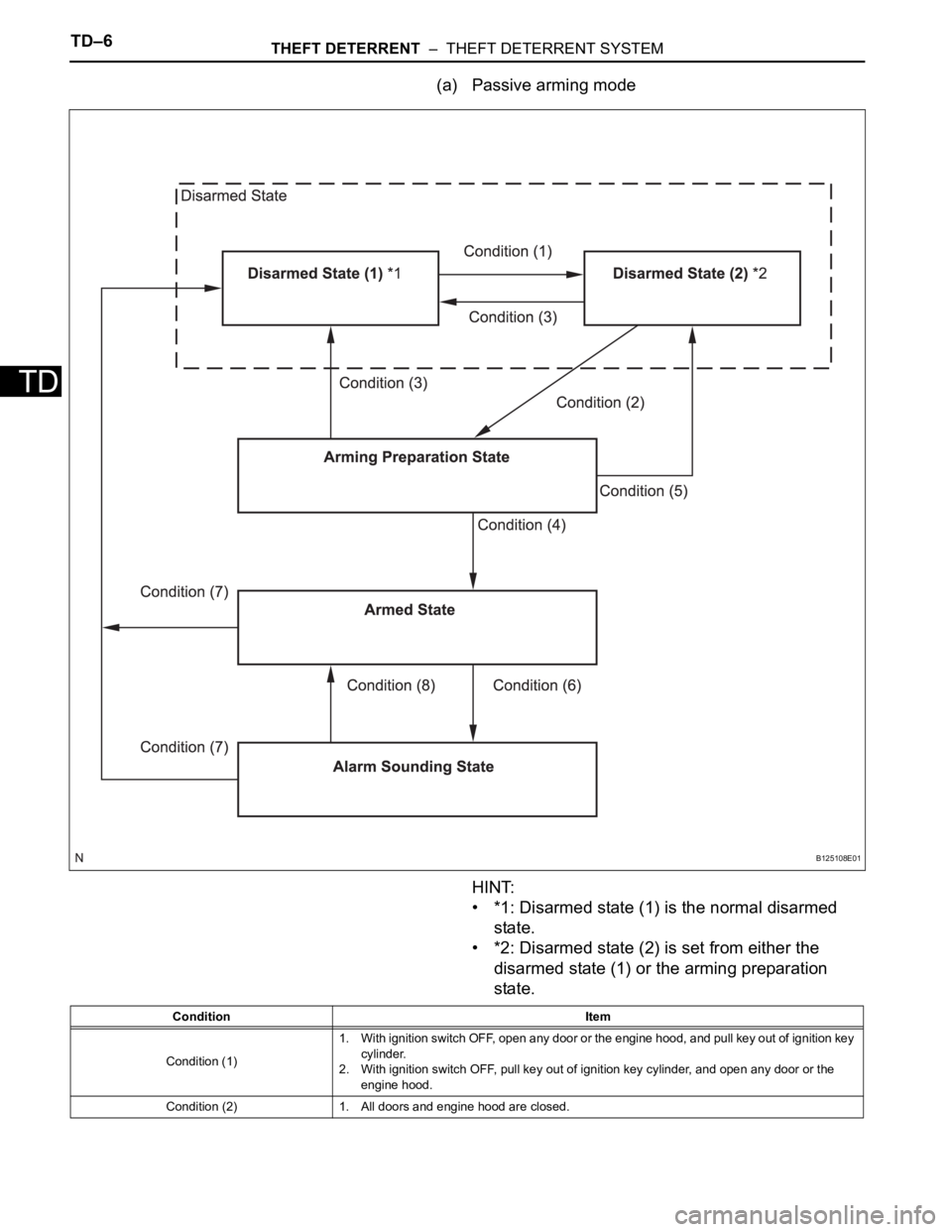
• This system activates as described in the diagram
below when one of items for each condition is met.
Condition (6)1. Unlock any door by wireless operation.
2. Unlock any door by key operation.
3. Insert key into ignition key cylinder and turn ignition switch from OFF to ON.
Condition (7) 1. After approx. 60 sec., alarm stops and system returns to armed state. Condition Item
Page 239 of 3000
TD–6THEFT DETERRENT – THEFT DETERRENT SYSTEM
TD
(a) Passive arming mode
HINT:
• *1: Disarmed state (1) is the normal disarmed
state.
• *2: Disarmed state (2) is set from either the
disarmed state (1) or the arming preparation
state.
B125108E01
Condition Item
Condition (1)1. With ignition switch OFF, open any door or the engine hood, and pull key out of ignition key
cylinder.
2. With ignition switch OFF, pull key out of ignition key cylinder, and open any door or the
engine hood.
Condition (2) 1. All doors and engine hood are closed.
Page 240 of 3000

THEFT DETERRENT – THEFT DETERRENT SYSTEMTD–7
TDHINT:
*1: When any door is opened while all the doors are
closed during passive arming mode, the entry delay
time starts. If the switch condition (armed state
disarmed state (1) or (2)) is met during the entry
delay time, the theft deterrent system will return to
disarmed state (1) or (2). However, if the switch
condition for disarmed state (1) or (2) is not met, the
theft deterrent system will recognize it as a theft and
set off the alarm.
Entry delay time of 0, 14 or 30 sec. can be selected
by the customizing function.
4. FORCED DOOR LOCK CONTROL
(a) The forced door lock control prevents the vehicle
from being tampered with. Immediately after a door
is unlocked (alarm starts), the door is forced to lock
by a forced door lock signal.
(1) Conditions that force the doors to lock:
No key is in the ignition key cylinder and both of
the following conditions are met.
• The theft deterrent system is in the alarm
sounding state of active arming mode.
• Any door is unlocked.
Condition (3)1. Unlock all door by wireless operation.
2. Insert key into ignition key cylinder.
3. Reconnect battery.
4. Turn ignition switch from OFF to ON.
5. Unlock any door by key operation.
Condition (4) 1. With all doors and engine hood closed, allow approx. 30 sec. to elapse.
Condition (5) 1. Open any door or the engine hood.
Condition (6)1. Open any door and allow entry delay time
*1 to elapse.
2. Open engine hood.
3. Reconnect battery.
4. Directly connect ignition switch without key (or turn ignition switch ON without key).
Condition (7)1. Unlock all door by wireless operation.
2. Unlock all door by key operation.
3. Insert key into ignition key cylinder and turn ignition switch from OFF to ON.
Condition (8) 1. After approx. 60 sec., alarm stops and system returns to armed state. Condition Item
Page 243 of 3000
ENGINE IMMOBILISER – ENGINE IMMOBILISER SYSTEMEI–3
EI
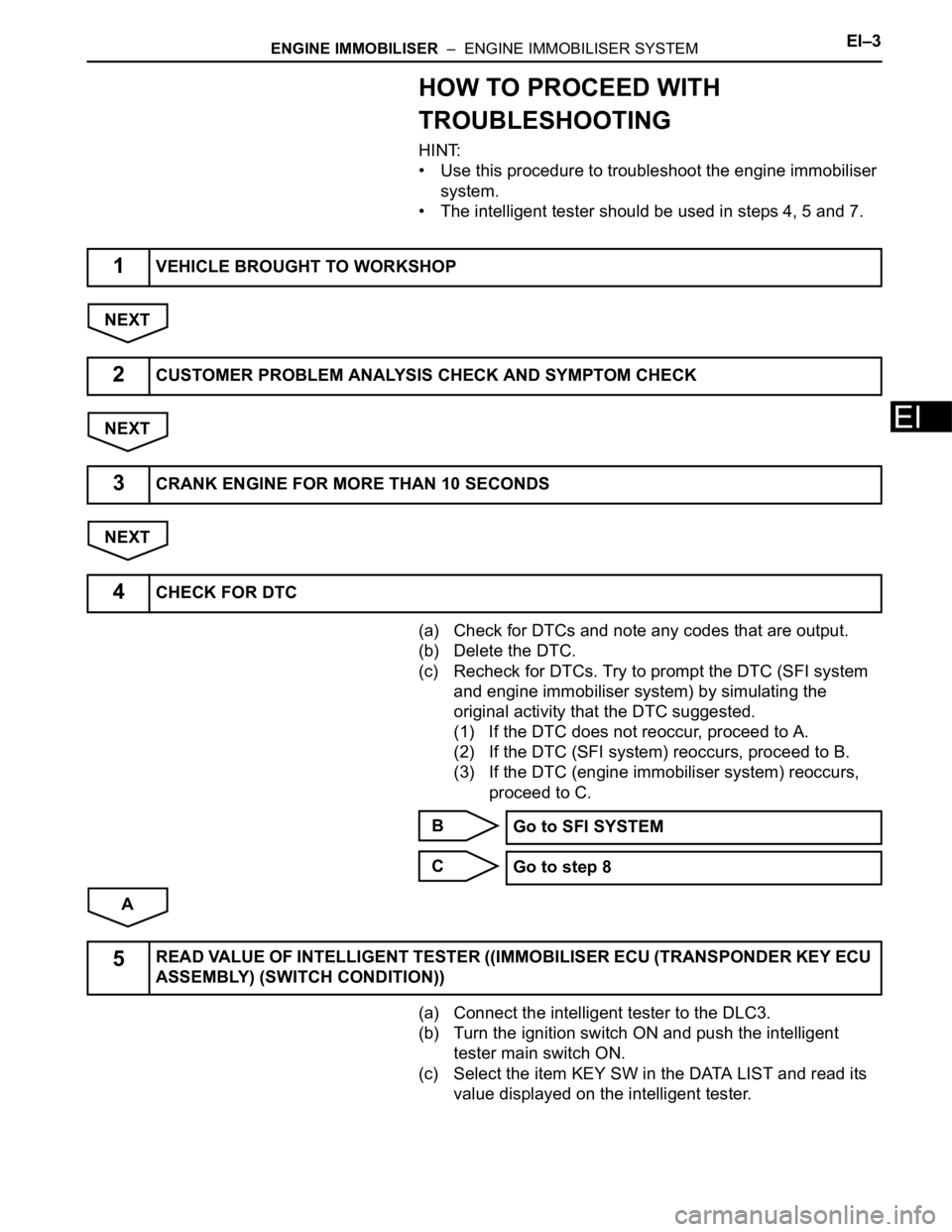
HOW TO PROCEED WITH
TROUBLESHOOTING
HINT:
• Use this procedure to troubleshoot the engine immobiliser
system.
• The intelligent tester should be used in steps 4, 5 and 7.
NEXT
NEXT
NEXT
(a) Check for DTCs and note any codes that are output.
(b) Delete the DTC.
(c) Recheck for DTCs. Try to prompt the DTC (SFI system
and engine immobiliser system) by simulating the
original activity that the DTC suggested.
(1) If the DTC does not reoccur, proceed to A.
(2) If the DTC (SFI system) reoccurs, proceed to B.
(3) If the DTC (engine immobiliser system) reoccurs,
proceed to C.
B
C
A
(a) Connect the intelligent tester to the DLC3.
(b) Turn the ignition switch ON and push the intelligent
tester main switch ON.
(c) Select the item KEY SW in the DATA LIST and read its
value displayed on the intelligent tester.
1VEHICLE BROUGHT TO WORKSHOP
2CUSTOMER PROBLEM ANALYSIS CHECK AND SYMPTOM CHECK
3CRANK ENGINE FOR MORE THAN 10 SECONDS
4CHECK FOR DTC
Go to SFI SYSTEM
Go to step 8
5READ VALUE OF INTELLIGENT TESTER ((IMMOBILISER ECU (TRANSPONDER KEY ECU
ASSEMBLY) (SWITCH CONDITION))
Page 244 of 3000
EI–4ENGINE IMMOBILISER – ENGINE IMMOBILISER SYSTEM
EI
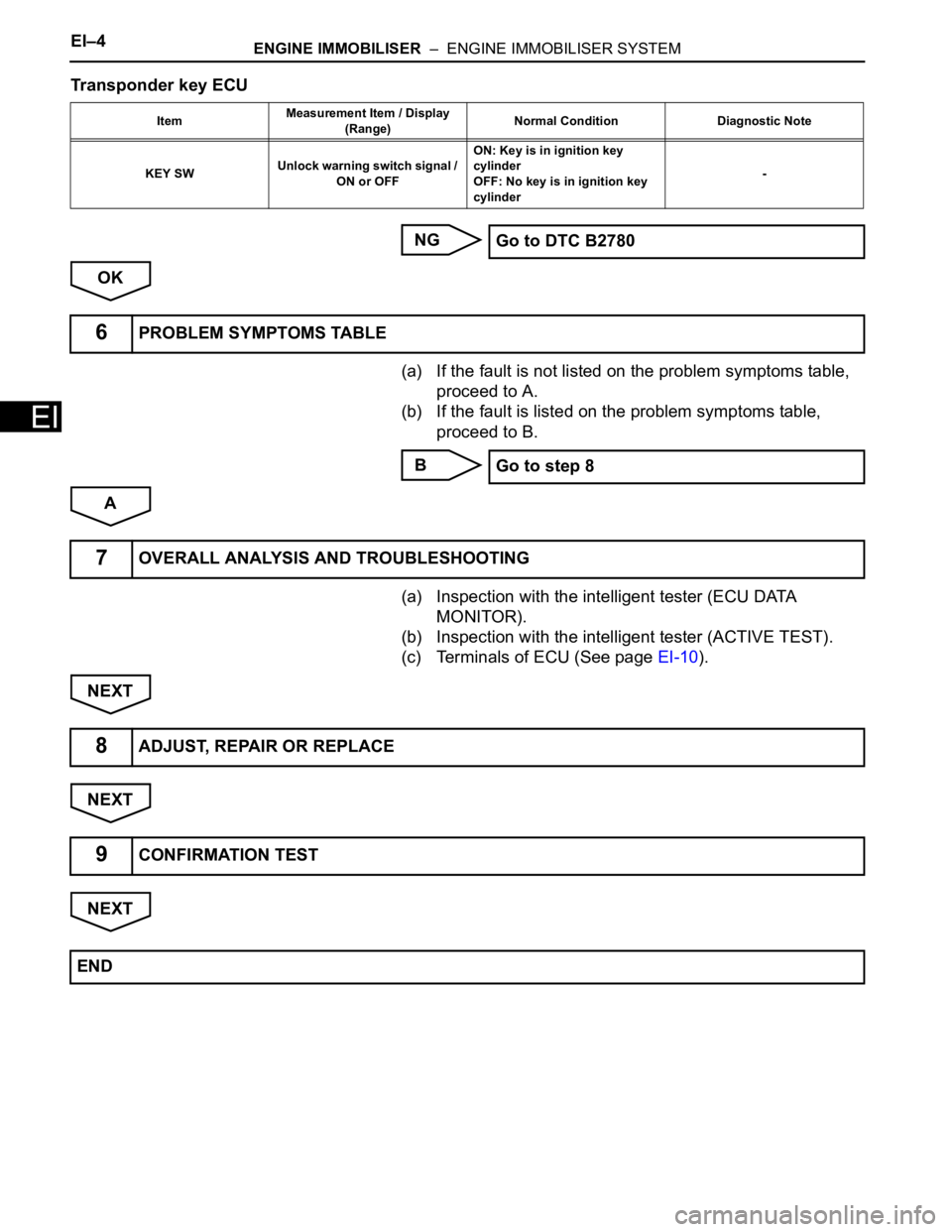
Transponder key ECU
NG
OK
(a) If the fault is not listed on the problem symptoms table,
proceed to A.
(b) If the fault is listed on the problem symptoms table,
proceed to B.
B
A
(a) Inspection with the intelligent tester (ECU DATA
MONITOR).
(b) Inspection with the intelligent tester (ACTIVE TEST).
(c) Terminals of ECU (See page EI-10).
NEXT
NEXT
NEXT
ItemMeasurement Item / Display
(Range)Normal Condition Diagnostic Note
KEY SWUnlock warning switch signal /
ON or OFFON: Key is in ignition key
cylinder
OFF: No key is in ignition key
cylinder-
Go to DTC B2780
6PROBLEM SYMPTOMS TABLE
Go to step 8
7OVERALL ANALYSIS AND TROUBLESHOOTING
8ADJUST, REPAIR OR REPLACE
9CONFIRMATION TEST
END
Page 308 of 3000
ES–62GR-FE ENGINE CONTROL SYSTEM – SFI SYSTEM
ES
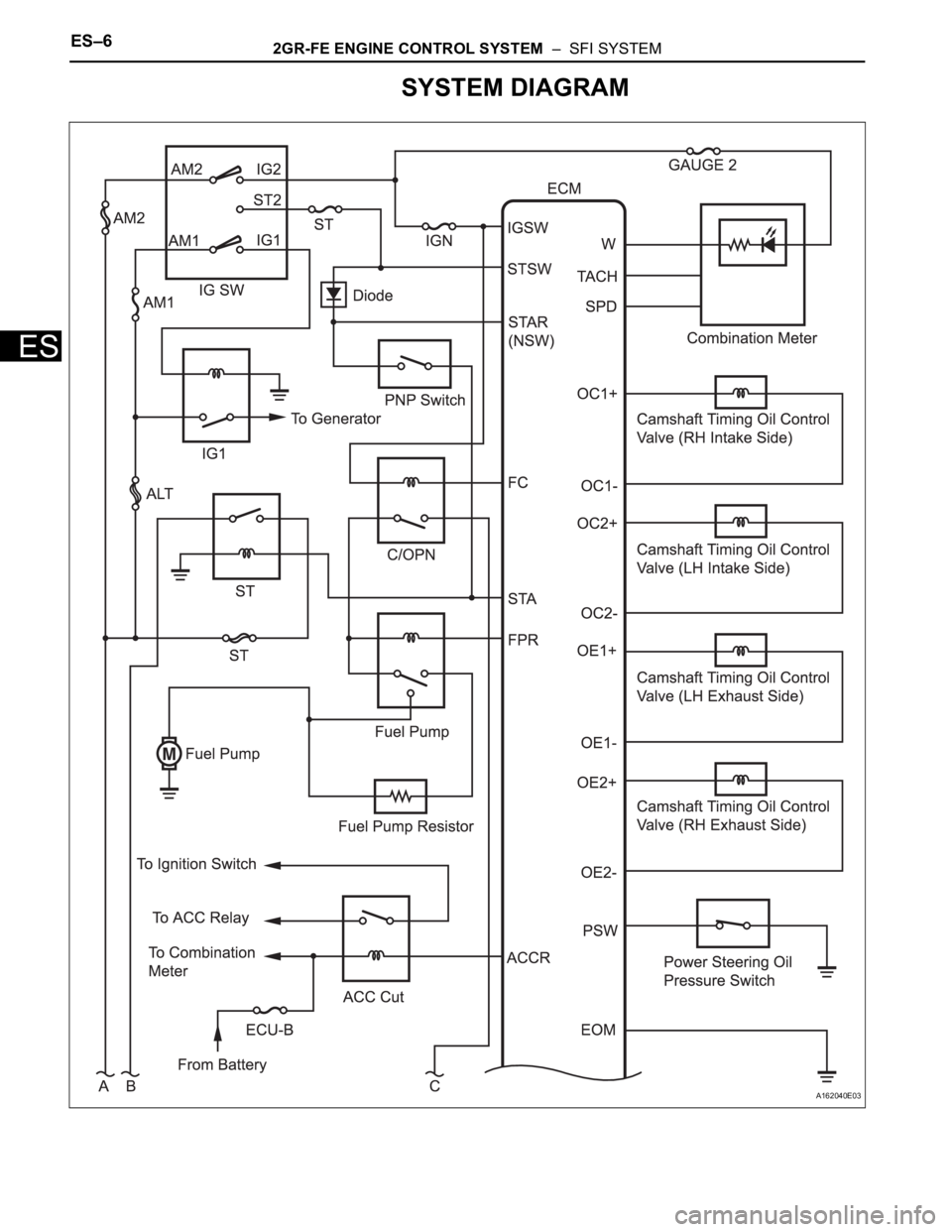
SYSTEM DIAGRAM
A162040E03
Page 309 of 3000
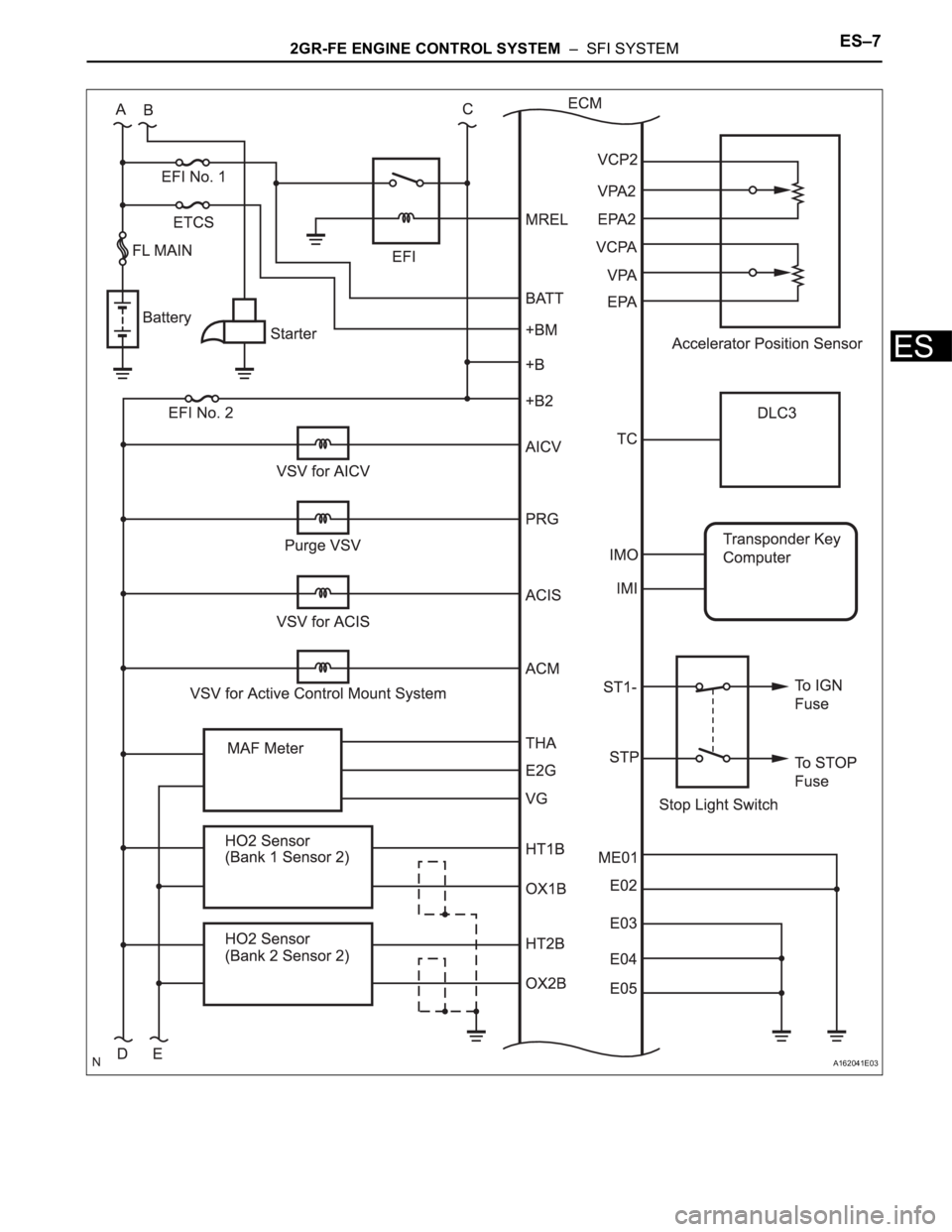
2GR-FE ENGINE CONTROL SYSTEM – SFI SYSTEMES–7
ES
A162041E03
Page 310 of 3000
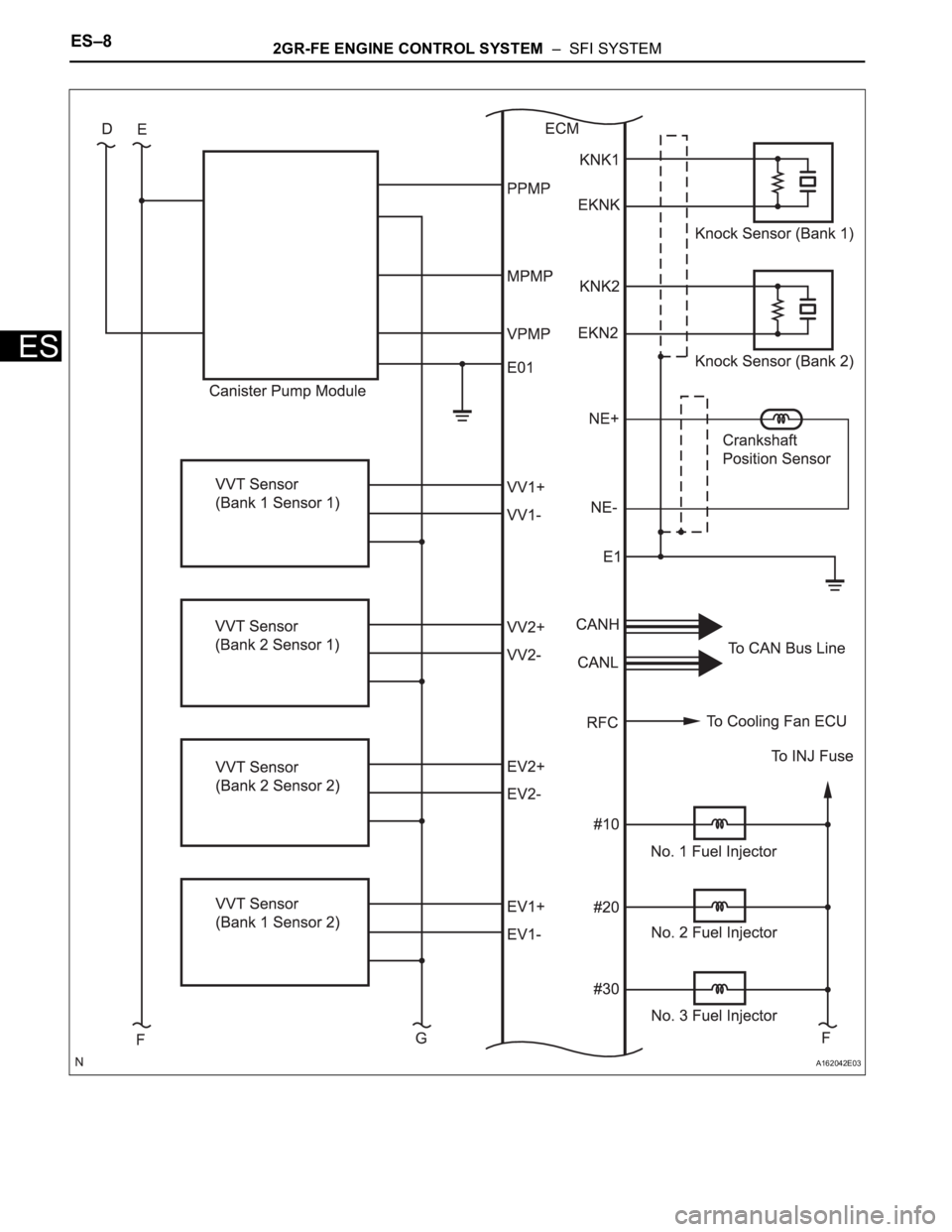
ES–82GR-FE ENGINE CONTROL SYSTEM – SFI SYSTEM
ES
A162042E03
Page 311 of 3000
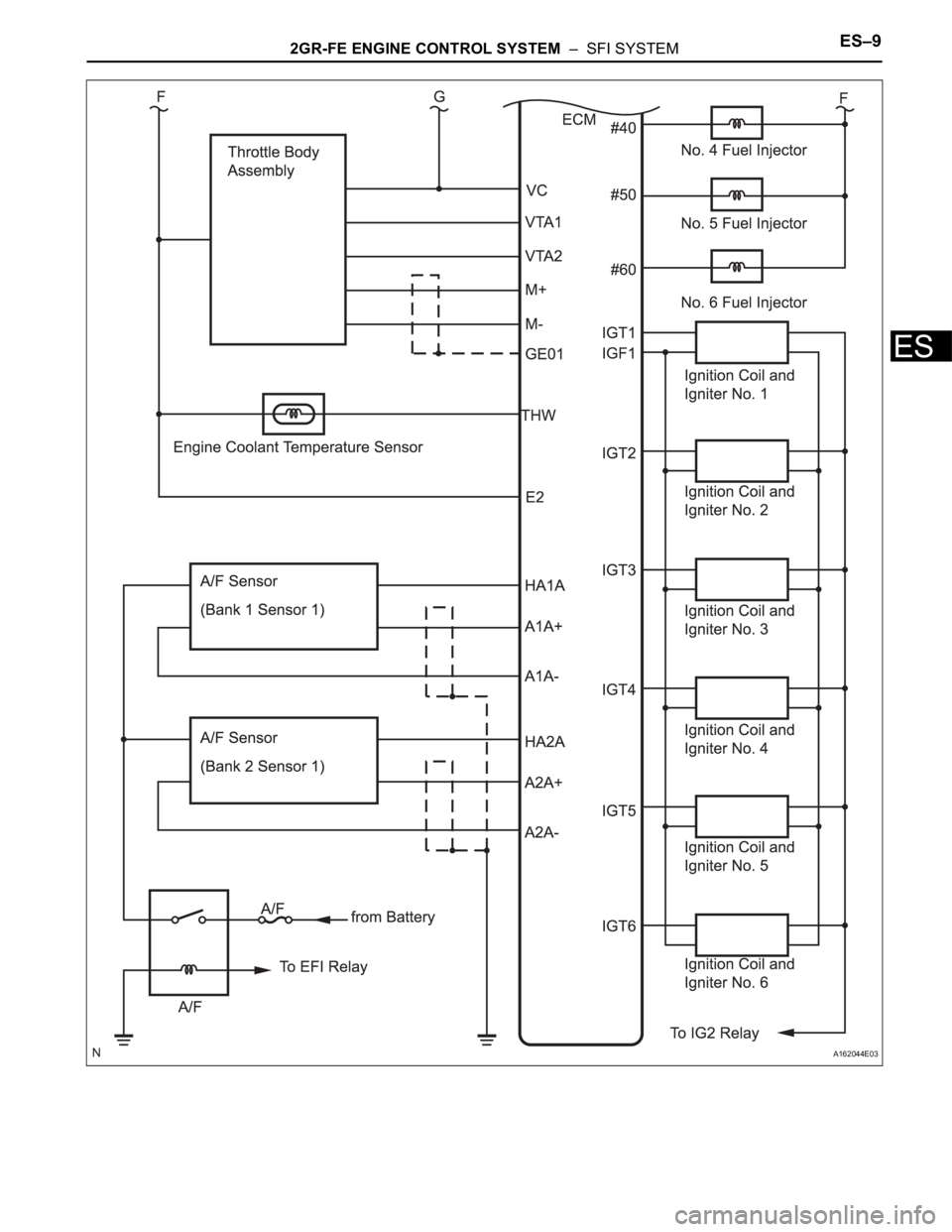
2GR-FE ENGINE CONTROL SYSTEM – SFI SYSTEMES–9
ES
A162044E03
Page 312 of 3000
ENGINE HOOD / DOOR – POWER SLIDE DOOR SYSTEMED–5
ED
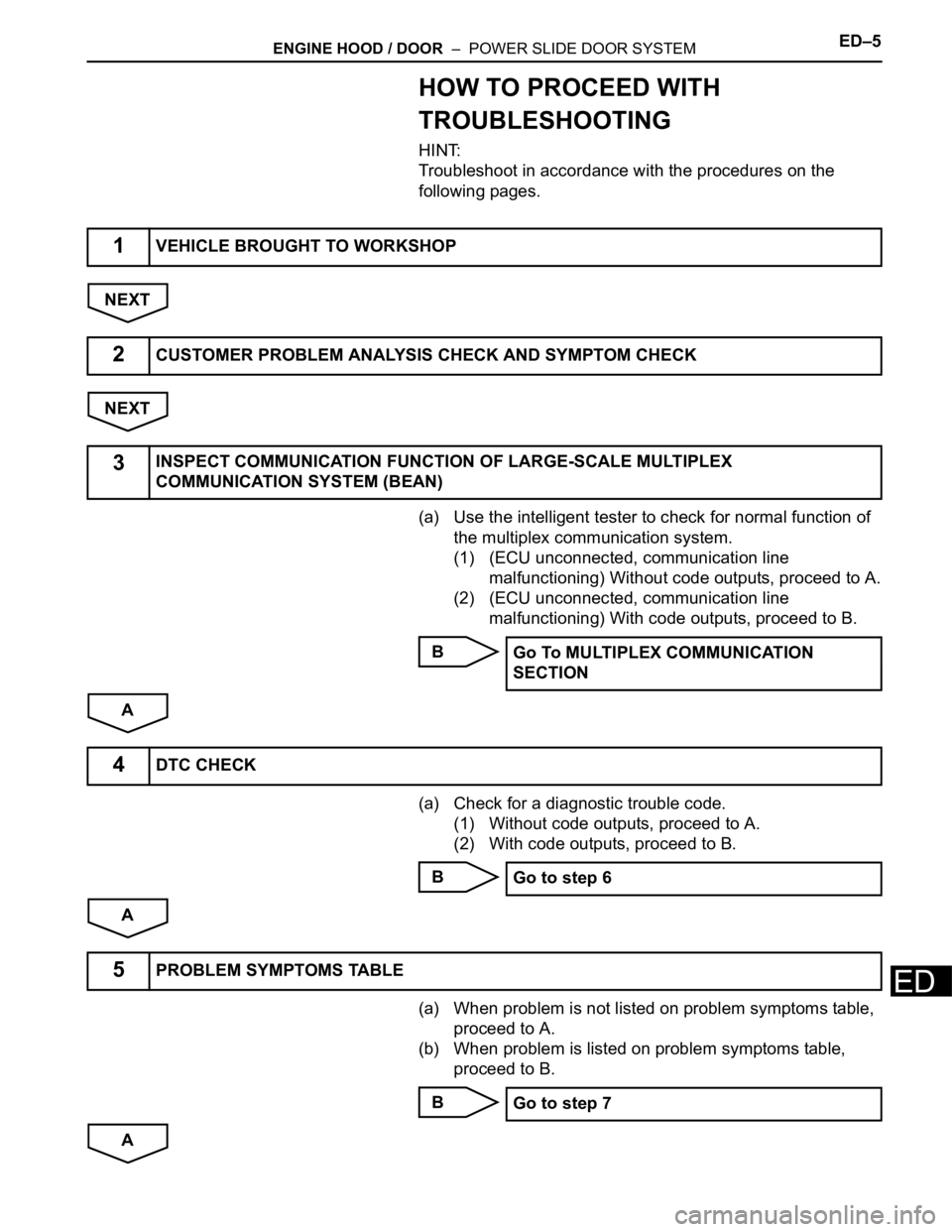
HOW TO PROCEED WITH
TROUBLESHOOTING
HINT:
Troubleshoot in accordance with the procedures on the
following pages.
NEXT
NEXT
(a) Use the intelligent tester to check for normal function of
the multiplex communication system.
(1) (ECU unconnected, communication line
malfunctioning) Without code outputs, proceed to A.
(2) (ECU unconnected, communication line
malfunctioning) With code outputs, proceed to B.
B
A
(a) Check for a diagnostic trouble code.
(1) Without code outputs, proceed to A.
(2) With code outputs, proceed to B.
B
A
(a) When problem is not listed on problem symptoms table,
proceed to A.
(b) When problem is listed on problem symptoms table,
proceed to B.
B
A
1VEHICLE BROUGHT TO WORKSHOP
2CUSTOMER PROBLEM ANALYSIS CHECK AND SYMPTOM CHECK
3INSPECT COMMUNICATION FUNCTION OF LARGE-SCALE MULTIPLEX
COMMUNICATION SYSTEM (BEAN)
Go To MULTIPLEX COMMUNICATION
SECTION
4DTC CHECK
Go to step 6
5PROBLEM SYMPTOMS TABLE
Go to step 7