steering column TOYOTA SIENNA 2007 Service Repair Manual
[x] Cancel search | Manufacturer: TOYOTA, Model Year: 2007, Model line: SIENNA, Model: TOYOTA SIENNA 2007Pages: 3000, PDF Size: 52.26 MB
Page 189 of 3000
STEERING COLUMN – STEERING SYSTEMSR–3
SR
REPAIR
1. STEERING OFF CENTER REPAIR PROCEDURE
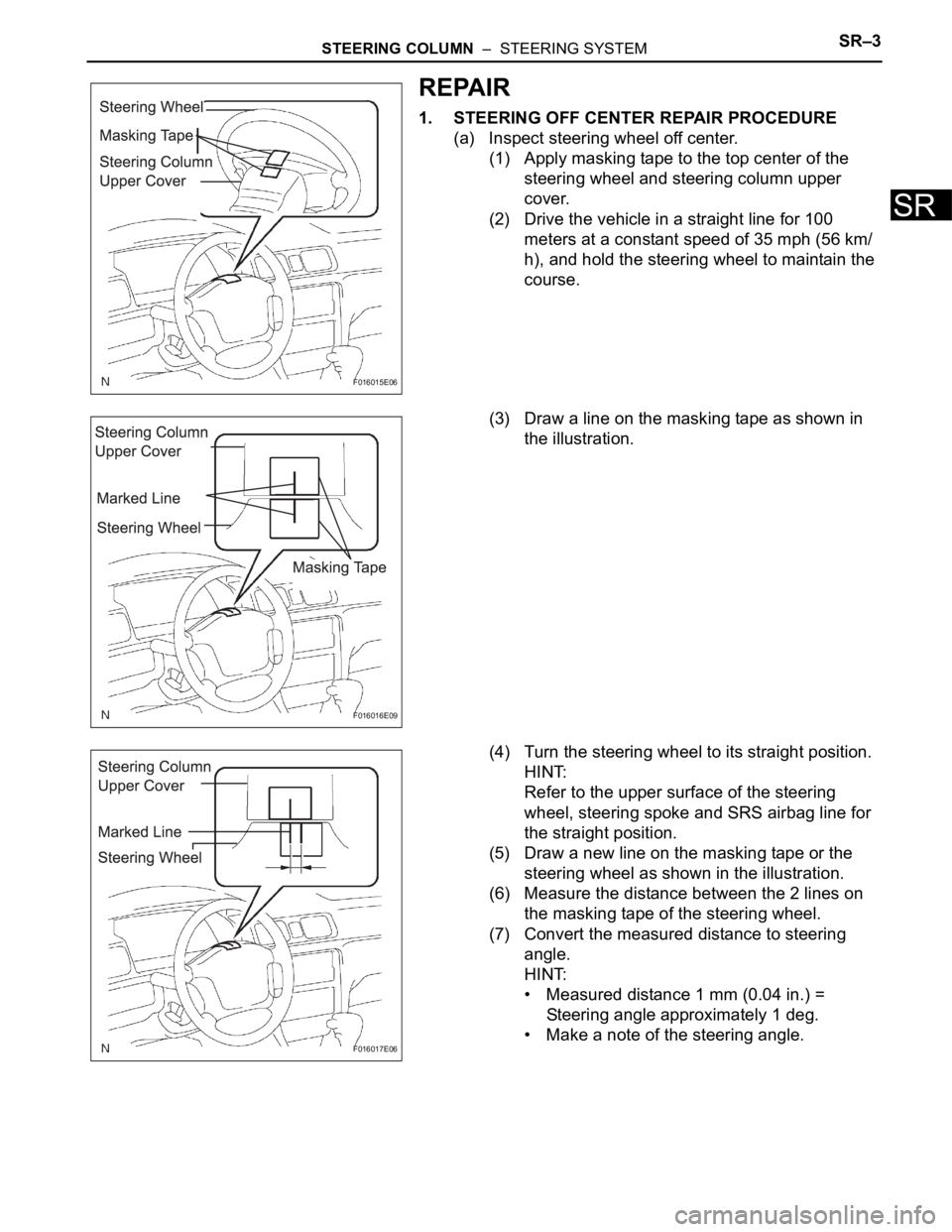
(a) Inspect steering wheel off center.
(1) Apply masking tape to the top center of the
steering wheel and steering column upper
cover.
(2) Drive the vehicle in a straight line for 100
meters at a constant speed of 35 mph (56 km/
h), and hold the steering wheel to maintain the
course.
(3) Draw a line on the masking tape as shown in
the illustration.
(4) Turn the steering wheel to its straight position.
HINT:
Refer to the upper surface of the steering
wheel, steering spoke and SRS airbag line for
the straight position.
(5) Draw a new line on the masking tape or the
steering wheel as shown in the illustration.
(6) Measure the distance between the 2 lines on
the masking tape of the steering wheel.
(7) Convert the measured distance to steering
angle.
HINT:
• Measured distance 1 mm (0.04 in.) =
Steering angle approximately 1 deg.
• Make a note of the steering angle.
F016015E06
F016016E09
F016017E06
Page 190 of 3000
SR–4STEERING COLUMN – STEERING SYSTEM
SR
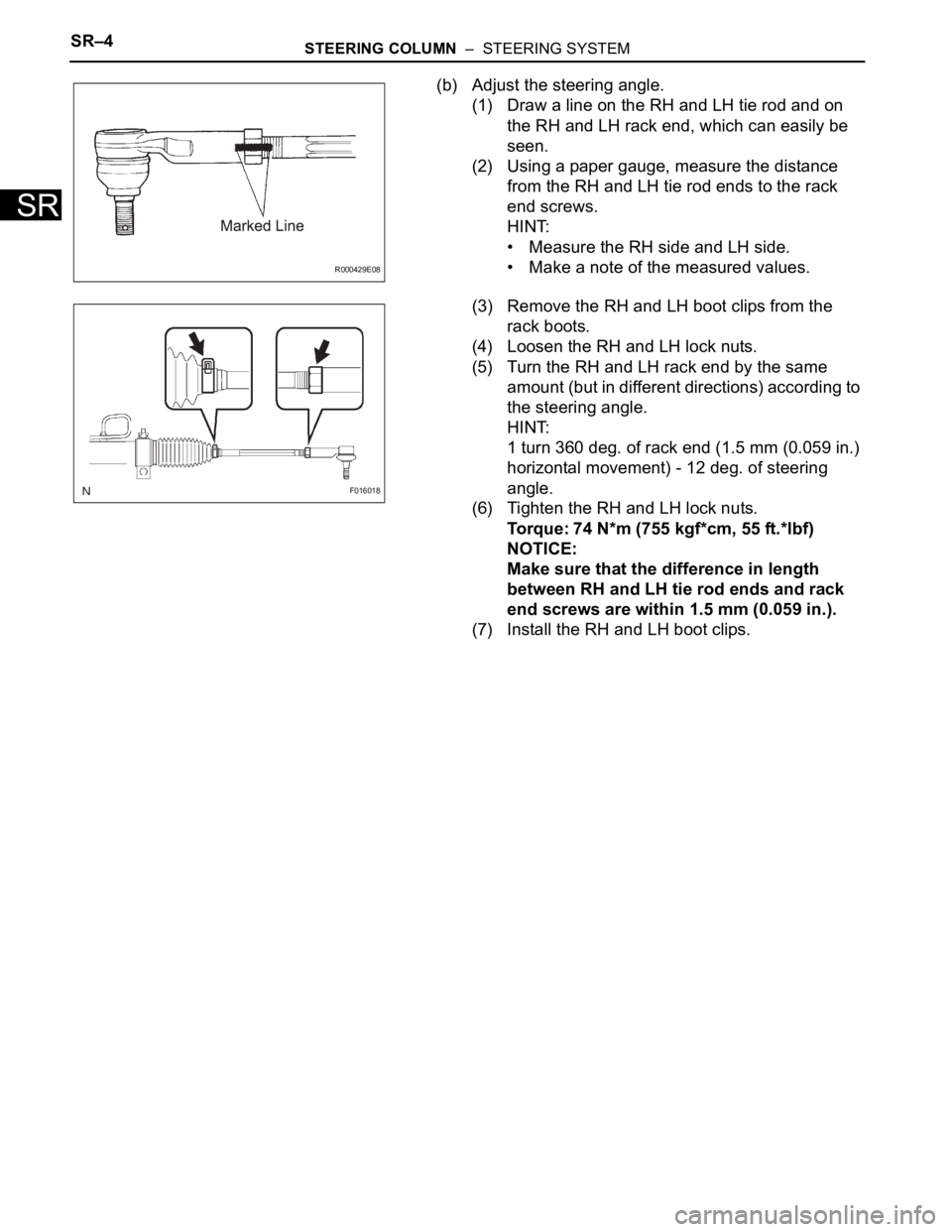
(b) Adjust the steering angle.
(1) Draw a line on the RH and LH tie rod and on
the RH and LH rack end, which can easily be
seen.
(2) Using a paper gauge, measure the distance
from the RH and LH tie rod ends to the rack
end screws.
HINT:
• Measure the RH side and LH side.
• Make a note of the measured values.
(3) Remove the RH and LH boot clips from the
rack boots.
(4) Loosen the RH and LH lock nuts.
(5) Turn the RH and LH rack end by the same
amount (but in different directions) according to
the steering angle.
HINT:
1 turn 360 deg. of rack end (1.5 mm (0.059 in.)
horizontal movement) - 12 deg. of steering
angle.
(6) Tighten the RH and LH lock nuts.
Torque: 74 N*m (755 kgf*cm, 55 ft.*lbf)
NOTICE:
Make sure that the difference in length
between RH and LH tie rod ends and rack
end screws are within 1.5 mm (0.059 in.).
(7) Install the RH and LH boot clips.
R000429E08
F016018
Page 249 of 3000

LI–104LIGHTING – HEADLIGHT DIMMER SWITCH
LI
INSTALLATION
1. INSTALL HEADLIGHT DIMMER SWITCH ASSEMBLY
2. INSTALL STEERING COLUMN UPPER COVER
3. INSTALL STEERING COLUMN LOWER COVER
Page 289 of 3000
INSTRUMENT PANEL – INSTRUMENT PANEL SAFETY PADIP–5
IP
REMOVAL
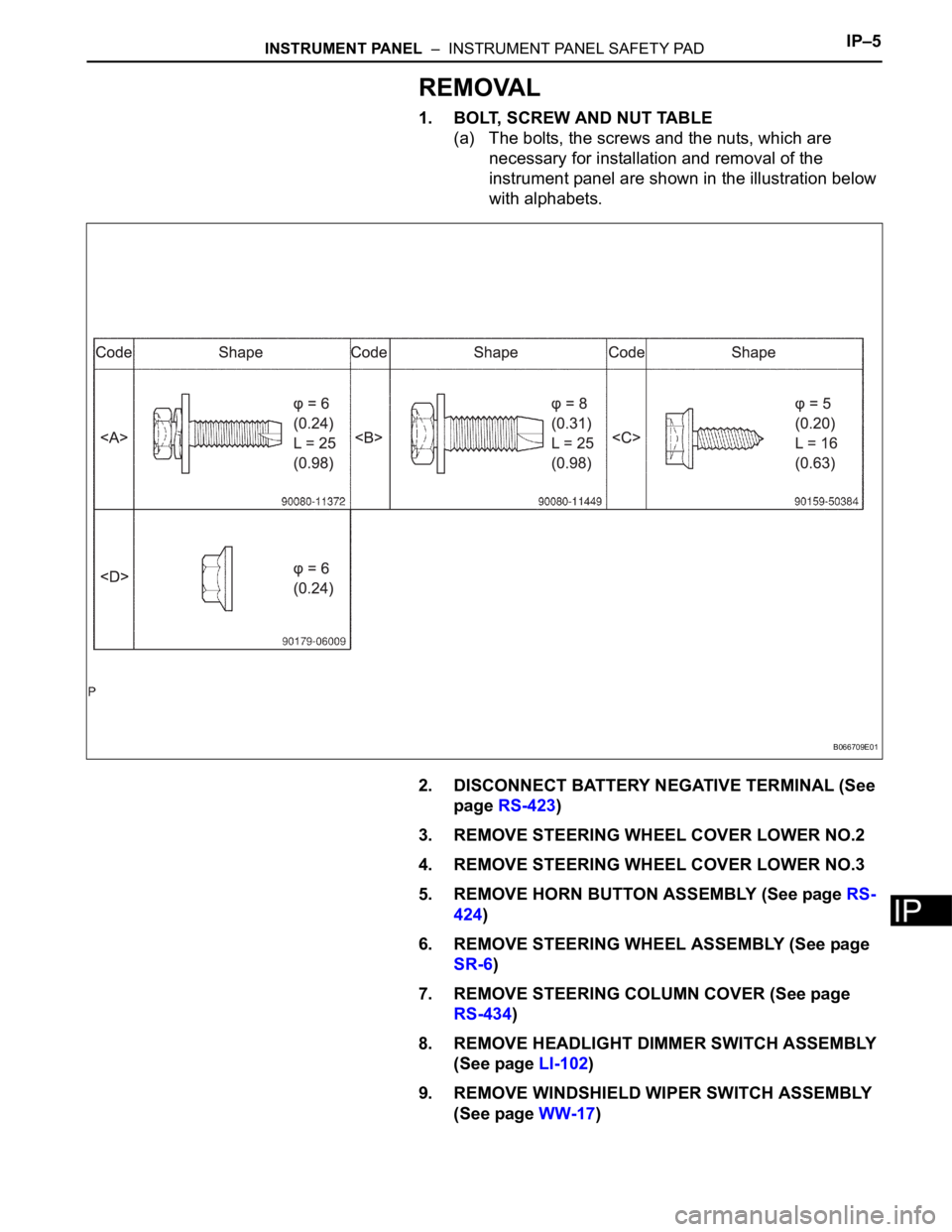
1. BOLT, SCREW AND NUT TABLE
(a) The bolts, the screws and the nuts, which are
necessary for installation and removal of the
instrument panel are shown in the illustration below
with alphabets.
2. DISCONNECT BATTERY NEGATIVE TERMINAL (See
page RS-423)
3. REMOVE STEERING WHEEL COVER LOWER NO.2
4. REMOVE STEERING WHEEL COVER LOWER NO.3
5. REMOVE HORN BUTTON ASSEMBLY (See page RS-
424)
6. REMOVE STEERING WHEEL ASSEMBLY (See page
SR-6)
7. REMOVE STEERING COLUMN COVER (See page
RS-434)
8. REMOVE HEADLIGHT DIMMER SWITCH ASSEMBLY
(See page LI-102)
9. REMOVE WINDSHIELD WIPER SWITCH ASSEMBLY
(See page WW-17)
B066709E01
Page 1339 of 3000
ST–162GR-FE STARTING – IGNITION SWITCH
ST
REMOVAL
1. DISCONNECT CABLE FROM NEGATIVE BATTERY
TERMINAL
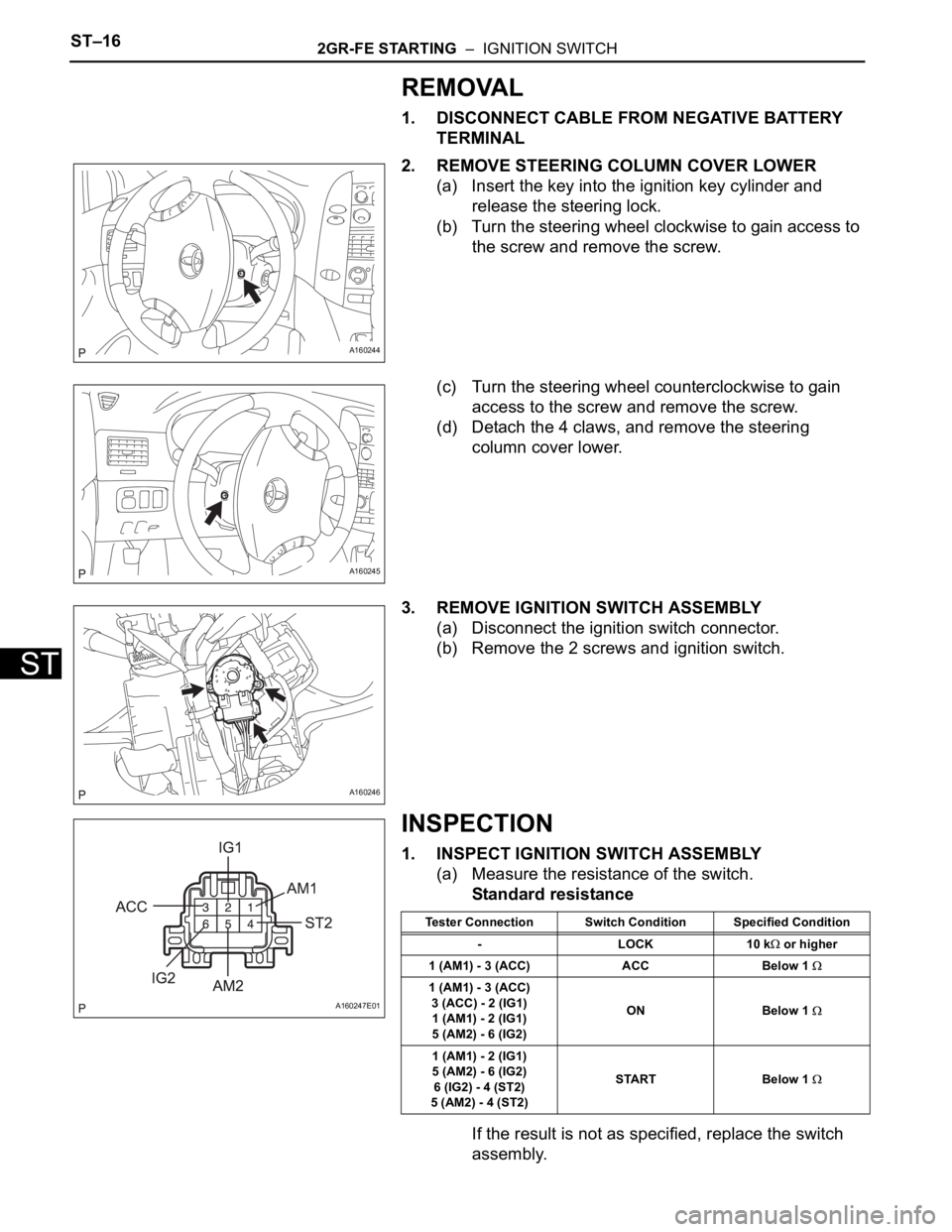
2. REMOVE STEERING COLUMN COVER LOWER
(a) Insert the key into the ignition key cylinder and
release the steering lock.
(b) Turn the steering wheel clockwise to gain access to
the screw and remove the screw.
(c) Turn the steering wheel counterclockwise to gain
access to the screw and remove the screw.
(d) Detach the 4 claws, and remove the steering
column cover lower.
3. REMOVE IGNITION SWITCH ASSEMBLY
(a) Disconnect the ignition switch connector.
(b) Remove the 2 screws and ignition switch.
INSPECTION
1. INSPECT IGNITION SWITCH ASSEMBLY
(a) Measure the resistance of the switch.
Standard resistance
If the result is not as specified, replace the switch
assembly.
A160244
A160245
A160246
A160247E01
Tester Connection Switch Condition Specified Condition
-LOCK10 k
or higher
1 (AM1) - 3 (ACC) ACC Below 1
1 (AM1) - 3 (ACC)
3 (ACC) - 2 (IG1)
1 (AM1) - 2 (IG1)
5 (AM2) - 6 (IG2)ON Below 1
1 (AM1) - 2 (IG1)
5 (AM2) - 6 (IG2)
6 (IG2) - 4 (ST2)
5 (AM2) - 4 (ST2)START Below 1
Page 1340 of 3000
2GR-FE STARTING – IGNITION SWITCHST–17
ST
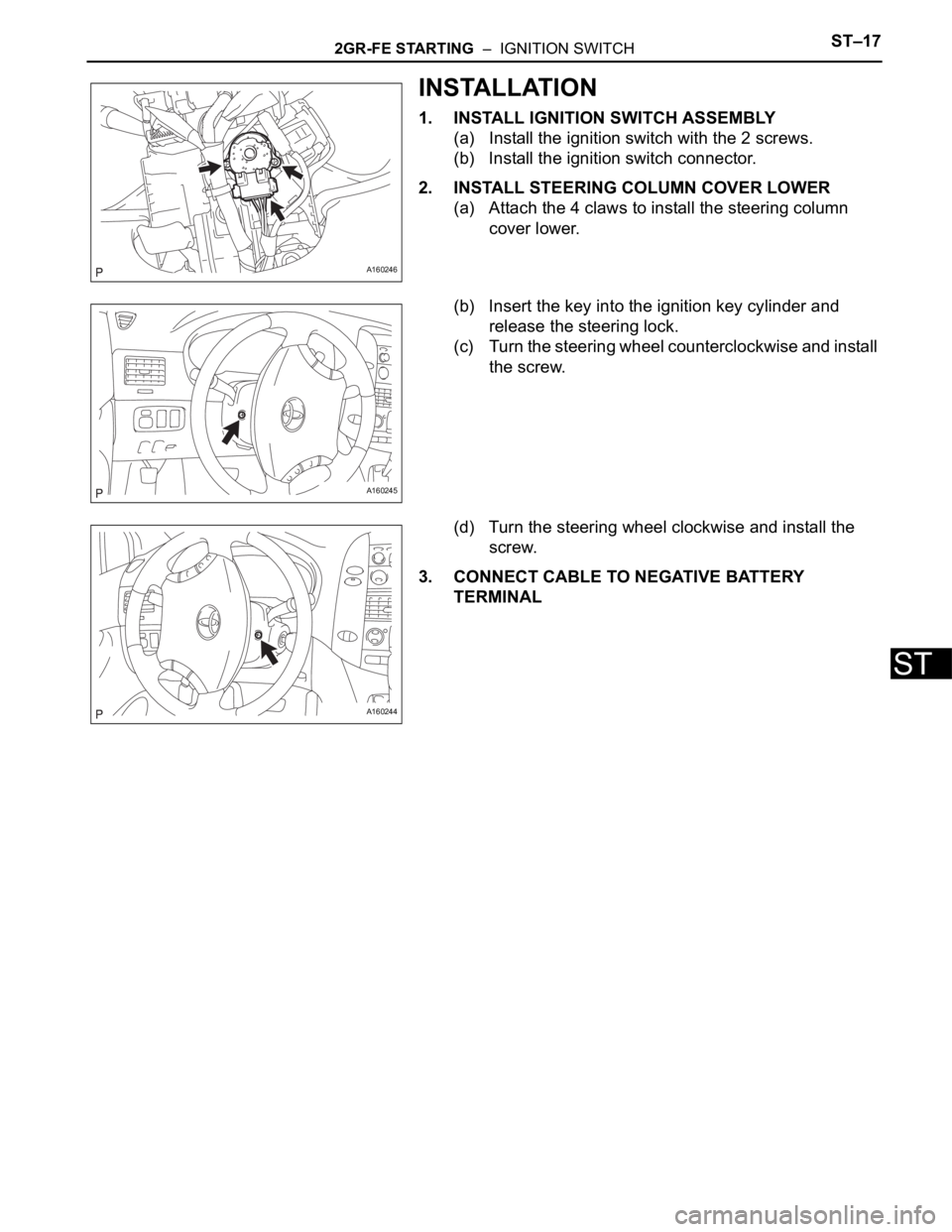
INSTALLATION
1. INSTALL IGNITION SWITCH ASSEMBLY
(a) Install the ignition switch with the 2 screws.
(b) Install the ignition switch connector.
2. INSTALL STEERING COLUMN COVER LOWER
(a) Attach the 4 claws to install the steering column
cover lower.
(b) Insert the key into the ignition key cylinder and
release the steering lock.
(c) Turn the steering wheel counterclockwise and install
the screw.
(d) Turn the steering wheel clockwise and install the
screw.
3. CONNECT CABLE TO NEGATIVE BATTERY
TERMINAL
A160246
A160245
A160244
Page 2486 of 3000
BC–124BRAKE CONTROL – VEHICLE STABILITY CONTROL SYSTEM
BC
• When the speed sensor or the yaw rate sensor has trouble. DTCs for the steering angle sensor may be
output even when the steering angle sensor is normal. When DTCs for the speed sensor or yaw rate
sensor are output accompanied with other DTCs for the steering angle sensor, inspect and repair the
speed sensor and yaw rate sensor first, and the n inspect and repair the steering angle sensor.
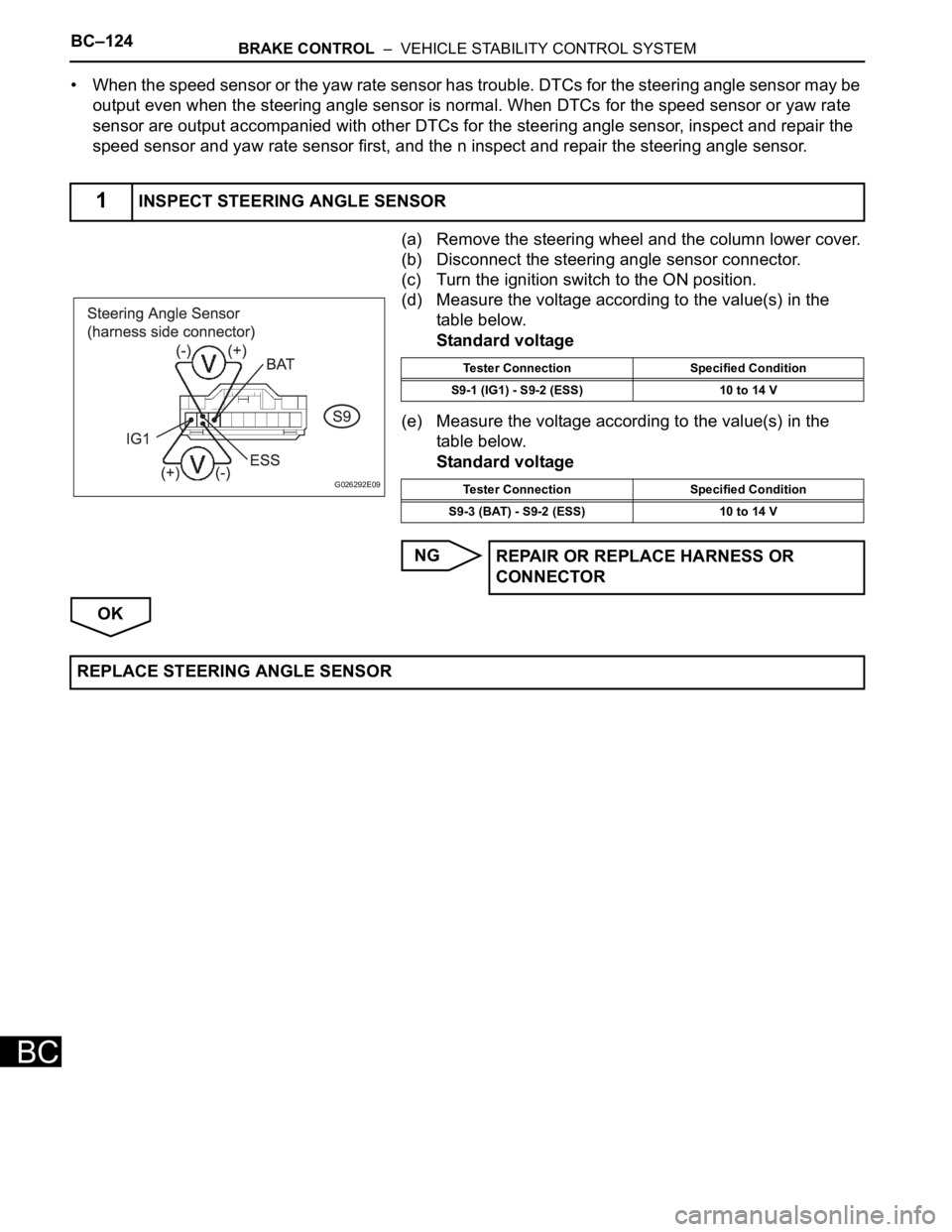
(a) Remove the steering wheel and the column lower cover.
(b) Disconnect the steering angle sensor connector.
(c) Turn the ignition switch to the ON position.
(d) Measure the voltage according to the value(s) in the
table below.
Standard voltage
(e) Measure the voltage according to the value(s) in the
table below.
Standard voltage
NG
OK
1INSPECT STEERING ANGLE SENSOR
G026292E09
Tester Connection Specified Condition
S9-1 (IG1) - S9-2 (ESS) 10 to 14 V
Tester Connection Specified Condition
S9-3 (BAT) - S9-2 (ESS) 10 to 14 V
REPAIR OR REPLACE HARNESS OR
CONNECTOR
REPLACE STEERING ANGLE SENSOR
Page 2587 of 3000
BRAKE CONTROL – STEERING ANGLE SENSORBC–199
BC
REMOVAL
1. PRECAUTION
HINT:
See page RS-1
2. SEPARATE BATTERY NEGATIVE TERMINAL
3. PLACE FRONT WHEELS FACING STRAIGHT AHEAD
4. REMOVE HORN BUTTON ASSEMBLY (See page RS-
424)
5. REMOVE STEERING WHEEL ASSEMBLY (See page
SR-6)
6. REMOVE STEERING COLUMN COVER LWR (See
page RS-434)
7. REMOVE SPIRAL CABLE SUB-ASSEMBLY (See page
RS-434)
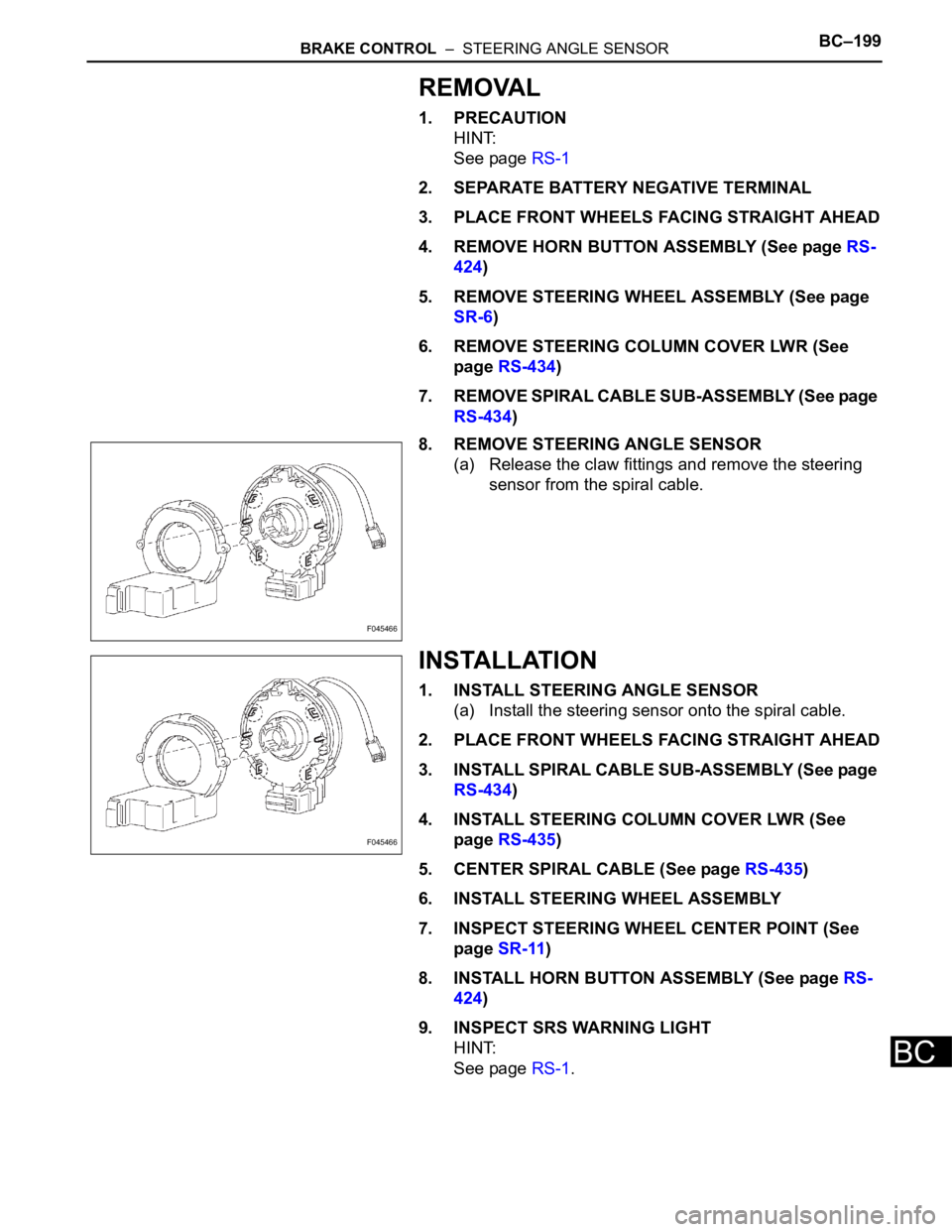
8. REMOVE STEERING ANGLE SENSOR
(a) Release the claw fittings and remove the steering
sensor from the spiral cable.
INSTALLATION
1. INSTALL STEERING ANGLE SENSOR
(a) Install the steering sensor onto the spiral cable.
2. PLACE FRONT WHEELS FACING STRAIGHT AHEAD
3. INSTALL SPIRAL CABLE SUB-ASSEMBLY (See page
RS-434)
4. INSTALL STEERING COLUMN COVER LWR (See
page RS-435)
5. CENTER SPIRAL CABLE (See page RS-435)
6. INSTALL STEERING WHEEL ASSEMBLY
7. INSPECT STEERING WHEEL CENTER POINT (See
page SR-11)
8. INSTALL HORN BUTTON ASSEMBLY (See page RS-
424)
9. INSPECT SRS WARNING LIGHT
HINT:
See page RS-1.
F045466
F045466
Page 2670 of 3000
SR–6STEERING COLUMN – STEERING COLUMN ASSEMBLY
SR
REMOVAL
1. PRECAUTION
HINT:
See page RS-1
2. DISCONNECT BATTERY NEGATIVE TERMINAL
Wait for 90 seconds after disconnecting the battery
terminal to prevent the airbag working.
3. PLACE FRONT WHEELS FACING STRAIGHT AHEAD
4. REMOVE STEERING WHEEL COVER LOWER NO.2
(See page RS-424)
5. REMOVE STEERING WHEEL COVER LOWER NO.3
(See page RS-424)
6. REMOVE HORN BUTTON ASSEMBLY (See page RS-
424)
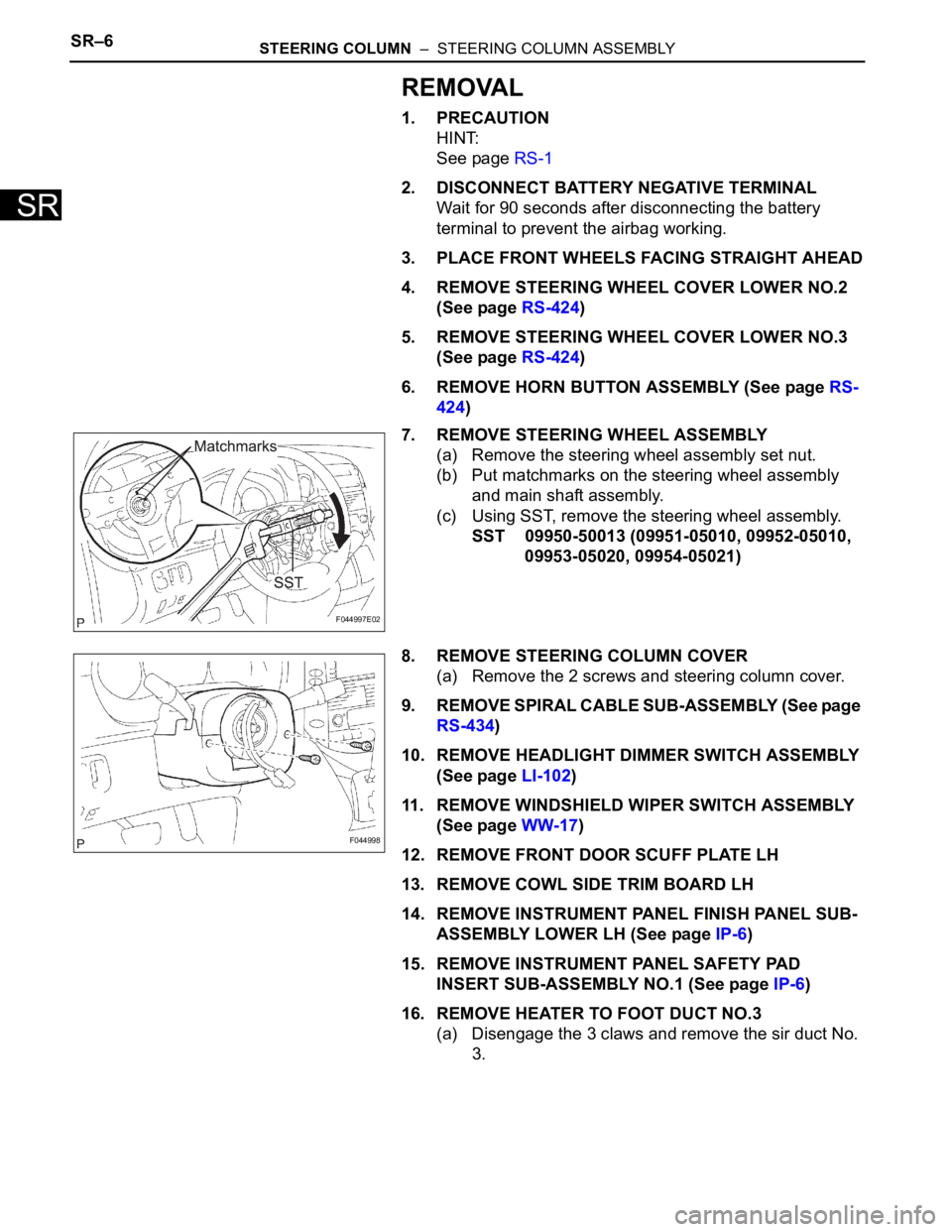
7. REMOVE STEERING WHEEL ASSEMBLY
(a) Remove the steering wheel assembly set nut.
(b) Put matchmarks on the steering wheel assembly
and main shaft assembly.
(c) Using SST, remove the steering wheel assembly.
SST 09950-50013 (09951-05010, 09952-05010,
09953-05020, 09954-05021)
8. REMOVE STEERING COLUMN COVER
(a) Remove the 2 screws and steering column cover.
9. REMOVE SPIRAL CABLE SUB-ASSEMBLY (See page
RS-434)
10. REMOVE HEADLIGHT DIMMER SWITCH ASSEMBLY
(See page LI-102)
11. REMOVE WINDSHIELD WIPER SWITCH ASSEMBLY
(See page WW-17)
12. REMOVE FRONT DOOR SCUFF PLATE LH
13. REMOVE COWL SIDE TRIM BOARD LH
14. REMOVE INSTRUMENT PANEL FINISH PANEL SUB-
ASSEMBLY LOWER LH (See page IP-6)
15. REMOVE INSTRUMENT PANEL SAFETY PAD
INSERT SUB-ASSEMBLY NO.1 (See page IP-6)
16. REMOVE HEATER TO FOOT DUCT NO.3
(a) Disengage the 3 claws and remove the sir duct No.
3.
F044997E02
F044998
Page 2671 of 3000
STEERING COLUMN – STEERING COLUMN ASSEMBLYSR–7
SR
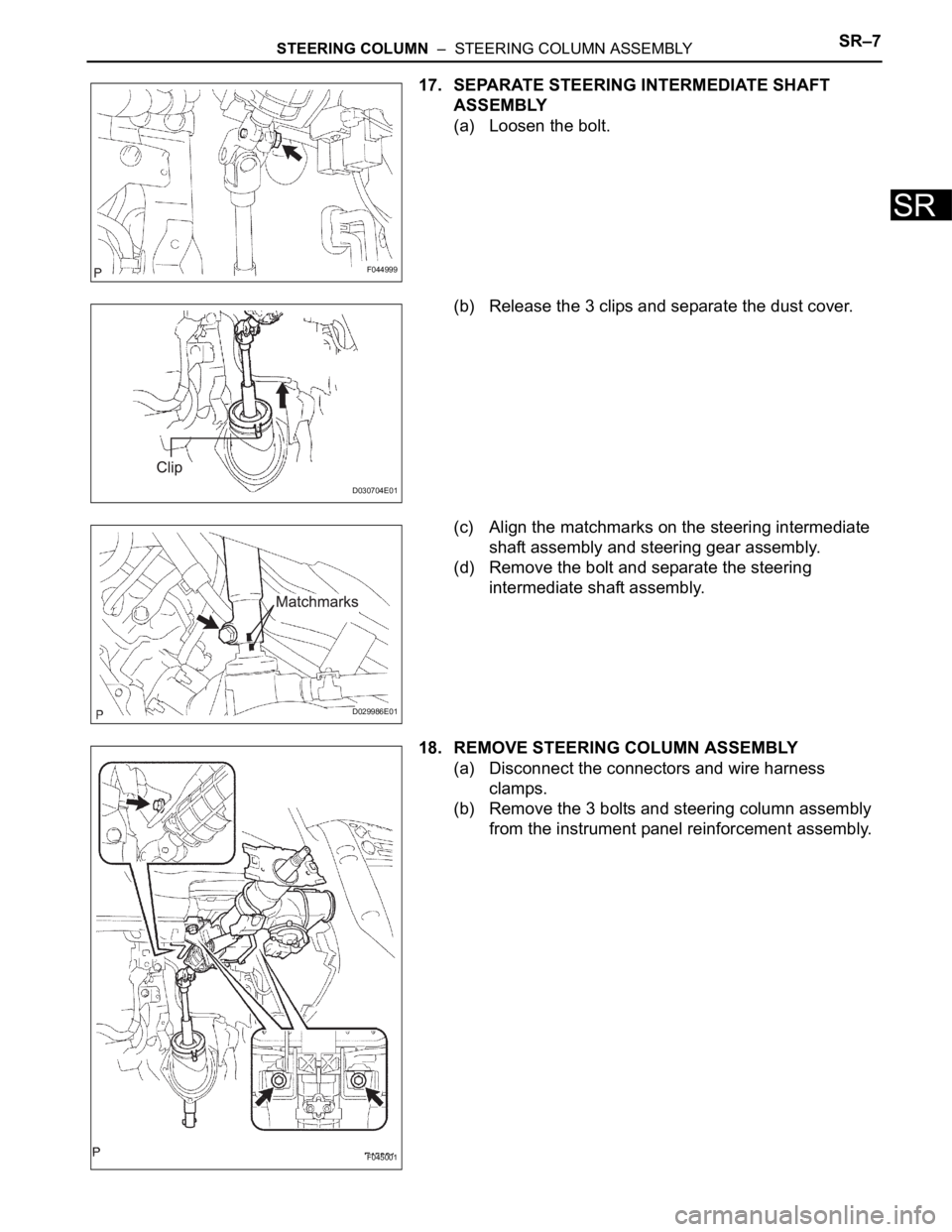
17. SEPARATE STEERING INTERMEDIATE SHAFT
ASSEMBLY
(a) Loosen the bolt.
(b) Release the 3 clips and separate the dust cover.
(c) Align the matchmarks on the steering intermediate
shaft assembly and steering gear assembly.
(d) Remove the bolt and separate the steering
intermediate shaft assembly.
18. REMOVE STEERING COLUMN ASSEMBLY
(a) Disconnect the connectors and wire harness
clamps.
(b) Remove the 3 bolts and steering column assembly
from the instrument panel reinforcement assembly.
F044999
D030704E01
D029986E01
F045001