sat nav TOYOTA SIENNA 2018 Owners Manual (in English)
[x] Cancel search | Manufacturer: TOYOTA, Model Year: 2018, Model line: SIENNA, Model: TOYOTA SIENNA 2018Pages: 584, PDF Size: 14.47 MB
Page 278 of 584
278
SIENNA_OM_OM08019U_(U)
4-5. Using the driving support systems
■If the PCS warning light flashes or illuminates and a warning m essage is
displayed on the multi-information display
The pre-collision system may be temporarily unavailable or ther e may be a
malfunction in the system.
● In the following situations, the warning light will turn off, t he message will
disappear and the system will become operational when normal op erating
conditions return:
• When the radar sensor or camera sensor or the area around eith er sen-
sor is hot, such as in the sun
• When the radar sensor or camera sensor or the area around eith er sen-
sor is cold, such as in an extremely cold environment
• When a front sensor is dirty or covered with snow, etc.
• When the part of the windshield in front of the camera sensor is fogged up
or covered with condensation or ice (Defogging the windshield: P. 3 3 6 )
• If the camera sensor is obstructed, such as when the hood is open or a
sticker is attached to the windshield near the camera sensor
● If the PCS warning light continues to flash or remains illuminated or the
warning message does not disappear even though the vehicle has returned
to normal, the system may be malfunctioning. Have the vehicle inspected by
your Toyota dealer immediately.
■ If VSC is disabled
●If VSC is disabled ( P. 323), the pre-collision brake assist and pre-collision
braking functions are also disabled.
● The PCS warning light will turn on and “VSC Turned Off Pre-Coll ision Brake
System Unavailable” will be displayed on the multi-information display.
Page 287 of 584
SIENNA_OM_OM08019U_(U)
2874-5. Using the driving support systems
4
Driving
■Warning message
If the following warning message is displayed on the multi-info rmation display
and the LDA indicator illuminates in amber, follow the appropri ate trouble-
shooting procedure.
If a different warning message is displayed, follow the instructions displayed
on the screen.
Warning messageDetails/Actions
“Lane Departure Alert
Malfunction
Contact Your Dealer” The system may not be operating properly.
Have the vehicle inspected at your Toyota
dealer.
“Front Camera
Unavailable Remove
Debris On Windshield”
Dirt, rain, condensation, ice, snow, etc. are pres-
ent on the windshield in front of the camera sen-
sor.
Turn the LDA system off, remove any dirt,
rain, condensation, ice, snow, etc. from
the windshield, and then turn the LDA
system back on.
“Front Camera
Unavailable”
The operation conditions of the camera sensor
(temperature, etc.) are not met.
When the operation conditions of the
camera sensor (temperature, etc.) are
met, the LDA system will become avail-
able. Turn the LDA system off, wait for a
little while, and then turn the LDA system
back on.
“Lane Departure
Alert Unavailable”
The LDA system is temporarily canceled due to
a malfunction in a sensor other than the camera
sensor.
Turn the LDA system off and follow the
appropriate troubleshooting procedures
for the warning messag e. Afterward, drive
the vehicle for a short time, and then turn
the LDA system back on.
“Lane Departure Alert
Unavailable
Below Approx 32 MPH”The LDA system cannot be used as the vehicle
speed is less than approximately 32 mph (50
km/h).
Drive the vehicle at approximately 32 mph
(50 km/h) or more.
Page 458 of 584
458
SIENNA_OM_OM08019U_(U)
6-3. Do-it-yourself maintenance
WARNING
■Replacing light bulbs
● Turn off the lights. Do not attempt to replace the bulb immedia tely after
turning off the lights.
The bulbs become very hot and may cause burns.
● Do not touch the glass portion of the light bulb with bare hands. When it is
unavoidable to hold the glass portion, use and hold with a clea n dry cloth
to avoid getting moisture and oils on the bulb. Also, if the bu lb is scratched
or dropped, it may blow out or crack.
● Fully install light bulbs and any parts used to secure them. Fa ilure to do so
may result in heat damage, fire, or water entering the headligh t unit. This
may damage the headlights or cause condensation to build up on the lens.
● Do not attempt to repair or disassemble the bulb, socket, elect rical wiring,
or sub components. This may cause serious injury due to electri c shock.
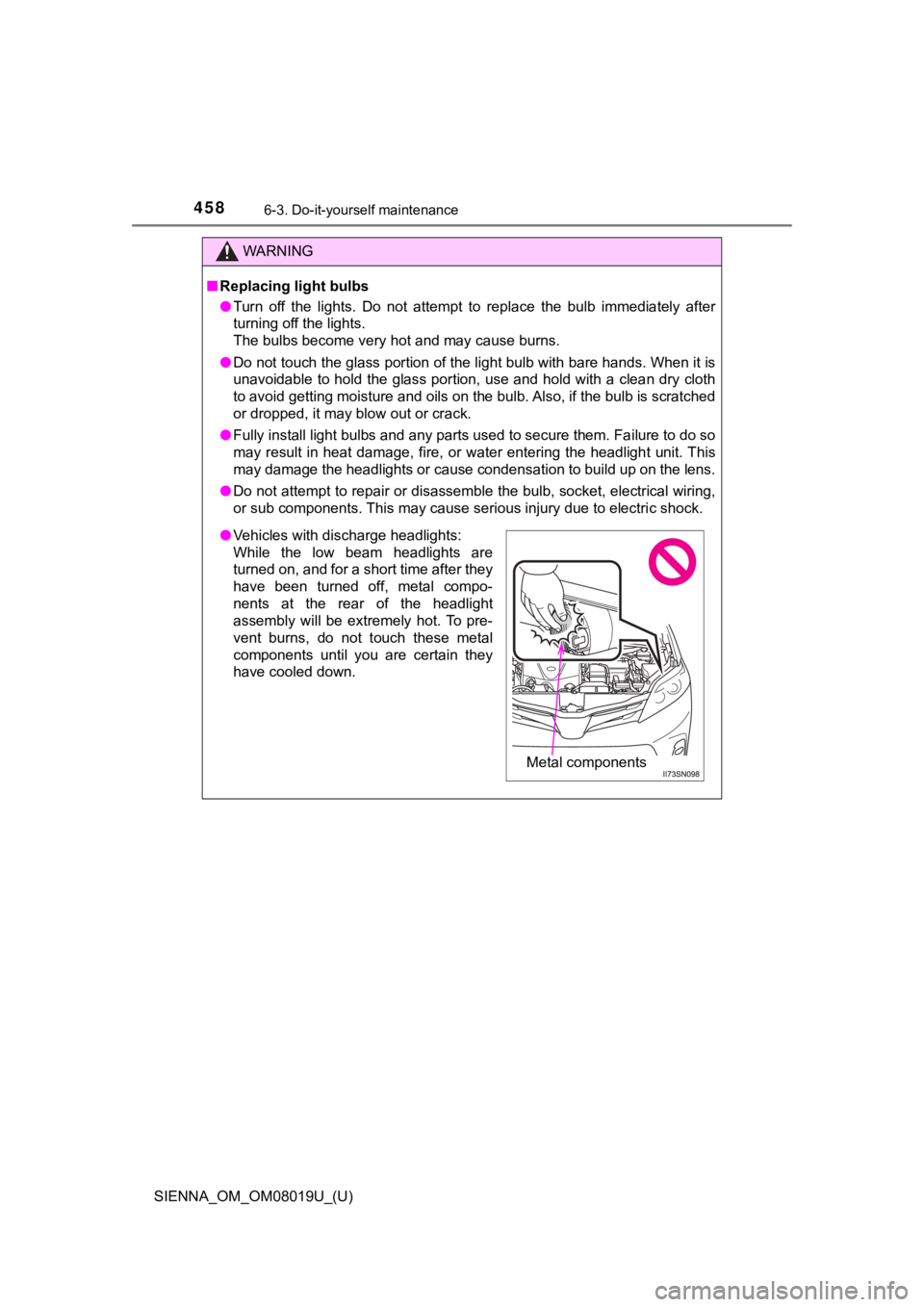
●Vehicles with discharge headlights:
While the low beam headlights are
turned on, and for a short time after they
have been turned off, metal compo-
nents at the rear of the headlight
assembly will be extremely hot. To pre-
vent burns, do not touch these metal
components until you are certain they
have cooled down.
Metal components
Page 510 of 584
5107-2. Steps to take in an emergency
SIENNA_OM_OM08019U_(U)
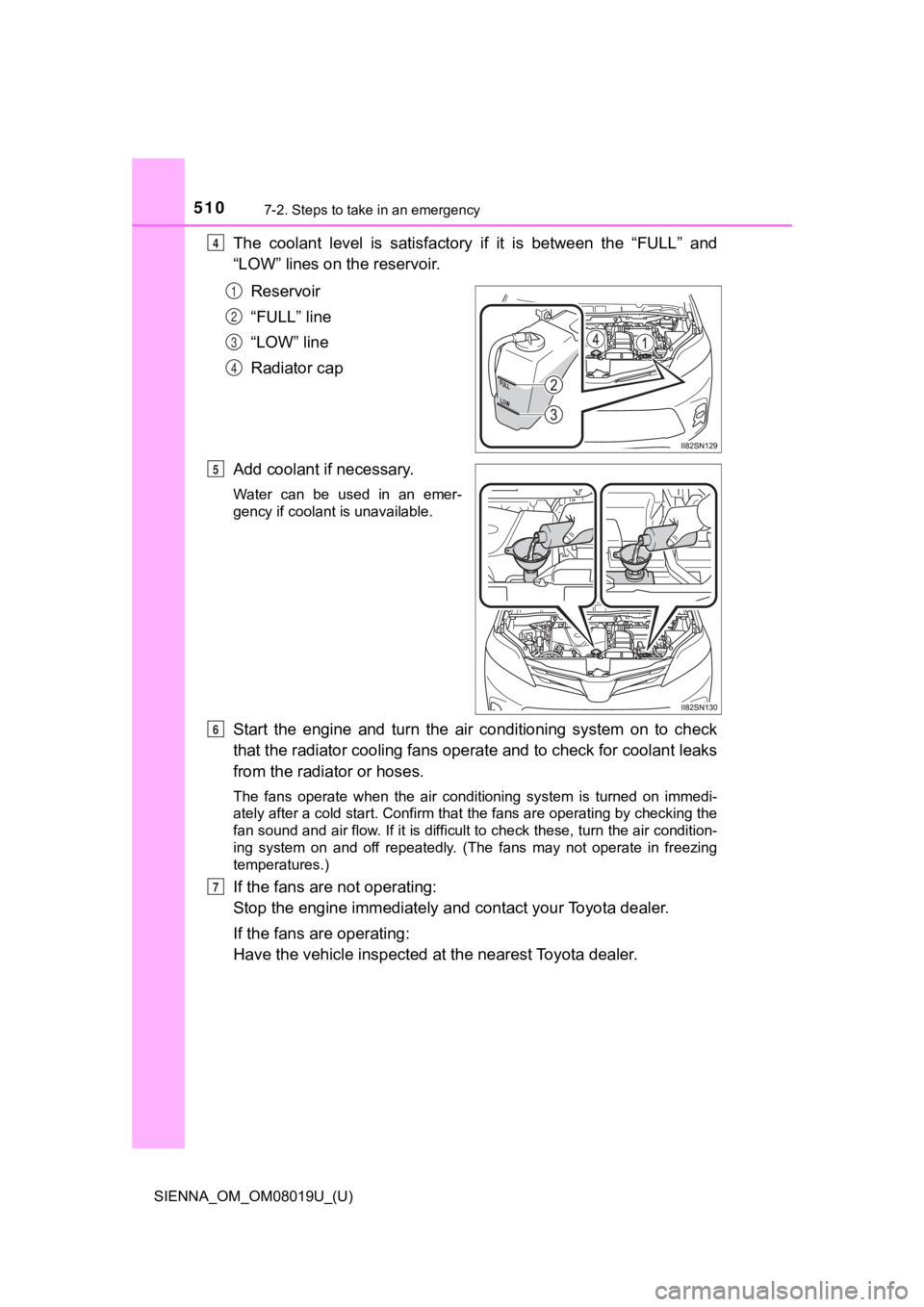
The coolant level is satisfactory if it is between the “FULL” and
“LOW” lines on the reservoir.
Reservoir
“FULL” line
“LOW” line
Radiator cap
Add coolant if necessary.
Water can be used in an emer-
gency if coolant is unavailable.
Start the engine and turn the ai r conditioning system on to check
that the radiator cooling fans operate and to check for coolant leaks
from the radiator or hoses.
The fans operate when the air conditioning system is turned on immedi-
ately after a cold start. Confirm that the fans are operating b y checking the
fan sound and air flow. If it is difficult to check these, turn the air condition-
ing system on and off repeatedly. (The fans may not operate in freezing
temperatures.)
If the fans are not operating:
Stop the engine immediately and contact your Toyota dealer.
If the fans are operating:
Have the vehicle ins pected at the nearest Toyota dealer.
4
1
2
3
4
5
6
7
Page 577 of 584
577Alphabetical index
SIENNA_OM_OM08019U_(U)
License plate lightsLight switch ........................... 241
Replacing light bulbs............. 456
Wattage ................................ 525
Light bulbs
Replacing .............................. 442
Wattage ................................ 525
Lights
Automatic High Beam system ......... ....................... 246
Door courtesy lights .............. 347
Engine switch light ................ 347
Fog light switch ..................... 251
Headlight switch.................... 241
Illuminated entry system ....... 349
Interior light switch ................ 348
Luggage compartment
light ..................................... 137
Outer foot lights .................... 347
Personal light switch ............. 348
Rear ceiling lights ................. 349
Replacing light bulbs............. 442
Turn signal lever ................... 239
Vanity lights .......................... 363
Wattage ................................ 525
Load capacity........................... 209
Lock steering column ..... 226, 231
Luggage compartment light Switch ................................... 137
Wattage ................................ 525 Maintenance
Do-it-yourself
maintenance....................... 405
General maintenance ........... 401
Maintenance data ................. 516
Maintenance requirements ... 398
Malfunction indicator lamp..... 471
Manual headlight leveling dial .......................................... 243
Meter Indicators ................................ 84
Instrument panel light
control ..................................... 91
Meters..................................... 89
Multi-information display ......... 92
Warning lights ....................... 471
Warning messages ............... 481
Microphone
*
Mirrors Conversation mirror .............. 364
Inside rear view mirror .......... 179
Outside rear view mirror defoggers ........................... 336
Outside rear view mirrors ..... 181
Vanity mirrors ....................... 363
Moon roof Jam protection function ........ 190
Operation .............................. 189
MP3 disc
*Multi-information display.......... 92 Drive information .................... 94
Dynamic radar cruise control ................................ 289
Intuitive parking assist .......... 314
LDA (Lane Departure Alert) ....... 283
Settings display .................... 541
Warning messages ............... 481
M
*: Refer to “NAVIGATION AND MULTIMEDIA
SYSTEM OWNER’S MANUAL”