phone TOYOTA SIENNA 2019 Accessories, Audio & Navigation (in English)
[x] Cancel search | Manufacturer: TOYOTA, Model Year: 2019, Model line: SIENNA, Model: TOYOTA SIENNA 2019Pages: 441, PDF Size: 9.89 MB
Page 103 of 441
103
2. RADIO OPERATION
SIENNA_Navi+MM_OM08027U_(U)
18.05.08 11:51
AUDIO/VISUAL SYSTEM
3
2. INTERNET RADIO
1Display the audio source selection
screen. (P.84)
2Select the desired application screen
button.
The internet radio application screen is
displayed.
Perform operations according to the dis-
played application screen.
For the instrument panel operation
method: P. 8 4
If a compatible phone is already regis-
tered, it will be connected automatically.
LISTENING TO INTERNET
RADIO
One of Toyota Entune App Suite Con-
nect features is the ability to listen to in-
ternet radio. In order to use this
service, a compatible phone and the
system needs to be set up. For details:
P.404
INFORMATION
●Other applications can be activated
while listening to internet radio.
● Some parts of applications can be
adjusted using the switches on the
steering wheel.
● For additional information, refer to
http://www.toyota.com/Entune/
or call
1-800-331-4331 in the United States,
http://www.toyota.ca/entune
or call
1-888-869-6828 in Canada, and
http://www.toyotapr.com/entune
or call
1-877-855-8377 in Puerto Rico.
Page 110 of 441
110
3. MEDIA OPERATION
SIENNA_Navi+MM_OM08027U_(U)
18.05.08 11:51
3. iPod/iPhone
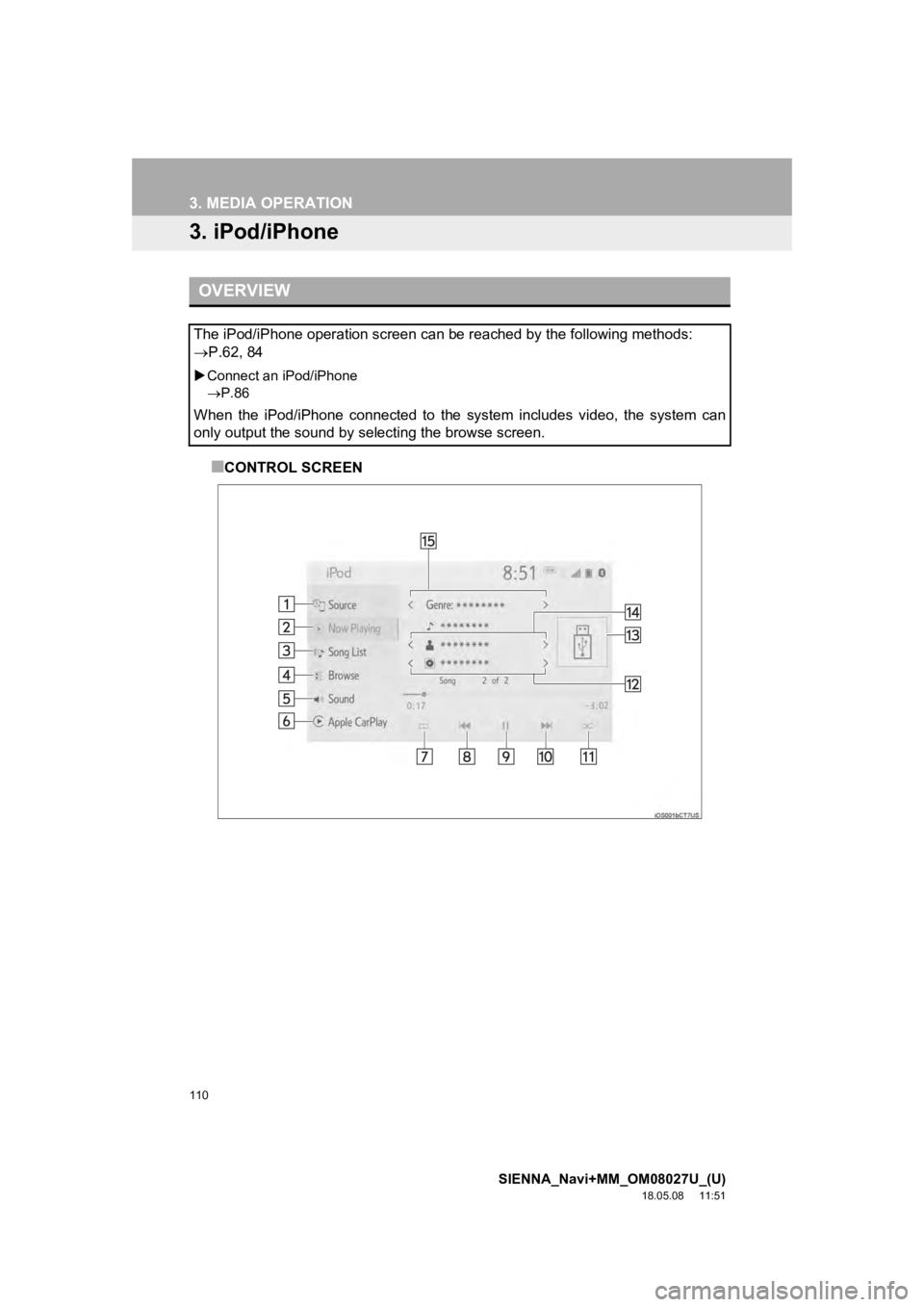
■CONTROL SCREEN
OVERVIEW
The iPod/iPhone operation screen can be reached by the following methods:
P.62, 84
Connect an iPod/iPhone
P.86
When the iPod/iPhone connected to the system includes video, the system can
only output the sound by selecting the browse screen.
Page 112 of 441
112
3. MEDIA OPERATION
SIENNA_Navi+MM_OM08027U_(U)
18.05.08 11:51
Displays cover art
*1Select to change the artist.
*1Select to change the playlist.
*3Press to play/pause.
Press to change the track.
Press and hold to fast forward/rewind.
Turn to change the track.
Turn to move up/down the list. Also, the knob can be used to en ter selections on the
list screens by pressing it.
*
1: When an Apple CarPlay connection is established, this switch will not be displayed.
*2: This switch will only be displayed when an Apple CarPlay connection is established.
*3: Entune Audio Plus/Entune Premium Audio only
WA R N I N G
● Do not operate the player’s con trols or connect the iPod/iPhone while driving.
NOTICE
●Do not leave your portable player in the car. In particular, hi gh temperatures inside the
vehicle may damage the portable player.
● Do not push down on or apply unnecessary pressure to the portab le player while it is con-
nected as this may damage the portable player or its terminal.
● Do not insert foreign objects into the port as this may damage the portable player or its
terminal.
No.Function
Page 113 of 441
113
3. MEDIA OPERATION
SIENNA_Navi+MM_OM08027U_(U)
18.05.08 11:51
AUDIO/VISUAL SYSTEM
3
INFORMATION
●When an iPod/iPhone is connected using a genuine iPod/iPhone cable, the iPod/iPhone
starts charging its battery.
● Depending on the iPod/iPhone, the video sound may not be able t o be heard.
● Depending on the iPod/iPhone and the songs in the iPod/iPhone, a cover art may be dis-
played. This function can be changed to on/off. ( P.125) It may take time to display the
cover art, and the iPod/iPhone may not be operated while the co ver art display is in pro-
cess.
● When an iPod/iPhone is connected and the audio source is change d to iPod/iPhone
mode, the iPod/iPhone will resume playing from the same point i t was last used.
● Depending on the iPod/iPhone that is connected to the system, c ertain functions may not
be available.
● Files/tracks selected by operating a connected iPod/iPhone may not be recognized or
displayed properly.
● The system may not function properly if a conversion adapter is used to connect a
device.
Page 117 of 441
117
3. MEDIA OPERATION
SIENNA_Navi+MM_OM08027U_(U)
18.05.08 11:51
AUDIO/VISUAL SYSTEM
3
INFORMATION
●Depending on the Bluetooth® device that is connected to the system, the music may start
playing when selecting while it is paused. Conversely, the music may pause when
selecting while it is playing.
● In the following conditions, the system may not function:
• The Bluetooth
® device is turned off.
• The Bluetooth
® device is not connected.
• The Bluetooth
® device has a low battery.
● When using the Bluetooth
® audio and Wi-Fi® Hotspot functions at the same time, the fol-
lowing problems may occur:
• It may take longer than normal to connect to the Bluetooth
® device.
• The sound may cut out.
● It may take time to connect the phone when Bluetooth
® audio is being played.
● For operating the portable player, see the instruction manual t hat comes with it.
● If the Bluetooth
® device is disconnected due to poor reception from the Bluetoot h® net-
work when the engine switch is in the following, the system will automatically reconnect
to the portable player.
Vehicles without a smart key system
The engine switch is in the “ACC” or “ON” position.
Vehicles with a smart key system
The engine switch is in ACC ESSORY or IGNITION ON mode.
●If the Bluetooth® device is disconnected on purpose, such as it was turned off, this does
not happen. Reconnect the portable player manually.
● Bluetooth
® device information is registered when the Bluetooth® device is connected to
the Bluetooth® audio/visual system. When selling or disposing of the vehicle, remove the
Bluetooth® audio information from the system. (P.69)
Page 118 of 441

118
3. MEDIA OPERATION
SIENNA_Navi+MM_OM08027U_(U)
18.05.08 11:51
Registering an add itional device
1Display the Bluetooth® audio control
screen. ( P.114)
2Select “Connect” .
3Select “Add Device” .
When another Bluetooth® device is con-
nected, a confirmation screen will be dis-
played. To disconnect the Bluetooth
®
device, select “Yes”.
4Follow the steps in “REGISTERING A
Bluetooth
® PHONE FOR THE FIRST
TIME” from “STEP 5”. ( P.43)
Selecting a registered device
1Display the Bluetooth® audio control
screen. ( P.114)
2Select “Connect” .
3Select the desired device to be con-
nected.
4Check that a confirmation screen is
displayed when the connection is com-
plete.
If an error message is displayed, follow
the guidance on the screen to try again.
REGISTERING/CONNECTING
A Bluetooth® DEVICE
To use the Bluetooth® audio system, it
is necessary to register a Bluetooth
®
device with the system.
Page 123 of 441
123
4. AUDIO/VISUAL REMOTE CONTROLS
SIENNA_Navi+MM_OM08027U_(U)
18.05.08 11:51
AUDIO/VISUAL SYSTEM
3
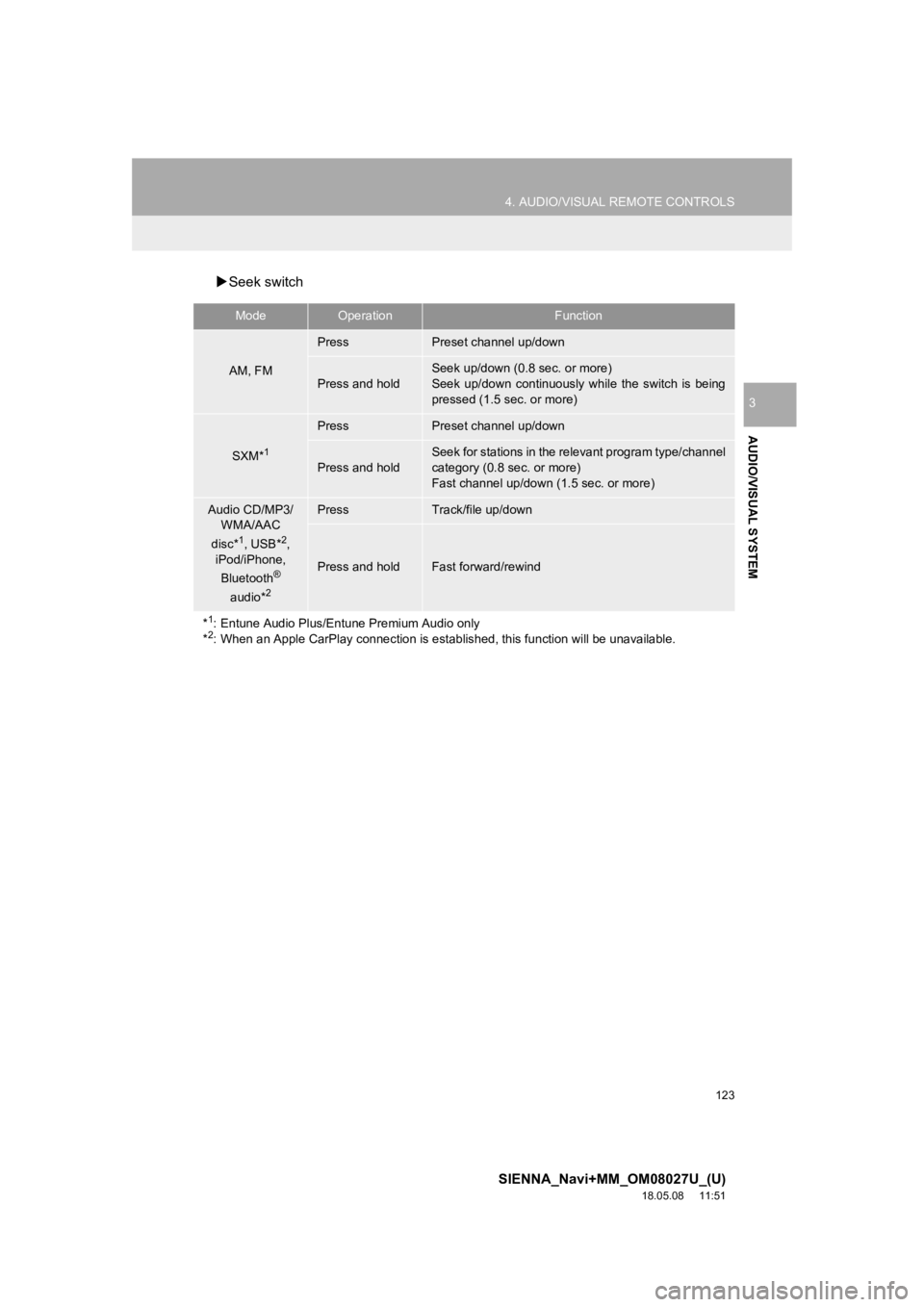
Seek switch
ModeOperationFunction
AM, FM
PressPreset channel up/down
Press and hold
Seek up/down (0.8 sec. or more)
Seek up/down continuously while the switch is being
pressed (1.5 sec. or more)
SXM*1
PressPreset channel up/down
Press and hold
Seek for stations in the relevant program type/channel
category (0.8 sec. or more)
Fast channel up/down (1.5 sec. or more)
Audio CD/MP3/
WMA/AAC
disc*
1, USB*2,
iPod/iPhone,
Bluetooth
®
audio*2
PressTrack/file up/down
Press and holdFast forward/rewind
*
1: Entune Audio Plus/Entune Premium Audio only
*2: When an Apple CarPlay connection is established, this function will be unavailable.
Page 124 of 441
124
4. AUDIO/VISUAL REMOTE CONTROLS
SIENNA_Navi+MM_OM08027U_(U)
18.05.08 11:51
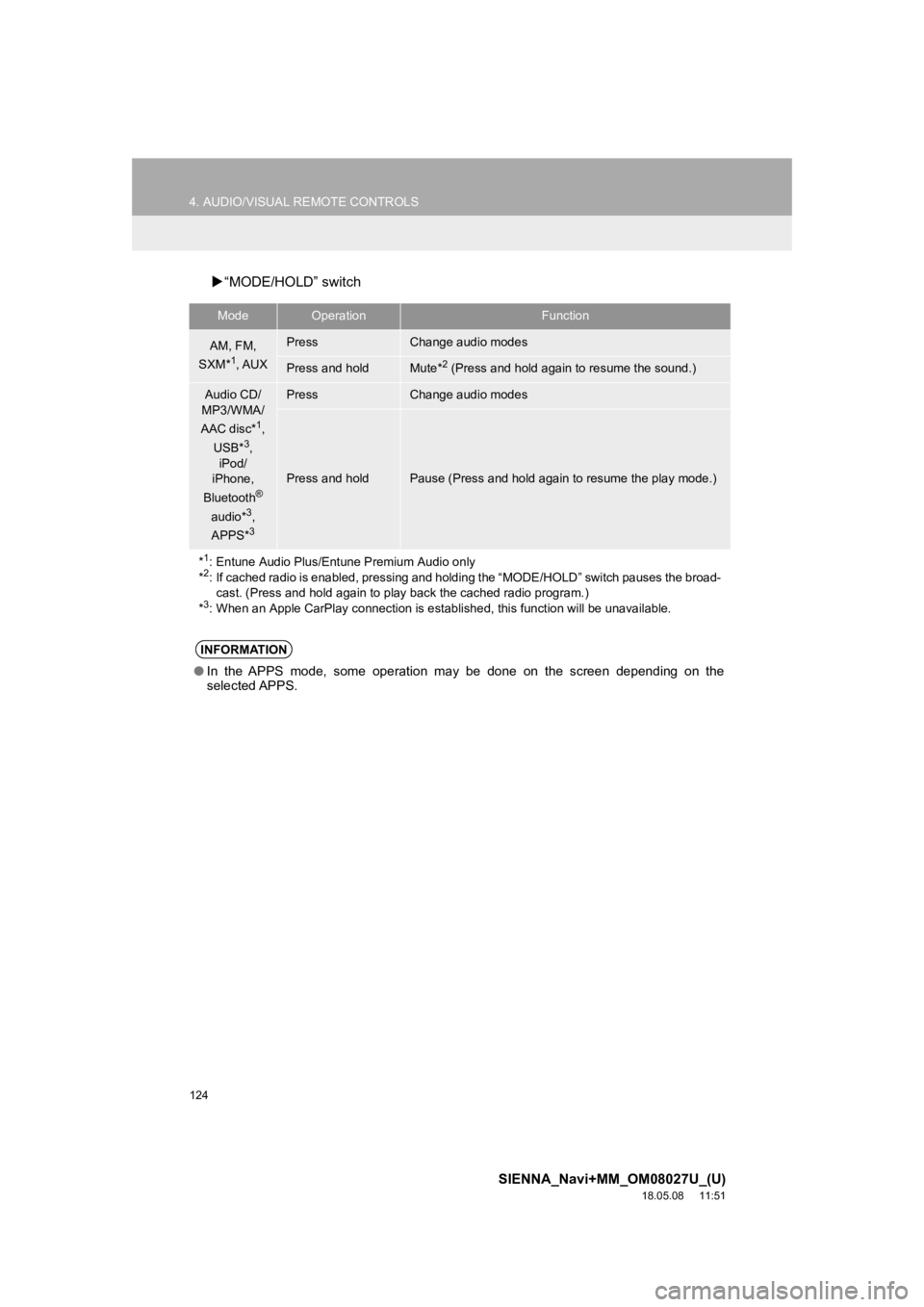
“MODE/HOLD” switch
ModeOperationFunction
AM, FM,
SXM*1, AUX
PressChange audio modes
Press and holdMute*2 (Press and hold again to resume the sound.)
Audio CD/
MP3/WMA/
AAC disc*
1,
USB*3,
iPod/
iPhone,
Bluetooth
®
audio*3,
APPS*3
PressChange audio modes
Press and holdPause (Press and hold again to resume the play mode.)
*
1: Entune Audio Plus/Entune Premium Audio only
*2: If cached radio is enabled, pres sing and holding the “MODE/HOL D” switch pauses the broad-
cast. (Press and hold again to play back the cached radio progr am.)
*
3: When an Apple CarPlay connection is established, this function will be unavailable.
INFORMATION
●In the APPS mode, some operation may be done on the screen depe nding on the
selected APPS.
Page 127 of 441
127
5. SETUP
SIENNA_Navi+MM_OM08027U_(U)
18.05.08 11:51
AUDIO/VISUAL SYSTEM
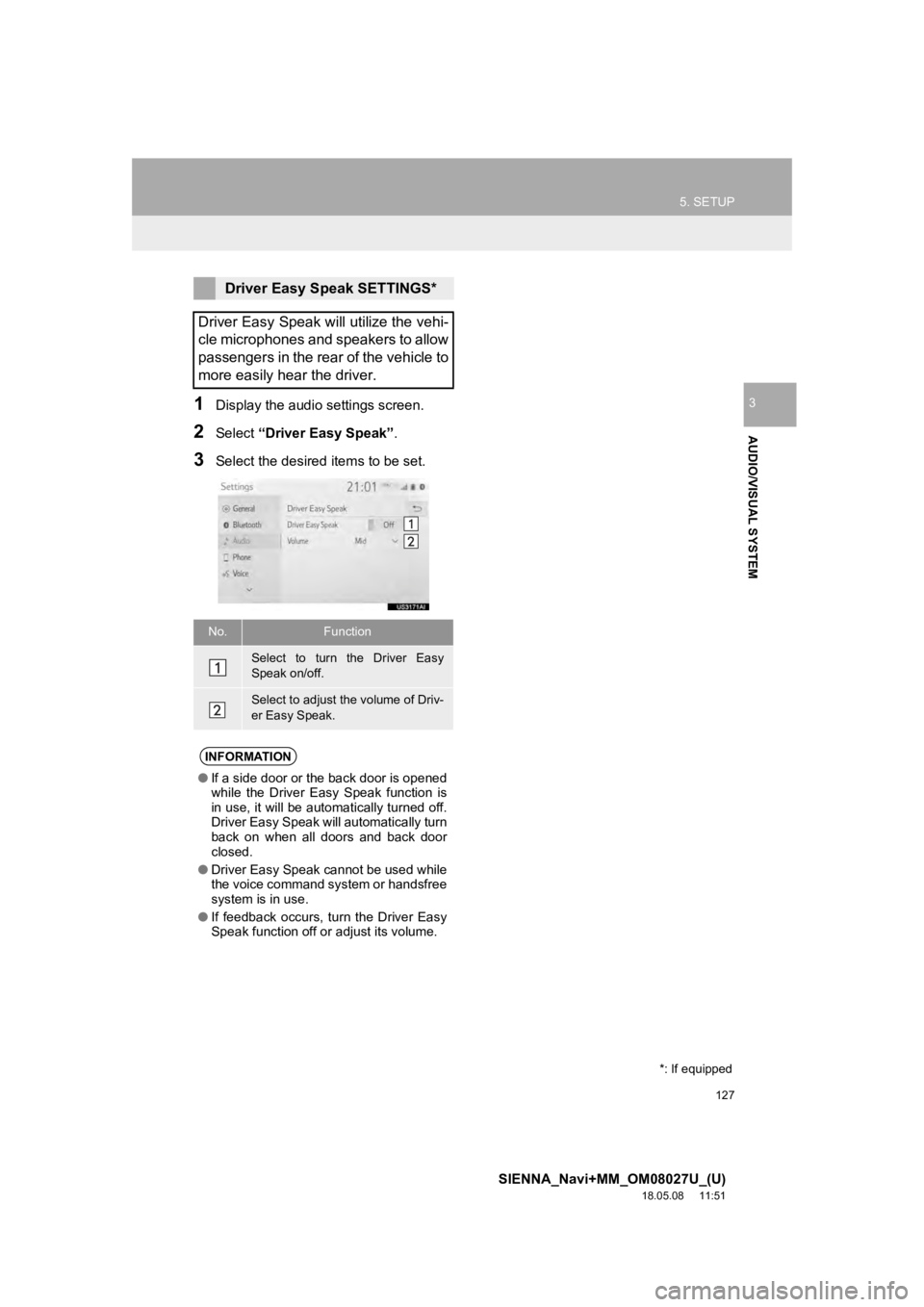
31Display the audio settings screen.
2Select “Driver Easy Speak” .
3Select the desired items to be set.
Driver Easy Speak SETTINGS*
Driver Easy Speak will utilize the vehi-
cle microphones and speakers to allow
passengers in the rear of the vehicle to
more easily hear the driver.
No.Function
Select to turn the Driver Easy
Speak on/off.
Select to adjust the volume of Driv-
er Easy Speak.
INFORMATION
● If a side door or the back door is opened
while the Driver Easy Speak function is
in use, it will be automatically turned off.
Driver Easy Speak will automatically turn
back on when all doors and back door
closed.
● Driver Easy Speak cannot be used while
the voice command system or handsfree
system is in use.
● If feedback occurs, turn the Driver Easy
Speak function off or adjust its volume.
*: If equipped
Page 128 of 441
128
SIENNA_Navi+MM_OM08027U_(U)
18.05.08 11:51
6. TIPS FOR OPERATING THE AUDIO/VISUAL SYSTEM
1. OPERATING INFORMATION
Fading and drifting stations: Generally, the
effective range of FM is about 25 miles (40
km). Once outside this range, you may no-
tice fading and drifting, which increase with
the distance from the radio transmitter.
They are often accompanied by distortion.
Multi-path: FM signals are reflective, mak-
ing it possible for 2 signals to reach the ve-
hicle’s antenna at the same time. If this
happens, the signals will cancel each other
out, causing a momentary flutter or loss of
reception.
Static and fluttering: These occur when
signals are blocked by buildings, trees or
other large objects. Increasing the bass
level may reduce static and fluttering.
Station swapping: If the FM signal being
listened to is interrupted or weakened, and
there is another strong station nearby on
the FM band, the radio may tune in the
second station until the original signal can
be picked up again.
Fading: AM broadcasts are reflected by
the upper atmosphere — especially at
night. These reflected signals can interfere
with those received directly from the radio
station, causing the radio station to sound
alternately st rong and weak.
NOTICE
●To avoid damage to the audio/visual
system:
• Be careful not to spill beverages over
the audio/visual system.
• Do not put anything other than an appropriate disc into the disc slot.
INFORMATION
● The use of a cellular phone inside or
near the vehicle may cause a noise from
the speakers of the audio/visual system
which you are listening to. However, this
does not indicate a malfunction.
RADIO
Usually, a problem with radio reception
does not mean there is a problem with
the radio — it is just the normal result
of conditions outside the vehicle.
For example, nearby buildings and ter-
rain can interfere with FM reception.
Power lines or phone wires can inter-
fere with AM signals. And of course, ra-
dio signals have a limited range. The
farther the vehicle is from a station, the
weaker its signal will be. In addition, re-
ception conditions change constantly
as the vehicle moves.
Here, some common reception prob-
lems that probably do not indicate a
problem with the radio are described.
FM
AM