park assist TOYOTA SIENNA 2019 Owners Manual (in English)
[x] Cancel search | Manufacturer: TOYOTA, Model Year: 2019, Model line: SIENNA, Model: TOYOTA SIENNA 2019Pages: 56, PDF Size: 3.1 MB
Page 3 of 56
1
OVERVIEW
FEATURES & OPERATIONS
TOYOTA SAFETY SENSE
SAFETY & EMERGENCY FEATURES
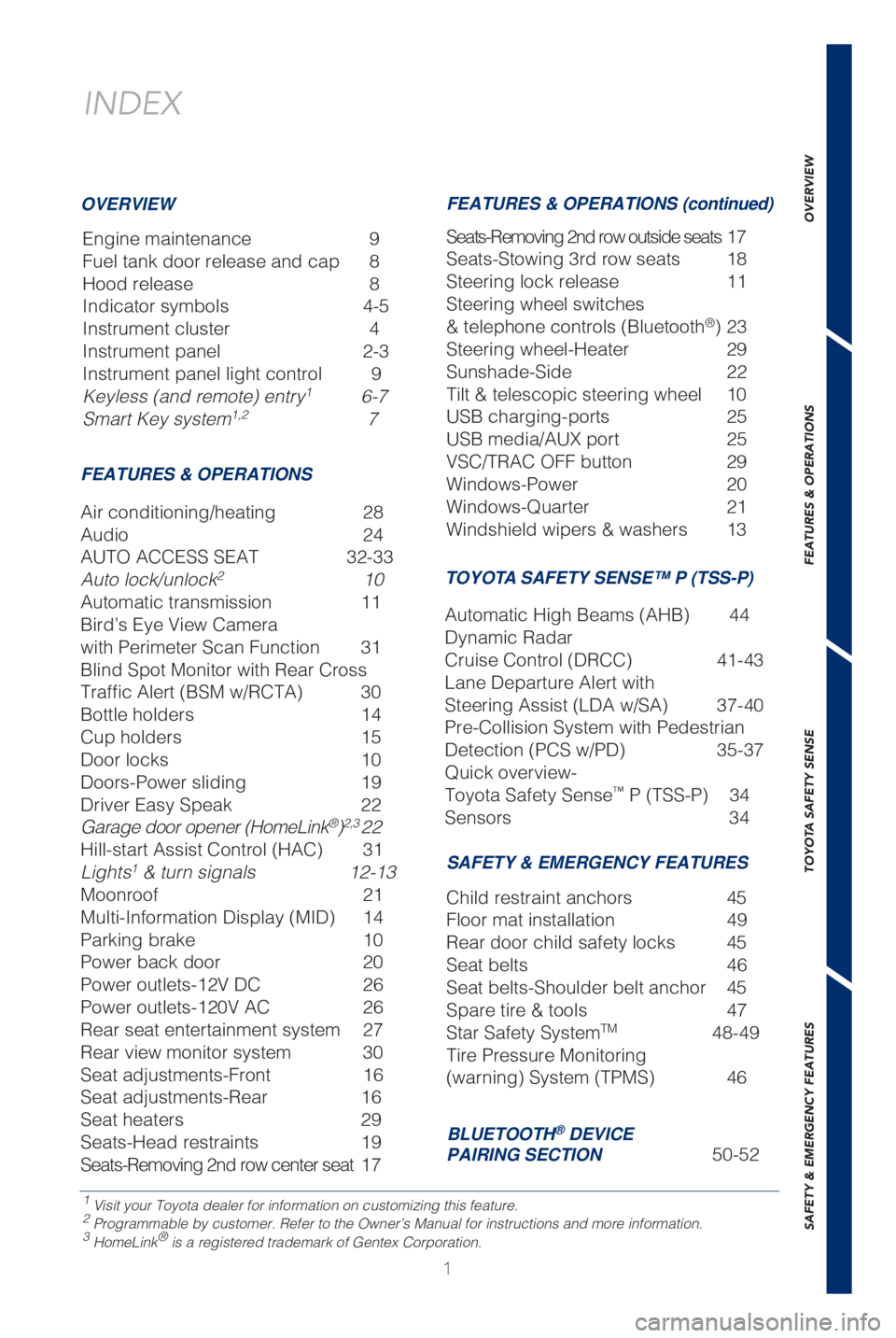
INDEX
Engine maintenance 9
Fuel tank door release and cap 8
Hood release 8
Indicator symbols 4-5
Instrument cluster 4
Instrument panel 2-3
Instrument panel light control 9
Keyless (and remote) entry
1 6-7
Smart Key system1,2 7
1 Visit your Toyota dealer for information on customizing this feature.2 Programmable by customer. Refer to the Owner’s Manual for instructio\
ns and more information.3 HomeLink® is a registered trademark of Gentex Corporation.
OVERVIEW
FEATURES & OPERATIONS FEATURES & OPERATIONS (continued)
SAFETY & EMERGENCY FEATURES
Air conditioning/heating 28
Audio
24
AUTO ACCESS SEAT 32-33
Auto lock/unlock
2 10
Automatic transmission 11
Bird’s Eye View Camera
with Perimeter Scan Function 31
Blind Spot Monitor with Rear Cross
Traffic Alert (BSM w/RCTA) 30
Bottle holders 14
Cup holders 15
Door locks 10
Doors-Power sliding 19
Driver Easy Speak 22
Garage door opener (HomeLink
®)2,3 22
Hill-start Assist Control (HAC) 31
Lights
1 & turn signals 12-13
Moonroof 21
Multi-Information Display (MID) 14
Parking brake 10
Power back door 20
Power outlets-12V DC 26
Power outlets-120V AC 26
Rear seat entertainment system 27
Rear view monitor system 30
Seat adjustments-Front 16
Seat adjustments-Rear 16
Seat heaters 29
Seats-Head restraints 19
Seats-Removing 2nd row center seat 17 Seats-Removing 2nd row outside seats 17
Seats-Stowing 3rd row seats 18
Steering lock release
11
Steering wheel switches
& telephone controls (Bluetooth
®) 23
Steering wheel-Heater 29
Sunshade-Side 22
Tilt & telescopic steering wheel 10
USB charging-ports 25
USB media/AUX port 25
VSC/TRAC OFF button 29
Windows-Power 20
Windows-Quarter 21
Windshield wipers & washers 13
Child restraint anchors 45
Floor mat installation 49
Rear door child safety locks 45
Seat belts 46
Seat belts-Shoulder belt anchor 45
Spare tire & tools 47
Star Safety System
TM 48-49
Tire Pressure Monitoring
(warning) System (TPMS) 46
BLUETOOTH® DEVICE
PAIRING SECTION 50-52
TOYOTA SAFETY SENSE™ P (TSS-P)
Automatic High Beams (AHB) 44
Dynamic Radar
Cruise Control (DRCC) 41-43
Lane Departure Alert with
Steering Assist (LDA w/SA) 37-40
Pre-Collision System with Pedestrian
Detection (PCS w/PD) 35-37
Quick overview-
Toyota Safety Sense
™ P (TSS-P) 34
Sensors 34
Page 4 of 56
2
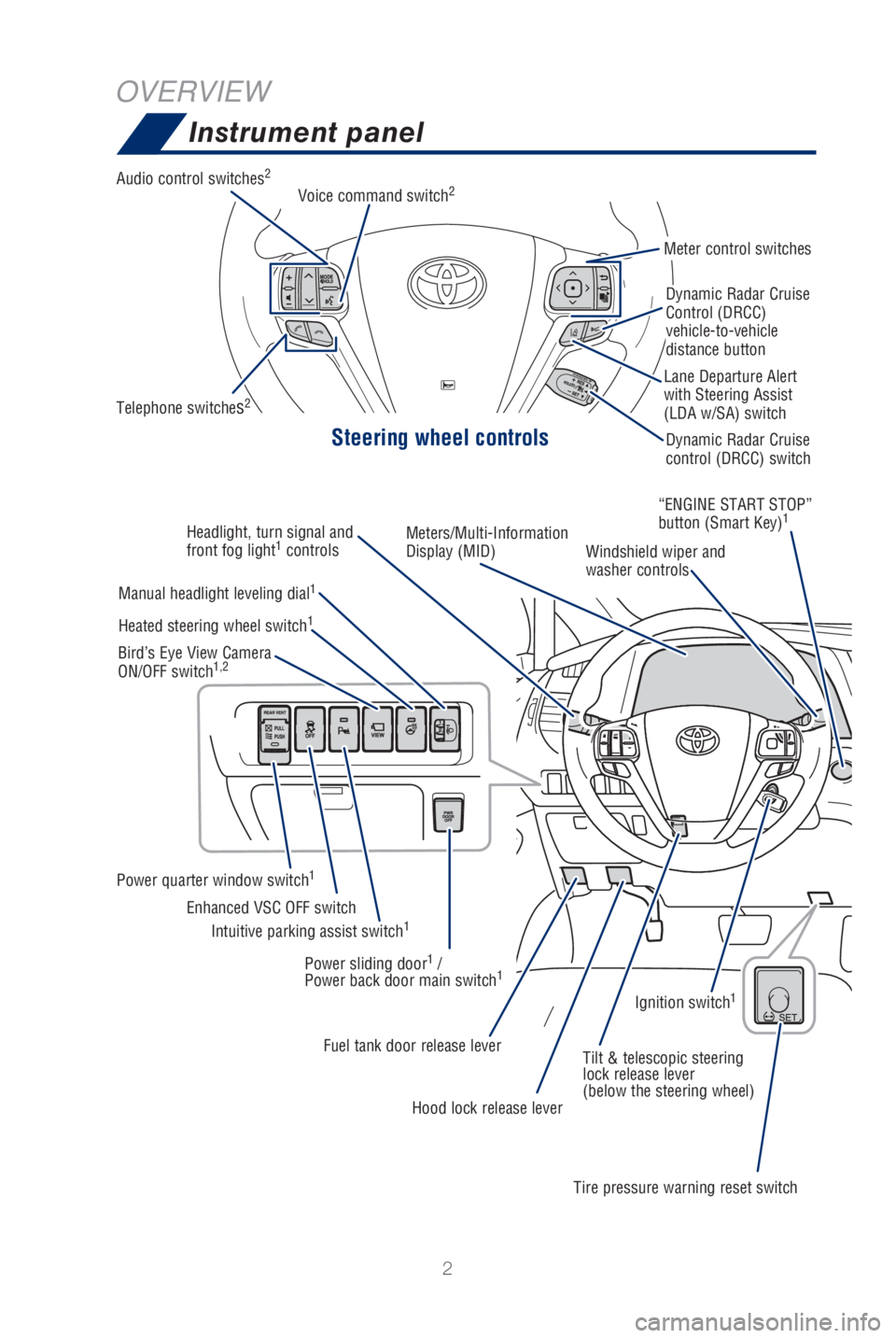
OVERVIEWInstrument panel
Steering wheel controls
Audio control switches2
Telephone switches2
Meter control switches
Dynamic Radar Cruise
Control (DRCC)
vehicle-to-vehicle
distance button
Dynamic Radar Cruise
control (DRCC) switch
Lane Departure Alert
with Steering Assist
(LDA w/SA) switch
Voice command switch
2
Headlight, turn signal and
front fog light1
controls Meters/Multi-Information
Display (MID)
Windshield wiper and
washer controls“ENGINE START STOP”
button (Smart Key)
1
Manual headlight leveling dial1
Power quarter window switch1
Intuitive parking assist switch1Enhanced VSC OFF switch
Heated steering wheel switch
1
Bird’s Eye View Camera
ON/OFF switch1,2
Power sliding door1 /
Power back door main switch1
Fuel tank door release lever Tilt & telescopic steering
lock release lever
(below the steering wheel)
Hood lock release lever
Tire pressure warning reset switchIgnition switch
1
Page 33 of 56
 31
OVERVIEW
FEATURES & OPERATIONS
TOYOTA SAFETY SENSE
SAFETY & EMERGENCY FEATURES
The Bird’s Eye View Camera with Perimeter Scan function assists the d\
river in
viewing the surroundings, when opera")
31
OVERVIEW
FEATURES & OPERATIONS
TOYOTA SAFETY SENSE
SAFETY & EMERGENCY FEATURES
The Bird’s Eye View Camera with Perimeter Scan function assists the d\
river in
viewing the surroundings, when operating at low speeds or parking, by co\
mbining
front, side and rear cameras and displaying an overhead image on the Ent\
une™
3.0 screen.
To view or turn OFF the screen, press the camera switch when the shift l\
ever is in
the “P” position. It will display two angles, the Moving view and \
the See Through
view.
Refer to section 6-3 in the “Navigation and Multimedia System Owner’\
s Manual” for
limitations and more details on this system.
Bird’s Eye View Camera
with Perimeter Scan Function (if equipped)
Moving viewSee through view
Rotation pause switch Rotation pause switch
Display mode switching button Display mode switching button
Body color setting switch
Body color setting switch
Hill-start Assist Control (HAC) (if equipped)
HAC helps prevent rolling backwards on an incline. To engage, push furth\
er down
on brake pedal while at a complete stop until a beep sounds and slip ind\
icator
illuminates. HAC holds for approximately 2 seconds after releasing brake\
pedal.
Refer to the Owner’s Manual for more details.
Brake
pedal