brakes TOYOTA SIENNA 2019 (in English) User Guide
[x] Cancel search | Manufacturer: TOYOTA, Model Year: 2019, Model line: SIENNA, Model: TOYOTA SIENNA 2019Pages: 584, PDF Size: 14.5 MB
Page 222 of 584

222
SIENNA_OM_OM08025U_(U)
4-1. Before driving
WARNING
■Trailer towing precautions
To tow a trailer safely, use extreme care and drive the vehicle in accordance
with the trailer’s characteristics and operating conditions. Failure to do so
could cause an accident resulting in death or serious injury. V ehicle stability
and braking performance are affected by trailer stability, brak e setting and
performance, and the hitch. Your vehicle will handle differently when towing
a trailer.
■ To avoid accident or injury
● Do not exceed the TWR, unbraked TWR, GCWR, GVWR or GAWR.
● If the gross trailer weight is over 2000 lb. (907 kg), a sway control device
with sufficient capacity is required.
● Adjust the tongue weight within the appropriate range. Place he avier loads
as close to the trailer axle as possible.
● Do not exceed 65 mph (104 km/h), the posted towing speed limit or the
speed limit for your trailer as set forth in your trailer owner ’s manual,
whichever is lowest. Slow down sufficiently before making a tur n, in cross-
winds, on wet or slippery surface, etc. to help avoid an accident. If you
experience a vehicle-trailer instability from reducing a certai n speed, slow
down and make sure you keep your vehicle speed under the speed of
which you experience the instability.
● Do not make jerky, abrupt or sharp turns.
● Do not apply the brakes suddenly as you may skid, resulting in jackknifing
and loss of vehicle control. This is especially true on wet or slippery sur-
faces.
● Do not exceed the trailer hitch assembly weight, gross vehicle weight,
gross axle weight and trailer tongue weight capacities.
Page 223 of 584
SIENNA_OM_OM08025U_(U)
2234-1. Before driving
4
Driving
WARNING
■To avoid accident or injury
● Do not use cruise control when towing.
● Slow down and downshift before descending steep or long downhill
grades. Do not make sudden downshifts while descending steep or long
downhill grades.
● Vehicle-trailer instability is more likely on steep long downhi lls. Before
descending steep or long downhill grades, slow down and downshi ft. Do
not make sudden downshifts when descending steep or long downhi ll
grades. Avoid holding the brake pedal down too long or applying the
brakes too frequently. This could cause the brakes to overheat and result
in reduced braking efficiency.
● Vehicles with compact spare tire: Do not tow a trailer when the compact
spare tire is installed on your vehicle.
■ Hitch
Trailer hitch assemblies have different weight capacities estab lished by the
hitch manufacturer. Even though the vehicle may be physically capable of
towing a higher weight, the operator must determine the maximum weight
rating of the particular hitch assembly and never exceed the ma ximum
weight rating specified for the trailer-hitch. Exceeding the ma ximum weight
rating set by the trailer-hitch manufacturer can cause an accid ent resulting
in death or serious personal injuries.
■ When towing a trailer
Toyota recommends trailers with brakes that conform to any appl icable fed-
eral and state/provincial regulations.
● If the gross trailer weight exceeds unbraked TWR, trailer brake s are
required. Toyota recommends trailers with brakes that conform t o all appli-
cable federal and state/provincial regulations.
● Never tap into your vehicle’s hydraulic system, as this will lo wer the vehi-
cle’s braking effectiveness.
● Never tow a trailer without using a safety chain securely attac hed to both
the trailer and the vehicle. If damage occurs to the coupling u nit or hitch
ball, there is danger of the trailer wandering into another lan e.
NOTICE
■When installing a trailer hitch
Use only the position recommended by your Toyota dealer. Do not install
the trailer hitch on the bumper; this may cause body damage.
■ Do not directly splice trailer lights
Do not directly splice trailer lights. Directly splicing traile r lights may damage
your vehicle’s electrical system and cause a malfunction.
Page 267 of 584
267
SIENNA_OM_OM08025U_(U)
4-5. Using the driving support systems
4
Driving
PCS (Pre-Collision system)
◆Pre-collision warning
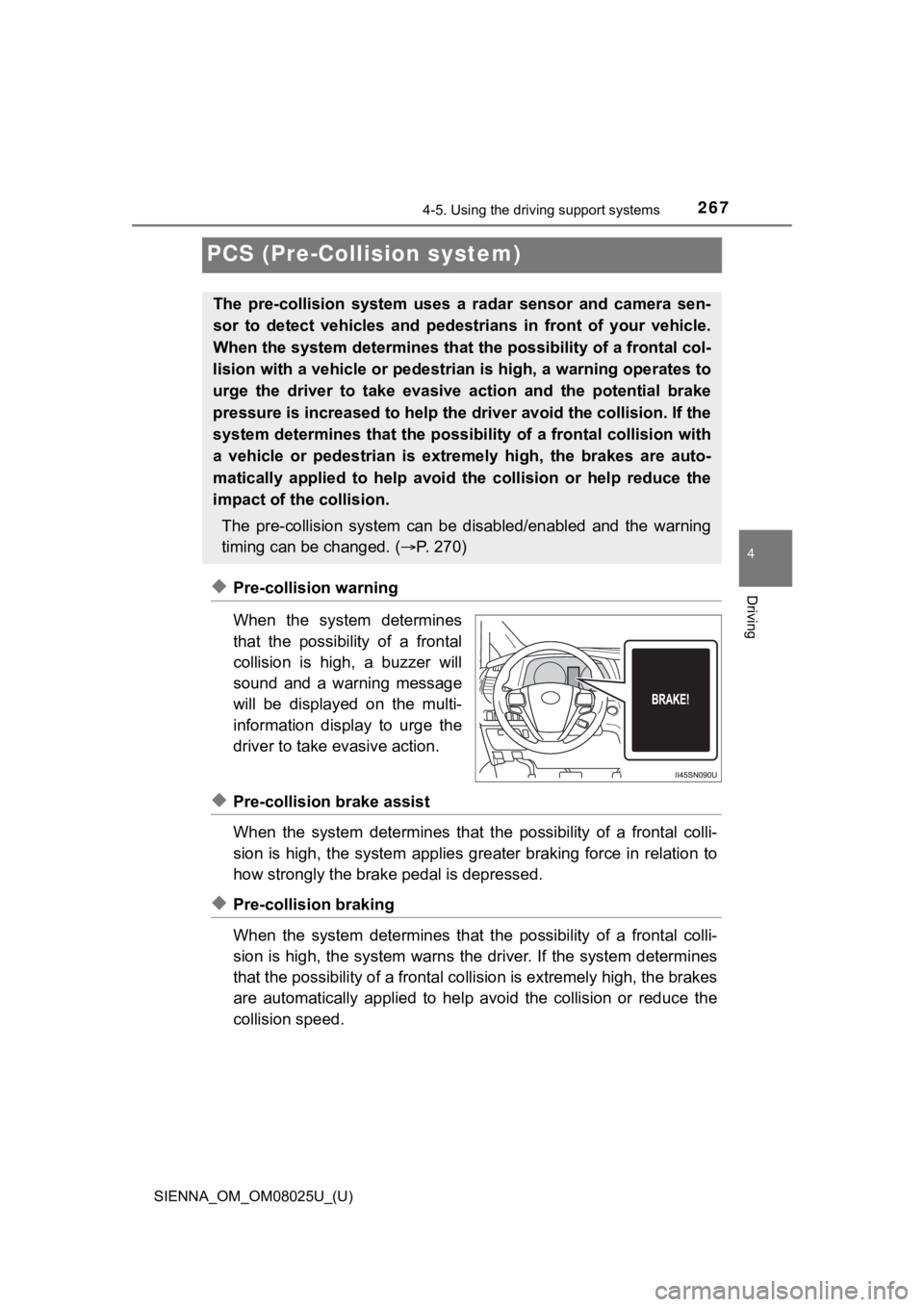
When the system determines
that the possibility of a frontal
collision is high, a buzzer will
sound and a warning message
will be displayed on the multi-
information display to urge the
driver to take evasive action.
◆Pre-collision brake assist
When the system determines that the possibility of a frontal colli-
sion is high, the system applies greater braking force in relat ion to
how strongly the brake pedal is depressed.
◆Pre-collision braking
When the system determines that the possibility of a frontal colli-
sion is high, the system warns the driver. If the system determ ines
that the possibility of a frontal collision is extremely high, the brakes
are automatically applied to hel p avoid the collision or reduce the
collision speed.
The pre-collision system uses a radar sensor and camera sen-
sor to detect vehicles and pedest rians in front of your vehicle.
When the system determines that t he possibility of a frontal col-
lision with a vehicle or pedest rian is high, a warning operates to
urge the driver to take evasive action and the potential brake
pressure is increased to help the driver avoid the collision. If the
system determines that the possi bility of a frontal collision with
a vehicle or pedestrian is extremely high, the brakes are auto-
matically applied to help avoid the collision or help reduce th e
impact of the collision.
The pre-collision system can b e disabled/enabled and the warnin g
timing can be changed. ( P. 2 7 0 )
Page 277 of 584

SIENNA_OM_OM08025U_(U)
2774-5. Using the driving support systems
4
Driving
●In some situations such as the following, sufficient braking fo rce may not be
obtained, preventing the system from performing properly:
• If the braking functions cannot operate to their full extent, such as when
the brake parts are extremely cold, extremely hot, or wet
• If the vehicle is not properly maintained (brakes or tires are excessively
worn, improper tire inflation pressure, etc.)
• When the vehicle is being driven on a gravel road or other sli ppery sur-
face
● Some pedestrians such as the following may not be detected by t he radar
sensor and camera sensor, preventing the system from operating properly:
• Pedestrians shorter than approximately 3.2 ft. (1 m) or taller than approx-
imately 6.5 ft. (2 m)
• Pedestrians wearing oversized clothing (a rain coat, long skir t, etc.), mak-
ing their silhouette obscure
• Pedestrians who are carrying large baggage, holding an umbrella, etc., hiding part of their body
• Pedestrians who are bending forward or squatting
• Pedestrians who are pushing a stroller, wheelchair, bicycle or other vehi-
cle
• Groups of pedestrians which are close together
• Pedestrians who are wearing white and look extremely bright
• Pedestrians in the dark, such as at night or while in a tunnel
• Pedestrians whose clothing appears to be nearly the same color or
brightness as their surroundings
• Pedestrians near walls, fences, guardrails, or large objects
• Pedestrians who are on a metal object (manhole cover, steel plate, etc.)
on the road
• Pedestrians who are walking fast
• Pedestrians who are changing speed abruptly
• Pedestrians running out from behind a vehicle or a large objec t
• Pedestrians who are extremely close to the side of the vehicle (outside
rear view mirror, etc.)
Page 293 of 584
SIENNA_OM_OM08025U_(U)
2934-5. Using the driving support systems
4
Driving
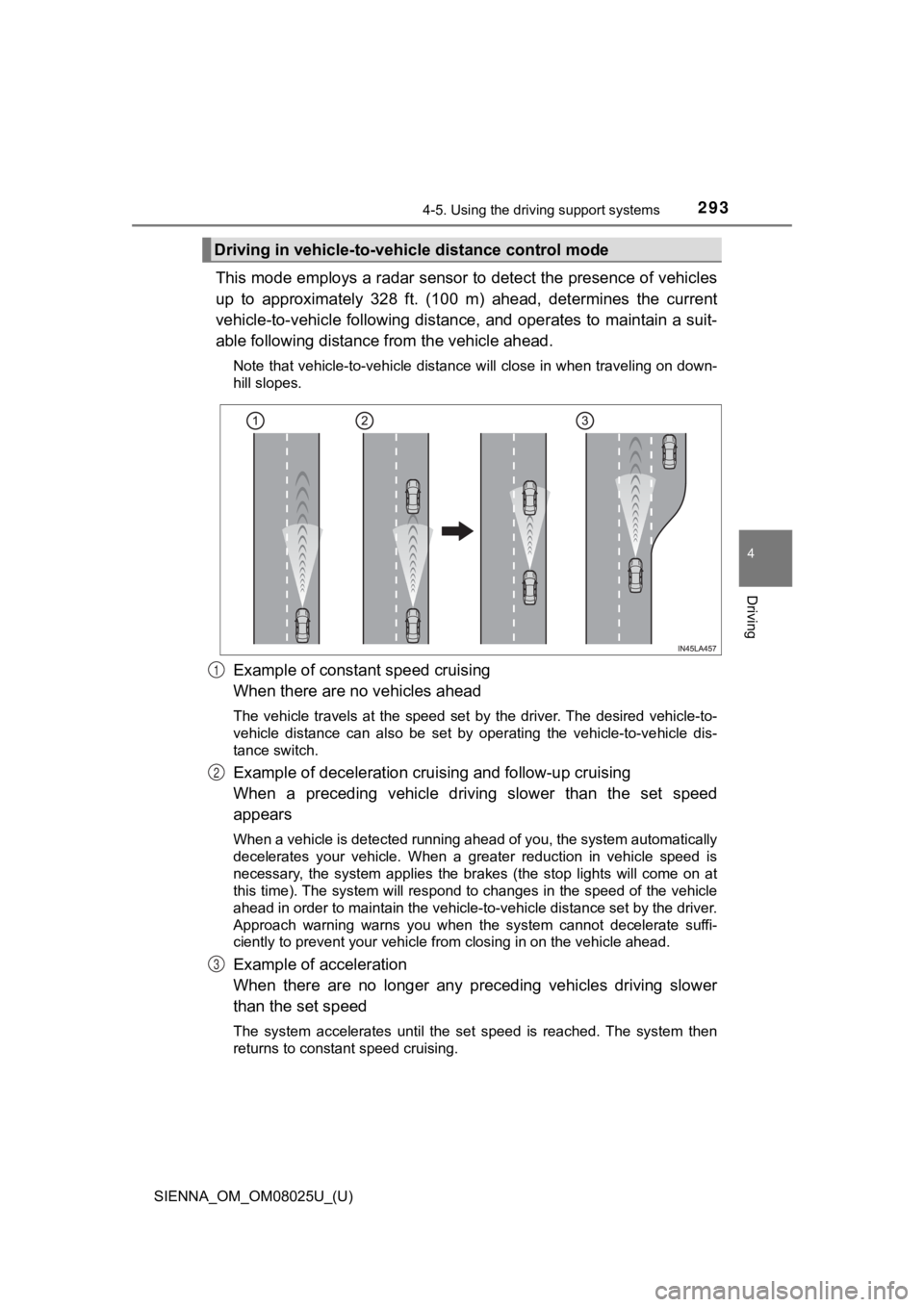
This mode employs a radar sensor to detect the presence of vehi cles
up to approximately 328 ft. (100 m) ahead, determines the curre nt
vehicle-to-vehicle following distance, and operates to maintain a suit-
able following distance from the vehicle ahead.
Note that vehicle-to-vehicle distance will close in when travel ing on down-
hill slopes.
Example of constant speed cruising
When there are no vehicles ahead
The vehicle travels at the speed set by the driver. The desired vehicle-to-
vehicle distance can also be set by operating the vehicle-to-ve hicle dis-
tance switch.
Example of deceleration crui sing and follow-up cruising
When a preceding vehicle driving slower than the set speed
appears
When a vehicle is detected running ahead of you, the system automatically
decelerates your vehicle. When a greater reduction in vehicle s peed is
necessary, the system applies the brakes (the stop lights will come on at
this time). The system will respond to changes in the speed of the vehicle
ahead in order to maintain the vehicle-to-vehicle distance set by the driver.
Approach warning warns you when the system cannot decelerate su ffi-
ciently to prevent your vehicle fr om closing in on the vehicle ahead.
Example of acceleration
When there are no longer any preceding vehicles driving slower
than the set speed
The system accelerates until the set speed is reached. The syst em then
returns to constant speed cruising.
Driving in vehicle-to-vehi cle distance control mode
1
2
3
Page 300 of 584

300
SIENNA_OM_OM08025U_(U)
4-5. Using the driving support systems
■Automatic cancelation of c onstant speed control mode
Constant speed control mode is automatically canceled in the following situa-
tions:
● Actual vehicle speed is more than approximately 10 mph (16 km/h ) below
the set vehicle speed.
● Actual vehicle speed falls below approximately 25 mph (40 km/h) .
● VSC is activated.
● TRAC is activated for a period of time.
● When the VSC or TRAC system is turned off.
● Pre-collision braking is activated.
If constant speed control mode is automatically canceled for an y other rea-
son, there may be a malfunction in the system. Contact your Toyota dealer.
■ Brake system operation sound
If the brakes are applied automatically while the vehicle is in vehicle-to-vehi-
cle distance control mode, a brake system operation sound may b e heard.
This does not indicate a malfunction.
■ If “Radar Cruise Control Unavaila ble” is shown on the multi-information
display
The radar cruise control system cannot be used temporarily. Use the system
when it becomes available again.
■ Warning messages and buzzers for d ynamic radar cruise control
Warning messages and buzzers are used to indicate a system malfunction or
to inform the driver of the need for caution while driving. If a warning message
is shown on the multi-information display, read the message and follow the
instructions.
■ When the sensor may not be correctly detect ing the vehicle ahead
In the case of the following and depending on the conditions, o perate the
brake pedal when deceleration of the system is insufficient or operate the
accelerator pedal when acceleration is required.
As the sensor may not be able to correctly detect these types o f vehicles, the
approach warning ( P. 297) may not be activated.
● Vehicles that cut in suddenly
● Vehicles traveling at low speeds
● Vehicles that are not moving in the same lane
Page 321 of 584

SIENNA_OM_OM08025U_(U)
3214-5. Using the driving support systems
4
Driving
WARNING
■Sensors
Certain vehicle conditions and the surrounding environment may affect the
ability of a sensor to correctl y detect an obstacle. Particular instances where
this may occur are listed below.
● There is dirt, snow or ice on the sensor. (Wiping the sensors w ill resolve
this problem.)
● The sensor is frozen. (Thawing the area will resolve this probl em.)
In especially cold weather, if a sensor is frozen the screen ma y show an
abnormal display, or obstacles may not be detected.
● The sensor is covered in any way.
● The vehicle is leaning considerably to one side.
● On an extremely bumpy road, on an incline, on gravel, or on grass.
● The vicinity of the vehicle is noisy due to vehicle horns, moto rcycle
engines, air brakes of large vehicles, or other loud noises pro ducing ultra-
sonic waves.
● There is another vehicle equipped with parking assist sensors i n the vicin-
ity.
● The sensor is coated with a sheet of spray or heavy rain.
● The sensor is drenched with water on a flooded road.
● The vehicle is equipped with a fender pole or wireless antenna.
● Towing eyelets are installed.
● The bumper or sensor receives a strong impact.
● The vehicle is approaching a tall or curved curb.
● The detection range is reduced due to an object such as a sign.
● In harsh sunlight or intense cold weather.
● The area directly under the bumpers is not detected.
● If obstacles draw too close to the sensor.
● A non-genuine Toyota suspension (lowered suspension, etc.) is i nstalled.
● A backlit license plate is installed.
In addition to the examples above, there are instances in which , because of
their shape, signs and other objects may be judged by a sensor to be closer
than they are.
Page 323 of 584
323
SIENNA_OM_OM08025U_(U)
4-5. Using the driving support systems
4
Driving
Driving assist systems
◆ABS (Anti-lock Brake System)
Helps to prevent wheel lock when the brakes are applied suddenl y,
or if the brakes are applied while driving on a slippery road surface
◆Brake assist
Generates an increased level of braking force after the brake p edal
is depressed when the system de tects a panic stop situation
◆VSC (Vehicle Stability Control)
Helps the driver to control skidding when swerving suddenly or
turning on slippery road surfaces
◆TRAC (Traction Control)
Helps to maintain drive power and prevent the drive wheels from
spinning when starting the vehicle or accelerating on slippery roads
◆Hill-start assist control
Helps to reduce the backward movement of the vehicle when start -
ing on an uphill
◆EPS (Electric Power Steering)
Employs an electric motor to reduce the amount of effort needed to
turn the steering wheel
◆Active Torque Control 4WD (AWD models only)
Automatically switches from front-wheel drive to AWD (All-Wheel
Drive) according to driving conditions, helping to ensure relia ble
handling and stability. Examples of conditions where the system will
switch to AWD are when corneri ng, going uphill, starting off or
accelerating, and when the road surface is slippery due to snow or
rain etc.
To keep driving safety and perf ormance, the following systems
operate automatically in respon se to various driving situations.
Be aware, however, that these systems are supplementary and
should not be relied upon too heav ily when operating the vehi-
cle.
Page 328 of 584
328
SIENNA_OM_OM08025U_(U)
4-6. Driving tips
Winter driving tips
●Use fluids that are appropriate t o the prevailing outside tempera-
tures. • Engine oil
• Engine coolant
• Washer fluid
● Have a service technician inspec t the condition of the battery.
● Have the vehicle fitted with four snow tires or purchase a set of tire
chains for the front tires.
Ensure that all tires are the same size and brand, and that cha ins match
the size of the tires.
Perform the following accordi ng to the driving conditions:
● Do not try to forcibly open a window or move a wiper that is fr ozen.
Pour warm water over the frozen area to melt the ice. Wipe away
the water immediately to prevent it from freezing.
● To ensure proper operation of the climate control system fan,
remove any snow that has accumulated on the air inlet vents in
front of the windshield.
● Check for and remove any excess ic e or snow that may have accu-
mulated on the exterior lights, vehicle’s roof, chassis, around the
tires or on the brakes.
● Remove any snow or mud from the bottom of your shoes before
getting in the vehicle.
Carry out the necessary preparations and inspections before
driving the vehicle in winter. Always drive the vehicle in a ma n-
ner appropriate to the prevailing weather conditions.
Preparation for winter
Before driving the vehicle
Page 402 of 584
402
SIENNA_OM_OM08025U_(U)
6-2. Maintenance
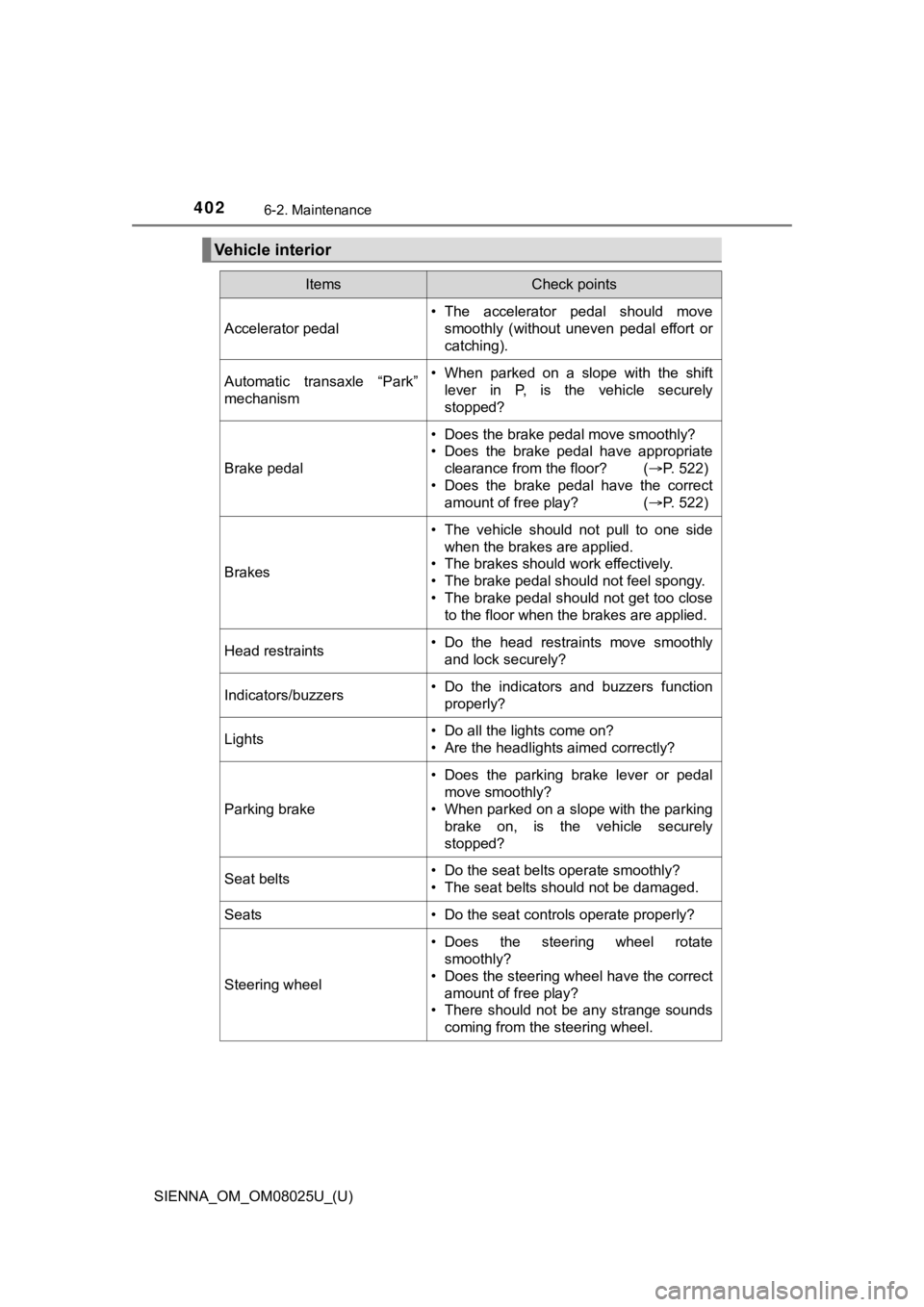
Vehicle interior
ItemsCheck points
Accelerator pedal • The accelerator pedal should move
smoothly (without uneven pedal effort or
catching).
Automatic transaxle “Park”
mechanism• When parked on a slope with the shift
lever in P, is the vehicle securely
stopped?
Brake pedal
• Does the brake pedal move smoothly?
• Does the brake pedal have appropriateclearance from the floor? (P. 522)
• Does the brake pedal have the correct amount of free play? ( P. 522)
Brakes
• The vehicle should not pull to one side
when the brakes are applied.
• The brakes should work effectively.
• The brake pedal should not feel spongy.
• The brake pedal should not get too close to the floor when the brakes are applied.
Head restraints• Do the head restraints move smoothlyand lock securely?
Indicators/buzzers• Do the indicators and buzzers function
properly?
Lights• Do all the lights come on?
• Are the headlights aimed correctly?
Parking brake
• Does the parking brake lever or pedalmove smoothly?
• When parked on a slope with the parking brake on, is the vehicle securely
stopped?
Seat belts• Do the seat belts operate smoothly?
• The seat belts should not be damaged.
Seats• Do the seat controls operate properly?
Steering wheel
• Does the steering wheel rotatesmoothly?
• Does the steering wheel have the correct amount of free play?
• There should not be any strange sounds
coming from the steering wheel.