brake TOYOTA SIENNA 2019 (in English) Workshop Manual
[x] Cancel search | Manufacturer: TOYOTA, Model Year: 2019, Model line: SIENNA, Model: TOYOTA SIENNA 2019Pages: 584, PDF Size: 14.5 MB
Page 320 of 584

320
SIENNA_OM_OM08025U_(U)
4-5. Using the driving support systems
■The intuitive parking assist can be operated when
●The engine switch is in the “ON” position (vehicles without a s mart key sys-
tem) or IGNITION ON mode (vehicles with a smart key system).
● Front corner sensors:
• The shift lever is not in P.
• The vehicle speed is approximately 6 mph (10 km/h) or less.
● Rear corner and rear center sensors:
The shift lever is in R.
■ Intuitive parking assist display
When an obstacle is detected while the rear view monitor system or pan-
oramic view monitor (if equipped) is in use, the warning indica tor will appear
in the upper part of the screen even if the display setting has been set to off.
■ Sensor detection information
●The sensor’s detection areas are limited to the areas around th e vehicle’s
bumper.
● Depending on the shape of the obstacle and other factors, the detection dis-
tance may shorten, or detection may be impossible.
● Obstacles may not be detected if they are too close to the sens or.
● There will be a short delay between obstacle detection and disp lay. Even at
slow speeds, there is a possibility that the obstacle will come within the sen-
sor’s detection.
● Thin posts or objects lower than the sensor may not be detected when
approached, even if they have been detected once.
● It might be difficult to hear beeps due to the volume of audio/ visual system
or air flow noise of the air conditioning system.
■ Certification (Canada only)
This ISM device complies with Canadian ICES-001.
Cet appareil ISM est conforme a la norme NMB-001 du Canada.
WARNING
■When using the Intuiti ve parking assist-sensor
Observe the following precautions.
Failure to do so may result in the vehicle being unable to be d riven safely
and possibly cause an accident.
● Do not use the sensor at speeds in excess of 6 mph (10 km/h).
● The sensors’ detection areas and reaction times are limited. When moving
forward or reversing, check the areas surrounding the vehicle ( especially
the sides of the vehicle) for safety, and drive slowly, using t he brake to
control the vehicle’s speed.
● Do not install accessories within the sensors’ detection areas.
Page 321 of 584

SIENNA_OM_OM08025U_(U)
3214-5. Using the driving support systems
4
Driving
WARNING
■Sensors
Certain vehicle conditions and the surrounding environment may affect the
ability of a sensor to correctl y detect an obstacle. Particular instances where
this may occur are listed below.
● There is dirt, snow or ice on the sensor. (Wiping the sensors w ill resolve
this problem.)
● The sensor is frozen. (Thawing the area will resolve this probl em.)
In especially cold weather, if a sensor is frozen the screen ma y show an
abnormal display, or obstacles may not be detected.
● The sensor is covered in any way.
● The vehicle is leaning considerably to one side.
● On an extremely bumpy road, on an incline, on gravel, or on grass.
● The vicinity of the vehicle is noisy due to vehicle horns, moto rcycle
engines, air brakes of large vehicles, or other loud noises pro ducing ultra-
sonic waves.
● There is another vehicle equipped with parking assist sensors i n the vicin-
ity.
● The sensor is coated with a sheet of spray or heavy rain.
● The sensor is drenched with water on a flooded road.
● The vehicle is equipped with a fender pole or wireless antenna.
● Towing eyelets are installed.
● The bumper or sensor receives a strong impact.
● The vehicle is approaching a tall or curved curb.
● The detection range is reduced due to an object such as a sign.
● In harsh sunlight or intense cold weather.
● The area directly under the bumpers is not detected.
● If obstacles draw too close to the sensor.
● A non-genuine Toyota suspension (lowered suspension, etc.) is i nstalled.
● A backlit license plate is installed.
In addition to the examples above, there are instances in which , because of
their shape, signs and other objects may be judged by a sensor to be closer
than they are.
Page 323 of 584
323
SIENNA_OM_OM08025U_(U)
4-5. Using the driving support systems
4
Driving
Driving assist systems
◆ABS (Anti-lock Brake System)
Helps to prevent wheel lock when the brakes are applied suddenl y,
or if the brakes are applied while driving on a slippery road surface
◆Brake assist
Generates an increased level of braking force after the brake p edal
is depressed when the system de tects a panic stop situation
◆VSC (Vehicle Stability Control)
Helps the driver to control skidding when swerving suddenly or
turning on slippery road surfaces
◆TRAC (Traction Control)
Helps to maintain drive power and prevent the drive wheels from
spinning when starting the vehicle or accelerating on slippery roads
◆Hill-start assist control
Helps to reduce the backward movement of the vehicle when start -
ing on an uphill
◆EPS (Electric Power Steering)
Employs an electric motor to reduce the amount of effort needed to
turn the steering wheel
◆Active Torque Control 4WD (AWD models only)
Automatically switches from front-wheel drive to AWD (All-Wheel
Drive) according to driving conditions, helping to ensure relia ble
handling and stability. Examples of conditions where the system will
switch to AWD are when corneri ng, going uphill, starting off or
accelerating, and when the road surface is slippery due to snow or
rain etc.
To keep driving safety and perf ormance, the following systems
operate automatically in respon se to various driving situations.
Be aware, however, that these systems are supplementary and
should not be relied upon too heav ily when operating the vehi-
cle.
Page 325 of 584

SIENNA_OM_OM08025U_(U)
3254-5. Using the driving support systems
4
Driving
■Turning off both TRAC and VSC systems
To turn the TRAC and VSC systems off, press and hold for more than 3
seconds while the vehicle is stopped.
The VSC OFF indicator light will come on and the “Traction Cont rol Turned
Off” will be shown on the multi-information display.
*
Press again to turn the systems back on.
*: Pre-collision brake assist and pre-collision braking will als o be disabled.
The PCS warning light will come on and the message will be shown on the
multi-information display. ( P. 472)
■ When the message is displayed on the multi-information display show-
ing that TRAC has been disab led even if has not been pressed
TRAC is temporary deactivated. If the information continues to show, contact
your Toyota dealer.
■ Sounds and vibrations caused by the ABS, brake assist, VSC, TRAC and
hill-start assist control systems
●A sound may be heard from the engine compartment when the brake pedal
is depressed repeatedly, when the engine is started or just aft er the vehicle
begins to move. This sound does not indicate that a malfunction has
occurred in any of these systems.
● Any of the following conditions may occur when the above system s are
operating.
None of these indicates that a malfunction has occurred.
• Vibrations may be felt through the vehicle body and steering.
• A motor sound may be heard also after the vehicle comes to a s top.
• The brake pedal may pulsate slightly after the ABS is activate d.
• The brake pedal may move down sli ghtly after the ABS is activated.
■ EPS operation sound
When the steering wheel is operated, a motor sound (whirring so und) may be
heard. This does not indicate a malfunction.
■ Automatic reactivation of TRAC and VSC systems
After turning the TRAC and VSC systems off, the systems will be automati-
cally re-enabled in the following situations:
● When the engine switch is turned to the “LOCK” position (vehicles without a
smart key system) or off (vehicles with a smart key system)
● If only the TRAC system is turned off, the TRAC will turn on wh en vehicle
speed increases
If both the TRAC and VSC systems are turned off, automatic re-e nabling will
not occur when vehicle speed increases.
Page 326 of 584

326
SIENNA_OM_OM08025U_(U)
4-5. Using the driving support systems
■Reduced effectiveness of the EPS system
The effectiveness of the EPS system is reduced to prevent the s ystem from
overheating when there is frequent steering input over an exten ded period of
time. The steering wheel may feel heavy as a result. Should thi s occur, refrain
from excessive steering input or stop the vehicle and turn the engine off. The
EPS system should return to normal within 10 minutes.
■ Operating conditions of hill-start assist control
When the following four conditions are met, the hill-start assi st control will
operate:
● The shift lever is in a position other than P or N (when starting off forward/
backward on an upward incline)
● The vehicle is stopped
● The accelerator pedal is not depressed
● The parking brake is not engaged
■ Automatic system cancelation of hill-start assist control
The hill-start assist control will turn off in any of the following situations:
● The shift lever is shifted to P or N
● The accelerator pedal is depressed
● The parking brake is engaged
● No more than 2 seconds have elapsed after the brake pedal is re leased
WARNING
■The ABS does not operate effectively when
● The limits of tire gripping performance have been exceeded (suc h as
excessively worn tires on a snow covered road).
● The vehicle hydroplanes while driving at high speed on wet or s lick roads.
■ Stopping distance when the ABS is operating may exceed that of nor-
mal conditions
The ABS is not designed to shorten the vehicle’s stopping distance. Always
maintain a safe distance from the vehicle in front of you, espe cially in the
following situations:
● When driving on dirt, gravel or snow-covered roads
● When driving with tire chains
● When driving over bumps in the road
● When driving over roads with potholes or uneven surfaces
Page 327 of 584

SIENNA_OM_OM08025U_(U)
3274-5. Using the driving support systems
4
Driving
WARNING
■TRAC/VSC may not operate effectively when
Directional control and power may not be achievable while driving on slip-
pery road surfaces, even if the TRAC/VSC system is operating. D rive the
vehicle carefully in conditions where stability and power may b e lost.
■ Hill-start assist control does not operate effectively when
● Do not overly rely on hill-start assist control. Hill-start ass ist control may
not operate effectively on steep inclines and roads covered wit h ice.
● Unlike the parking brake, hill-start assist control is not inte nded to hold the
vehicle stationary for an extended period of time. Do not attempt to use
hill-start assist control to hold the vehicle on an incline, as doing so may
lead to an accident.
■ When the VSC is activated
The slip indicator light flashes. Always drive carefully. Reckless driving may
cause an accident. Exercise particular care when the indicator light flashes.
■ When the TRAC/VSC systems are turned off
Be especially careful and drive at a speed appropriate to the r oad condi-
tions. As these are the systems to help ensure vehicle stabilit y and driving
force, do not turn the TRAC/VSC systems off unless necessary.
■
Replacing tires
Make sure that all tires are of the specified size, brand, trea d pattern
and total load capacity. In addition, make sure that the tires are inflated
to the recommended tire inflation pressure level.
The ABS, TRAC and VSC systems will not function correctly if di fferent
tires are installed on the vehicle.
Contact your Toyota dealer for further information when replaci ng tires
or wheels.
■Handling of tires and the suspension
Using tires with any kind of probl em or modifying the suspension will
affect the driving assist syste ms, and may cause a system to ma lfunc-
tion.
■ Active Torque Control 4WD system (AWD models only)
● The AWD system of this vehicle is intended to ensure driving st ability on
normal roads. It is not designed for use in demanding situation s such as
rally driving.
● Take care when driving on slippery road surfaces.
Page 328 of 584
328
SIENNA_OM_OM08025U_(U)
4-6. Driving tips
Winter driving tips
●Use fluids that are appropriate t o the prevailing outside tempera-
tures. • Engine oil
• Engine coolant
• Washer fluid
● Have a service technician inspec t the condition of the battery.
● Have the vehicle fitted with four snow tires or purchase a set of tire
chains for the front tires.
Ensure that all tires are the same size and brand, and that cha ins match
the size of the tires.
Perform the following accordi ng to the driving conditions:
● Do not try to forcibly open a window or move a wiper that is fr ozen.
Pour warm water over the frozen area to melt the ice. Wipe away
the water immediately to prevent it from freezing.
● To ensure proper operation of the climate control system fan,
remove any snow that has accumulated on the air inlet vents in
front of the windshield.
● Check for and remove any excess ic e or snow that may have accu-
mulated on the exterior lights, vehicle’s roof, chassis, around the
tires or on the brakes.
● Remove any snow or mud from the bottom of your shoes before
getting in the vehicle.
Carry out the necessary preparations and inspections before
driving the vehicle in winter. Always drive the vehicle in a ma n-
ner appropriate to the prevailing weather conditions.
Preparation for winter
Before driving the vehicle
Page 329 of 584
SIENNA_OM_OM08025U_(U)
3294-6. Driving tips
4
Driving
Accelerate the vehicle slowly, keep a safe distance between you and
the vehicle ahead, and drive at a reduced speed suitable to roa d con-
ditions.
● Park the vehicle and move the shift lever to P without setting the
parking brake. The parking brake may freeze up, preventing it from
being released. If the vehicle is parked without setting the pa rking
brake, make sure b lock the wheels.
Failure to do so may be dangerou s because it may cause the vehi-
cle to move unexpectedly, pos sibly leading to an accident.
● If the vehicle is parked without setting the parking brake, confirm
that the shift lever c annot be moved out of P
*.
*: The shift lever will be locked if it is attempted to be shifte d from P to any
other position without depressing the brake pedal. If the shift lever can be
shifted from P, there may be a problem with the shift lock syst em. Have the
vehicle inspected by your Toyota dealer immediately.
Use the tire chains of c orrect size and type.
Use SAE Class “S” type radial tire chains, with the exception o f radial
cable chains or V-bar type chains.
Regulations regarding the use of tire chains vary depending on loca-
tion and type of road. Always chec k local regulations before installing
chains.
■ Tire chain installation
Observe the following precautions when installing and removing chains.
● Install and remove tire chains in a safe location.
● Install tire chains on the front tires only. Do not install tir e chains on the rear
tires.
● Install tire chains on front tires as tightly as possible. Reti ghten chains after
driving 1/4 - 1/2 mile (0.5 - 1.0 km).
● Install tire chains following the instructions provided with th e tire chains.
When driving the vehicle
When parking the vehicle
Selecting tire chains
Regulations on the use of tire chains
Page 394 of 584
394
SIENNA_OM_OM08025U_(U)
6-1. Maintenance and care
NOTICE
■To prevent paint deterioration an d corrosion on the body and compo-
nents (aluminum wheels etc.)
● Wash the vehicle immediately in the following cases:
• After driving near the sea coast
• After driving on salted roads
• If coal tar or tree sap is present on the paint surface
• If you see dead insects, insect droppings or bird droppings on the paint
• After driving in an area contaminated with soot, oily smoke, mine dust, iron powder or chemical substances
• If the vehicle becomes heavily soiled in dust or mud
• If liquids such as benzene and gasoline are spilled on the pai nt surface
● If the paint is chipped or scratched, have it repaired immediat ely.
● To prevent the wheels from corroding, remove any dirt and store in a place
with low humidity when storing wheels.
■ Cleaning the exterior lights
● Wash carefully. Do not use organic substances or scrub with a h ard brush.
This may damage the surface of the lights.
● Do not apply wax on the surfaces of the lights.
Wax may cause damage to the lenses.
■ When using an automatic car wash (vehicles with rain-sensing wi nd-
shield wipers)
Set the wiper switch to the off position. If the wiper switch i s in “AUTO”, the
wipers may operate and the wiper blades may be damaged.
■ When using a high pressure car wash
Do not bring the nozzle tip close to boots (rubber or resin man ufactured
cover), connectors or the following parts. The parts may be damaged if they
come into contact with high-pressure water.
• Traction related parts
• Steering parts
• Suspension parts
• Brake parts
Page 401 of 584
401
SIENNA_OM_OM08025U_(U)
6-2. Maintenance
6
Maintenance and care
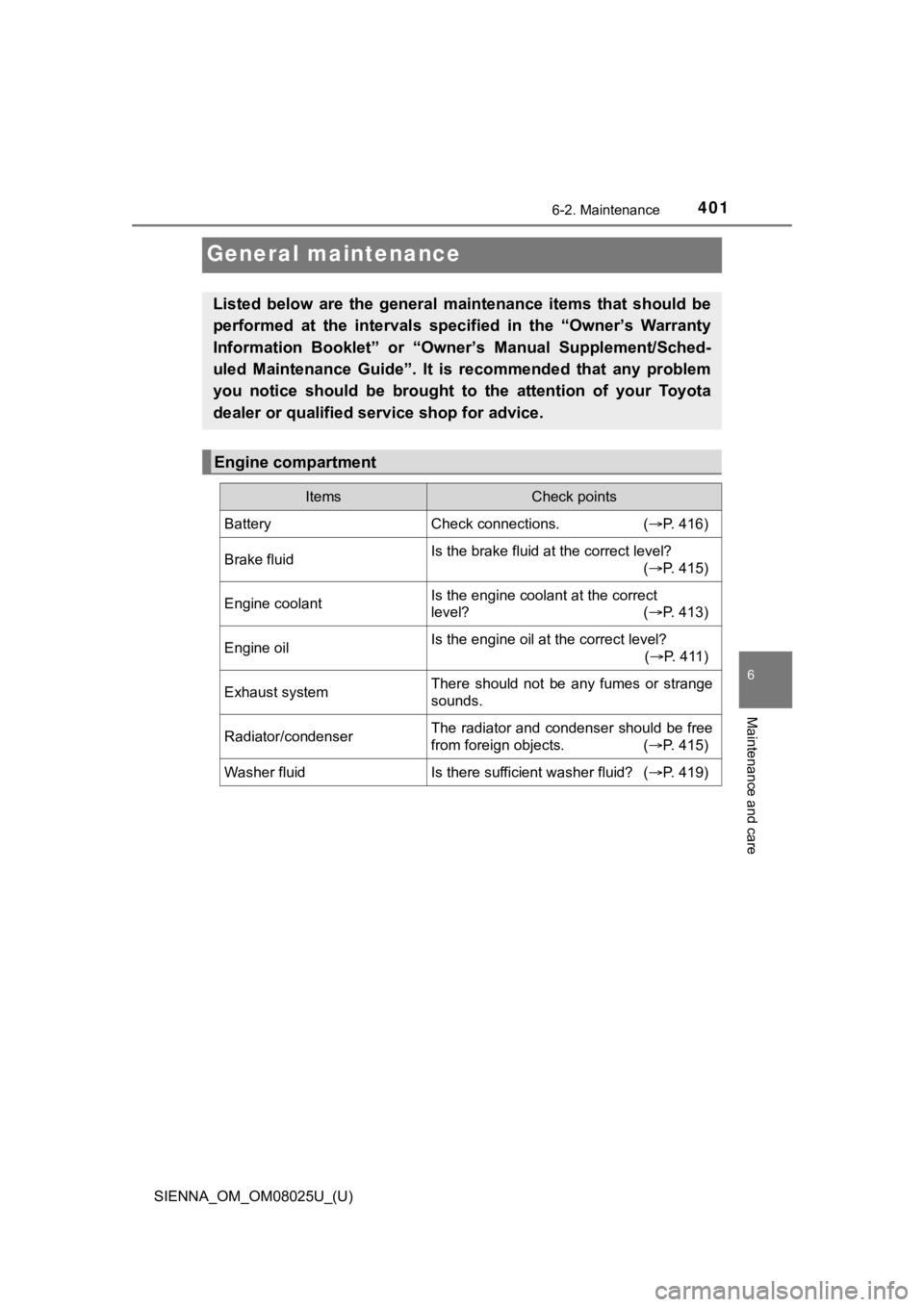
General maintenance
Listed below are the general maintenance items that should be
performed at the intervals specified in the “Owner’s Warranty
Information Booklet” or “Own er’s Manual Supplement/Sched-
uled Maintenance Guide”. It is recommended that any problem
you notice should be brought to the attention of your Toyota
dealer or qualified s ervice shop for advice.
Engine compartment
ItemsCheck points
BatteryCheck connections. (P. 416)
Brake fluidIs the brake fluid at the correct level?
(P. 415)
Engine coolantIs the engine coolant at the correct
level? ( P. 413)
Engine oilIs the engine oil at the correct level?
(P. 4 1 1 )
Exhaust systemThere should not be any fumes or strange
sounds.
Radiator/condenserThe radiator and condenser should be free
from foreign objects. ( P. 415)
Washer fluidIs there sufficient washer fluid? (P. 419)