brakes TOYOTA SIENNA HYBRID 2021 Owners Manual (in English)
[x] Cancel search | Manufacturer: TOYOTA, Model Year: 2021, Model line: SIENNA HYBRID, Model: TOYOTA SIENNA HYBRID 2021Pages: 76, PDF Size: 6 MB
Page 12 of 76
 10
Hybrid Synergy Drive System
The Hybrid Synergy Drive System utilizes a computer-controlled gasoline \
engine
and electric motor to provide the most efficient combination of power fo\
r the
vehicl")
10
Hybrid Synergy Drive System
The Hybrid Synergy Drive System utilizes a computer-controlled gasoline \
engine
and electric motor to provide the most efficient combination of power fo\
r the
vehicle. When the brakes are applied, the braking force generates electr\
icity, which
is then sent to the traction battery to conserve energy. In addition, th\
e engine shuts
off when the vehicle is stopped. The benefits are better fuel economy an\
d reduced
vehicle emissions.
NOTE: Fuel consumption and energy information of the Hybrid System are shown on the Multi-Information Display (MID) and the audio system
screen (navigation system or multi-media system.)
- Ensure tire pressures are maintained at levels specified in the Owner’\
s Manual.
- Link trips to reduce engine cold starts whenever possible.
- Avoid driving at speeds that are higher than necessary, especially on \
the highway.
- When possible, avoid sudden stops to maximize regenerative braking ene\
rgy.
- Minimize use of the Air Conditioning.
(1) Put the shift lever in “Park.”
(2) Depress the brake pedal, and “
” will be displayed on the Multi-Information
Display.
(3) Push the “POWER” button briefly and firmly.
(4) The “READY” light will blink. After a few seconds, when the light \
remains steady
and a beep sounds, shift the gear to the desired position and you may be\
gin
driving.
FEATURES & OPERATIONS
TIPS FOR IMPROVED FUEL ECONOMY
STARTING THE HYBRID SYSTEM
Push
When the steering lock cannot be
released, “Push Power Button while
Turning the Steering Wheel in Either
Direction” will be displayed on the
Multi-Information Display.
Check that the shift lever is set in P.
Press the power button shortly and
firmly while turning the steering wheel
left and right.
Push
Turn
Steering lock release
Shift the shift lever to “S” position from “D” position.
+ :
Upshift (push and release)
- : Downshift (pull and release)
Downshifting increases power going uphill, or provides engine braking do\
wnhill. For
best fuel economy during normal driving conditions, always drive with th\
e shift lever
in the “D” position. * The vehicle must be on and the brake pedal depressed to shift from Par\
k.
“S” (SEQUENTIAL) MODE
DEFAULT SETTING
CUSTOMIZED SETTING
Automatic door locks can be programmed to operate in different modes, or\
turned
OFF.
Speed linked door locking function
-Doors lock when the vehicle speed is approximately 12 mph or higher.
Driver’s door linked door unlocking function
-Doors unlock when the driver
Page 13 of 76
 11
The Hybrid Synergy Drive System utilizes a computer-controlled gasoline \
engine
and electric motor to provide the most efficient combination of power fo\
r the
vehicle. When the brakes are appli")
11
The Hybrid Synergy Drive System utilizes a computer-controlled gasoline \
engine
and electric motor to provide the most efficient combination of power fo\
r the
vehicle. When the brakes are applied, the braking force generates electr\
icity, which
is then sent to the traction battery to conserve energy. In addition, th\
e engine shuts
off when the vehicle is stopped. The benefits are better fuel economy an\
d reduced
vehicle emissions.
NOTE: Fuel consumption and energy information of the Hybrid System are shown on the Multi-Information Display (MID) and the audio system
screen (navigation system or multi-media system.)
- Ensure tire pressures are maintained at levels specified in the Owner’\
s Manual.
- Link trips to reduce engine cold starts whenever possible.
- Avoid driving at speeds that are higher than necessary, especially on \
the highway.
- When possible, avoid sudden stops to maximize regenerative braking ene\
rgy.
- Minimize use of the Air Conditioning.
(1) Put the shift lever in “Park.”
(2) Depress the brake pedal, and “
” will be displayed on the Multi-Information
Display.
(3) Push the “POWER” button briefly and firmly.
(4) The “READY” light will blink. After a few seconds, when the light \
remains steady
and a beep sounds, shift the gear to the desired position and you may be\
gin
driving.
OVERVIEW
FEATURES & OPERATIONS
TOYOTA SAFETY SENSE
SAFETY & EMERGENCY FEATURES
When the steering lock cannot be
released, “Push Power Button while
Turning the Steering Wheel in Either
Direction” will be displayed on the
Multi-Information Display.
Check that the shift lever is set in P.
Press the power button shortly and
firmly while turning the steering wheel
left and right.
Steering lock release
Hybrid transmission
Shift the shift lever to “S” position from “D” position.
+ : Upshift (push and release)
- : Downshift (pull and release)
Downshifting increases power going uphill, or provides engine braking do\
wnhill. For
best fuel economy during normal driving conditions, always drive with th\
e shift lever
in the “D” position. * The vehicle must be on and the brake pedal depressed to shift from Par\
k.
“S” (SEQUENTIAL) MODE
P
R
N
D
S
+ (“S” mode)
- (“S” mode)
Park*
Reverse
Neutral
Drive
“S” mode
DEFAULT SETTING
CUSTOMIZED SETTING
Auto lock/unlock
Automatic door locks can be programmed to operate in different modes, or\
turned
OFF.
Speed linked door locking function
-Doors lock when the vehicle speed is approximately 12 mph or higher.
Driver’s door linked door unlocking function
-Doors unlock when the driver’s door is opened within 45 seconds after\
the vehicle is turned off.
Refer to the Owner’s Manual for more details. Shift position linked door locking/unlocking function
-Doors lock when shifting from Park.
-Doors unlock when shifting into Park.
MY21_Sienna_QRG_V4_ML_0929.indd 1110/5/20 12:14 PM
Page 44 of 76
42
FEATURES & OPERATIONS
(1) Press “” or “” switches and select “” from the Multi-Information Display
(MID).
(2) Press “
” or “” switches and select “ (PKSB)” and then press “.”
The setting screen is displayed.
(3) Press “
” or “” switches and press “” to select the desired setting.
(4) Press “
” to go back to the menu.
The system will continue in the last state it was in (ON or OFF) when \
the vehicle is
started again.
Refer to all of the section “Parking Support Brake function” (sta\
tic objects and rear-
crossing vehicles) in the Owner’s Manual for limitations and more de\
tails.
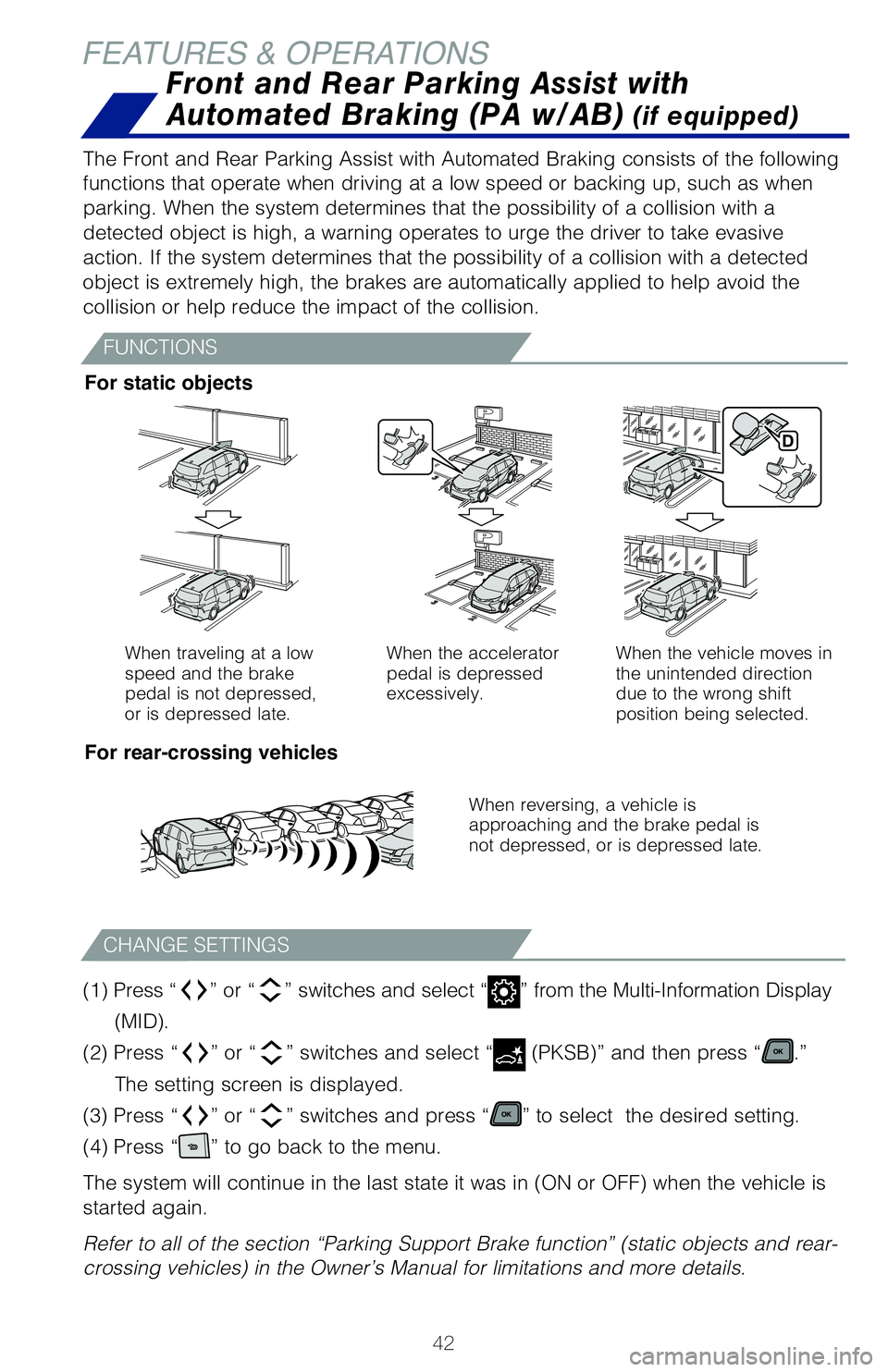
When traveling at a low
speed and the brake
pedal is not depressed,
or is depressed late. When the accelerator
pedal is depressed
excessively.
When the vehicle moves in
the unintended direction
due to the wrong shift
position being selected.
When reversing, a vehicle is
approaching and the brake pedal is
not depressed, or is depressed late.
The Front and Rear Parking Assist with Automated Braking consists of the\
following
functions that operate when driving at a low speed or backing up, such a\
s when
parking. When the system determines that the possibility of a collision \
with a
detected object is high, a warning operates to urge the driver to take e\
vasive
action. If the system determines that the possibility of a collision wit\
h a detected
object is extremely high, the brakes are automatically applied to help a\
void the
collision or help reduce the impact of the collision. For static objects
For rear-crossing vehicles
CHANGE SETTINGS
Front and Rear Parking Assist with
Automated Braking (PA w/AB)
(if equipped)
FUNCTIONS
If the sensors detect an obstacle, the buzzer and MID or navigation syst\
em
display inform the driver of the approximate position and distance of th\
e obstacle
by illuminating continuously (far) or blinking (near). Depending on \
your Audio
Multimedia system, you can adjust settings.
(1) Press “” or “ ” switches and select “” from the Multi-Information Display
(MID).
(2) Press “ ” or “ ” switches and select “
(Intuitive parking assist)” and then
press “
.” The setting screen is displayed.
(3) Press “ ” or “ ” switches and select the “Intuitive parking assist on/off”
setting function and then press “
.”
(4) Press “
” to go back to the menu.
Refer to the Owner’s Manual for limitations and more details.
SYSTEM ON/OFF
MY21_Sienna_QRG_V4_ML_0929.indd 4210/5/20 12:15 PM
Page 45 of 76
43
OVERVIEW
FEATURES & OPERATIONS
TOYOTA SAFETY SENSE
SAFETY & EMERGENCY FEATURES
Intuitive parking assist (if equipped)
(1) Press “” or “ ” switches and select “” from the Multi-Information Display
(MID).
(2) Press “ ” or “ ” switches and select “
(PKSB)” and then press “.”
The setting screen is displayed.
(3) Press “ ” or “ ” switches and press “
” to select the desired setting.
(4) Press “
” to go back to the menu.
The system will continue in the last state it was in (ON or OFF) when \
the vehicle is
started again.
Refer to all of the section “Parking Support Brake function” (sta\
tic objects and rear-
crossing vehicles) in the Owner’s Manual for limitations and more de\
tails.
When the vehicle moves in
the unintended direction
due to the wrong shift
position being selected.
The Front and Rear Parking Assist with Automated Braking consists of the\
following
functions that operate when driving at a low speed or backing up, such a\
s when
parking. When the system determines that the possibility of a collision \
with a
detected object is high, a warning operates to urge the driver to take e\
vasive
action. If the system determines that the possibility of a collision wit\
h a detected
object is extremely high, the brakes are automatically applied to help a\
void the
collision or help reduce the impact of the collision.
For static objects
For rear-crossing vehicles
Front and Rear Parking Assist with
Automated Braking (PA w/AB)
(if equipped)
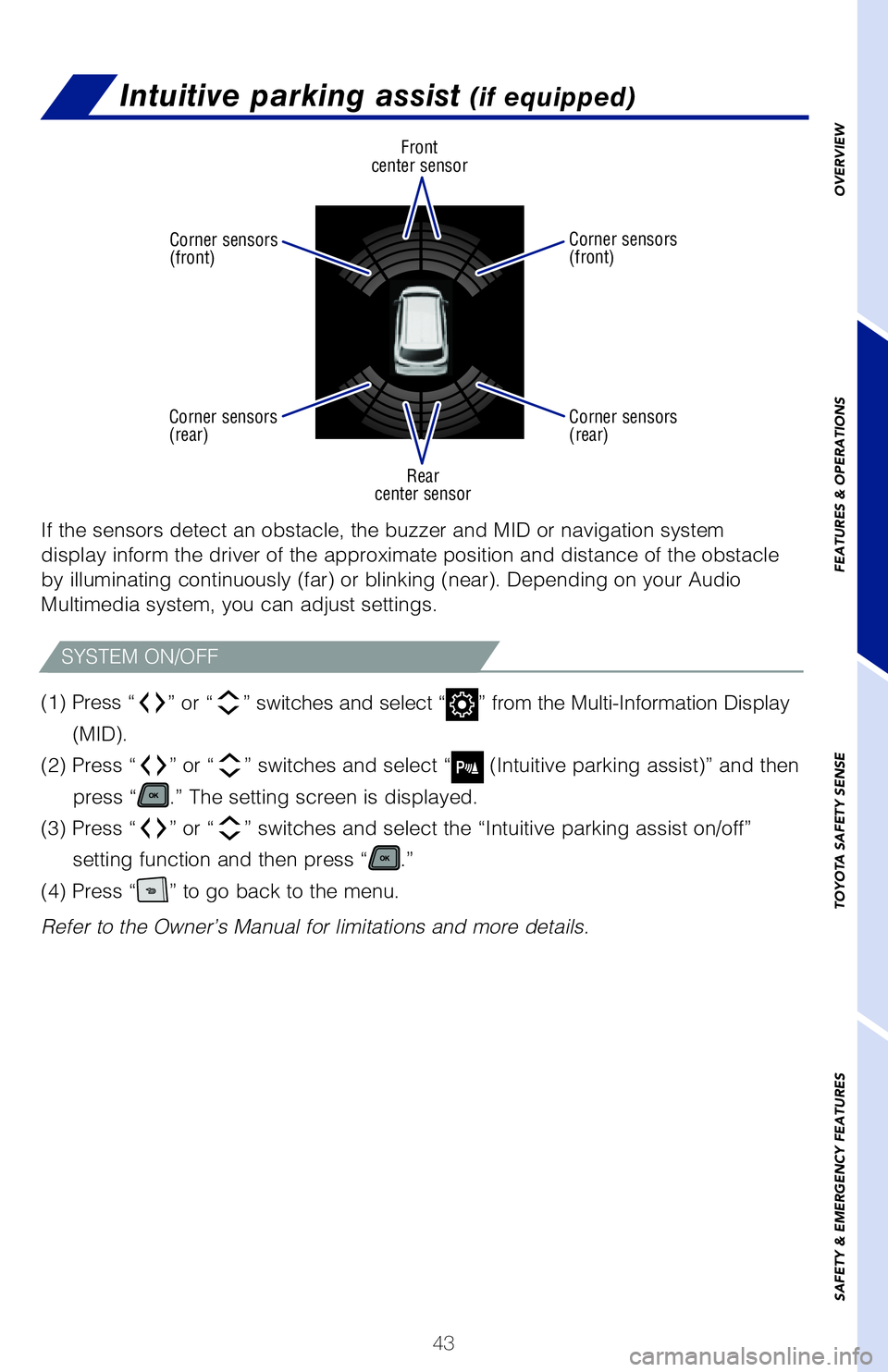
Front
center sensor
Rear
center sensor
Corner sensors
(front)
Corner sensors
(front)
Corner sensors
(rear) Corner sensors
(rear)
If the sensors detect an obstacle, the buzzer and MID or navigation syst\
em
display inform the driver of the approximate position and distance of th\
e obstacle
by illuminating continuously (far) or blinking (near). Depending on \
your Audio
Multimedia system, you can adjust settings.
(1)
Press “
” or “” switches and select “” from the Multi-Information Display
(MID).
(2) Press “
” or “” switches and select “ (Intuitive parking assist)” and then
press “
.” The setting screen is displayed.
(3) Press “
” or “” switches and select the “Intuitive parking assist on/off”
setting function and then press “
.”
(4) Press “
” to go back to the menu.
Refer to the Owner’s Manual for limitations and more details.
SYSTEM ON/OFF
MY21_Sienna_QRG_V4_ML_0929.indd 4310/5/20 12:15 PM
Page 48 of 76
 46
Pre-Collision Warning
When the system determines that the possibility of a frontal collision i\
s high, a
buzzer will sound and a warning message will be displayed on the Multi-I\
nformation
Disp")
46
Pre-Collision Warning
When the system determines that the possibility of a frontal collision i\
s high, a
buzzer will sound and a warning message will be displayed on the Multi-I\
nformation
Display (MID) to urge the driver to take evasive action.
Pre-Collision Brake Assist
If the driver notices the hazard and brakes, the system may provide addi\
tional
braking force using Brake Assist. This system may prime the brakes and m\
ay apply
greater braking force in relation to how strongly the brake pedal is dep\
ressed.
Pre-Collision Braking
If the driver does not brake in a set time and the system determines tha\
t the
possibility of a frontal collision with a preceding vehicle is extremely\
high, the
system may automatically apply the brakes, reducing speed in order to he\
lp the
driver reduce the impact and in certain cases avoid the collision.
Refer to the Toyota Owner’s Manual for additional information on PCS \
w/PD
operation, settings adjustments, limitations, and precautions before att\
empting to
use it.
TOYOTA SAFETY SENSE™
PRE-COLLISION SYSTEM (CONTINUED)
Under certain conditions, the PCS system included with the TSS 2.0 packa\
ge
may also help to detect a pedestrian or bicyclist in front of your vehic\
le using the
forward-facing camera and front grille-mounted radar. The forward-facing camera of
PCS detects a potential pedestrian or bicyclist based on size, profile, \
and motion
of the detected pedestrian or bicyclist. However, a pedestrian or bicycl\
ist may not
be detected depending on the conditions, including the surrounding brigh\
tness
and the motion, posture, size, and angle of the potential detected pedes\
trian or
bicyclist, preventing the system from operating or engaging.
PCS PEDESTRIAN DETECTION
Monocular camera sensor
Millimeter
wave radar
As part of the Pre-Collision System, this function is also designed to f\
irst provide an
alert and then automatic braking if needed.
Refer to the Toyota Owner’s Manual for additional limitations and inf\
ormation.
CHANGING PCS ALERT TIMING
(1) Press “ ” or “ ” switches and select “” from the Multi-Information Display
(MID).
(2) Press “ or
” switches and select “
(PCS)” and then press “.” The
setting screen is displayed.
(3) Press “ or
” switches and select “Sensitivity” and then press “
” to select
the desired setting. Each time it is pressed, the response to the PCS wa\
rning
timing changes as shown above.
(4) Press “
” to go back to the menu.
Note: PCS is enabled each time the vehicle is turned on. The system can be
disabled/enabled and the alert timing of the system can be changed.
(Alert timing only, brake operation remains the same.)
(1) Press “ ” or “ ” switches and select “
” from the Multi-Information Display
(MID).
(2) Press “ or
” switches and select “
(PCS)” and then press “.” The
setting screen is displayed.
(3) Press “ or
” switches and select “PCS on/off” and then press “
” to
select the desired setting.
(4) Press “
” to go back to the menu.
Note: The system is enabled each time the vehicle is turned on.
Refer to the Toyota Owner’s Manual for additional information on PCS \
w/PD
operation, settings adjustments, limitations, and precautions before att\
empting to
use it.
DISABLING PRE-COLLISION SYSTEM (PCS)
MY21_Sienna_QRG_V4_ML_0929.indd 4610/5/20 12:15 PM
Page 49 of 76
 47
Pre-Collision Warning
When the system determines that the possibility of a frontal collision i\
s high, a
buzzer will sound and a warning message will be displayed on the Multi-I\
nformation
Disp")
47
Pre-Collision Warning
When the system determines that the possibility of a frontal collision i\
s high, a
buzzer will sound and a warning message will be displayed on the Multi-I\
nformation
Display (MID) to urge the driver to take evasive action.
Pre-Collision Brake Assist
If the driver notices the hazard and brakes, the system may provide addi\
tional
braking force using Brake Assist. This system may prime the brakes and m\
ay apply
greater braking force in relation to how strongly the brake pedal is dep\
ressed.
Pre-Collision Braking
If the driver does not brake in a set time and the system determines tha\
t the
possibility of a frontal collision with a preceding vehicle is extremely\
high, the
system may automatically apply the brakes, reducing speed in order to he\
lp the
driver reduce the impact and in certain cases avoid the collision.
Refer to the Toyota Owner’s Manual for additional information on PCS \
w/PD
operation, settings adjustments, limitations, and precautions before att\
empting to
use it.
OVERVIEW
FEATURES & OPERATIONS
TOYOTA SAFETY SENSE
SAFETY & EMERGENCY FEATURES
Under certain conditions, the PCS system included with the TSS 2.0 packa\
ge
may also help to detect a pedestrian or bicyclist in front of your vehic\
le using the
forward-facing camera and front grille-mounted radar. The forward-facing camera of
PCS detects a potential pedestrian or bicyclist based on size, profile, \
and motion
of the detected pedestrian or bicyclist. However, a pedestrian or bicycl\
ist may not
be detected depending on the conditions, including the surrounding brigh\
tness
and the motion, posture, size, and angle of the potential detected pedes\
trian or
bicyclist, preventing the system from operating or engaging.
As part of the Pre-Collision System, this function is also designed to f\
irst provide an
alert and then automatic braking if needed.
Refer to the Toyota Owner’s Manual for additional limitations and inf\
ormation.
CHANGING PCS ALERT TIMING
Far Middle
(default) Near
(1) Press “” or “” switches and select “” from the Multi-Information Display
(MID).
(2) Press “
or ” switches and select “ (PCS)” and then press “.” The
setting screen is displayed.
(3) Press “
or ” switches and select “Sensitivity” and then press “” to select
the desired setting. Each time it is pressed, the response to the PCS wa\
rning
timing changes as shown above.
(4) Press “
” to go back to the menu.
Note: PCS is enabled each time the vehicle is turned on. The system can be
disabled/enabled and the alert timing of the system can be changed.
(Alert timing only, brake operation remains the same.)
(1) Press “
” or “” switches and select “” from the Multi-Information Display
(MID).
(2) Press “
or ” switches and select “ (PCS)” and then press “.” The
setting screen is displayed.
(3) Press “
or ” switches and select “PCS on/off” and then press “” to
select the desired setting.
(4) Press “
” to go back to the menu.
Note: The system is enabled each time the vehicle is turned on.
Refer to the Toyota Owner’s Manual for additional information on PCS \
w/PD
operation, settings adjustments, limitations, and precautions before att\
empting to
use it.
DISABLING PRE-COLLISION SYSTEM (PCS)
MY21_Sienna_QRG_V4_ML_0929.indd 4710/5/20 12:15 PM
Page 58 of 76
 56
TOYOTA SAFETY SENSE™
Full-Speed Range Dynamic Radar Cruise
Control (DRCC)
Intended for highway use, Full-Speed Range Dynamic Radar Cruise Control \
(DRCC) lets you drive at a preset speed. The")
56
TOYOTA SAFETY SENSE™
Full-Speed Range Dynamic Radar Cruise
Control (DRCC)
Intended for highway use, Full-Speed Range Dynamic Radar Cruise Control \
(DRCC) lets you drive at a preset speed. The system is designed to fun\
ction
between 0-110 mph* and uses vehicle-to-vehicle distance control, helping\
maintain
a preset distance from the vehicle ahead of you.*
* See www.toyota.com/safety-sense for more information.
Refer to the Toyota Owner’s Manual for a list of additional situation\
s in which the
system operation may be limited.
ADJUSTING DRCC SET SPEED
TURNING SYSTEM ON/OFF
Refer to page 58 for switching to Constant Speed (Cruise) Control Mode\
.
Multi-information
displaySet speed
Full-Speed Range
Dynamic Radar Cruise
Control vehicle-to-
vehicle distance button
Cruise control
switches
Indicators
(1)
Push once: On
Push twice: Off
(2) (3) Increase speed/
Resume
Set/
Decrease speedCancel*
Vehicle will cruise at a set speed, decelerate to maintain a selected di\
stance from a
slower vehicle traveling in front and accelerate back up to the selected\
speed if the
vehicle in front changes lanes or speeds up.
(1) Push “
” to turn DRCC system ON. The “RADAR READY” and “”
indicator will come on.
(2)
Use the steering wheel controls to increase speed by pushing
“+RES” or
decrease the speed by pushing “-SET.” Push and hold to make a large
adjustment or push each time to make fine adjustments (1 mph [1.6 km/h]\
or 1
km/h [0.6 mph] increments.)
(3) Push “Cancel” to cancel the speed control.
* The speed control may also be canceled by depressing the brake pedal.
ADJUSTING DISTANCE
This mode employs a radar sensor to detect the presence of vehicles up t\
o
approximately 328 ft (100 m) ahead, determines the current vehicle-to-\
vehicle
following distance and operates to maintain a preset following distance \
from the
vehicle ahead. These distances vary based on vehicle speed.
Note: Vehicle-to-vehicle distance will close in when traveling on long downhill
slopes.
(1) Constant speed cruising when there are no vehicles ahead
The vehicle travels at the speed set by the driver. The desired vehicle-\
to-
vehicle distance can also be set by operating the vehicle-to-vehicle dis\
tance
control.
(2) Deceleration cruising and follow-up cruising when a preceding vehicle
driving slower than the set speed appears When a slower vehicle is detected running ahead of you, the system
automatically decelerates your vehicle. When a greater reduction in vehi\
cle
speed is necessary, the system may apply the brakes (the brake lights w\
ill
come on at this time). The system will respond to changes in the speed \
of the
vehicle ahead in order to maintain the vehicle-to-vehicle distance set b\
y the
driver. A warning tone warns you when the system cannot decelerate suffi\
ciently
to prevent your vehicle from closing in on the vehicle ahead.
MY21_Sienna_QRG_V4_ML_0929.indd 5610/5/20 12:15 PM
Page 59 of 76
57
OVERVIEW
FEATURES & OPERATIONS
TOYOTA SAFETY SENSE
SAFETY & EMERGENCY FEATURES
Full-Speed Range Dynamic Radar Cruise
Control (DRCC)
Intended for highway use, Full-Speed Range Dynamic Radar Cruise Control \
(DRCC) lets you drive at a preset speed. The system is designed to fun\
ction
between 0-110 mph* and uses vehicle-to-vehicle distance control, helping\
maintain
a preset distance from the vehicle ahead of you.*
* See www.toyota.com/safety-sense for more information.
Refer to the Toyota Owner’s Manual for a list of additional situation\
s in which the
system operation may be limited.
Refer to page 58 for switching to Constant Speed (Cruise) Control Mode\
.
Full-Speed Range
Dynamic Radar Cruise
Control vehicle-to-
vehicle distance button
Vehicle will cruise at a set speed, decelerate to maintain a selected di\
stance from a
slower vehicle traveling in front and accelerate back up to the selected\
speed if the
vehicle in front changes lanes or speeds up.
(1) Push “
” to turn DRCC system ON. The “RADAR READY” and “”
indicator will come on.
(2) Use the steering wheel controls to increase speed by pushing “+RES” or
decrease the speed by pushing “-SET.” Push and hold to make a large
adjustment or push each time to make fine adjustments (1 mph [1.6 km/h]\
or 1
km/h [0.6 mph] increments.)
(3) Push “Cancel” to cancel the speed control.
* The speed control may also be canceled by depressing the brake pedal.
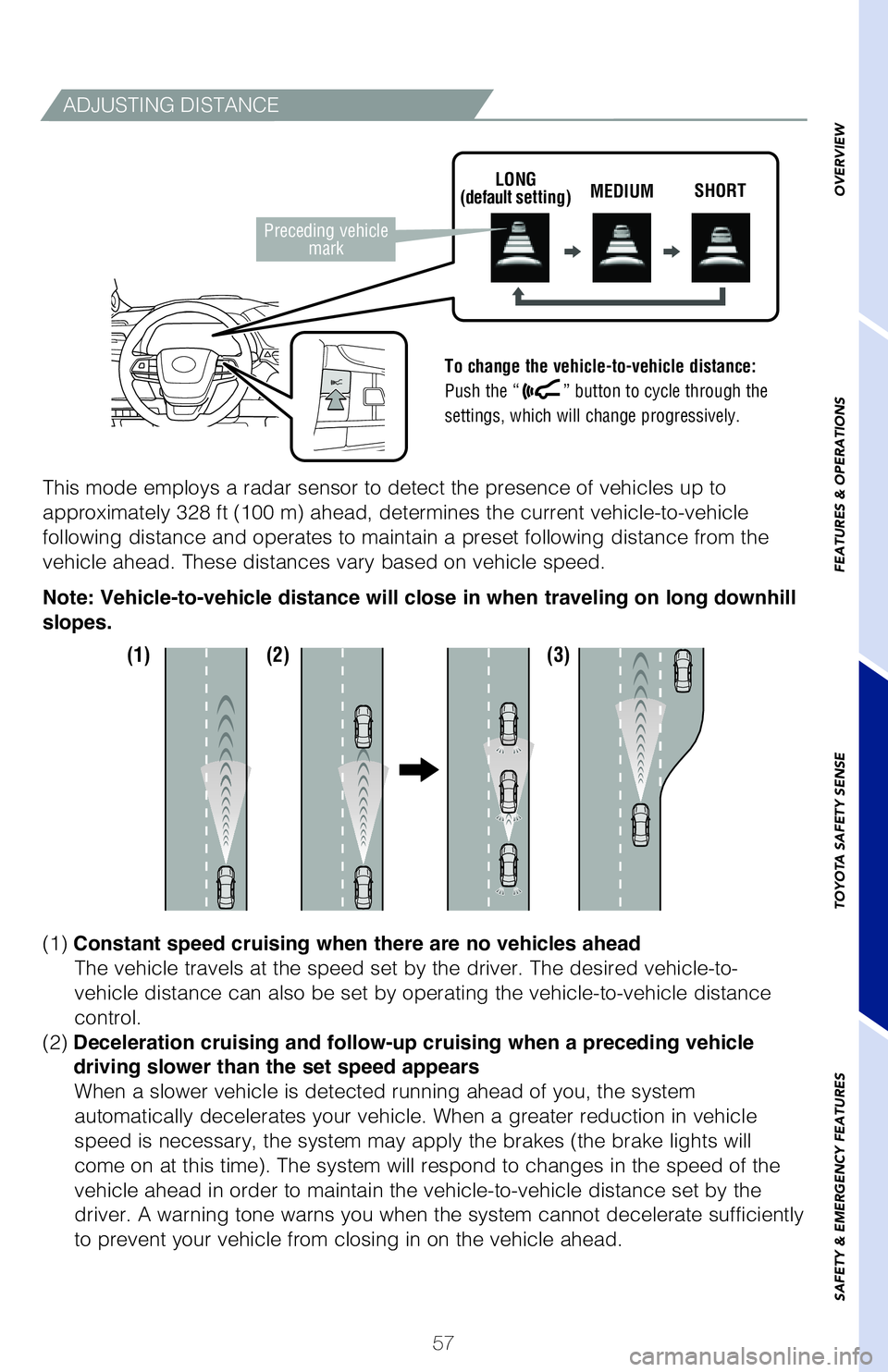
ADJUSTING DISTANCE
To change the vehicle-to-vehicle distance:
Push the “
” button to cycle through the
settings, which will change progressively.
This mode employs a radar sensor to detect the presence of vehicles up t\
o
approximately 328 ft (100 m) ahead, determines the current vehicle-to-\
vehicle
following distance and operates to maintain a preset following distance \
from the
vehicle ahead. These distances vary based on vehicle speed.
Note: Vehicle-to-vehicle distance will close in when traveling on long downhill
slopes.
(1) Constant speed cruising when there are no vehicles ahead
The vehicle travels at the speed set by the driver. The desired vehicle-\
to-
vehicle distance can also be set by operating the vehicle-to-vehicle dis\
tance
control.
(2) Dece
leration cruising and follow-up cruising when a preceding vehicle
driving
slower than the set speed appears
When a slower vehicle is detected running ahead of you, the system
automatically decelerates your vehicle. When a greater reduction in vehi\
cle
speed is necessary, the system may apply the brakes (the brake lights w\
ill
come on at this time). The system will respond to changes in the speed \
of the
vehicle ahead in order to maintain the vehicle-to-vehicle distance set b\
y the
driver. A warning tone warns you when the system cannot decelerate suffi\
ciently
to prevent your vehicle from closing in on the vehicle ahead.
LONG
(default setting) MEDIUM
SHORT
Preceding vehicle
mark
(1) (2) (3)
MY21_Sienna_QRG_V4_ML_0929.indd 5710/5/20 12:49 PM
Page 68 of 76
66
Safety Connect®
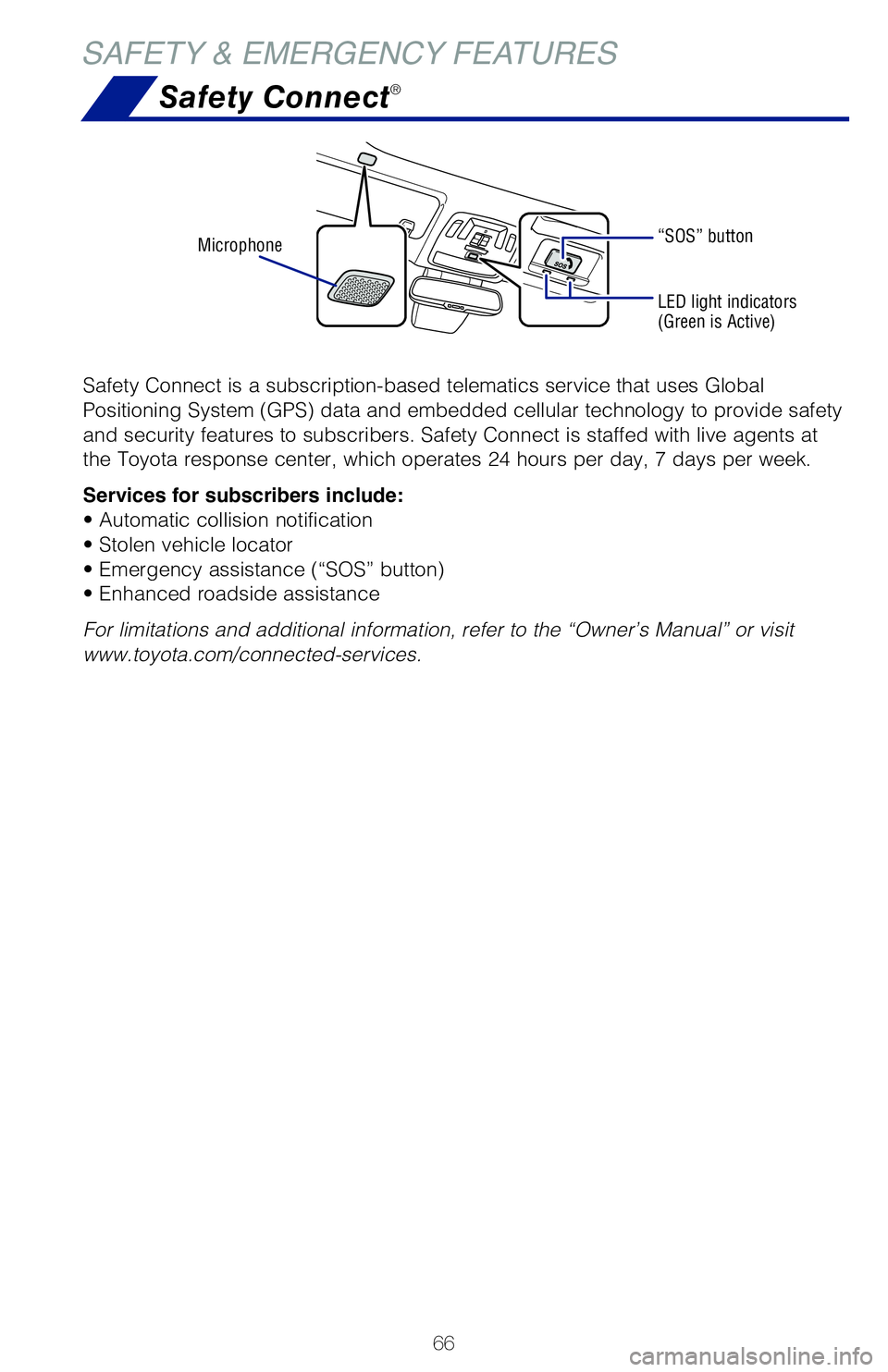
Safety Connect is a subscription-based telematics service that uses Global
Positioning System (GPS) data and embedded cellular technology to provide safety
and security features to subscribers. Safety Connect is staffed with live agents at
the Toyota response center, which operates 24 hours per day, 7 days per week.
Services for subscribers include:
• Automatic collision notification
• Stolen vehicle locator
• Emergency assistance (“SOS” button)
• Enhanced roadside assistance
For limitations and additional information, refer to the “Owner’s Manual” or visit
www.toyota.com/connected-services.
Microphone
LED light indicators
(Green is Active)
“SOS” button
SAFETY & EMERGENCY FEATURES
VEHICLE STABILITY CONTROL (VSC)
VSC helps prevent loss of traction during cornering by reducing engine power and
applying brake force to selected wheels.
Toyota’s VSC monitors steering angle and the direction your vehicle is traveling.
When it senses that the front or rear wheels begin to lose traction, VSC reduces
engine power and applies braking to selected wheels. This helps restore traction
and vehicle control.
ANTI-LOCK BRAKE SYSTEM (ABS)
Toyota’s ABS sensors detect which wheels are locking up and limits wheel lockup
by “pulsing” each wheel’s brakes independently. Pulsing releases brake pressure
repeatedly for fractions of a second. This helps the tires attain the traction that
current road conditions will allow, helping you to stay in directional control.
BRAKE ASSIST (BA)
Brake Assist is designed to detect sudden or “panic” braking, and then add braking
pressure to help decrease the vehicle’s stopping distance. When there’s only a split
second to react, Brake Assist can add additional brake pressure more quickly than
just the driver alone can.
ELECTRONIC BRAKE FORCE DISTRIBUTION (EBD)
Toyota’s ABS technology has Electronic Brake-force Distribution (EBD) to help
maintain control and balance when braking. EBD responds to sudden stops by
redistributing brake force to enhance the braking effectiveness of all four wheels. Your vehicle comes standard with the Star Safety System
TM, which combines Anti-
lock Braking System (ABS), Brake Assist (BA), Electronic Brake-force Distribution
(EBD), Smart Stop Technology (SST), Traction Control (TRAC) and Vehicle Stability
Control (VSC).
Refer to the Owner’s Manual for more details and important information on limitations
to these systems.
SMART STOP TECHNOLOGY (SST)
Smart Stop Technology automatically reduces engine power when the accelerator
and brake pedals are pressed simultaneously under certain conditions.
SST engages when the accelerator is depressed first and the brakes are applied
firmly for longer than one-half second at speeds greater than five miles per hour.
SST doesn’t engage if the brake pedal is depressed before the accelerator pedal,
allowing vehicles to start on a steep hill and safely accelerate without rolling
backward.
MY21_Sienna_QRG_V4_ML_0929.indd 6610/5/20 12:15 PM
Page 69 of 76
 67
OVERVIEW
FEATURES & OPERATIONS
TOYOTA SAFETY SENSE
SAFETY & EMERGENCY FEATURES
Safety Connect®
Safety Connect is a subscription-based telematics service that uses Glob\
al
Positioning System (GP")
67
OVERVIEW
FEATURES & OPERATIONS
TOYOTA SAFETY SENSE
SAFETY & EMERGENCY FEATURES
Safety Connect®
Safety Connect is a subscription-based telematics service that uses Glob\
al
Positioning System (GPS) data and embedded cellular technology to prov\
ide safety
and security features to subscribers. Safety Connect is staffed with liv\
e agents at
the Toyota response center, which operates 24 hours per day, 7 days per \
week.
Services for subscribers include:
• Automatic collision notification
• Stolen vehicle locator
• Emergency assistance (“SOS” button)
• Enhanced roadside assistance
For limitations and additional information, refer to the “Owner’s \
Manual” or visit
www.toyota.com/connected-services.
Star Safety System™
VEHICLE STABILITY CONTROL (VSC)
VSC helps prevent loss of traction during cornering by reducing engine p\
ower and
applying brake force to selected wheels.
Toyota’s VSC monitors steering angle and the direction your vehicle i\
s traveling.
When it senses that the front or rear wheels begin to lose traction, VSC\
reduces
engine power and applies braking to selected wheels. This helps restore \
traction
and vehicle control.
ANTI-LOCK BRAKE SYSTEM (ABS)
Toyota’s ABS sensors detect which wheels are locking up and limits wh\
eel lockup
by “pulsing” each wheel’s brakes independently. Pulsing release\
s brake pressure
repeatedly for fractions of a second. This helps the tires attain the tr\
action that
current road conditions will allow, helping you to stay in directional c\
ontrol.
BRAKE ASSIST (BA)
Brake Assist is designed to detect sudden or “panic” braking, and \
then add braking
pressure to help decrease the vehicle’s stopping distance. When there\
’s only a split
second to react, Brake Assist can add additional brake pressure more qui\
ckly than
just the driver alone can.
ELECTRONIC BRAKE FORCE DISTRIBUTION (EBD)
Toyota’s ABS technology has Electronic Brake-force Distribution (EBD\
) to help
maintain control and balance when braking. EBD responds to sudden stops \
by
redistributing brake force to enhance the braking effectiveness of all f\
our wheels. Your vehicle comes standard with the Star Safety System
TM, which combines Anti-
lock Braking System (ABS), Brake Assist (BA), Electronic Brake-force\
Distribution
(EBD), Smart Stop Technology (SST), Traction Control (TRAC) and V\
ehicle Stability
Control (VSC).
Refer to the Owner’s Manual for more details and important information on limitations
to these systems.
SMART STOP TECHNOLOGY (SST)
Smart Stop Technology automatically reduces engine power when the accele\
rator
and brake pedals are pressed simultaneously under certain conditions.
SST engages when the accelerator is depressed first and the brakes are a\
pplied
firmly for longer than one-half second at speeds greater than five miles\
per hour.
SST doesn’t engage if the brake pedal is depressed before the acceler\
ator pedal,
allowing vehicles to start on a steep hill and safely accelerate without\
rolling
backward.
MY21_Sienna_QRG_V4_ML_0929.indd 6710/5/20 12:15 PM