navigation TOYOTA SIENNA HYBRID 2021 Owners Manual (in English)
[x] Cancel search | Manufacturer: TOYOTA, Model Year: 2021, Model line: SIENNA HYBRID, Model: TOYOTA SIENNA HYBRID 2021Pages: 76, PDF Size: 6 MB
Page 4 of 76
2
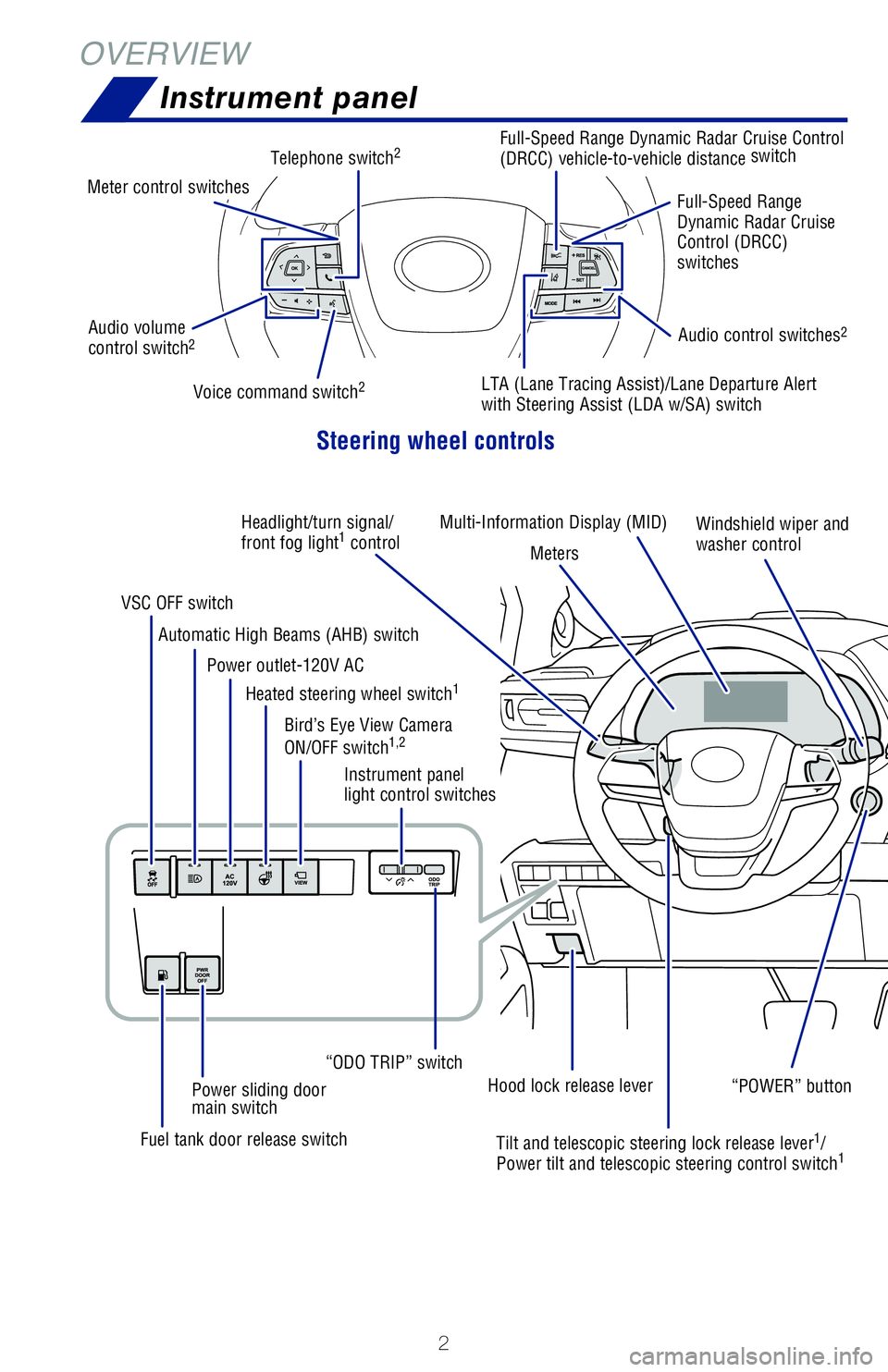
OVERVIEWInstrument panel
Steering wheel controls
Multi-Information Display (MID)
Audio volume
control switch2Audio control switches2
Telephone switch2
Meter control switches
Full-Speed Range Dynamic Radar Cruise Control
(DRCC) vehicle-to-vehicle distance switch
Full-Speed Range
Dynamic Radar Cruise
Control (DRCC)
switches
LTA (Lane Tracing Assist)/Lane Departure Alert
with Steering Assist (LDA w/SA) switchVoice command switch2
Headlight/turn signal/
front fog light1 control
MetersWindshield wiper and
washer control
“POWER” button
Instrument panel
light control switches
Automatic High Beams (AHB) switch
Power outlet-120V AC
VSC OFF switch
Heated steering wheel switch
1
Bird’s Eye View Camera
ON/OFF switch1,2
Power sliding door
main switch
“ODO TRIP” switch
Fuel tank door release switch Tilt and telescopic steering lock release lever
1/
Power tilt and telescopic steering control switch1
Hood lock release lever
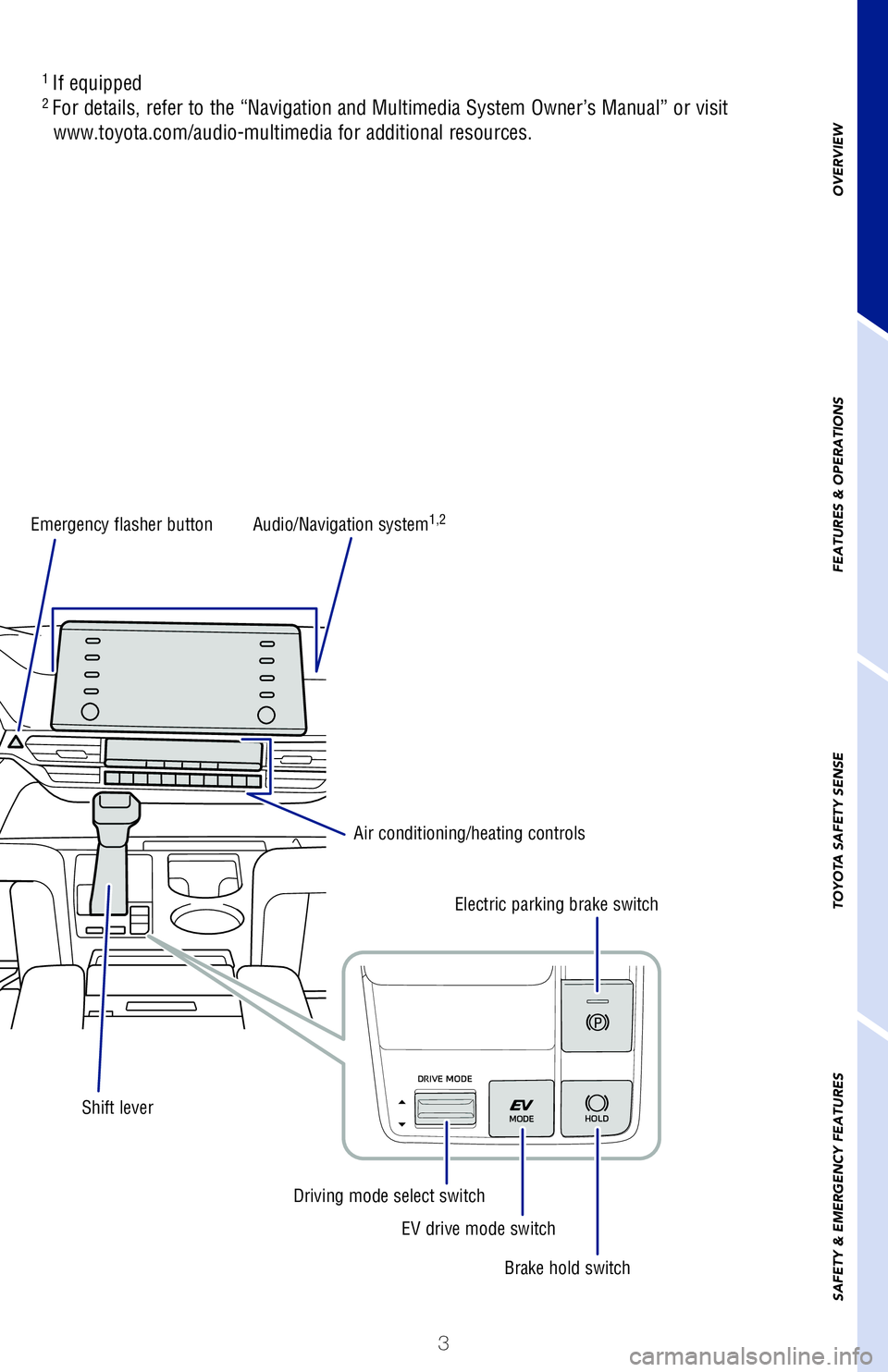
Emergency flasher button
1
If equipped2 For details, refer to the “Navigation and Multimedia System Owner’s Manual” or visit
www.toyota.com/audio-multimedia for additional resources.
MY21_Sienna_QRG_V4_ML_0929.indd 210/5/20 12:14 PM
Page 5 of 76
3
OVERVIEW
FEATURES & OPERATIONS
TOYOTA SAFETY SENSE
SAFETY & EMERGENCY FEATURES
Audio control switches2
Full-Speed Range Dynamic Radar Cruise Control
(DRCC) vehicle-to-vehicle distance switch
Full-Speed Range
Dynamic Radar Cruise
Control (DRCC)
switches
LTA (Lane Tracing Assist)/Lane Departure Alert
with Steering Assist (LDA w/SA) switch
Windshield wiper and
washer control
“POWER” button
Audio/Navigation system1,2
Air conditioning/heating controls Electric parking brake switch
Brake hold switch
EV drive mode switch
Driving mode select switch
Tilt and telescopic steering lock release lever1/ Power tilt and telescopic steering control switch1 Emergency flasher button
Shift lever
1
If equipped2 For details, refer to the “Navigation and Multimedia System Owner’\
s Manual” or visit
www.toyota.com/audio-multimedia for additional resources.
MY21_Sienna_QRG_V4_ML_0929.indd 310/5/20 12:14 PM
Page 12 of 76
 10
Hybrid Synergy Drive System
The Hybrid Synergy Drive System utilizes a computer-controlled gasoline \
engine
and electric motor to provide the most efficient combination of power fo\
r the
vehicl")
10
Hybrid Synergy Drive System
The Hybrid Synergy Drive System utilizes a computer-controlled gasoline \
engine
and electric motor to provide the most efficient combination of power fo\
r the
vehicle. When the brakes are applied, the braking force generates electr\
icity, which
is then sent to the traction battery to conserve energy. In addition, th\
e engine shuts
off when the vehicle is stopped. The benefits are better fuel economy an\
d reduced
vehicle emissions.
NOTE: Fuel consumption and energy information of the Hybrid System are shown on the Multi-Information Display (MID) and the audio system
screen (navigation system or multi-media system.)
- Ensure tire pressures are maintained at levels specified in the Owner’\
s Manual.
- Link trips to reduce engine cold starts whenever possible.
- Avoid driving at speeds that are higher than necessary, especially on \
the highway.
- When possible, avoid sudden stops to maximize regenerative braking ene\
rgy.
- Minimize use of the Air Conditioning.
(1) Put the shift lever in “Park.”
(2) Depress the brake pedal, and “
” will be displayed on the Multi-Information
Display.
(3) Push the “POWER” button briefly and firmly.
(4) The “READY” light will blink. After a few seconds, when the light \
remains steady
and a beep sounds, shift the gear to the desired position and you may be\
gin
driving.
FEATURES & OPERATIONS
TIPS FOR IMPROVED FUEL ECONOMY
STARTING THE HYBRID SYSTEM
Push
When the steering lock cannot be
released, “Push Power Button while
Turning the Steering Wheel in Either
Direction” will be displayed on the
Multi-Information Display.
Check that the shift lever is set in P.
Press the power button shortly and
firmly while turning the steering wheel
left and right.
Push
Turn
Steering lock release
Shift the shift lever to “S” position from “D” position.
+ :
Upshift (push and release)
- : Downshift (pull and release)
Downshifting increases power going uphill, or provides engine braking do\
wnhill. For
best fuel economy during normal driving conditions, always drive with th\
e shift lever
in the “D” position. * The vehicle must be on and the brake pedal depressed to shift from Par\
k.
“S” (SEQUENTIAL) MODE
DEFAULT SETTING
CUSTOMIZED SETTING
Automatic door locks can be programmed to operate in different modes, or\
turned
OFF.
Speed linked door locking function
-Doors lock when the vehicle speed is approximately 12 mph or higher.
Driver’s door linked door unlocking function
-Doors unlock when the driver
Page 13 of 76
 11
The Hybrid Synergy Drive System utilizes a computer-controlled gasoline \
engine
and electric motor to provide the most efficient combination of power fo\
r the
vehicle. When the brakes are appli")
11
The Hybrid Synergy Drive System utilizes a computer-controlled gasoline \
engine
and electric motor to provide the most efficient combination of power fo\
r the
vehicle. When the brakes are applied, the braking force generates electr\
icity, which
is then sent to the traction battery to conserve energy. In addition, th\
e engine shuts
off when the vehicle is stopped. The benefits are better fuel economy an\
d reduced
vehicle emissions.
NOTE: Fuel consumption and energy information of the Hybrid System are shown on the Multi-Information Display (MID) and the audio system
screen (navigation system or multi-media system.)
- Ensure tire pressures are maintained at levels specified in the Owner’\
s Manual.
- Link trips to reduce engine cold starts whenever possible.
- Avoid driving at speeds that are higher than necessary, especially on \
the highway.
- When possible, avoid sudden stops to maximize regenerative braking ene\
rgy.
- Minimize use of the Air Conditioning.
(1) Put the shift lever in “Park.”
(2) Depress the brake pedal, and “
” will be displayed on the Multi-Information
Display.
(3) Push the “POWER” button briefly and firmly.
(4) The “READY” light will blink. After a few seconds, when the light \
remains steady
and a beep sounds, shift the gear to the desired position and you may be\
gin
driving.
OVERVIEW
FEATURES & OPERATIONS
TOYOTA SAFETY SENSE
SAFETY & EMERGENCY FEATURES
When the steering lock cannot be
released, “Push Power Button while
Turning the Steering Wheel in Either
Direction” will be displayed on the
Multi-Information Display.
Check that the shift lever is set in P.
Press the power button shortly and
firmly while turning the steering wheel
left and right.
Steering lock release
Hybrid transmission
Shift the shift lever to “S” position from “D” position.
+ : Upshift (push and release)
- : Downshift (pull and release)
Downshifting increases power going uphill, or provides engine braking do\
wnhill. For
best fuel economy during normal driving conditions, always drive with th\
e shift lever
in the “D” position. * The vehicle must be on and the brake pedal depressed to shift from Par\
k.
“S” (SEQUENTIAL) MODE
P
R
N
D
S
+ (“S” mode)
- (“S” mode)
Park*
Reverse
Neutral
Drive
“S” mode
DEFAULT SETTING
CUSTOMIZED SETTING
Auto lock/unlock
Automatic door locks can be programmed to operate in different modes, or\
turned
OFF.
Speed linked door locking function
-Doors lock when the vehicle speed is approximately 12 mph or higher.
Driver’s door linked door unlocking function
-Doors unlock when the driver’s door is opened within 45 seconds after\
the vehicle is turned off.
Refer to the Owner’s Manual for more details. Shift position linked door locking/unlocking function
-Doors lock when shifting from Park.
-Doors unlock when shifting into Park.
MY21_Sienna_QRG_V4_ML_0929.indd 1110/5/20 12:14 PM
Page 20 of 76
18
Multi-Information Display (MID)
1) Push “MENU” button next to the screen.
2) Select “Setup” or “General” in the touchscreen to access the general setting screen.
3) Select “Clock.”
4) Select desired items to be set.
Refer to the “Navigation and Multimedia System Owner’s Manual” \
for more details.
* Premium Audio only
FEATURES & OPERATIONS
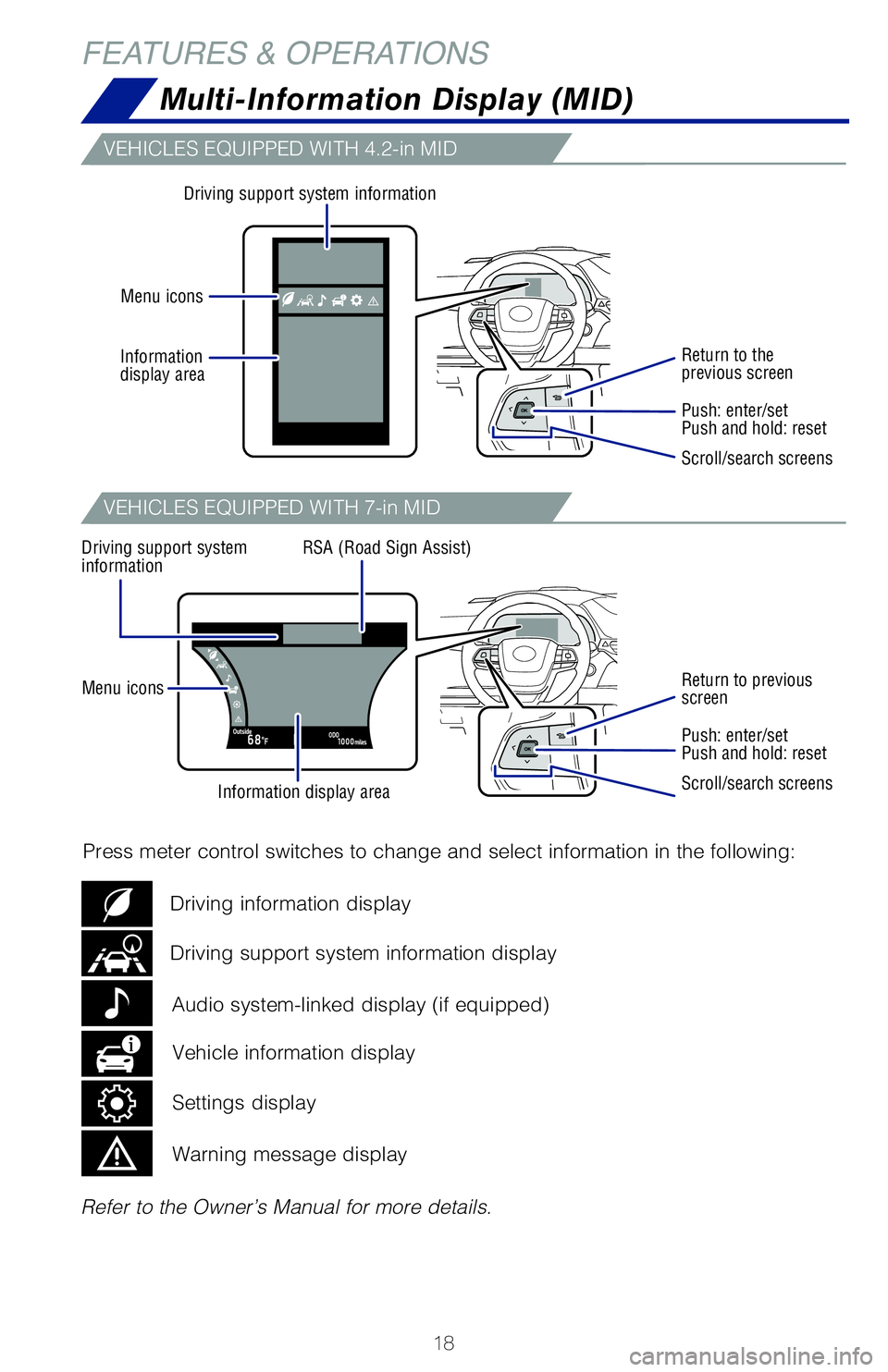
Information display area
Driving support system information
Driving support system
information RSA (Road Sign Assist)
Menu icons
Menu icons Information
display area
Refer to the Owner’s Manual for more details.
Press meter control switches to change and select information in the fol\
lowing:
Return to the
previous screen
Return to previous
screen
Push: enter/set
Push and hold: reset
Push: enter/set
Push and hold: reset
Scroll/search screens
Scroll/search screens
Driving support system information display Driving information display
Vehicle information display
Audio system-linked display (if equipped)
Settings display
Warning message display
VEHICLES EQUIPPED WITH 4.2-in MID
VEHICLES EQUIPPED WITH 7-in MID
The head-up display projects a variety of driving related information an\
d the
operating state of the driving support systems on the windshield.
Press meter control switches and select “
” on the Multi-Information Display
(MID) and select “HUD Main” to access Head-up display settings. \
And push “
”
to enter selection.
Refer to the Owner’s Manual for more details.
MY21_Sienna_QRG_V4_ML_0929.indd 1810/5/20 12:14 PM
Page 21 of 76
19
Multi-Information Display (MID)
1) Push “MENU” button next to the screen.
2) Select “Setup” or “General” in the touchscreen to access the general setting screen.
3) Select “Clock.”
4) Select desired items to be set.
Refer to the “Navigation and Multimedia System Owner’s Manual” \
for more details.
* Premium Audio only
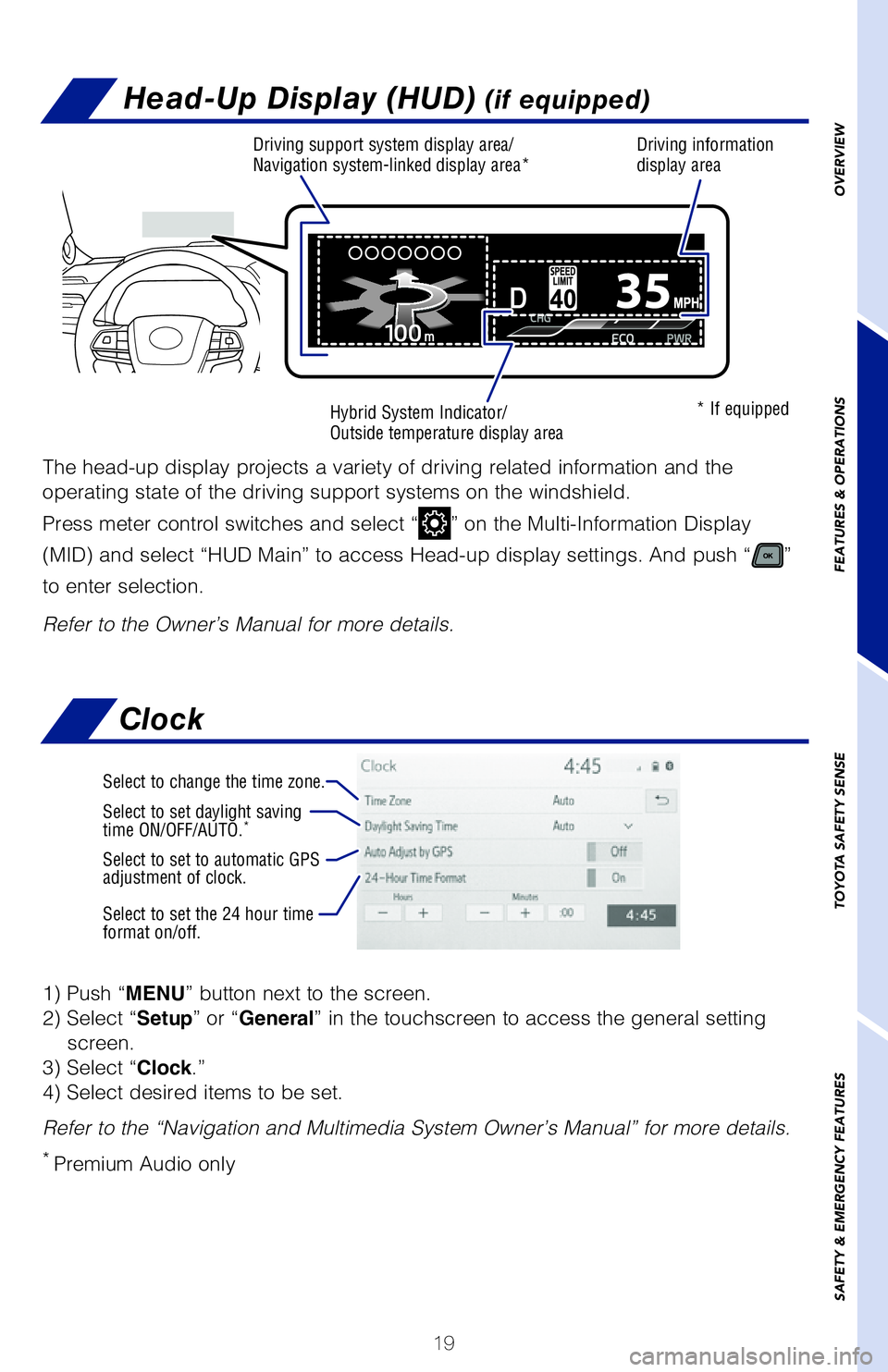
Select to change the time zone.
Select to set daylight saving
time ON/OFF/AUTO.*
Select to set to automatic GPS
adjustment of clock.
Select to set the 24 hour time
format on/off.
Clock
OVERVIEW
FEATURES & OPERATIONS
TOYOTA SAFETY SENSE
SAFETY & EMERGENCY FEATURES
Refer to the Owner’s Manual for more details. Press meter control switches to change and select information in the fol\
lowing:
Return to the
previous screen
Return to previous
screen
Push: enter/set
Push and hold: reset
Push: enter/set
Push and hold: reset
Scroll/search screens
Scroll/search screens
Driving support system information display Driving information display
Head-Up Display (HUD) (if equipped)
The head-up display projects a variety of driving related information an\
d the
operating state of the driving support systems on the windshield.
Press meter control switches and select “
” on the Multi-Information Display
(MID) and select “HUD Main” to access Head-up display settings. \
And push “
”
to enter selection.
Refer to the Owner’s Manual for more details.
* If equipped
Driving support system display area/
Navigation system-linked display area*Hybrid System Indicator/
Outside temperature display area Driving information
display area
MY21_Sienna_QRG_V4_ML_0929.indd 1910/5/20 12:14 PM
Page 30 of 76
 28
FEATURES & OPERATIONS
Bluetooth® technology allows dialing or receipt of calls without removing your han\
ds
from the steering wheel.
Refer to the Bluetooth
® device pairing in this guide or th")
28
FEATURES & OPERATIONS
Bluetooth® technology allows dialing or receipt of calls without removing your han\
ds
from the steering wheel.
Refer to the Bluetooth
® device pairing in this guide or the Navigation and
Multimedia System Owner’s Manual for additional user instructions.
NOTE: Always use safe driving practices and follow all traffic rules.
Type A (without moonroof)
Volume control1) Push “MENU” button next to the screen.
2) Select “Setup.”
3) Select “Audio ” and then select “Driver Easy Speak.”
4) Select the desired items to be set.
Refer to the “Navigation and Multimedia System Owner’s Manual” \
for more details.
On/Off setting
Volume setting
Driver Easy Speak (if equipped)
Driver Easy Speak will utilize the vehicle’s built-in microphone and \
speakers to allow
passengers in the rear of the vehicle to more easily hear the driver.
The feature must be turned on every time you enter the vehicle, and auto\
matically
turns off when any door (including the liftgate) is opened.
MY21_Sienna_QRG_V4_ML_0929.indd 2810/5/20 12:14 PM
Page 31 of 76
29
OVERVIEW
FEATURES & OPERATIONS
TOYOTA SAFETY SENSE
SAFETY & EMERGENCY FEATURES
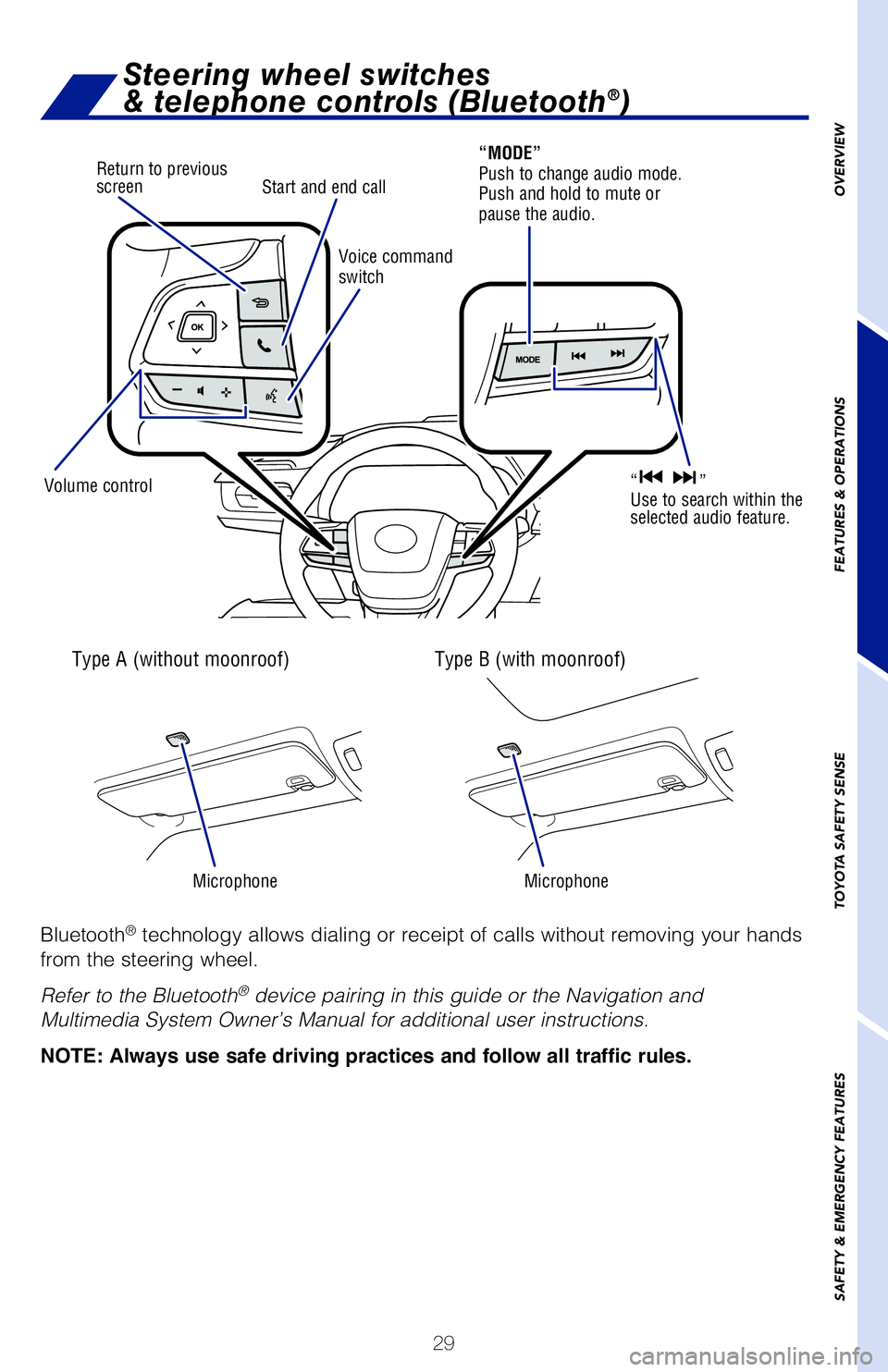
Bluetooth® technology allows dialing or receipt of calls without removing your hands
from the steering wheel.
Refer to the Bluetooth
® device pairing in this guide or the Navigation and
Multimedia System Owner’s Manual for additional user instructions.
NOTE: Always use safe driving practices and follow all traffic rules.
Steering wheel switches
& telephone controls (Bluetooth®)
Type A (without moonroof)
Microphone Microphone
Type B (with moonroof)
Volume controlVoice command
switch
Start and end call
“MODE”
Push to change audio mode.
Push and hold to mute or
pause the audio.
“ ”
Use to search within the
selected audio feature.
Return to previous
screen
1) Push “MENU” button next to the screen.
2) Select “Setup.”
3) Select “Audio ” and then select “Driver Easy Speak.”
4) Select the desired items to be set.
Refer to the “Navigation and Multimedia System Owner’s Manual” for more details.
Driver Easy Speak (if equipped)
Driver Easy Speak will utilize the vehicle’s built-in microphone and speakers to allow
passengers in the rear of the vehicle to more easily hear the driver.
The feature must be turned on every time you enter the vehicle, and automatically
turns off when any door (including the liftgate) is opened.
MY21_Sienna_QRG_V4_ML_0929.indd 2910/5/20 12:14 PM
Page 32 of 76
30
FEATURES & OPERATIONS
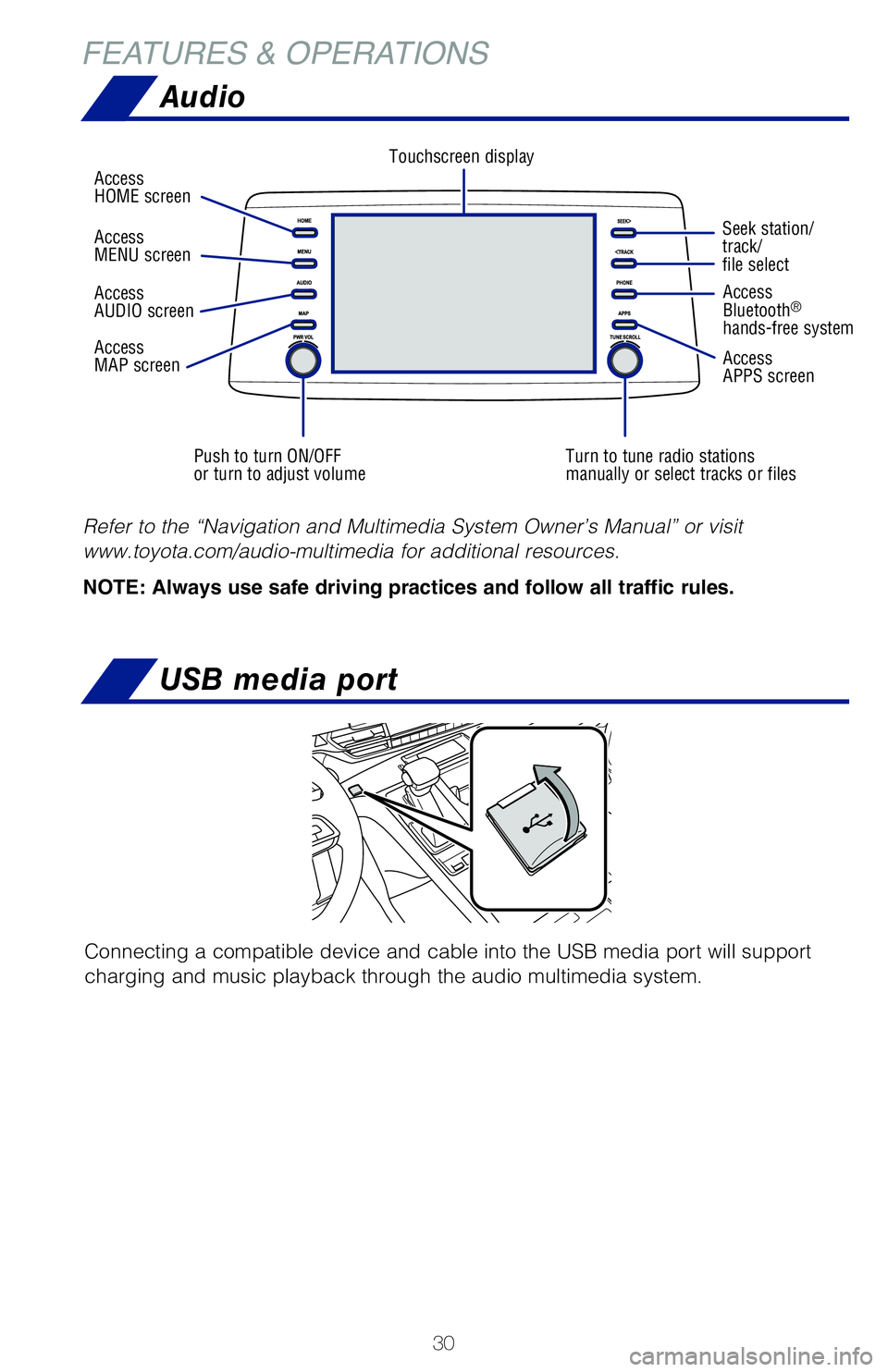
Audio
Push to turn ON/OFF
or turn to adjust volumeTurn to tune radio stations
manually or select tracks or filesSeek station/
track/
file select
Access
HOME screen
Touchscreen display
Access
Bluetooth
®
hands-free system
Access
APPS screen
Access
AUDIO screen
Access
MAP screen Access
MENU screen
Refer to the “Navigation and Multimedia System Owner’s Manual” or visit
www.toyota.com/audio-multimedia for additional resources.
NOTE: Always use safe driving practices and follow all traffic rules.
USB media port
Connecting a compatible device and cable into the USB media port will support
charging and music playback through the audio multimedia system.
In the console box
Interior panel of 3rd row seating
The vehicle must be in the “ACCESSORY” or “IGNITION ON” mode for use.
USB Type-A port: 2.5A / USB Type-C port: 3.0A
MY21_Sienna_QRG_V4_ML_0929.indd 3010/5/20 12:14 PM
Page 33 of 76
31
OVERVIEW
FEATURES & OPERATIONS
TOYOTA SAFETY SENSE
SAFETY & EMERGENCY FEATURES
Seek station/
track/
file select
Access
Bluetooth
®
hands-free system
Access
APPS screen
Refer to the “Navigation and Multimedia System Owner’s Manual” \
or visit
www.toyota.com/audio-multimedia for additional resources.
NOTE: Always use safe driving practices and follow all traffic rules.
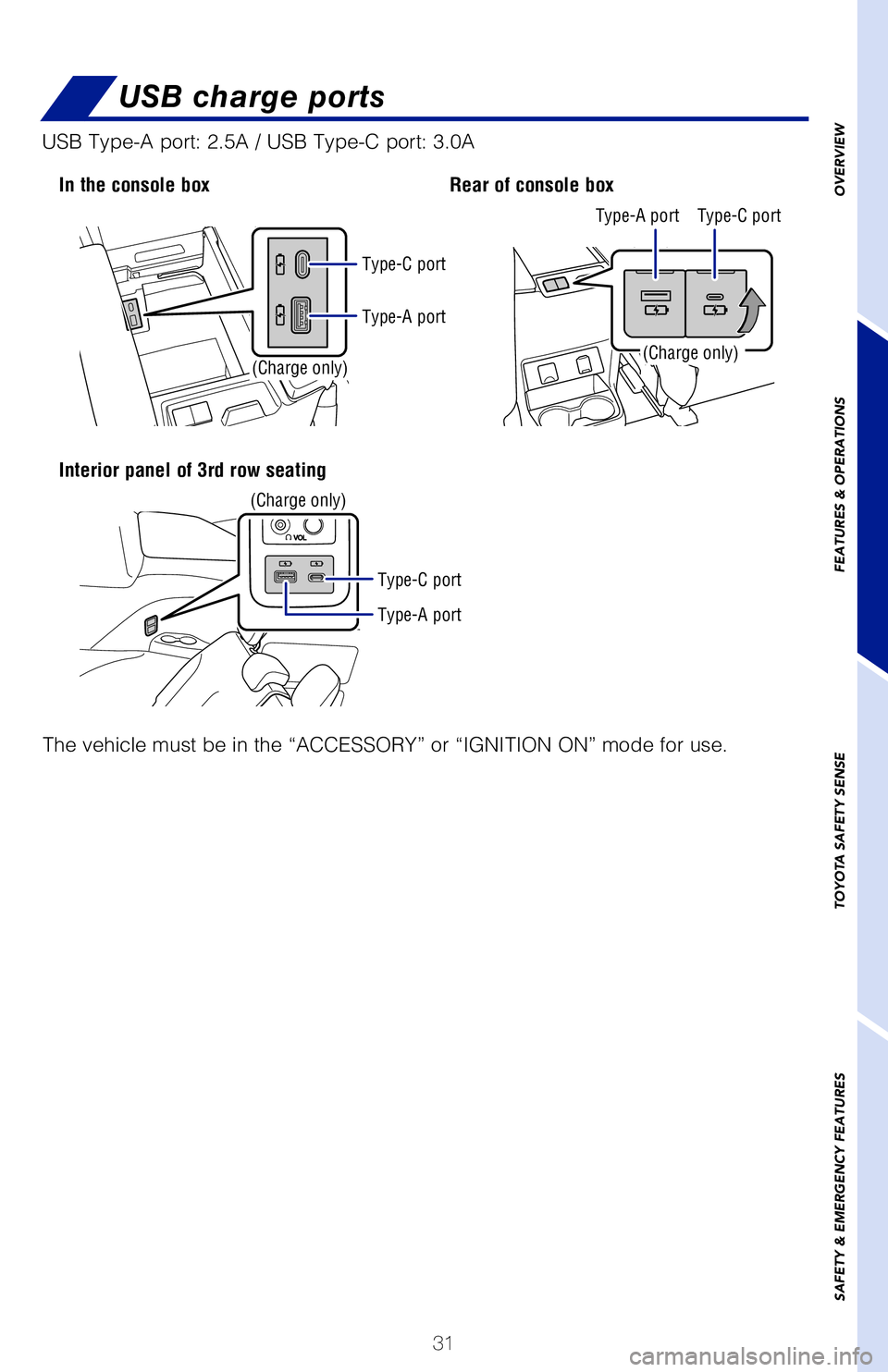
USB charge ports
Connecting a compatible device and cable into the USB media port will su\
pport
charging and music playback through the audio multimedia system.
In the console box
Interior panel of 3rd row seating Rear of console box
(Charge only)
(Charge only)(Charge only)
The vehicle must be in the “ACCESSORY” or “IGNITION ON” mode\
for use.
USB Type-A port: 2.5A / USB Type-C port: 3.0A
Type-A port
Type-A port Type-A port Type-C port
Type-C port
Type-C port
MY21_Sienna_QRG_V4_ML_0929.indd 3110/5/20 12:14 PM