window TOYOTA SIENNA HYBRID 2021 Owners Manual (in English)
[x] Cancel search | Manufacturer: TOYOTA, Model Year: 2021, Model line: SIENNA HYBRID, Model: TOYOTA SIENNA HYBRID 2021Pages: 76, PDF Size: 6 MB
Page 2 of 76
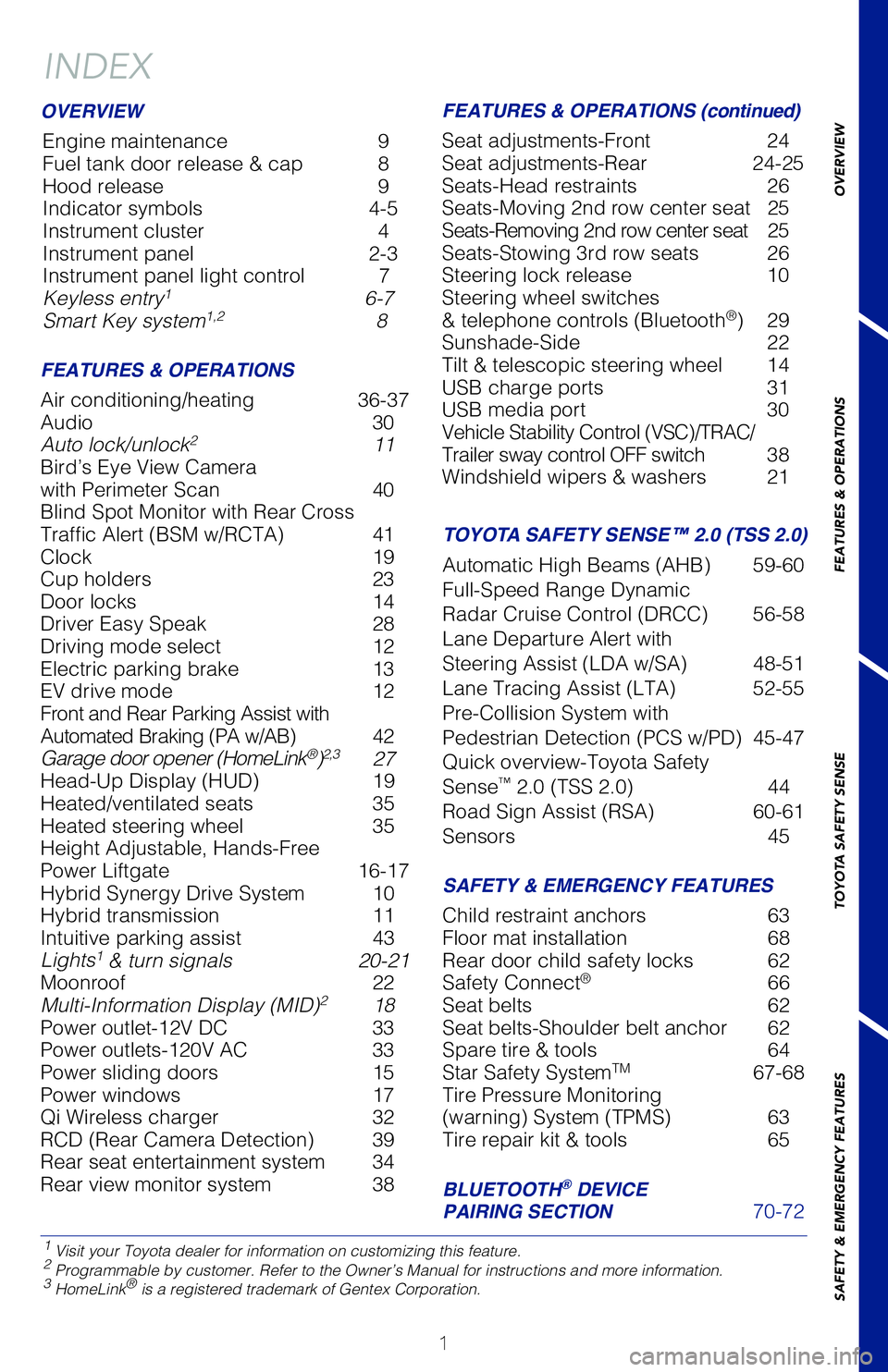
 INDEX
1 Visit your Toyota dealer for information on customizing this feature.2 Programmable by customer. Refer to the Owner’s Manual for instructio\
ns and more information.3 HomeLink® is a registe")
INDEX
1 Visit your Toyota dealer for information on customizing this feature.2 Programmable by customer. Refer to the Owner’s Manual for instructio\
ns and more information.3 HomeLink® is a registered trademark of Gentex Corporation.
OVERVIEW
FEATURES & OPERATIONS
Air conditioning/heating 36-37
Audio 30
Auto lock/unlock
2 11
Bird’s Eye View Camera
with Perimeter Scan 40
Blind Spot Monitor with Rear Cross
Traffic Alert (BSM w/RCTA) 41
Clock 19
Cup holders 23
Door locks 14
Driver Easy Speak 28
Driving mode select 12
Electric parking brake 13
EV drive mode 12
Front and Rear Parking Assist with
Automated Braking (PA w/AB) 42
Garage door opener (HomeLink
®)2,3 27
Head-Up Display (HUD) 19
Heated/ventilated seats 35
Heated steering wheel 35
Height Adjustable, Hands-Free
Power Liftgate 16-17
Hybrid Synergy Drive System 10
Hybrid transmission 11
Intuitive parking assist 43
Lights
1 & turn signals 20-21
Moonroof 22
Multi-Information Display (MID)
2 18
Power outlet-12V DC 33
Power outlets-120V AC 33
Power sliding doors 15
Power windows 17
Qi Wireless charger 32
RCD (Rear Camera Detection) 39
Rear seat entertainment system 34
Rear view monitor system 38
SIENNA 2021
This Quick Reference Guide is a summary of basic vehicle
operations. It contains brief descriptions of fundamental
operations so you can locate and use the vehicle’s main
equipment quickly and easily.
The Quick Reference Guide is not intended as a substitute for
the Owner’s Manual located in your vehicle’s glove box. We
strongly encourage you to review the Owner’s Manual and
supplementary manuals so you will have a better understanding
of your vehicle’s capabilities and limitations.
Your dealership and the entire staff of Toyota Motor North
America, Inc. wish you many years of satisfied driving in your
new Sienna.
A word about safe vehicle operations
This Quick Reference Guide is not a full description of Sienna operation\
s.
Every Sienna owner should review the Owner’s Manual that accompanies \
this
vehicle.
Pay special attention to the boxed
information highlighted in color throughout
the Owner’s Manual. Each box contains safe operating instructions to \
help you
avoid injury or equipment malfunction.
All information in this Quick Reference Guide is current at the time of \
printing.
Toyota reserves the right to make changes at any time without notice.
Engine maintenance 9
Fuel tank door release & cap 8
Hood release 9
Indicator symbols 4-5
Instrument cluster 4
Instrument panel 2-3
Instrument panel light control 7
Keyless entry
1 6-7
Smart Key system1,2 8
MY21_Sienna_QRG_V4_ML_0929.indd 210/5/20 12:14 PM
Page 3 of 76
1
OVERVIEW
FEATURES & OPERATIONS
TOYOTA SAFETY SENSE
SAFETY & EMERGENCY FEATURES
INDEX
1 Visit your Toyota dealer for information on customizing this feature.2 Programmable by customer. Refer to the Owner’s Manual for instructio\
ns and more information.3 HomeLink® is a registered trademark of Gentex Corporation.
OVERVIEW
FEATURES & OPERATIONS FEATURES & OPERATIONS (continued)
SAFETY & EMERGENCY FEATURES
Air conditioning/heating 36-37
Audio 30
Auto lock/unlock
2 11
Bird’s Eye View Camera
with Perimeter Scan
40
Blind Spot Monitor with Rear Cross
Traffic Alert (BSM w/RCTA)
41
Clock
19
Cup holders
23
Door locks
14
Driver Easy Speak
28
Driving mode select
12
Electric parking brake
13
EV drive mode
12
Front and Rear Parking Assist with
Automated Braking (PA w/AB)
4
2
Garage door opener (HomeLink
®)2,3 27
Head-Up Display (HUD)
19
Heated/ventilated seats
35
Heated steering wheel
35
Height Adjustable, Hands-Free
Power Liftgate
16-17
Hybrid Synergy Drive System
10
Hybrid transmission
11
Intuitive parking assist
43
Lights1 & turn signals 20-21
Moonroof 22
Multi-Information Display (MID)
2 18
Power outlet-12V DC
33
Power outlets-120V AC
33
Power sliding doors
15
Power windows
17
Qi Wireless charger
32
RCD (Rear Camera Detection)
39
Rear seat entertainment system
34
Rear view monitor system
38 Seat adjustments-Front
24
Seat adjustments-Rear
24-25
Seats-Head restraints
26
Seats-Moving 2nd row center seat
2
5
Seats-Removing 2nd row center seat
25
Seats-Stowing 3rd row seats
26
Steering lock release
10
Steering wheel switches
& telephone controls (Bluetooth
®) 29
Sunshade-Side
22
Tilt & telescopic steering wheel
14
USB charge ports
31
USB media port
30
Vehicle Stability Control (VSC)/TRAC/
Trailer sway control OFF switch
3
8
Windshield wipers & washers
21
Child restraint anchors
63
Floor mat installation
68
Rear door child safety locks
62
Safety Connect
® 66
Seat belts
62
Seat belts-Shoulder belt anchor
62
Spare tire & tools
64
Star Safety SystemTM 67-68
Tire Pressure Monitoring
(warning) System (TPMS)
63
Tire repair kit & tools
65
SIENNA 2021
This Quick Reference Guide is a summary of basic vehicle
operations. It contains brief descriptions of fundamental
operations so you can locate and use the vehicle’s main
equipment quickly and easily.
The Quick Reference Guide is not intended as a substitute for
the Owner’s Manual located in your vehicle’s glove box. We
strongly encourage you to review the Owner’s Manual and
supplementary manuals so you will have a better understanding
of your vehicle’s capabilities and limitations.
Your dealership and the entire staff of Toyota Motor North
America, Inc. wish you many years of satisfied driving in your
new Sienna.
A word about safe vehicle operations
This Quick Reference Guide is not a full description of Sienna operation\
s.
Every Sienna owner should review the Owner’s Manual that accompanies \
this
vehicle.
Pay special attention to the boxed information highlighted in color throughout
the Owner’s Manual. Each box contains safe operating instructions to \
help you
avoid injury or equipment malfunction.
All information in this Quick Reference Guide is current at the time of \
printing.
Toyota reserves the right to make changes at any time without notice.
BLUETOOTH® DEVICE
PAIRING SECTION 70-72
TOYOTA SAFETY SENSE™ 2.0 (TSS 2.0)
Automatic High Beams (AHB) 59-60
Full-Speed Range Dynamic
Radar Cruise Control (DRCC)
56-58
Lane Departure Alert with
Steering Assist (LDA w/SA)
48-51
Lane Tracing Assist (LTA)
52-55
Pre-Collision System with
Pedestrian Detection (PCS w/PD)
45-47
Quick overview-Toyota Safety
Sense
™ 2.0 (TSS 2.0) 44
Road Sign Assist (RSA)
60-61
Sensors
45
Engine maintenance
9
Fuel tank door release & cap
8
Hood release
9
Indicator symbols
4-5
Instrument cluster
4
Instrument panel
2-3
Instrument panel light control
7
Keyless entry
1 6-7
Smart Key system1,2 8
MY21_Sienna_QRG_V4_ML_0929.indd 110/5/20 12:14 PM
Page 18 of 76
 16
1. When the liftgate reaches the desired height, push the rear liftgate \
close-button (on the door jam of the liftgate) once. Press and hold the button unti\
l the buzzer
sounds (4 times).
2. To")
16
1. When the liftgate reaches the desired height, push the rear liftgate \
close-button (on the door jam of the liftgate) once. Press and hold the button unti\
l the buzzer
sounds (4 times).
2. To reset the height, with the liftgate open and not moving, press and\
hold the rear liftgate close-button until the buzzer sounds 4 times, and continue to h\
old until it
buzzes again, then let go. Push the same button to close the liftgate. W\
hen you
next open the liftgate, it will open to the maximum height.
3. To set the height using the Multi-Information Display, press “
” or “” of the
meter control switches and select “
(Vehicle Settings)” from “” screen.
Press “
” or “” and select “ (PBD)” and then press “.” Select “PBD
Opening Adjustment,” then press “
.” Select desired position (5 height options
to choose from,) then press “
.”
NOTE: If battery is disconnected, the power back door needs to be reinit\
ialized.
From front seats
Power Liftgate (back door)
Open: Push and hold
Close: Push and hold again
(close only)(open only)
HANDS-FREE FUNCTION (CONTINUED)
HEIGHT ADJUSTABLE FUNCTION
Height Adjustable, Hands-Free
Power Liftgate
(if equipped)
To automatically open/close Power Liftgate: Quickly kick your foot underneath
the lower center part of the rear bumper for within 1 second to trigger\
sensor. To
operate, make sure that the touchless sensor operation is enabled, the v\
ehicle is
OFF and that you are carrying the remote.
Press “ ” or “” of the meter control switches and select “
(PBD)” from the “
(Vehicle Settings)” from the “” screen on the Multi-Information Display (MID)
to access hands-free settings. And push “
” to enter selection.
NOTE:
- Installation of a tow hitch receiver or other accessories may require disabling or removing the kick sensor.
- Use the same gear and “
” icons from the HUD section.
For more details, refer to the Owner’s Manual.
HANDS-FREE FUNCTION (IF EQUIPPED)
Perform the entire kick operation
within 1 second.
Sensor area
Kick sensor
Carry Smart Key remote
All window auto up/down: Push the switch completely down or pull it completely
up and release to fully open or close. To stop window partway, lightly p\
ush the
switch in the opposite direction.
Window lock switch: Deactivates all passenger windows. Driver’s window remains
operable.
FEATURES & OPERATIONS
MY21_Sienna_QRG_V4_ML_0929.indd 1610/5/20 12:14 PM
Page 19 of 76
 17
OVERVIEW
FEATURES & OPERATIONS
TOYOTA SAFETY SENSE
SAFETY & EMERGENCY FEATURES
1. When the liftgate reaches the desired height, push the rear liftgate \
close-button
(on the door jam of the liftga")
17
OVERVIEW
FEATURES & OPERATIONS
TOYOTA SAFETY SENSE
SAFETY & EMERGENCY FEATURES
1. When the liftgate reaches the desired height, push the rear liftgate \
close-button
(on the door jam of the liftgate) once. Press and hold the button unti\
l the buzzer
sounds (4 times).
2. To reset the height, with the liftgate open and not moving, press and\
hold the rear liftgate close-button until the buzzer sounds 4 times, and continue to h\
old until it
buzzes again, then let go. Push the same button to close the liftgate. W\
hen you
next open the liftgate, it will open to the maximum height.
3. To set the height using the Multi-Information Display, press “ ” or “ ” of the
meter control switches and select “
(Vehicle Settings)” from “” screen.
Press “ ” or “ ” and select “
(PBD)” and then press “.” Select “PBD
Opening Adjustment,” then press “
.” Select desired position (5 height options
to choose from,) then press “
.”
NOTE: If battery is disconnected, the power back door needs to be reinit\
ialized.
HANDS-FREE FUNCTION (CONTINUED)
Height Adjustable, Hands-Free
Power Liftgate
(if equipped)
To automatically open/close Power Liftgate: Quickly kick your foot underneath
the lower center part of the rear bumper for within 1 second to trigger\
sensor. To
operate, make sure that the touchless sensor operation is enabled, the v\
ehicle is
OFF and that you are carrying the remote.
Press “
” or “” of the meter control switches and select “ (PBD)” from the “
(Vehicle Settings)” from the “” screen on the Multi-Information Display (MID)
to access hands-free settings. And push “
” to enter selection.
NOTE:
- Installation of a tow hitch receiver or other accessories may require disabling or removing the kick sensor.
- Use the same gear and “
” icons from the HUD section.
For more details, refer to the Owner’s Manual.
All window auto up/down: Push the switch completely down or pull it completely
up and release to fully open or close. To stop window partway, lightly p\
ush the
switch in the opposite direction.
Window lock switch: Deactivates all passenger windows. Driver’s window remains
operable.
Window lock switch
Indicator
Up
Down
Power windows
MY21_Sienna_QRG_V4_ML_0929.indd 1710/5/20 12:14 PM
Page 24 of 76
22
FEATURES & OPERATIONS
CONSOLE BOX
2ND CENTER SEAT (8-PASSENGER MODELS)
3RD ROW SEAT
Type A
Type B
Vehicles without spare tire
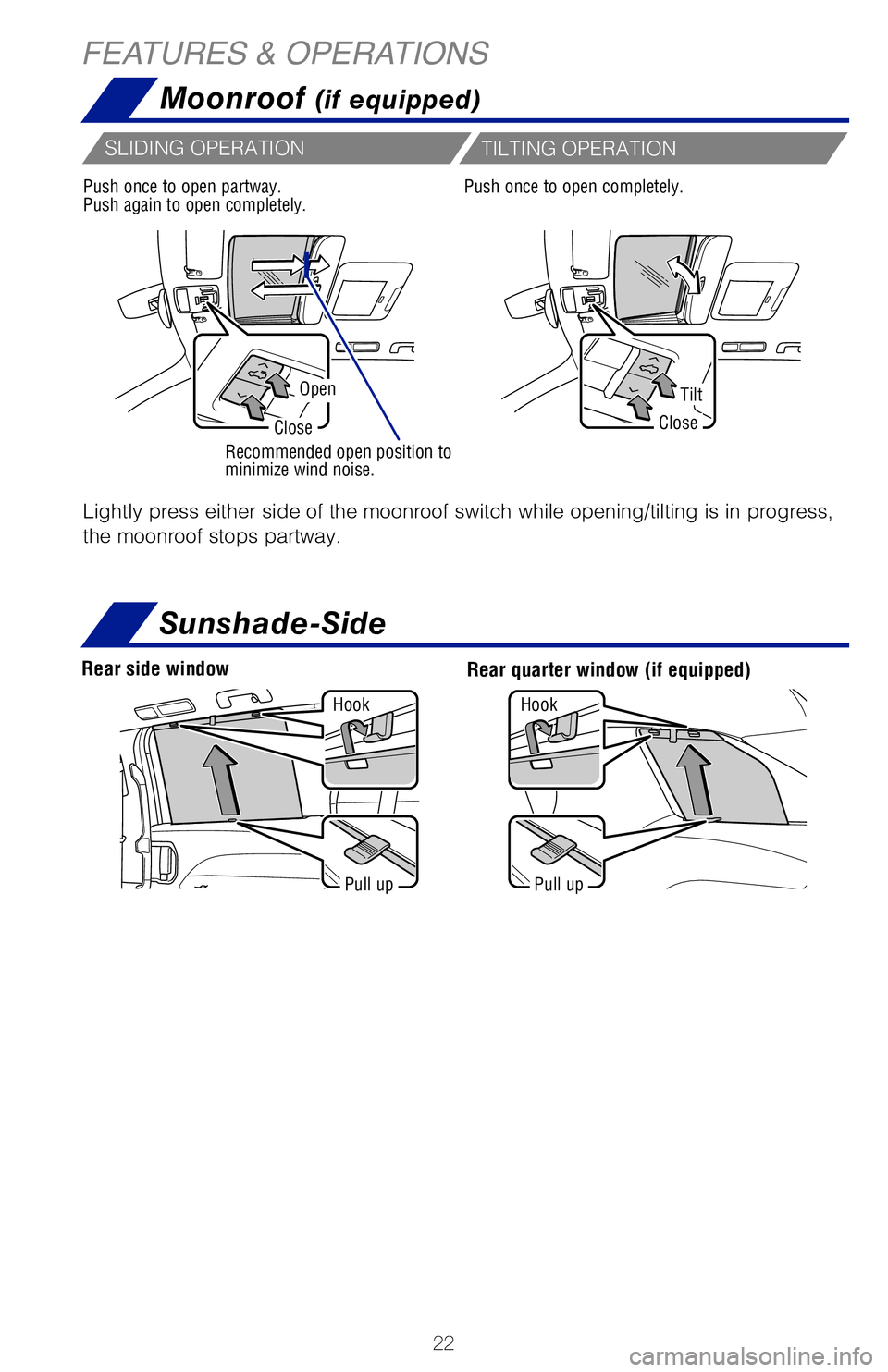
Moonroof (if equipped)
OpenTilt
CloseClose
Recommended open position to
minimize wind noise.
Lightly press either side of the moonroof switch while opening/tilting is in progress,
the moonroof stops partway.
Push once to open partway.
Push again to open completely.Push once to open completely.
SLIDING OPERATION
TILTING OPERATION
Pull upPull up
Hook
Hook
Sunshade-Side
Rear quarter window (if equipped)Rear side window
MY21_Sienna_QRG_V4_ML_0929.indd 2210/5/20 12:14 PM
Page 25 of 76
23
OVERVIEW
FEATURES & OPERATIONS
TOYOTA SAFETY SENSE
SAFETY & EMERGENCY FEATURES
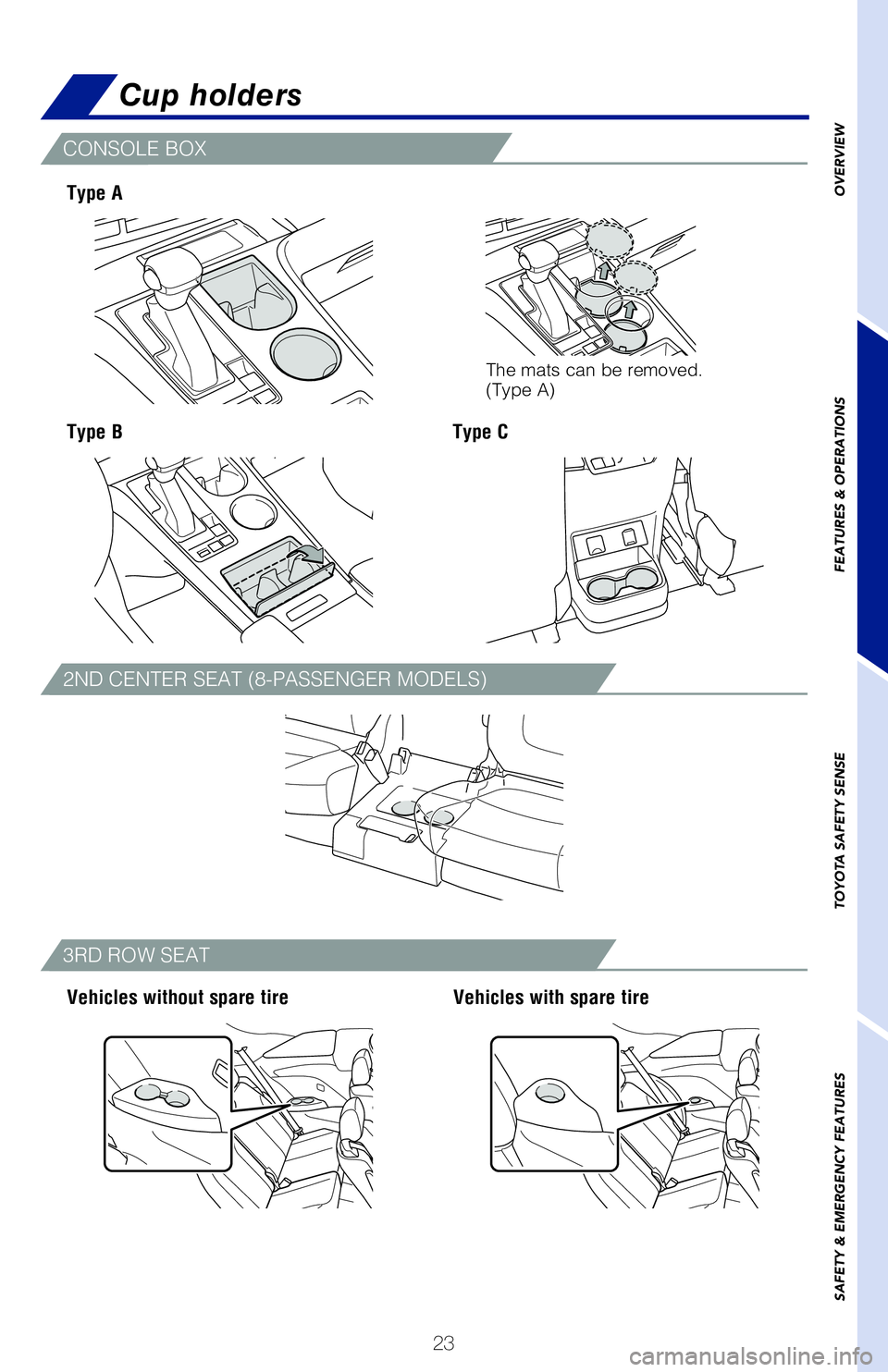
Cup holders
CONSOLE BOX
2ND CENTER SEAT (8-PASSENGER MODELS)
3RD ROW SEAT
Type A
Type B
Vehicles without spare tire Vehicles with spare tire
Type C
Lightly press either side of the moonroof switch while opening/tilting i\
s in progress,
the moonroof stops partway.
Push once to open completely.
Sunshade-Side
Rear quarter window (if equipped)
The mats can be removed.
(Type A)
MY21_Sienna_QRG_V4_ML_0929.indd 2310/5/20 12:14 PM
Page 38 of 76
36
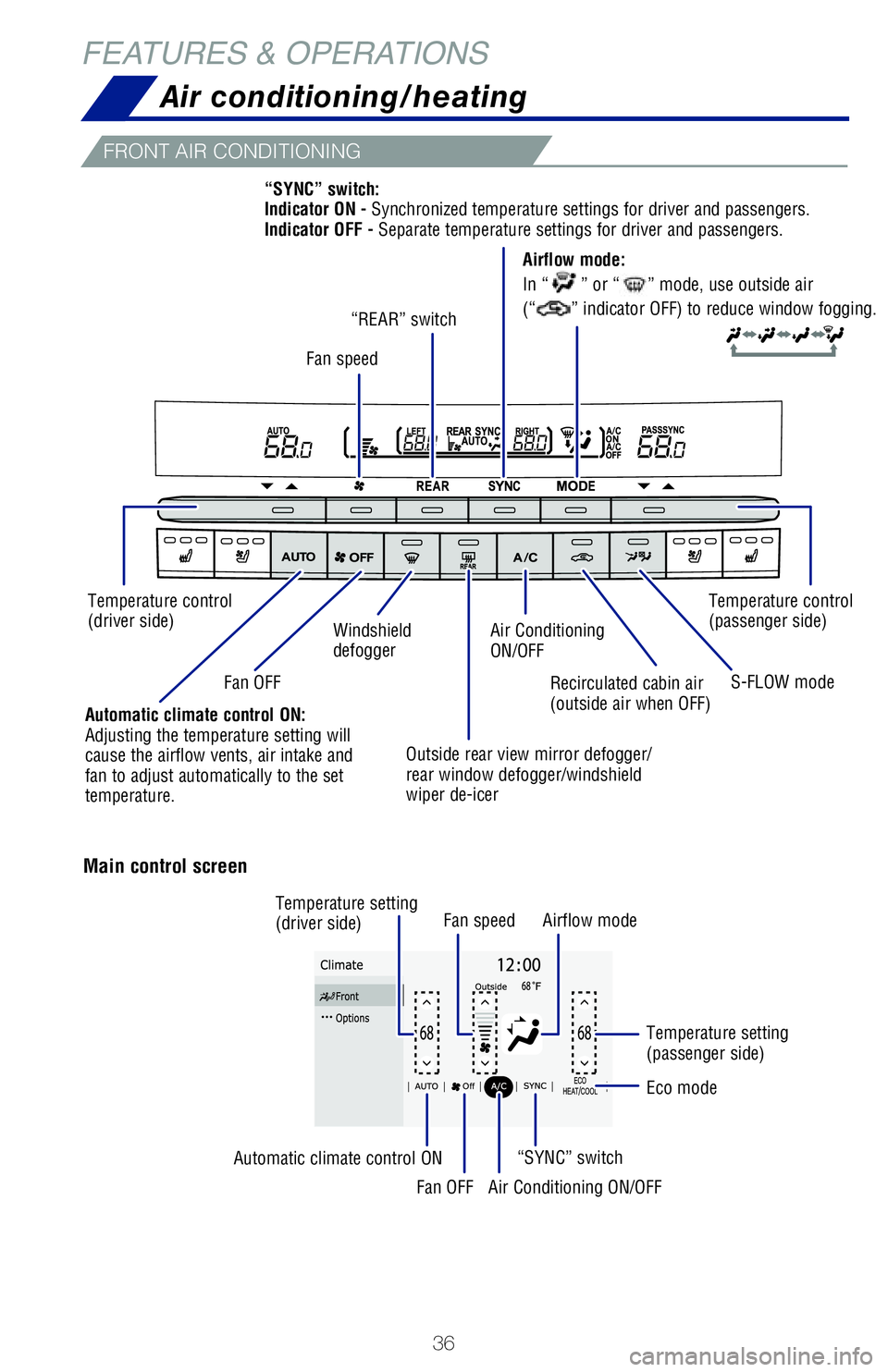
Air conditioning/heating
Recirculated cabin air
(outside air when OFF)
Air Conditioning
ON/OFF
Outside rear view mirror defogger/
rear window defogger/windshield
wiper de-icer
Windshield
defogger
FRONT AIR CONDITIONING
FRONT AIR CONDITIONING (CONTINUED)
REAR AIR CONDITIONING
Temperature control
(driver side) Fan speed
“REAR” switch
Temperature control
(passenger side)
Automatic climate control ON:
Adjusting the temperature setting will
cause the airflow vents, air intake and
fan to adjust automatically to the set
temperature.Fan OFF
S-FLOW mode
“SYNC” switch:
Indicator ON - Synchronized temperature settings for driver and pas
sengers.
Indicator OFF - Separate temperature settings for driver and passengers.
Main control screen
Option control screen
Fan speed Airflow mode
“SYNC” switch
Fan OFF
Automatic climate control ON
Air Conditioning ON/OFF
Temperature setting
(driver side)
Temperature setting
(passenger side)
Eco mode
Airflow mode:
In “
” or “” mode, use outside air
(“
” indicator OFF) to reduce window fogging.
FEATURES & OPERATIONS
MY21_Sienna_QRG_V4_ML_0929.indd 3610/5/20 12:14 PM
Page 39 of 76
37
OVERVIEW
FEATURES & OPERATIONS
TOYOTA SAFETY SENSE
SAFETY & EMERGENCY FEATURES
Automatic climate control ON
FRONT AIR CONDITIONING (CONTINUED)
REAR AIR CONDITIONING
Airflow mode:
Temperature control
(driver side)
Temperature control
(passenger side)
Temperature control (passenger side*)
* If equipped.
S-FLOW mode
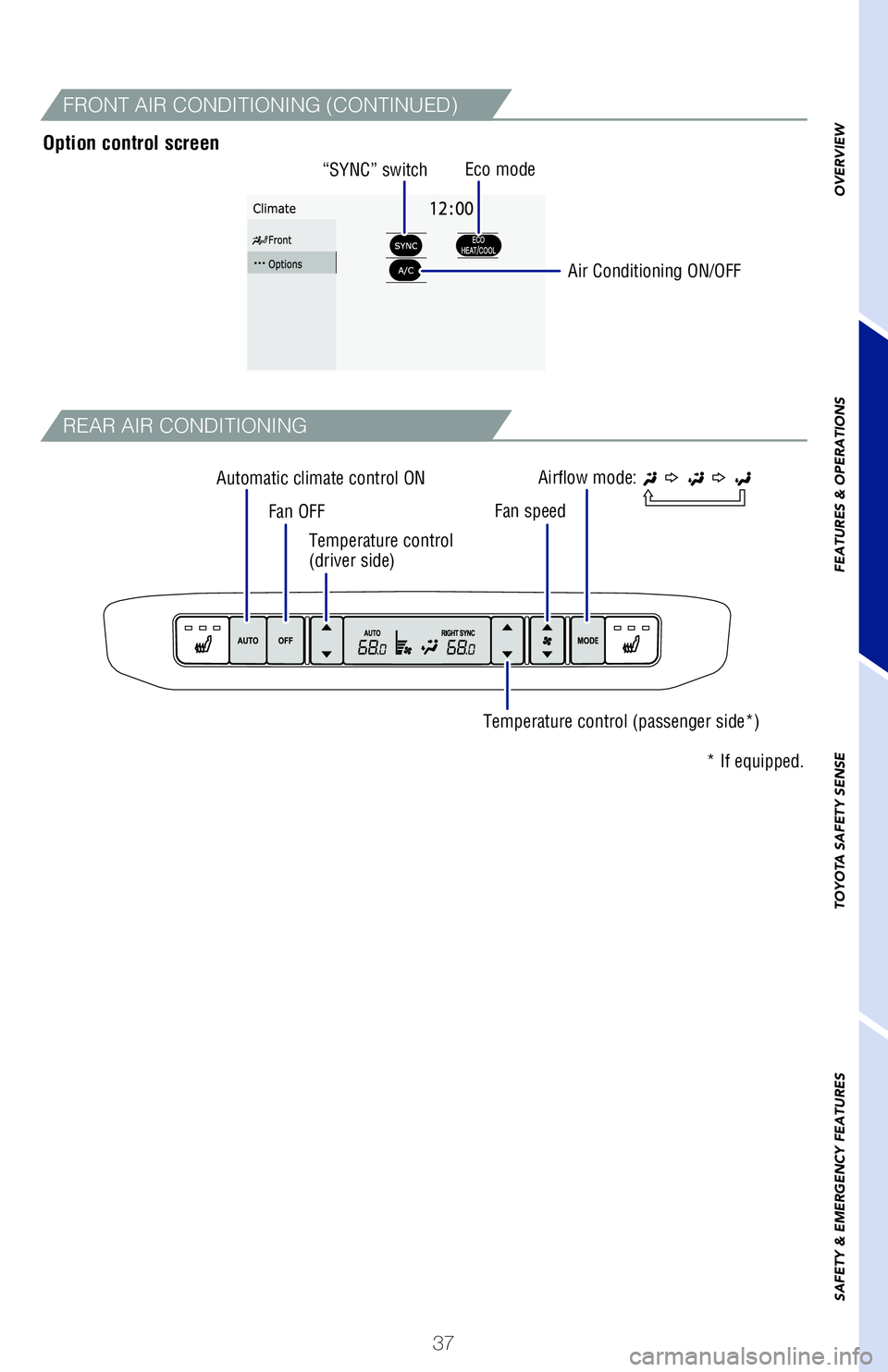
“SYNC” switch:
Indicator ON - Synchronized temperature settings for driver and pas
sengers.
Indicator OFF - Separate temperature settings for driver and passengers.
Option control screen
Fan speed
“SYNC” switch
Fan OFF Air Conditioning ON/OFF
Eco mode
Airflow mode:
In “
” or “” mode, use outside air
(“
” indicator OFF) to reduce window fogging.
MY21_Sienna_QRG_V4_ML_0929.indd 3710/5/20 12:14 PM