fuel TOYOTA SIENNA HYBRID 2021 (in English) Owner's Manual
[x] Cancel search | Manufacturer: TOYOTA, Model Year: 2021, Model line: SIENNA HYBRID, Model: TOYOTA SIENNA HYBRID 2021Pages: 601, PDF Size: 32.07 MB
Page 105 of 601
1052-1. Instrument cluster
2
Vehicle status information and indicators
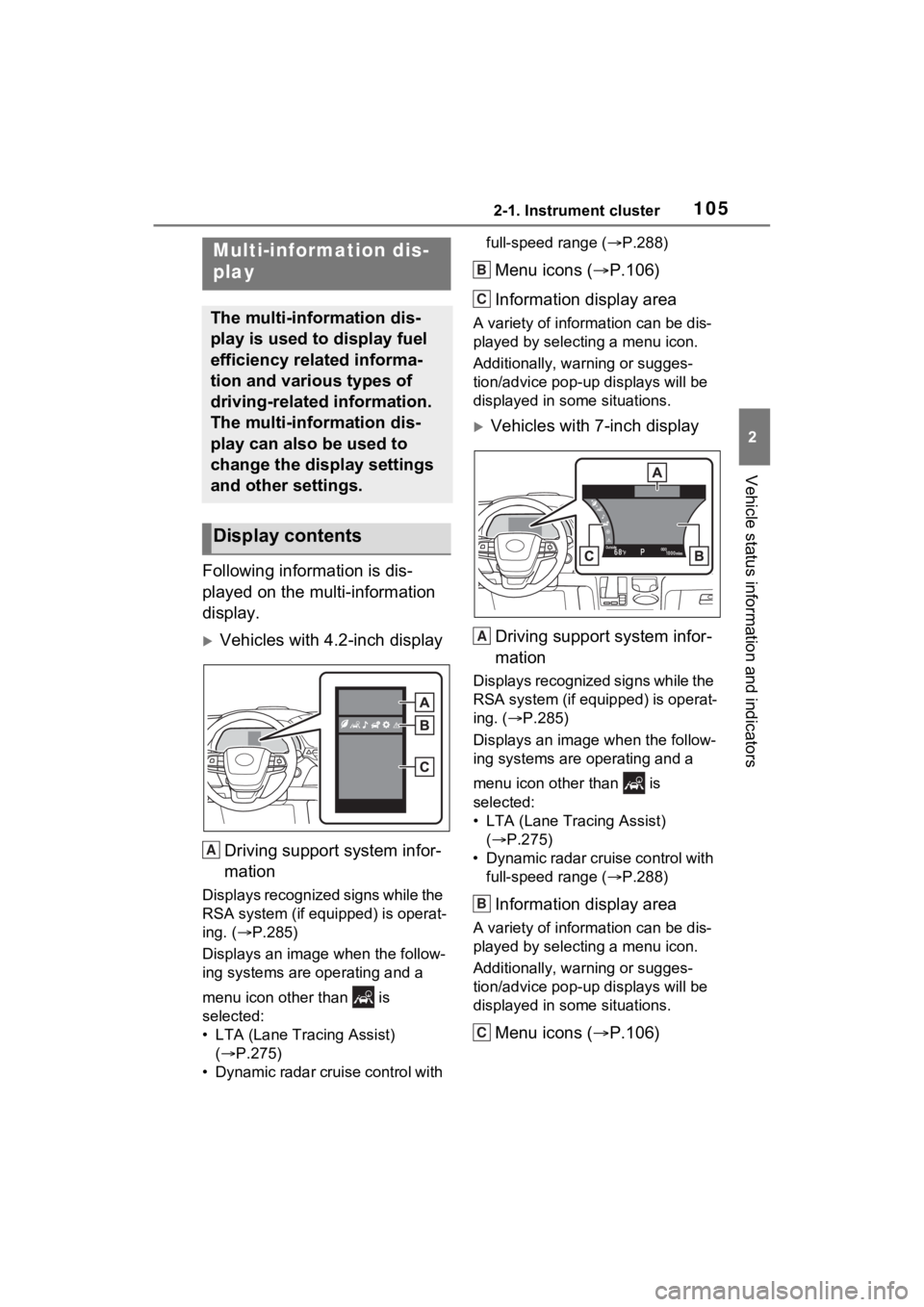
Following information is dis-
played on the multi-information
display.
Vehicles with 4.2-inch displayDriving support system infor-
mation
Displays recognized signs while the
RSA system (if equipped) is operat-
ing. ( P.285)
Displays an image when the follow-
ing systems are operating and a
menu icon other than is
selected:
• LTA (Lane Tracing Assist) ( P.275)
• Dynamic radar cruise control with full-speed range (
P.288)
Menu icons ( P.106)
Information display area
A variety of information can be dis-
played by selecting a menu icon.
Additionally, warning or sugges-
tion/advice pop-up displays will be
displayed in some situations.
Vehicles with 7-inch display
Driving support system infor-
mation
Displays recognized signs while the
RSA system (if equipped) is operat-
ing. ( P.285)
Displays an image when the follow-
ing systems are operating and a
menu icon other than is
selected:
• LTA (Lane Tracing Assist) ( P.275)
• Dynamic radar cruise control with full-speed range ( P.288)
Information display area
A variety of information can be dis-
played by selecting a menu icon.
Additionally, warning or sugges-
tion/advice pop-up displays will be
displayed in some situations.
Menu icons ( P.106)
Multi-information dis-
play
The multi-information dis-
play is used to display fuel
efficiency related informa-
tion and various types of
driving-related information.
The multi-information dis-
play can also be used to
change the display settings
and other settings.
Display contents
A
B
C
A
B
C
Page 107 of 601
1072-1. Instrument cluster
2
Vehicle status information and indicatorsSelect to display fuel consump-
tion data in various forms.
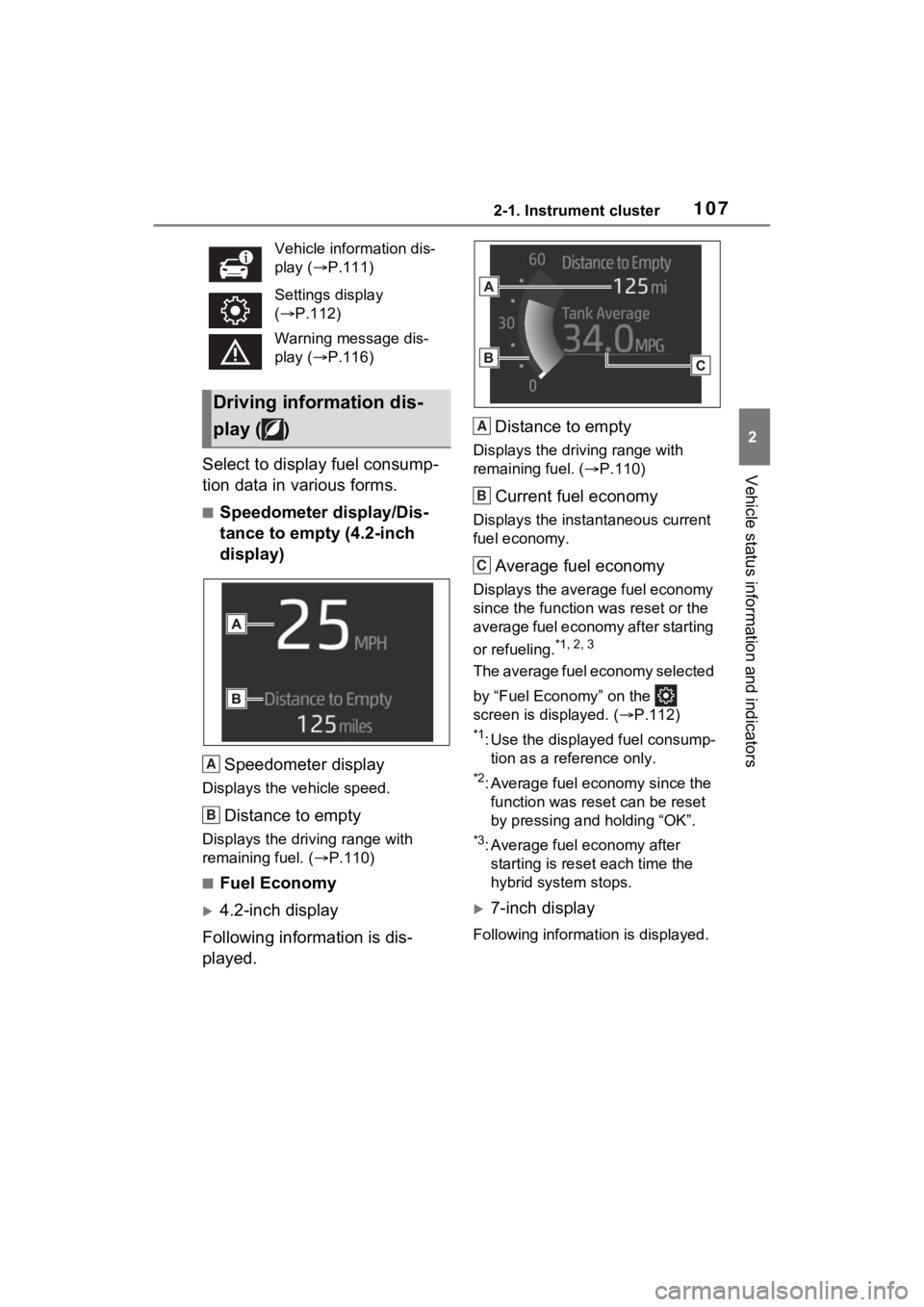
■Speedometer display/Dis-
tance to empty (4.2-inch
display)Speedometer display
Displays the vehicle speed.
Distance to empty
Displays the driving range with
remaining fuel. ( P.110)
■Fuel Economy
4.2-inch display
Following information is dis-
played. Distance to empty
Displays the driving range with
remaining fuel. (
P.110)
Current fuel economy
Displays the instantaneous current
fuel economy.
Average fuel economy
Displays the average fuel economy
since the function was reset or the
average fuel economy after starting
or refueling.
*1, 2, 3
The average fuel economy selected
by “Fuel Economy” on the
screen is displayed. ( P.112)
*1: Use the displayed fuel consump-
tion as a reference only.
*2: Average fuel economy since the function was res et can be reset
by pressing and holding “OK”.
*3: Average fuel economy after starting is reset each time the
hybrid system stops.
7-inch display
Following information is displayed.
Vehicle information dis-
play (
P.111)
Settings display
( P.112)
Warning message dis-
play ( P.116)
Driving information dis-
play ( )
A
B
A
B
C
Page 108 of 601
1082-1. Instrument cluster
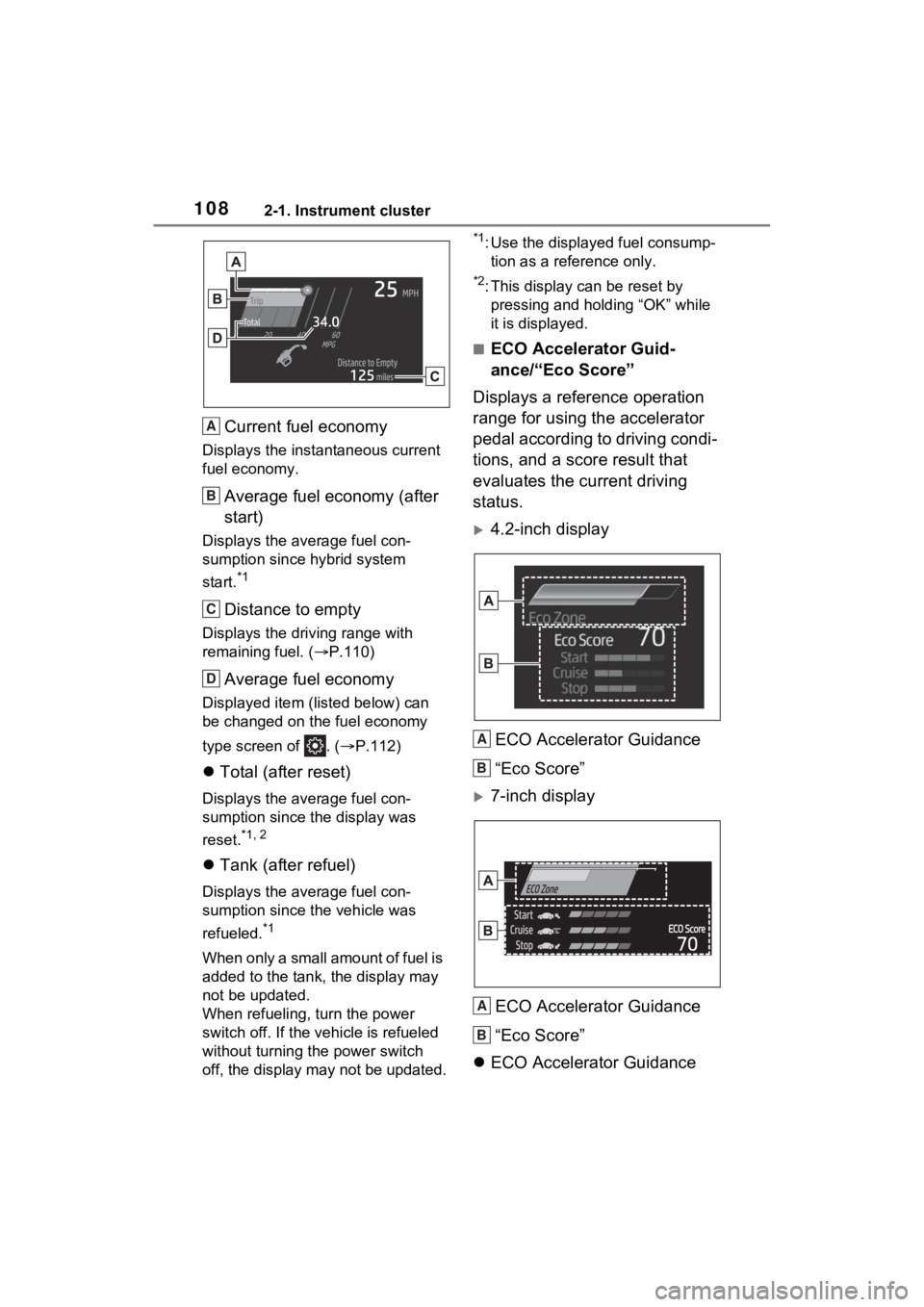
Current fuel economy
Displays the instantaneous current
fuel economy.
Average fuel economy (after
start)
Displays the average fuel con-
sumption since hybrid system
start.
*1
Distance to empty
Displays the driving range with
remaining fuel. (P.110)
Average fuel economy
Displayed item (listed below) can
be changed on the fuel economy
type screen of . ( P.112)
Total (after reset)
Displays the average fuel con-
sumption since the display was
reset.
*1, 2
Tank (after refuel)
Displays the average fuel con-
sumption since the vehicle was
refueled.
*1
When only a small amount of fuel is
added to the tank, the display may
not be updated.
When refueling, turn the power
switch off. If the vehicle is refueled
without turning the power switch
off, the display m ay not be updated.
*1: Use the displayed fuel consump-
tion as a reference only.
*2: This display can be reset by pressing and holding “OK” while
it is displayed.
■ECO Accelerator Guid-
ance/“Eco Score”
Displays a reference operation
range for using the accelerator
pedal according to driving condi-
tions, and a score result that
evaluates the current driving
status.
4.2-inch display
ECO Accelerator Guidance
“Eco Score”
7-inch displayECO Accelerator Guidance
“Eco Score”
ECO Accelerator Guidance
A
B
C
D
A
B
A
B
Page 111 of 601
1112-1. Instrument cluster
2
Vehicle status information and indicators
played.*
*
: The score result is displayed only when “Eco Score” is selected for
“Trip Summary”. ( P.112)
■Change the speedometer
display (7-inch display)
P.115
■Distance to empty
●This distance is computed based
on your averag e fuel consump-
tion. As a result, the actual dis-
tance that can be driven may
differ from tha t displayed.
●When only a small amount of fuel
is added to the tank, the display
may not be updated. When refuel-
ing, turn the power switch off. If
the vehicle is refueled without
turning the power switch off, the
display may not be updated.
●When “Refuel” is displayed, the
remaining fuel amount is low and
the distance that can be driven
with the remaining fuel cannot be
calculated.
Refuel immediately.
■ECO Accelerator Guid-
ance/“Eco Score” will not oper-
ate when
The ECO Accelerator Guid-
ance/“Eco Score” will not operate in
the following situations:
●The Hybrid System Indicator is not
operating.
●The vehicle is being driven using
the dynamic radar cruise control
with full-speed range.
■Driving support system
information display
Select to display the operational status of the following systems:
LTA (Lane Tracing Assist)
( P.275)
Dynamic radar cruise control
with full-speed range
( P.288)
RSA (Road Sign Assist) (if
equipped) ( P.285)
■Navigation system-linked
display (if equipped)
Select to display the following
navigation system-linked infor-
mation.
Route guidance
Compass display (north-up
display/heading-up display)
■Route guidance to destination
display
When the route guidance to destina-
tion display is enabled on the head-
up display, it will not be displayed on
the multi-information display.
( P.118)
Select to enable selection of an
audio source or track on the dis-
play.
■Drive information (4.2-inch
display)
2 items that are selected using
the “Drive Info Items” setting
Driving support system
information display ( )
Audio system-linked dis-
play (if equipped) ( )
Vehicle information dis-
play ( )
Page 116 of 601

1162-1. Instrument cluster
ID code set, contact your Toyota
dealer.
• “Setting UNIT”
Select to change the units of the
tire pressure displayed.
“Oil Maintenance” ( P.418)
Select to reset the Oil maintenance.
■ Meter Settings
“Language”
Select to change the language on
the multi-inform ation display.
“Units”
Select to change t he units of mea-
sure displayed.
Digital Speed (7-inch display)
Select to enable/disable the speed-
ometer display.
EV indicator ( P.80)
Select to enable/disable the EV
indicator.
Driving information display
settings
Select to set up the following items.
• “Hybrid System”
Select to enable/disable the ECO
Accelerator Guidance ( P.108).
• “Fuel Economy”
Select to change the average fuel
economy display ( P.106).
Audio settings
Select to enable/d isable the audio
system-linked display.
Vehicle information dis-
play settings
• “Display Contents” Select to displa
y the following
items.
“Energy monitor”
Select to enable/disable the Energy
monitor ( P.122)
“AWD” (AWD models)
Select to enable /disable the AWD
system display ( P.112).
• “Drive Info Type” (4.2-inch dis- play)
Select to change the drive informa-
tion type between trip and total
( P.111).
• “Drive Info Items” (4.2-inch dis- play)
Select to set the items on the upper
and lower side of the drive informa-
tion screen. from th ree items, aver-
age speed, distance and total time.
“Trip Summary” (4.2-inch dis-
play)
Select to set the items displayed
when the power switch is turned off.
“Pop-Up Display”
Select to enable/d isable the follow-
ing pop-up displays, which may
appear in some situations.
• TbT Navigation (if equipped)
• Telephone (if equipped)
• Audio operation
• Volume operation
• Voice control (if equipped)
• Brightness
“Multi-Information Display
OFF”
A blank screen is displayed.
“Default Settings”
Page 125 of 601
1252-1. Instrument cluster
2
Vehicle status information and indicators
tery)
Tire
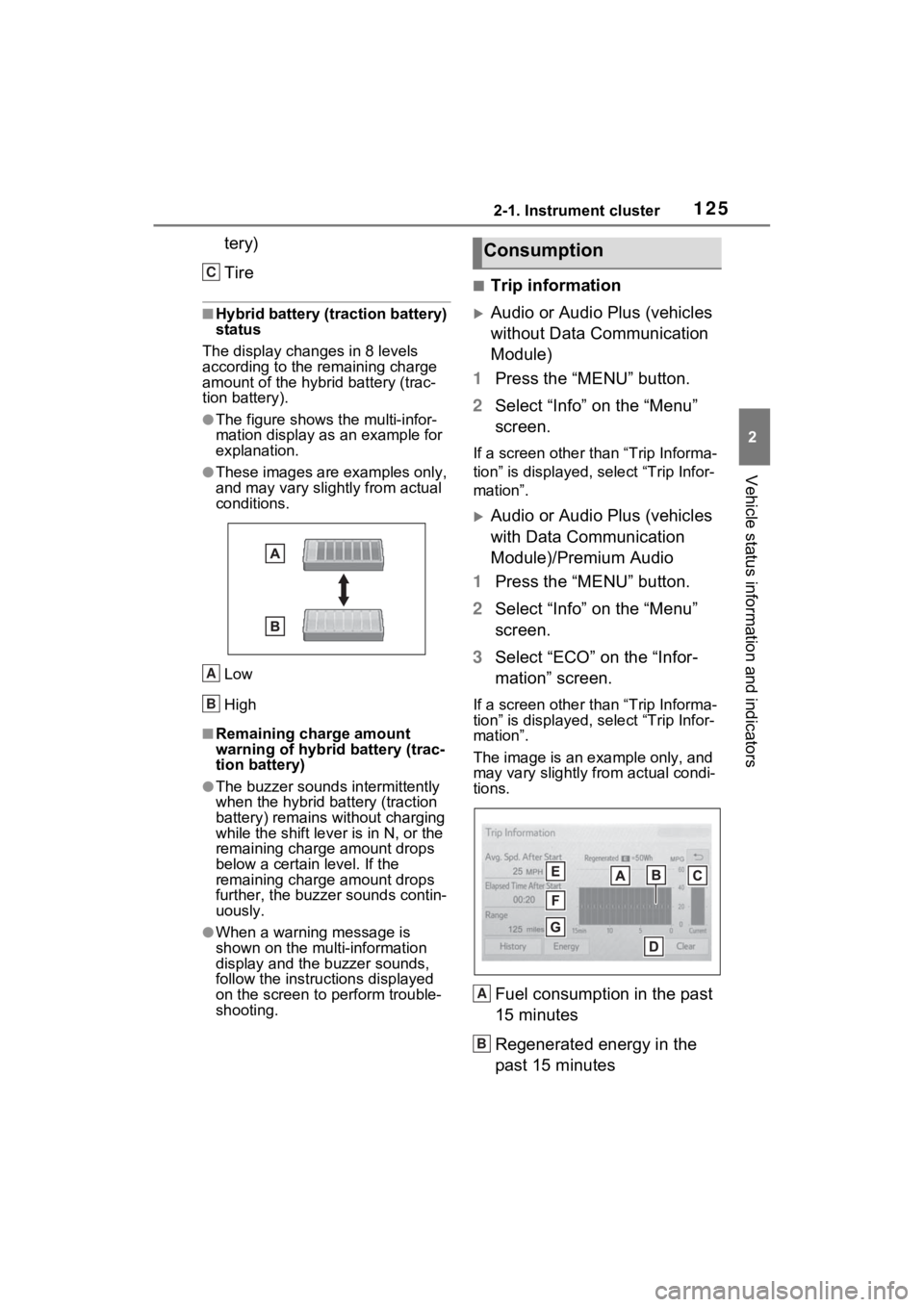
■Hybrid battery (traction battery)
status
The display changes in 8 levels
according to the remaining charge
amount of the hybrid battery (trac-
tion battery).
●The figure shows the multi-infor-
mation display as an example for
explanation.
●These images are examples only,
and may vary slight ly from actual
conditions.
Low
High
■Remaining charge amount
warning of hybrid battery (trac-
tion battery)
●The buzzer sounds intermittently
when the hybrid battery (traction
battery) remains without charging
while the shift leve r is in N, or the
remaining charge amount drops
below a certain level. If the
remaining charge amount drops
further, the buzzer sounds contin-
uously.
●When a warning message is
shown on the multi-information
display and the buzzer sounds,
follow the instructions displayed
on the screen to p erform trouble-
shooting.
■Trip information
Audio or Audio Plus (vehicles
without Data Communication
Module)
1 Press the “MENU” button.
2 Select “Info” on the “Menu”
screen.
If a screen other than “Trip Informa-
tion” is displayed, select “Trip Infor-
mation”.
Audio or Audio Plus (vehicles
with Data Communication
Module)/Premium Audio
1 Press the “MENU” button.
2 Select “Info” on the “Menu”
screen.
3 Select “ECO” on the “Infor-
mation” screen.
If a screen other than “Trip Informa-
tion” is displayed, select “Trip Infor-
mation”.
The image is an example only, and
may vary slightly from actual condi-
tions.
Fuel consumption in the past
15 minutes
Regenerated energy in the
past 15 minutes
C
A
B
Consumption
A
B
Page 126 of 601
1262-1. Instrument cluster
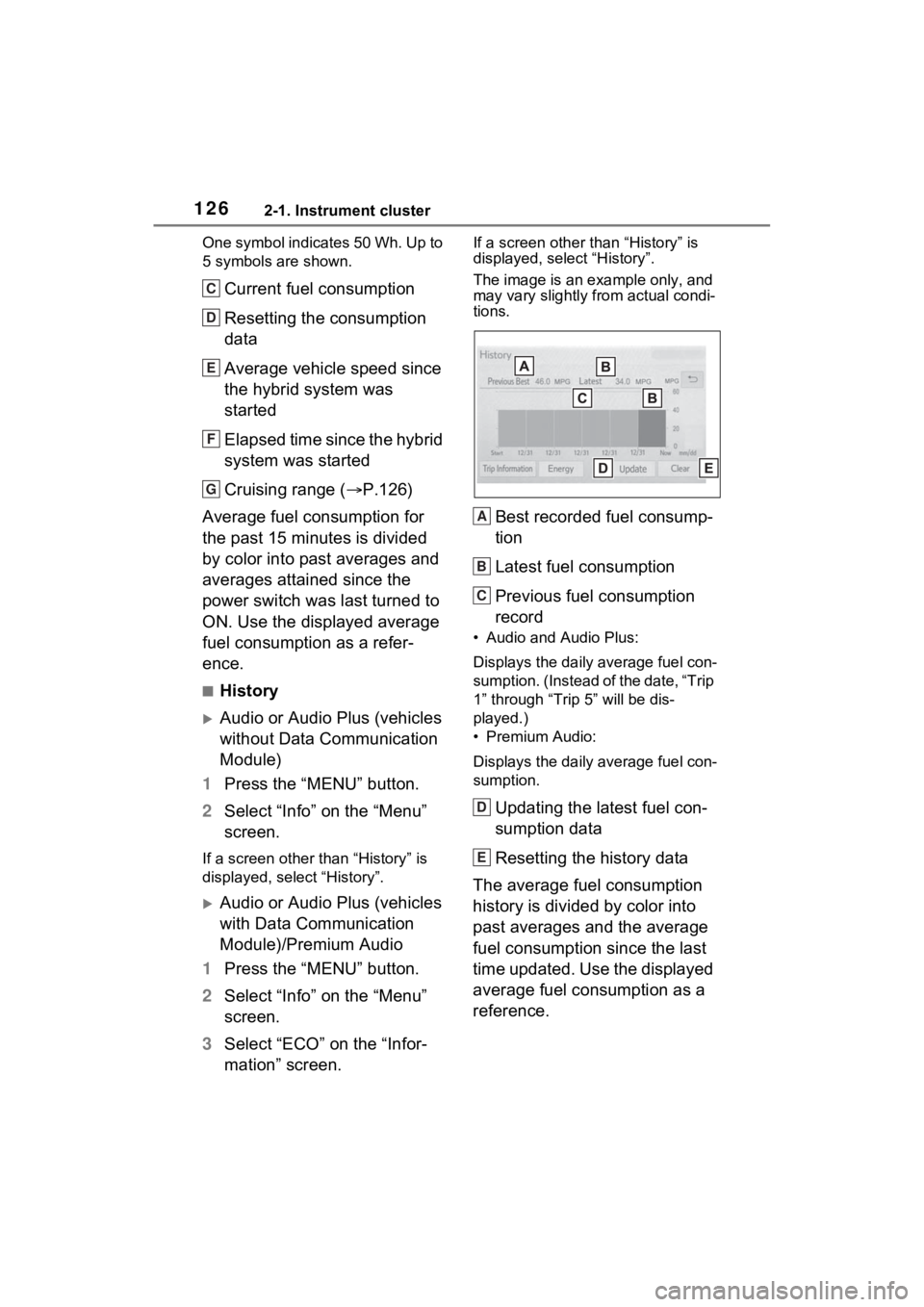
One symbol indicates 50 Wh. Up to
5 symbols are shown.
Current fuel consumption
Resetting the consumption
data
Average vehicle speed since
the hybrid system was
started
Elapsed time since the hybrid
system was started
Cruising range (P.126)
Average fuel consumption for
the past 15 minutes is divided
by color into past averages and
averages attained since the
power switch was last turned to
ON. Use the displayed average
fuel consumption as a refer-
ence.
■History
Audio or Audio Plus (vehicles
without Data Communication
Module)
1 Press the “MENU” button.
2 Select “Info” on the “Menu”
screen.
If a screen other than “History” is
displayed, select “History”.
Audio or Audio Plus (vehicles
with Data Communication
Module)/Premium Audio
1 Press the “MENU” button.
2 Select “Info” on the “Menu”
screen.
3 Select “ECO” on the “Infor-
mation” screen.
If a screen other than “History” is
displayed, select “History”.
The image is an example only, and
may vary slightly from actual condi-
tions.
Best recorded fuel consump-
tion
Latest fuel consumption
Previous fuel consumption
record
• Audio and Audio Plus:
Displays the daily average fuel con-
sumption. (Instead of the date, “Trip
1” through “Trip 5” will be dis-
played.)
• Premium Audio:
Displays the daily average fuel con-
sumption.
Updating the latest fuel con-
sumption data
Resetting the history data
The average fuel consumption
history is divided by color into
past averages and the average
fuel consumption since the last
time updated. Use the displayed
average fuel consumption as a
reference.
C
D
E
F
G
A
B
C
D
E
Page 127 of 601

1272-1. Instrument cluster
2
Vehicle status information and indicators
■Updating the history data
Update the latest fuel consumption
by selecting “Upda te” to measure
the current fuel consumption again.
■Resetting the data
The fuel consumption data can be
deleted by selecting “Clear”.
■Cruising range
Displays the estimated maximum
distance that can be driven with the
quantity of fuel remaining.
This distance is computed based on
your average fuel consumption. As
a result, the actual distance that can
be driven may differ from that dis-
played.
Page 143 of 601
1423-2. Opening, closing and locking the doors
moulding again during the halted
operation, the sliding door will per-
form the reverse operation.
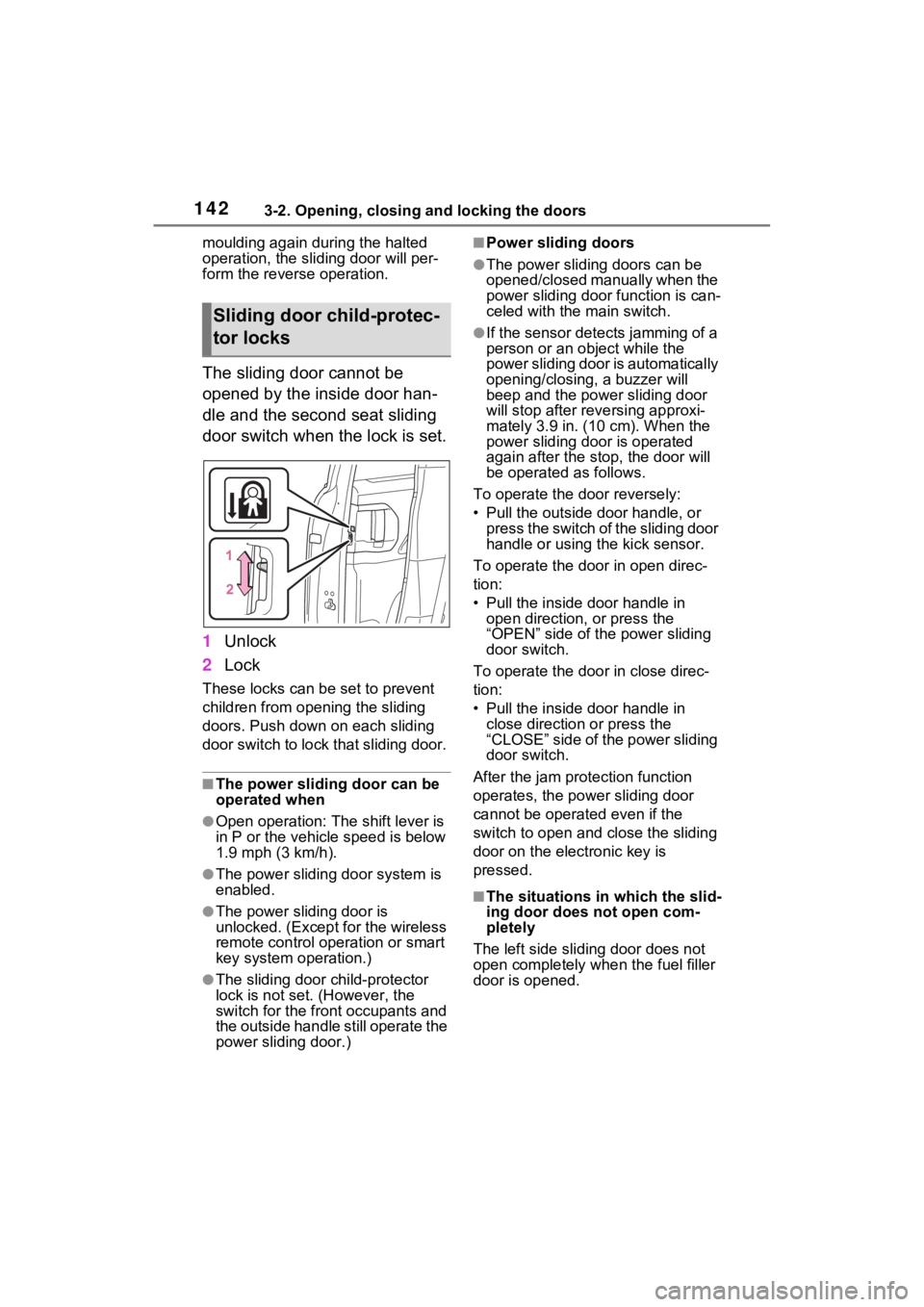
The sliding door cannot be
opened by the inside door han-
dle and the second seat sliding
door switch when the lock is set.
1Unlock
2 Lock
These locks can be set to prevent
children from opening the sliding
doors. Push down on each sliding
door switch to lock that sliding door.
■The power sliding door can be
operated when
●Open operation: The shift lever is
in P or the vehicle speed is below
1.9 mph (3 km/h).
●The power sliding door system is
enabled.
●The power sliding door is
unlocked. (Except for the wireless
remote control operation or smart
key system operation.)
●The sliding door child-protector
lock is not set. (However, the
switch for the front occupants and
the outside handle still operate the
power sliding door.)
■Power sliding doors
●The power sliding doors can be
opened/closed manually when the
power sliding door function is can-
celed with the main switch.
●If the sensor detects jamming of a
person or an object while the
power sliding door is automatically
opening/closin g, a buzzer will
beep and the power sliding door
will stop after rev ersing approxi-
mately 3.9 in. (10 cm). When the
power sliding door is operated
again after the stop, the door will
be operated as follows.
To operate the door reversely:
• Pull the outside door handle, or press the switch of the sliding door
handle or using the kick sensor.
To operate the d oor in open direc-
tion:
• Pull the inside door handle in open direction, or press the
“OPEN” side of the power sliding
door switch.
To operate the door in close direc-
tion:
• Pull the inside door handle in close direction or press the
“CLOSE” side of the power sliding
door switch.
After the jam protection function
operates, the power sliding door
cannot be operated even if the
switch to open and close the sliding
door on the electronic key is
pressed.
■The situations in which the slid-
ing door does not open com-
pletely
The left side sliding door does not
open completely whe n the fuel filler
door is opened.
Sliding door child-protec-
tor locks
Page 148 of 601
1473-2. Opening, closing and locking the doors
3
Before driving
WARNING
■Jam protection function
Observe the following precau-
tions. Failure to do so may cause
death or serious injury.
●Never use any part of your body
to intentionally a ctivate the jam
protection function.
●The jam protection function may
not work if something gets
caught just before the power
sliding door fully closes. Be
careful not to catch fingers or
anything else.
●The jam protection function may
not work depending on the
shape of the object that is
caught. Be careful not to catch
fingers or anything else.
■Hands Free Power Sliding
Doors (if equipped)
Observe the following precautions
when operating the Hands Free
Power Sliding Door. Failure to do
so may cause death or serious
injury.
●Check the safety of the sur-
rounding area to make sure
there are no obstacles or any-
thing that could cause any of
your belongings to get caught.
●Do not leave the electronic key
within the eff ective range
(detection area) of the power
sliding door.
NOTICE
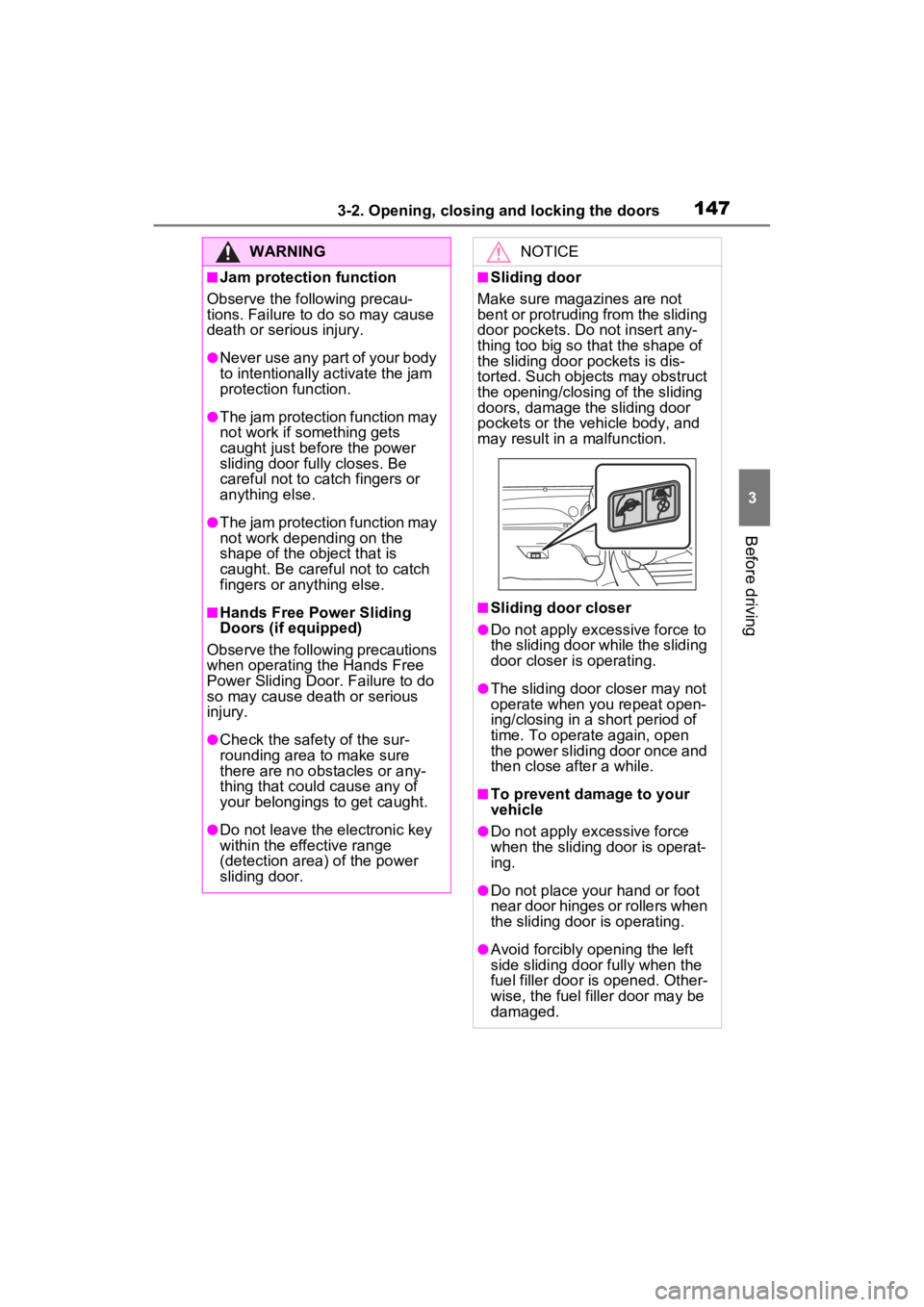
■Sliding door
Make sure magazines are not
bent or protruding from the sliding
door pockets. Do not insert any-
thing too big so that the shape of
the sliding door pockets is dis-
torted. Such objects may obstruct
the opening/closing of the sliding
doors, damage the sliding door
pockets or the vehicle body, and
may result in a malfunction.
■Sliding door closer
●Do not apply excessive force to
the sliding door w hile the sliding
door closer is operating.
●The sliding door closer may not
operate when you repeat open-
ing/closing in a short period of
time. To operate again, open
the power sliding door once and
then close after a while.
■To prevent damage to your
vehicle
●Do not apply excessive force
when the sliding door is operat-
ing.
●Do not place your hand or foot
near door hinges or rollers when
the sliding door is operating.
●Avoid forcibly opening the left
side sliding door fully when the
fuel filler door i s opened. Other-
wise, the fuel filler door may be
damaged.