ECU TOYOTA SIENNA HYBRID 2021 (in English) Service Manual
[x] Cancel search | Manufacturer: TOYOTA, Model Year: 2021, Model line: SIENNA HYBRID, Model: TOYOTA SIENNA HYBRID 2021Pages: 601, PDF Size: 32.07 MB
Page 89 of 601
891-5. Theft deterrent system
1
For safety and security
*: If equipped
■Items to check before lock-
ing the vehicle
To prevent unexpected trigger-
ing of the alarm and vehicle
theft, make sure of the following:
Nobody is in the vehicle.
The side windows and moon
roof (if equipped) are closed
before the alarm is set.
No valuables or other per-
sonal items are left in the
vehicle.
■Setting
Close the doors and hood, and
lock all the doors. The system
will be set automatically after 30 seconds.
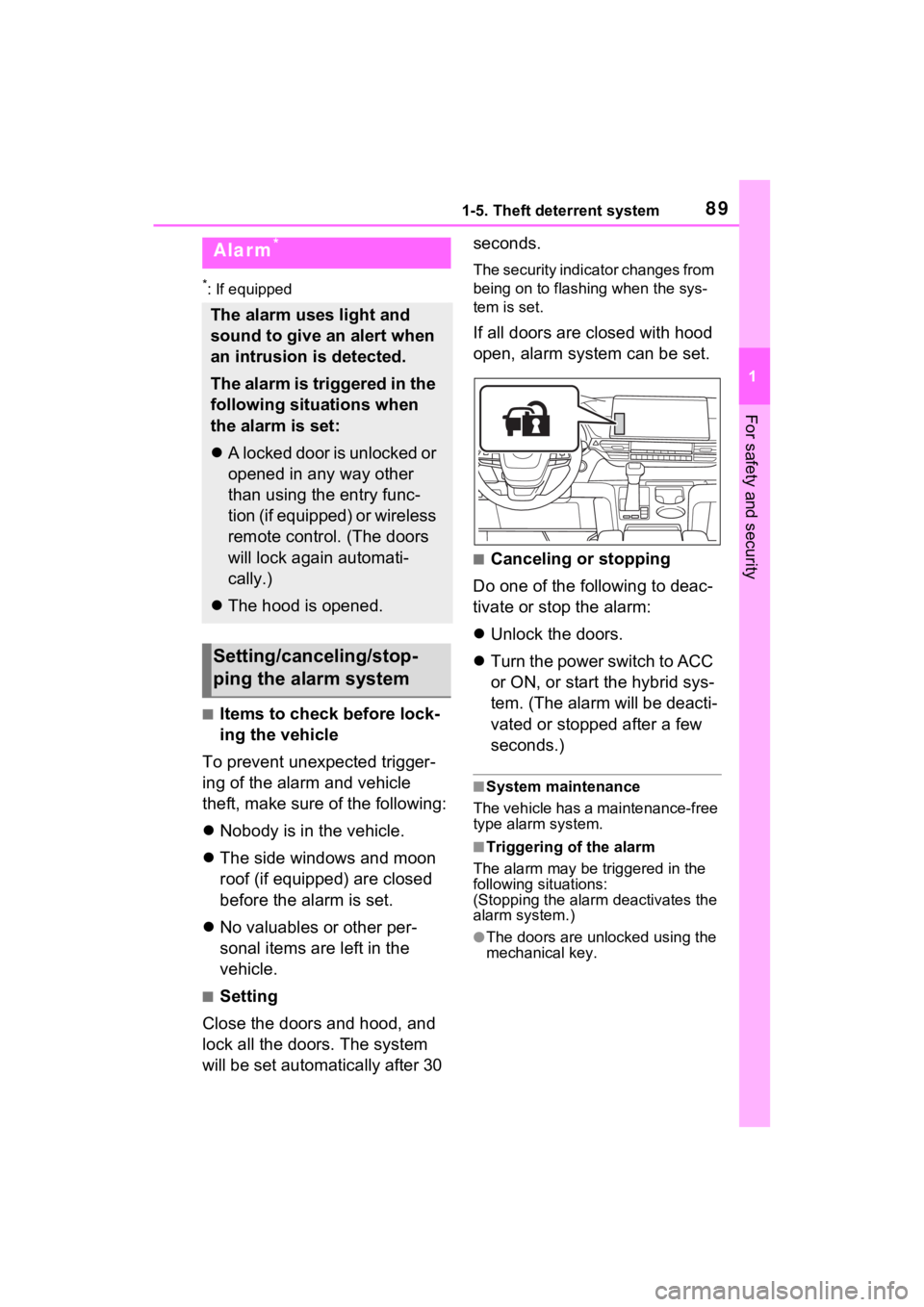
The security indicator changes from
being on to flashing when the sys-
tem is set.
If all doors are closed with hood
open, alarm system can be set.
■Canceling or stopping
Do one of the following to deac-
tivate or stop the alarm:
Unlock the doors.
Turn the power switch to ACC
or ON, or start the hybrid sys-
tem. (The alarm will be deacti-
vated or stopped after a few
seconds.)
■System maintenance
The vehicle has a maintenance-free
type alarm system.
■Triggering of the alarm
The alarm may be triggered in the
following situations:
(Stopping the alarm deactivates the
alarm system.)
●The doors are unlocked using the
mechanical key.
Alarm*
The alarm uses light and
sound to give an alert when
an intrusion is detected.
The alarm is triggered in the
following situations when
the alarm is set:
A locked door is unlocked or
opened in any way other
than using the entry func-
tion (if equipped) or wireless
remote control. (The doors
will lock again automati-
cally.)
The hood is opened.
Setting/canceling/stop-
ping the alarm system
Page 95 of 601
952-1. Instrument cluster
2
Vehicle status information and indicators
The indicators inform the driver
of the operating state of the
vehicle’s various systems.
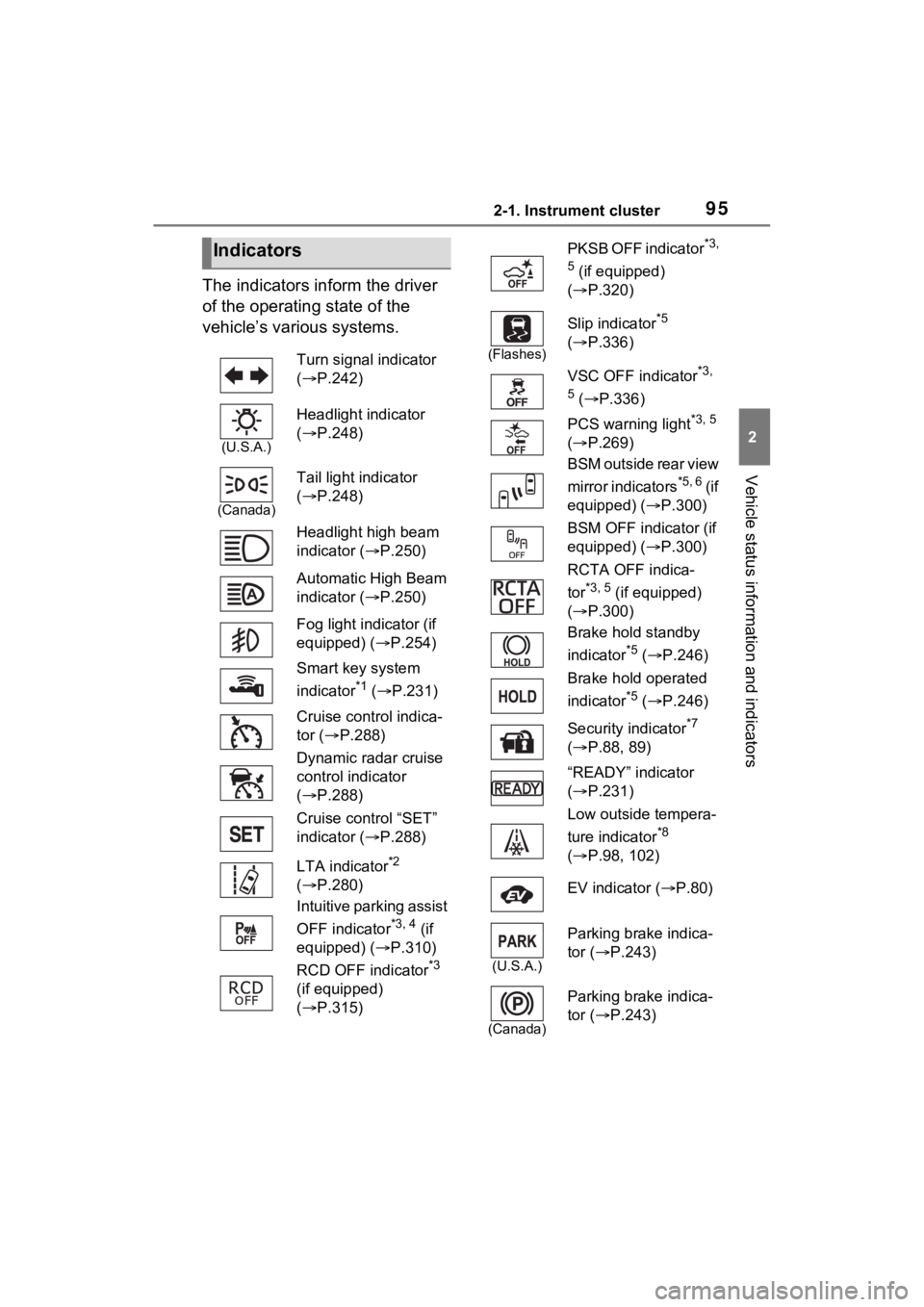
Indicators
Turn signal indicator
( P.242)
(U.S.A.)
Headlight indicator
( P.248)
(Canada)
Tail light indicator
( P.248)
Headlight high beam
indicator ( P.250)
Automatic High Beam
indicator ( P.250)
Fog light indicator (if
equipped) ( P.254)
Smart key system
indicator
*1 ( P.231)
Cruise control indica-
tor ( P.288)
Dynamic radar cruise
control indicator
( P.288)
Cruise control “SET”
indicator ( P.288)
LTA indicator
*2
( P.280)
Intuitive parking assist
OFF indicator
*3, 4 (if
equipped) ( P.310)
RCD OFF indicator
*3
(if equipped)
( P.315)
PKSB OFF indicator*3,
5
(if equipped)
( P.320)
(Flashes)
Slip indicator*5
( P.336)
VSC OFF indicator
*3,
5
( P.336)
PCS warning light
*3, 5
( P.269)
BSM outside rear view
mirror indicators
*5, 6 ( i f
equipped) ( P.300)
BSM OFF indicator (if
equipped) ( P.300)
RCTA OFF indica-
tor
*3, 5 (if equipped)
( P.300)
Brake hold standby
indicator
*5 ( P.246)
Brake hold operated
indicator
*5 ( P.246)
Security indicator
*7
( P.88, 89)
“READY” indicator
( P.231)
Low outside tempera-
ture indicator
*8
( P.98, 102)
EV indicator ( P.80)
(U.S.A.)
Parking brake indica-
tor ( P.243)
(Canada)
Parking brake indica-
tor (P.243)
Page 133 of 601
1323-2. Opening, closing and locking the doors
3-2.Opening, closing and locking the doors
■Using the entry function (if
equipped)
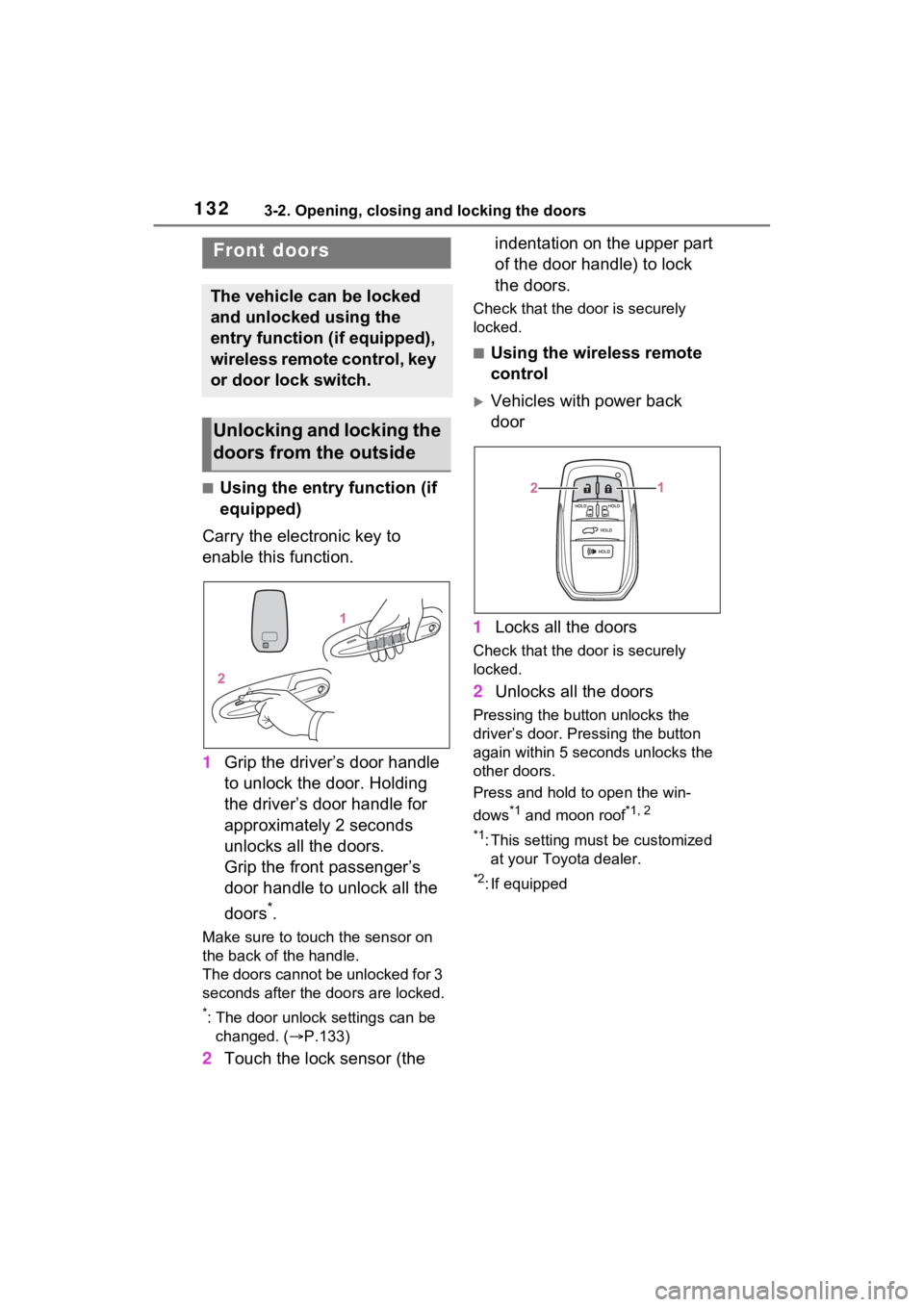
Carry the electronic key to
enable this function.
1 Grip the driver’s door handle
to unlock the door. Holding
the driver’s door handle for
approximately 2 seconds
unlocks all the doors.
Grip the front passenger’s
door handle to unlock all the
doors
*.
Make sure to touch the sensor on
the back of the handle.
The doors cannot be unlocked for 3
seconds after the doors are locked.
*: The door unlock settings can be
changed. ( P.133)
2 Touch the lock sensor (the indentation on the upper part
of the door handle) to lock
the doors.
Check that the d
oor is securely
locked.
■Using the wireless remote
control
Vehicles with power back
door
1 Locks all the doors
Check that the d oor is securely
locked.
2 Unlocks all the doors
Pressing the button unlocks the
driver’s door. Pressing the button
again within 5 seconds unlocks the
other doors.
Press and hold to open the win-
dows
*1 and moon roof*1, 2
*1
: This setting must be customized at your Toyo ta dealer.
*2: If equipped
Front doors
The vehicle can be locked
and unlocked using the
entry function (if equipped),
wireless remote control, key
or door lock switch.
Unlocking and locking the
doors from the outside
Page 134 of 601
1333-2. Opening, closing and locking the doors
3
Before driving
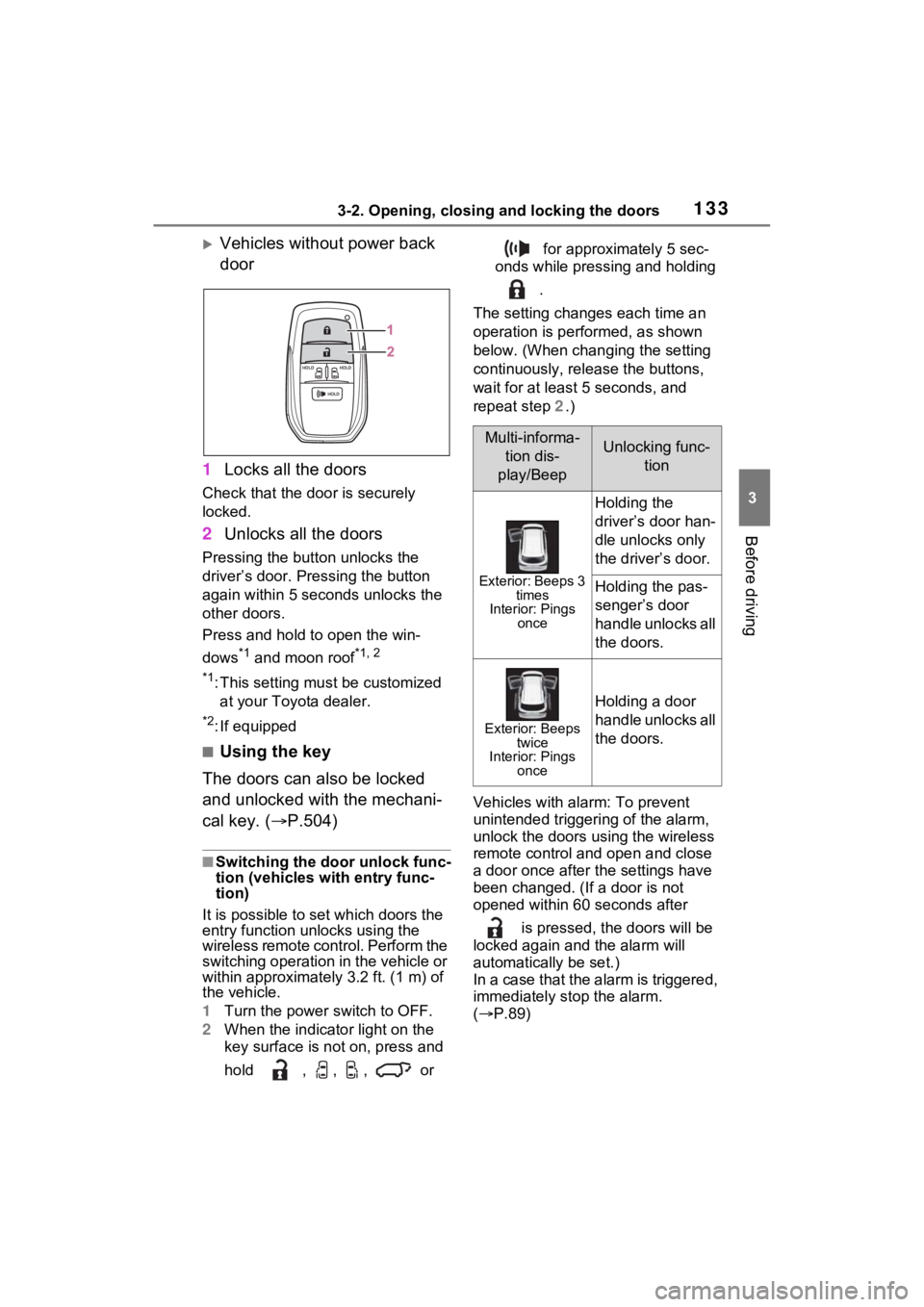
Vehicles without power back
door
1 Locks all the doors
Check that the door is securely
locked.
2Unlocks all the doors
Pressing the button unlocks the
driver’s door. Pressing the button
again within 5 seconds unlocks the
other doors.
Press and hold to open the win-
dows
*1 and moon roof*1, 2
*1
:This setting mu st be customized
at your Toyota dealer.
*2: If equipped
■Using the key
The doors can also be locked
and unlocked with the mechani-
cal key. ( P.504)
■Switching the door unlock func-
tion (vehicles with entry func-
tion)
It is possible to set which doors the
entry function unlocks using the
wireless remote control. Perform the
switching operation in the vehicle or
within approximately 3.2 ft. (1 m) of
the vehicle.
1 Turn the power switch to OFF.
2 When the indicator light on the
key surface is not on, press and
hold , , , or for approximately 5 sec-
onds while pressing and holding
.
The setting changes each time an
operation is per formed, as shown
below. (When changing the setting
continuously, release the buttons,
wait for at least 5 seconds, and
repeat step 2 .)
Vehicles with alarm: To prevent
unintended triggeri ng of the alarm,
unlock the doors using the wireless
remote control and open and close
a door once after the settings have
been changed. (If a door is not
opened within 60 seconds after
is pressed, the doors will be
locked again and the alarm will
automatically be set.)
In a case that the alarm is triggered,
immediately stop the alarm.
( P.89)
Multi-informa-
tion dis-
play/BeepUnlocking func- tion
Exterior: Beeps 3 times
Interior: Pings once
Holding the
driver’s door han-
dle unlocks only
the driver’s door.
Holding the pas-
senger’s door
handle unlocks all
the doors.
Exterior: Beeps twice
Interior: Pings once
Holding a door
handle unlocks all
the doors.
Page 135 of 601
1343-2. Opening, closing and locking the doors
■Impact detection door lock
release system
In the event that t he vehicle is sub-
ject to a strong impact, all the doors
are unlocked. Depending on the
force of the impact or the type of
accident, however, the system may
not operate.
■Operation signals (vehicles
with entry function)
A buzzer sounds and the emer-
gency flashers flash to indicate that
the doors have been
locked/unlocked . (Locked: Once;
Unlocked: Twice)
■Security feature
If a door is not opened within
approximately 60 seconds after the
vehicle is unlocked, the security fea-
ture automatically locks the vehicle
again. (Vehicles with entry function:
However, depending on the location
of the electronic key, the key may
be detected as being in the vehicle.
In this case, vehicle may be
unlocked.)
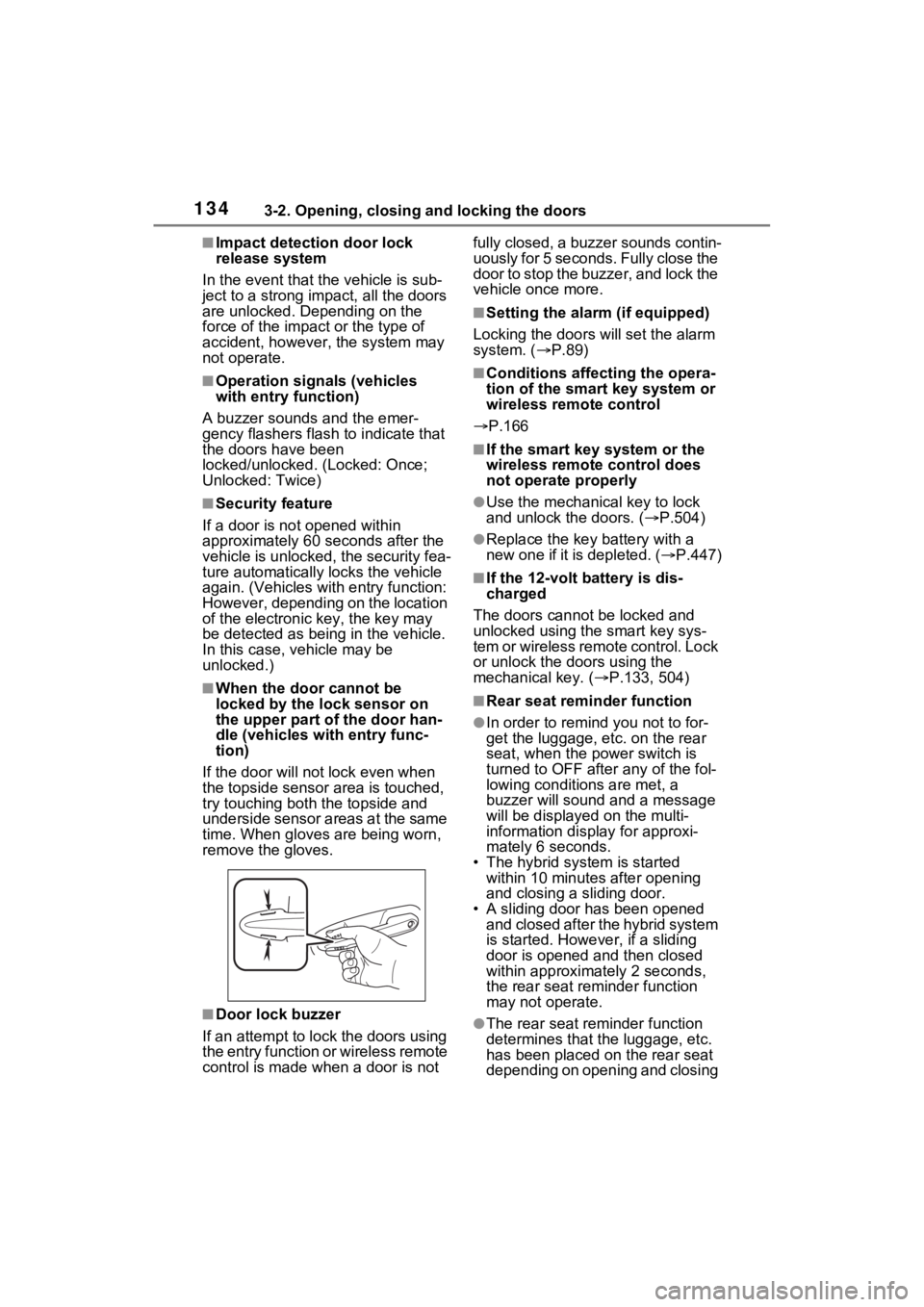
■When the door cannot be
locked by the lock sensor on
the upper part of the door han-
dle (vehicles with entry func-
tion)
If the door will no t lock even when
the topside sensor area is touched,
try touching both the topside and
underside sensor areas at the same
time. When gloves are being worn,
remove the gloves.
■Door lock buzzer
If an attempt to lock the doors using
the entry function or wireless remote
control is made w hen a door is not fully closed, a buzzer sounds contin-
uously for 5 seconds. Fully close the
door to stop the buzzer, and lock the
vehicle once more.
■Setting the alarm (if equipped)
Locking the doors will set the alarm
system. ( P.89)
■Conditions affecting the opera-
tion of the smart key system or
wireless remote control
P.166
■If the smart key system or the
wireless remote control does
not operate properly
●Use the mechanical key to lock
and unlock the doors. ( P.504)
●Replace the key battery with a
new one if it is depleted. ( P.447)
■If the 12-volt b attery is dis-
charged
The doors cannot be locked and
unlocked using the smart key sys-
tem or wireless remote control. Lock
or unlock the do ors using the
mechanical key. ( P.133, 504)
■Rear seat reminder function
●In order to r emind you not to for-
get the luggage, etc. on the rear
seat, when the power switch is
turned to OFF afte r any of the fol-
lowing conditions are met, a
buzzer will sound and a message
will be displayed on the multi-
information display for approxi-
mately 6 seconds.
• The hybrid system is started within 10 minutes after opening
and closing a sliding door.
• A sliding door has been opened and closed after the hybrid system
is started. However, if a sliding
door is opened and then closed
within approximately 2 seconds,
the rear seat rem inder function
may not operate.
●The rear seat reminder function
determines that t he luggage, etc.
has been placed on the rear seat
depending on opening and closing
Page 147 of 601
1463-2. Opening, closing and locking the doors
WARNING
●When using the door handle to
open or close the power sliding
door, remove your hand from
the door handle immediately
after starting power sliding door
operation. If you leave your
hand on the door handle during
operation, your hand, fingers,
wrist etc. may be subjected to
an excessive amount of force.
●Check the safety of the sur-
rounding area to make sure
there are no obstacles or any-
thing that could cause any of
your belongings to get caught.
●If anyone is in the vicinity, make
sure they are safe and let them
know that the sliding door is
about to open or close. Also, do
not operate the power sliding
door if anyone inside or outside
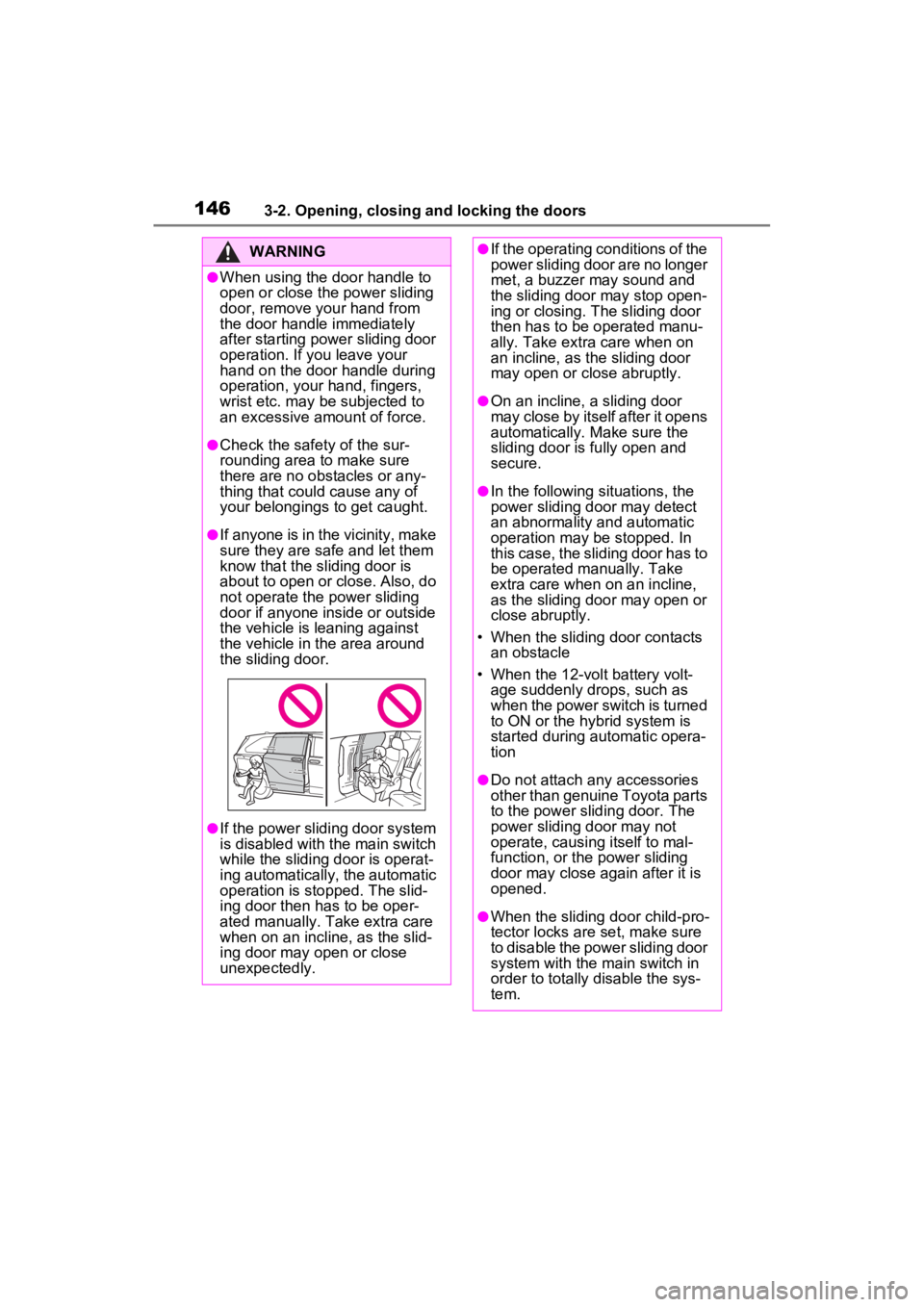
the vehicle is leaning against
the vehicle in the area around
the sliding door.
●If the power sliding door system
is disabled with the main switch
while the sliding door is operat-
ing automatically, the automatic
operation is stopped. The slid-
ing door then has to be oper-
ated manually. Take extra care
when on an incline, as the slid-
ing door may open or close
unexpectedly.
●If the operating conditions of the
power sliding door are no longer
met, a buzzer may sound and
the sliding door may stop open-
ing or closing. Th e sliding door
then has to be operated manu-
ally. Take extra care when on
an incline, as the sliding door
may open or close abruptly.
●On an incline, a sliding door
may close by itself after it opens
automatically. Make sure the
sliding door is fully open and
secure.
●In the following si tuations, the
power sliding door may detect
an abnormality and automatic
operation may be stopped. In
this case, the sliding door has to
be operated manually. Take
extra care when on an incline,
as the sliding door may open or
close abruptly.
• When the sliding door contacts an obstacle
• When the 12-volt battery volt- age suddenly drops, such as
when the power switch is turned
to ON or the hybrid system is
started during automatic opera-
tion
●Do not attach any accessories
other than genuine Toyota parts
to the power slid ing door. The
power sliding door may not
operate, causing itself to mal-
function, or the power sliding
door may close again after it is
opened.
●When the sliding door child-pro-
tector locks are set, make sure
to disable the power sliding door
system with the main switch in
order to totally disable the sys-
tem.
Page 152 of 601
1513-2. Opening, closing and locking the doors
3
Before driving
■Using the entry function (if
equipped)
Carry the electronic key to
enable this function.
WARNING
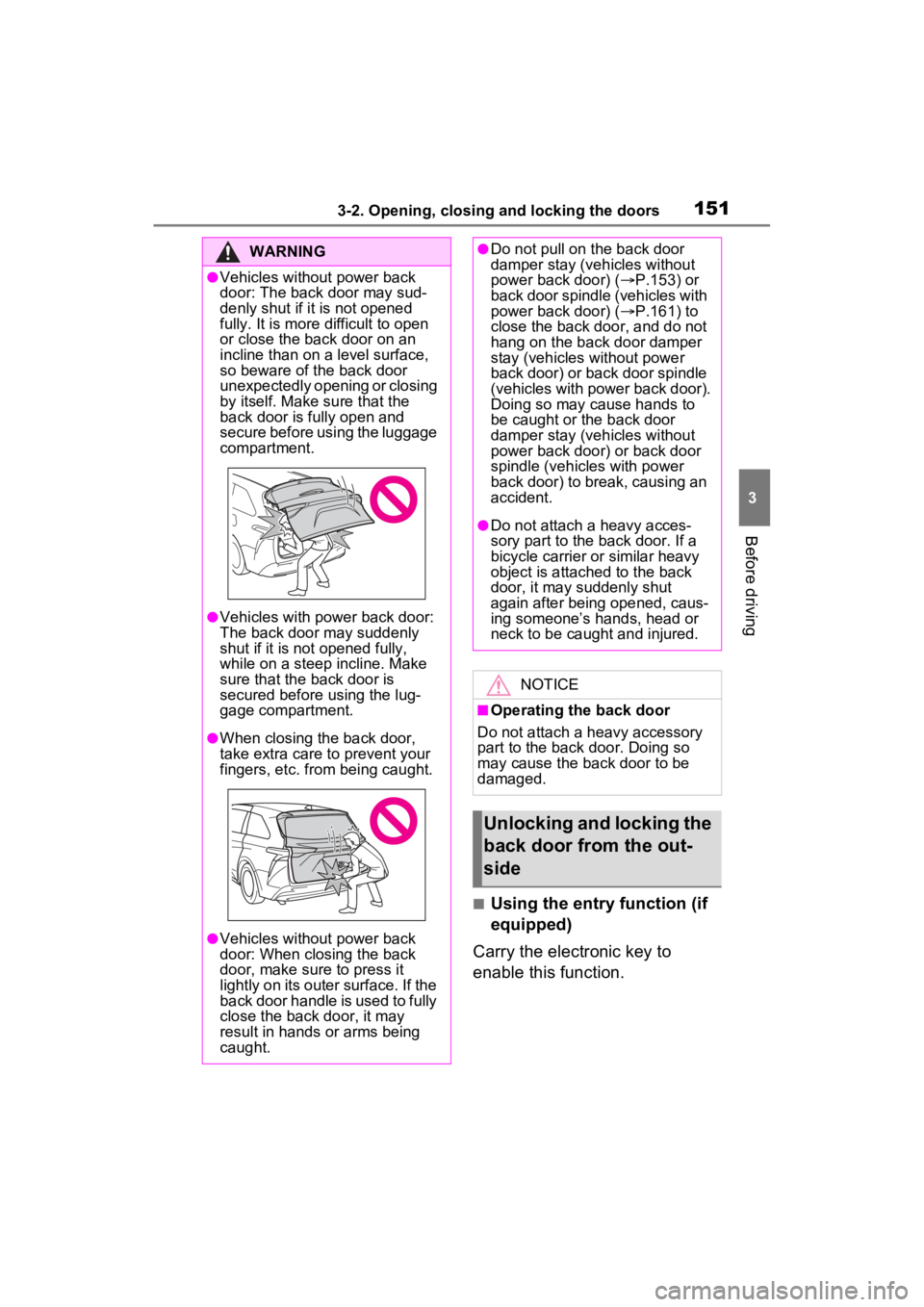
●Vehicles without power back
door: The back door may sud-
denly shut if it is not opened
fully. It is more difficult to open
or close the ba ck door on an
incline than on a level surface,
so beware of the back door
unexpectedly opening or closing
by itself. Make sure that the
back door is fully open and
secure before using the luggage
compartment.
●Vehicles with power back door:
The back door may suddenly
shut if it is not opened fully,
while on a steep incline. Make
sure that the back door is
secured before using the lug-
gage compartment.
●When closing the back door,
take extra care to prevent your
fingers, etc. from being caught.
●Vehicles without power back
door: When closing the back
door, make sure to press it
lightly on its outer surface. If the
back door handle is used to fully
close the back door, it may
result in hands or arms being
caught.
●Do not pull on the back door
damper stay (vehicles without
power back door) ( P.153) or
back door spindle (vehicles with
power back door) ( P.161) to
close the back door, and do not
hang on the back door damper
stay (vehicles without power
back door) or back door spindle
(vehicles with power back door).
Doing so may cause hands to
be caught or the back door
damper stay (vehicles without
power back door) or back door
spindle (vehicles with power
back door) to break, causing an
accident.
●Do not attach a heavy acces-
sory part to the back door. If a
bicycle carrier or similar heavy
object is attached to the back
door, it may suddenly shut
again after being opened, caus-
ing someone’s hands, head or
neck to be caught and injured.
NOTICE
■Operating the back door
Do not attach a heavy accessory
part to the back d oor. Doing so
may cause the back door to be
damaged.
Unlocking and locking the
back door from the out-
side
Page 153 of 601
1523-2. Opening, closing and locking the doors
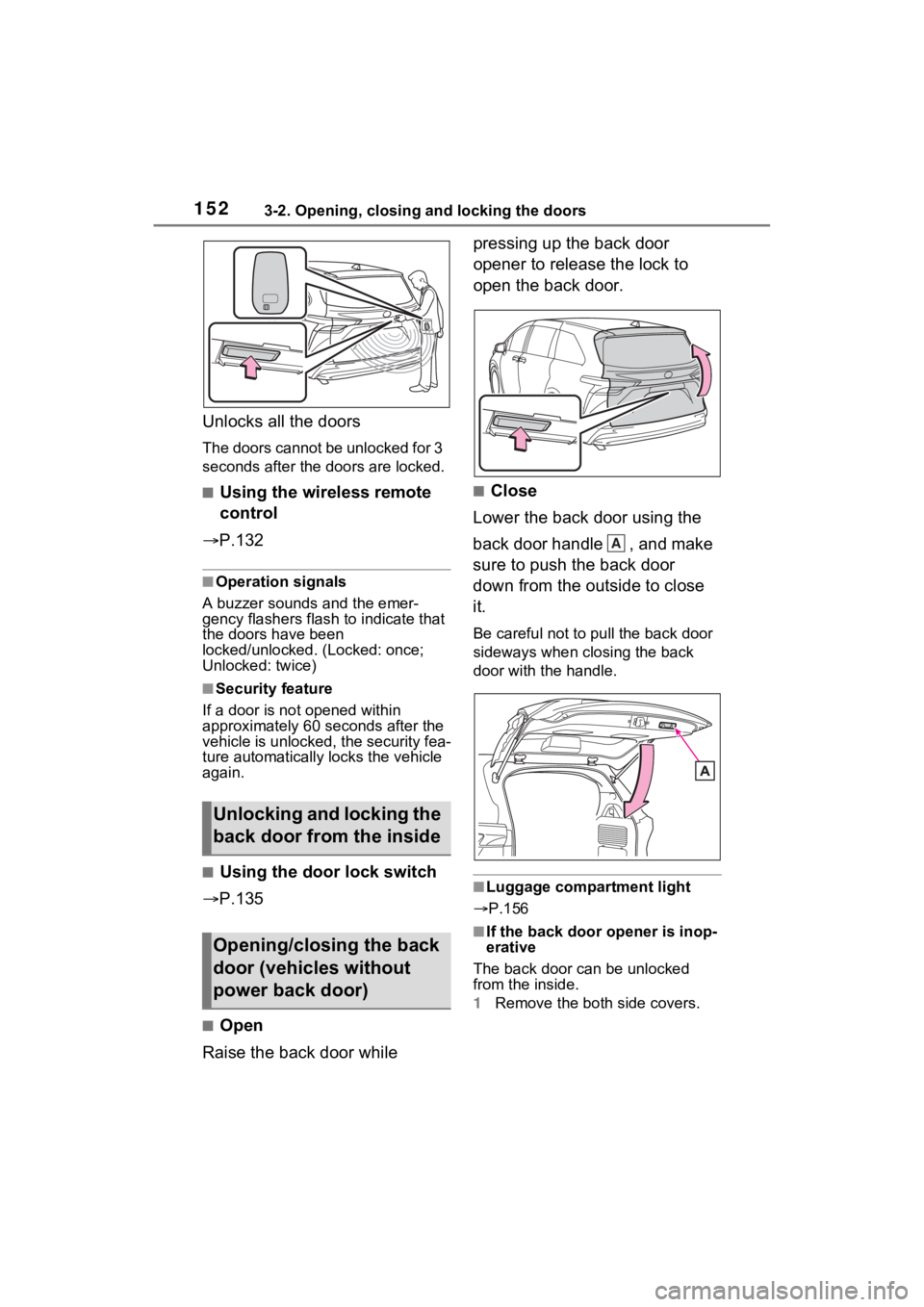
Unlocks all the doors
The doors cannot be unlocked for 3
seconds after the doors are locked.
■Using the wireless remote
control
P.132
■Operation signals
A buzzer sounds and the emer-
gency flashers flash to indicate that
the doors have been
locked/unlocked . (Locked: once;
Unlocked: twice)
■Security feature
If a door is not opened within
approximately 60 seconds after the
vehicle is unlocked, the security fea-
ture automatically locks the vehicle
again.
■Using the door lock switch
P.135
■Open
Raise the back door while pressing up the back door
opener to release the lock to
open the back door.
■Close
Lower the back door using the
back door handle , and make
sure to push the back door
down from the outside to close
it.
Be careful not to pull the back door
sideways when closing the back
door with the handle.
■Luggage compartment light
P.156
■If the back door opener is inop-
erative
The back door can be unlocked
from the inside.
1 Remove the both side covers.
Unlocking and locking the
back door from the inside
Opening/closing the back
door (vehicles without
power back door)
A
Page 161 of 601
1603-2. Opening, closing and locking the doors
■Customization
Settings (e.g. power back door
opening angle) can be changed.
(Customizable features: P.546)
WARNING
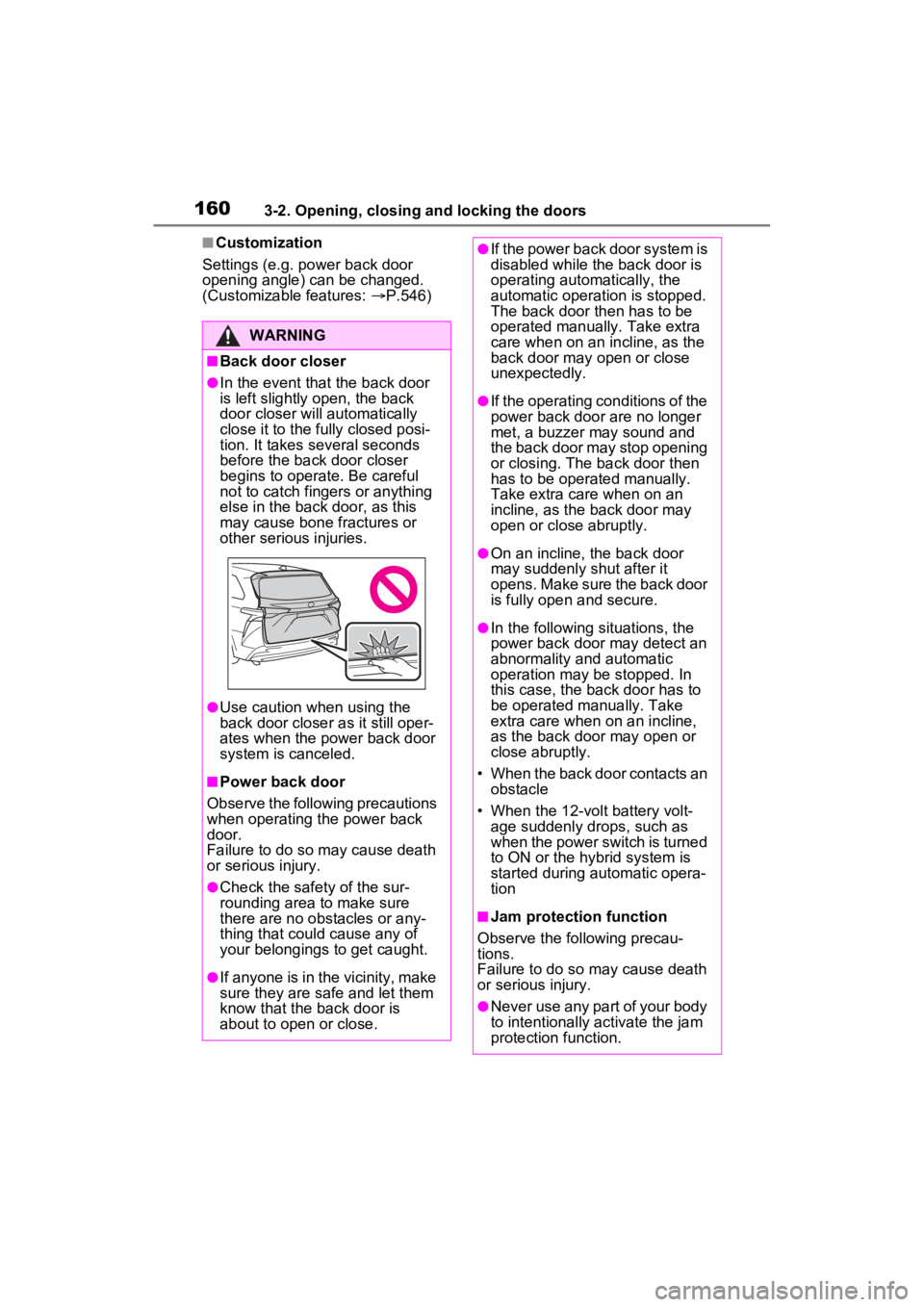
■Back door closer
●In the event that the back door
is left slightly open, the back
door closer will automatically
close it to the fully closed posi-
tion. It takes several seconds
before the back door closer
begins to operate. Be careful
not to catch fingers or anything
else in the back door, as this
may cause bone fractures or
other serious injuries.
●Use caution when using the
back door closer as it still oper-
ates when the power back door
system is canceled.
■Power back door
Observe the following precautions
when operating the power back
door.
Failure to do so may cause death
or serious injury.
●Check the safety of the sur-
rounding area to make sure
there are no obstacles or any-
thing that could cause any of
your belongings to get caught.
●If anyone is in the vicinity, make
sure they are safe and let them
know that the back door is
about to open or close.
●If the power back door system is
disabled while the back door is
operating automatically, the
automatic operation is stopped.
The back door then has to be
operated manually. Take extra
care when on an incline, as the
back door may open or close
unexpectedly.
●If the operating conditions of the
power back door are no longer
met, a buzzer may sound and
the back door may stop opening
or closing. The ba ck door then
has to be operated manually.
Take extra care when on an
incline, as the back door may
open or close abruptly.
●On an incline, the back door
may suddenly shut after it
opens. Make sure the back door
is fully open and secure.
●In the following si tuations, the
power back door may detect an
abnormality and automatic
operation may be stopped. In
this case, the back door has to
be operated manually. Take
extra care when on an incline,
as the back door may open or
close abruptly.
• When the back door contacts an obstacle
• When the 12-volt battery volt- age suddenly drops, such as
when the power switch is turned
to ON or the hybrid system is
started during automatic opera-
tion
■Jam protection function
Observe the following precau-
tions.
Failure to do so may cause death
or serious injury.
●Never use any part of your body
to intentionally activate the jam
protection function.
Page 168 of 601

1673-2. Opening, closing and locking the doors
3
Before driving
hybrid system is started or power
switch modes are changed.
●Do not leave the electronic key on
top of the instrument panel or near
the door pockets when exiting the
vehicle. Depending on the radio
wave reception conditions, it may
be detected by the antenna out-
side the cabin and the door will
become lockable from the outside,
possibly trapping the electronic
key inside the vehicle.
●As long as the electronic key is
within the effective range, the
doors may be locked or unlocked
by anyone. However, only the
doors detecting the electronic key
can be used to unl ock the vehicle.
●Even if the electronic key is not
inside the vehicle, it may be possi-
ble to start the hybrid system if the
electronic key is near the window.
●The doors may unlock if a large
amount of water splashes on the
door handle, such as in the rain or
in a car wash when the electronic
key is within the effective range.
(The doors will automatically be
locked after approximately 60 sec-
onds if the doors are not opened
and closed.)
●If the wireless remote control is
used to lock the doors when the
electronic key is near the vehicle,
there is a possib ility that the door
may not be unlocke d by the entry
function. (Use the wireless remote
control to unloc k the doors.)
●Touching the door lock sensor
while wearing gloves may delay or
prevent lock operation. Remove
the gloves and touch the lock sen-
sor again.
●When the lock op eration is per-
formed using the lock sensor, rec-
ognition signals will be shown up
to two consecutive times. After
this, no recogniti on signals will be
given.
●If the door handle becomes wet
while the electronic key is within the effective range, the door may
lock and unlock repeatedly. In that
case, follow the
following correc-
tion procedures to wash the vehi-
cle:
• Place the electronic key in a loca-
tion 6 ft. (2 m) or more away from
the vehicle. (Take care to ensure
that the key is not stolen.)
• Set the electronic key to battery- saving mode to disable the smart
key system. ( P.166)
●If the electronic key is inside the
vehicle and a door handle
becomes wet during a car wash, a
message may be shown on the
multi-information display and a
buzzer will sound outside the vehi-
cle. To turn off th e alarm, lock all
the doors.
●The lock sensor may not work
properly if it comes into contact
with ice, snow, m ud, etc. Clean
the lock sensor and attempt to
operate it again, or use the lock
sensor on the lower part of the
door handle.
●A sudden approach to the effec-
tive range or door handle may pre-
vent the doors from being
unlocked. In this case, return the
door handle to the original position
and check that t he doors unlock
before pulling the door handle
again.
●If there is another electronic key in
the detection area, it may take
slightly longer to unlock the doors
after the door handle is gripped.
■When the vehicle is not driven
for extended periods
●Vehicles with entry function: To
prevent theft of the vehicle, do not
leave the electronic key within 6 ft.
(2 m) of the vehicle.
●The smart key system can be
deactivated in advance. ( P.544)
●Battery-saving mode can reduce
the power consumption of elec-
tronic keys. ( P.166)