change time TOYOTA SIENNA HYBRID 2021 (in English) Workshop Manual
[x] Cancel search | Manufacturer: TOYOTA, Model Year: 2021, Model line: SIENNA HYBRID, Model: TOYOTA SIENNA HYBRID 2021Pages: 601, PDF Size: 32.07 MB
Page 481 of 601

4807-2. Steps to take in an emergency
ing the power switch to OFF with the
shift lever in any position other than
P.
Shift the shift lever to P.
■If “Shift Is in N Release Acceler-
ator Before Shifting” is shown
Message is displayed when the
accelerator pedal has been
depressed and the shift lever is in N.
Release the accelerator pedal and
shift the shift lever to D or R.
■If “Accelerator Pedal is
Pressed” is displayed
The accelerator pedal has been
depressed when the shift lever is in
P. Release the accelerator pedal.
■If “Press Brake When Vehicle Is
Stopped Hybrid System May
Overheat” is shown
Message is displayed when the
accelerator pedal is depressed to
maintain the vehicle position when
stopped on a upward slope, etc.
If this continues, the hybrid system
may overheat.
Release the accelerator pedal and
depress the brake pedal.
■If “Auto Power Off to Conserve
Battery” is shown
Power was turned off due to the
automatic power off function.
Next time when starting the hybrid
system, operate th e hybrid system
for approximatel y 5 minutes to
recharge the 12-volt battery.
■If “High Power Consumption
Power to Climate Temporarily
Limited” is displayed
Turn off unnecessary electronic
equipment to reduce power con-
sumption.
Please wait until th e power supply
returns to normal.
■If “Headlight System Malfunc-
tion Visit Your D ealer” is dis-
played
The following systems may be mal- functioning.
Have the vehicle inspected by your
Toyota dealer immediately.
●The LED headlight system
●Automatic High Beam
■If “Radar Cruise Control
Unavailable” is shown
The dynamic radar cruise control
with full-speed range system is sus-
pended temporarily or until the prob-
lem shown in the message is
resolved. (causes and coping meth-
ods: P.265)
■If a message that indicates the
malfunction of front camera is
displayed
The following systems may be sus-
pended until the problem shown in
the message is resolved. (P.265,
466)
●PCS (Pre-Collision System)
●LTA (Lane Tracing Assist)
●Automatic High Beam
●RSA (Road Sign Assist) (if
equipped)
●Dynamic radar cruise control with
full-speed range
■If “Oil Maintenance Required
Soon” is displayed
Indicates that the engine oil should
be scheduled to be changed.
Check the engine oil and change it if
necessary.
After changing the engine oil, make
sure to reset t he message.
( P.418)
■If “Oil Maintenance Required
Visit Your Deale r” is displayed
Indicates that the engine oil should
be changed.
Check and change the engine oil
and oil filter by yo ur Toyota dealer.
After changing the engine oil, make
sure to reset t he message.
( P.418)
Page 506 of 601
5057-2. Steps to take in an emergency
7
When trouble arises
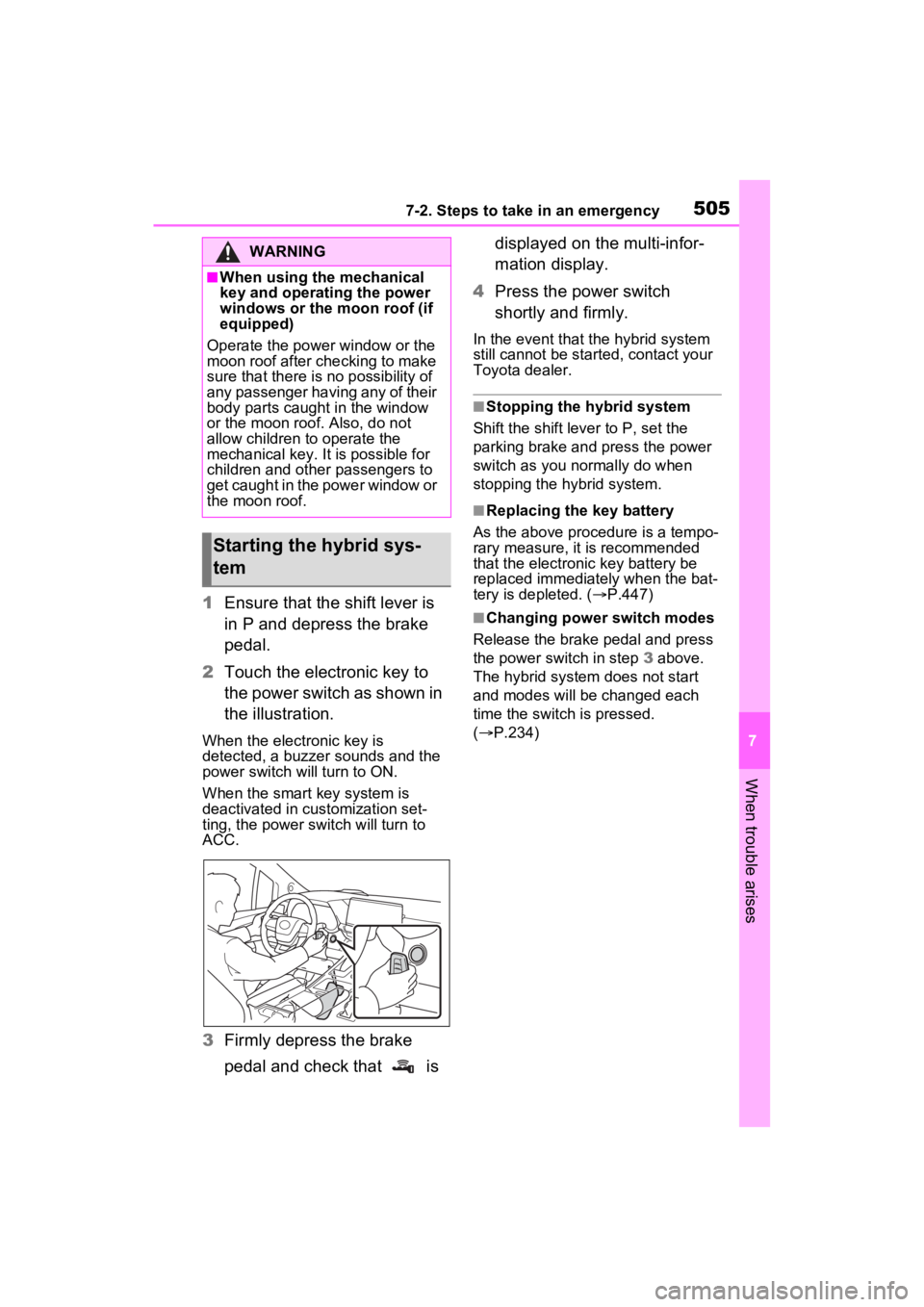
1Ensure that the shift lever is
in P and depress the brake
pedal.
2 Touch the electronic key to
the power switch as shown in
the illustration.
When the electronic key is
detected, a buzzer sounds and the
power switch will turn to ON.
When the smart key system is
deactivated in customization set-
ting, the power switch will turn to
ACC.
3Firmly depress the brake
pedal and check that is displayed on the multi-infor-
mation display.
4 Press the power switch
shortly and firmly.
In the event that t he hybrid system
still cannot be started, contact your
Toyota dealer.
■Stopping the hybrid system
Shift the shift lever to P, set the
parking brake and press the power
switch as you normally do when
stopping the hybrid system.
■Replacing the key battery
As the above proce dure is a tempo-
rary measure, it is recommended
that the electronic key battery be
replaced immediately when the bat-
tery is depleted. ( P.447)
■Changing power switch modes
Release the brake pedal and press
the power switch in step 3 above.
The hybrid system does not start
and modes will be changed each
time the switch is pressed.
( P.234)
WARNING
■When using the mechanical
key and operating the power
windows or the moon roof (if
equipped)
Operate the power window or the
moon roof after checking to make
sure that there is n o possibility of
any passenger having any of their
body parts caught in the window
or the moon roof. Also, do not
allow children to operate the
mechanical key. It is possible for
children and other passengers to
get caught in the power window or
the moon roof.
Starting the hybrid sys-
tem
Page 545 of 601

5448-2. Customization
■Smart key system and wireless remote control (P.130, 164)
■Smart key system ( P.164)
*: This setting can be changed when the smart door unlocking sett ing is set
to Driver’s door.
Automatic door unlocking
function
Shift position linked door unlocking operationOff
O–ODriver’s door linked door unlocking operation
FunctionDefault settingCustomized setting
Operation signal (emer-
gency flashers)OnOffO–O
Operation buzzer volume5OffO–O1 to 7
Time elapsed before the
automatic door lock function
is activated if a door is not
opened after being unlocked
60 seconds
Off
O–O30 seconds
120 seconds
Open door reminder buzzer
(When locking the vehicle)OnOff––O
FunctionDefault settingCustomized setting
Smart key systemOnOff––O
Smart door unlockingDriver’s doorAll the doorsO–O
Number of consecutive door
lock operations2 timesAs many as desired––O
Time elapsed before unlock-
ing all the door when gripping
and holding the driver’s door
handle
* (with entry function)
2 seconds
Off
––O1.5 seconds
2.5 seconds
Power switch illuminationOnOff––O
FunctionDefault settingCustomized settingABC
ABC
ABC