remote control TOYOTA SUPRA 2019 Owner's Manual
[x] Cancel search | Manufacturer: TOYOTA, Model Year: 2019, Model line: SUPRA, Model: TOYOTA SUPRA 2019Pages: 456, PDF Size: 88.65 MB
Page 138 of 456
138
Supra Owner's Manual3-1. CONTROLS
■General
Use during the journey serves as
an emergency brake.
Pull and hold the switch. Vehicle brakes strongly for as long as the
switch is pulled.
A vehicle message is shown.
Apply the parking brake when the
vehicle is stationary.
1Switch on drive-ready state.
2 Automatic transmission:
press the switch with the brake
pedal depressed or selector
lever position P engaged.
LED and indicator lamp turn off.
The parking brake is released.
The parking brake is automatically
released on driving off.
LED and indicator lamp turn off.
If the parking brake fails or malfunc-
tions:
After getting out, secure the vehicle
to prevent it from rolling away, for
example with a chock.
WARNING
●Engaging selector lever position N.
●Operating vehicle equipment.
There is a risk of accidents or injury.
Do not leave children or pets unsu-
pervised in the vehicle. When leaving
the vehicle, take the remote control
with you and lock the vehicle.
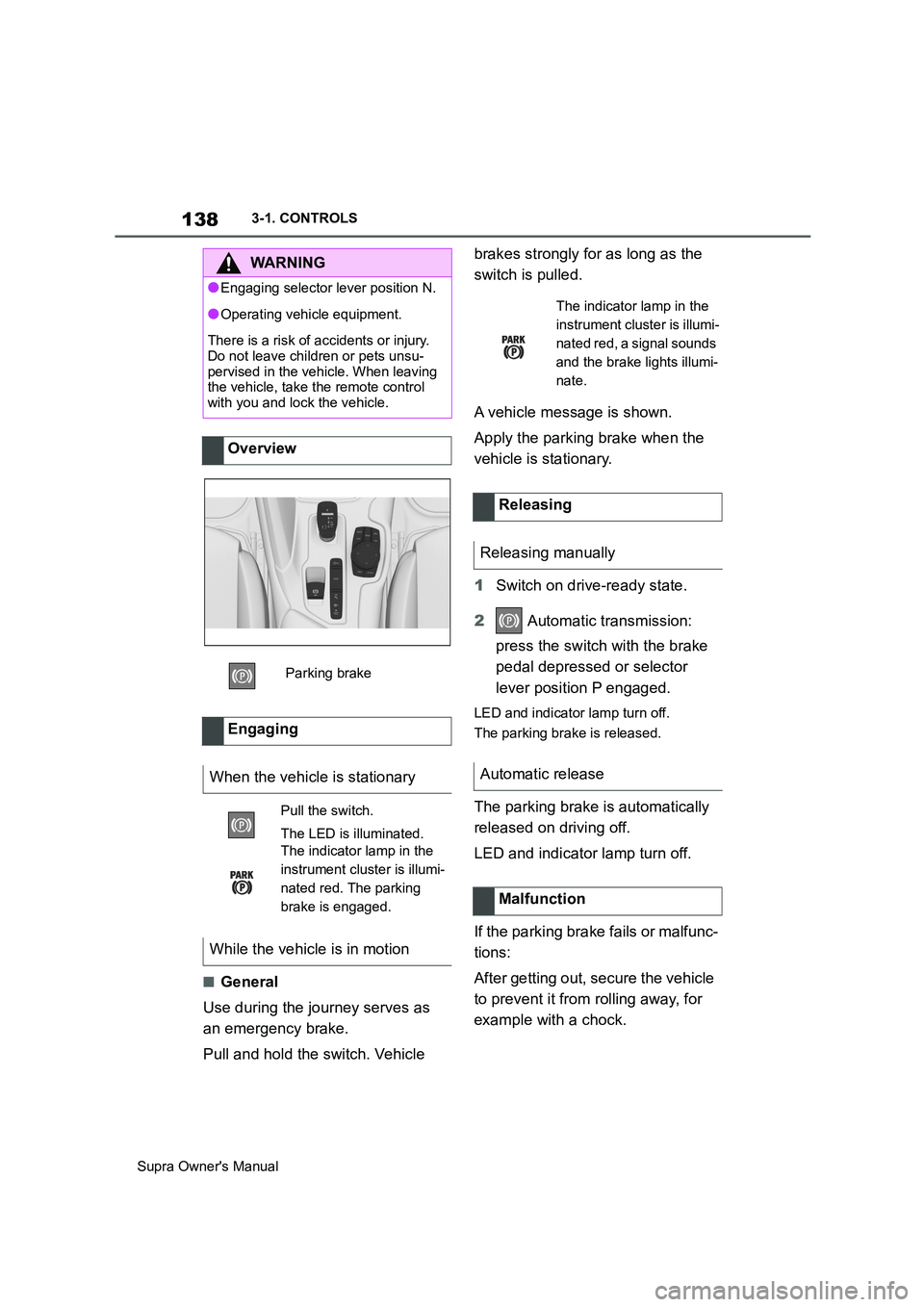
Overview
Parking brake
Engaging
When the vehicle is stationary
Pull the switch.
The LED is illuminated.
The indicator lamp in the
instrument cluster is illumi-
nated red. The parking
brake is engaged.
While the vehicle is in motion
The indicator lamp in the
instrument cluster is illumi-
nated red, a signal sounds
and the brake lights illumi-
nate.
Releasing
Releasing manually
Automatic release
Malfunction
Page 168 of 456
168
Supra Owner's Manual3-1. CONTROLS
Via Toyota Supra Command:
1"My Vehicle"
2"Vehicle settings"
3"Speed warning"
4"Warning at:"
5Turn the Controller until the
desired speed is displayed.
6Press the Controller.
Via Toyota Supra Command:
1"My Vehicle"
2"Vehicle settings"
3"Speed warning"
4"Speed warning"
Via Toyota Supra Command:
1"My Vehicle"
2"Vehicle settings"
3"Speed warning"
4"Select current speed"
The status can be displayed or
actions performed for some sys-
tems.Via Toyota Supra Command:
1"My vehicle"
2"Vehicle status"
• "Tyre Pressure Monitor": Sta-
tus of the Tyre Pressure Monitor,
see page 290
• "Engine oil level": Electronic
oil measurement, see page 309.
• "Vehicle messages": Vehicle
messages are stored in the
background and can be shown
on the Control Display. Display-
ing of saved vehicle messages,
see page 152.
• "Service requirements": dis-
play of the service requirements,
see page 159.
• "Remote maintenance call":
Remote maintenance call.
The system projects important
information, for example the speed,
into the driver's field of vision.
The driver can register this informa-
tion without having to divert atten-
tion from the road. Adjusting the speed warning
Activating/deactivating the
speed warning
Setting the current speed as
the speed warning
Vehicle status
General
Calling up the vehicle status
Overview of the information
Head-Up Display (vehicles
with head-up display)
Principle
Page 189 of 456
189
3
Supra Owner's Manual3-1. CONTROLS
CONTROLS
The front and side airbags for the
front passenger can be deacti-
vated and reactivated using the
integrated key from the remote con-
trol.
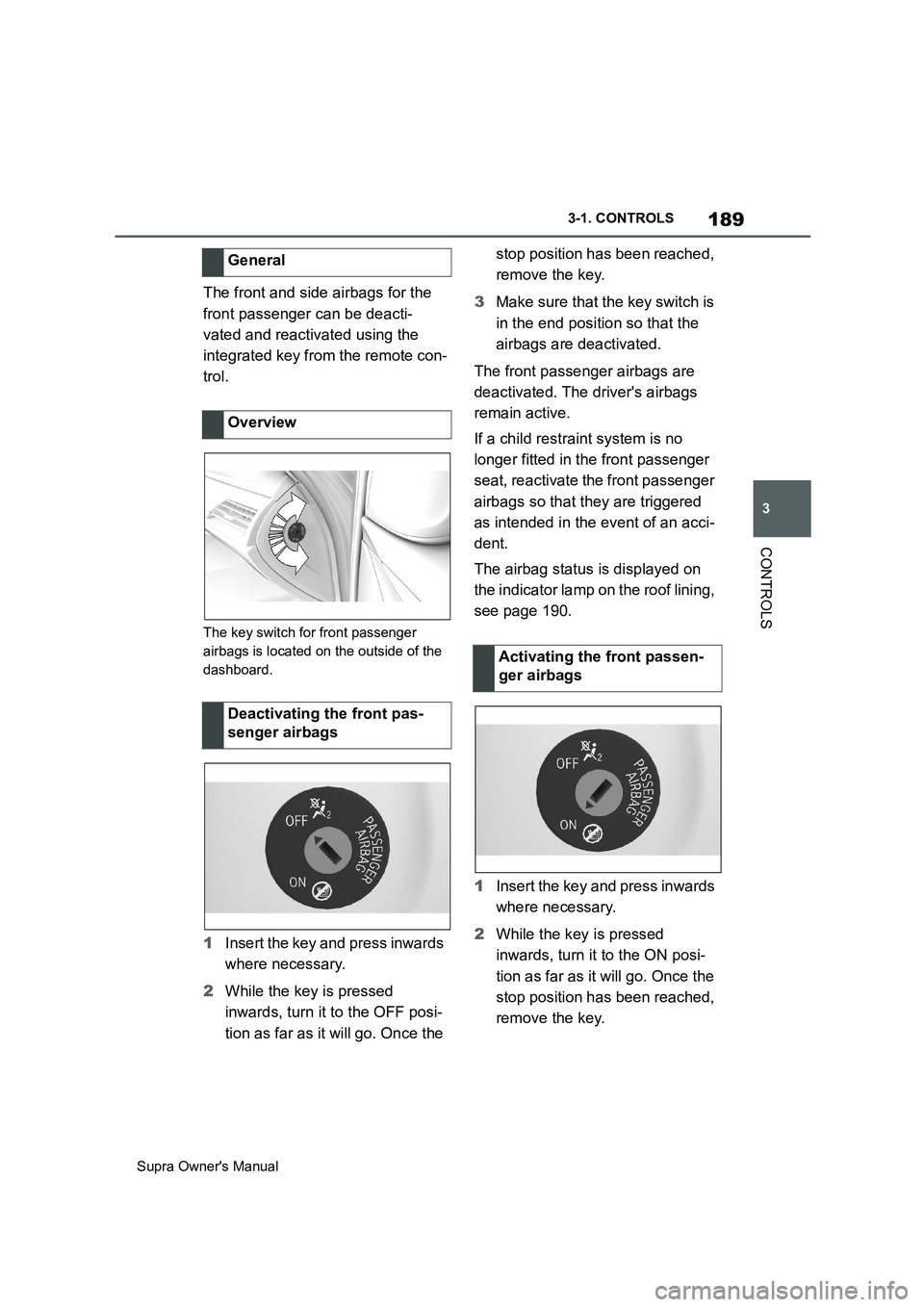
The key switch for front passenger
airbags is located on the outside of the
dashboard.
1Insert the key and press inwards
where necessary.
2While the key is pressed
inwards, turn it to the OFF posi-
tion as far as it will go. Once the stop position has been reached,
remove the key.
3Make sure that the key switch is
in the end position so that the
airbags are deactivated.
The front passenger airbags are
deactivated. The driver's airbags
remain active.
If a child restraint system is no
longer fitted in the front passenger
seat, reactivate the front passenger
airbags so that they are triggered
as intended in the event of an acci-
dent.
The airbag status is displayed on
the indicator lamp on the roof lining,
see page 190.
1Insert the key and press inwards
where necessary.
2While the key is pressed
inwards, turn it to the ON posi-
tion as far as it will go. Once the
stop position has been reached,
remove the key. General
Overview
Deactivating the front pas-
senger airbags
Activating the front passen-
ger airbags
Page 260 of 456
260
Supra Owner's Manual3-1. CONTROLS
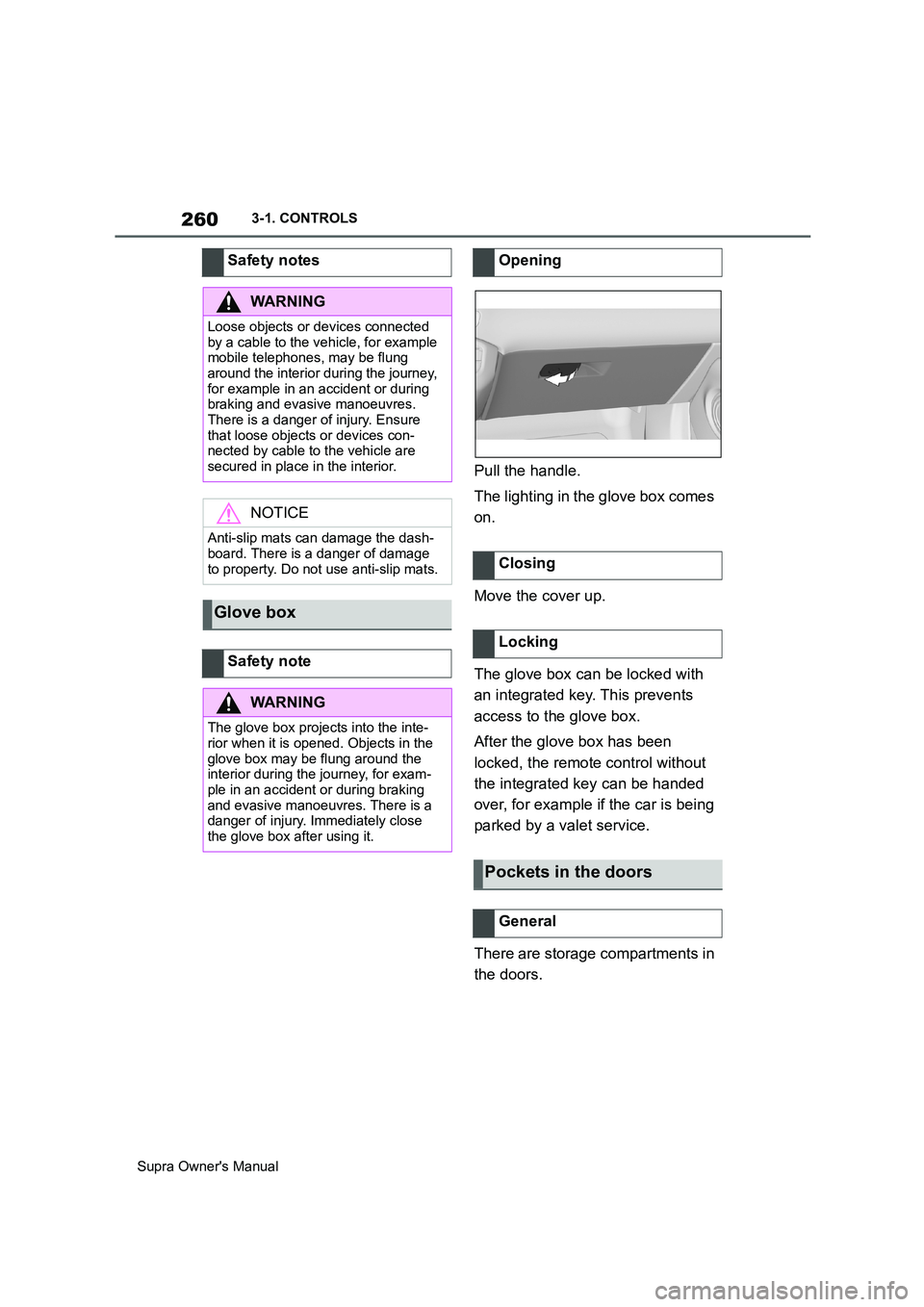
Pull the handle.
The lighting in the glove box comes
on.
Move the cover up.
The glove box can be locked with
an integrated key. This prevents
access to the glove box.
After the glove box has been
locked, the remote control without
the integrated key can be handed
over, for example if the car is being
parked by a valet service.
There are storage compartments in
the doors. Safety notes
WARNING
Loose objects or devices connected
by a cable to the vehicle, for example
mobile telephones, may be flung
around the interior during the journey,
for example in an accident or during
braking and evasive manoeuvres.
There is a danger of injury. Ensure
that loose objects or devices con-
nected by cable to the vehicle are
secured in place in the interior.
NOTICE
Anti-slip mats can damage the dash-
board. There is a danger of damage
to property. Do not use anti-slip mats.
Glove box
Safety note
WARNING
The glove box projects into the inte-
rior when it is opened. Objects in the
glove box may be flung around the
interior during the journey, for exam-
ple in an accident or during braking
and evasive manoeuvres. There is a
danger of injury. Immediately close
the glove box after using it.
Opening
Closing
Locking
Pockets in the doors
General
Page 332 of 456
332
Supra Owner's Manual5-1. MOBILITY
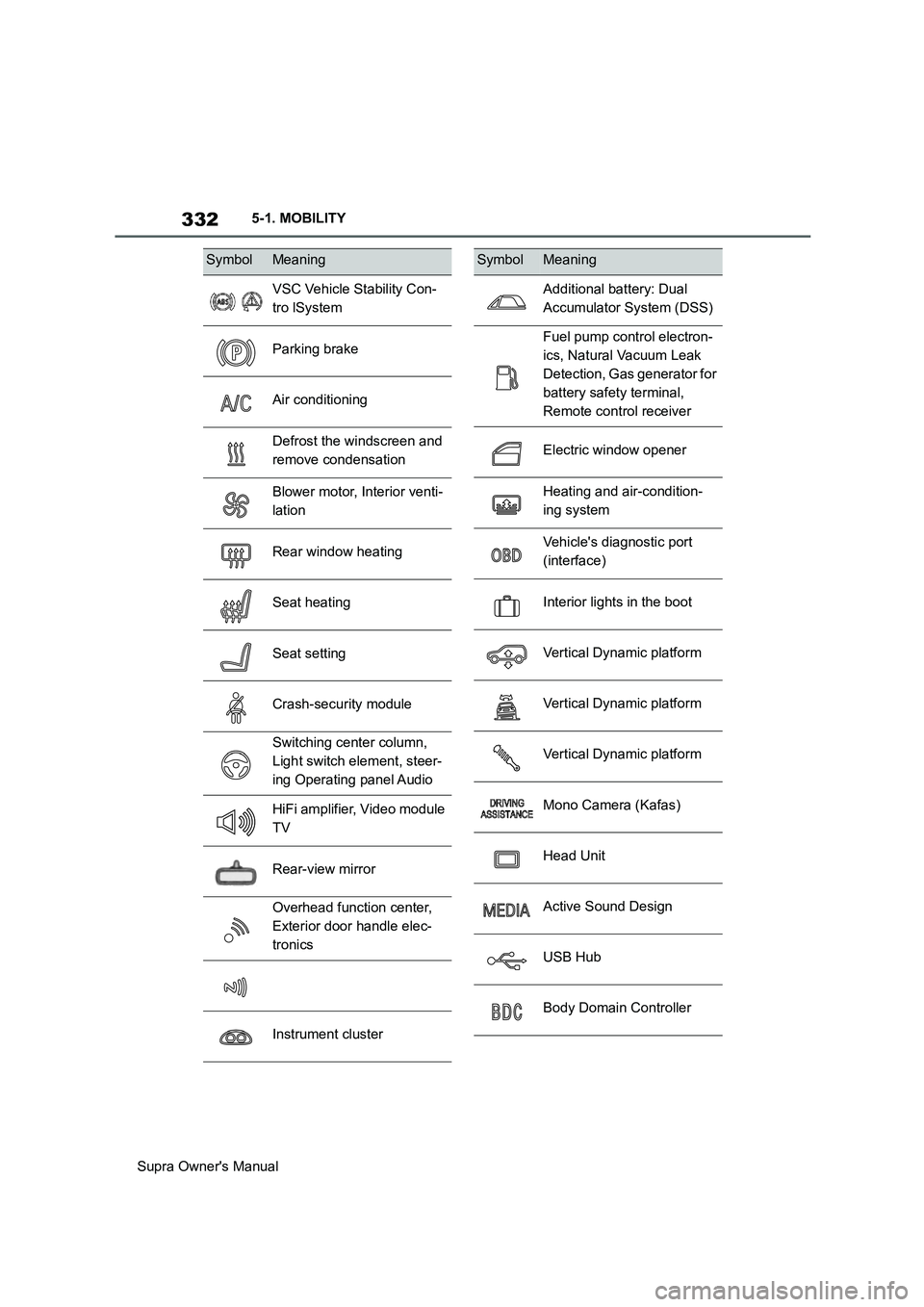
SymbolMeaning
VSC Vehicle Stability Con-
tro lSystem
Parking brake
Air conditioning
Defrost the windscreen and
remove condensation
Blower motor, Interior venti-
lation
Rear window heating
Seat heating
Seat setting
Crash-security module
Switching center column,
Light switch element, steer-
ing Operating panel Audio
HiFi amplifier, Video module
TV
Rear-view mirror
Overhead function center,
Exterior door handle elec-
tronics
Instrument cluster
Additional battery: Dual
Accumulator System (DSS)
Fuel pump control electron-
ics, Natural Vacuum Leak
Detection, Gas generator for
battery safety terminal,
Remote control receiver
Electric window opener
Heating and air-condition-
ing system
Vehicle's diagnostic port
(interface)
Interior lights in the boot
Vertical Dynamic platform
Vertical Dynamic platform
Vertical Dynamic platform
Mono Camera (Kafas)
Head Unit
Active Sound Design
USB Hub
Body Domain Controller
SymbolMeaning
Page 349 of 456
349
5
Supra Owner's Manual5-1. MOBILITY
MOBILITY
■Safety note
■General
In a car wash, the vehicle must be
able to roll freely.
Roll or push the vehicle, see page
145.
Some car washes require you to
get out of the vehicle. It is not possi-
ble to lock the vehicle from the out-
side in selector lever position N. If an attempt is made to lock the vehi-
cle, a signal sounds.
Ensure that the remote control is
located in the vehicle.
Switch on drive-ready state, see
page 45.
Do not rub wet headlights dry and
do not use abrasive or corrosive
cleaning agents.
Soak impurities such as insect resi-
dues with shampoo and wash off
with water.
Remove ice with a de-icer spray; do
not use an ice scraper.
After the vehicle has been washed,
briefly apply the brakes to dry them
otherwise braking effectiveness
may be temporarily reduced. The
heat generated by braking dries the
brake discs and brake pads and
protects them against corrosion.
Completely remove residues on the
windscreens to avoid affecting visi-
bility due to smearing, and to
reduce wiping noise and wiper
blade wear.
NOTICE
The vehicle can be damaged if auto-
matic washing bays or car washes
are used incorrectly. There is a dan-
ger of damage to property. Observe
the following notes:
●Textile car washes or systems
using soft brushes are preferable,
to avoid damage to the paintwork.
●Avoid washing bays or car washes
with guide rails higher than 10 cm,
4 in, to avoid damage to the body.
●Note the maximum tyre width of the
guide rail to avoid damage to tyres
and rims.
●Fold in the exterior mirrors to avoid
damaging them.
●Deactivate the wipers and the rain
sensor (if fitted) to avoid damage to
the wiper system.
Entering a car wash with a auto-
matic transmission
NOTICE
Selector lever position P is automati-
cally engaged when standby state is
switched off. There is a danger of
damage to property. Do not switch off
standby state in car washes.
Exiting from a car wash
Headlights
After washing the vehicle
Page 397 of 456
397
6
Supra Owner's Manual6-1. REFERENCE
REFERENCE
Integrated Universal Remote
Control
Page 411 of 456
411
6
Supra Owner's Manual6-1. REFERENCE
REFERENCE
Remote Control
Page 445 of 456
445
Supra Owner's ManualAlphabetical Index
Bonnet ........................................... 306
Boot ............................................... 261
Boot lid ............................................ 85
Boot lid via remote control ............ 77
Boot lid, emergency release .......... 86
Boot, emergency release ............... 86
Bottle holder, see Cupholder....... 261
Brake assist .................................. 216
Brake assist, adaptive .................. 216
Brake lights, see Bulbs and lights
..................................................... 327
Brake system ................................ 267
Braking safely ............................... 270
Braking, notes .............................. 270
Break recommendations, see Driver
Attention Control........................ 213
Breakdown Assist ........................ 336
Breakdown assistance................. 336
Breakdown, help........................... 336
Brightness, Control Display .......... 63
Bulbs and lights ........................... 327
Button SOS, see Automatic emer-
gency call .................................... 338
Button, start/stop.......................... 134
Buttons on the steering wheel ...... 40
C
Call up mirror adjustment .............. 90
Call up seat adjustment ................. 90
Calling up steering wheel adjust-
ment............................................... 90
Camera lenses, care..................... 353
Camera, rear-view camera, without
Surround View ............................ 242
Camera-based assistance systems,
see Toyota Supra Safety ............ 191
Camera-based Cruise Control, see
Adaptive Cruise Control ............ 225
Can holder, see Cupholder .......... 261
Car wash ....................................... 348
Care of displays, screens ............ 354
Care of upholstery fabrics ........... 352
Care products ............................... 350
Care, Head-Up Display ................. 354Care, see Vehicle wash ................ 348
Care, vehicle.................................. 350
Carpet, care ................................... 353
CarPlay, connection to the vehicle70
Carrying children .......................... 109
Carrying children safely ............... 109
Catalytic converter, see Hot exhaust
system ......................................... 267
CBS Condition Based Service ..... 315
CC, see Cruise Control................. 222
Central locking system .................. 81
Central screen, see Control Display
....................................................... 50
Centre console ................................ 42
Changes, technical, see Your own
safety ...............................................6
Changing bulbs, see Bulbs and
lights ............................................ 327
Changing gear, Automatic transmis-
sion .............................................. 143
Chassis number, see Vehicle identifi-
cation number............................... 17
Checking the oil level electronically
..................................................... 309
Child restraint systems, i-Size..... 113
Child restraint systems, see Carry-
ing children safely ...................... 109
Child seat mounting ..................... 110
Child seat mountings, ISOFIX ..... 112
Child seats, see Carrying children
safely ........................................... 109
Chrome surfaces, care ................. 352
Chrome-plated surfaces, care ..... 352
Cleaning of displays, screens ..... 354
Cleaning, Head-Up Display .......... 354
Comfort closing with the remote
control ........................................... 76
Comfort opening using the remote
control ........................................... 76
Compact wheel, see Emergency
wheel ........................................... 303
Compartments in the doors ......... 260
Compressor................................... 286
Condensation when vehicle is
parked.......................................... 271
Page 449 of 456
449
Supra Owner's ManualAlphabetical Index
Inflation pressure check, see Tyre
Pressure Monitor........................ 290
Inflation pressure, tyres............... 278
Information on no passing .......... 160
Initialising, Tyre Pressure Monitor
TPM.............................................. 293
Instrument cluster ........................ 151
Instrument cluster switch, see Wiper
system ......................................... 140
Instrument lighting ....................... 177
Integrated key ................................. 79
Intended use ..................................... 6
Interior light .................................. 177
Interior light when unlocking ........ 75
Interior light with the vehicle locked
....................................................... 77
Interior movement detector ........... 92
Interval Display, see Service require-
ments........................................... 159
i-Size child restraint systems ...... 113
ISOFIX, child seat mountings...... 112
J
Joystick, Automatic transmission
..................................................... 143
Jump starting, see Starting assis-
tance ............................................ 343
Jump-starting connections ......... 344
Junction warning, see Front-end col-
lision warning with light braking
function ....................................... 193
K
Key switch for front passenger
airbags ........................................ 188
Key, mechanical.............................. 79
Key, see Remote control ................ 74
Keyless Go, see Smart Key System
....................................................... 82
Kick-down, Automatic transmission
..................................................... 143
Knee airbag ................................... 180
L
Labelling of recommended tyres 282
Labelling of run-flat tyres............. 284
Lane boundary, warning .............. 203
Lane Departure Warning .............. 203
Language, setting on the Control
Display........................................... 61
Lashing eyes in the boot.............. 262
Lashing straps, see Lashing eyes in
the boot ....................................... 262
Launch Control ............................. 148
Laying up the vehicle ................... 354
Laying up, vehicle......................... 354
Leather care .................................. 351
Left-hand traffic, light setting ...... 176
Light alloy wheels, care ............... 352
Light in exterior mirror, see Crossing
traffic warning............................. 246
Light in the exterior mirror, see Blind
spot monitor ............................... 207
Light switch ................................... 171
Lighting.......................................... 171
Lights ............................................. 171
LIM button, see Manual Speed Lim-
iter ................................................ 220
List of all messages........................ 64
Loading .......................................... 261
Loading the boot, see Stowing and
securing a transported load ...... 262
Locking settings ............................. 89
Locking with the remote control ... 76
Locking, automatic ......................... 90
Locking, see Opening and closing74
Low-beam headlights ................... 173
Luggage compartment lid, see Boot
lid ................................................... 85
Lumbar support .............................. 98
M
Maintenance .................................. 315
Scheduled maintenance............. 319
Maintenance requirement, see CBS
Condition Based Service ........... 315