infotainment TOYOTA SUPRA 2019 Owners Manual
[x] Cancel search | Manufacturer: TOYOTA, Model Year: 2019, Model line: SUPRA, Model: TOYOTA SUPRA 2019Pages: 456, PDF Size: 88.65 MB
Page 7 of 456
7
1
Supra Owner's Manual1-1. NOTES
NOTES
performs work such as mainte-
nance and repair according to
Toyota specifications with properly
trained personnel. In this Owner's
Manual, facilities of this kind are
referred to as "any reliable repairer
or other qualified service shop".
If such work, for example mainte-
nance and repair, is performed
inexpertly, it could result in conse-
quential damage and thus consti-
tute a safety risk.
Toyota recommends using parts
and accessories that are specifi-
cally approved for this purpose by
To y o t a .
You are recommended to consult
Toyota for advice on genuine
Toyota parts and accessories, other
Toyota approved products and
expert advice on all related matters.
The safety and compatibility of
these products in conjunction with
Toyota vehicles have been checked
by Toyota.
Toyota accepts product responsibil-
ity for genuine Toyota parts and
accessories. Toyota cannot accept
liability for parts or accessory prod-
ucts of any kind which it has not
approved.
Toyota is unable to assess each
individual product of outside origin
as to its suitability for use on Toyota
vehicles without safety risk. Nor can suitability be assured if an offi-
cial permit has been issued for it in
a specific country. Tests performed
for such permits cannot always
cover all operating conditions for
Toyota vehicles, and some of them
therefore are insufficient.
A number of electronic control
devices are installed in your vehi-
cle. Electronic control devices pro-
cess data that they receive from
vehicle sensors, generate them-
selves or exchange with one
another, for example. Some control
devices are necessary for the vehi-
cle to function safely or provide
assistance during driving, for exam-
ple Driver Assistance Systems.
Furthermore, control devices facili-
tate comfort or infotainment func-
tions.
Information on the data saved or
exchanged can be obtained from
the vehicle manufacturer, for exam-
ple in a separate brochure.
Every vehicle has a unique vehicle
identification number. Depending
on the country, a vehicle owner can
be identified by the vehicle identifi-
cation number, the number plate
and the relevant authorities. There Parts and accessories
Data memory
General
Personal identification
Page 27 of 456
27
2
Supra Owner's Manual2-1. QUICK REFERENCE
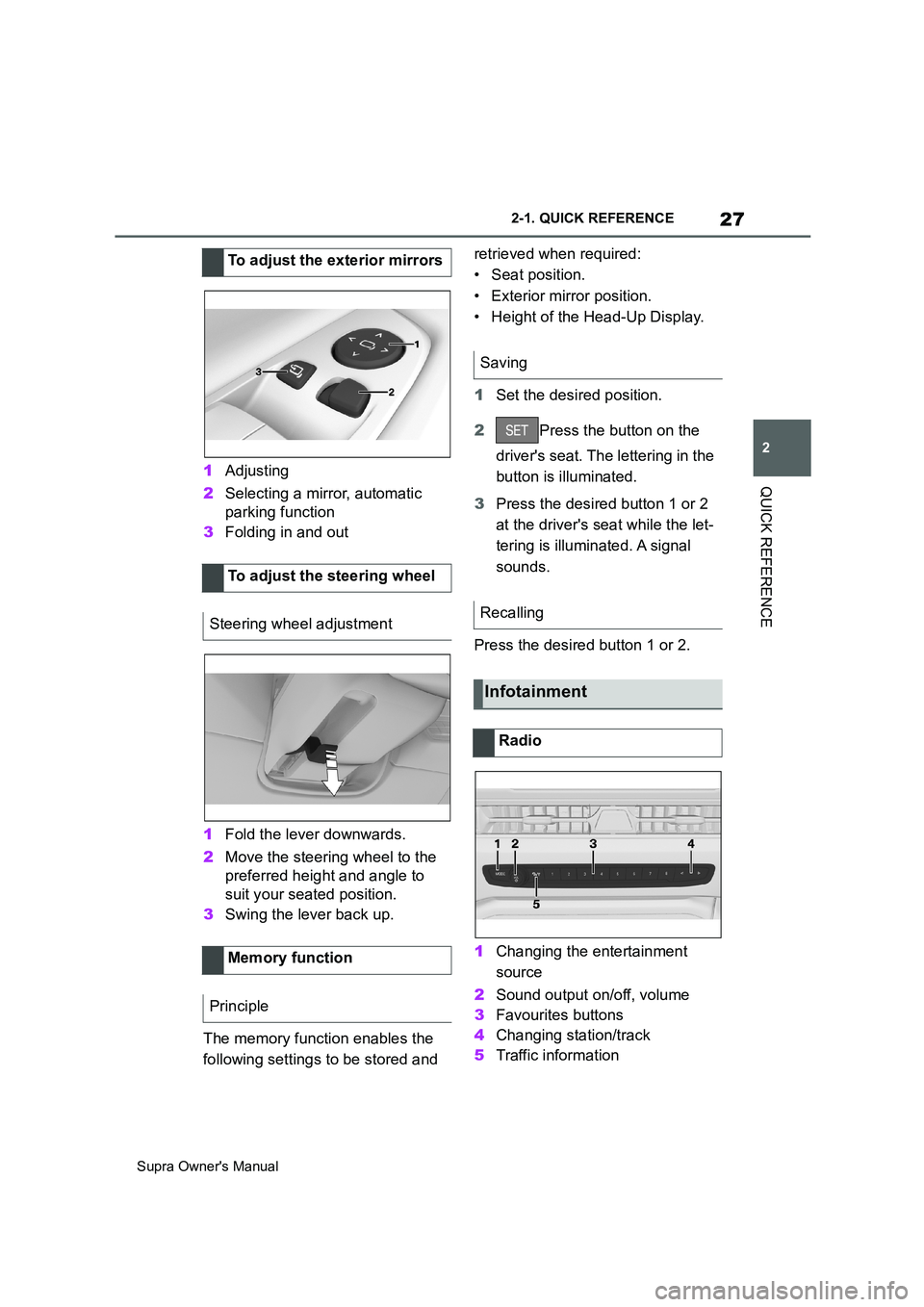
QUICK REFERENCE1Adjusting
2Selecting a mirror, automatic
parking function
3Folding in and out
1Fold the lever downwards.
2Move the steering wheel to the
preferred height and angle to
suit your seated position.
3Swing the lever back up.
The memory function enables the
following settings to be stored and retrieved when required:
• Seat position.
• Exterior mirror position.
• Height of the Head-Up Display.
1Set the desired position.
2Press the button on the
driver's seat. The lettering in the
button is illuminated.
3Press the desired button 1 or 2
at the driver's seat while the let-
tering is illuminated. A signal
sounds.
Press the desired button 1 or 2.
1Changing the entertainment
source
2Sound output on/off, volume
3Favourites buttons
4Changing station/track
5Traffic information To adjust the exterior mirrors
To adjust the steering wheel
Steering wheel adjustment
Memory function
Principle
Saving
Recalling
Infotainment
Radio