radio TOYOTA SUPRA 2019 Owners Manual
[x] Cancel search | Manufacturer: TOYOTA, Model Year: 2019, Model line: SUPRA, Model: TOYOTA SUPRA 2019Pages: 456, PDF Size: 88.65 MB
Page 25 of 456
25
2
Supra Owner's Manual2-1. QUICK REFERENCE
QUICK REFERENCE
together the functions of a number
of switches. These functions can be
operated using the Controller and,
depending on the equipment ver-
sion, the touchscreen.
■General
The buttons can be used to call up
menus directly. The Controller can
be used to select menu items and
perform settings.
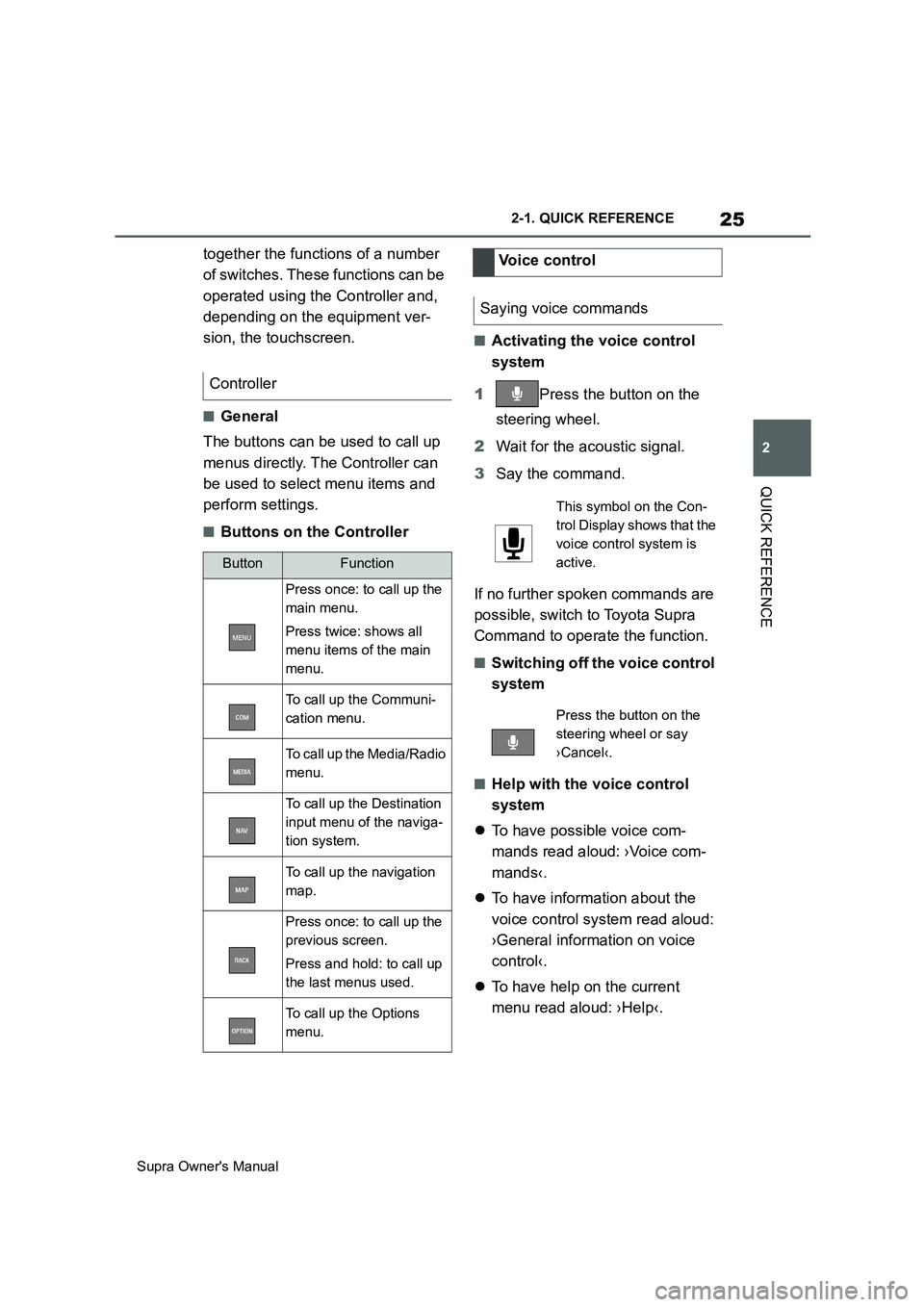
■Buttons on the Controller
■Activating the voice control
system
1Press the button on the
steering wheel.
2Wait for the acoustic signal.
3Say the command.
If no further spoken commands are
possible, switch to Toyota Supra
Command to operate the function.
■Switching off the voice control
system
■Help with the voice control
system
To have possible voice com-
mands read aloud: ›Voice com-
mands‹.
To have information about the
voice control system read aloud:
›General information on voice
control‹.
To have help on the current
menu read aloud: ›Help‹. Controller
ButtonFunction
Press once: to call up the
main menu.
Press twice: shows all
menu items of the main
menu.
To call up the Communi-
cation menu.
To call up the Media/Radio
menu.
To call up the Destination
input menu of the naviga-
tion system.
To call up the navigation
map.
Press once: to call up the
previous screen.
Press and hold: to call up
the last menus used.
To call up the Options
menu.
Voice control
Saying voice commands
This symbol on the Con-
trol Display shows that the
voice control system is
active.
Press the button on the
steering wheel or say
›Cancel‹.
Page 27 of 456
27
2
Supra Owner's Manual2-1. QUICK REFERENCE
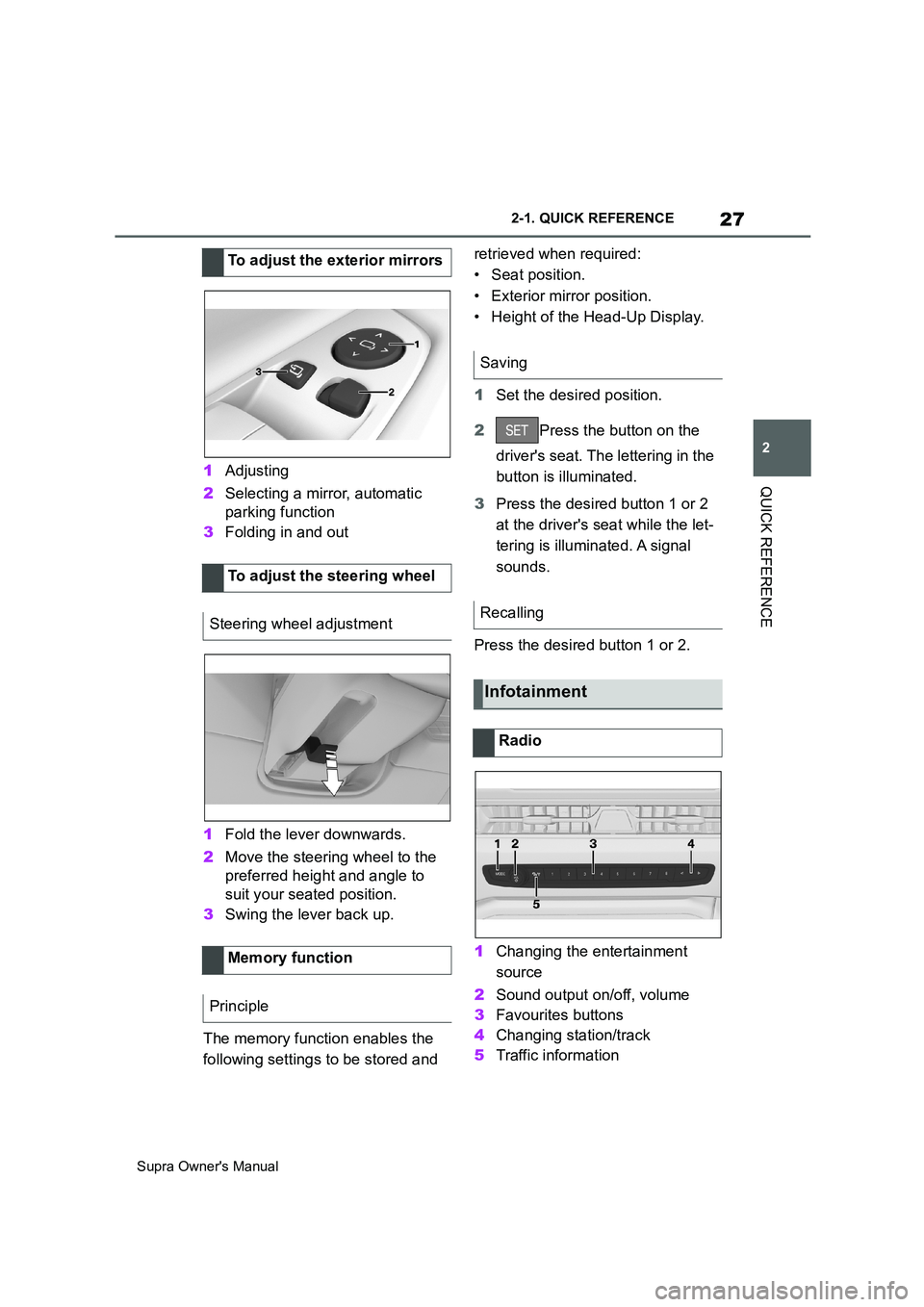
QUICK REFERENCE1Adjusting
2Selecting a mirror, automatic
parking function
3Folding in and out
1Fold the lever downwards.
2Move the steering wheel to the
preferred height and angle to
suit your seated position.
3Swing the lever back up.
The memory function enables the
following settings to be stored and retrieved when required:
• Seat position.
• Exterior mirror position.
• Height of the Head-Up Display.
1Set the desired position.
2Press the button on the
driver's seat. The lettering in the
button is illuminated.
3Press the desired button 1 or 2
at the driver's seat while the let-
tering is illuminated. A signal
sounds.
Press the desired button 1 or 2.
1Changing the entertainment
source
2Sound output on/off, volume
3Favourites buttons
4Changing station/track
5Traffic information To adjust the exterior mirrors
To adjust the steering wheel
Steering wheel adjustment
Memory function
Principle
Saving
Recalling
Infotainment
Radio
Page 29 of 456
29
2
Supra Owner's Manual2-1. QUICK REFERENCE
QUICK REFERENCE
enter the control number your-
self.
• Compare the control number
shown on the Control Display
with the control number in the
device display.
Confirm the control number in the
device and on the Control Display.
• Enter the same control number
on the device and via Toyota
Supra Command then confirm.
The device is connected and dis-
played in the device list.
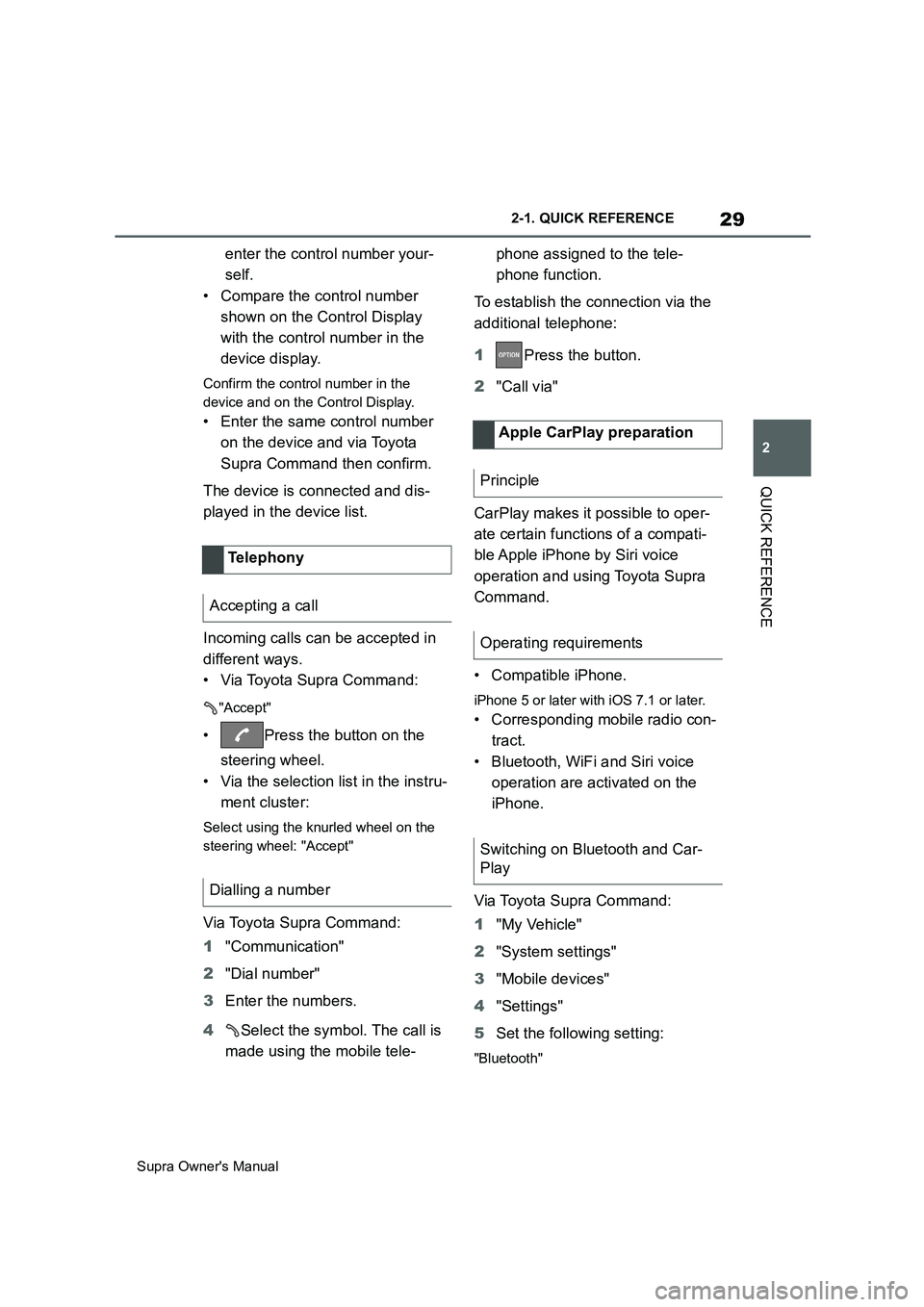
Incoming calls can be accepted in
different ways.
• Via Toyota Supra Command:
"Accept"
• Press the button on the
steering wheel.
• Via the selection list in the instru-
ment cluster:
Select using the knurled wheel on the
steering wheel: "Accept"
Via Toyota Supra Command:
1"Communication"
2"Dial number"
3Enter the numbers.
4Select the symbol. The call is
made using the mobile tele-phone assigned to the tele-
phone function.
To establish the connection via the
additional telephone:
1Press the button.
2"Call via"
CarPlay makes it possible to oper-
ate certain functions of a compati-
ble Apple iPhone by Siri voice
operation and using Toyota Supra
Command.
• Compatible iPhone.
iPhone 5 or later with iOS 7.1 or later.
• Corresponding mobile radio con-
tract.
• Bluetooth, WiFi and Siri voice
operation are activated on the
iPhone.
Via Toyota Supra Command:
1"My Vehicle"
2"System settings"
3"Mobile devices"
4"Settings"
5Set the following setting:
"Bluetooth"
Telephony
Accepting a call
Dialling a number
Apple CarPlay preparation
Principle
Operating requirements
Switching on Bluetooth and Car-
Play
Page 42 of 456
42
Supra Owner's Manual3-1. CONTROLS
14 To release the bonnet
P. 3 0 615 Unlocking the boot lid P.77
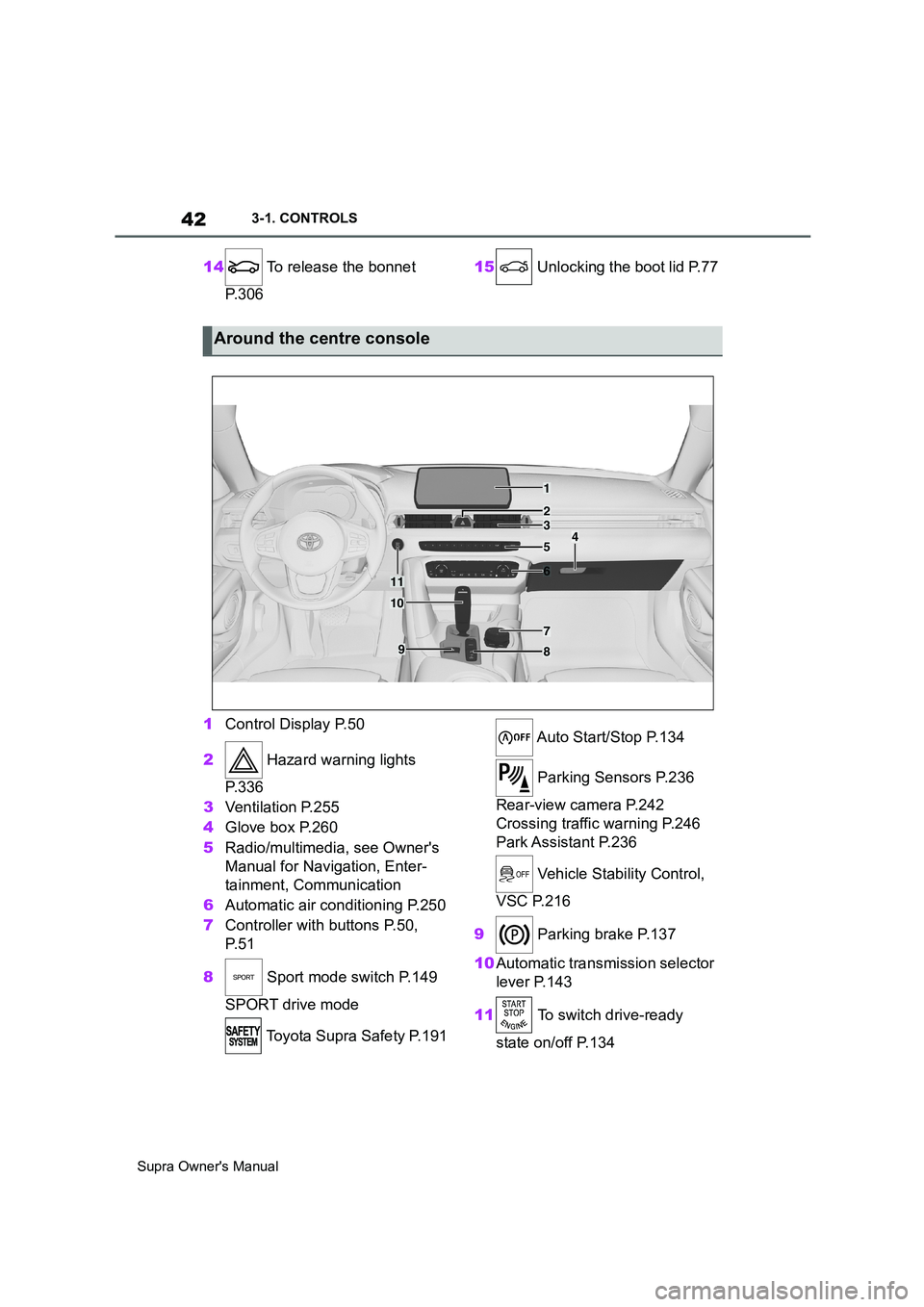
1Control Display P.50
2 Hazard warning lights
P. 3 3 6
3Ventilation P.255
4Glove box P.260
5Radio/multimedia, see Owner's
Manual for Navigation, Enter-
tainment, Communication
6Automatic air conditioning P.250
7Controller with buttons P.50,
P. 5 1
8 Sport mode switch P.149
SPORT drive mode
Toyota Supra Safety P.191 Auto Start/Stop P.134
Parking Sensors P.236
Rear-view camera P.242
Crossing traffic warning P.246
Park Assistant P.236
Vehicle Stability Control,
VSC P.216
9 Parking brake P.137
10Automatic transmission selector
lever P.143
11 To switch drive-ready
state on/off P.134
Around the centre console
1
4
23
5
6
7
89
10
11
Page 51 of 456

51
3
Supra Owner's Manual3-1. CONTROLS
CONTROLS
Supra Command can be operated
with the touchpad of the Controller,
see page 56.
• Turn to switch between menu
items, for example.
• Press to select a menu item, for
example.
• Tilt in four directions to switch
between screens, for example.
The buttons can be used to call up
menus directly. The Controller can
be used to select menu items and
perform settings.
• Turn to switch between menu
items, for example. OperationButtons on the Controller
ButtonFunction
Press once: to call up the
main menu.
Press twice: shows all menu
items of the main menu.
To call up the Communica-
tion menu.
To call up the Media/Radio
menu.
To call up the Destination
input menu of the navigation
system.
To call up the navigation
map.
Press once: to call up the
previous screen.
Press and hold: to call up
the last menus used.
To call up the Options menu.
Controller without naviga-
tion system
General
Operation
Page 52 of 456
52
Supra Owner's Manual3-1. CONTROLS
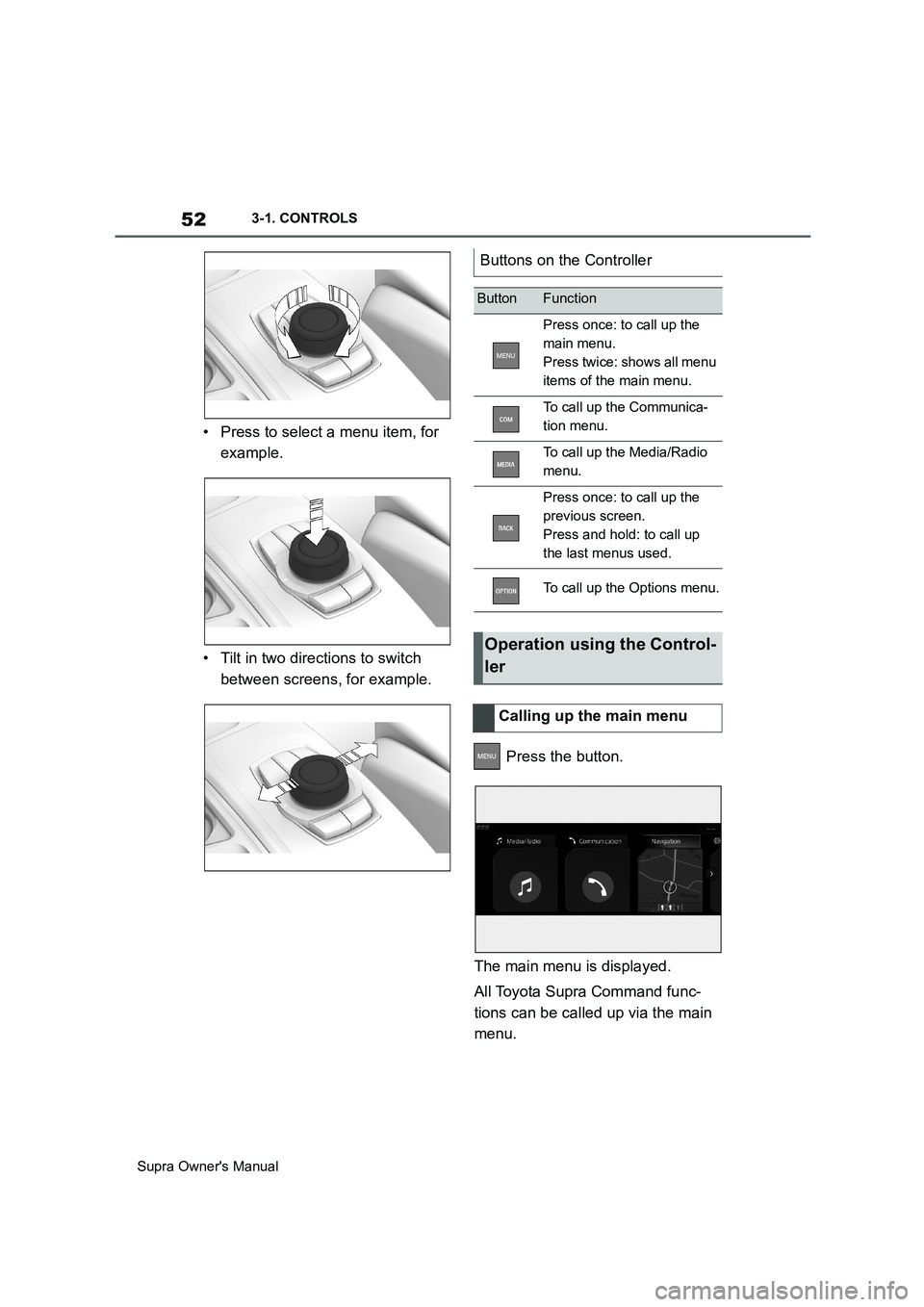
• Press to select a menu item, for
example.
• Tilt in two directions to switch
between screens, for example.
Press the button.
The main menu is displayed.
All Toyota Supra Command func-
tions can be called up via the main
menu.
Buttons on the Controller
ButtonFunction
Press once: to call up the
main menu.
Press twice: shows all menu
items of the main menu.
To call up the Communica-
tion menu.
To call up the Media/Radio
menu.
Press once: to call up the
previous screen.
Press and hold: to call up
the last menus used.
To call up the Options menu.
Operation using the Control-
ler
Calling up the main menu
Page 53 of 456
53
3
Supra Owner's Manual3-1. CONTROLS
CONTROLS
1 Press the button twice.
All menu items of the main menu are
displayed.
2Select a menu item.
3To move a menu item to the
desired position, tilt the Control-
ler to the right or left.
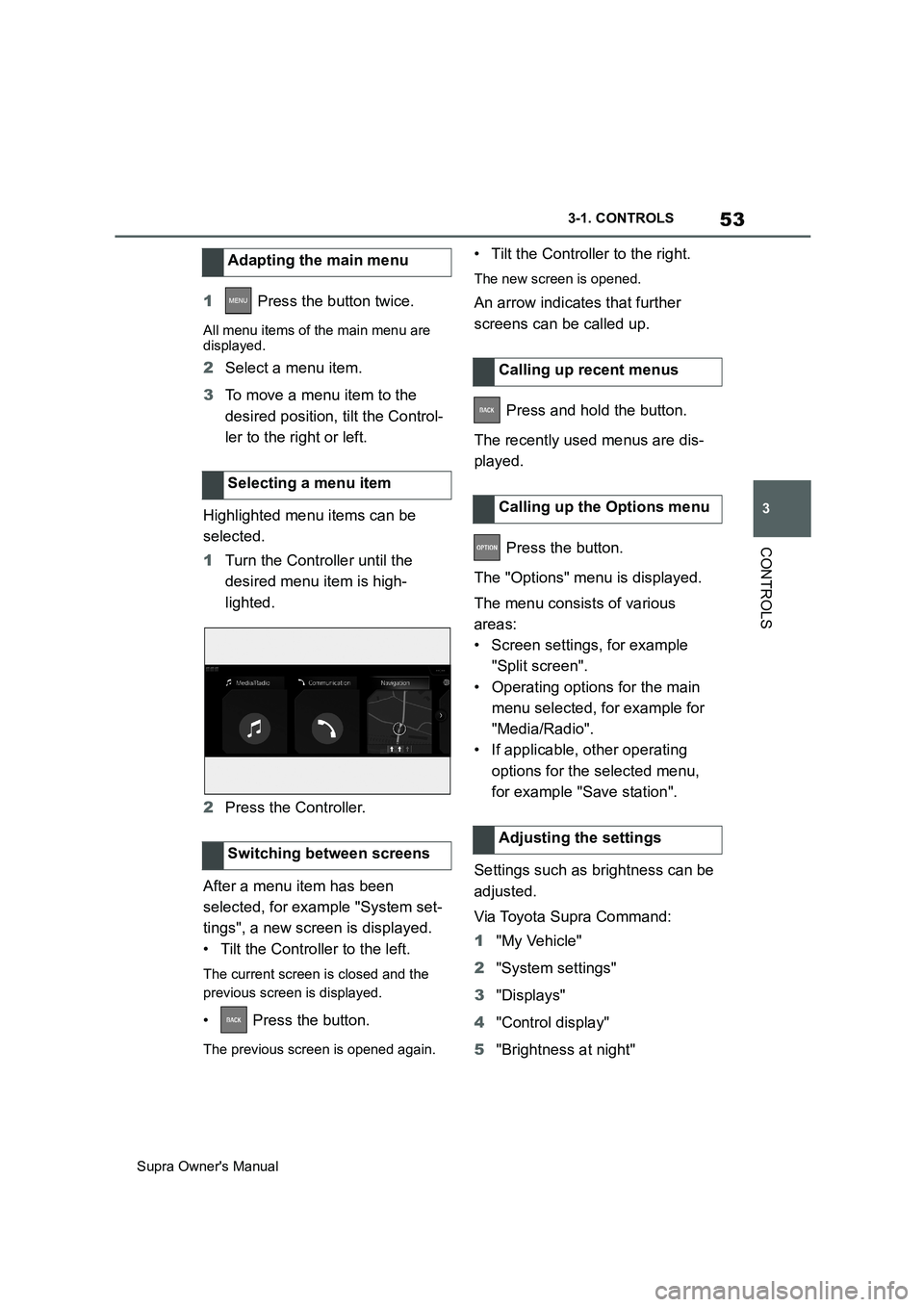
Highlighted menu items can be
selected.
1Turn the Controller until the
desired menu item is high-
lighted.
2Press the Controller.
After a menu item has been
selected, for example "System set-
tings", a new screen is displayed.
• Tilt the Controller to the left.
The current screen is closed and the
previous screen is displayed.
• Press the button.
The previous screen is opened again.
• Tilt the Controller to the right.
The new screen is opened.
An arrow indicates that further
screens can be called up.
Press and hold the button.
The recently used menus are dis-
played.
Press the button.
The "Options" menu is displayed.
The menu consists of various
areas:
• Screen settings, for example
"Split screen".
• Operating options for the main
menu selected, for example for
"Media/Radio".
• If applicable, other operating
options for the selected menu,
for example "Save station".
Settings such as brightness can be
adjusted.
Via Toyota Supra Command:
1"My Vehicle"
2"System settings"
3"Displays"
4"Control display"
5"Brightness at night" Adapting the main menu
Selecting a menu item
Switching between screens
Calling up recent menus
Calling up the Options menu
Adjusting the settings
Page 57 of 456
57
3
Supra Owner's Manual3-1. CONTROLS
CONTROLS
Toyota Supra Command functions,
for example radio stations, naviga-
tion destinations and telephone
numbers, can be saved to Favour-
ites buttons and called up directly.
The settings are saved for the cur-
rently used driver profile.
1Select function via Toyota Supra
Command.
2 Press and hold the
desired button until a signal
sounds.
Press the button.
The function is carried out immedi-
ately. If you have selected a tele-
phone number for example, the
connection will also be established.
Touch the buttons with your finger.
Do not wear gloves or use objects.
The button assignment is displayed
at the top edge of the screen.1Press and hold buttons 1 and 8
simultaneously for approx. 5
seconds.
2"OK"
Favourites buttons
General
Saving a function
Performing a function
Displaying the button assign-
ment
Clearing the button assign-
ment
Page 58 of 456
58
Supra Owner's Manual3-1. CONTROLS
This chapter describes all standard,
country-specific and special equip-
ment available for the model series.
It may therefore describe equip-
ment which is not installed in your
vehicle, for example on account of
the optional equipment selected or
the country specification. This also
applies to safety-relevant functions
and systems. Please comply with
the relevant laws and regulations
when using the corresponding func-
tions and systems.
The voice control system enables
most of the functions shown in the
Control Display to be operated by
spoken commands. The system
provides spoken announcements to
assist you with input.
• Functions that can only be used
when the vehicle is stationary
can only be operated via the
voice control system to a limited
extent.
• The system has a special micro-
phone on the driver's side.
• ›...‹ indicates commands for the
voice control system in the
Owner's Manual.• Commands, numbers and let-
ters should be spoken fluently,
with the usual emphasis and at a
normal volume and speed.
• Always say the commands in the
language of the voice control
system.
• When selecting the radio sta-
tion, use the customary pronun-
ciation of the station name as it is
displayed on the Control Display.
›[...] Station ...‹, for example,
Classic Radio station.
In order for the voice commands to
be detected, a language must be
set using Toyota Supra Command
that is supported by the voice con-
trol system.
Selecting the language, see page
61.
1 Press the button on the
steering wheel.
2Wait for the acoustic signal.
3Say the command.
It is possible that no further spoken
commands are available. In this
Voice control system
Vehicle equipment
Principle
General
Operating requirements
Saying voice commands
Activating the voice control
system
This symbol on the Control
Display shows that the voice
control system is active.
Page 60 of 456
60
Supra Owner's Manual3-1. CONTROLS
1If necessary, switch on enter-
tainment audio output.
2 Press the button on the
steering wheel.
3›Media and radio‹
4›Sound‹
You can select whether the system
uses the standard dialogue or the
short variant.
If the short variant is selected, the
system announcements are played
in shortened form.
Via Toyota Supra Command:
1"My Vehicle"
2"System settings"
3"Language"
4"Voice control:"
5Select the desired setting.
Voice recognition via server ena-
bles use of the dictation function,
natural input of destinations and
improves the quality of voice recog-
nition. To use it, data is sent across
an encrypted connection to a ser-
vice provider and stored locally
there.
Via Toyota Supra Command:1"My Vehicle"
2"System settings"
3"Language"
4"Server speech recognition"
It is possible to answer while the
voice control system is querying
your previous spoken instruction.
The function can be deactivated if
the queries are frequently cancelled
inadvertently, for example due to
background noise or speaking.
Via Toyota Supra Command:
1"My Vehicle"
2"System settings"
3"Language"
4"Speaking during voice output"
The language to be used for voice
control and system announcements
can be set.
Via Toyota Supra Command:
1"My Vehicle"
2"System settings"
3If applicable, "Language"
4"Language:"
5Select the desired language.
Turn the volume knob during the
spoken instructions until the
Settings
Setting the speech dialogue
Activating voice recognition
via server
Speaking during voice output
Selecting the language
Adjusting the volume