suspension TOYOTA SUPRA 2020 Owners Manual (in English)
[x] Cancel search | Manufacturer: TOYOTA, Model Year: 2020, Model line: SUPRA, Model: TOYOTA SUPRA 2020Pages: 352, PDF Size: 6.49 MB
Page 10 of 352

101-1. NOTES
Supra Owner's Manual
any time.
For example, this includes:
• Setting for the seat position.
• Suspension and climate con-trol settings.
If necessary, data can be trans-
ferred to the entertainment and
communication system of the
vehicle, e.g. via smartphone.
This includes the following
depending on the respective
equipment:
• Multimedia data such as music, films or photos for
playback in an integrated mul-
timedia system.
• Address book data for use in conjunction with an integrated
hands-free system or an inte-
grated navigation system.
• Entered navigation destina- tions.
• Data on the use of Internet services.
This data can be stored locally
in the vehicle or is found on a
device that has been connected
to the vehicle, e.g., a smart-
phone, USB stick or MP3 player.
If this data is stored in the vehi-
cle, it can be deleted at any
time.
This data is only transmitted to
third parties upon personal
request as part of the use of
online services. The transmis-
sion depends on the selected
settings for the use of the ser-
vices. Depending on the vehicle equip-
ment, mobile devices connected
to the vehicle, for instance
smartphones, can be controlled
via the vehicle control elements.
The sound and picture from the
mobile device can be played
back and displayed through the
multimedia system. Certain
information is transferred to the
mobile device at the same time.
Depending on the type of incor-
poration, this includes, for
instance position data and other
general vehicle information. This
optimizes the way in which
selected apps, for instance navi-
gation or music playback, work.
There is no further interaction
between the mobile device and
the vehicle, for instance active
access to vehicle data.
How the data will be processed
further is determined by the pro-
vider of the particular app being
used. The extent of the possible
settings depends on the respec-
tive app and the operating sys-
tem of the mobile device.
If the vehicle has a wireless net-
work connection, this enables Incorporation of mobile end
devices
Services
General information
Page 129 of 352
1293-1. CONTROLS
Supra Owner's Manual
3
CONTROLS
Adaptive variable suspension.
Steering.
Display in the instrument clus-
ter.
Cruise control.
When drive-ready state is
switched on, the NORMAL driv-
ing mode is selected automati- cally.
■Concept
Balanced tuning between
dynamic and efficient driving.
■Concept
Dynamic tuning for higher agility
with an optimized chassis and
suspension.
■Switching on
■Concept
Customize settings can be
adjusted in the customize driv-
ing mode.
■Configuration
Via Toyota Supra Command:
1 "My Vehicle"
2 "Vehicle settings"
3 "Configure SPORT INDIVID-
UAL"
4 Select the desired setting.
The setting is stored for the
driver profile currently used.
Reset Customize to the stan-
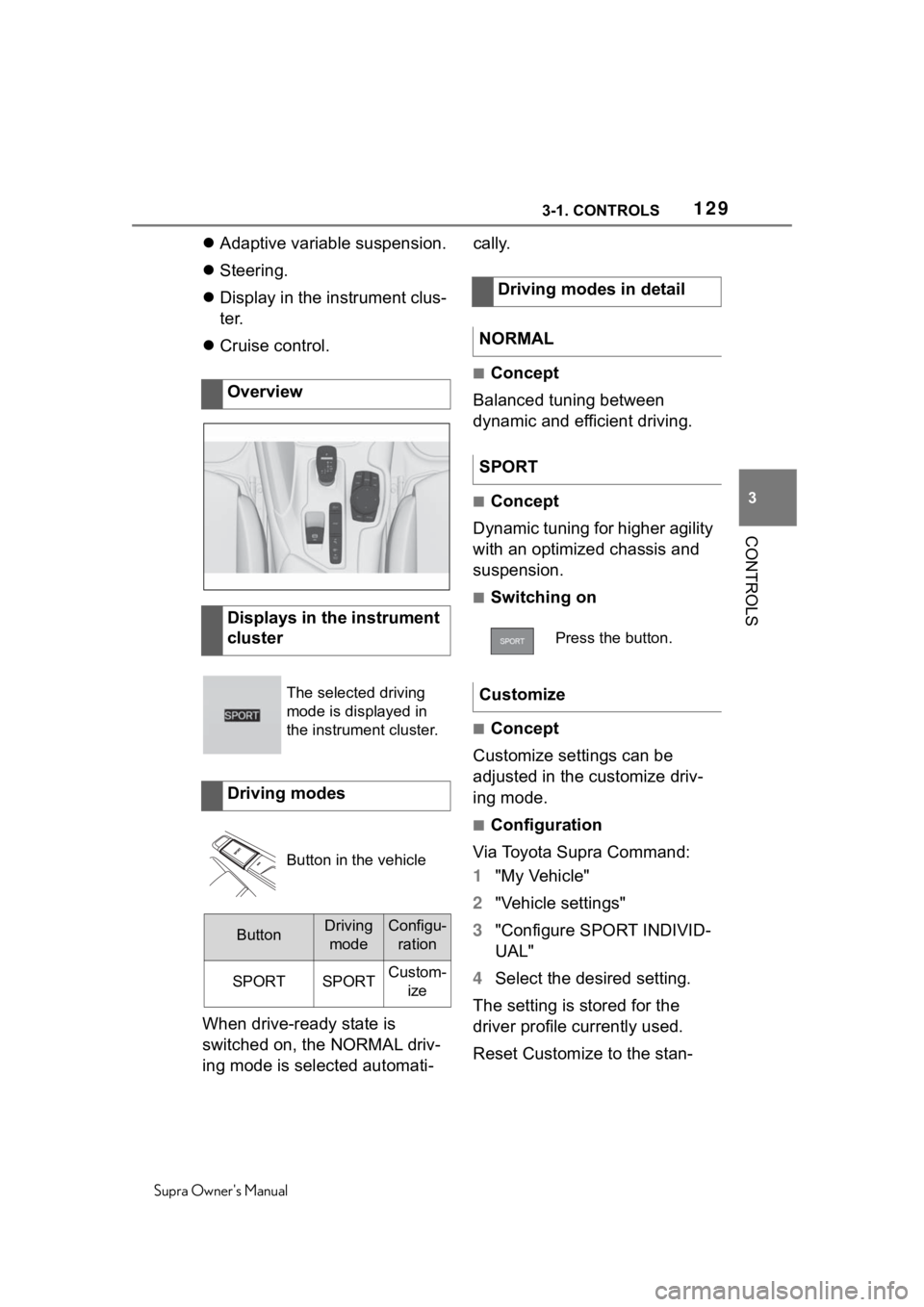
Overview
Displays in the instrument
cluster
The selected driving
mode is displayed in
the instrument cluster.
Driving modes
Button in the vehicle
ButtonDriving
modeConfigu- ration
SPORTSPORTCustom- ize
Driving modes in detail
NORMAL
SPORT
Press the button.
Customize
Page 224 of 352
2243-1. CONTROLS
Supra Owner's Manual
This chapter describes all stan-
dard, country-specific and
optional features offered with
the series. It also describes fea-
tures and functions that are not
necessarily available in your
vehicle, e.g., due to the selected
options or country versions. This
also applies to safety-related
functions and systems. When
using these functions and sys-
tems, the applicable laws and
regulations must be observed.
The Adaptive variable suspen-
sion is a controllable sport chas-
sis/suspension. This system
reduces undesirable vehicle
motion when using a dynamic
driving style or traveling on
uneven road surfaces.
This enhances the driving
dynamics and driving comfort
depending on the road surface
condition and driving style.
The system offers several differ-ent damping settings.
The damping settings are
assigned to the different driving
modes of the Sport mode
switch, refer to page 128.
Performance Control enhances
the agility of the vehicle.
To increase maneuverability,
wheels are braked individually
when a sporty driving style is
used. The resulting braking
power is simultaneously largely
compensated by an engine
intervention.
Driving comfor t
Vehicle features and
options
Adaptive variable suspen-
sion
Concept
General information
Driving modeDamper tuning
NORMALBalanced
SPORTFirm
Performance Control
Page 265 of 352
2655-1. MOBILITY
Supra Owner's Manual
5
MOBILITY
Winter and all-season tires with
better cold weather performance
than summer tires.
Do not drive with a tire tread of
less than 0.12 in/3 mm, other-
wise there is an increased risk
of hydroplaning.
Do not drive with a tire tread of
less than 0.16 in/4 mm, as such
tires are less suitable for winter
operation. Wear indicators are distributed
around the tire's circumference
and have the legally required
minimum height of 0.063
inches/1.6 mm.
The positions of the wear indica-
tors are marked on the tire side-
wall with TWI, Tread Wear
Indicator.
Inspect your tires regularly for
damage, foreign objects lodged
in the tread, and tread wear.
Driving over rough or damaged
road surfaces, as well as debris,
curbs and other obstacles can
cause serious damage to
wheels, tires and suspension
parts. This is more likely to
occur with low-profile tires,
which provide less cushioning
between the wheel and the
road. Be careful to avoid road
hazards and reduce your speed,
especially if your vehicle is
WA R N I N G
The temperature grade for this tire
is established for a tire that is
properly inflated and not over-
loaded. Excessive speed, under-
inflation, or excessive loading,
either separately or in combina-
tion, can cause heat buildup and
possible tire failure.
M+S
Tire tread
Summer tires
Winter tires
Minimum tread depth
Tire damage
General information
Page 274 of 352
2745-1. MOBILITY
Supra Owner's Manual
7Stow the Mobility System in
the vehicle.
Do not exceed the maximum
permissible speed of 50 mph/80
km/h
Reset the Tire Pressure Monitor
TPM, refer to page 274.
Replace the nonworking tire and
the sealant container of the
Mobility System promptly.
Tire chains cannot be mounted.
Snow tires should be used
instead.
The system monitors tire infla-
tion pressure in the four
mounted tires. The system
warns you if there is a loss of
pressure in one or more tires. Sensors in the tire valves mea-
sure the tire inflation pressure
and tire temperature.
The system detects the
mounted tires automatically. The
system displays the specified
nominal pressure values on the
Control Display and compares
these values to the actual tire
pressure values.
If tires are being used that are
not specified on the tire inflation
pressure details on the vehicle,
refer to page 248, such as tires
with special approval, the sys-
tem needs to be actively reset.
The system will then take over
the actual tire inflation pressures
as the target pressures.
When operating the system,
also note the additional informa-
tion found in the Tire inflation
pressure, refer to page 248,
chapter.
Continuing the trip
Snow chains
NOTICE
■Driving with tire chains
Do not fit tire chains. Tire chains
may damage the vehicle body
and suspension, and adversely
affect driving performance.
Selecting tire chains
Tire Pressure Monitor
TPM
Concept
General information
Page 311 of 352
3115-1. MOBILITY
Supra Owner's Manual
5
MOBILITY
ing starting aid terminal of the
vehicle to be started.
4 Attach one terminal clamp of
the negative jumper cable to
the negative terminal of the
battery, or to the correspond-
ing engine or body ground of
assisting vehicle.
5 Attach the second terminal
clamp to the negative termi-
nal of the battery, or to the
corresponding engine or
body ground of the vehicle to
be started.
Never use spray fluids to start
the engine.
1 Start the engine of the assist-
ing vehicle and let it run for
several minutes at an
increased idle speed.
2 Start the engine of the vehicle
that is to be started in the
usual way.
If the first starting attempt is not
successful, wait a few minutes
before making another attempt in
order to allow the discharged bat-
tery to recharge.
3Let both engines run for sev-
eral minutes.
4 Disconnect the jumper
cables in the reverse order.
Check the battery and recharge,
if needed. The vehicle is not permitted to
be towed.
Starting the engine
Tow-starting and towing
Safety information
WA R N I N G
Due to system limits, individual
functions can malfunction during
tow-starting/towing with the Toy-
ota Supra Safety systems acti-
vated. There is a risk of an
accident. Switch all Toyota Supra
Safety systems off prior to
tow-starting/towing.
Transporting the vehicle
General information
Safety information
NOTICE
The vehicle can be damaged
when towing the vehicle with a
single lifted axle. There is a risk of
damage to property. The vehicle
should only be t ransported on a
loading platform.
NOTICE
The vehicle can become dam-
aged when lifting and securing it.
There is a risk of damage to prop-
erty.
●Lift the vehicle using suitable
means.
●Do not lift or secure the vehicle
by its tow fitting, body parts, or
suspension parts.
Page 338 of 352

338Alphabetical Index
Supra Owner's Manual
Alphabetical Index
A
A/C button, see Air conditioning ............................................... 227
ABS, Antilock Brake System . 192
ACC, see Adaptive Cruise Con- trol with Stop & Go............... 201
Acceleration Assistant, see Launch Control..................... 127
Accessories and parts ............... 6
Activated charcoal filter ........ 230
Active Guard, see Toyota Supra Safety .................................... 170
Adaptive brake assistant ....... 193
Adaptive Cruise Control with Stop & Go function ACC ...... 201
Adaptive variable suspension ............................................... 224
Additives, engine oil types .... 291
Air circulation, see Recircu- lated-air mode....................... 228
Air conditioning ...................... 227
Air distribution, manual ......... 229
Air flow, automa tic climate con-
trol ......................................... 229
Air outlets, see Ventilation .... 230
Air pressure, tires .................. 258
Airbags .................................... 158
Airbags, indicator and warning light........................................ 160
Alarm system ............................ 90
Alarm, unintentional................. 92
All-season tires, see Winter tires ............................................... 268
Antilock Brake System, ABS . 192
Anti-slip control, see VSC ..... 193
Anti-theft protection, locking .. 75
Anti-theft protection, see Lug bolt lock ................................ 283
Apple CarPlay, connection to the vehicle ..................................... 70 Approach control warning with
City light braking function ...172
Approach control warning with light braking function ...........172
Approved axle load ................323
Approved total weight ............323
Assistance when driving off, see Drive-off assistan t ................193
Assistance with breakdown ..307
AUTO program, automatic cli- mate control ..........................228
Auto Start/Stop function ........ 113
Automatic climate control .....225
Automatic cruise control with Stop & Go ..............................201
Automatic Curb Monitor, exte- rior mirror ..............................104
Automatic deactivation, front-seat passenger airbags...............................................168
Automatic headlight control ..151
Automatic high-beam .............153
Automatic locking ....................90
Automatic transmission.........123
Automatic transmission, see Automatic transm ission.......123
Automatic unlocking ................90
Automatic vehicle wash .........314
Autonomous Emergency Brak- ing ..........................................190
Axle loads, weights ................323
B
Backrest curvature, see Lumbar support ................ ....................98
Backrest tilt ...............................97
Backrest, seats .........................95
Backrest, width .........................98
Bar for tow-starting/towing....312
Battery, changing, remote con- trol of the vehicle ....................77
Battery, disposing of ..............301
Page 347 of 352

347
Supra Owner's Manual347Alphabetical Index
Safety belts, care .................... 319
Safety systems, see Airbags . 158
Safety systems, see Toyota Supra Safety ......................... 170
Saving fuel .............................. 251
Screen Mirroring, connection . 71
Screen, see Control Display .... 48
Screwdriver, see Onboard vehi- cle tool kit ............................. 298
Sealant, see Mobility System 269
Seat heating ............................ 107
Seat, see Memory function .... 105
Seating position for children. 108
Seats, front ............................... 95
Securing cargo ....................... 243
Selection list in instrument clus- ter........................................... 142
Selector lever, Automatic trans- mission.................................. 123
Sensors, care .......................... 320
Service and warranty ................. 7
Service requirements ............. 139
Service requirements, see Condi- tion Based Service CBS ...... 296
SET button, see Adaptive Cruise Control with Stop & Go........ 201
SET button, see Cruise control ............................................... 197
Set speed, see Adaptive Cruise Control with Stop & Go........ 201
Settings on Control Display .... 60
Settings, locking/unlocking..... 88
Shift paddles on the steering wheel ..................................... 123
Side airbag .............................. 158
Side protection ....................... 215
Signaling, horn ......................... 38
Signals when unlocking, see Confirmation signals from the
vehicle ..................................... 89
Sitting safely ............................. 94
Sizes, see Dimensions ........... 322 Smallest turning radius..........322
SMS text message, supplemen-
tary .........................................132
Snow chains............................274
Socket for OBD Onboard Diagno- sis ..........................................296
Sockets ....................................237
SOS button, see Intelligent emer- gency call ..............................308
Special equipment, see Vehicle features and options ................5
Speed Limit Assist .................210
Speed limit display, see Speed Limit Info ...............................140
Speed Limit Info......................140
Sport chassis/suspension, see Adaptive variable suspension...............................................224
Sport displays .........................146
Sport mode switch .................128
Sport program, Automatic trans- mission ..................................123
SPORT, see Sport mode switch ...............................................128
Stability control s ystems .......192
Standard equipment, see Vehicle features and options ................5
Standard view, Head-up Display ...............................................148
Standby state, idle state and drive-ready state .....................44
Start/Stop button .................... 113
Start/stop, automatic function113
Status control displ ay, tires...276
Status information, Toyota Supra Command ................................46
Status of Owner's Manual ..........5
Status, vehicle ........................147
Steering wheel, adj usting ......105
Steering wheel, buttons ...........38
Steering wheel, see Memory function .................................105
Page 348 of 352

348Alphabetical Index
Supra Owner's Manual
Steptronic Sport transmission, see Automatic transmission 123
Storage compartments, locations ............................................... 239
Storage, tires .......................... 268
Storing the vehicle ................. 320
Stowing and securing cargo . 243
Straps for cargo, see Lashing eyes in the cargo area ......... 243
Summer tires, tread ............... 265
Sun visor ................................. 237
Supplementary SMS text mes- sage ....................................... 132
Suspension settings, see Sport mode switch ......................... 128
Switch for driving dynamics, see Sport mode switch ............... 128
Switches, see Cockpit ............. 38
Symbols and displays ............... 4
T
Tail lights, see Lights and bulbs ............................................... 299
Technical changes, see For Your Own Safety................................ 5
Technical data......................... 322
Temperature display, see Exter- nal temperature .................... 138
Temperature, automatic climate control ................................... 226
Temperature, engine oil ......... 138
Theft alarm system, see Alarm system ..................................... 90
Tilt alarm sensor....................... 92
Tilt, backrest ............................. 97
Tilting the passenger's side mir- ror, see Automatic Curb Moni-
tor, exterior mirror ................ 104
Time ........................................... 61
Tire brands, recommended ... 267
Tire damage ............................ 265
Tire identification marks ........ 262 Tire inflation pres
sure ............258
Tire pressure ...........................258
Tire Pressure Monitor TPM ....274
Tire repair kit, s ee Mobility Sys-
tem .........................................269
Tire sealant, se e Mobility System
...............................................269
Tire settings ............................275
Tire tread .................................265
Tires and wheels.....................258
Tires, changing .......................266
Tool ..........................................298
Torque display, see Sport dis- plays ......................................146
Touchscreen .............................53
Tow bar ....................................312
Tow fitting................................313
Tow rope ..................................312
Towing ..................................... 311
Tow-starting ............................ 311
Toyota Supra Command ..........45
Toyota Supra Safety ...............170
TPM Tire Pressure Monitor ....274
Traction control ......................195
Traction mode .........................195
TRACTION, driving dynamics195
Transmission lock, electronic unlocking...............................127
Transmission, see Automatic transmission .........................123
Transporting children safely .108
Tread, tires ..............................265
Triple turn signal activation ... 119
Trunk lid.....................................84
Trunk lid via remote control ....76
Trunk lid, emergency unlocking .................................................85
Trunk lid, see Trunk lid.............84
Trunk, emergency unlocking ...85
Turn signal, indicator light.....136
Turn signals, bulb replacement, see Lights and bulbs ............299