key battery TOYOTA SUPRA 2023 Owners Manual
[x] Cancel search | Manufacturer: TOYOTA, Model Year: 2023, Model line: SUPRA, Model: TOYOTA SUPRA 2023Pages: 372, PDF Size: 6.32 MB
Page 8 of 372

81-1. NOTES
assistance during driving, for
instance driver assistance sys-
tems. Furthermore, control units
facilitate comfort or infotainment
functions.
Information about stored or
exchanged data can be
requested from the manufac-
turer of the vehicle, in a sepa-
rate booklet, for example.
Each vehicle is marked with a
unique vehicle identification
number. Depending on the
country, the vehicle owner can
be identified with the vehicle
identification number, license
plate and corresponding authori-
ties. In addition, there are other
options to track data collected in
the vehicle to the driver or vehi-
cle owner, e.g. via the Toyota
Supra Connect account that is
used.
Control units process data to
operate the vehicle.
For example, this includes:
• Status messages for the vehi-cle and its Customize compo-
nents, e.g., wheel rotational
speed, wheel speed, deceler-
ation, transverse acceleration,
engaged safety belt indicator.
• Ambient conditions, e.g., tem- perature, rain sensor signals.
The processed data is only pro-
cessed in the vehicle itself and
generally volatile. The data is
not stored beyond the operating
period.
Electronic components, e.g.
control units and ignition keys,
contain components for storing
technical information. Informa-
tion about the vehicle condition,
component usage, mainte-
nance requirements or faults
can be stored temporarily or
permanently.
This information generally
records the state of a compo-
nent, a module, a system, or the
environment, for instance:
• Operating states of system components, e.g., fill levels,
tire inflation pressure, battery
status.
• Malfunctions and faults in important system compo-
nents, for instance lights and
brakes.
• Responses by the vehicle to special situations such as air-
bag deployment or engage-
ment of the driving stability
control systems.
• Information on vehicle-dam- aging events.
The data is required to perform
the control unit functions. Fur-
thermore, it also serves to rec-
ognize and correct malfunctions,
and helps the vehicle manufac-
Personal reference
Operating data in the vehi-
cle
Page 45 of 372
453-1. CONTROLS
3
CONTROLS
This chapter describes all stan-
dard, country-specific and
optional features offered with
the series. It also describes fea-
tures and functions that are not
necessarily available in your
vehicle, e.g., due to the selected
options or country versions. This
also applies to safety-related
functions and systems. When
using these functions and sys-
tems, the applicable laws and
regulations must be observed.
Depending on the situation, the
vehicle is in one of the three
states:
• Idle state.
• Standby state.
• Drive-ready state.
If the vehicle is in idle state, it is
switched off.
The vehicle is in idle state prior
to opening from the outside and after exiting and locking.
For instance, the idle state is
automatically established under
the following conditions:
• After several minutes, if no
operation takes place on the
vehicle.
• If the charge state of the vehi- cle battery is low.
• Depending on the setting via Toyota Supra Command:
when one or both front doors
are opened after driving when
exiting the vehicle.
In some situations, the idle state
is not set automatically, for
instance during a phone call or
when the low beams are
switched on.
After a trip, the sleep mode can
be established by opening the
front doors. For this purpose,
the driver and front passenger
must exit the vehicle.
Via Toyota Supra Command:
1 "My Vehicle"
2 "Vehicle settings"
3 "Doors/Key"
4 "Turn off after door opening"
Operating state of the
vehicle
Vehicle features and
options
General information
Idle state
Principle
General information
Automatic idle state
Establishing idle state
when opening the front
doors
Page 79 of 372
793-1. CONTROLS
3
CONTROLS
changed.
Via Toyota Supra Command:
1"My Vehicle"
2 "System settings"
3 "Mobile devices"
4 "Settings"
5 "Swap telephone/additional
tel." This chapter describes all stan-
dard, country-specific and
optional features offered with
the series. It also describes fea-
tures and functions that are not
necessarily available in your
vehicle, e.g., due to the selected
options or country versions. This
also applies to safety-related
functions and systems. When
using these functions and sys-
tems, the applicable laws and
regulations must be observed.
The vehicle is supplied with two
remote controls with integrated
key.
Each remote control contains a
replaceable battery. Replacing
the battery, refer to page 84.
Depending on the equipment
and country version, various
settings, refer to page 93, can
be configured for the button
functions.
A driver profile, refer to page 68,
with personal settings can be
assigned to a remote control.
To prevent possible locking in of Opening and closing
Vehicle features and
options
Remote control
General information
Page 80 of 372
803-1. CONTROLS
the remote control, take the
remote control with you when
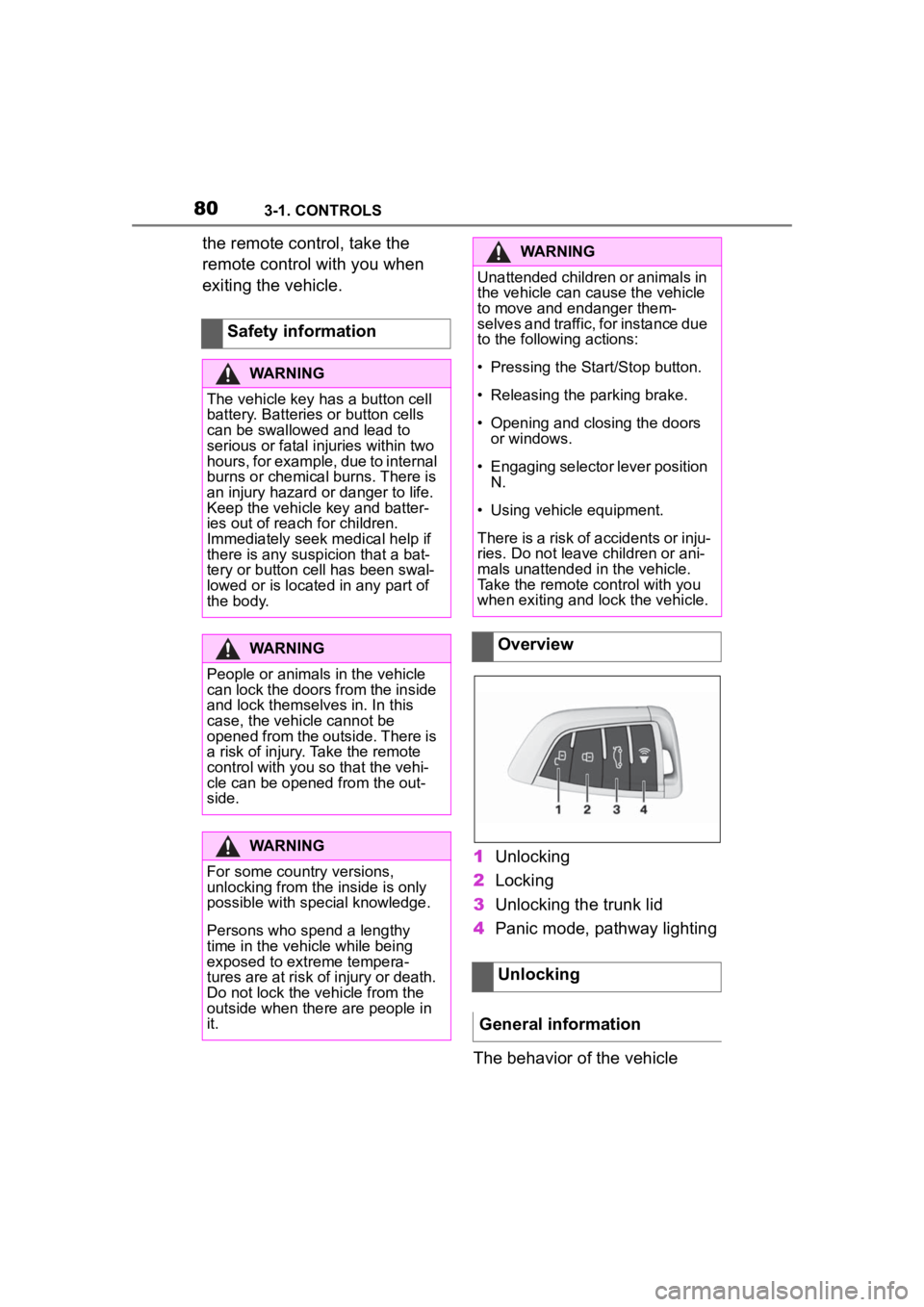
exiting the vehicle.1Unlocking
2 Locking
3 Unlocking the trunk lid
4 Panic mode, pathway lighting
The behavior of the vehicle
Safety information
WARNING
The vehicle key has a button cell
battery. Batteries or button cells
can be swallowed and lead to
serious or fatal injuries within two
hours, for example, due to internal
burns or chemical burns. There is
an injury hazard or danger to life.
Keep the vehicle key and batter-
ies out of reach for children.
Immediately seek medical help if
there is any suspicion that a bat-
tery or button cell has been swal-
lowed or is located in any part of
the body.
WARNING
People or animals in the vehicle
can lock the doors from the inside
and lock themselves in. In this
case, the vehicle cannot be
opened from the outside. There is
a risk of injury. Take the remote
control with you so that the vehi-
cle can be opene
d from the out-
side.
WARNING
For some country versions,
unlocking from the inside is only
possible with special knowledge.
Persons who spend a lengthy
time in the vehicle while being
exposed to extreme tempera-
tures are at risk of injury or death.
Do not lock the vehicle from the
outside when there are people in
it.
WARNING
Unattended children or animals in
the vehicle can cause the vehicle
to move and endanger them-
selves and traffic, for instance due
to the following actions:
Page 83 of 372
833-1. CONTROLS
3
CONTROLS
The light functions may depend
on the ambient brightness.
To avoid locking the vehicle key
in the vehicle, do not place the
vehicle key in the cargo area.
You can set up if the doors will
be unlocked when the trunk lid
is opened with the remote con-
trol. Settings, refer to page 93.
You can trigger the alarm sys-tem if you find yourself in a dan-
gerous situation.
To switch off the alarm: press
any button.
Set the duration, refer to page
159.
Trunk lid
General information
Safety information
WARNING
Body parts can be jammed when
operating the trunk lid. There is a
risk of injury. Make sure that the
area of movement o f the trunk lid
is clear during opening and clos-
ing.
NOTICE
During opening, the trunk lid piv-
ots back and up. There is a risk of
damage to property. Make sure
that the area of movement of the
trunk lid is clear during opening
and closing.
Unlocking
Press and hold the button
on the remote control for
approx. 1 second.
Panic mode
• Press the button on the
remote control and hold
for at least 3 seconds.
• Briefly press the button on the remote control
three times in succes-
sion.
Switching on the headlight
courtesy delay feature
Press and hold the button
on the remote control for
approx. 1 second.
Replacing the battery
WARNING
The battery inside the vehicle key
is a button cell. Batteries or button
cells can be swallowed, causing
serious or even fatal injuries
within two hours, e .g. due to inter-
nal burns or cauterisations. There
is a danger of injury or danger to
life. Keep vehicle keys and batter-
ies out of the reach of children.
Seek medical assistance immedi-
ately if you suspect that a battery
or button cell ha s been swallowed
or has got into a part of the body.
Page 84 of 372
843-1. CONTROLS
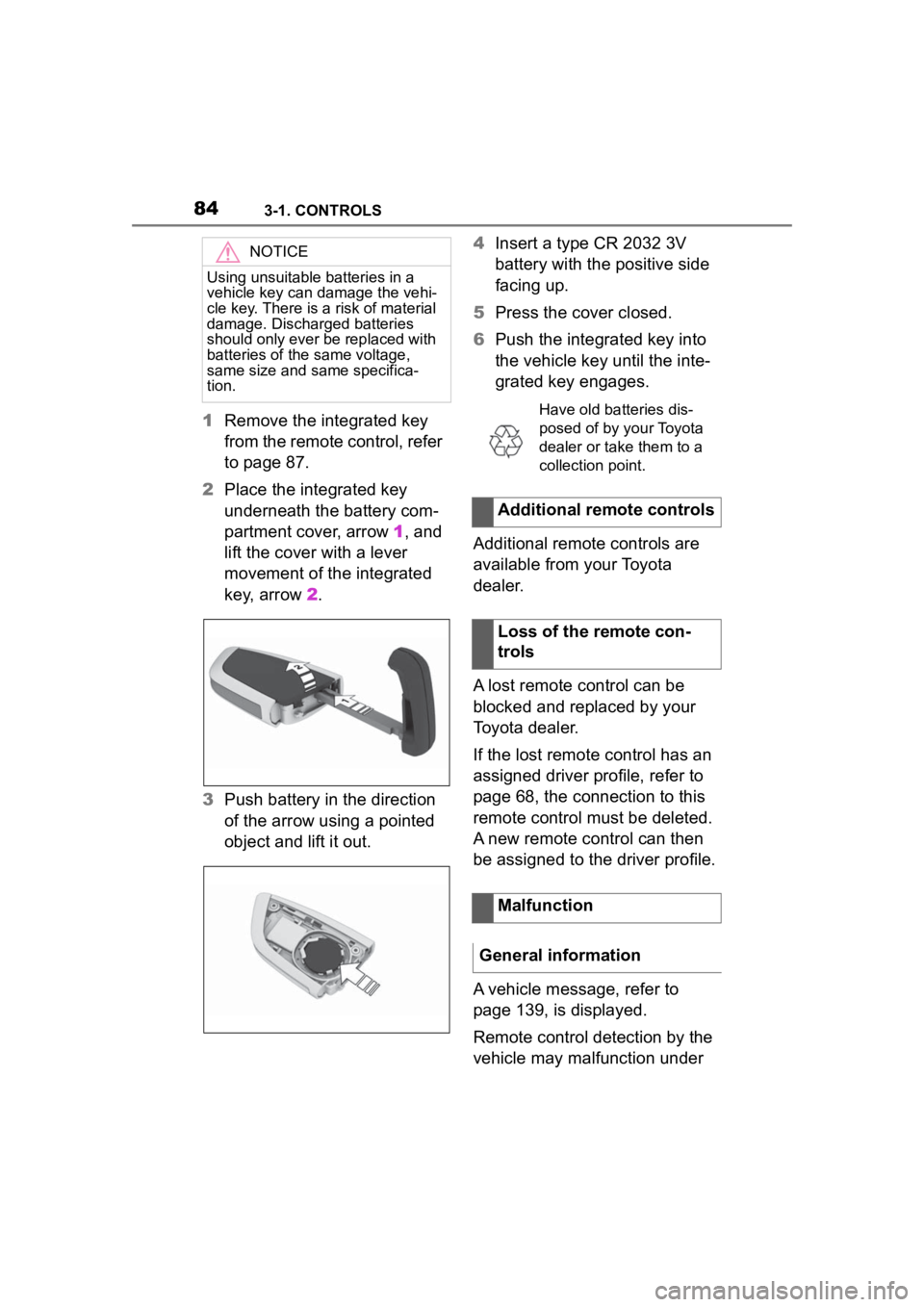
1Remove the integrated key
from the remote control, refer
to page 87.
2 Place the integrated key
underneath the battery com-
partment cover, arrow 1, and
lift the cover with a lever
movement of the integrated
key, arrow 2.
3 Push battery in the direction
of the arrow using a pointed
object and lift it out. 4
Insert a type CR 2032 3V
battery with the positive side
facing up.
5 Press the cover closed.
6 Push the integrated key into
the vehicle key until the inte-
grated key engages.
Additional remote controls are
available from your Toyota
dealer.
A lost remote control can be
blocked and replaced by your
Toyota dealer.
If the lost remote control has an
assigned driver profile, refer to
page 68, the connection to this
remote control must be deleted.
A new remote control can then
be assigned to the driver profile.
A vehicle message, refer to
page 139, is displayed.
Remote control detection by the
vehicle may malfunction under
NOTICE
Using unsuitable batteries in a
vehicle key can damage the vehi-
cle key. There is a risk of material
damage. Discharged batteries
should only ever be replaced with
batteries of the same voltage,
same size and same specifica-
tion.
Have old batteries dis-
posed of by your Toyota
dealer or take them to a
collection point.
Additional remote controls
Loss of the remote con-
trols
Malfunction
General information
Page 85 of 372
853-1. CONTROLS
3
CONTROLS
the following circumstances:
• The battery of the vehicle key is discharged. For replacing
the battery, refer to page 84.
• Interference of the radio con- nection from transmission
towers or other equipment
with high transmitting power.
• Shielding of the remote con- trol due to metal objects.
Do not transport the remote control
together with metal objects.
• Interference of the radio con-nection from mobile phones
or other electronic devices in
direct proximity to the remote
control.
Do not transport the remote control
together with elec tronic devices.
• Interference of radio transmis-
sion by a charging process of
mobile devices, for instance
charging of a mobile phone.
• The remote control is in direct proximity of the wireless
charging tray.
Place the remote control down at a
different location.
In the case of interference, the
vehicle can be unlocked and
locked from the outside with the
integrated key, refer to page 86. It is not possible to switch on the
drive-ready state if the remote
control has not been detected.
Proceed as follows in this case:
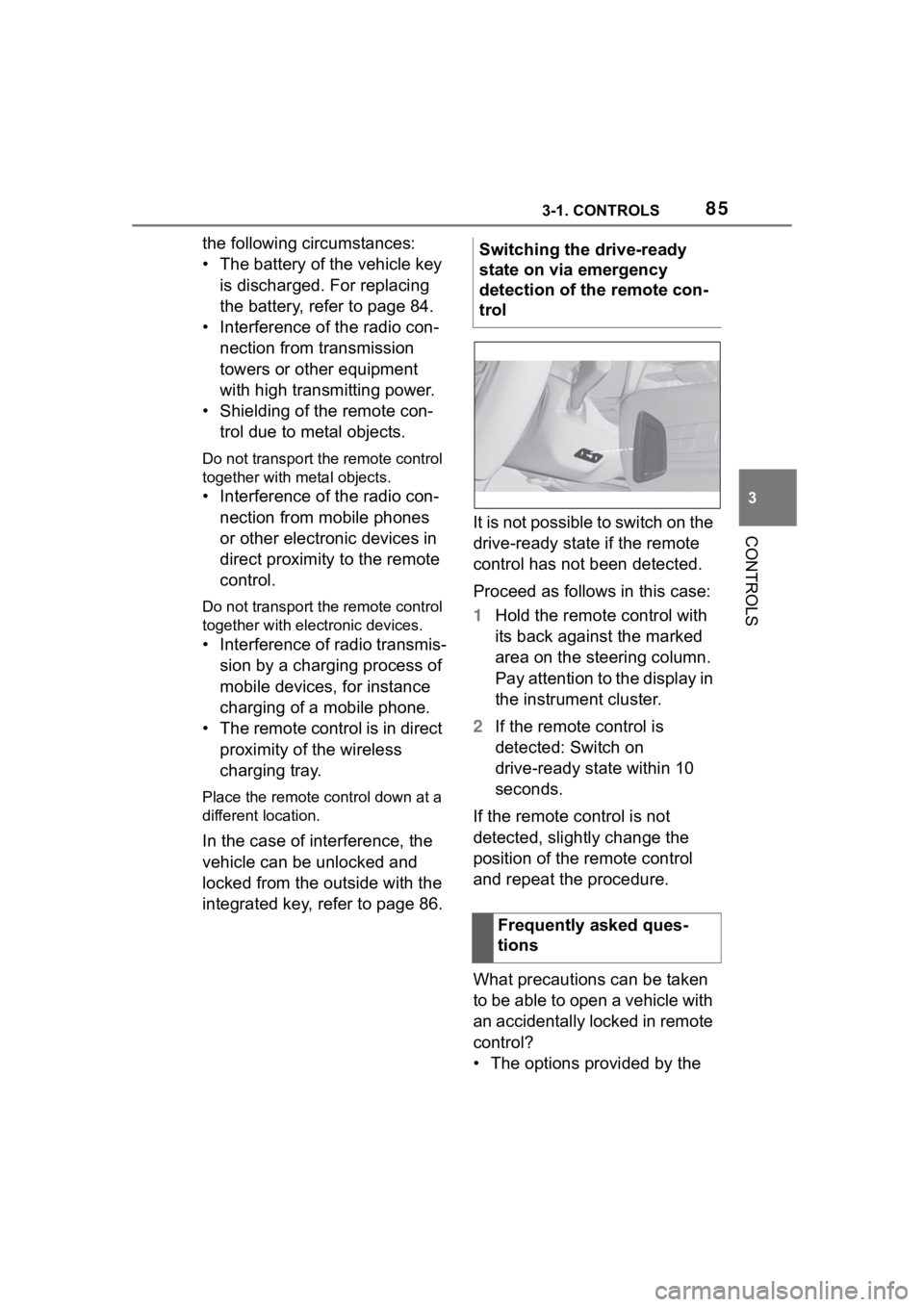
1
Hold the remote control with
its back against the marked
area on the steering column.
Pay attention to the display in
the instrument cluster.
2 If the remote control is
detected: Switch on
drive-ready state within 10
seconds.
If the remote control is not
detected, slightly change the
position of the remote control
and repeat the procedure.
What precautions can be taken
to be able to open a vehicle with
an accidentally locked in remote
control?
• The options provided by the Switching the drive-ready
state on via emergency
detection of the remote con-
trol
Frequently asked ques-
tions
Page 88 of 372
883-1. CONTROLS
• Pull the door handle on the door to open the door. The
other doors remain locked.
• Press the button to unlock all the doors. Pull the
door opener.
The vehicle can be accessed
without operating the vehicle
key.
Carrying the vehicle key with
you, e.g., in your pants pocket,
is sufficient.
The vehicle automatically
detects the remote control when
it is in close proximity or in the
car's interior.
Comfort entry supports the fol-
lowing functions:
• Unlocking and locking the vehicle from the door handle.
• To lock the vehicle, the remote control must be
located outside of the vehicle
near the doors.
• The next unlocking and lock- ing cycle is not possible until after approx. 2 seconds.
The driver should always
carry the remote control on
their person and take it with
them when they leave the
vehicle.
Depending on the location of
the vehicle or the surround-
ing radio wave conditions, the
remote control may not oper-
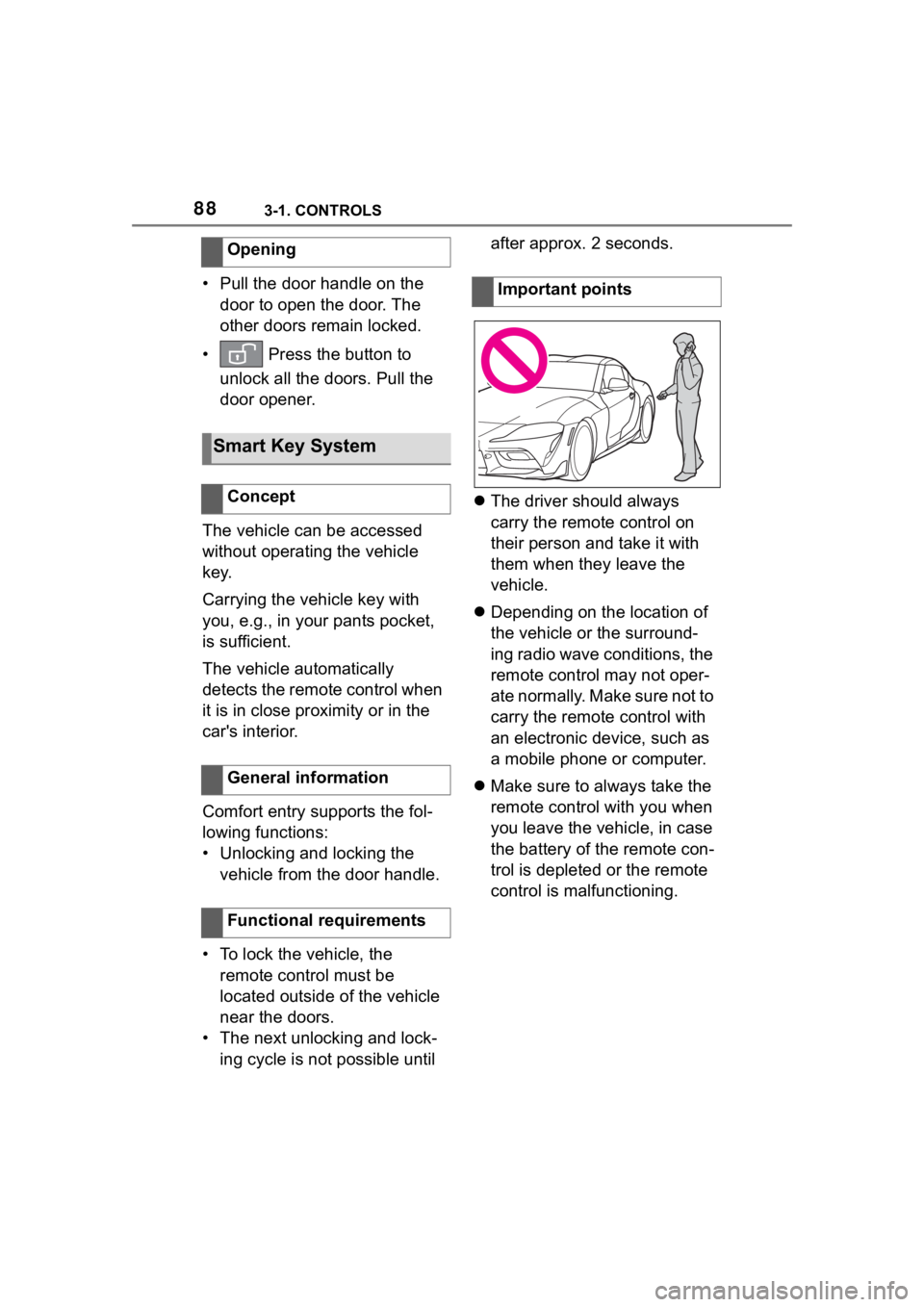
ate normally. Make sure not to
carry the remote control with
an electronic device, such as
a mobile phone or computer.
Make sure to always take the
remote control with you when
you leave the vehicle, in case
the battery of the remote con-
trol is depleted or the remote
control is malfunctioning.
Opening
Smart Key System
Concept
General information
Functional requirements
Important points
Page 95 of 372
953-1. CONTROLS
3
CONTROLS
3"Doors/Key"
4 "Turn off after door opening"
Opening the front doors establishes
the idle state, refer to page 45.
The alarm system issues a
visual and acoustic signal when
someone attempts to open the
locked vehicle incorrectly.
When the vehicle is locked, the
vehicle alarm system reacts to
the following changes:
• Opening a door, the hood or
the trunk lid.
• Movements in the car's inte- rior.
• Changes in the vehicle tilt, e. g., during attempts at stealing
a wheel or when towing the
vehicle.
• Disconnected battery voltage.
• Improper use of the socket for OBD Onboard Diagnosis.
• Locking the vehicle while a device is connected to the
socket for the OBD Onboard-
Diagnosis. For socket for the
OBD Onboard Diagnosis,
refer to page 309.
The alarm system signals the
following changes visually and
acoustically:
• Acoustic alarm: Depending on local regulations, the acoustic
alarm may be suppressed.
• Visual alarm: By flashing of the hazard warning system
and headlights, where
required.
Do not modify the system to
ensure function of the alarm
system.
When you unlock and lock the
vehicle, either with the remote
control or with Comfort entry, the
alarm system is switched off and
on at the same time.
The alarm system is triggered
when a door is opened if the
door was unlocked using the
integrated key in the door lock.
Switching off the alarm, refer to
page 97.
The trunk lid can be opened
even when the alarm system is
switched on.
After the trunk lid is closed, it is
locked and monitored again pro-
vided the doors are locked. The
hazard warning system flashes
Alarm system
Concept
General information
Switching on/off
Opening the doors with
the alarm system switched
on
Opening the trunk lid with
the alarm system switched
on
Page 368 of 372

368Alphabetical Index
P
Paint, vehicle .......................... 332
Panic alarm, see Panic mode .. 96
Panic mode ............................... 96
Parked-car ventilation ............ 239
Parking aid, see Parking Sensors............................................... 220
Parking brake ......................... 123
Parking lights ......................... 158
Parking Sensors ..................... 220
Parking Sensors with emergency braking function ................... 188
Parking Sensors with emergency braking function, see Emer-
gency brake function ........... 223
Parts and accessories ............... 6
Passenger's side mirror, tilting, see Automatic Curb Monitor,
exterior mirror ...................... 110
Pathway lines, rearview camera ............................................... 227
Performance display, see Sport displays ................................. 152
Personal data, deleting ............ 67
Personal profile, see Driver pro- files .......................................... 68
Plastic parts, care .................. 335
Power failure ........................... 314
Power windows ........................ 97
Pre-Collision System (for pedes- trians and bicycles).............. 183
Pressure monitor, see Tire Pres- sure Monitor TPM ................. 287
Pressure, tires ........................ 270
Prevention of rear collision ... 195
Profiles, see Drive r profiles ..... 68
Programmable memory buttons, Toyota Supra Command ........ 59
Protective function, windows, see Jam protection system ... 98 Push-and-turn reel, see Control-
ler .............................................52
R
Racetrack operation ...............263
Radar sensors, see Sensors of the vehicle ...............................42
Radiator fluid ..........................306
Radio-operated remote control, see Remote control ................80
Rain sensor .............................127
RCTA (Rear cross traffic alert)
function .................................228
Rear collision warning, see Pre- vention of rear collision .......195
Rear lights, see Lights and bulbs ...............................................312
Rear window defroster ...........238
Rearview camera ....................225
Recirculated-air filter, see Micro- filter/activated-charcoal filter...............................................238
Recirculated-air mode ............236
Recommended fuel grade......301
Recommended tire brands ....280
Refueling ............ .....................268
Remote control of the vehicle, changing the battery ..............84
Remote control, additional ......85
Remote control, integrated key .................................................86
Remote control, loss ................85
Remote control, malfunction ...85
Remote control, opening/closing .................................................80
Remote control, universal .....241
Replacing parts....................... 311
Replacing wheels/tires ...........279
Reporting safety malfunctions 14
RES CNCL button, see Cruise control ...................................205