light TOYOTA TACOMA 1996 Service Manual
[x] Cancel search | Manufacturer: TOYOTA, Model Year: 1996, Model line: TACOMA, Model: TOYOTA TACOMA 1996Pages: 196, PDF Size: 1.8 MB
Page 79 of 196

75
RESUMING THE PRESET SPEED
If the preset speed is cancelled by pulling
the control lever or by depressing the
brake pedal or clutch pedal, pushing the
lever up in the RES/ACCº direction will
restore
the speed set prior to cancellation.
However, once the vehicle speed falls be-
low about 40 km/h (25 mph), the preset
speed will not be resumed.
CRUISE CONTROL FAILURE WARNING
If the CRUISEº indicator light in the in-
strument cluster flashes when using the
cruise control, press the CRUISE
ON-OFFº button to turn the system off
and then press it again to turn it on.
If any of the following conditions then oc-
curs, there is some trouble in the cruise control system. The indicator light does not come on.
The indicator light flashes again.
The indicator light goes out after it
comes on.
If this is the case, contact your Toyota
dealer and have your vehicle inspected.
To crank the engine without depress- ing the clutch pedal, push the switch
with the ignition on.
The switch stays on as long as the ignition
is on. And it will automatically turn off
when the ignition is off.
This switch cancels the clutch start sys-
tem, which is designed to keep the starter
motor from operating if the clutch pedal is
not depressed all the way down.
The switch allows the vehicle to be driven
out of difficult situations by cranking the
engine with the clutch engaged. Never use the switch for normal engine
starting. Be sure to
follow the starting pro-
cedure instructed in How to start the en- gineº in Part 3.
Clutch start cancel switch
(four-wheel
drive models with
manual transmission)
Page 88 of 196

84ILLUMINATION CONTROL LOGIC
On some audio-units, when the instru-
ment panel lights are on, the letters on op-
erable buttons of the mode in current use
light up together with the mode selection and eject buttons. RADIO RECEPTION
Usually, a problem with radio reception
does not mean there is a problem with
your radioÐit is just the normal result of
conditions outside the vehicle.
For example, nearby buildings and terrain
can interfere with FM reception. Power
lines or telephone wires can interfere with
AM signals. And of course, radio signals
have a limited range, and the farther youare from a station, the weaker its signal
will be. In addition, reception conditions
change
constantly as your vehicle moves.
Here are some common reception prob-
lems that probably do not indicate a prob- lem with your radio: FM
Fading and drifting stationsÐGenerally,
the effective range of FM is about 40 km
(25 miles). Once outside this range, you
may notice fading and drifting, which in- crease with the distance from the radio
transmitter. They are often accompanied by distortion.
Multi-pathÐFM signals are reflective,
making it
possible for two signals to reach
your antenna at the same time. If this hap-
pens, the signals will cancel each other
out, causing a momentary flutter or loss of
reception.
Static and flutteringÐThese occur when
signals are blocked by buildings, trees, or other large objects. Increasing the bass
level may reduce static and fluttering.
Station swappingÐIf the FM signal you are listening to is interrupted or weak-
ened, and there is another strong station
nearby on the FM band, your radio may
tune in the second station until the original
signal can be picked up again. AM FadingÐAM broadcasts are reflected by the upper atmosphereÐespecially atnight. These reflected signals can inter-
fere with those received directly from the radio station, causing the radio station tosound alternately strong and weak.
Station interferenceÐWhen a reflected
signal and a signal received directly froma radio station are very nearly the same
frequency, they can interfere with each
other,
making it difficult to hear the broad-
cast.
StaticÐAM is easily affected by external sources of electrical noise, such as high
tension power lines, lightening, or electri- cal motors. This results in static.
CARING FOR YOUR CASSETTE
PLAYER AND TAPES
For high performance from your cassette
player and tapes:
Clean the tape head and other parts regu-
larly. A dirty tape head or tape path can de-
crease sound quality and tangle your
cassette tapes. The easiest way to
clean them is by using a cleaning tape.
ÐCar audio system operating hints
Page 89 of 196

85
Use high-quality cassettes.
Low-quality cassette tapes can cause
many problems, including poor sound, inconsistent playing speed, and
constant auto-reversing. They can
also get stuck or tangled in the cas-
sette player.
Do not use a cassette if it has been
damaged or tangled or if its label is
peeling off.
Do not leave a cassette in the player if
you are not listening to it, especially if it is hot outside.
Store cassettes in their cases and out
of direct sunlight.
Avoid using cassettes with a total play-
ing time longer than 100 minutes (50
minutes per side). The tape used in
these cassettes is thin and could get
stuck or tangled in the cassette player.
Page 97 of 196

Part 1Clock
93
OPERATION OF INSTRUMENTS AND CONTROLSÐ
Chapter 1-8 Other equipment
Clock
Cigarette lighter and ashtray
Glovebox
Cup holder
Floor mat
The digital clock indicates the time.
The key must be in the ``ACCº or ``ON'' position.
To reset the hour: Push the Hº button.
To reset the minutes: Push the Mº button.
If quick adjustment to a full hour is de- sired, push the :00º button.
For example, if the :00º button is de-
pressed when the time is between
1:01Ð1:29, the time will change to 1:00.
If the time is between 1:30Ð1:59, the time
will change to 2:00.
Once the electrical power source has
been disconnected from the clock, the
time is automatically set to 1:00 (oneo'clock). When the instrument panel lights turned
on, the brightness of the time indication
will be reduced.
Page 98 of 196
94
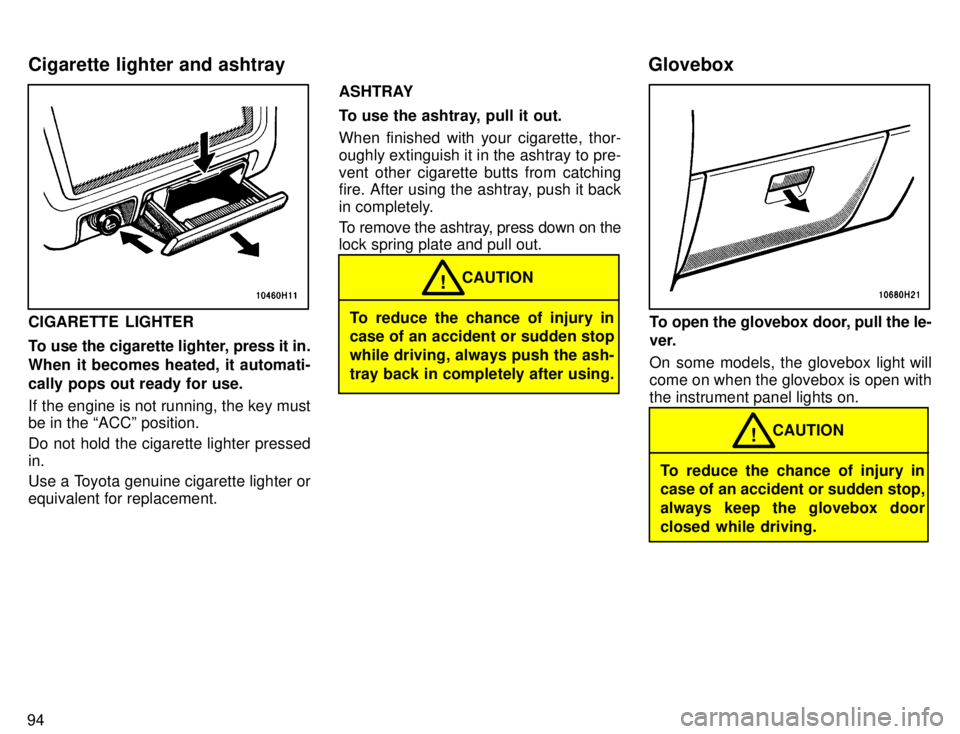
CIGARETTE LIGHTER
To use the cigarette lighter, press it in.
When it becomes heated, it automati-
cally pops out ready for use.
If the engine is not running, the key must be in the ACCº position.
Do not hold the cigarette lighter pressed in.
Use a Toyota genuine cigarette lighter or equivalent for replacement.ASHTRAY
To use the ashtray, pull it out. When finished with your cigarette, thor-
oughly extinguish it in the ashtray to pre-
vent other cigarette butts from catching
fire. After using the ashtray, push it back
in completely.
To remove the ashtray, press down on the lock spring plate and pull out.To reduce the chance of injury in
case of an accident or sudden stop while driving, always push the ash-tray back in completely after using.
CAUTION
!
To open the glovebox door, pull the le-
ver.
On some models, the glovebox light will come on when the glovebox is open withthe instrument panel lights on.
To reduce the chance of injury in
case of an accident or sudden stop,
always keep the glovebox door
closed while driving.
CAUTION
!
Cigarette lighter and ashtray
Glovebox
Page 103 of 196

99
If your engine knocks...
If you detect heavy knocking even when
using the recommended fuel, or if you
hear steady knocking while holding a
steady sp
eed on level roads, consult your
Toyota dealer.
However, now and then, you may notice
light knocking for a short time while accel-
erating or driving up hills. This is no cause
for concern.
GASOLINES CONTAINING DETER-
GENT ADDITIVES
Toyota recommends use of gasolines
that contain detergent additives to
avoid build-up of engine deposits.
For further details, ask your Toyota dealer
or a local gasoline retailer.
GASOLINES CONTAINING MTBE
Gasolines that contain MTBE (Methyl
Tertiary-Butyl Ether) are available in
the market. If you use a gasoline mixed
with MTBE, make certain that it does
not contain more than 15% of MTBE.
If the use of gasolines containing MTBE causes poor driveability and/or poor fuel
economy, you should discontinue the use
of fuels containing MTBE. GASOLINES CONTAINING ALCOHOL I
f you use of gasohol in your Toyota,
be sure that it is unleaded, has an oc- tane rating no lower than 87 and doesnot contain more than 10% ethanol.
Gasohol is a mixture of gasoline and etha-
nol.
Toyota does not recommend the use of
gasolines containing methanol. If you use
gasoline containing methanol, use only
gasoline meeting the requirements above
and also containing less than 5% metha-
nol with cosolvents and corrosion inhibi-
tors for methanol.
Do not use gasohol other thanstated above. It will cause fuel
system damage or vehicle perfor-
mance problems.
If driveability problems are en-countered (poor hot starting, va-porizing, engine knock, etc.), dis-continue the use.
Take care not to spill gasohol dur-
ing refueling. Gasohol may causepaint damage.
NOTICE
FUEL TANK CAPACITY
Two-wheel drive models
57 L (15.1 gal., 12.5 Imp. gal.)
Four-wheel drive models 68 L (18.0 gal., 15.0 Imp. gal.) If you plan to drive your Toyota in
another country... First,
comply with the vehicle registration
laws. Second, confirm the availability of the
correct fuel (unleaded and minimum oc- tane number).
Operation in foreign countries
Page 107 of 196
103
TANDEM MASTER CYLINDER BRAKE SYSTEM
The tandem master cylinder brake sys-
tem is a hydraulic system with two sepa-
rate sub-systems. If either sub-system
should fa
il, the other will still work. Howev-
er, the pedal will be harder to press, and
your stopping distance will be longer.
Also, the brake system warning light may come on.
CAUTION!
Do not drive your vehicle with only
a single brake system. Have your
brakes fixed immediately.
BRAKE BOOSTER
The brake booster uses engine vacuum to
power-assist the brakes. If the engine
should quit while you are driving, you can
bring the vehicle to a stop with normal
pedal pressure. There is enough reserve vacuum for one or two stopsÐbut no more!
CAUTION!
Do not pump the brake pedal if the
engine stalls. Each push on the
pedal uses up your vacuum re- serve.
Even if the power assist is com-
pletely lost, the brakes will still
work. But you will have to push the
pedal hardÐmuch harder than
normal. And your braking distance
will be longer.
ANTI-LOCK BRAKE SYSTEM (with ABSº warning light)
The anti-lock brake system is designed to prevent lock-up of the wheels during sud-
den braking or braking on slippery road surfaces. This assists the driver in con-
trolling the vehicle under these circum-stances.
The anti-lock brake system becomes op- erative after the vehicle has accelerated
to a speed in excess of approximately 10
km/h (6 mph). It stops operating when the
vehicle decelerates to a speed below
approximately 5 km/h (3 mph).
You may hear a sound in the engine
compartment for a few seconds when the
engine is started or just after the vehicleis started. This means that the anti-lock
brake system is in the self check mode,
and does not indicate a malfunction.
When the anti-lock brake system function is in action, you may feel the brake pedal
pulsating and hear a noise. In this situa-
tion, to let the anti-lock brake systemwork for you, just hold the brake pedal
down more firmly. Do not pump the brake. The brake pedal pulsation caused by the
anti-lock brake system may indicate haz- ardous road surface conditions. Althoughthe anti-lock brake system assists in pro-
viding
vehicle control, it is still important to
drive with all due care, because the anti-
lock brake system cannot overcome the
laws of physics that act on your vehicle: Braking capab ility is dependent on tire
friction with the road surface.
Even though the anti-lock brake sys-
tem is operating, a driver cannot main- tain full control on certain slippery road
surfaces, when cornering at highspeeds, or in violent maneuvers.
Avoid high speeds on wet roads. The
anti-lock brake system cannot elimi-
nate the risk of hydroplaning and lossof tire friction.
Always maintain a safe distance from the
vehicle in front of you. Compared with ve-
hicles not fitted with an anti-lock brake
system, your vehicle may require a longer
stopping distance in the following cases: Driving on rough, gravel or snow-cov-
ered roads.
Driving with tire chains installed.
Driving on roads where the road sur-
face is pitted or has other differences in surface height.
Brake system
Page 108 of 196
104
CAUTION!
Do not use tires other than the
manufacturer 's designated tires,
and do not mix tires or wheels of dif-
ferent sizes. You may prevent the
anti-lock brake system from operat-
ing at full effectiveness.
Vehicles with rear differential lock systemÐ
The anti-lock brake system does not op-
erate when the rear differential is locked.
It is normal operation for the ABSº warn-
ing light to be on at this time.
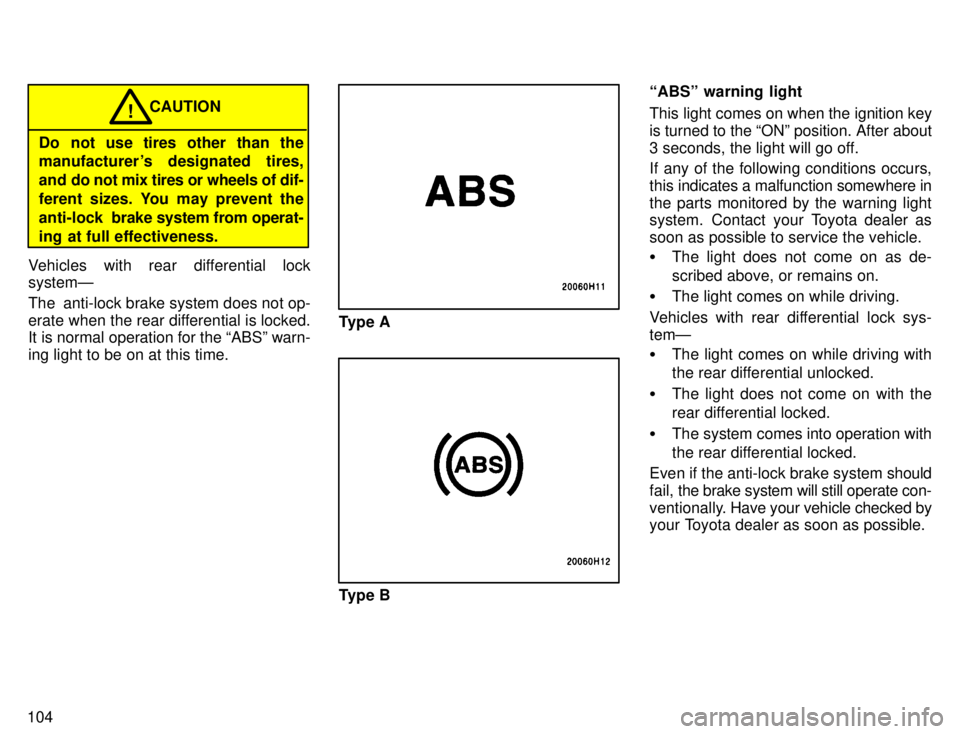
Type A
Type B ABSº warning light
This light comes on when the ignition key is turned to the ONº position. After about
3 seconds, the light will go off.
If any of the following conditions occurs, this
indicates a malfunction somewhere in
the parts monitored by the warning light
system. Contact your Toyota dealer as
soon as possible to service the vehicle. The light does not come on as de-
scribed above, or remains on.
The light comes on while driving.
Vehicles with rear differential lock sys- temÐ The light comes on while driving with
the rear differential unlocked.
The light does not come on with the
rear differential locked.
The system comes into operation with
the rear differential locked.
Even if the anti-lock brake system should
fail, the brake system will still operate con-
ventionally. Have your vehicle checked by
your Toyota dealer as soon as possible.
Page 113 of 196

Part 3How to start the engineÐ
(a) Before cranking
Before starting the engine
109
STARTING AND DRIVING
Before starting the engine
How to start the engine
Tips for driving in various conditions
Off-road driving precautions
Winter driving tips
Trailer towing
How to save fuel and make
your vehicle last longer, too
1. Check the area around the vehicle be-
fore entering it.
2. Adjust seat position, seatback angle,
seat cushion angle, head restraint height and steering wheel angle.
3. Adjust inside and outside rear view mirrors.
4. Lock both doors.
5. Fasten seat belts.
1. Apply the parking brake firmly.
2. Turn off unnecessary lights and acces- sories. 3.
Manual transmission: Press the
clutch pedal to the floor and shift the trans-
mission into neutral. Hold the clutch pedal
to the floor until the engine is started. A
starter safety device will prevent the start-
er from operating if the clutch pedal is not fully depressed.
Automatic transmission: Put the selec-
tor lever in Pº. If you need to restart the
engine while the vehicle is moving, put the
selector lever in Nº. A starter safety de-vice will prevent the starter from operating
if the selector lever is in any drive position. 4. Automatic transmission only: De-
press the brake pedal and hold it to the
floor until driving off.
Page 114 of 196

11 0Before starting the engine, be sure to follow
the instructions in (a) Before crankingº. Normal starting procedure
The multiport fuel injection system/se-
quential multiport fuel injection system in
your engine automatically controls the
proper air-fuel mixture for starting. You can start a cold or hot engine as follows:
1. With your foot off the accelerator ped- al, crank the engine by turning the key to
STARTº. Release it when the engine starts.
2. After
the engine runs for about 10 sec-
onds, you are ready to drive.
If the weather is below freezing, let the en-
gine warm up for a few minutes before driving.
If the engine stalls...
Simply restart it, using the correct proce- dure given in normal starting. If the engine will not startÐ
See If your vehicle will not startº in Part 4.
Do not crank for more than 15 sec-onds at a time. This may overheat
the starter and wiring systems.
Do not race a cold engine.
NOTICE
If the engine becomes difficult tostart or stalls frequently, have the
engine checked immediately. Always slow down in gusty crosswinds.
This will allow you much better control.
Drive slowly onto curbs and, if pos-
sible, at a right angle. Avoid drivingonto high, sharp-edged objects and
other road hazards. Failure to do so
can lead to severe tire damage result-
ing in tire bursts.
When parking on a hill, turn the front
wheels until they touch the curb so that
the vehicle will not roll. Apply the parking
brake, and place the transmission in Pº
(automatic) or in first or reverse (manu-
al). If necessary, block the wheels.
Washing your vehicle or driving through
deep water may get the brakes wet. To
see whether they are wet, check that
there is no traffic near you, and then
press the pedal lightly. If you do not feel
a normal braking force, the brakes are
probably wet. To dry them, drive the ve-
hicle cautiously while lightly pressing the
brake pedal with the parking brake
pulled. If they still do not work safely, pull
to the side of the road and call a Toyota
dealer for assistance.
Four- wheel drive modelsÐToyota rec-
ommends not using four- wheel drive on
dry hard- surfaced roads, because four-
wheel driving will cause unnecessary
noise and wear, and poor fuel economy.
(b) Starting the engine
Tips for driving in variousconditions