ad blue TOYOTA TACOMA 2009 Owners Manual (in English)
[x] Cancel search | Manufacturer: TOYOTA, Model Year: 2009, Model line: TACOMA, Model: TOYOTA TACOMA 2009Pages: 520, PDF Size: 10.75 MB
Page 262 of 520
262
3-3. Using the hands-free phone system (for cellular phone)
Hands-free phone system (for cellular phone) (if equipped)
■When using the hands-free system
●The audio system and voice guidance are muted when making a call.
● If both parties speak at the same time it may be difficult to hear.
● If the received call volume is overly loud, an echo may be heard.
● Try to face toward the microphone as much as possible when speaking.
● In the following circumstances it may be difficult to hear the other party:
• If driving on unpaved roads
• If driving at high speeds
• If a window is open
• If the air conditioning is blowing directly on the microphone
• If the air conditioning fan speed is set to high
This system supports Bluetooth®, which allows you connect a cellu-
lar phone without using cables a nd to make or receive calls without
operating the cellular phone buttons.
TitlePage
Using the hands-free phone system P. 266
Making a phone call P. 274
Setting a cellular phone P. 279
Security and system setup P. 284
Using the phone book P. 287
Page 263 of 520
263
3-3. Using the hand
s-free phone system (for cellular phone)
3
Interior and exterior features
■Conditions under which th e system will not operate
● If using a cellular phone that does not support Bluetooth
®
●If the cellular phone is switched off
● If you are outside service range
● If the cellular phone is not connected
● If the cellular phone’s battery is low
■ Bluetooth
® antenna
The antenna is built into the display. If the cellular phone is behind the seat
or in the console box, or touching or covered by metal objects, connection
status may deteriorate.
■ Signal status
This display may not correspond exactly with the cellular phone itself.
■ About Bluetooth
®
■Compatible models
Compatible with HFP (Hands Free Profile) Ver. 1.0 and OPP (Object Push
Profile) Ver. 1.1.
If your cellular phone does not support HFP, you cannot enter the Blue-
tooth
® phone. If your cellular phone supports OPP alone, you cannot use
the Bluetooth® phone.
Bluetooth is a registered trademark of
Bluetooth SIG, Inc.
Page 265 of 520
265
3-3. Using the hand
s-free phone system (for cellular phone)
3
Interior and exterior features
FCC WARNING:
Changes or modifications not expressly approved by the party responsible
for compliance could void the user’s authority to operate the equipment.
CAUTION:
Radio Frequency Radiation Exposure
This equipment complies with FCC radiation exposure limits set forth for
uncontrolled equipment and meets the FCC radio frequency (RF) Exposure
Guidelines in Supplement C to OET65. This equipment has very low levels
of RF energy that it deemed to comply without maximum permissive expo-
sure evaluation (MPE). But it is desirable that it should be installed and oper-
ated with at least 20 cm and more between the radiator and person’s body
(excluding extremities: hands, wrists, feet and legs).
Co-location:
This transmitter must not be co-located or operated in conjunction with any
other antenna or transmitter.
CAUTION
■Caution while driving
Do not use a cellular phone or connect the Bluetooth
® phone.
NOTICE
■When leaving the vehicle
Do not leave a cellular phone in the vehicle. The inside of the vehicle may
become hot, causing damage to the phone.
Page 266 of 520
266
3-3. Using the hands-free phone system (for cellular phone)
Using the hands-free phone system
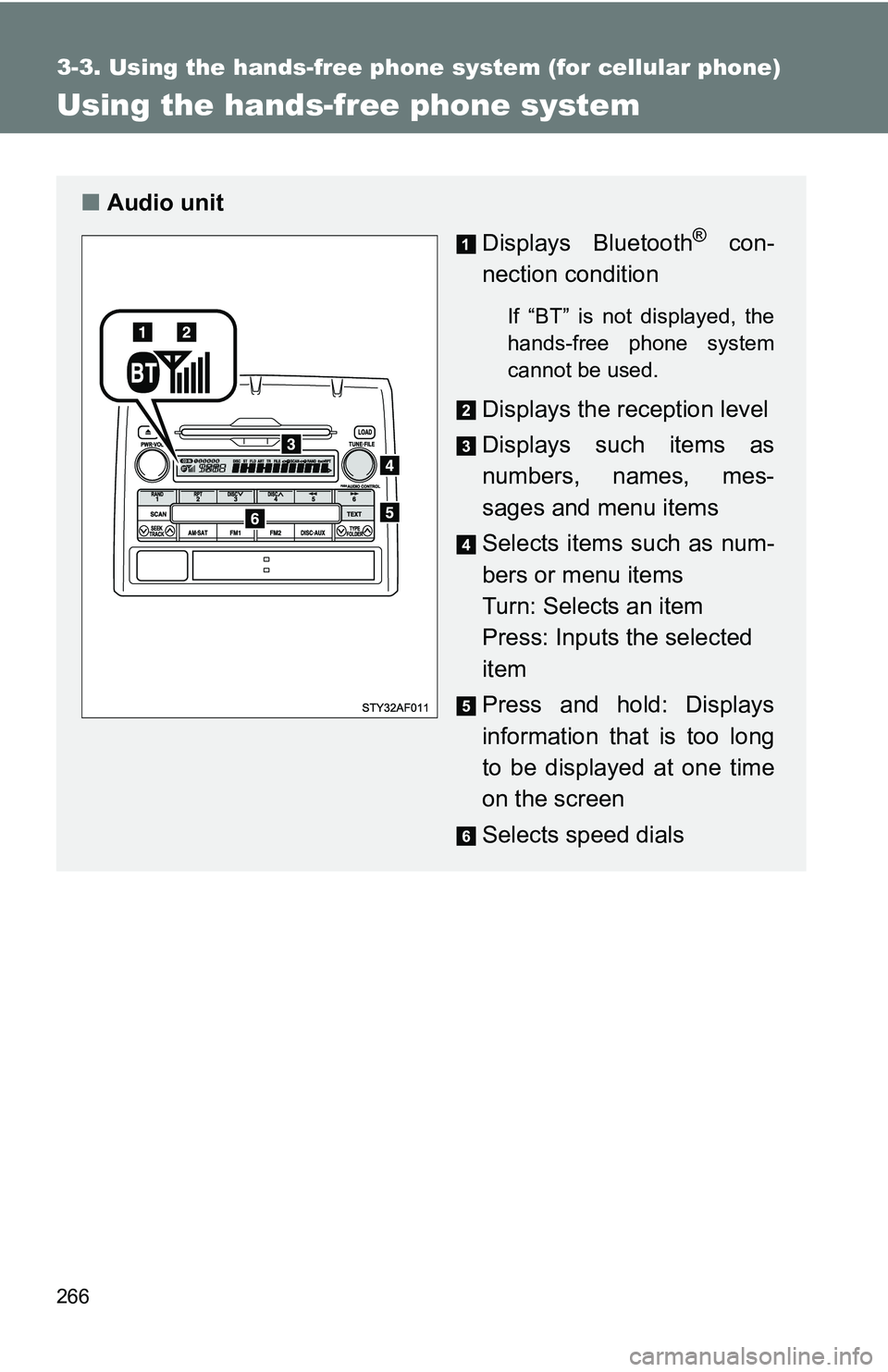
■Audio unit
Displays Bluetooth
® con-
nection condition
If “BT” is not displayed, the
hands-free phone system
cannot be used.
Displays the reception level
Displays such items as
numbers, names, mes-
sages and menu items
Selects items such as num-
bers or menu items
Turn: Selects an item
Press: Inputs the selected
item
Press and hold: Displays
information that is too long
to be displayed at one time
on the screen
Selects speed dials
Page 369 of 520
369
4-3. Do-it-yourself maintenance
4
Maintenance and care
■
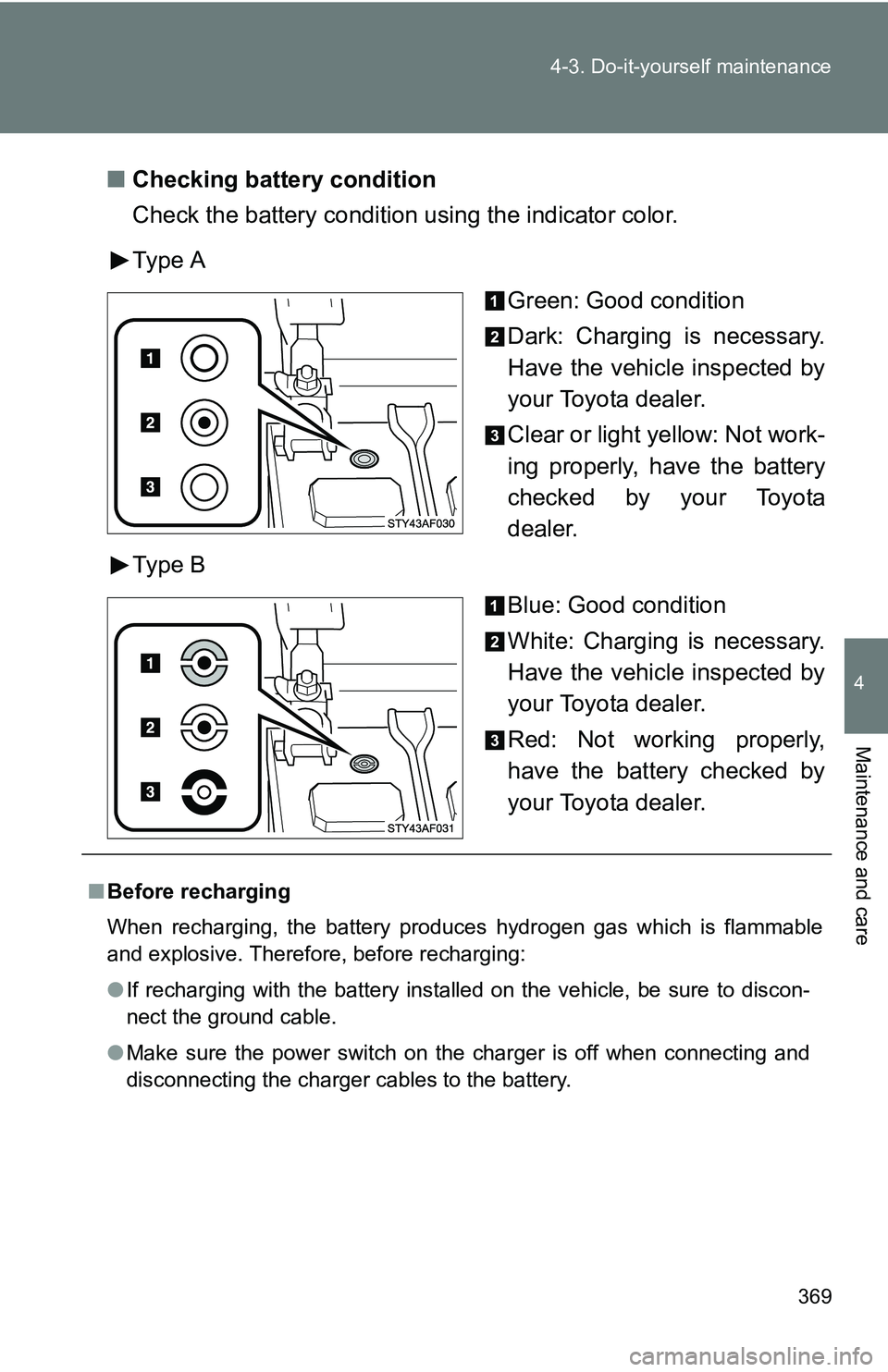
Checking battery condition
Check the battery condition using the indicator color.
Type A
Green: Good condition
Dark: Charging is necessary.
Have the vehicle inspected by
your Toyota dealer.
Clear or light yellow: Not work-
ing properly, have the battery
checked by your Toyota
dealer.
Type B
Blue: Good condition
White: Charging is necessary.
Have the vehicle inspected by
your Toyota dealer.
Red: Not working properly,
have the battery checked by
your Toyota dealer.
■Before recharging
When recharging, the battery produces hydrogen gas which is flammable
and explosive. Therefore, before recharging:
●If recharging with the battery installed on the vehicle, be sure to discon-
nect the ground cable.
● Make sure the power switch on the charger is off when connecting and
disconnecting the charger cables to the battery.
Page 508 of 520
508
Alphabetical index
Alphabetical index
A/C ............................................. 220
ABS ........................................... 184
Access doors .............................39
Accessory meter ...................... 156
Active traction control system .................................... 174
Air conditioning filter............... 388
Air conditioning system
Air conditioning filter .............. 388
Manual air conditioning system ................................ 220
Airbags Airbag operating conditions.....84
Airbag precautions for your
child ......................................89
Airbag warning light............... 426
Curtain shield airbag operating
conditions..............................85
Curtain shield airbag
precautions ...........................91
Front passenger occupant classification system .............97
General airbag precautions .....88
Locations of airbags ................81
Modification and disposal of airbags ..................................92
Passenger airbag off switch ....................................93
Proper driving posture .......79, 88
Roll sensing of curtain shield airbag off switch .................... 95
Side airbag operating conditions..............................85
Side airbag precautions ..........90
SRS airbags ............................81
Antenna..................................... 233
Anti-lock brake system ABS warning light .................. 426
Anti-lock brake system .......... 184
Audio input ............................... 257
Audio remote controls............. 259
Audio system Antenna ................................. 233 Audio input ............................ 257
AUX adapter ......................... 257
CD player .............................. 237
MP3/WMA disc ..................... 244
Optimal use ........................... 253
Portable music player ........... 257
Radio..................................... 231
Steering wheel audio
switch.................................. 259
Sub woofer ............................ 256
Type ...................................... 228
AUTO LSD system ................... 176
Automatic light off system...... 158
Automatic limited slip differential .............................. 176
Automatic transmission
Automatic transmission ......... 141
If the shift lever cannot be shifted from P ..................... 450
AUX adapter ............................. 257
Auxiliary box .... 296, 302, 319, 320
Back-up lights Replacing light bulbs ............. 409
Wattage................................. 478
Back window .............................. 71
Battery Charging system warning light ..................................... 425
Checking ............................... 369
If the vehicle battery is
discharged .......................... 452
Preparing and checking before winter ....................... 201
Bluetooth
®................................ 266
Bottle holders................... 296, 300
Brake assist.............................. 184
Brakes Brake system warning buzzer ......... 175, 177, 182, 187
Brake system warning light ... 424
Fluid ...................................... 364
Parking brake ........................ 148
A
B