display TOYOTA TACOMA 2012 Owners Manual (in English)
[x] Cancel search | Manufacturer: TOYOTA, Model Year: 2012, Model line: TACOMA, Model: TOYOTA TACOMA 2012Pages: 628, PDF Size: 12.11 MB
Page 4 of 628

TABLE OF CONTENTSIndex
4
3-4. Using the hands-free phonesystem (for cellula r phone)
Hands-free phone system features ............................ 326
Using the hands-free phone system ................... 330
Making a phone call ........... 339
Setting a cellular phone...... 344
Security and system setup ................................ 350
Using the phone book ........ 355
3-5. Using the interior lights Interior lights list ................. 363
• Interior light ...................... 364
• Personal lights ................. 364
3-6. Using the storage features List of storage features....... 365
• Glove box .......................... 366
• Front console box ............ 366
• Cup holders ...................... 367
• Bottle holders ................... 369
• Auxiliary boxes ................. 370
• Overhead console ............ 372 3-7. Other interior features
Sun visors ........................... 373
Vanity mirrors ..................... 374
Clock................................... 375
Outside temperature display (vehicles with
auto anti-glare inside rear
view mirror) ....................... 376
Power outlets (12V DC) ...... 381
Power outlet (120V AC) ...... 382
Seatback table .................... 388
Floor mat ............................ 389
Luggage compartment features ............................ 391
Garage door opener ........... 400
Compass (vehicles with auto anti-glare inside rear
view mirror) ....................... 409
4-1. Maintenance and care Cleaning and protecting the vehicle exterior ........... 418
Cleaning and protecting the vehicle interior ............ 421
4-2. Maintenance Maintenance requirements .................... 424
General maintenance ......... 426
Emission inspection and maintenance (I/M)
programs .......................... 429
4Maintenance and care
Page 15 of 628
15
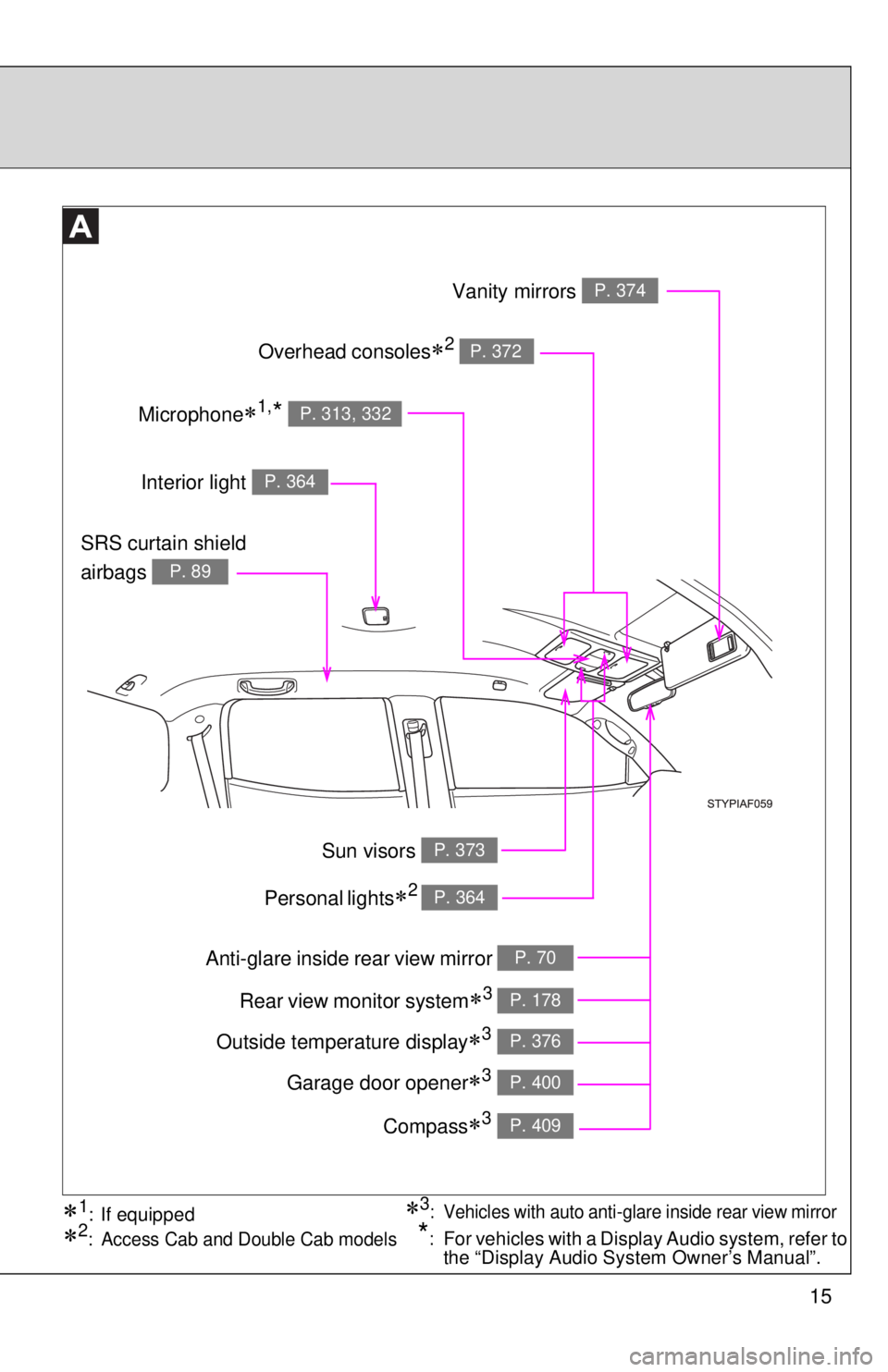
Anti-glare inside rear view mirror P. 70
SRS curtain shield
airbags
P. 89
Vanity mirrors P. 374
Interior light P. 364
Rear view monitor system3 P. 178
Overhead consoles2 P. 372
Garage door opener3 P. 400
Compass3 P. 409
Personal lights2 P. 364
Outside temperature display3 P. 376
3: Vehicles with auto anti-glare inside rear view mirror1: If equipped
2: Access Cab and Double Cab models*:For vehicles with a Display Audio system, refer to
the “Display Audio System Owner’s Manual”.
Microphone1,* P. 313, 332
Sun visors P. 373
Page 22 of 628
22
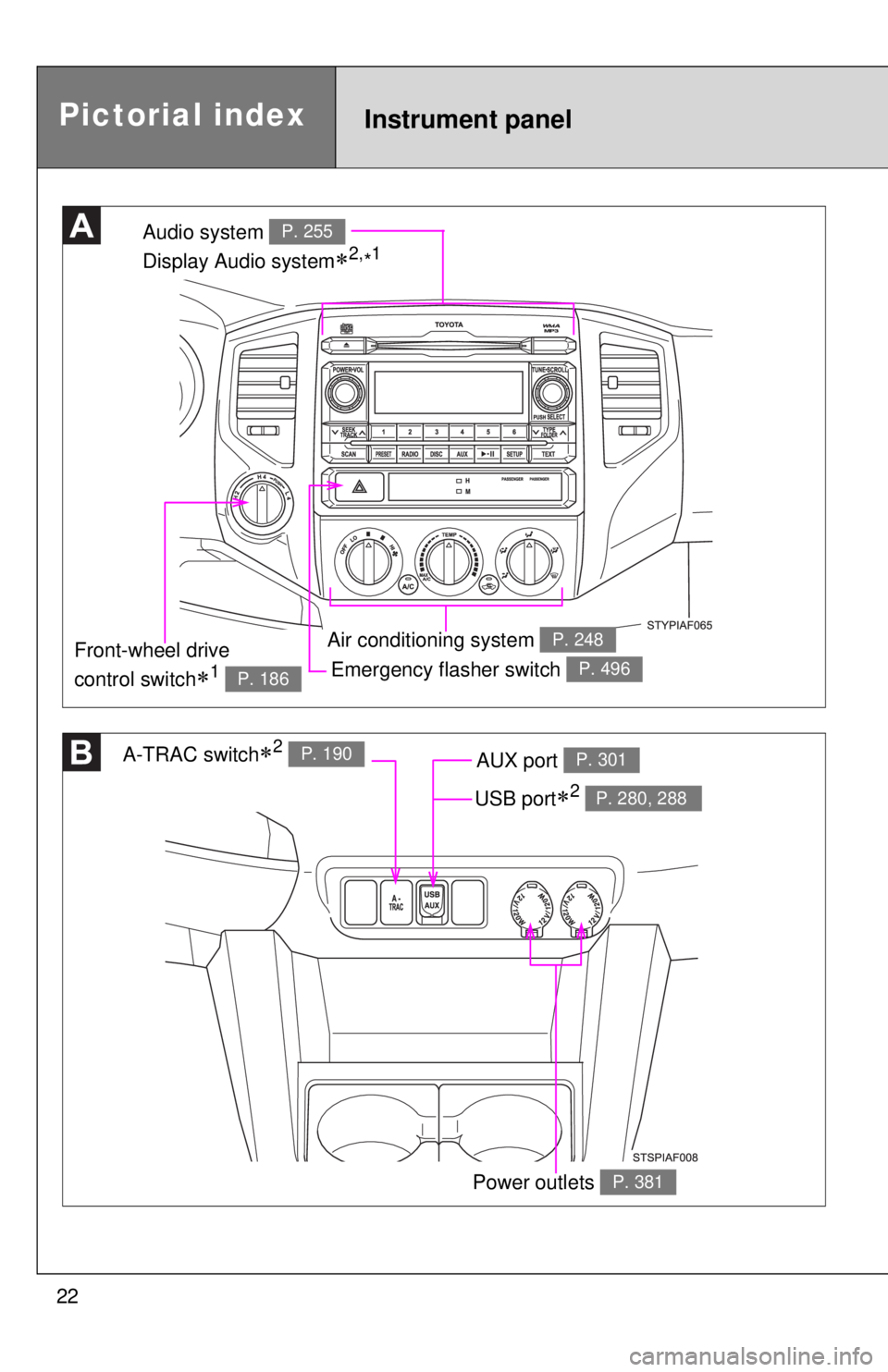
Emergency flasher switch P. 496
Audio system
Display Audio system
2,*1P. 255
Air conditioning system P. 248
A-TRAC switch2 P. 190AUX port P. 301
Power outlets P. 381
Front-wheel drive
control switch
1 P. 186
Pictorial indexInstrument panel
USB port2 P. 280, 288
Page 23 of 628
23
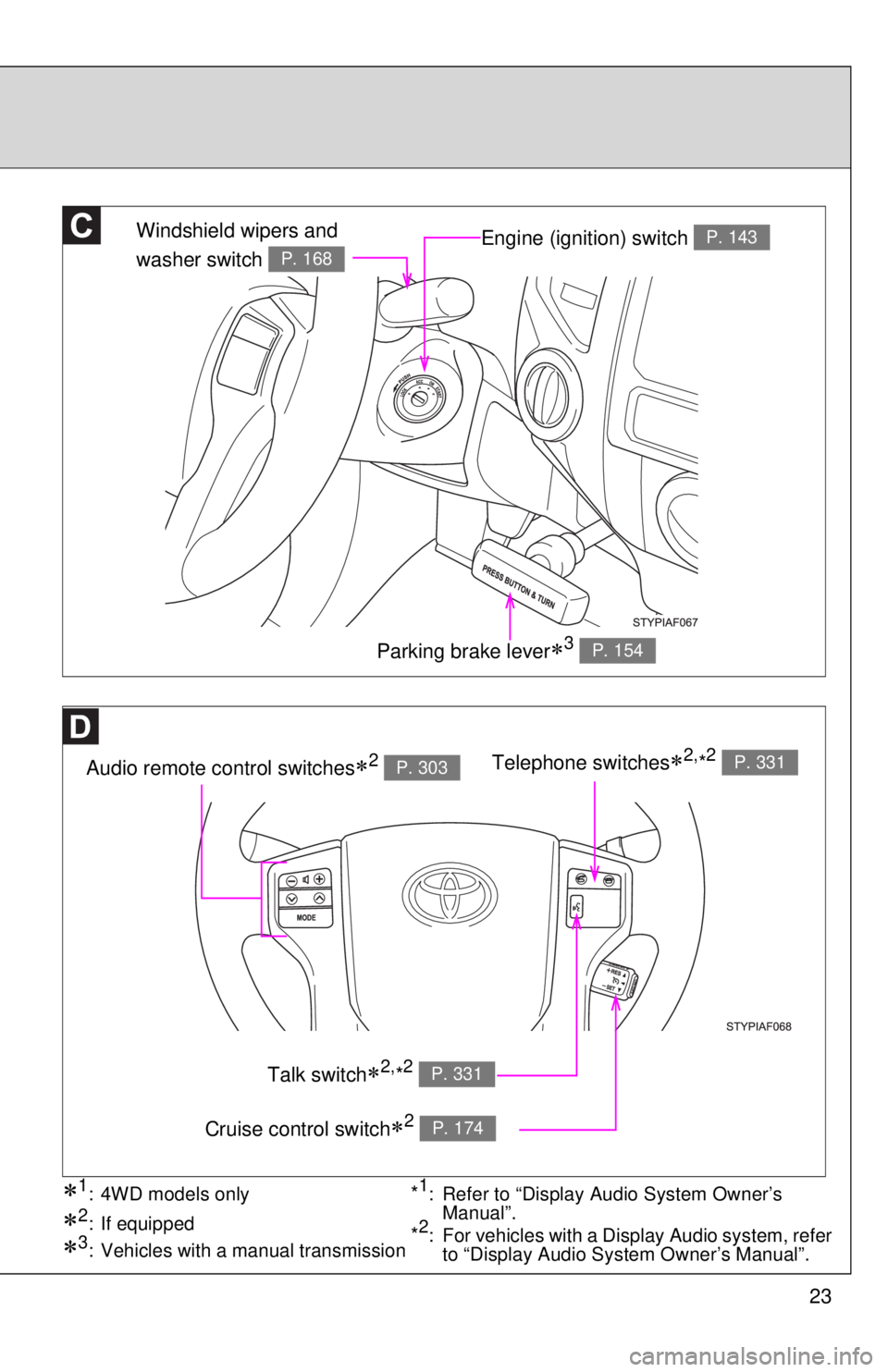
Engine (ignition) switch P. 143
Audio remote control switches2 P. 303
Windshield wipers and
washer switch
P. 168
Parking brake lever3 P. 154
Telephone switches2,*2 P. 331
Talk switch2,*2 P. 331
Cruise control switch2 P. 174
3: Vehicles with a manual transmission
1: 4WD models only
2: If equipped
*1: Refer to “Display Audio System Owner’s
Manual”.
*2: For vehicles with a Display Audio system, refer to “Display Audio System Owner’s Manual”.
Page 73 of 628
73
1-3. Adjustable components (s
eats, mirrors, steering wheel)
1
Before driving
Inside rear view mirror display (vehicles with auto anti-glare
inside rear view mirror)
The inside rear view mirror displays the following information.
Also, the display and display settings can be changed.
■ Compass
P. 4 0 9
■ Outside temperature display
P. 3 7 6
■ Rear view monitor system
P. 1 7 8
■ Garage door opener
P. 4 0 0
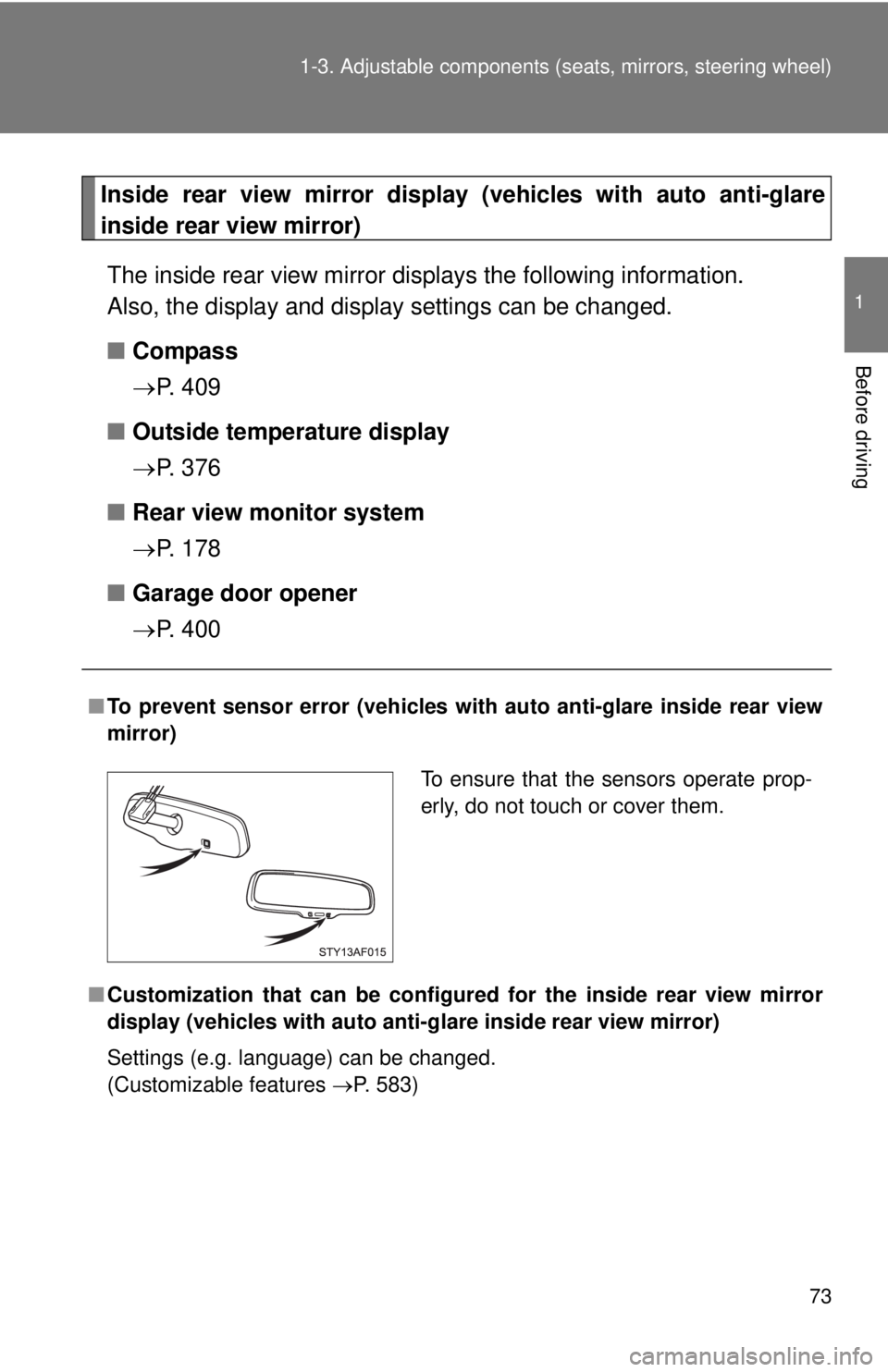
■To prevent sensor error (vehicles with auto anti-glare inside rear view
mirror)
■ Customization that can be configured for the in side rear view mirror
display (vehicles with auto anti-g lare inside rear view mirror)
Settings (e.g. language) can be changed.
(Customizable features P. 583)
To ensure that the sensors operate prop-
erly, do not touch or cover them.
Page 112 of 628
112
1-7. Safety information
Installing child restraints
Follow the child restraint system manufacturer’s instructions. Firmly
secure child restraints to the seat s using the LATCH anchors or a
seat belt. Attach the top tether stra p when installing a child restraint.
The lap/shoulder belt can be used if your child restraint system is
not compatible with the LATCH (Low er Anchors and Tethers for Chil-
dren) system.
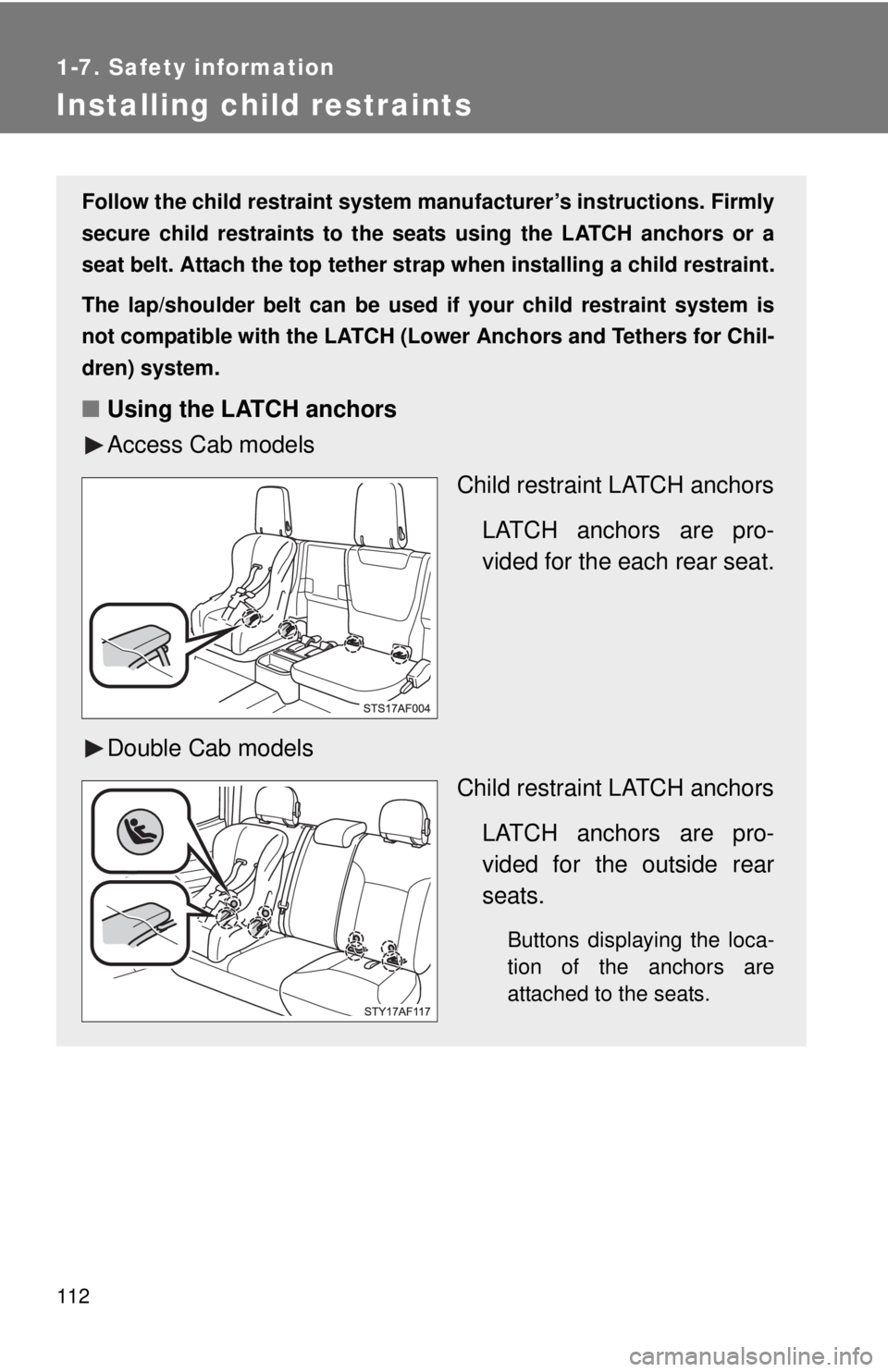
■ Using the LATCH anchors
Access Cab models
Child restraint LATCH anchors
LATCH anchors are pro-
vided for the each rear seat.
Double Cab models Child restraint LATCH anchors
LATCH anchors are pro-
vided for the outside rear
seats.
Buttons displaying the loca-
tion of the anchors are
attached to the seats.
Page 157 of 628
157
2
When driving
2-2. Gauges and meters
Gauges and meters
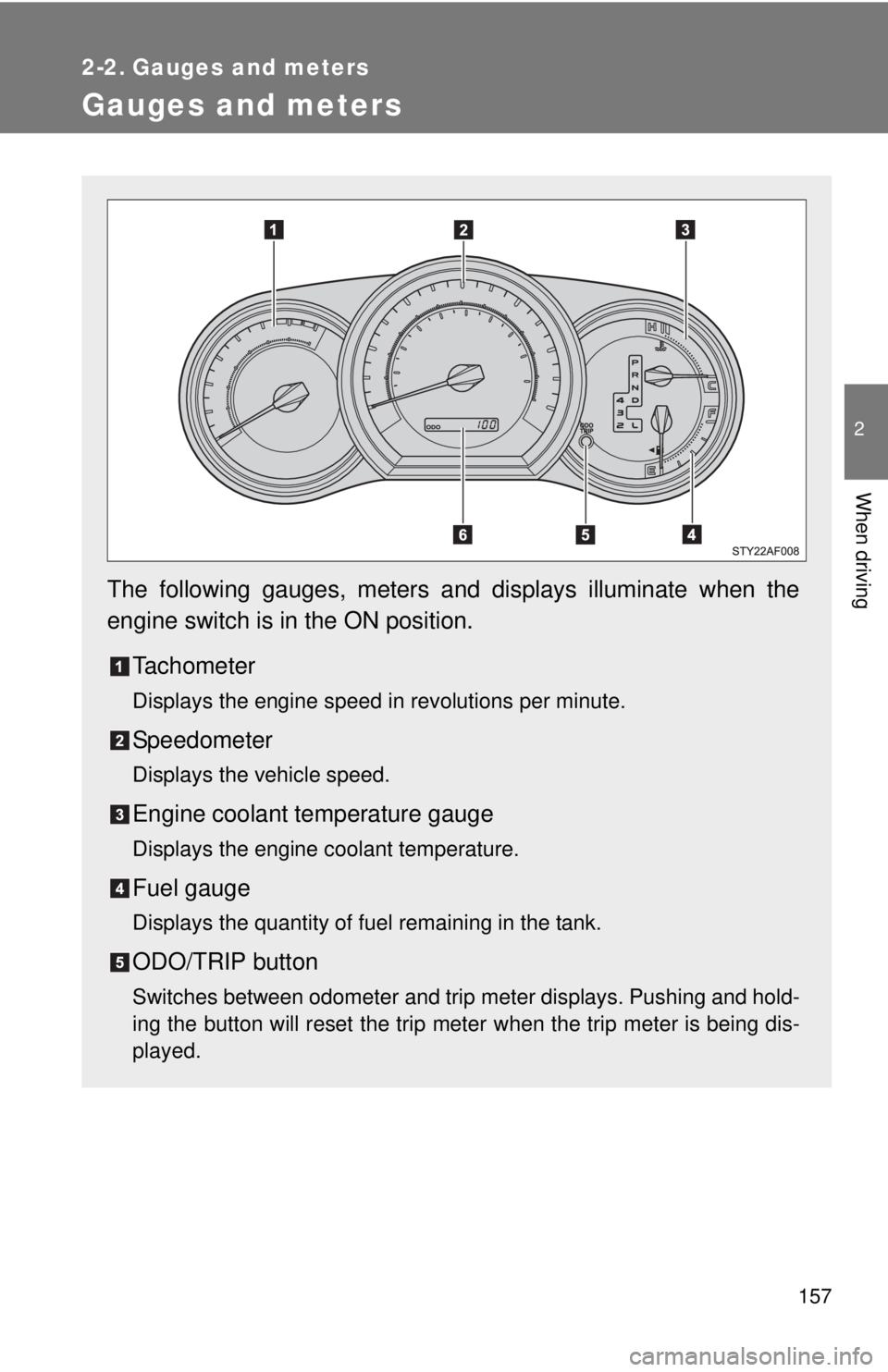
The following gauges, meters and displays illuminate when the
engine switch is in the ON position.Tachometer
Displays the engine speed in revolutions per minute.
Speedometer
Displays the vehicle speed.
Engine coolant temperature gauge
Displays the engine coolant temperature.
Fuel gauge
Displays the quantity of fuel remaining in the tank.
ODO/TRIP button
Switches between odometer and trip meter displays. Pushing and hold-
ing the button will reset the trip meter when the trip meter is being dis-
played.
Page 158 of 628
158 2-2. Gauges and meters
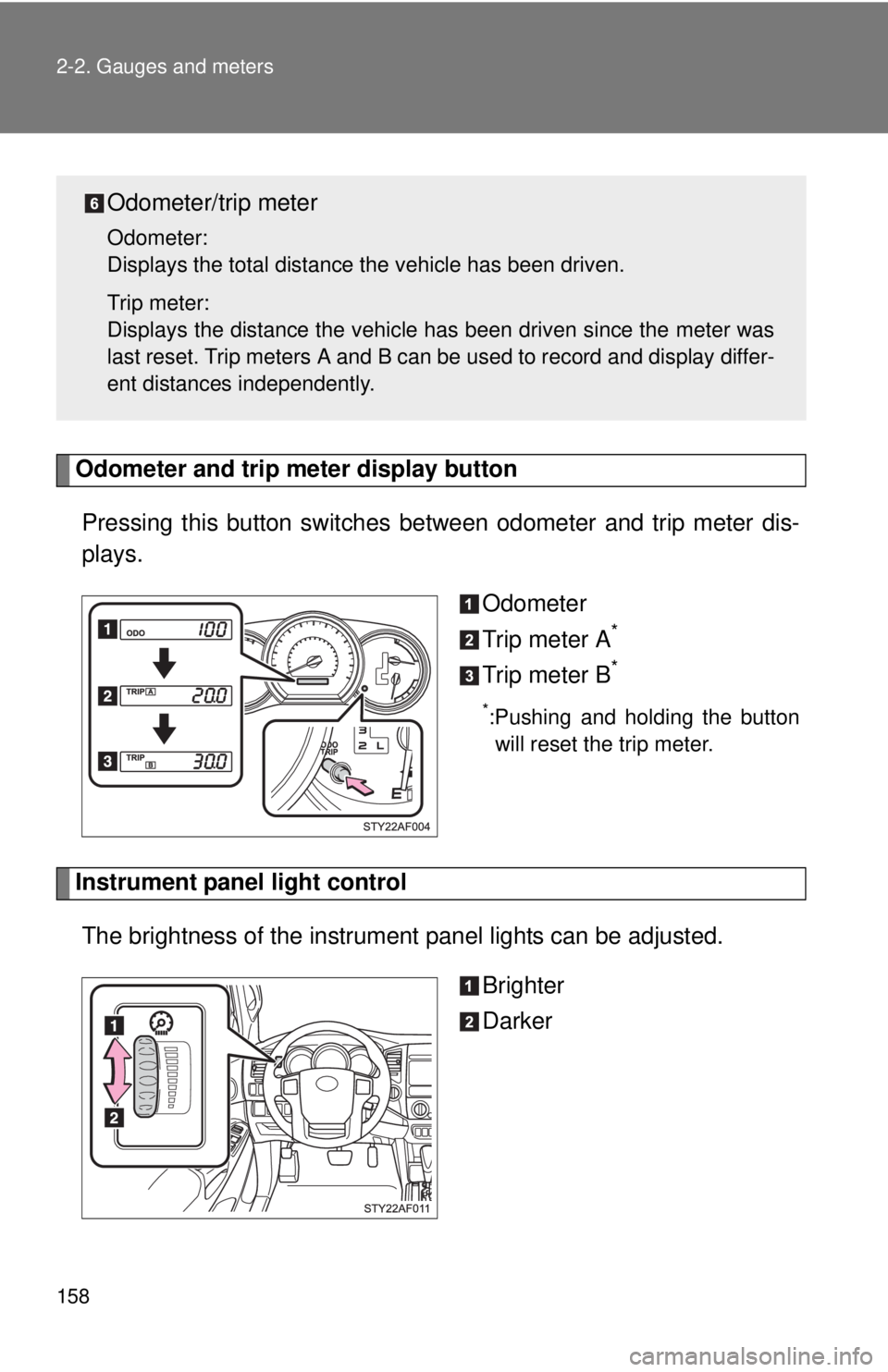
Odometer and trip meter display buttonPressing this button switches between odometer and trip meter dis-
plays.
Odometer
Trip meter A
*
Trip meter B*
*:Pushing and holding the buttonwill reset the trip meter.
Instrument panel light control
The brightness of the instrument panel lights can be adjusted.
Brighter
Darker
Odometer/trip meter
Odometer:
Displays the total distance the vehicle has been driven.
Trip meter:
Displays the distance the vehicle has been driven since the meter was
last reset. Trip meters A and B can be used to record and display differ-
ent distances independently.
Page 178 of 628
178
2-4. Using other driving systems
Rear view monitor system (vehicles with auto anti-glare inside rear view mirror)
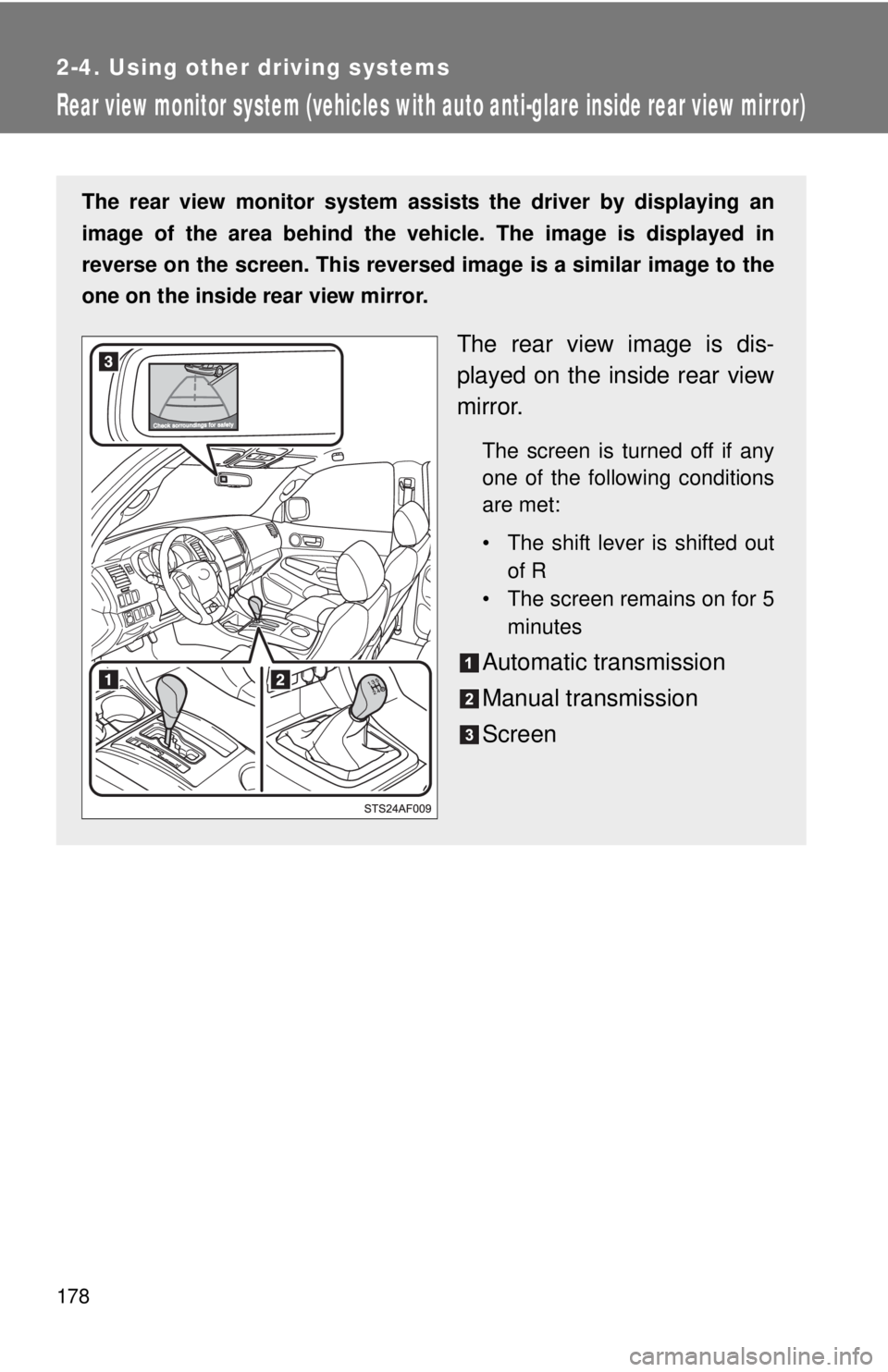
The rear view monitor system assists the driver by displaying an
image of the area behind the vehicle. The image is displayed in
reverse on the screen. This reversed im age is a similar image to the
one on the inside rear view mirror.
The rear view image is dis-
played on the inside rear view
mirror.
The screen is turned off if any
one of the following conditions
are met:
• The shift lever is shifted out of R
• The screen remains on for 5 minutes
Automatic transmission
Manual transmission
Screen
Page 179 of 628
179
2-4. Using other
driving systems
2
When driving
■The rear view monitor system can be operated when
The shift lever is in R and engine switch is ON.
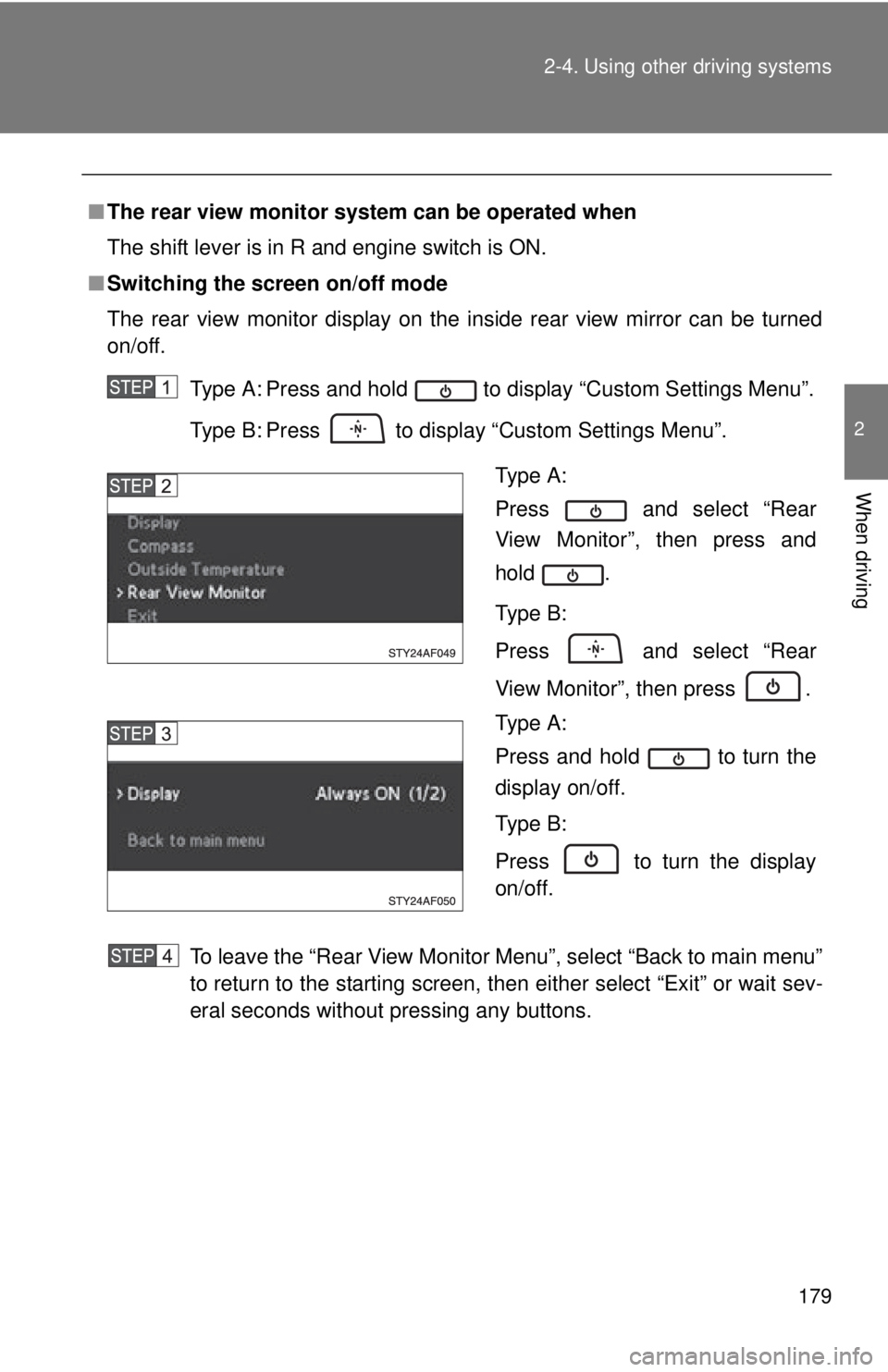
■ Switching the screen on/off mode
The rear view monitor display on the inside rear view mirror can be turned
on/off.
Type A: Press and hold to display “Custom Settings Menu”.
Type B: Press to display “Custom Settings Menu”.
To leave the “Rear View Monitor Menu”, select “Back to main menu”
to return to the starting screen, then either select “Exit” or wait sev-
eral seconds without pressing any buttons.
Type A:
Press and select “Rear
View Monitor”, then press and
hold .
Type B:
Press and select “Rear
View Monitor”, then press .
Type A:
Press and hold to turn the
display on/off.
Type B:
Press to turn the display
on/off.