fuel TOYOTA TACOMA 2016 Accessories, Audio & Navigation (in English)
[x] Cancel search | Manufacturer: TOYOTA, Model Year: 2016, Model line: TACOMA, Model: TOYOTA TACOMA 2016Pages: 44, PDF Size: 1.75 MB
Page 3 of 44
2
The Quick Reference Guide is designed to provide information on the basic operation and key
features of the navigation system and Entune™. The Quick Reference Guide is not intended as a
substitute for the Navigation Owner’s Manual. We strongly encourage you to review the Navigation
Owner’s Manual, the quick reference guide and visit www.toyota.com/entune so you will have a
better understanding of all your vehicles features and controls.
OVERVIEW
LIMITATIONS OF THE QUICK REFERENCE GUIDE
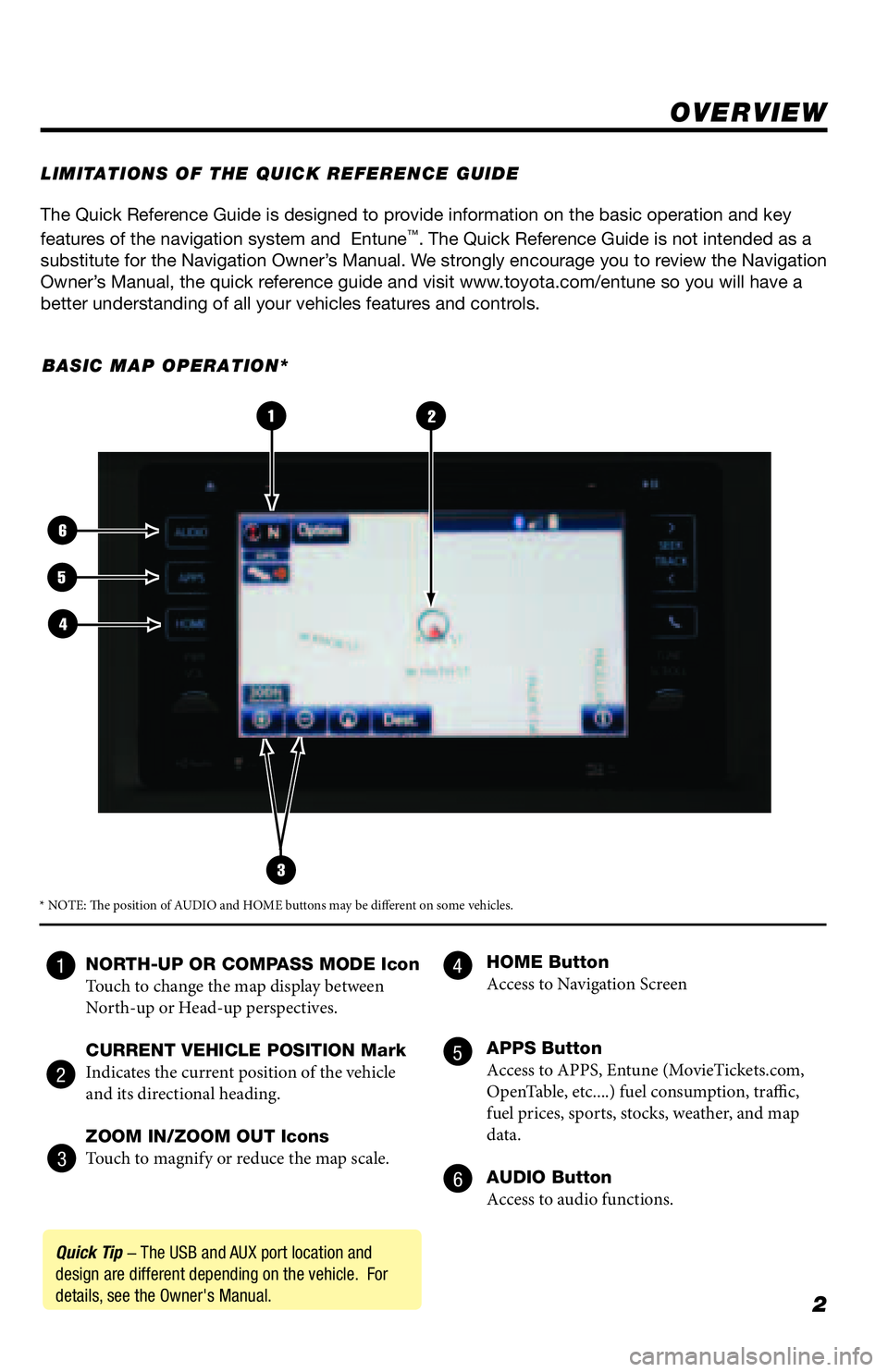
BASIC MAP OPERATION*
NORTH-UP OR COMPASS MODE Icon
Touch to change the map display between
North-up or Head-up perspectives.
CURRENT VEHICLE POSITION Mark
Indicates the current position of the vehicle
and its directional heading.
ZOOM IN/ZOOM OUT Icons
Touch to magnify or reduce the map scale. HOME Button
Access to Navigation Screen
APPS Button
Access to APPS, Entune (MovieTickets.com,
OpenTable, etc....) fuel consumption, traffic,
fuel prices, sports, stocks, weather, and map
data.
AUDIO Button
Access to audio functions.
3
2
6
5
4
1
Quick Tip - The USB and AUX port location and
design are different depending on the vehicle. For
details, see the Owner's Manual.
* NOTE: The position of AUDIO and HOME buttons may be different on some vehicles.
4
5
6 1
2
3
Page 4 of 44
3
- INTRODUCTION
STOPPLEASE READ
The available Entune® App Suite system is a collection of popular mobile
applications and data services integrated with select 2016 Toyota vehicles. Entune®
App Suite is subscription free.
Once the phone is connected to the vehicle using Bluetooth
® wireless technology,
Entune's App Suite features are operated using the vehicle's controls or, for
some services, by voice recognition. Entune
® App Suite includes mobile apps
for Destination Search, iHeartRadio, MovieTickets.com, OpenTable®, Pandora®,
Facebook Places, Yelp, and Slacker Radio. Data Services include Fuel Guide, Sports,
Stocks, Traffic and Weather. All apps and data services are subject to change
without notice. See www.toyota.com/entune for availability of apps and data
services.
In order to access Entune
® App Suite applications from your vehicle’s touch screen,
an Entune® App Suite compatible phone, the Entune mobile application and Entune®
App Suite are required. Use your smartphone to download the Entune™ mobile
application from the appropriate app store and register via the mobile application.
You may also register for Entune
® App Suite through myentune.com and visit www.
toyota.com/entune to learn more about the Entune® App Suite.
ENTUNE® APP SUITE*
WHAT IS ENTUNE® APP SUITE?
An Entune® App Suite compatible phone is required to use the additional features.
Check phone compatibility by one of the following methods:
•Visit: www.toyota.com/connect
•Call the Toyota Customer Experience
Center at 1-800-331-4331
Note: You do not need an Entune App Suite compatible phone to use
Bluetooth
® hands-free, Bluetooth audio or the navigation system.
To connect a Bluetooth Phone, refer to page 7.
PHONE COMPATIBILITY
Page 25 of 44
24
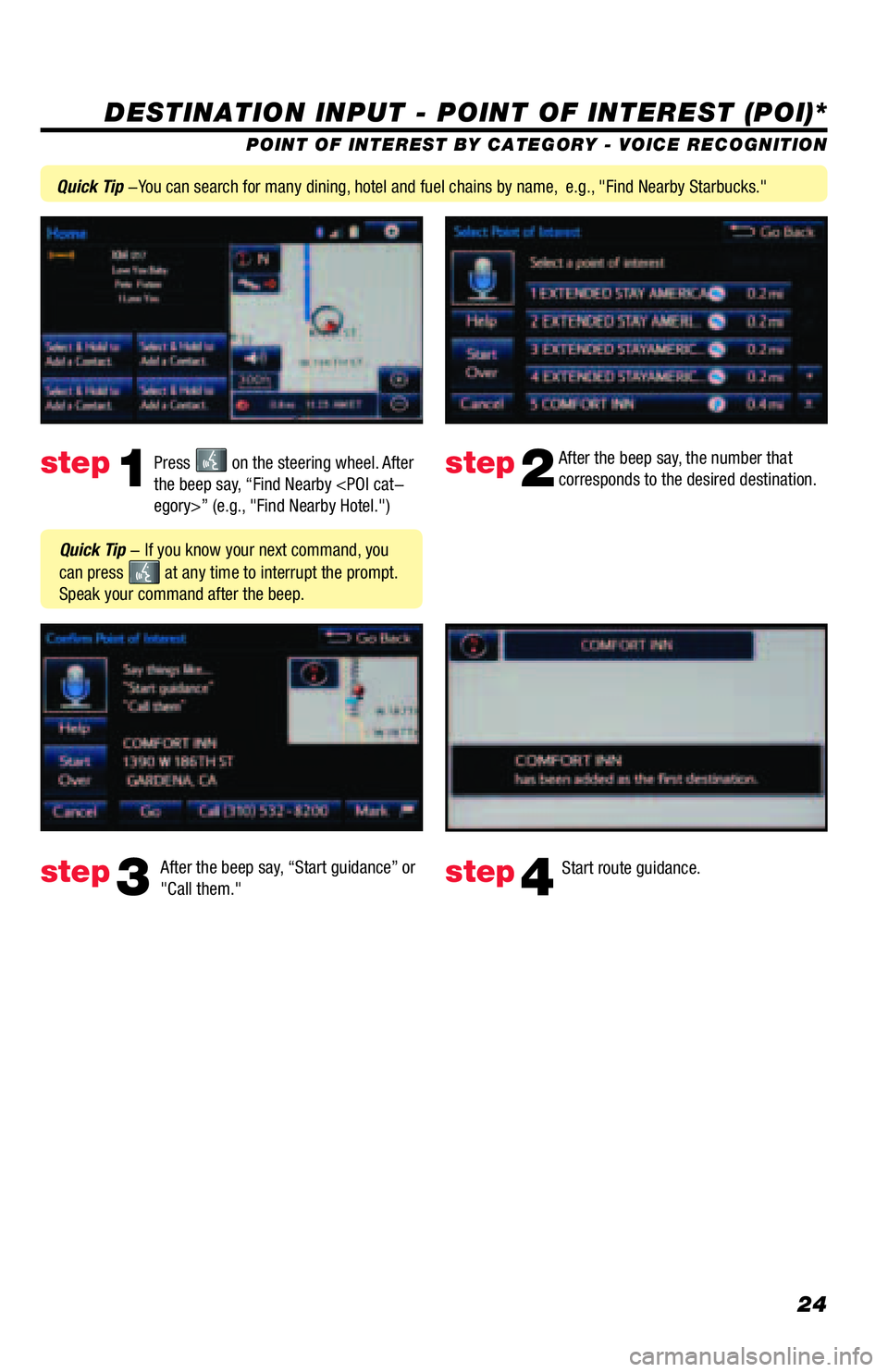
DESTINATION INPUT - POINT OF INTEREST (POI)*
POINT OF INTEREST BY CATEGORY - VOICE RECOGNITION
Press
on the steering wheel. After
the beep say, “Find Nearby
corresponds to the desired destination.
After the beep say, “Start guidance” or
"Call them."step1step2
step3step4
Quick Tip - If you know your next command, you
can press
at any time to interrupt the prompt.
Speak your command after the beep.
Start route guidance.
Quick Tip -You can search for many dining, hotel and fuel chains by name, e.g., "Find Nearby Starbucks."