phone TOYOTA TACOMA 2016 Owners Manual (in English)
[x] Cancel search | Manufacturer: TOYOTA, Model Year: 2016, Model line: TACOMA, Model: TOYOTA TACOMA 2016Pages: 640, PDF Size: 40.18 MB
Page 4 of 640
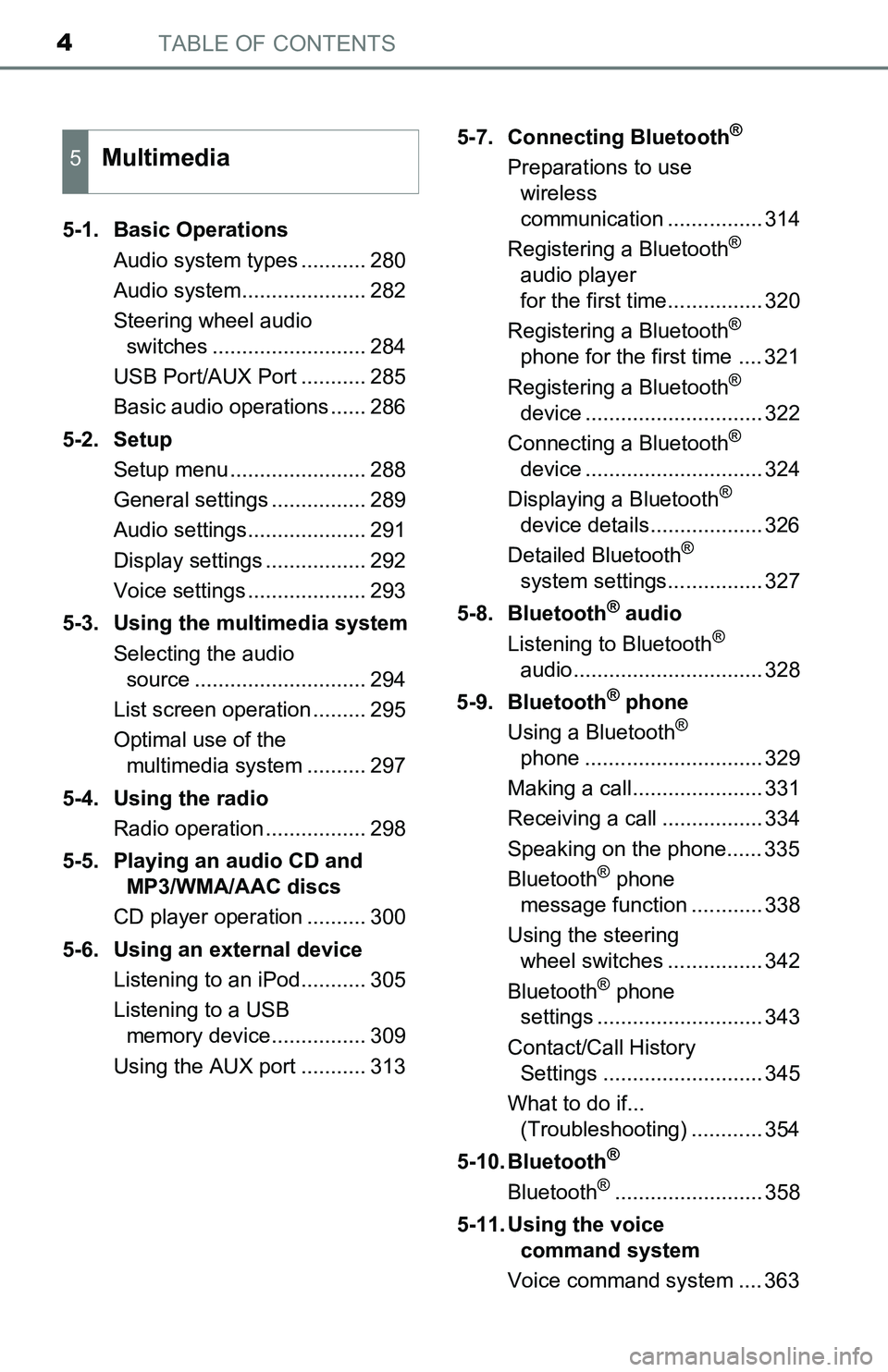
TABLE OF CONTENTS4
5-1. Basic Operations
Audio system types ........... 280
Audio system..................... 282
Steering wheel audio
switches .......................... 284
USB Port/AUX Port ........... 285
Basic audio operations ...... 286
5-2. Setup
Setup menu ....................... 288
General settings ................ 289
Audio settings.................... 291
Display settings ................. 292
Voice settings .................... 293
5-3. Using the multimedia system
Selecting the audio
source ............................. 294
List screen operation ......... 295
Optimal use of the
multimedia system .......... 297
5-4. Using the radio
Radio operation ................. 298
5-5. Playing an audio CD and
MP3/WMA/AAC discs
CD player operation .......... 300
5-6. Using an external device
Listening to an iPod........... 305
Listening to a USB
memory device................ 309
Using the AUX port ........... 3135-7. Connecting Bluetooth
®
Preparations to use
wireless
communication ................ 314
Registering a Bluetooth
®
audio player
for the first time................ 320
Registering a Bluetooth
®
phone for the first time .... 321
Registering a Bluetooth
®
device .............................. 322
Connecting a Bluetooth
®
device .............................. 324
Displaying a Bluetooth
®
device details................... 326
Detailed Bluetooth
®
system settings................ 327
5-8. Bluetooth
® audio
Listening to Bluetooth®
audio................................ 328
5-9. Bluetooth
® phone
Using a Bluetooth®
phone .............................. 329
Making a call...................... 331
Receiving a call ................. 334
Speaking on the phone...... 335
Bluetooth
® phone
message function ............ 338
Using the steering
wheel switches ................ 342
Bluetooth
® phone
settings ............................ 343
Contact/Call History
Settings ........................... 345
What to do if...
(Troubleshooting) ............ 354
5-10. Bluetooth
®
Bluetooth®......................... 358
5-11. Using the voice
command system
Voice command system .... 363
5Multimedia
Page 11 of 640
11
The SRS airbag and seat belt pretensioner devices in your Toyota contain
explosive chemicals. If the vehicle is scrapped with the airbags and seat belt
pretensioners left as they are, this may cause an accident such as fire. Be
sure to have the systems of the SRS airbag and seat belt pretensioner
removed and disposed of by a qualified service shop or by your Toyota dealer
before you scrap your vehicle.
Special handling may apply,
See www.dtsc.ca.gov/hazardouswaste/perchlorate.
Your vehicle has components that may contain perchlorate. These compo-
nents may include airbag, seat belt pretensioners, and wireless remote con-
trol batteries.
Scrapping of your Toyota
Perchlorate Material
WARNING
■General precautions while driving
Driving under the influence: Never drive your vehicle when under the influ-
ence of alcohol or drugs that have impaired your ability to operate your vehi-
cle. Alcohol and certain drugs delay reaction time, impair judgment and
reduce coordination, which could lead to an accident that could result in
death or serious injury.
Defensive driving: Always drive defensively. Anticipate mistakes that other
drivers or pedestrians might make and be ready to avoid accidents.
Driver distraction: Always give your full attention to driving. Anything that
distracts the driver, such as adjusting controls, talking on a cellular phone or
reading can result in a collision with resulting death or serious injury to you,
your occupants or others.
■General precaution regarding children’s safety
Never leave children unattended in the vehicle, and never allow children to
have or use the key.
Children may be able to start the vehicle or shift the vehicle into neutral.
There is also a danger that children may injure themselves by playing with
the windows, the moon roof, or other features of the vehicle. In addition,
heat build-up or extremely cold temperatures inside the vehicle can be fatal
to children.
Page 20 of 640
20Pictorial index
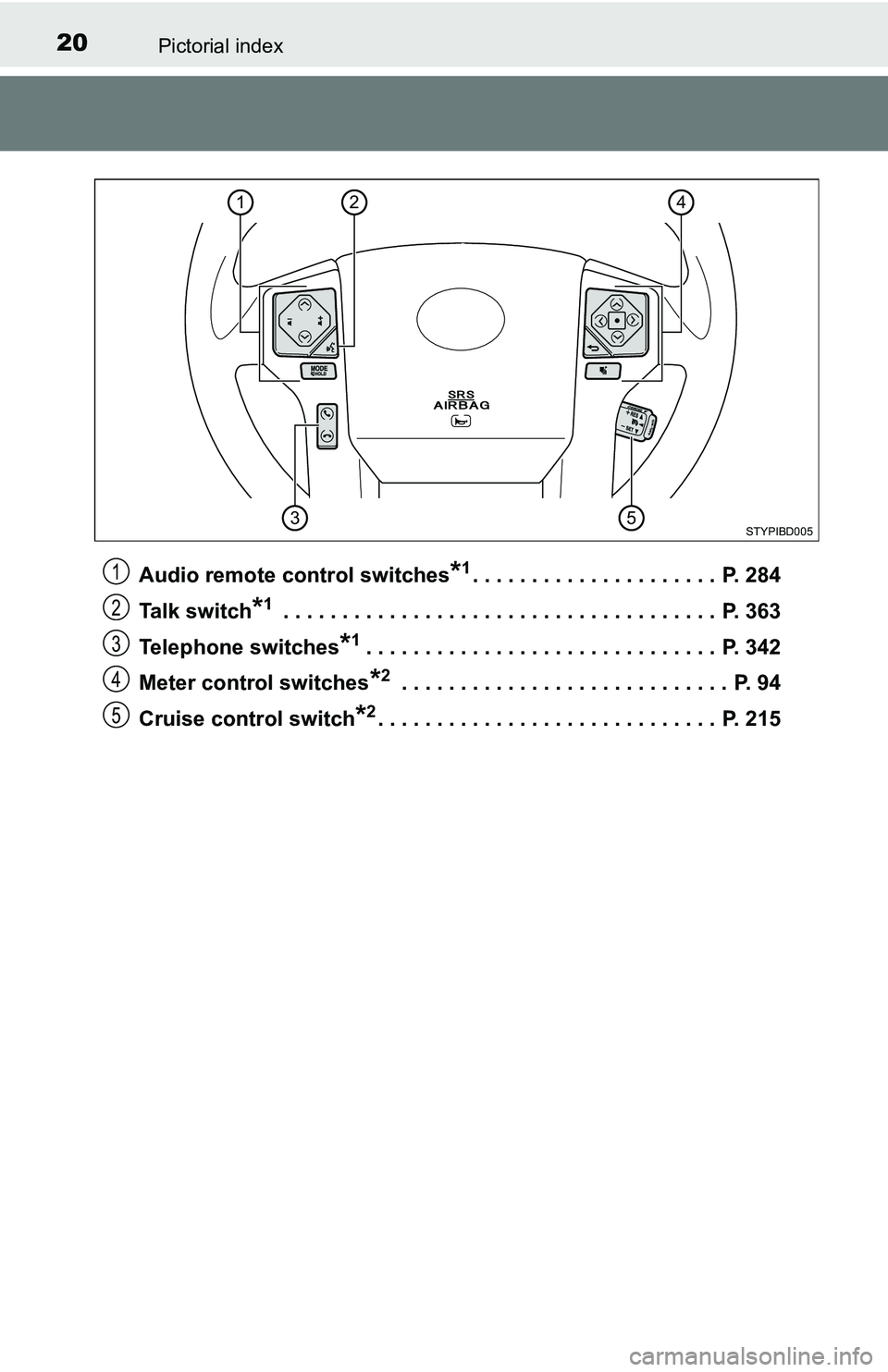
Audio remote control switches*1. . . . . . . . . . . . . . . . . . . . . P. 284
Talk switch
*1 . . . . . . . . . . . . . . . . . . . . . . . . . . . . . . . . . . . . . P. 363
Telephone switches
*1. . . . . . . . . . . . . . . . . . . . . . . . . . . . . . P. 342
Meter control switches
*2 . . . . . . . . . . . . . . . . . . . . . . . . . . . . P. 94
Cruise control switch
*2. . . . . . . . . . . . . . . . . . . . . . . . . . . . . P. 215
24
53
1
STYPIBD005
1
2
3
4
5
Page 96 of 640
962. Instrument cluster
■Customizable items
●Language
Select to change the language on the display.
●Units
Select to change the unit of measure for fuel consumption and
temperature.
●Drive information 1 through 3
Select to select up to 2 items that will be displayed on a Drive
information screen, up to 3 Drive information screens can be set.
●Pop-up display
Select to set the following pop-up displays, which may appear in
some situations, on/off.
• Instrument panel brightness adjustment display
• Route guidance display of the navigation system-linked sys-
tem (if equipped)
• Incoming call display of the hands-free phone system
• Shift position display (vehicles with an automatic transmission)
●Accent color
Select to change the accent colors on the screen, such as the
cursor color.
●Speed limit display
*
Select to set the display of speed limit information stored in the
navigation system (if equipped) to on with the speed limit caution
indicator (yellow) enabled, on with the speed limit caution not
enabled, or off. If enabled, the speed limit caution indicator will
come on if the vehicle speed exceeds the displayed speed limit.
●Programming
It is possible to set up a screen desired to be displayed as the
Top Screen by pressing and holding .
There are also screens that cannot be setup as the Top Screen.
●Maintenance system (U.S.A.)
Select to reset the message after the required maintenance is
performed. (P. 441)
●Default settings
Registered or changed meter settings will be deleted or returned
to their default setting.
*: Speed limit display may not be available for some regions.
Page 105 of 640
1053-1. Key information
3
Operation of each component
■When required to leave the vehicle’s key with a parking attendant (type
D)
Lock the glove box as circumstances demand. (P. 389)
Remove the mechanical key for your own use and provide the attendant with
the electronic key only.
■If you lose your keys
New genuine key can be made by your Toyota dealer using the other key and
the key number stamped on your key number plate.
Keep the plate in a safe place such as your wallet, not in the vehicle.
■When riding in an aircraft (type C or type D)
When bringing an wireless remote control function onto an aircraft, make sure
you do not press any button on the key while inside the aircraft cabin. If you
are carrying the key in your bag, etc., ensure that the buttons are not likely to
be pressed accidentally. Pressing a button may cause the key to emit radio
waves that could interfere with the operation of the aircraft.
■Conditions affecting operation (type C or type D)
Type C
The wireless remote control function may not operate normally in the follow-
ing situations:
●Near a TV tower, radio station, electric power plant, airport or other facility
that generates strong radio waves
●When carrying a portable radio, cellular phone or other wireless communi-
cation devices
●When multiple wireless keys are in the vicinity
●When the wireless key is in contact with, or is covered by a metallic object
●When a wireless key (that emits radio waves) is being used nearby
●When the wireless key has been left near an electrical appliance such as a
personal computer
Type D
P. 124
Page 106 of 640
1063-1. Key information
■Key battery depletion (type C or type D)
Type C
If the wireless remote control function does not operate, the battery may be
depleted. Replace the battery when necessary. (P. 481)
Type D
●The standard battery life is 1 to 2 years.
●If the battery becomes low, an alarm will sound in the cabin when the engine
stops. (P. 533)
●As the electronic key always receives radio waves, the battery will become
depleted even if the electronic key is not used. The following symptoms indi-
cate that the electronic key battery may be depleted. Replace the battery
when necessary. (P. 481)
• The smart key system or the wireless remote control does not operate.
• The detection area becomes smaller.
• The LED indicator on the key surface does not turn on.
●To avoid serious deterioration, do not leave the electronic key within 1 m
(3 ft.) of the following electrical appliances that produce a magnetic field:
•TVs
• Personal computers
• Cellular phones, cordless phones and battery chargers
• Recharging cellular phones or cordless phones
• Table lamps
• Induction cookers
■Replacing the battery (type C or type D)
P. 481
■Confirmation of the registered key number
The number of keys already registered to the vehicle can be confirmed. Ask
your Toyota dealer for details.
■Customization (type C or type D)
Settings (e.g. wireless remote control system) can be changed.
(Customizable features: P. 592)
Page 124 of 640
1243-2. Opening, closing and locking the doors
■Conditions affecting operation
The smart key system uses weak radio waves. In the following situations, the
communication between the electronic key and the vehicle may be affected,
preventing the smart key system, wireless remote control and engine immobi-
lizer system from operating properly. (Ways of coping: P. 555)
●When the electronic key battery is depleted
●Near a TV tower, electric power plant, gas station, radio station, large dis-
play, airport or other facility that generates strong radio waves or electrical
noise
●When carrying a portable radio, cellular phone, cordless phone or other
wireless communication device
●When the electronic key is in contact with, or is covered by the following
metallic objects
• Cards to which aluminum foil is attached
• Cigarette boxes that have aluminum foil inside
• Metallic wallets or bags
• Coins
• Hand warmers made of metal
• Media such as CDs and DVDs
●When multiple electronic keys are in the vicinity
●When other wireless keys (that emit radio waves) are being used nearby
●When carrying the electronic key together with the following devices that
emit radio waves
• Another vehicle’s electronic key or a wireless key that emits radio waves
• Personal computers or personal digital assistants (PDAs)
• Digital audio players
• Portable game systems
●If window tint with a metallic content or metallic objects are attached to the
back window
●When the electronic key is placed near a battery charger or electronic
devices
Page 279 of 640
279
5Multimedia
5-5. Playing an audio CD and
MP3/WMA/AAC discs
CD player operation .......... 300
5-6. Using an external device
Listening to an iPod .......... 305
Listening to a USB
memory device................ 309
Using the AUX port ........... 313
5-7. Connecting Bluetooth
®
Preparations to use
wireless
communication ................ 314
Registering a Bluetooth
®
audio player
for the first time ............... 320
Registering a Bluetooth
®
phone for the first time ... 321
Registering a Bluetooth
®
device.............................. 322
Connecting a Bluetooth
®
device.............................. 324
Displaying a Bluetooth
®
device details .................. 326
Detailed Bluetooth
®
system settings ............... 3275-8. Bluetooth
® audio
Listening to Bluetooth®
audio ............................... 328
5-9. Bluetooth
® phone
Using a Bluetooth®
phone .............................. 329
Making a call ..................... 331
Receiving a call ................. 334
Speaking on the phone ..... 335
Bluetooth
® phone
message function ............ 338
Using the steering wheel
switches .......................... 342
Bluetooth
® phone
settings ........................... 343
Contact/Call History
Settings ........................... 345
What to do if...
(Troubleshooting) ............ 354
5-10. Bluetooth
®
Bluetooth®......................... 358
5-11. Using the voice
command system
Voice command system .... 363
Page 282 of 640
2825-1. Basic Operations
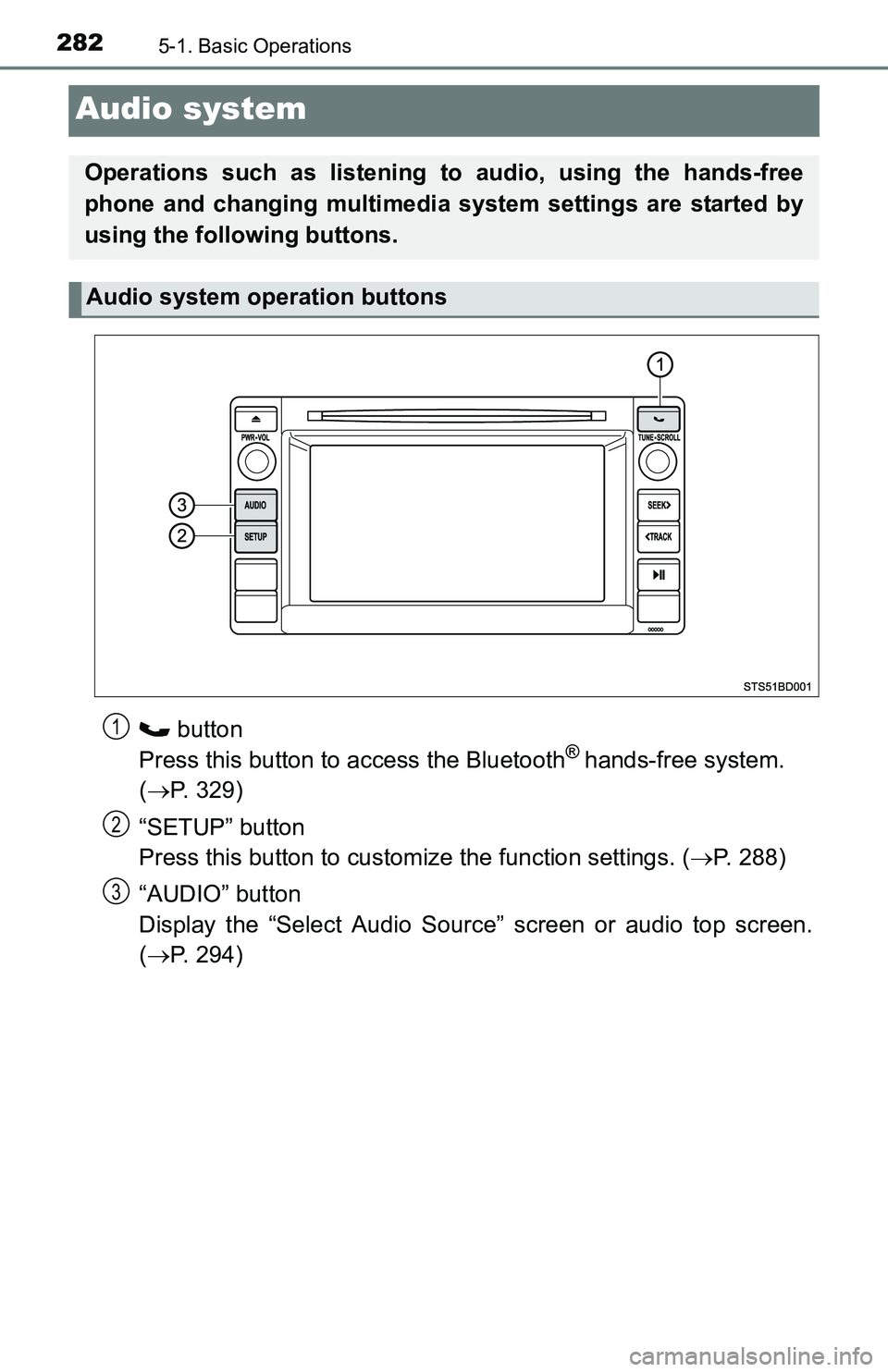
Audio system
button
Press this button to access the Bluetooth® hands-free system.
(P. 329)
“SETUP” button
Press this button to customize the function settings. (P. 288)
“AUDIO” button
Display the “Select Audio Source” screen or audio top screen.
(P. 294)
Operations such as listening to audio, using the hands-free
phone and changing multimedia system settings are started by
using the following buttons.
Audio system operation buttons
1
2
3
Page 287 of 640
2875-1. Basic Operations
5
Multimedia
■Using cellular phones
Interference may be heard through the multimedia system’s speakers if a cel-
lular phone is being used inside or close to the vehicle while the multimedia
system is operating.
WARNING
■For vehicles sold in U.S.A. and Canada
●Part 15 of the FCC Rules
FCC Warning:
Any unauthorized changes or modifications to this equipment would void
the user’s authority to operate this device.
●Laser products
CAUTION: THIS PRODUCT IS A CLASS I LASER PRODUCT.
USE OF CONTROLS OR ADJUSTMENTS OR PERFORMANCE OF
PROCEDURES OTHER THAN THOSE SPECIFIED HEREIN MAY
RESULT IN HAZARDOUS RADIATION EXPOSURE. DO NOT OPEN
COVERS AND DO NOT REPAIR BY YOURSELF. REFER SERVICING
TO QUALIFIED PERSONNEL.
• Do not take this unit apart or attempt to make any changes yourself.
This is an intricate unit that uses a laser pickup to retrieve information
from the surface of compact discs. The laser is carefully shielded so
that its rays remain inside the cabinet. Therefore, never try to disassem-
ble the player or alter any of its parts since you may be exposed to laser
rays and dangerous voltages.
• This product utilizes a laser.
Use of controls or adjustments or performance of procedures other than
those specified herein may result in hazardous radiation exposure.
THE USE OF OPTICAL INSTRUMENTS WITH THIS PRODUCT WILL
INCREASE EYE HAZARD.
NOTICE
■To prevent battery discharge
Do not leave the multimedia system on longer than necessary when the
engine is off.
■To avoid damaging the multimedia system
Take care not to spill drinks or other fluids on the multimedia system.