reset TOYOTA TACOMA 2019 Accessories, Audio & Navigation (in English)
[x] Cancel search | Manufacturer: TOYOTA, Model Year: 2019, Model line: TACOMA, Model: TOYOTA TACOMA 2019Pages: 294, PDF Size: 7.96 MB
Page 8 of 294

TABLE OF CONTENTS
8
1. CONTROLS AND FEATURES ........ 12
CONTROLS OVERVIEW....................... 12
“Apps” SCREEN .................................... 14
“Home” SCREEN ................................... 16
“Setup” SCREEN ................................... 20
2. NAVIGATION OPERATION ............ 22
REGISTERING HOME .......................... 22
REGISTERING PRESET DESTINATIONS .................................. 24
OPERATION FLOW: GUIDING THE ROUTE ....................... 25
SETTING HOME AS THE DESTINATION .................................... 26
3. FUNCTION INDEX ..... ...................... 27
FUNCTION INDEX ................................ 27
1. BASIC INFORMATION BEFORE
OPERATION .................................. 30
INITIAL SCREEN ................................... 30
CAPATIVE TOUCH SWITCHES ........... 32
TOUCH SCREEN GESTURES ............. 33
TOUCH SCREEN OPERATION ............ 34
“Home” SCREEN OPERATION ............. 35
“Apps” SCREEN OPERATION .............. 36
ENTERING LETTERS AND NUMBERS/
LIST SCREEN OPERATION............... 37
SCREEN ADJUSTMENT ....................... 40
LINKING MULTI-INFORMATION DISPLAY AND THE SYSTEM............. 42
2. Bluetooth® SETTINGS.................... 43
REGISTERING/CONNECTING Bluetooth® DEVICE............................. 43
SETTING Bluetooth® DETAILS ............. 51
3. OTHER SETTINGS ......................... 58
GENERAL SETTINGS ........................... 58
VOICE SETTINGS ................................. 63
VEHICLE SETTINGS ............................. 64
DRIVER SETTINGS ............................... 65
MAINTENANCE ..................................... 66
1. BASIC OPERATION ....................... 72
QUICK REFERENCE ............................. 72
SOME BASICS....................................... 74
2. RADIO OPERATION ....................... 79
AM/FM RADIO............................................... 79
XM Satellite Radio .................................. 90
INTERNET RADIO ................................. 97
3. MEDIA OPERATION ....................... 98
CD .......................................................... 98
USB MEMORY ..................................... 102
iPod ...................................................... 106
Bluetooth
® AUDIO................................ 111
AUX.......................................................... 1 16
4. AUDIO REMOTE CONTROLS...... 118
STEERING SWITCHES ....................... 118
5. SETUP ........................................... 119
AUDIO SETTINGS ............................... 119
6. TIPS FOR OPERATING
THE AUDIO SYSTEM.... .............. 121
OPERATING INFORMATION .............. 121
1QUICK GUIDE
2BASIC FUNCTION
3AUDIO SYSTEM
Page 11 of 294
1
11
1
2
3
4
5
6
7
8
9
1. CONTROLS OVERVIEW .............. 12
2. “Apps” SCREEN .......................... 14
3. “Home” SCREEN ......................... 16
STATUS DISPLAY.................................. 18
4. “Setup” SCREEN ......................... 20
1. REGISTERING HOME .................. 22
2. REGISTERING PRESET DESTINATIONS .......................... 24
3. OPERATION FLOW: GUIDING THE ROUTE................ 25
4. SETTING HOME AS THE DESTINATION ............................ 26
1. FUNCTION INDEX ........................ 27
1CONTROLS AND FEATURES
2NAVIGATION OPERATION
3FUNCTION INDEX
QUICK GUIDE
Page 21 of 294
21
1. CONTROLS AND FEATURES
QUICK GUIDE
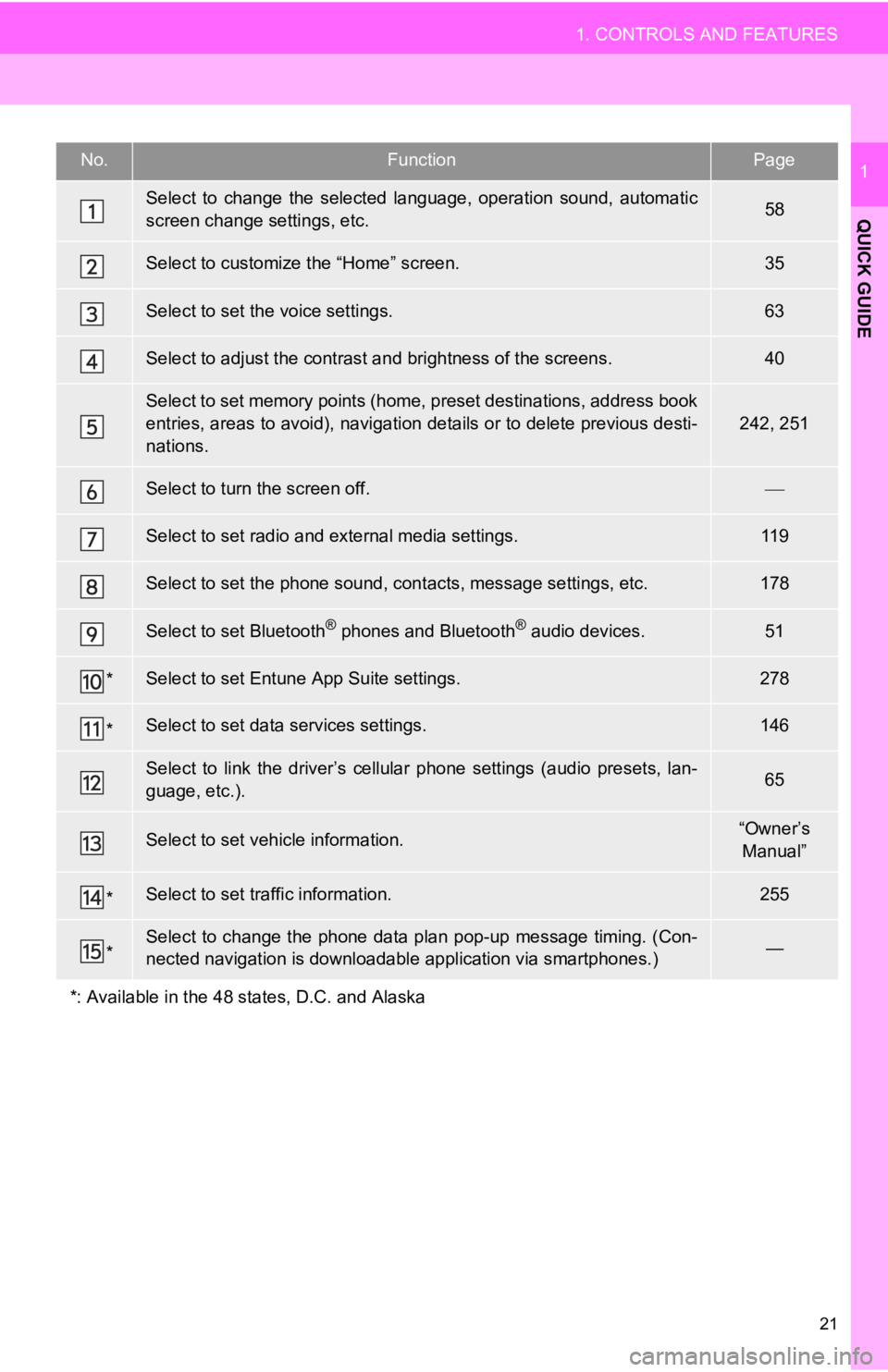
1No.FunctionPage
Select to change the selected language, operation sound, automatic
screen change settings, etc.58
Select to customize the “Home” screen.35
Select to set the voice settings.63
Select to adjust the contrast a nd brightness of the screens.40
Select to set memory points (home, preset destinations, address book
entries, areas to avoid), navigation details or to delete previous desti-
nations.
242, 251
Select to turn the screen off.
Select to set radio and external media settings.11 9
Select to set the phone sound, cont acts, message settings, etc.178
Select to set Bluetooth® phones and Bluetooth® audio devices.51
*Select to set Entune App Suite settings.278
*Select to set data services settings.146
Select to link the driver’s cellular phone settings (audio pres ets, lan-
guage, etc.).65
Select to set vehicle information.“Owner’s Manual”
*Select to set traffic information.255
*Select to change the phone data plan pop-up message timing. (Co n-
nected navigation is downloadabl e application via smartphones.)—
*: Available in the 48 st ates, D.C. and Alaska
Page 24 of 294
24
2. NAVIGATION OPERATION
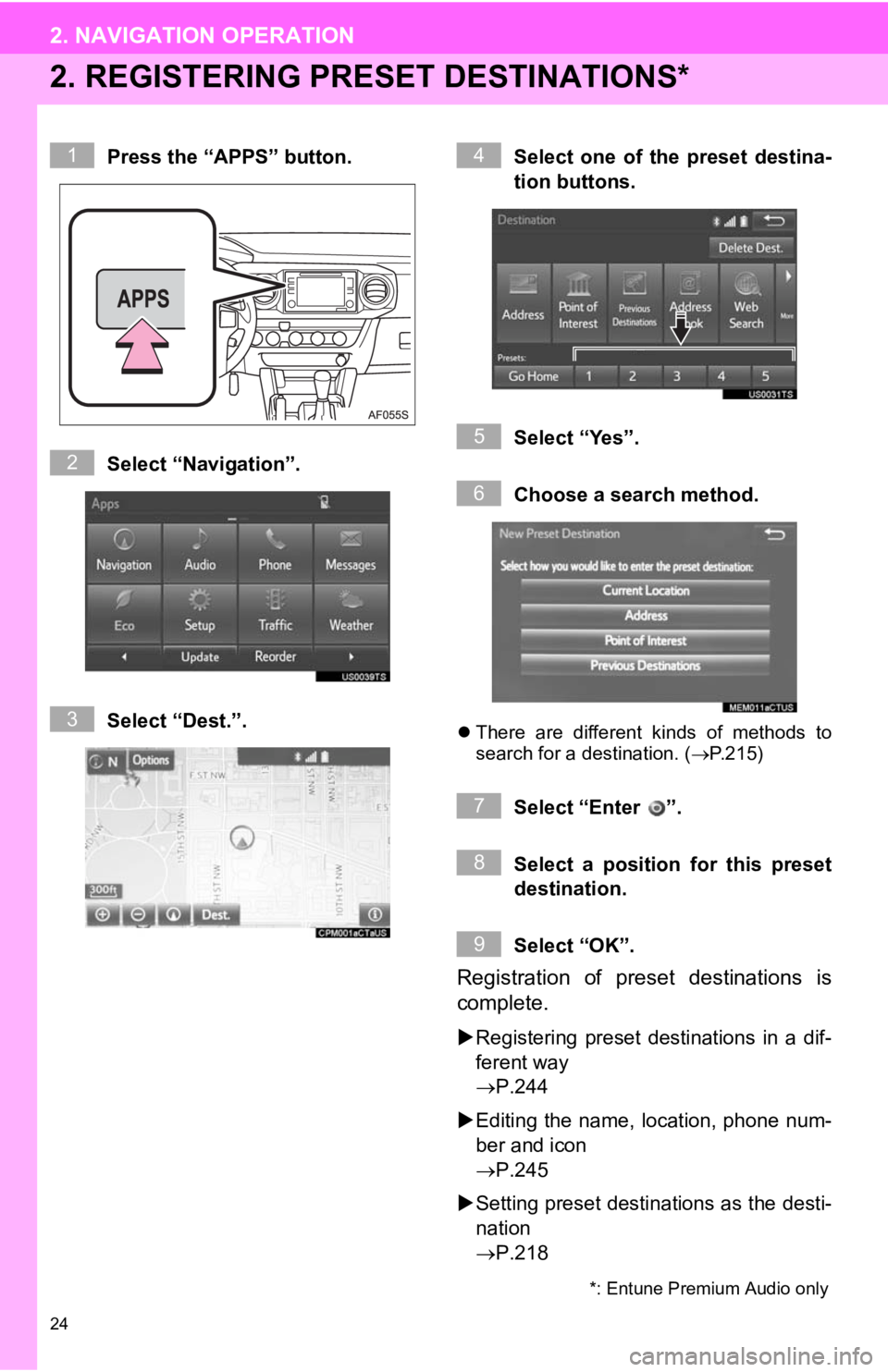
2. REGISTERING PRESET DESTINATIONS*
Press the “APPS” button.
Select “Navigation”.
Select “Dest.”.Select one of the preset destina-
tion buttons.
Select “Yes”.
Choose a search method.
There are different kinds of methods to
search for a destination. ( P.215)
Select “Enter ”.
Select a position for this preset
destination.
Select “OK”.
Registration of preset destinations is
complete.
Registering preset destinations in a dif-
ferent way
P.244
Editing the name, location, phone num-
ber and icon
P.245
Setting preset destinations as the desti-
nation
P.218
*: Entune Premium Audio only
1
2
3
4
5
6
7
8
9
Page 55 of 294
55
2. Bluetooth® SETTINGS
BASIC FUNCTION
2
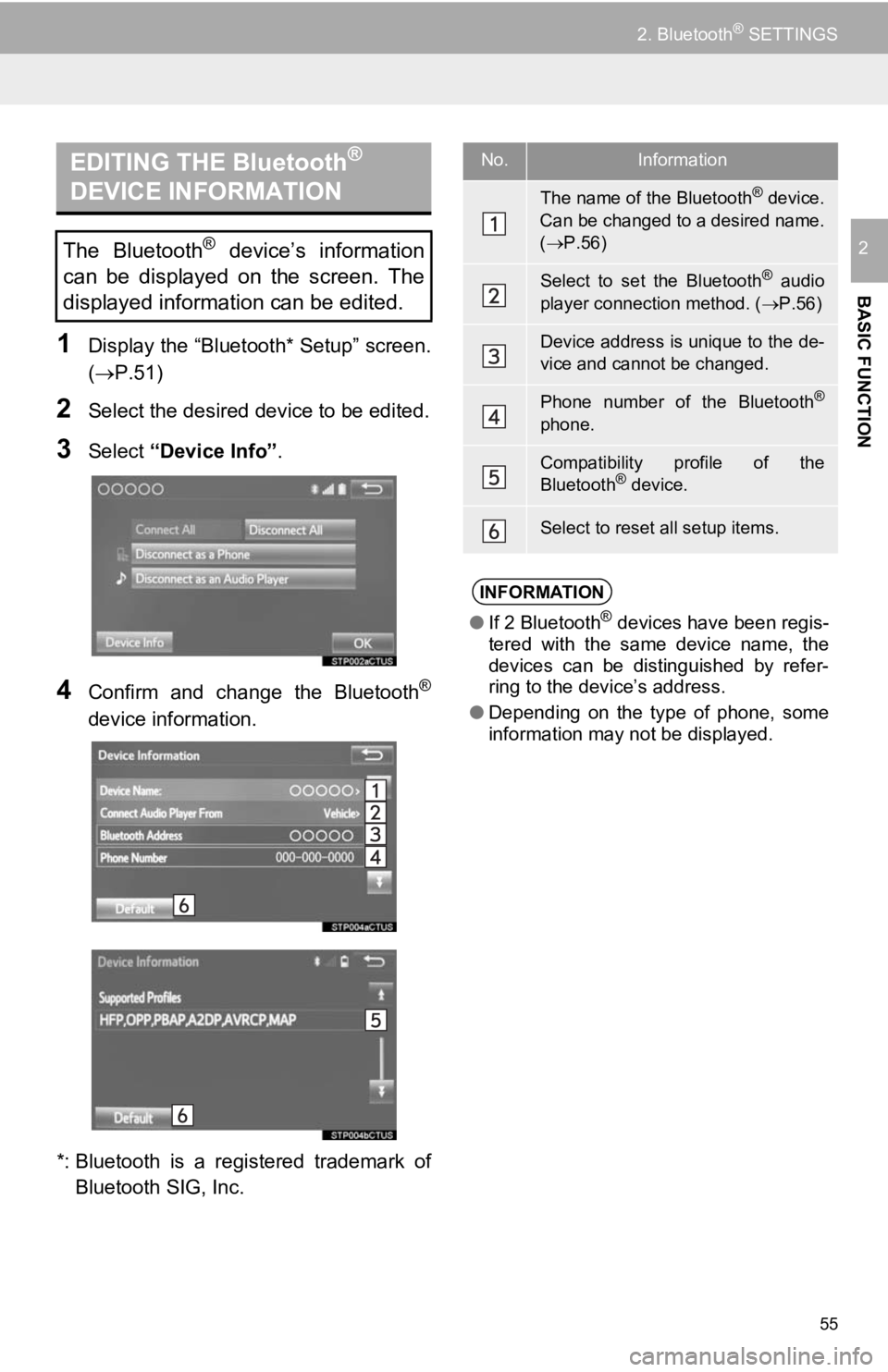
1Display the “Bluetooth* Setup” screen.
(P.51)
2Select the desired device to be edited.
3Select “Device Info” .
4Confirm and change the Bluetooth®
device information.
*: Bluetooth is a registered trademark of Bluetooth SIG, Inc.
EDITING THE Bluetooth®
DEVICE INFORMATION
The Bluetooth® device’s information
can be displayed on the screen. The
displayed information can be edited.
No.Information
The name of the Bluetooth® device.
Can be changed to a desired name.
( P.56)
Select to set the Bluetooth® audio
player connection method. ( P.56)
Device address is unique to the de-
vice and cannot be changed.
Phone number of the Bluetooth®
phone.
Compatibility profile of the
Bluetooth® device.
Select to reset all setup items.
INFORMATION
● If 2 Bluetooth® devices have been regis-
tered with the same device name, the
devices can be distinguished by refer-
ring to the device’s address.
● Depending on the type of phone, some
information may not be displayed.
Page 56 of 294
56
2. Bluetooth® SETTINGS
1Select “Device Name” .
2Enter the name and select “OK”.
1Select “Connect Audio Player
From” .
2Select the desired connection method.
“Vehicle” : Select to connect the audio
system to the audio player.
“Device” : Select to connect the audio
player to the audio system.
Depending on the audio player, the “Vehi-
cle” or “Device” connection method may
be best. As such, refer to the manual that
comes with the audio player.
To reset the connection method, select
“Default”.
1Display the “Bluetooth* Setup” screen.
( P.51)
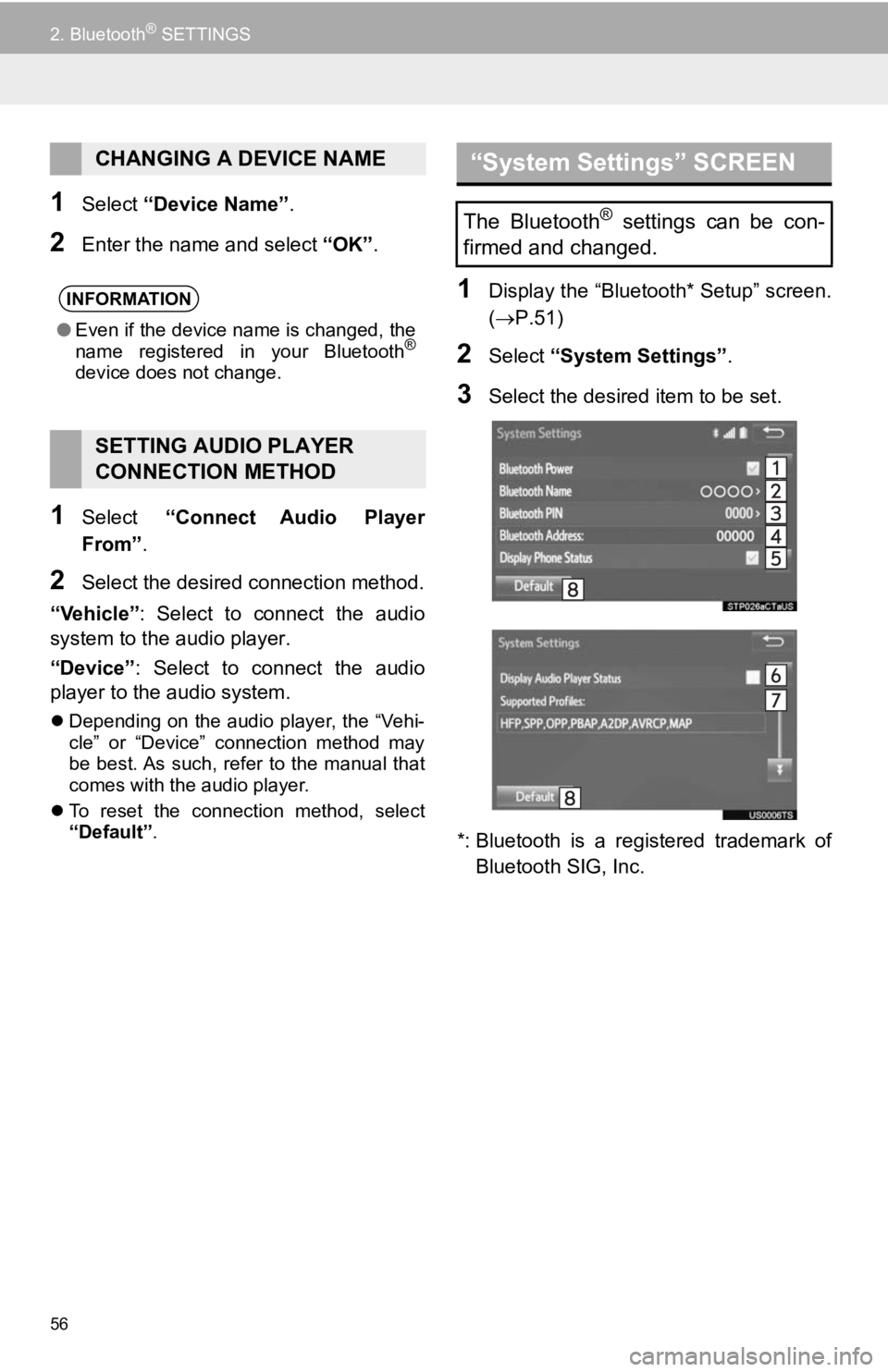
2Select “System Settings” .
3Select the desired item to be set.
*: Bluetooth is a registered trademark of Bluetooth SIG, Inc.
CHANGING A DEVICE NAME
INFORMATION
● Even if the device name is changed, the
name registered in your Bluetooth®
device does not change.
SETTING AUDIO PLAYER
CONNECTION METHOD
“System Settings” SCREEN
The Bluetooth® settings can be con-
firmed and changed.
Page 57 of 294
57
2. Bluetooth® SETTINGS
BASIC FUNCTION
21Select “Bluetooth* Power” .
When “Bluetooth* Power” is on:
Vehicles without a smart key system
The Bluetooth
® device is automatically
connected when the engine switch is
turned to the “ACC” or “ON” position.
Vehicles with a smart key system
The Bluetooth
® device is automatically
connected when the engine switch is
turned to ACCESSORY or IGNITION ON
mode.
When “Bluetooth* Power” is off:
The Bluetooth
® device is disconnected,
and the system will not connect to it next
time.
1Select “Bluetooth* Name” .
2Enter a name and select “OK”.
1Select “Bluetooth* PIN” .
2Enter a PIN-code and select “OK”.
*: Bluetooth is a registered trademark of Bluetooth SIG, Inc.
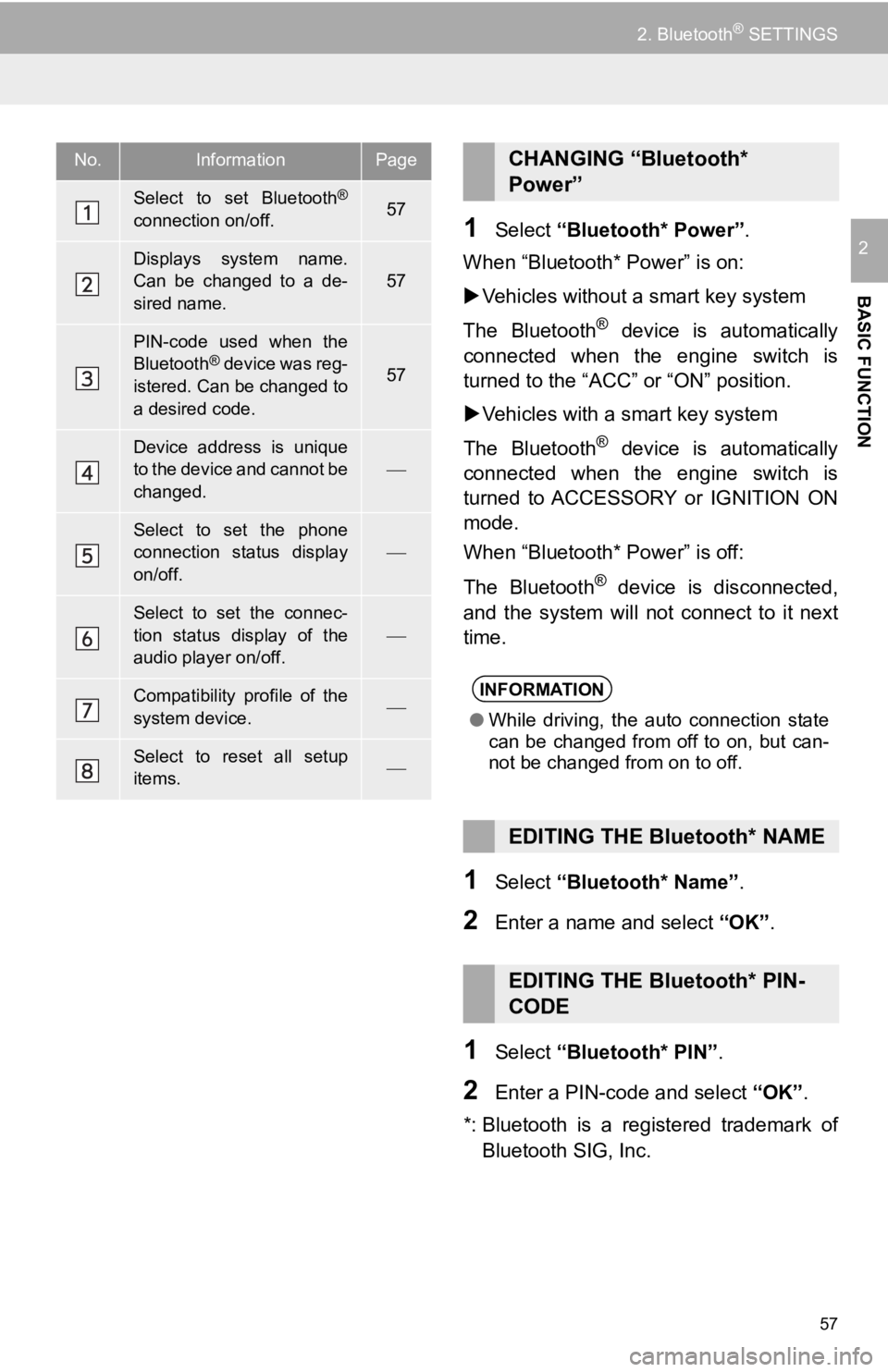
No.InformationPage
Select to set Bluetooth®
connection on/off.57
Displays system name.
Can be changed to a de-
sired name.
57
PIN-code used when the
Bluetooth® device was reg-
istered. Can be changed to
a desired code.57
Device address is unique
to the device and cannot be
changed.
Select to set the phone
connection status display
on/off.
Select to set the connec-
tion status display of the
audio player on/off.
Compatibility profile of the
system device.
Select to reset all setup
items.
CHANGING “Bluetooth*
Power”
INFORMATION
● While driving, the auto connection state
can be changed from off to on, but can-
not be changed from on to off.
EDITING THE Bluetooth* NAME
EDITING THE Bluetooth* PIN-
CODE
Page 59 of 294
59
3. OTHER SETTINGS
BASIC FUNCTION
2
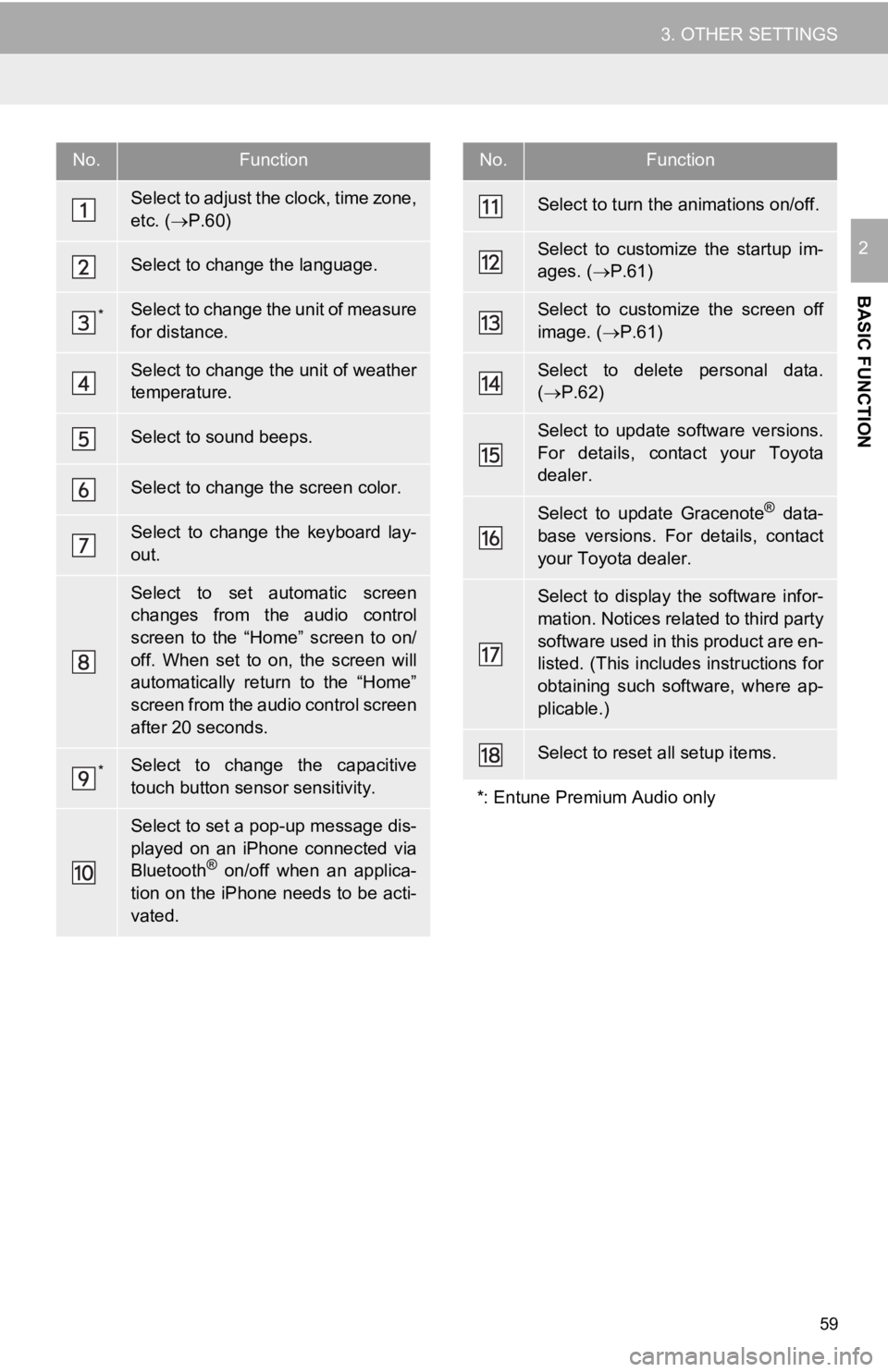
No.Function
Select to adjust the clock, time zone,
etc. (P.60)
Select to change the language.
*Select to change the unit of measure
for distance.
Select to change the unit of weather
temperature.
Select to sound beeps.
Select to change the screen color.
Select to change the keyboard lay-
out.
Select to set automatic screen
changes from the audio control
screen to the “Home” screen to on/
off. When set to on, the screen will
automatically return to the “Home”
screen from the audio control screen
after 20 seconds.
*Select to change the capacitive
touch button sensor sensitivity.
Select to set a pop-up message dis-
played on an iPhone connected via
Bluetooth
® on/off when an applica-
tion on the iPhone needs to be acti-
vated.
Select to turn the animations on/off.
Select to customize the startup im-
ages. ( P.61)
Select to customize the screen off
image. ( P.61)
Select to delete personal data.
( P.62)
Select to update software versions.
For details, contact your Toyota
dealer.
Select to update Gracenote® data-
base versions. For details, contact
your Toyota dealer.
Select to display the software infor-
mation. Notices related to third party
software used in this product are en-
listed. (This includes instructions for
obtaining such software, where ap-
plicable.)
Select to reset all setup items.
*: Entune Premium Audio only
No.Function
Page 63 of 294
63
3. OTHER SETTINGS
BASIC FUNCTION
2
2. VOICE SETTINGS
1Press the “APPS” button.
2Select “Setup” .
3Select “Voice”.
4Select the items to be set.
Voice volume, etc., can be set.
INFORMATION
●“Voice Settings” screen can also be dis-
played from the voice recognition top
screen. ( P.134)
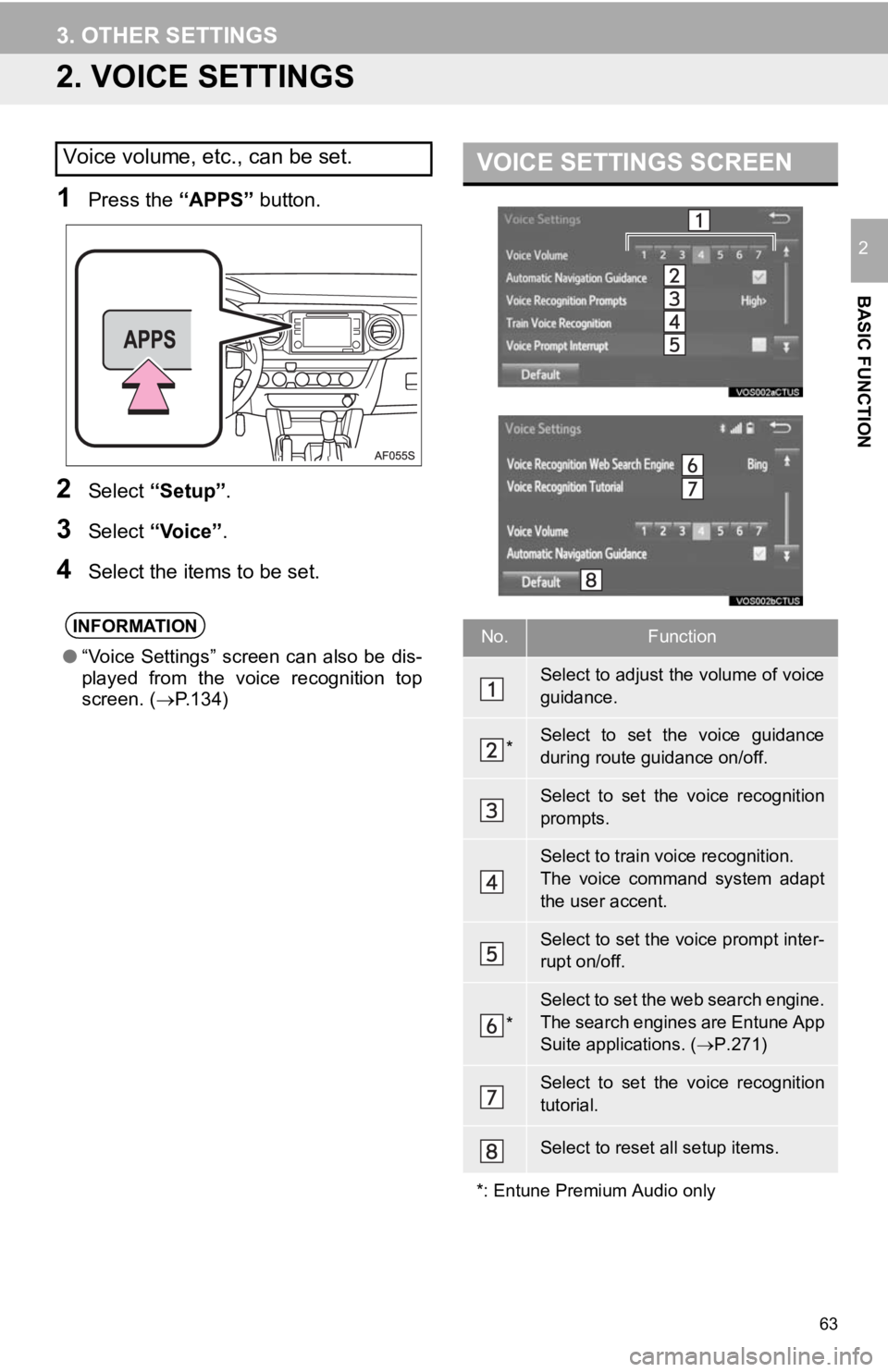
VOICE SETTINGS SCREEN
No.Function
Select to adjust the volume of voice
guidance.
*Select to set the voice guidance
during route guidance on/off.
Select to set the voice recognition
prompts.
Select to train voice recognition.
The voice command system adapt
the user accent.
Select to set the voice prompt inter-
rupt on/off.
*
Select to set the web search engine.
The search engines are Entune App
Suite applications. ( P.271)
Select to set the voice recognition
tutorial.
Select to reset all setup items.
*: Entune Premium Audio only
Page 65 of 294
65
3. OTHER SETTINGS
BASIC FUNCTION
2
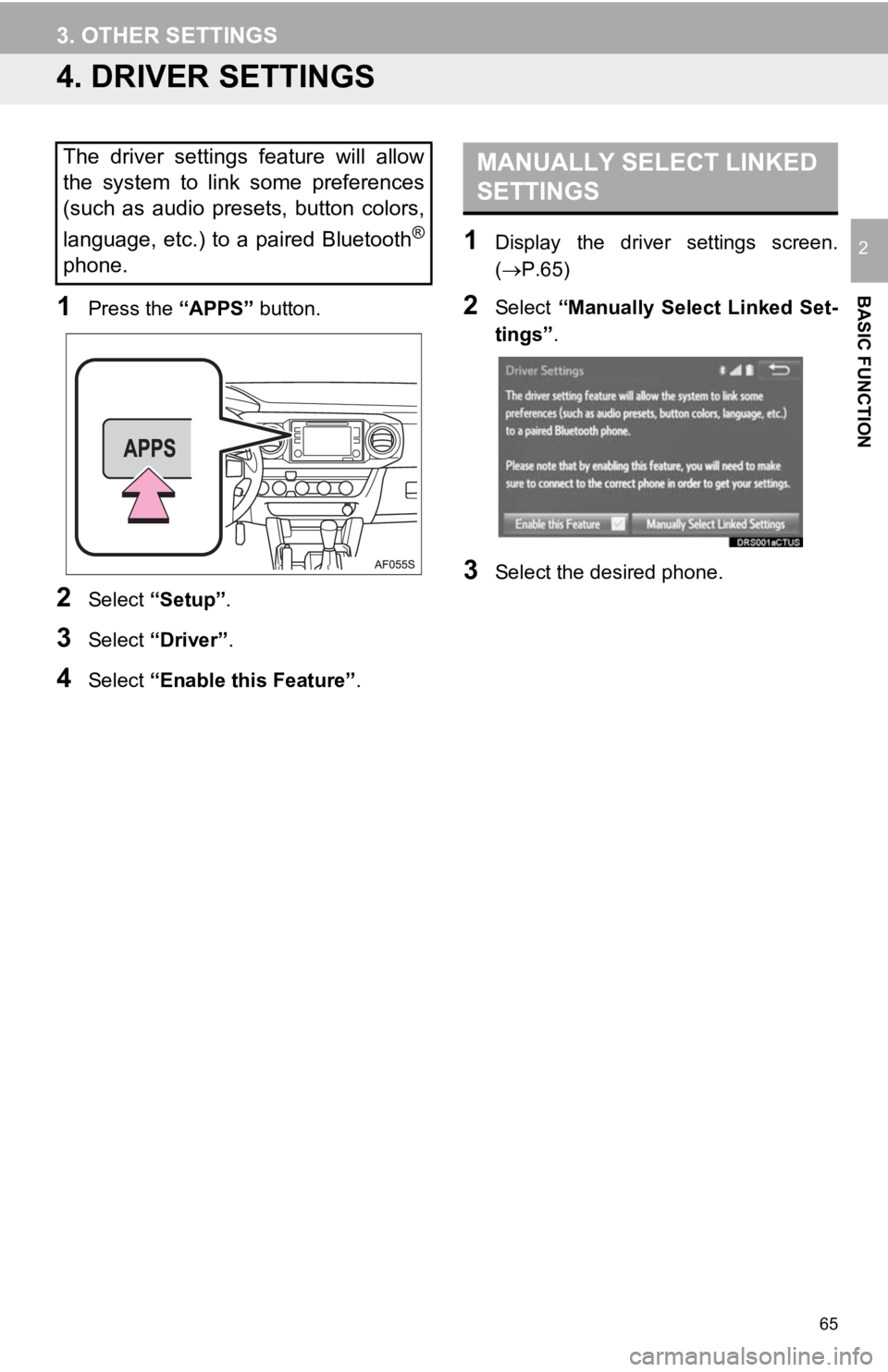
4. DRIVER SETTINGS
1Press the “APPS” button.
2Select “Setup” .
3Select “Driver” .
4Select “Enable this Feature” .
1Display the driver settings screen.
(P.65)
2Select “Manually Select Linked Set-
tings” .
3Select the desired phone.
The driver settings feature will allow
the system to link some preferences
(such as audio presets, button colors,
language, etc.) to a paired Bluetooth
®
phone.
MANUALLY SELECT LINKED
SETTINGS