engine TOYOTA tC 2012 Owners Manual (in English)
[x] Cancel search | Manufacturer: TOYOTA, Model Year: 2012, Model line: tC, Model: TOYOTA tC 2012Pages: 24, PDF Size: 1.36 MB
Page 3 of 24
OVERVIEW
FEATURES/OPERATIONS
SAFETY AND EMERGENCY FEATURES
1
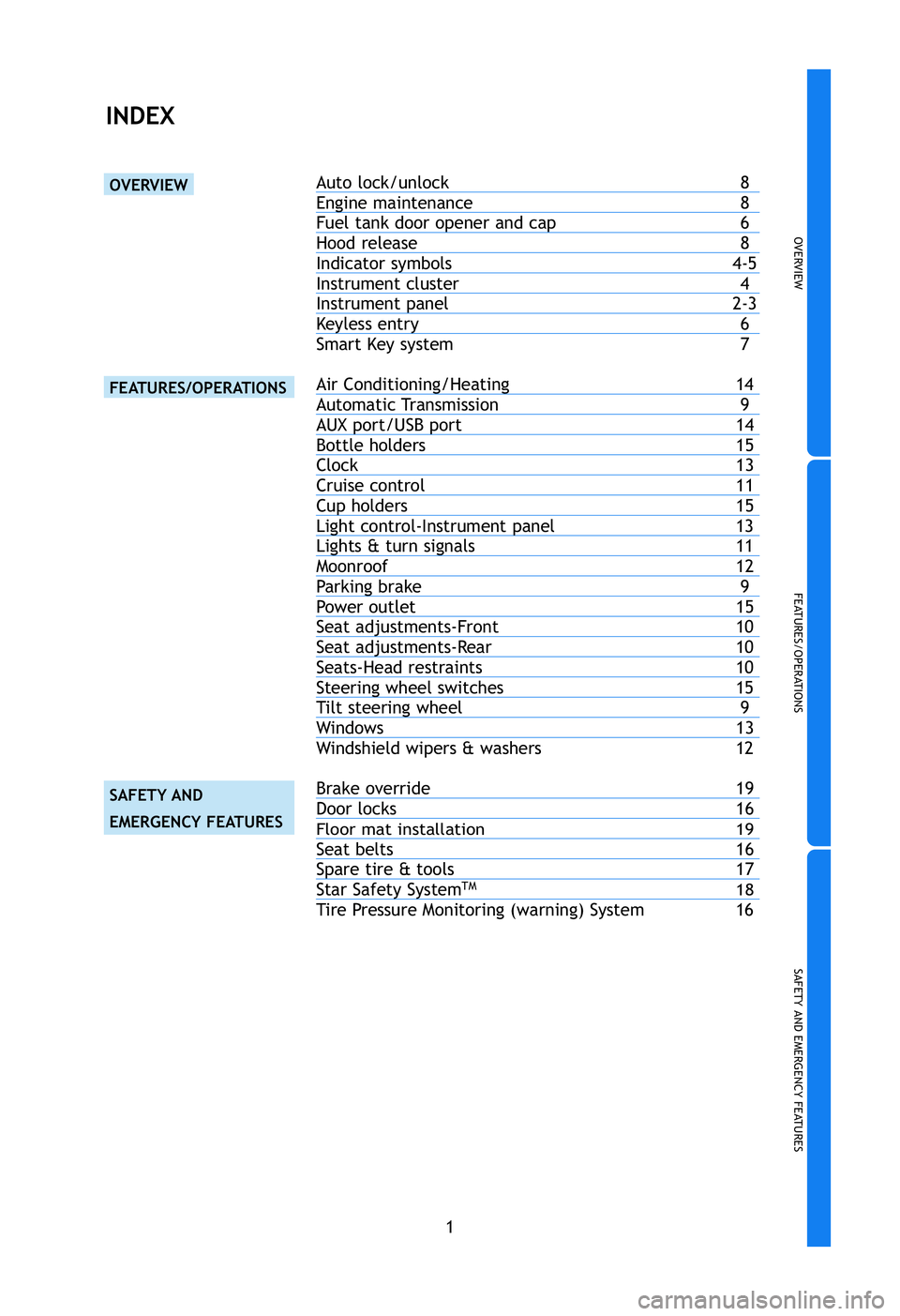
Auto lock/unlock8
Engine maintenance8
Fuel tank door openerand cap6
Hood release 8
Indicator symbols4-5
Instrument cluster 4
Instrument panel2-3
Keyless entry 6
Smart Key system 7
Air Conditioning/Heating 14
Automatic Transmission 9
AUX port/USB port14
Bottle holders15
Clock 13
Cruise control11
Cup holders15
Light control-Instrument panel13
Lights & turn signals11
Moonroof 12
Parking brake9
Power outlet 15
Seat adjustments-Front10
Seat adjustments-Rear10
Seats-Head restraints10
Steering wheel switches15
Tilt steering wheel9
Windows 13
Windshield wipers & washers 12
Brake override 19
Door locks 16
Floor mat installation19
Seat belts 16
Spare tire & tools17
Star Safety SystemTM18
Tire Pressure Monitoring (warning) System 16
OVERVIEW
FEATURES/OPERATIONS
SAFETY AND
EMERGENCYFEATURES
INDEX
2012Scion-tC.qxd 5/18/11 12:35 PM Page 1
Page 5 of 24
OVERVIEW
FEATURES/OPERATIONS
SAFETY AND EMERGENCY FEATURES
3
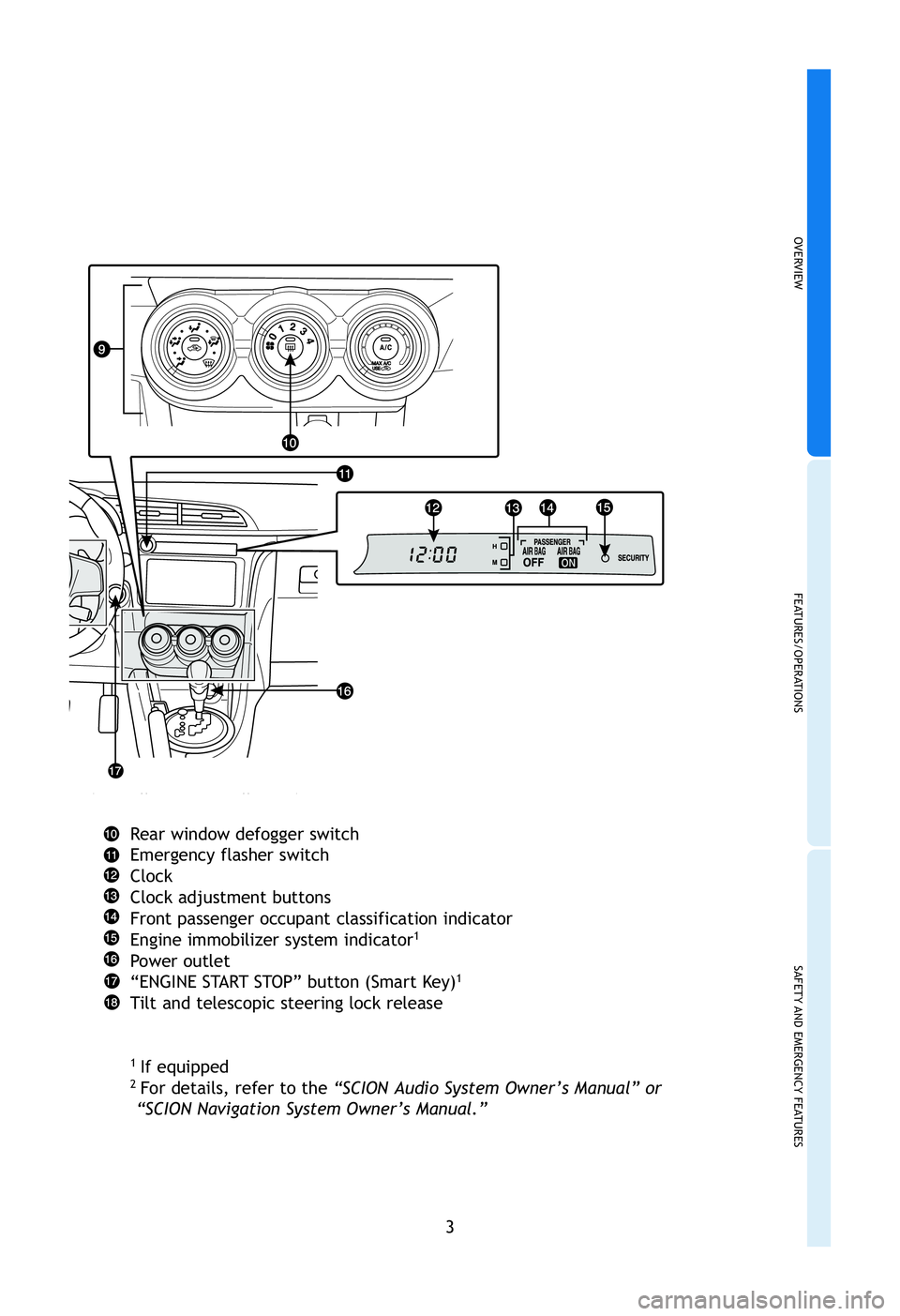
Rear window defogger switch
Emergency flasher switch
Clock
Clock adjustment buttons
Front passenger occupant classification indicator
Engine immobilizer system indicator
1
Power outlet
“ENGINE START STOP” button (Smart Key)1
Tilt and telescopic steering lock release
1If equipped2For details, refer to the “SCION Audio System Owner’s Manual” or
“SCION Navigation System Owner’s Manual.”
2012Scion-tC.qxd 5/14/11 8:46 AM Page 3
Page 6 of 24
4
OVERVIEW
2If th
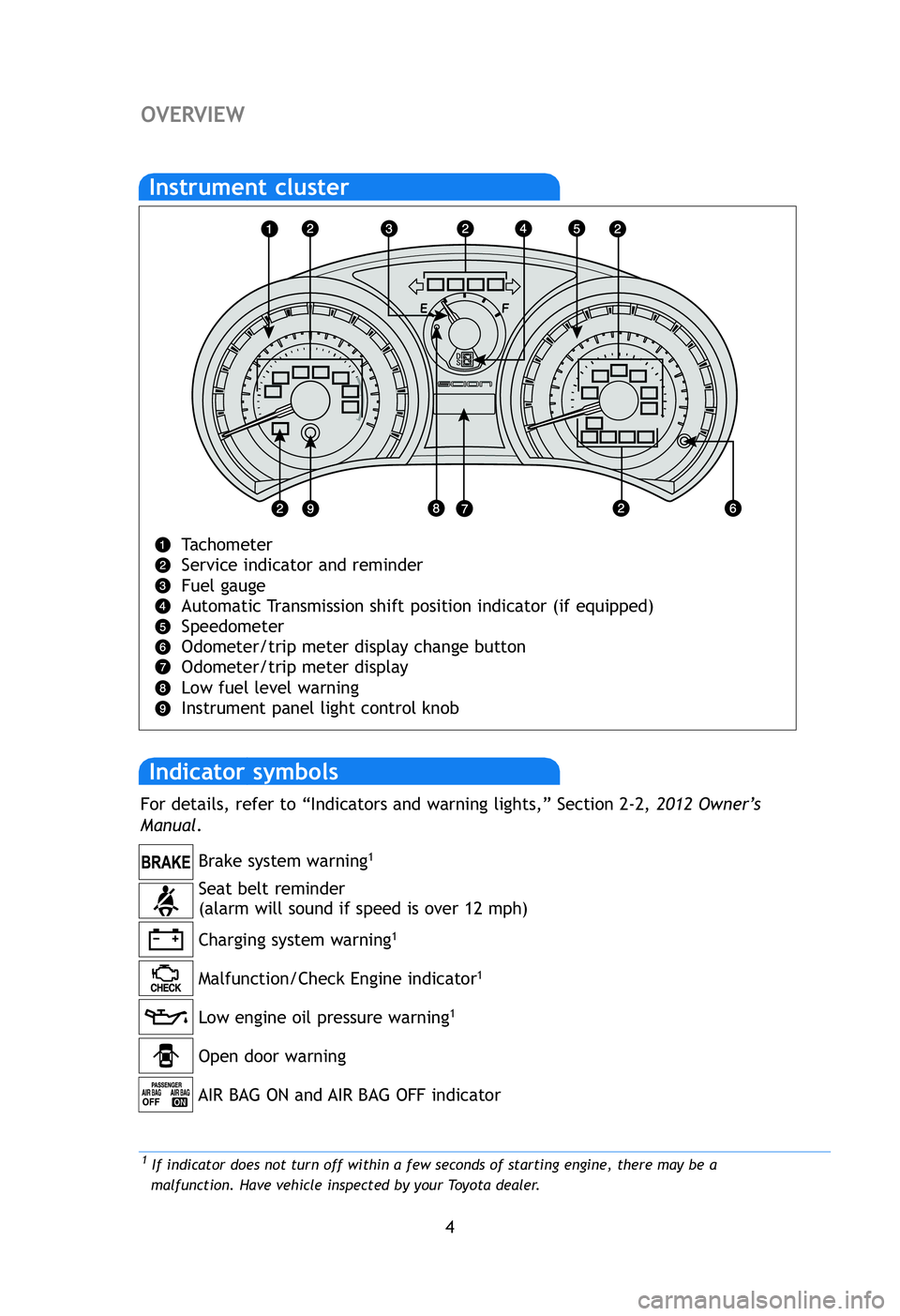
Tachometer
Service indicator and reminder
Fuel gauge
Automatic Transmission shift position indicator (if equipped)
Speedometer
Odometer/trip meter display change button
Odometer/trip meter display
Low fuel level warning
Instrument panel light control knob
Instrument cluster
Seat belt reminder
(alarm will sound if speed is over 12 mph) Brake system warning
1
Charging system warning1
Low engine oil pressure warning1
Malfunction/Check Engine indicator1
Indicator symbols
Open door warning
AIR BAG ON and AIR BAG OFF indicator
1If indicator does not turn off within a few seconds of starting engine, \
there may be a
malfunction. Have vehicle inspected by your Toyota dealer.
For details, refer to “Indicators and warning lights,” Section 2-2\
, 2012 Owner’s
Manual .
2012Scion-tC-2ndpg 4_5.qxd:Layout 1 5/17/11 6:32 PM Page 2
Page 7 of 24
 OVERVIEW
FEATURES/OPERATIONS
SAFETY AND EMERGENCY FEATURES
5
2If this light flashes, refer to “Cruise control” Section 2-4, 2012\
Owner’s Manual.
Anti-lock Brake System warning1
Engine oil repl")
OVERVIEW
FEATURES/OPERATIONS
SAFETY AND EMERGENCY FEATURES
5
2If this light flashes, refer to “Cruise control” Section 2-4, 2012\
Owner’s Manual.
Anti-lock Brake System warning1
Engine oil replacement reminder1
Turn signal indicatorsHeadlight low/high beam indicator
Airbag SRS warning
1
Low Tire Pressure Warning1
Cruise control indicator2
High coolant temperature warning1
Slip indicator
Low fuel level warning
Automatic Transmission fluid temperature warning1
Engine immobilizer system indicator Vehicle Stability Control OFF indicator
1
ECO driving indicator1
Low engine coolant temperature indicator
Traction Control OFF indicator1
Electric power steering system warning1
Smart Key system warning
s
2012Scion-tC.qxd 5/14/11 8:48 AM Page 5
Page 8 of 24
6
OVERVIEW
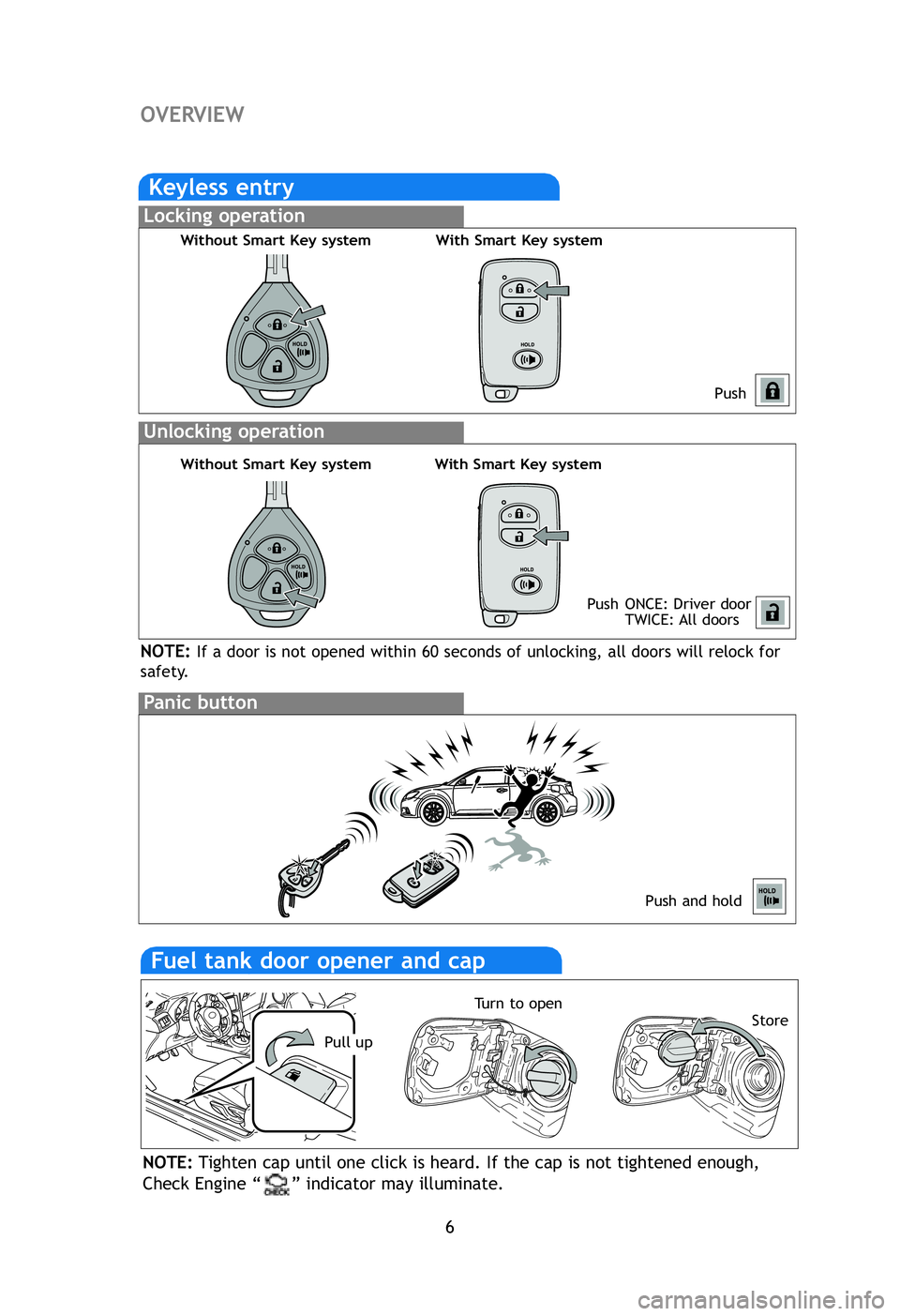
Keyless entry
Push
Push ONCE: Driver door TWICE: All doors
Locking operation
Unlocking operation
Panic button
Push and hold
NOTE:If a door is not opened within 60 seconds of unlocking, all doors will r\
elock for
safety.
Fuel tank door opener and cap
Turn to open Store
Pull up
NOTE:Tighten cap until one click is heard. If the cap is not tightened enough,\
Check Engine “ ” indicator may illuminate.
Without Smart Key system
Without Smart Key system With Smart Key system
With Smart Key system
Sm
Star
AC
ON
OF
With
STAR
NOT
Pow
Bac
Loc
Carr Carr
NOT
2012Scion-tC.qxd 5/14/11 8:50 AM Page 6
Page 9 of 24
OVERVIEW
FEATURES/OPERATIONS
SAFETY AND EMERGENCY FEATURES
7
for
tore
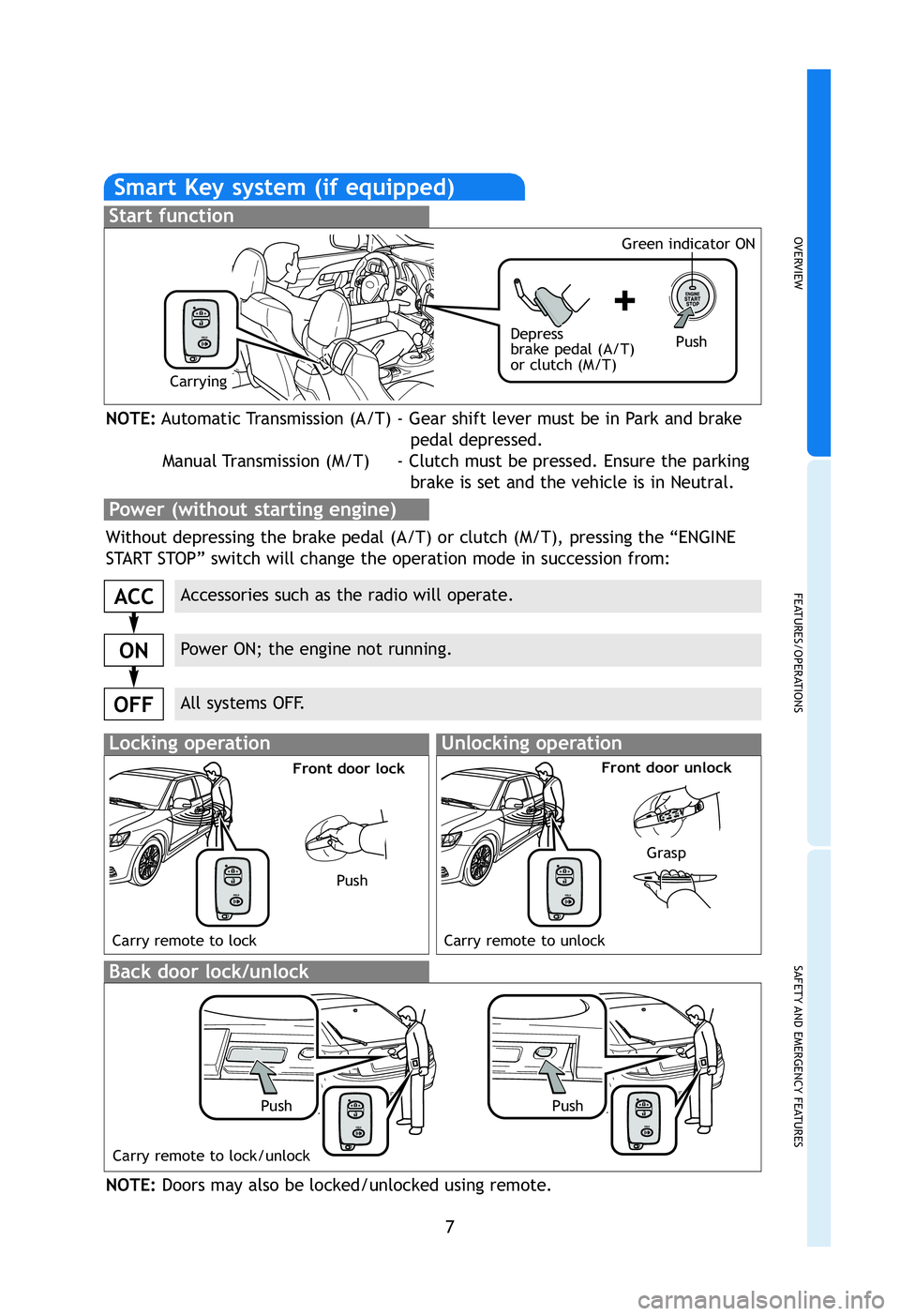
Smart Key system (if equipped)
Start function
Accessories such as the radio will operate.
Power ON; the engine not running.
All systems OFF.
ACC
ON
OFF
Push
Depress
brake pedal (A/T)
or clutch (M/T)
Carrying
Green indicator ON
Without depressing the brake pedal (A/T) or clutch (M/T), pressing th\
e “ENGINE
START STOP” switch will change the operation mode in succession from:
NOTE:
Doors may also be locked/unlocked using remote.
Power (without starting engine)
Back door lock/unlock
Push
Locking operationUnlocking operation
Carry remote to lock Carry remote to unlock
Push
Front door lock
Grasp
Carry remote to lock/unlock
Front door unlock
Push
NOTE: Automatic Transmission (A/T) - Gear shift lever must be in Park and brake
pedal depressed.
Manual Transmission (M/T) - Clutch must be pressed. Ensure the parking brake is set and the vehicle is in Neutral.
2012Scion-tC.qxd 5/14/11 8:51 AM Page 7
Page 10 of 24
8
FE
Au
* Thedep
Dow
For b
leve
Til
Hold
NOT
Pa
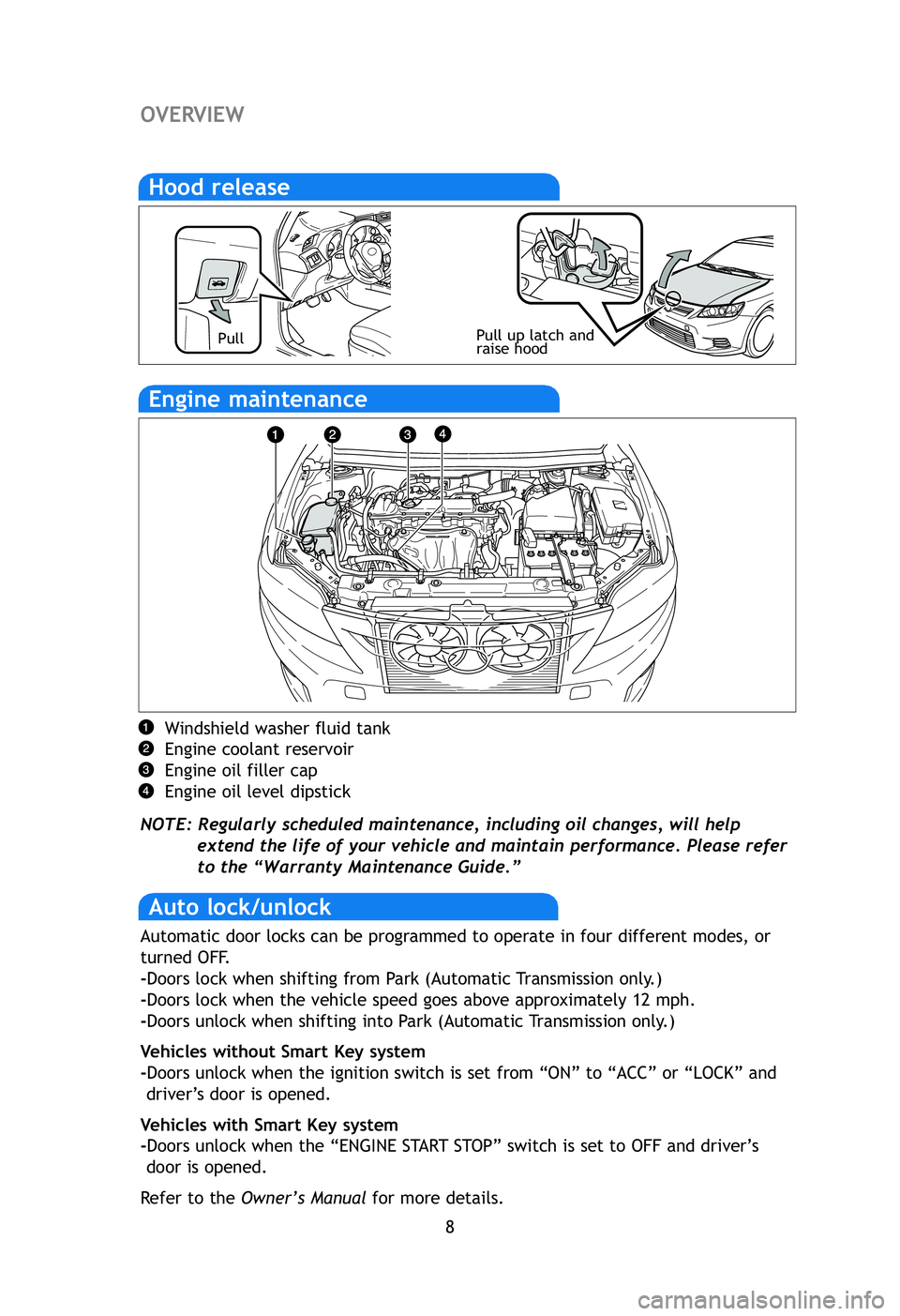
Engine maintenance
Windshield washer fluid tank
Engine coolant reservoir
Engine oil filler cap
Engine oil level dipstick
NOTE: Regularly scheduled maintenance, including oil changes, will help extend the life of your vehicle and maintain performance. Please refer
to the “Warranty Maintenance Guide.”
Auto lock/unlock
Automatic door locks can be programmed to operate in four different mode\
s, or
turned OFF.
-Doors lock when shifting from Park (Automatic Transmission only.)
-Doors lock when the vehicle speed goes above approximately 12 mph.
-Doors unlock when shifting into Park (Automatic Transmission only.)
Vehicles without Smart Key system
-Doors unlock when the ignition switch is set from “ON” to “ACC”\
or “LOCK” anddriver’s door is opened.
Vehicles with Smart Key system
-Doors unlock when the “ENGINE START STOP” switch is set to OFF and driver’s door is opened.
Refer to the Owner’s Manual for more details.
Hood release
Pull Pull up latch and
raise hood
OVERVIEW
2012Scion-tC.qxd 5/14/11 8:51 AM Page 8
Page 11 of 24
OVERVIEW
FEATURES/OPERATIONS
SAFETY AND EMERGENCY FEATURES
9
FEATURES/OPERATIONS
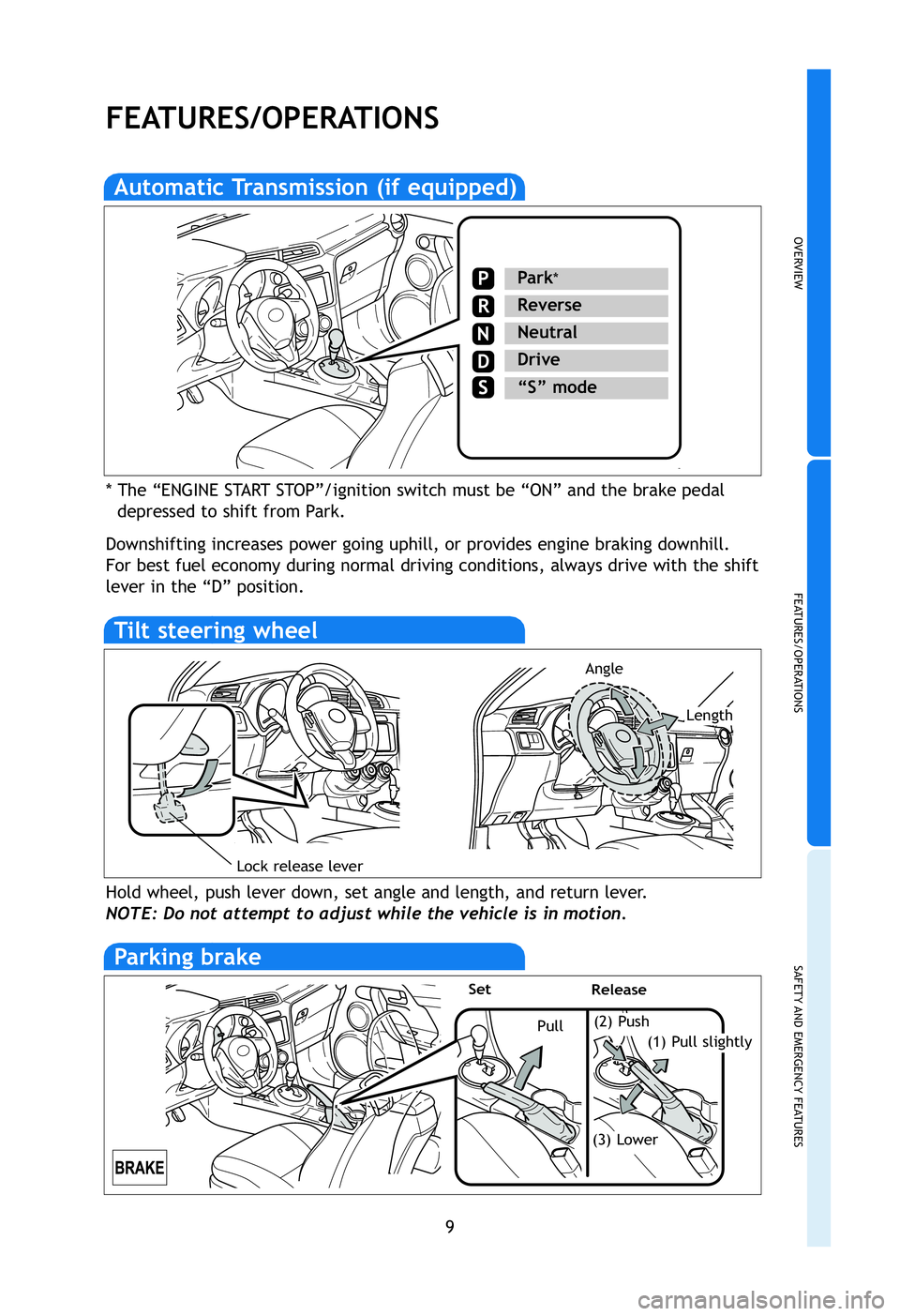
Automatic Transmission (if equipped)
Park*
Reverse
Neutral
Drive
N
* The “ENGINE START STOP”/ignition switch must be “ON” and the brake pedal depressed to shift from Park.
Downshifting increases power going uphill, or provides engine braking do\
wnhill.
For best fuel economy during normal driving conditions, always drive wit\
h the shift
lever in the “D” position.
Tilt steering wheel
Hold wheel, push lever down, set angle and length, and return lever.
NOTE: Do not attempt to adjust while the vehicle is in motion.
Lock release lever
Angle
Length
Parking brake
Pull(2) Push
(1) Pull slightly
(3) Lower
Set Release
efer
or
nd
2012Scion-tC.qxd 5/14/11 8:51 AM Page 9
Page 17 of 24
 OVERVIEW
FEATURES/OPERATIONS
SAFETY AND EMERGENCY FEATURES
15
g.
Steering wheel switches
“MODE”
Push to turn audio ON and select an audio mode. Push and hold to turn au\
dio
system OFF.
“")
OVERVIEW
FEATURES/OPERATIONS
SAFETY AND EMERGENCY FEATURES
15
g.
Steering wheel switches
“MODE”
Push to turn audio ON and select an audio mode. Push and hold to turn au\
dio
system OFF.
“ ”
Use to search within the selected audio medium (radio, CD, iPod
®, etc.).
Refer to the SCION Audio System Owner’s Manual or the SCION Navigation System
Owner’s Manual for more details.
>>
Volume control
ic
X
USB em
Bottle holders
FrontRear
Cup holders
Power outlet
Designed for car accessories. Ignition switch/“ENGINE START STOP” switch must be
in the “ACC” or “ON” position to be used.
2012Scion-tC.qxd 5/14/11 8:53 AM Page 15
Page 20 of 24
 18
Star Safety SystemTM
VSC helps prevent loss of traction during cornering by reducing engine p\
ower and
applying brake force to selected wheels.
Toyota’s VSC monitors steering angle and the dire")
18
Star Safety SystemTM
VSC helps prevent loss of traction during cornering by reducing engine p\
ower and
applying brake force to selected wheels.
Toyota’s VSC monitors steering angle and the direction your vehicle is travelin\
g.
When it senses that the front or rear wheels begin to lose traction, VSC\
reduces
engine power and applies braking to selected wheels. This helps restore traction
and vehicle control.
Vehicle Stability Control (VSC)
Anti-Lock Brake System (ABS)
Brake Assist (BA)
ABS helps prevent brakes from locking up by "pulsing" brake pressure to \
each
wheel. This limits brake lockup and provides the maximum brake effectiveness fo\
r
the current road conditions.
Toyota's ABS sensors detect which wheels are locking up and limits wheel lockup b\
y
"pulsing" each wheel's brakes independently. Pulsing releases brake pressure
repeatedly for fractions of a second. This helps the tires attain the maximum
traction that the current road conditions will allow, helping you stay in control. Brake Assist is designed to detect sudden or “panic” braking, and then a\
dd braking
pressure to decrease the vehicle’s stopping distance. When there’s only a split
second to react, Brake Assist can add additional brake pressure more quickly than
just the driver alone can. VSC helps prevent loss of traction during cornering by reducing engine p\
ower, and
Traction Control helps maintain traction on loose gravel and wet, icy, or uneven
surfaces by applying brake force to the spinning wheel(s).
Toyota’s TRAC sensors are activated when one of the drive wheels starts to slip.
TRAC limits engine output and applies the brakes to the spinning wheel. \
This
transfers power to the wheels that still have traction to help you drive\
safely.
Traction Control (TRAC)
Electronic Brake Force Distribution (EBD)
Toyota’s ABS technology has Electronic Brake-force Distribution (EBD) to help
maintain stability and balance when braking. Abrupt stops cause the vehicle to tilt
forward, reducing the braking power of the rear wheels. EBD responds to \
sudden
stops by redistributing brake force to maximize the braking effectivenes\
s of all
four wheels.Ther
has m
For s
•O
•Us
pl
•In
Flo
Bra
Smar
and
Brak
appli
per h
Brak
acce
with
SAFETY AND EMERGENCY FEATURES
All new Toyota vehicles come standard with the Star Safety SystemTM, which
combines Traction Control (TRAC), Electronic Brake-force Distribution (EBD), V\
ehicle
Stability Control (VSC), Brake Assist (BA) and an Anti-lock Braking System (ABS).
2012Scion-tC.qxd 5/14/11 8:54 AM Page 18