audio TOYOTA TUNDRA 2017 Manuel du propriétaire (in French)
[x] Cancel search | Manufacturer: TOYOTA, Model Year: 2017, Model line: TUNDRA, Model: TOYOTA TUNDRA 2017Pages: 600, PDF Size: 36.78 MB
Page 273 of 600
271
5Multimédia
TUNDRA_OM_USA_OM34594D_17MY5-8. Bluetooth
® audio
Écoute en Bluetooth®
audio ............................... 319
5-9. Téléphone Bluetooth
®
Utilisation d’un téléphone Bluetooth®....................... 320
Passer un appel ................ 322
Réception d’un appel ....... 325
Conversation au téléphone ........................ 326
Fonction Bluetooth
®
de message
téléphonique ................... 329
Utilisation des commandes au volant ..... 333
Paramètres du téléphone Bluetooth
®...................... 334
Paramètres des contacts/ historique des appels ...... 336
Que faire si... (Dépannage) ................... 345 5-10. Utilisation du système de
commande vocale
Système de commande vocale ............................. 349
5-11. Bluetooth
®
Bluetooth®........................ 353
5-12. Antenne Antenne............................. 357
TUNDRA_OM_USA_OM34594D.book 271 ページ 2016年5月11日 水曜日 午後9時37分
Page 274 of 600
2725-1. Opérations de base
TUNDRA_OM_USA_OM34594D_17MY
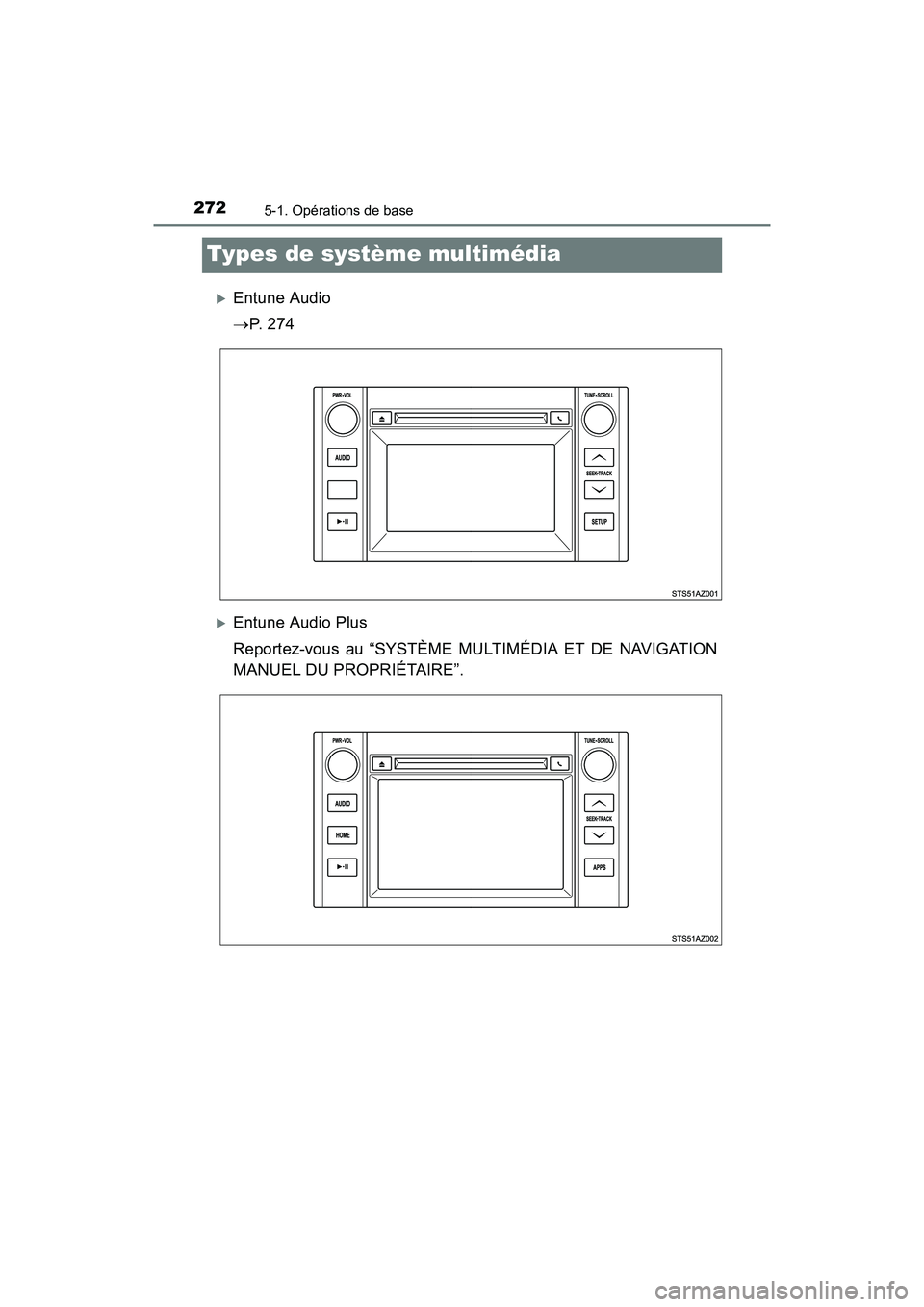
Types de système multimédia
Entune Audio
P. 2 7 4
Entune Audio Plus
Reportez-vous au “SYSTÈME MULTIMÉDIA ET DE NAVIGATION
MANUEL DU PROPRIÉTAIRE”.
TUNDRA_OM_USA_OM34594D.book 272 ページ 2016年5月11日 水曜日 午後9時37分
Page 275 of 600
2735-1. Opérations de base
5
Multimédia
TUNDRA_OM_USA_OM34594D_17MY
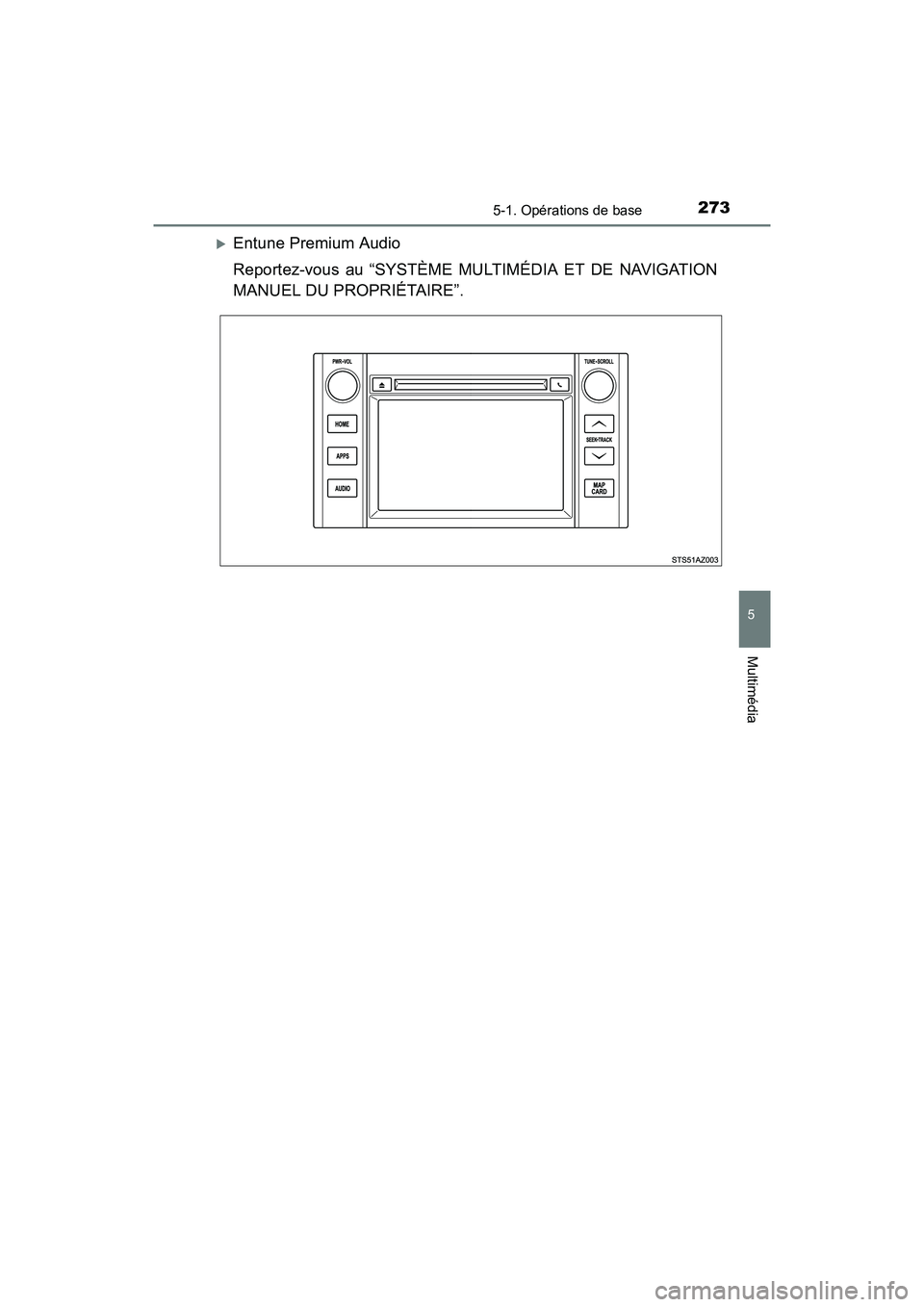
Entune Premium Audio
Reportez-vous au “SYSTÈME MULTIMÉDIA ET DE NAVIGATION
MANUEL DU PROPRIÉTAIRE”.
TUNDRA_OM_USA_OM34594D.book 273 ページ 2016年5月11日 水曜日 午後9時37分
Page 276 of 600
2745-1. Opérations de base
TUNDRA_OM_USA_OM34594D_17MY
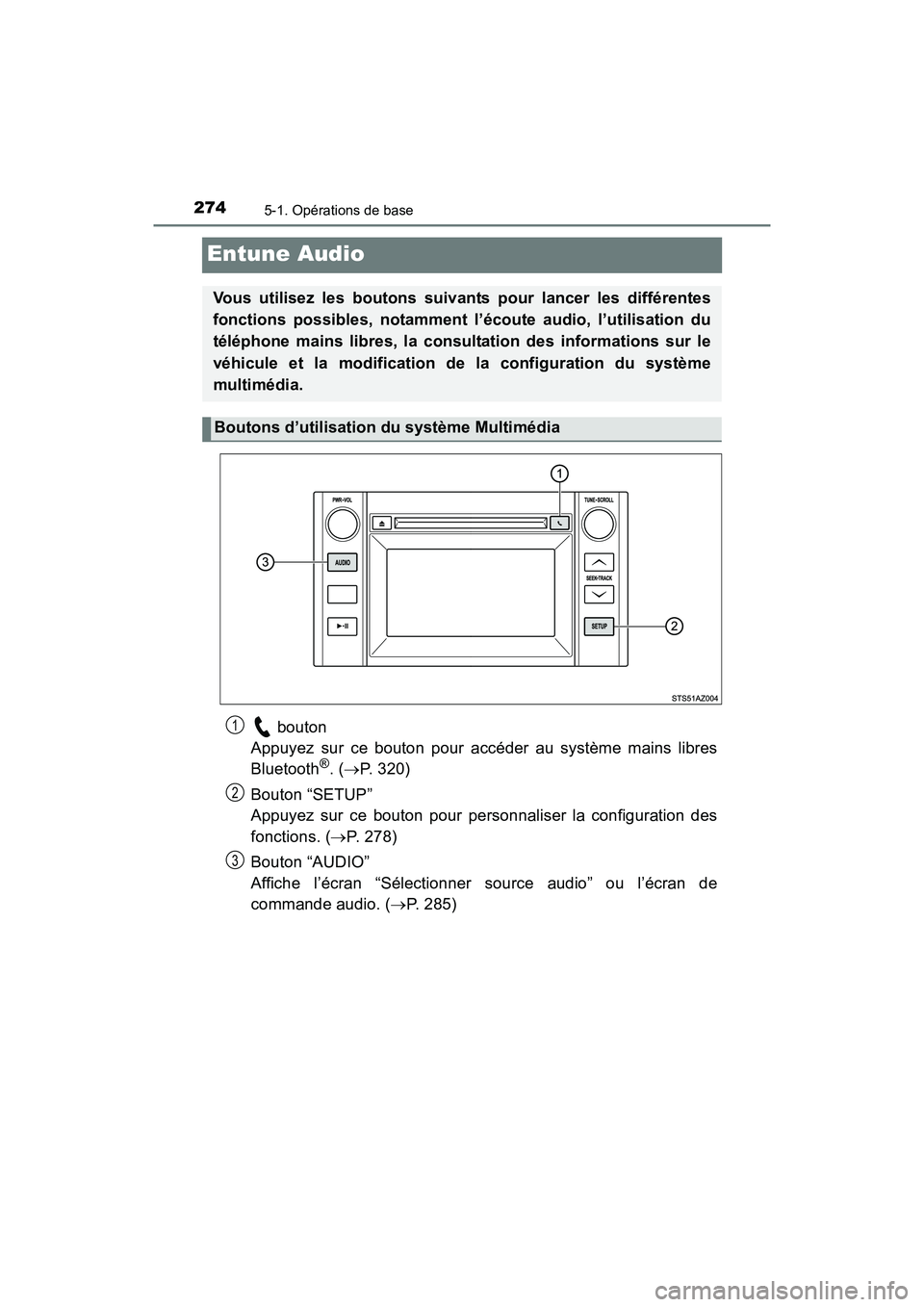
Entune Audio
bouton
Appuyez sur ce bouton pour accéder au système mains libres
Bluetooth
®. ( P. 320)
Bouton “SETUP”
Appuyez sur ce bouton pour personnaliser la configuration des
fonctions. ( P. 278)
Bouton “AUDIO”
Affiche l’écran “Sélectionner source audio” ou l’écran de
commande audio. ( P. 285)
Vous utilisez les boutons suivants pour lancer les différentes
fonctions possibles, notamment l’écoute audio, l’utilisation du
téléphone mains libres, la consultation des informations sur le
véhicule et la modification de la configuration du système
multimédia.
Boutons d’utilisation du système Multimédia
1
2
3
TUNDRA_OM_USA_OM34594D.book 274 ページ 2016年5月11日 水曜日 午後9時37分
Page 277 of 600
2755-1. Opérations de base
5
Multimédia
TUNDRA_OM_USA_OM34594D_17MY
En touchant l’écran avec le doigt, vous pouvez commander le
système audio, le système mains libres, etc.
■Défiler*
Touchez l’écran avec votre doigt, et déplacez l’écran jusqu’à la
position souhaitée.
●Défilement des listes
● Utilisation de la barre de défilement dans les listes
■Feuilleter*
Touchez l’écran avec votre doigt, puis déplacez-le rapidement
comme si vous le feuilletiez.
●Défilement de la page de l’écran principal
● Retour à l’écran du menu à partir de l’écran de sous-menu
(écran d’un niveau en dessous)
*: Les opérations ci-dessus peuvent ne pas être effectuées sur tous les
écrans.
■ Lorsque vous utilisez l’écran tactile
●Si l’écran est froid, l’affichage peut être sombre ou le système peut sembler
fonctionner un peu plus lentement que la normale.
● L’écran peut sembler sombre et difficile à voir quand on porte des lunettes
de soleil. Changez votre angle de vision, réglez l’affichage à l’écran
“Paramètres d’affichage” ( P. 282) ou retirez vos lunettes de soleil.
■ Utilisation de téléphones mobiles
En cas d’utilisation d’un téléphone mobile à l’intérieur ou à proximité
immédiate du véhicule alors que le système Multimédia est en marche, il est
possible qu’on entende des parasites dans les haut-parleurs du système.
Utilisation de l’écran tactile
TUNDRA_OM_USA_OM34594D.book 275 ページ 2016年5月11日 水曜日 午後9時37分
Page 279 of 600
2775-1. Opérations de base
5
Multimédia
TUNDRA_OM_USA_OM34594D_17MY
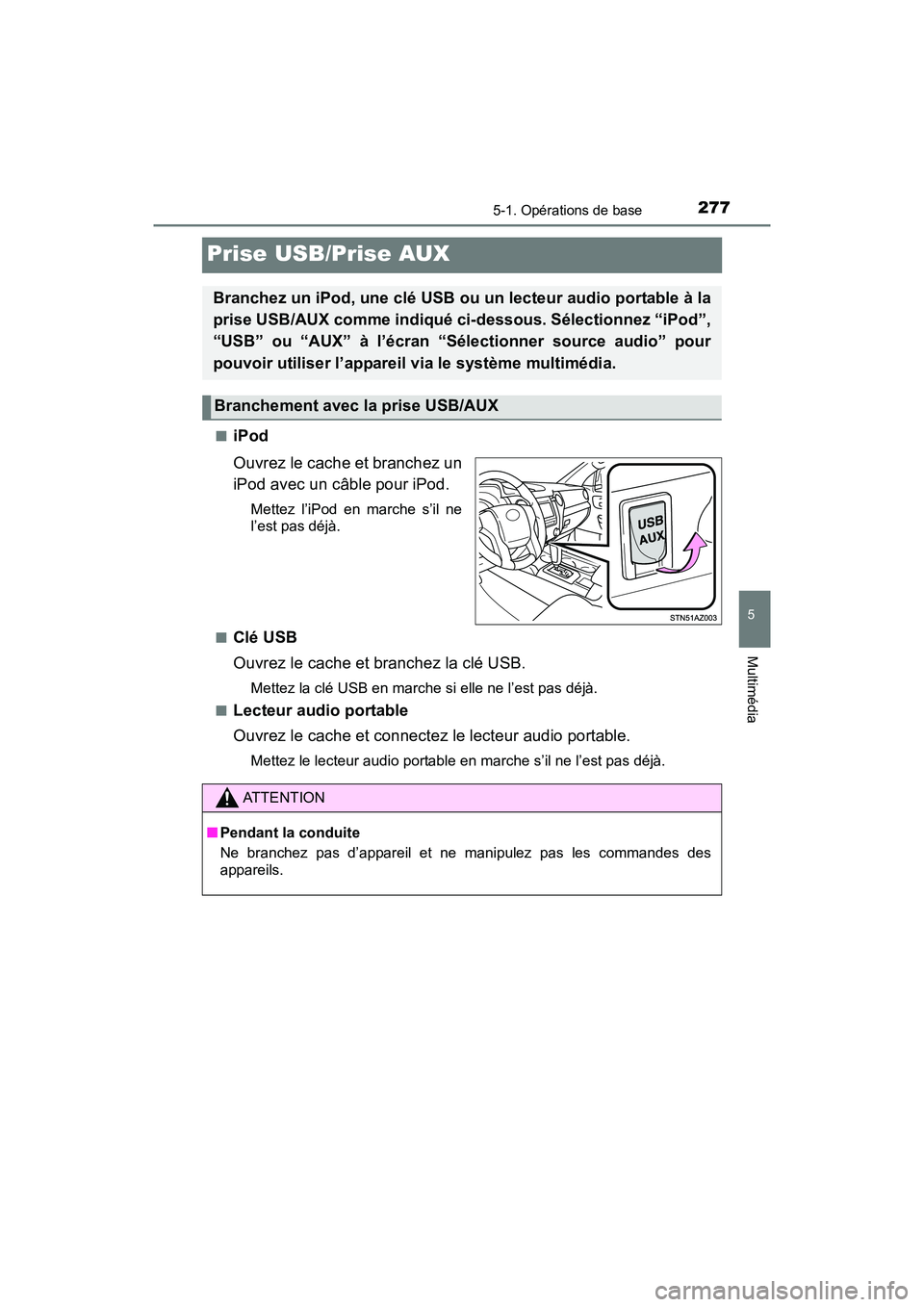
Prise USB/Prise AUX
■iPod
Ouvrez le cache et branchez un
iPod avec un câble pour iPod.
Mettez l’iPod en marche s’il ne
l’est pas déjà.
■
Clé USB
Ouvrez le cache et branchez la clé USB.
Mettez la clé USB en marche si elle ne l’est pas déjà.
■
Lecteur audio portable
Ouvrez le cache et connectez le lecteur audio portable.
Mettez le lecteur audio portable en marche s’il ne l’est pas déjà.
Branchez un iPod, une clé USB ou un lecteur audio portable à la
prise USB/AUX comme indiqué ci-dessous. Sélectionnez “iPod”,
“USB” ou “AUX” à l’écran “Sélectionner source audio” pour
pouvoir utiliser l’appareil via le système multimédia.
Branchement avec la prise USB/AUX
ATTENTION
■ Pendant la conduite
Ne branchez pas d’appareil et ne manipulez pas les commandes des
appareils.
TUNDRA_OM_USA_OM34594D.book 277 ページ 2016年5月11日 水曜日 午後9時37分
Page 282 of 600
2805-2. Configuration
TUNDRA_OM_USA_OM34594D_17MY
■Pour revenir aux paramètres par défaut
Sélectionnez “Par défaut”, puis “Oui”.
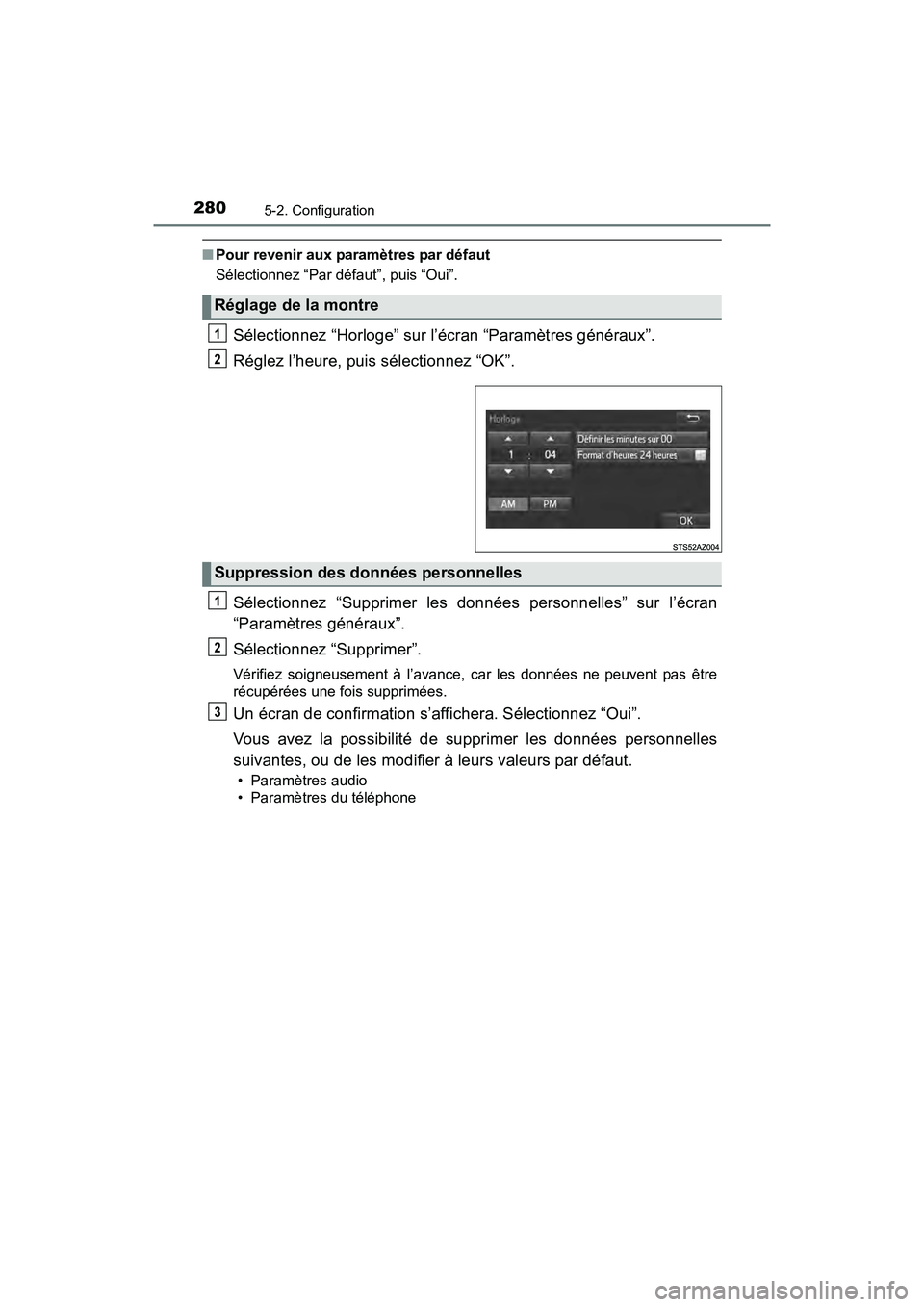
Sélectionnez “Horloge” sur l’écran “Paramètres généraux”.
Réglez l’heure, puis sélectionnez “OK”.
Sélectionnez “Supprimer les données personnelles” sur l’écran
“Paramètres généraux”.
Sélectionnez “Supprimer”.
Vérifiez soigneusement à l’avance, car les données ne peuvent pas être
récupérées une fois supprimées.
Un écran de confirmation s’affichera. Sélectionnez “Oui”.
Vous avez la possibilité de supprimer les données personnelles
suivantes, ou de les modifier à leurs valeurs par défaut.
• Paramètres audio
• Paramètres du téléphone
Réglage de la montre
1
2
Suppression des données personnelles
1
2
3
TUNDRA_OM_USA_OM34594D.book 280 ページ 2016年5月11日 水曜日 午後9時37分
Page 283 of 600
2815-2. Configuration
5
Multimédia
TUNDRA_OM_USA_OM34594D_17MY
Paramètres audio
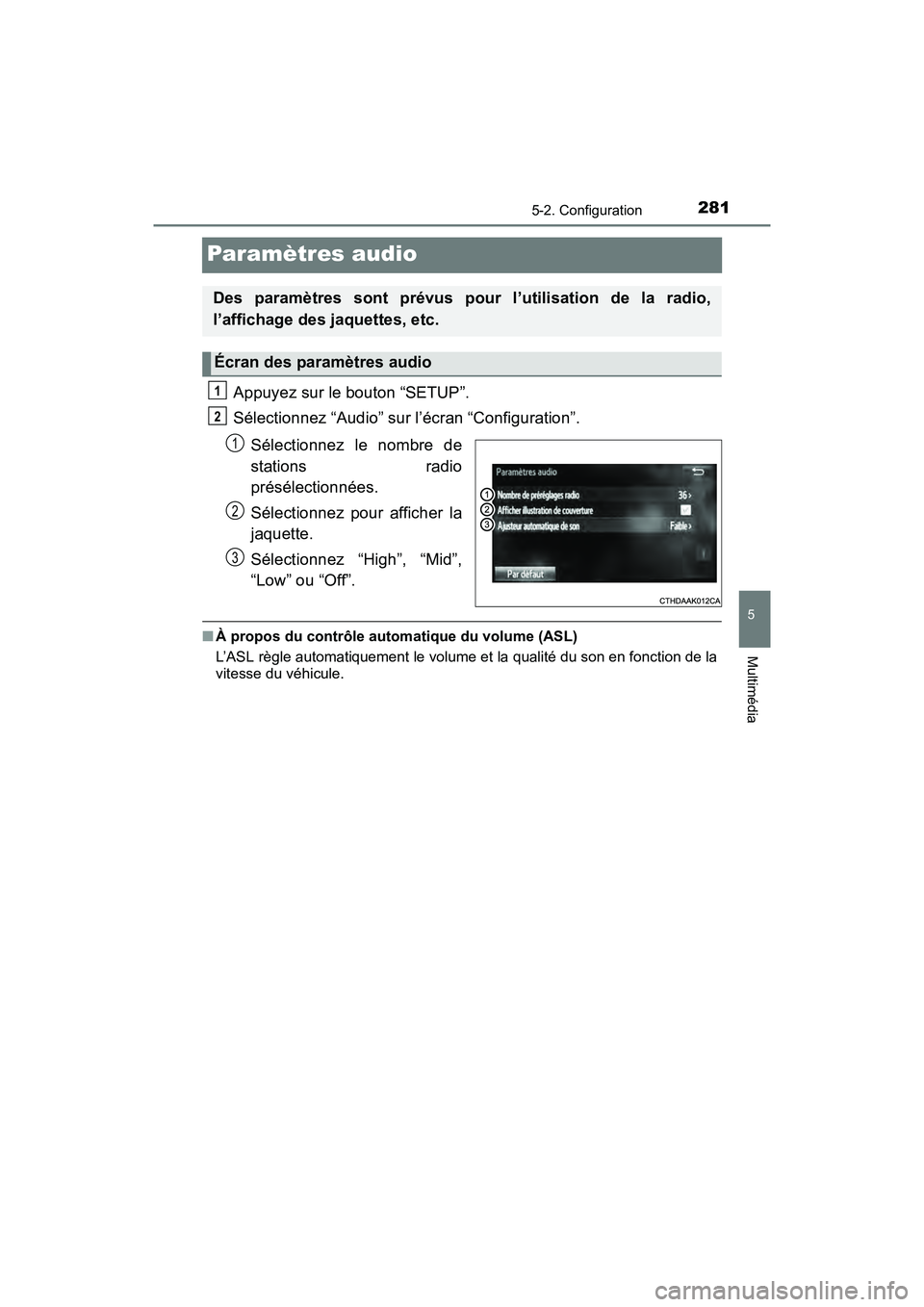
Appuyez sur le bouton “SETUP”.
Sélectionnez “Audio” sur l’écran “Configuration”.Sélectionnez le nombre de
stations radio
présélectionnées.
Sélectionnez pour afficher la
jaquette.
Sélectionnez “High”, “Mid”,
“Low” ou “Off”.
■À propos du contrôle automatique du volume (ASL)
L’ASL règle automatiquement le volume et la qualité du son en fonction de la
vitesse du véhicule.
Des paramètres sont prévus pour l’utilisation de la radio,
l’affichage des jaquettes, etc.
Écran des paramètres audio
1
2
1
2
3
TUNDRA_OM_USA_OM34594D.book 281 ページ 2016年5月11日 水曜日 午後9時37分
Page 286 of 600
2845-3. Utilisation du système audio
TUNDRA_OM_USA_OM34594D_17MY
Opérations audio de base
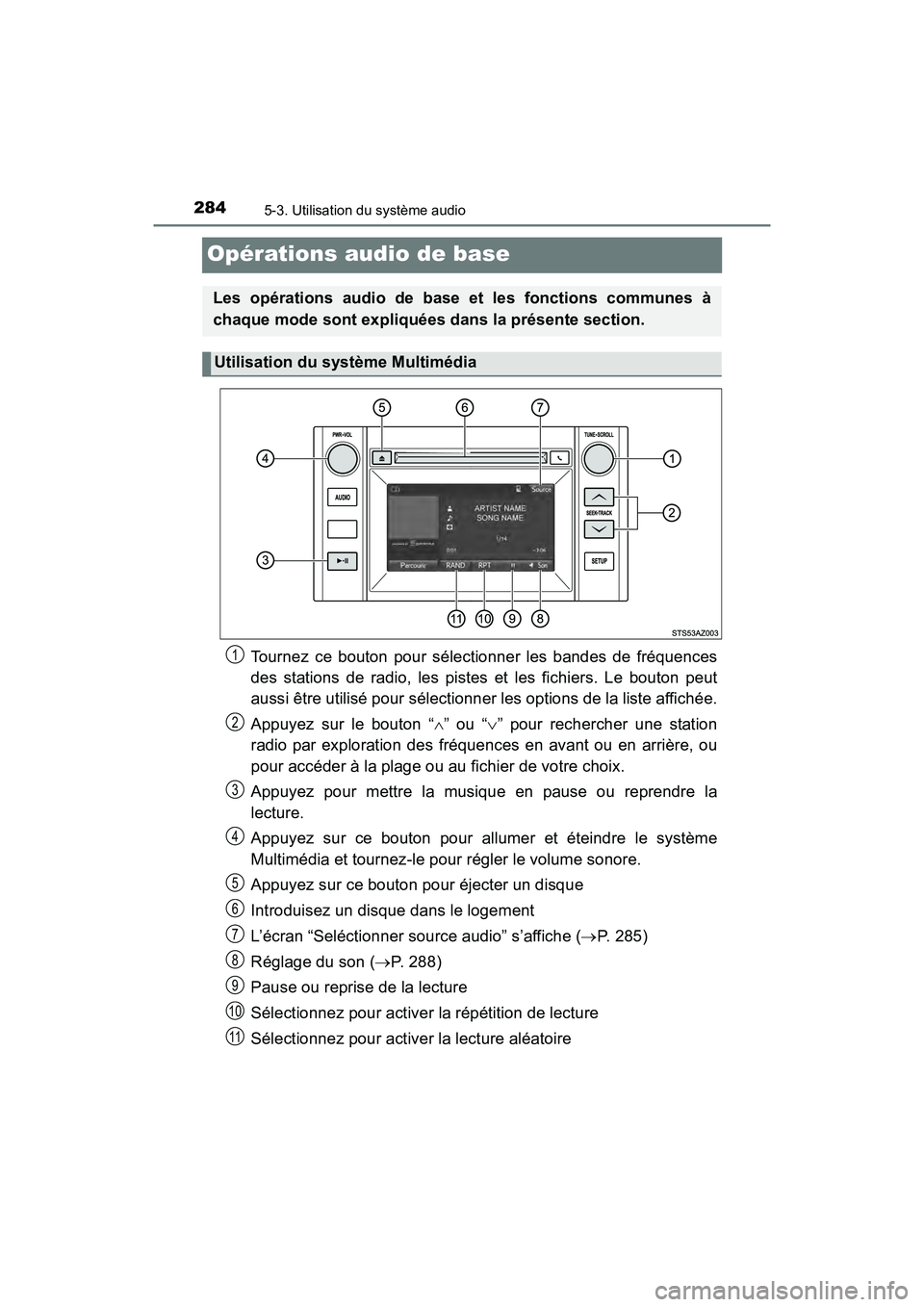
Tournez ce bouton pour sélectionner les bandes de fréquences
des stations de radio, les pistes et les fichiers. Le bouton peut
aussi être utilisé pour sélectionner les options de la liste affichée.
Appuyez sur le bouton “” ou “ ” pour rechercher une station
radio par exploration des fréquences en avant ou en arrière, ou
pour accéder à la plage ou au fichier de votre choix.
Appuyez pour mettre la musique en pause ou reprendre la
lecture.
Appuyez sur ce bouton pour allumer et éteindre le système
Multimédia et tournez-le pour régler le volume sonore.
Appuyez sur ce bouton pour éjecter un disque
Introduisez un disque dans le logement
L’écran “Seléctionner source audio” s’affiche ( P. 285)
Réglage du son ( P. 288)
Pause ou reprise de la lecture
Sélectionnez pour activer la répétition de lecture
Sélectionnez pour activer la lecture aléatoire
Les opérations audio de base et les fonctions communes à
chaque mode sont expliquées dans la présente section.
Utilisation du système Multimédia
1
2
3
4
5
6
7
8
9
10
11
TUNDRA_OM_USA_OM34594D.book 284 ページ 2016年5月11日 水曜日 午後9時37分
Page 287 of 600
2855-3. Utilisation du système audio
5
Multimédia
TUNDRA_OM_USA_OM34594D_17MY
Sélection de la source audio
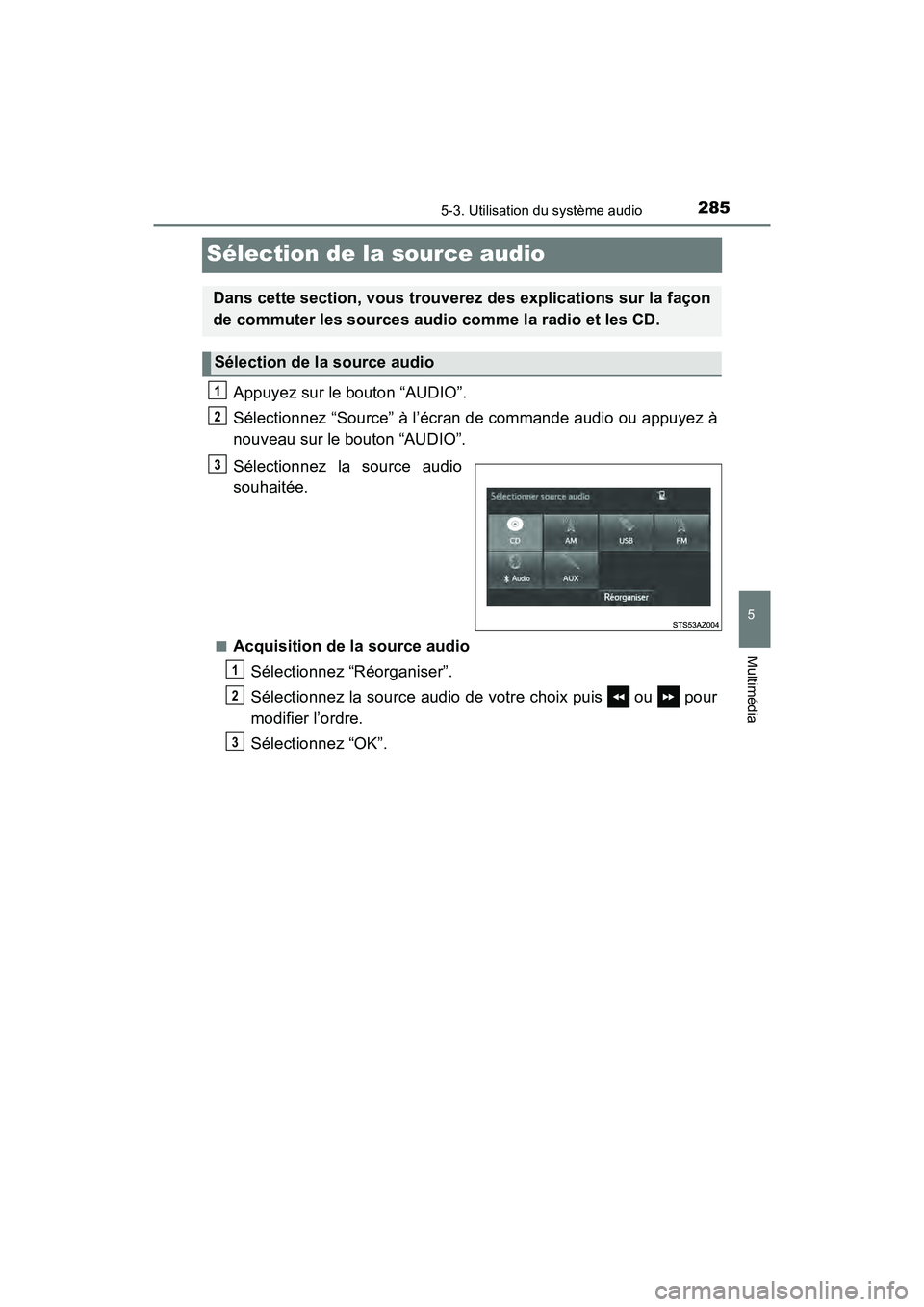
Appuyez sur le bouton “AUDIO”.
Sélectionnez “Source” à l’écran de commande audio ou appuyez à
nouveau sur le bouton “AUDIO”.
Sélectionnez la source audio
souhaitée.
■Acquisition de la source audioSélectionnez “Réorganiser”.
Sélectionnez la source audio de votre choix puis ou pour
modifier l’ordre.
Sélectionnez “OK”.
Dans cette section, vous trouverez des explications sur la façon
de commuter les sources audio comme la radio et les CD.
Sélection de la source audio
1
2
3
1
2
3
TUNDRA_OM_USA_OM34594D.book 285 ページ 2016年5月11日 水曜日 午後9時37分