remote control TOYOTA TUNDRA 2020 Owners Manual (in English)
[x] Cancel search | Manufacturer: TOYOTA, Model Year: 2020, Model line: TUNDRA, Model: TOYOTA TUNDRA 2020Pages: 608, PDF Size: 13.19 MB
Page 5 of 608
5
1
9 8
7 5 4
3
2
6
6-1. Maintenance and careCleaning and protecting the vehicle exterior .......... 400
Cleaning and protecting the vehicle interior ........... 403
6-2. Maintenance Maintenance requirements ................... 406
General maintenance ........ 408
Emission inspection and maintenance (I/M)
programs ......................... 411
6-3. Do-it-yourself maintenance Do-it-yourself service precautions ..................... 412
Hood.................................. 414
Engine compartment ......... 415
Tires .................................. 426
Tire inflation pressure........ 440
Wheels .............................. 443
Air conditioning filter .......... 446
Wireless remote control/ electronic key battery ...... 449
Checking and replacing fuses ............................... 452
Light bulbs ......................... 455 7-1. Essential information
Emergency flashers ........... 472
If your vehicle has to be stopped in
an emergency.................. 473
If the vehicle is trapped in rising water .................. 475
7-2. Steps to take in an emergency
If your vehicle needs to be towed .......................... 476
If you think something is wrong............................... 481
Fuel pump shut off system ............................. 482
If a warning light turns on or a warning buzzer
sounds ............................. 483
If a warning message is displayed ......................... 491
If you have a flat tire .......... 504
If the engine will not start ................................. 519
If the electronic key does not operate properly
(vehicles with a smart
key system) .................... 521
If the vehicle battery is discharged ....................... 523
If your vehicle overheats.... 527
If the vehicle becomes stuck ................................ 530
6Maintenance and care7When trouble arises
Page 12 of 608
12
The SRS airbag and seat belt pretensioner devices in your Toyota contain
explosive chemicals. If the vehicle is scrapped with the airbag s and seat belt
pretensioners left as they are, this may cause an accident such as fire. Be
sure to have the systems of the SRS airbag and seat belt preten sioner
removed and disposed of by a qualified service shop or by your Toyota dealer
before you scrap your vehicle.
Special handling may apply,
See www.dtsc.ca.gov/hazardouswaste/perchlorate.
Your vehicle has components that may contain perchlorate. These compo-
nents may include airbag, seat belt pretensioners, and wireless remote con-
trol batteries.
Scrapping of your Toyota
Perchlorate Material
WARNING
■ General precautions while driving
Driving under the influence: Never drive your vehicle when unde r the influ-
ence of alcohol or drugs that have impaired your ability to operate your vehi-
cle. Alcohol and certain drugs delay reaction time, impair judg ment and
reduce coordination, which could lead to an accident that could result in
death or serious injury.
Defensive driving: Always drive defensively. Anticipate mistake s that other
drivers or pedestrians might make and be ready to avoid acciden ts.
Driver distraction: Always give your full attention to driving. Anything that
distracts the driver, such as adjusting controls, talking on a cellular phone or
reading can result in a collision with resulting death or serio us injury to you,
your occupants or others.
■ General precaution regar ding children’s safety
Never leave children unattended in the vehicle, and never allow children to
have or use the key.
Children may be able to start the vehicle or shift the vehicle into neutral.
There is also a danger that children may injure themselves by p laying with
the windows, the moon roof, or other features of the vehicle. In addition,
heat build-up or extremely cold temperatures inside the vehicle can be fatal
to children.
Page 23 of 608
23Pictorial index
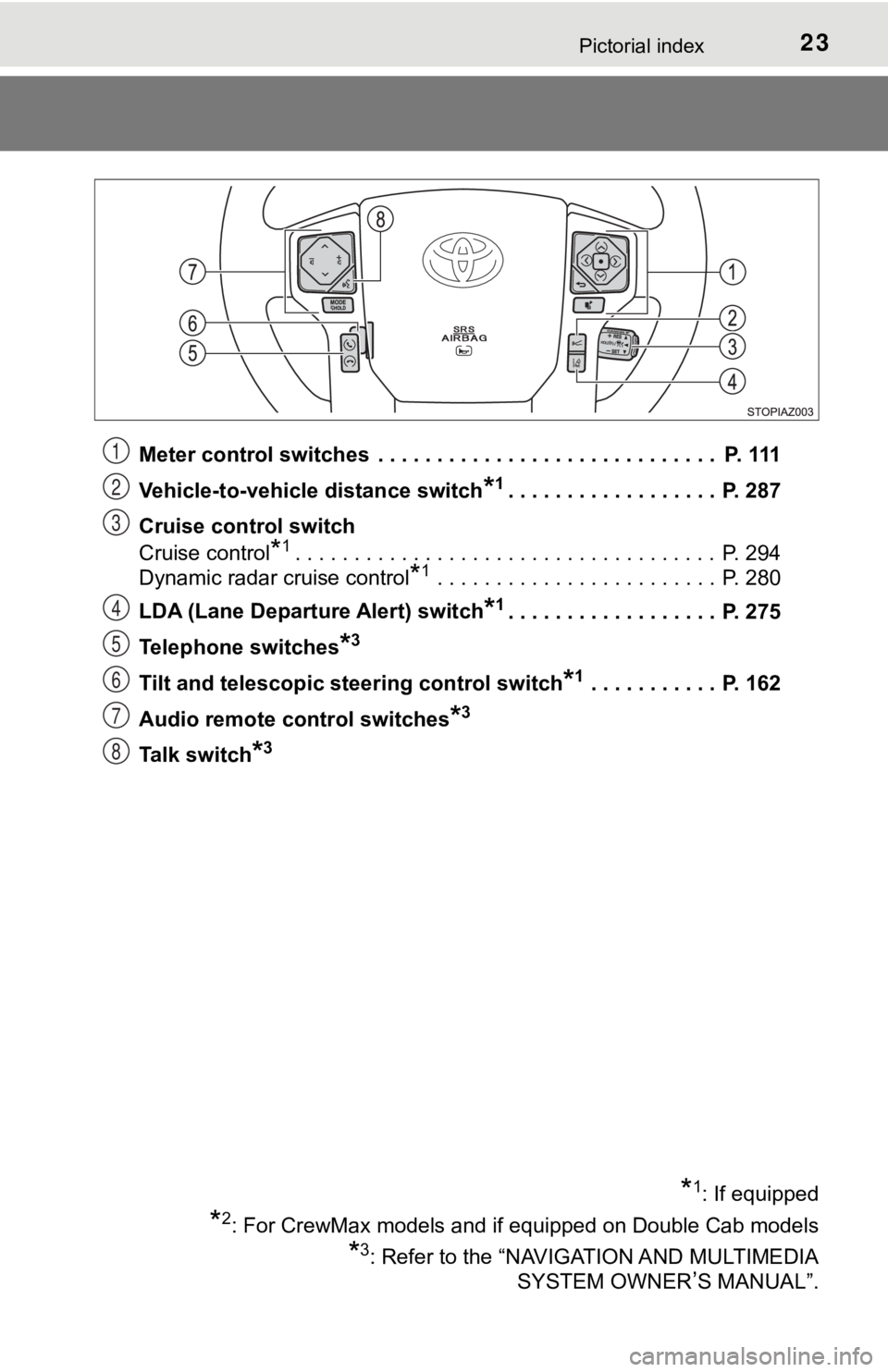
Meter control switches . . . . . . . . . . . . . . . . . . . . . . . . . . . . . P. 111
Vehicle-to-vehicle distance switch
*1. . . . . . . . . . . . . . . . . . P. 287
Cruise control switch
Cruise control
*1. . . . . . . . . . . . . . . . . . . . . . . . . . . . . . . . . . . . P. 294
Dynamic radar cruise control
*1 . . . . . . . . . . . . . . . . . . . . . . . . P. 280
LDA (Lane Departure Alert) switch
*1. . . . . . . . . . . . . . . . . . P. 275
Telephone switches
*3
Tilt and telescopic steering control switch*1 . . . . . . . . . . . P. 162
Audio remote control switches
*3
Talk switch*3
*1: If equipped
*2: For CrewMax models and if equipped on Double Cab models
*3: Refer to the “NAVIGATION AND MULTIMEDIA SYSTEM OWNER
’S MANUAL”.
1
2
3
4
5
6
7
8
Page 95 of 608
951-3. Theft deterrent system
1
For safety and security
Alar m
The alarm uses light and sound to give an alert when an intrusion is
detected.
The alarm is triggered in the following situations when the ala rm is
set:
● A locked door is unlocked or opened in any way other than using a
key or wireless remote control. (The doors will lock again automati-
cally.)
● The hood is opened.
● Vehicles with the glass breaka ge sensor: The side windows are
tapped or broken.
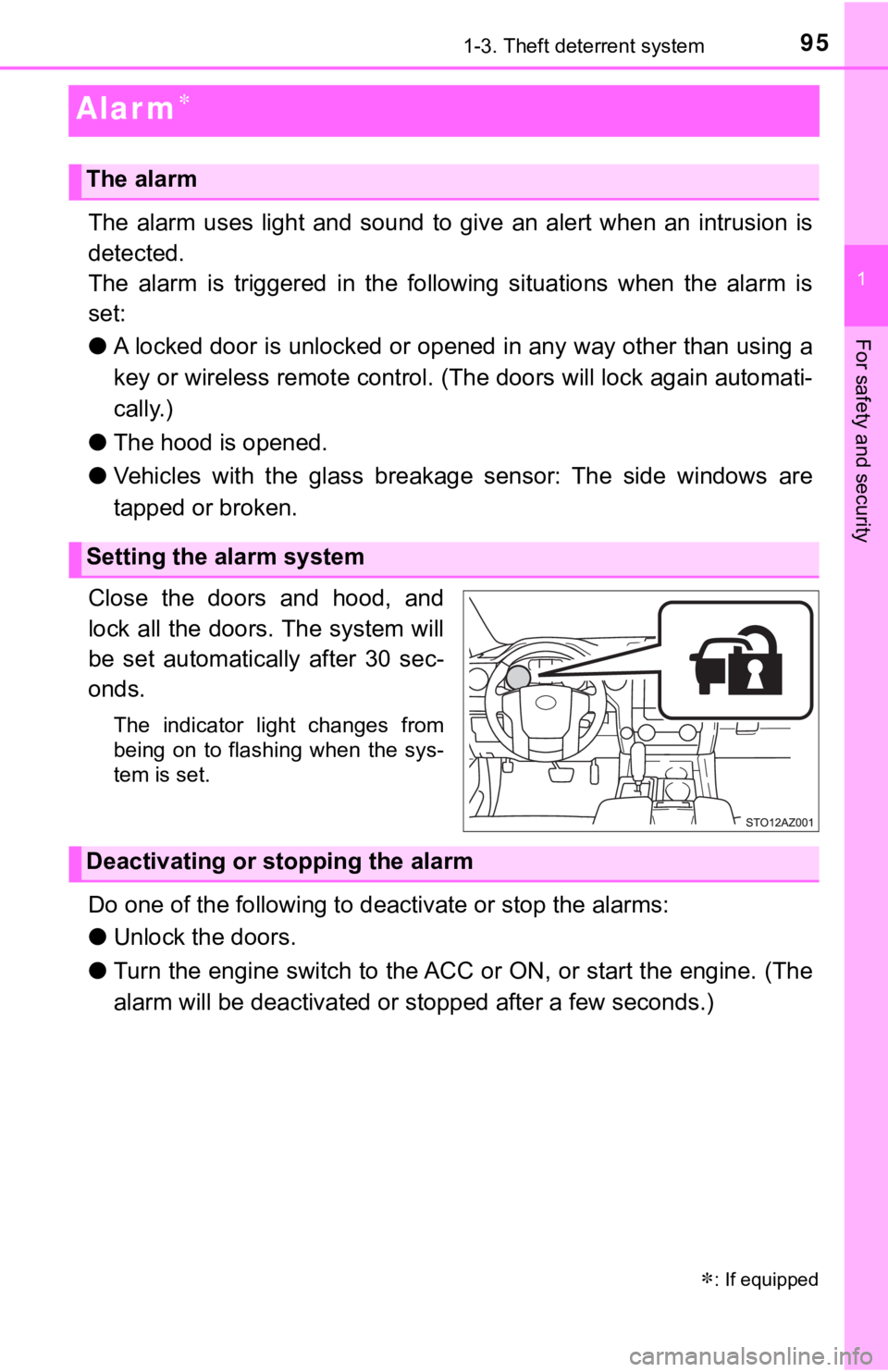
Close the doors and hood, and
lock all the doors. The system will
be set automatically after 30 sec-
onds.
The indicator light changes from
being on to flashing when the sys-
tem is set.
Do one of the following to d eactivate or stop the alarms:
● Unlock the doors.
● Turn the engine switch to the ACC or ON, or start the engine. ( The
alarm will be deactivated or s topped after a few seconds.)
: If equipped
The alarm
Setting the alarm system
Deactivating or stopping the alarm
Page 120 of 608
1203-1. Key information
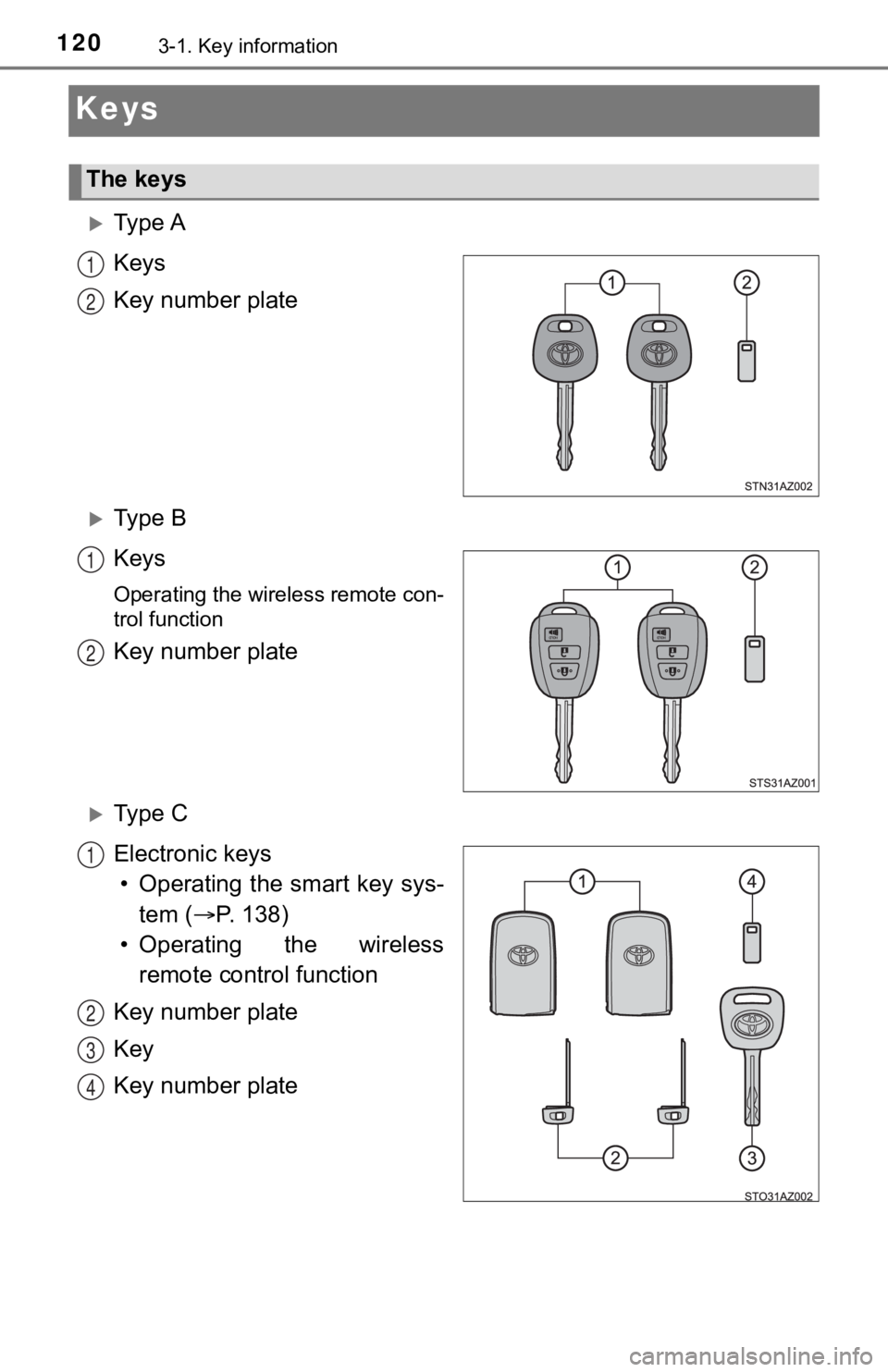
Keys
Ty p e A
Keys
Key number plate
Ty p e B
Keys
Operating the wireless remote con-
trol function
Key number plate
Ty p e C
Electronic keys• Operating the smart key sys- tem ( P. 138)
• Operating the wireless remote control function
Key number plate
Key
Key number plate
The keys
1
2
1
2
1
2
3
4
Page 121 of 608
1213-1. Key information
3
Operation of each component
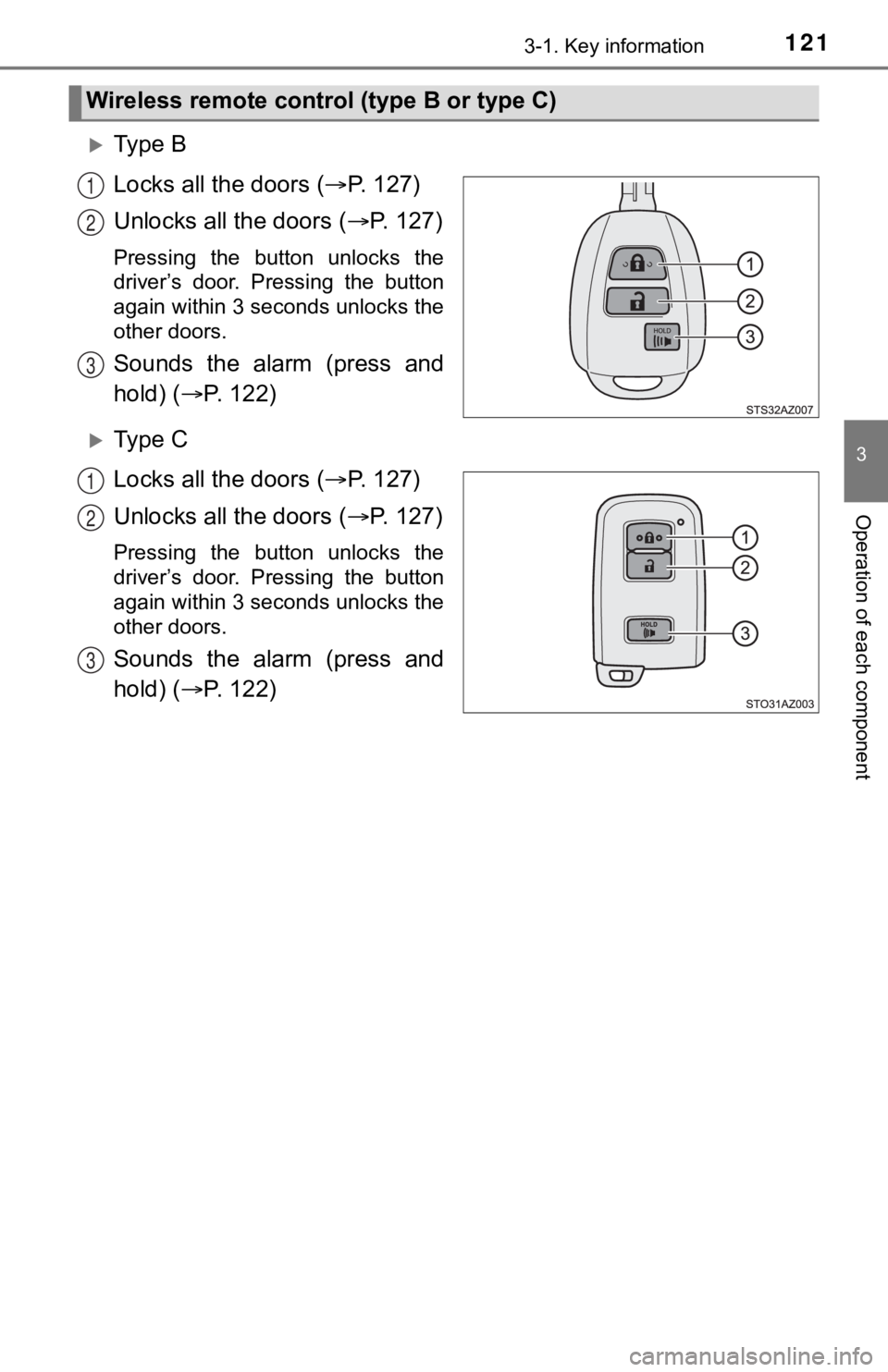
Ty p e B
Locks all the doors ( P. 1 2 7 )
Unlocks all the doors ( P. 1 2 7 )
Pressing the button unlocks the
driver’s door. Pressing the button
again within 3 seconds unlocks the
other doors.
Sounds the alarm (press and
hold) ( P. 1 2 2 )
Ty p e C
Locks all the doors ( P. 1 2 7 )
Unlocks all the doors ( P. 1 2 7 )
Pressing the button unlocks the
driver’s door. Pressing the button
again within 3 seconds unlocks the
other doors.
Sounds the alarm (press and
hold) ( P. 1 2 2 )
Wireless remote control (type B or type C)
1
2
3
1
2
3
Page 122 of 608
1223-1. Key information
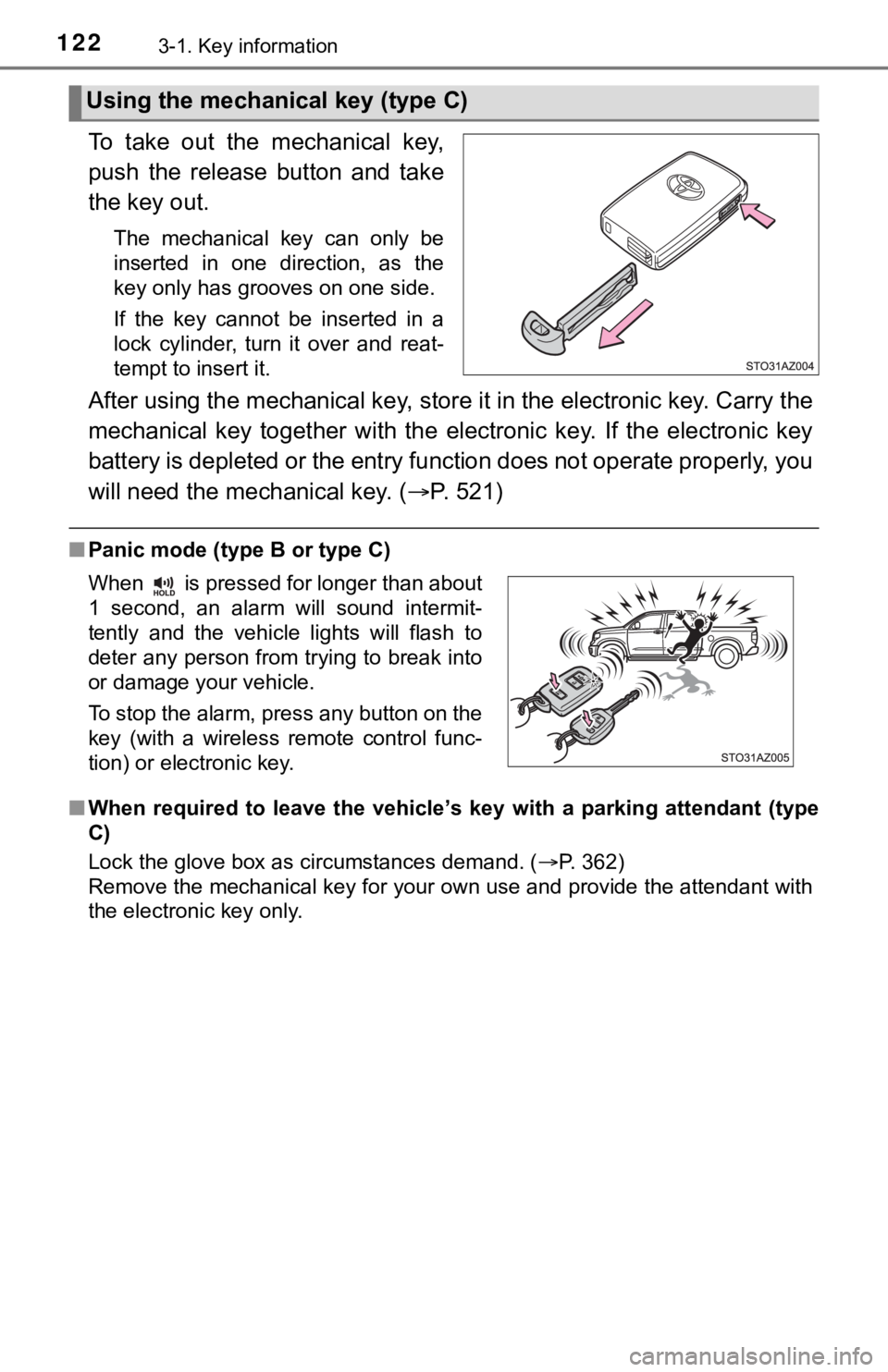
To take out the mechanical key,
push the release button and take
the key out.
The mechanical key can only be
inserted in one direction, as the
key only has grooves on one side.
If the key cannot be inserted in a
lock cylinder, turn it over and reat-
tempt to insert it.
After using the mechanical key, store it in the electronic key. Carry the
mechanical key together with the electronic key. If the electronic key
battery is depleted or the ent ry function does not operate prop erly, you
will need the mechanical key. ( P. 521)
■Panic mode (type B or type C)
■ When required to leave the vehicle ’s key with a parking attendant (type
C)
Lock the glove box as circumstances demand. ( P. 362)
Remove the mechanical key for your own use and provide the attendant with
the electronic key only.
Using the mechanical key (type C)
When is pressed for longer than about
1 second, an alarm will sound intermit-
tently and the vehicle lights will flash to
deter any person from trying to break into
or damage your vehicle.
To stop the alarm, press any button on the
key (with a wireless remote control func-
tion) or electronic key.
Page 123 of 608

1233-1. Key information
3
Operation of each component
■If you lose your keys
Type A and B
New genuine key can be made by your Toyota dealer using the other key and
the key number stamped on your key number plate.
Keep the plate in a safe place such as your wallet, not in the vehicle.
Type C
New genuine key can be made by your Toyota dealer.
The following are necessary when making new keys.
Mechanical key:
The key number for the mechanical key stamped on the number pla te and the
other key.
Key:
The key number for key stamped on the key number plate.
Keep the plates in a safe place such as your wallet, not in the vehicle.
There are key number plates for the mechanical key and key resp ectively.
When storing them, keep them in a safe place in a manner to dis tinguish one
from the other (such as markings, etc.).
■ When riding in an aircraft (type B or type C)
When bringing an wireless remote control function onto an aircr aft, make sure
you do not press any button on the key while inside the aircraf t cabin. If you
are carrying the key in your bag, etc., ensure that the buttons are not likely to
be pressed accidentally. Pressing a button may cause the key to emit radio
waves that could interfere with the operation of the aircraft.
■ Conditions affecting operation (type B or type C)
Type B
The wireless remote control function may not operate normally i n the following
situations.
● Near a TV tower, radio station, electric power plant, airport o r other facility
that generates strong radio waves
● When carrying a portable radio, cellular phone or other wireles s communi-
cation device
● When multiple wireless keys are in the vicinity
● When the wireless key has come into contact with, or is covered by a metal-
lic object
● When a wireless key (that emits radio waves) is being used near by
● When the wireless key has been left near an electrical applianc e such as a
personal computer
Type C
P. 142
Page 124 of 608

1243-1. Key information
■Key battery depletion (type B or type C)
Type B
If the wireless remote control function does not operate, the b attery may be
depleted. Replace the battery when necessary. ( P. 449)
Type C
● The standard battery life is 1 to 2 years.
● If the battery becomes low, an alarm will sound in the cabin wh en the engine
stops. ( P. 501)
● As the electronic key always receives radio waves, the battery will become
depleted even if the electronic key is not used. The following symptoms indi-
cate that the electronic key battery may be depleted. Replace the battery
when necessary. ( P. 449)
• The smart key system or the wirel ess remote control does not oper-
ate.
• The detection area becomes smaller.
• The LED indicator on the key surface does not turn on.
●To avoid serious deterioration, do not leave the electronic key within 1 m
(3 ft.) of the following electrical appliances that produce a m agnetic field:
•TVs
• Personal computers
• Cellular phones, cordless phones and battery chargers
• Recharging cellular phones or cordless phones
• Table lamps
• Induction cookers
■Replacing the battery (type B or type C)
P. 449
■ Confirmation of the registered key number
The number of keys already registered to the vehicle can be confirmed. Ask
your Toyota dealer for details.
■ Customization (type B or type C)
Settings (e.g. wireless remote control system) can be changed.
(Customizable features: P. 562)
Page 125 of 608

1253-1. Key information
3
Operation of each component
■Certification for wireless remote control (type B)
For vehicles sold in the U.S.A.
FCC ID: GQ4-52T
FCC ID: GQ4-49R
NOTE:
This device complies with part 15 of the FCC Rules. Operation is subject to
the following two conditions: (1) This device may not cause har mful interfer-
ence, and (2) this device must accept any interference received, including
interference that may cause undesired operation.
FCC WARNING:
Changes or modifications not expressly approved by the party re sponsible for
compliance could void the user’s authority to operate the equip ment.
The FCC ID/IC Certification number is affixed inside the equipment. You can
find the ID/number when replacing the battery.
For vehicles sold in Canada
NOTE:
This device complies with Industry Canada’s license-exempt RSSs . Opera-
tion is subject to the following two conditions: (1) This devic e may not cause
interference; and (2) This device must accept any interference, including
interference that may cause undesired operation of the device.
The FCC ID/IC Certification number is affixed inside the equipment. You can
find the ID/number when replacing the battery.
NOTE:
Le présent appareil est conforme aux CNR d’Industrie Canada app licables
aux appareils radio exempts de licence. L’exploitation est auto risée aux deux
conditions suivantes:(1) l’appareil ne doit pas produire de bro uillage; (2) l’util-
isateur de l’appareil doit accepter tout brouillage radioélectr ique subi, même
si le brouillage est susceptible d’en compromettre le fonctionn ement.
L’identification FCC/Ie numéro d’accréditation IC est apposé(e) à l’intérieur
de l’appareil.
■ Certification for wireless remote control (type C)
P. 145