rear view mirror TOYOTA TUNDRA 2021 (in English) Owner's Manual
[x] Cancel search | Manufacturer: TOYOTA, Model Year: 2021, Model line: TUNDRA, Model: TOYOTA TUNDRA 2021Pages: 612, PDF Size: 13.7 MB
Page 255 of 612
2554-5. Using the driving support systems
4
Driving
WARNING
●If the part of the windshield in front of the front camera is f ogged up or cov-
ered with condensation, or ice, use the windshield defogger to remove the
fog, condensation, or ice. ( P. 342, 349)
● If water droplets cannot be properly removed from the area of t he wind-
shield in front of the front camera by the windshield wipers, replace the
wiper insert or wiper blade.
● Do not attach window tint to the windshield.
● Replace the windshield if it is damaged or cracked.
After replacing the windshield, the front camera must be recali brated. Con-
tact your Toyota dealer for details.
● Do not allow liquids to contact the front camera.
● Do not allow bright lights to shine into the front camera.
● Do not dirty or damage the front camera.
When cleaning the inside of the windshield, do not allow glass cleaner to
contact the lens of the front camera. Also, do not touch the le ns.
If the lens is dirty or damaged, contact your Toyota dealer.
● Do not subject the front camera to a strong impact.
● Do not change the installation position or direction of the fro nt camera or
remove it.
● Do not disassemble the front camera.
● Do not modify any components of the vehicle around the front ca mera
(inside rear view mirror, etc.) or ceiling.
● Do not attach any accessories to the hood, front grille or front bumper that
may obstruct the front camera. Contact your Toyota dealer for d etails.
● If a surfboard or other long object is to be mounted on the roo f, make sure
that it will not obstruct the front camera.
● Do not modify the headlights or other lights.
Page 271 of 612
2714-5. Using the driving support systems
4
Driving
●In some situations such as the following, sufficient braking fo rce may not be
obtained, preventing the system from performing properly:
• If the braking functions cannot operate to their full extent, such as when
the brake parts are extremely cold, extremely hot, or wet
• If the vehicle is not properly maintained (brakes or tires are excessively
worn, improper tire inflation pressure, etc.)
• When the vehicle is being driven on a gravel road or other sli ppery sur-
face
● Some pedestrians such as the following may not be detected by t he radar
sensor and front camera, preventing the system from operating properly:
• Pedestrians shorter than approximately 3.2 ft. (1 m) or taller than approx-
imately 6.5 ft. (2 m)
• Pedestrians wearing oversized clothing (a rain coat, long skir t, etc.), mak-
ing their silhouette obscure
• Pedestrians who are carrying large baggage, holding an umbrell a, etc.,
hiding part of their body
• Pedestrians who are bending forward or squatting
• Pedestrians who are pushing a stroller, wheelchair, bicycle or other vehi-
cle
• Groups of pedestrians which are close together
• Pedestrians who are wearing white and look extremely bright
• Pedestrians in the dark, such as at night or while in a tunnel
• Pedestrians whose clothing appears to be nearly the same color or
brightness as their surroundings
• Pedestrians near walls, fences, guardrails, or large objects
• Pedestrians who are on a metal object (manhole cover, steel plate, etc.) on the road
• Pedestrians who are walking fast
• Pedestrians who are changing speed abruptly
• Pedestrians running out from beh ind a vehicle or a large object
• Pedestrians who are extremely close to the side of the vehicle (outside rear view mirror, etc.)
■ If VSC is disabled
●If VSC is disabled ( P. 323), the pre-collision brake assist and pre-collision
braking functions are also disabled.
● The PCS warning light will turn on and “VSC Turned Off Pre-Coll ision Brake
System Unavailable” will be displayed on the multi-information display.
Page 305 of 612
3054-5. Using the driving support systems
4
Driving
BSM (Blind Spot Monitor)
The Blind Spot Monitor is a system that has 2 functions;
● The Blind Spot Monitor function
Assists the driver in making t he decision when changing lanes
● The Rear Cross Traffic Alert function
Assists the driver when backing up
These functions use same sensors.
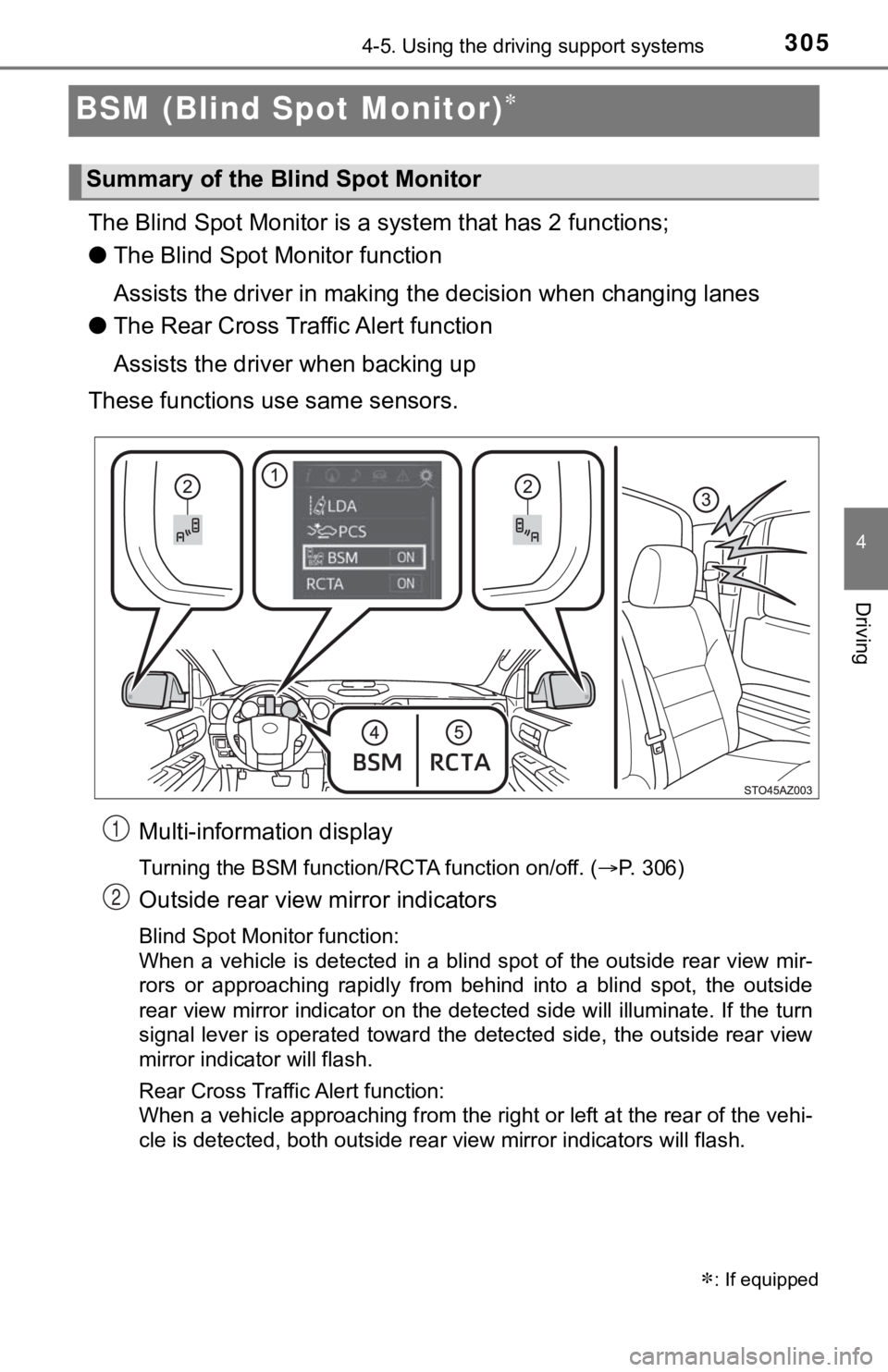
Multi-information display
Turning the BSM function/RCTA function on/off. ( P. 306)
Outside rear view mirror indicators
Blind Spot Monitor function:
When a vehicle is detected in a blind spot of the outside rear view mir-
rors or approaching rapidly from behind into a blind spot, the outside
rear view mirror indicator on the detected side will illuminate. If the turn
signal lever is operated toward the detected side, the outside rear view
mirror indicator will flash.
Rear Cross Traffic Alert function:
When a vehicle approaching from the right or left at the rear of the vehi-
cle is detected, both outside rear view mirror indicators will flash.
: If equipped
Summary of the Blind Spot Monitor
1
2
Page 306 of 612
3064-5. Using the driving support systems
Rear Cross Traffic Alert buzzer (Rear Cross Traffic Alert funct ion
only)
When a vehicle approaching from the right or left rear of the v ehicle is
detected, a buzzer sounds from behind the left-hand rear pillar .
“BSM” indicator
When the BSM function is turned on, the indicator illuminates.
“RCTA” indicator
When the RCTA function is turned on, the indicator illuminates.
The BSM (Blind Spot Monitor) function and RCTA (Rear Cross Traf fic
Alert) function can be enabled/d isabled on the multi-information dis-
play as following:
Press “ ” or “” of meter control sw itches and select .
Press “ ” or “ ” of meter control switches and select “BSM” or
“RCTA”, and press to select the desired setting (on/off).
The BSM (Blind Spot Monitor) outside rear view mirror indicator s
brightness can be changed on the m ulti-information display as follow-
ing:
Press “ ” or “” of meter control sw itches and select .
Press “ ” or “ ” of meter control switches and select “Vehicle
Settings”, and then press .
Press “ ” or “ ” of meter control switches and select “BSM
Brightness”, and then press to select the desired setting
(bright/dim).
Turning the BSM function/RCTA function on/off
Changing the BSM indicator brightness
3
4
5
1
2
1
2
3
Page 307 of 612
3074-5. Using the driving support systems
4
Driving
Press “” or “” of meter control sw itches and select .
Press “ ” or “ ” of meter control switches and select “Vehicle
Settings”, and then press .
Press “ ” or “ ” of meter control switches and select “RCTA Vol-
ume”, and then press to sel ect the desired setting.
The buzzer volume cha nges with each press.
■The outside rear view mirror indicators visibility
When under strong sunlight, the outside rear view mirror indica tor may be dif-
ficult to see.
■ Rear Cross Traffic Alert buzzer hearing
Rear Cross Traffic Alert function may be difficult to hear over noises such as
high audio volume.
■ When there is a malfunction in the Blind Spot Monitor system
If a system malfunction is detected due to any of the following reasons, warn-
ing messages will be displayed: ( P. 494, 495)
● There is a malfunction with the sensors
● The sensors have become dirty
● The outside temperature is extremely high or low
● The sensor voltage has become abnormal
■ Certification for the Blind Spot Monitor system
For vehicles sold in the U.S.A.
FCC ID: OAYSRR3A
This device complies with part 15 of the FCC Rules. Operation is subject to
the following three conditions:
(1) This device may not cause harmful interference, and
(2) this device must accept any interference received, includin g interference
that may cause undesired operation.
FCC Warning
Changes or modifications not expressly approved by the party re sponsible for
compliance could void the user’s authority to operate the equip ment.
Changing the Rear Cross Traffic Alert warning buzzer volume
1
2
3
Page 309 of 612
3094-5. Using the driving support systems
4
Driving
The Blind Spot Monitor function uses radar sensors to detect vehicles
that are traveling in an adjacent lane in the area that is not reflected in
the outside rear view mirror (the blind spot), and advises the driver of
the vehicles existence via the outside rear view mirror indicat or.
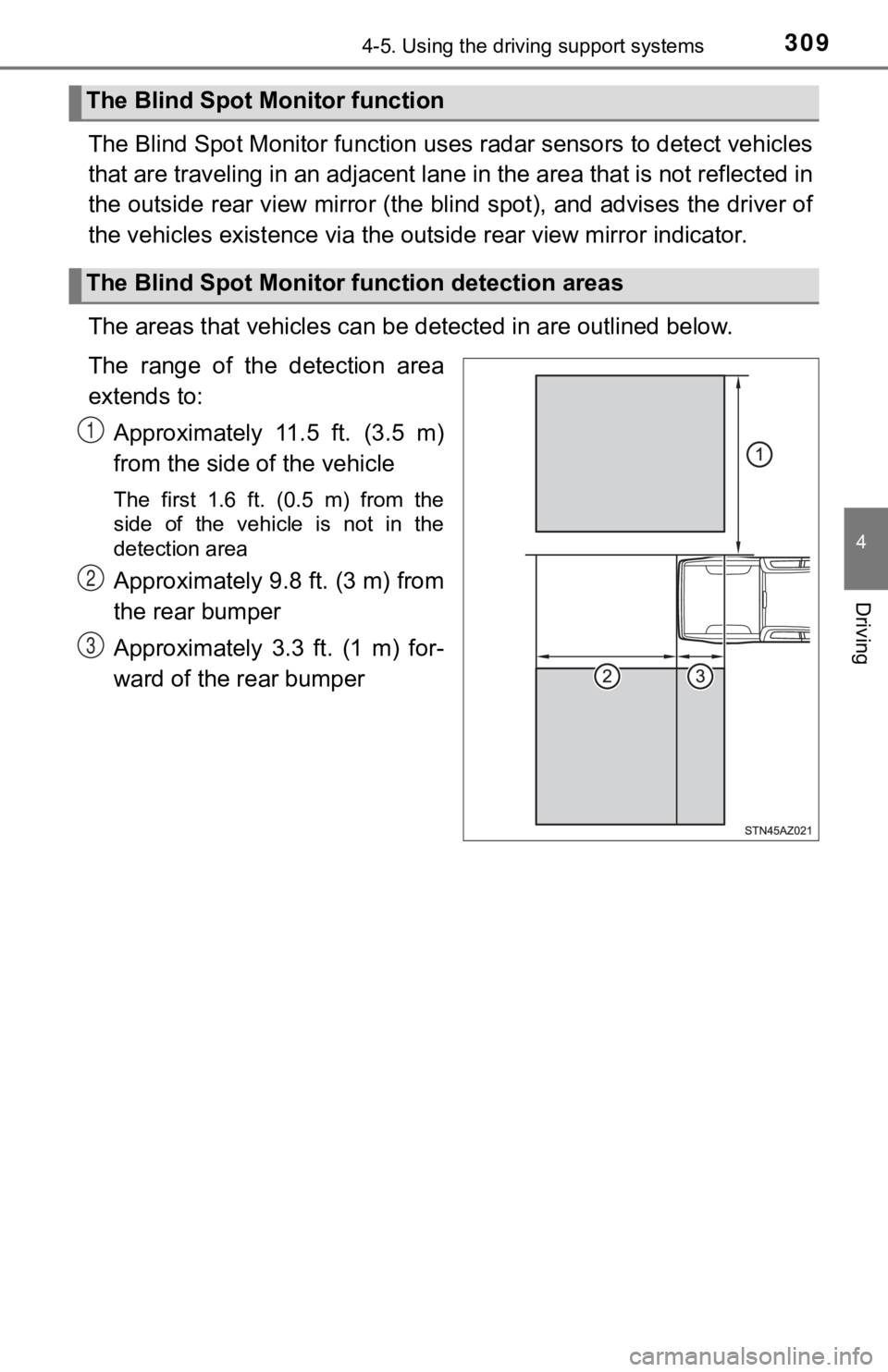
The areas that vehicles can be detected in are outlined below.
The range of the detection area
extends to: Approximately 11.5 ft. (3.5 m)
from the side of the vehicle
The first 1.6 ft. (0.5 m) from the
side of the vehicle is not in the
detection area
Approximately 9.8 ft. (3 m) from
the rear bumper
Approximately 3.3 ft. (1 m) for-
ward of the rear bumper
The Blind Spot Monitor function
The Blind Spot Monitor f unction detection areas
1
2
3
Page 312 of 612
3124-5. Using the driving support systems
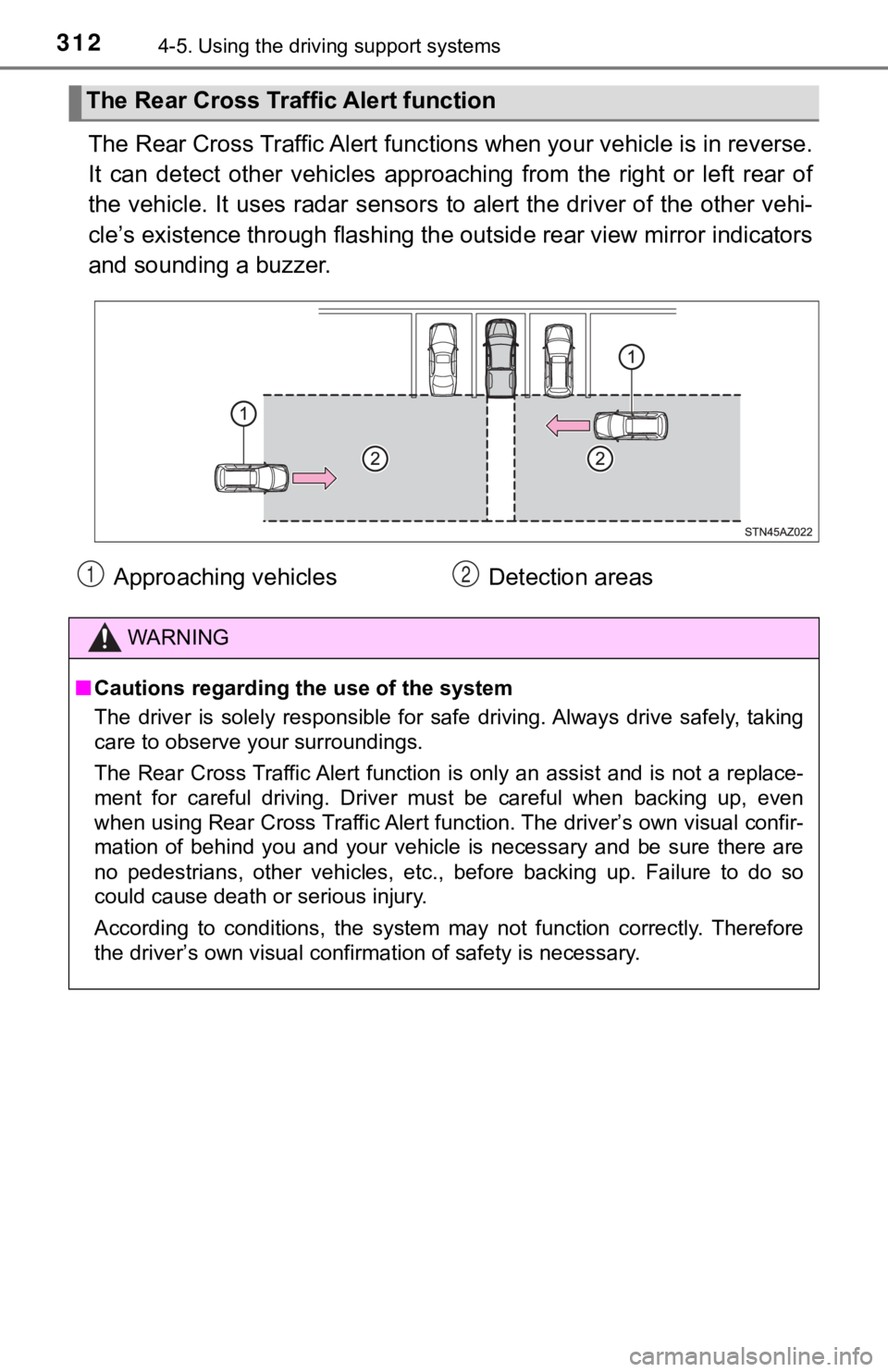
The Rear Cross Traffic Alert func tions when your vehicle is in reverse.
It can detect other vehicles appr oaching from the right or left rear of
the vehicle. It uses radar sensors to alert the driver of the other vehi-
cle’s existence through flashing the outside rear view mirror i ndicators
and sounding a buzzer.
The Rear Cross Tra ffic Alert function
Approaching vehicles Detection areas
WARNING
■Cautions regarding the use of the system
The driver is solely responsible for safe driving. Always drive safely, taking
care to observe your surroundings.
The Rear Cross Traffic Alert function is only an assist and is not a replace-
ment for careful driving. Driver must be careful when backing u p, even
when using Rear Cross Traffic Al ert function. The driver’s own visual confir-
mation of behind you and your vehicle is necessary and be sure there are
no pedestrians, other vehicles, etc., before backing up. Failure to do so
could cause death or serious injury.
According to conditions, the system may not function correctly. Therefore
the driver’s own visual confirmation of safety is necessary.
12
Page 341 of 612
3415-1. Using the air conditioning system
5
Interior features
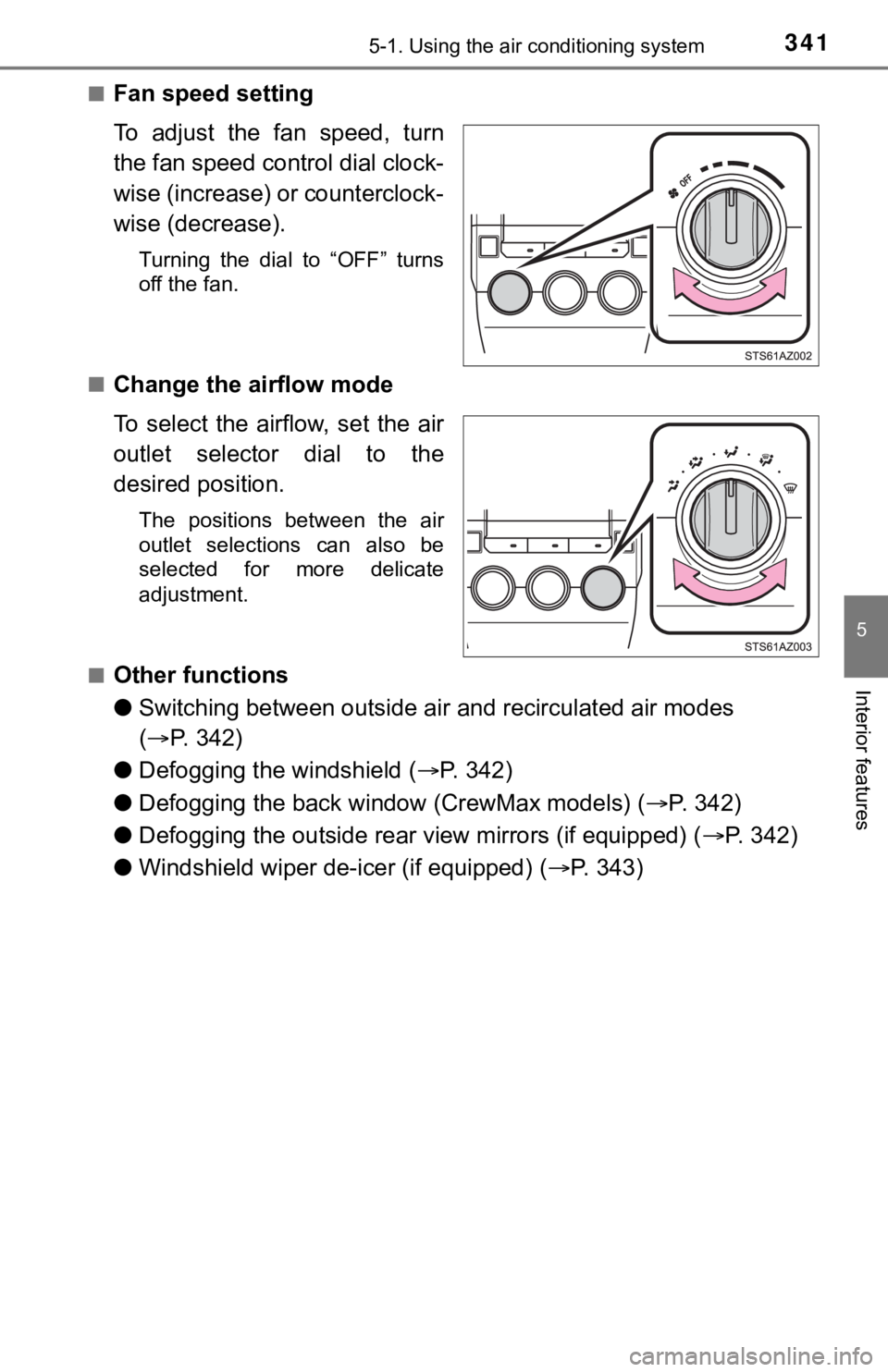
■Fan speed setting
To adjust the fan speed, turn
the fan speed control dial clock-
wise (increase) or counterclock-
wise (decrease).
Turning the dial to “OFF” turns
off the fan.
■
Change the airflow mode
To select the airflow, set the air
outlet selector dial to the
desired position.
The positions between the air
outlet selections can also be
selected for more delicate
adjustment.
■
Other functions
● Switching between outside air and recirculated air modes
( P. 342)
● Defogging the windshield ( P. 3 4 2 )
● Defogging the back window (CrewMax models) ( P. 342)
● Defogging the outside rear view mirrors (if equipped) ( P. 342)
● Windshield wiper de-icer (if equipped) ( P. 3 4 3 )
Page 342 of 612
3425-1. Using the air conditioning system
■Switching between outside air and recirculated air modes
Press .
The mode switches between outside air mode (introduces air from
outside the vehicle) (indicator off) and recirculated air mode (recy-
cles air inside the vehicle) (in dicator on) each time the butto n is
pressed.
■Defogging the windshield
Defoggers are used to defog the windshield and front side win-
dows.
Set the air outlet selector dial to position.
Set the outside/recirculated air mode button to outside air mod e if the recir-
culated air mode is used. (It may switch automatically.)
To defog the windshield and the side windows early, turn the ai r flow and
temperature up.
■
Defogging the back wi ndow (CrewMax models)
Defogger is used to defog the back window.
Press .
The defogger will automatically turn off after approximately 15 minutes.
■
Defogging the outside rear v iew mirrors (if equipped)
Defogger is used to defog to remove raindrops, dew and frost fr om
the outside rear view mirrors.
Press or .
The defogger will automatically turn off after approximately 15 minutes.
CrewMax models: Turning the back window defogger on will turn t he out-
side rear view mirror defoggers on.
Other functions
Page 343 of 612
3435-1. Using the air conditioning system
5
Interior features
■Windshield wiper de-icer (if equipped)
This feature is used to prevent ice from building up on the win d-
shield and wiper blades.
Press or .
The defogger will automatically turn off after approximately 15 minutes.
Double Cab models: Turning the outside rear view mirror defogge rs on will
turn the windshield wiper de-icer on.
CrewMax models: Turning the back window defogger on will turn t he wind-
shield wiper de-icer on.
■
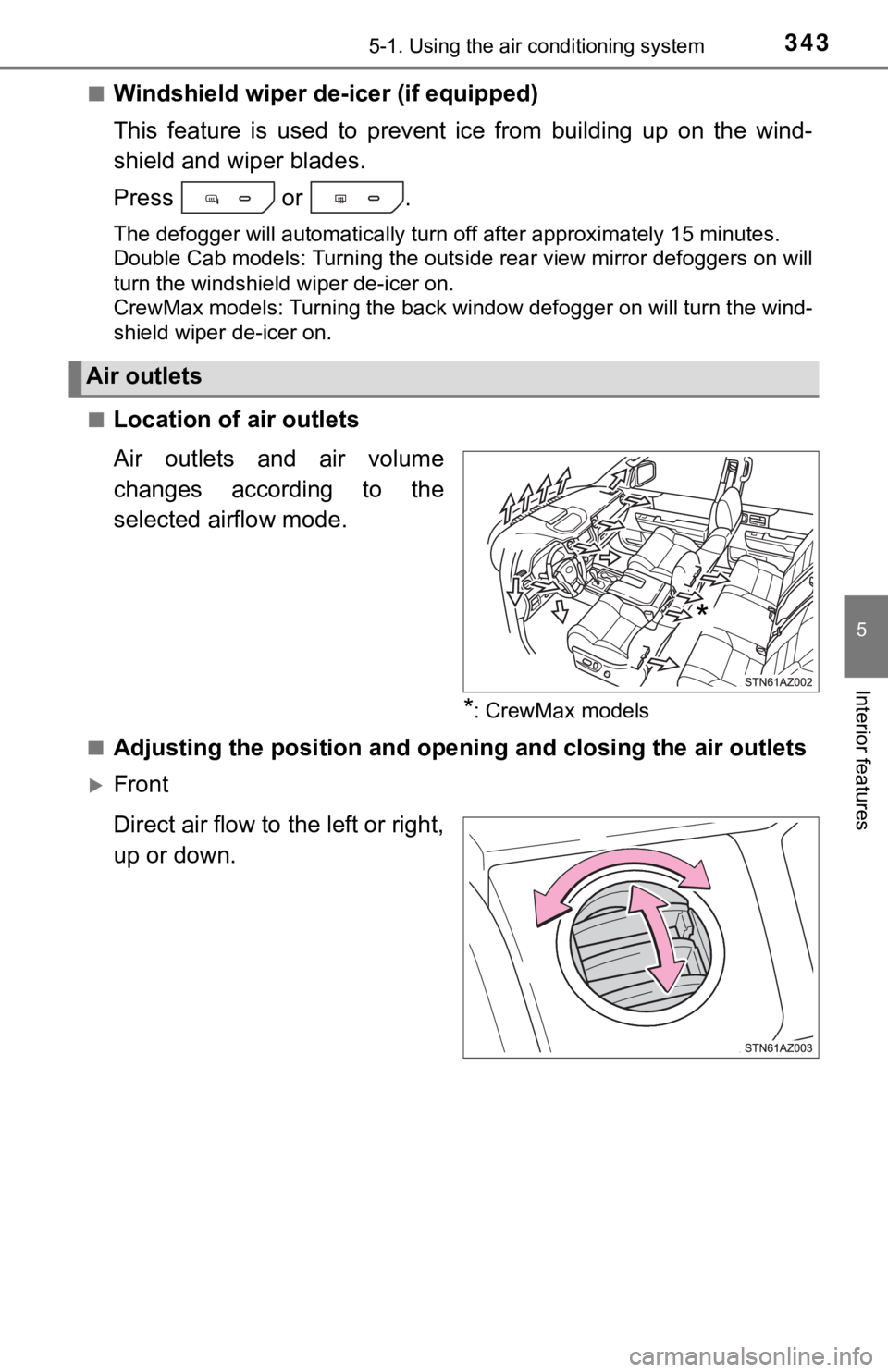
Location of a ir outlets
Air outlets and air volume
changes according to the
selected airflow mode.
*: CrewMax models
■
Adjusting the position and open ing and closing the air outlets
Front
Direct air flow to the left or right,
up or down.
Air outlets
*