warning light TOYOTA TUNDRA HYBRID 2023 Owner's Manual
[x] Cancel search | Manufacturer: TOYOTA, Model Year: 2023, Model line: TUNDRA HYBRID, Model: TOYOTA TUNDRA HYBRID 2023Pages: 618, PDF Size: 13.67 MB
Page 87 of 618
872-1. Instrument cluster
Owners Manual_USA_M0C052_en
2
Vehicle status information and indicators
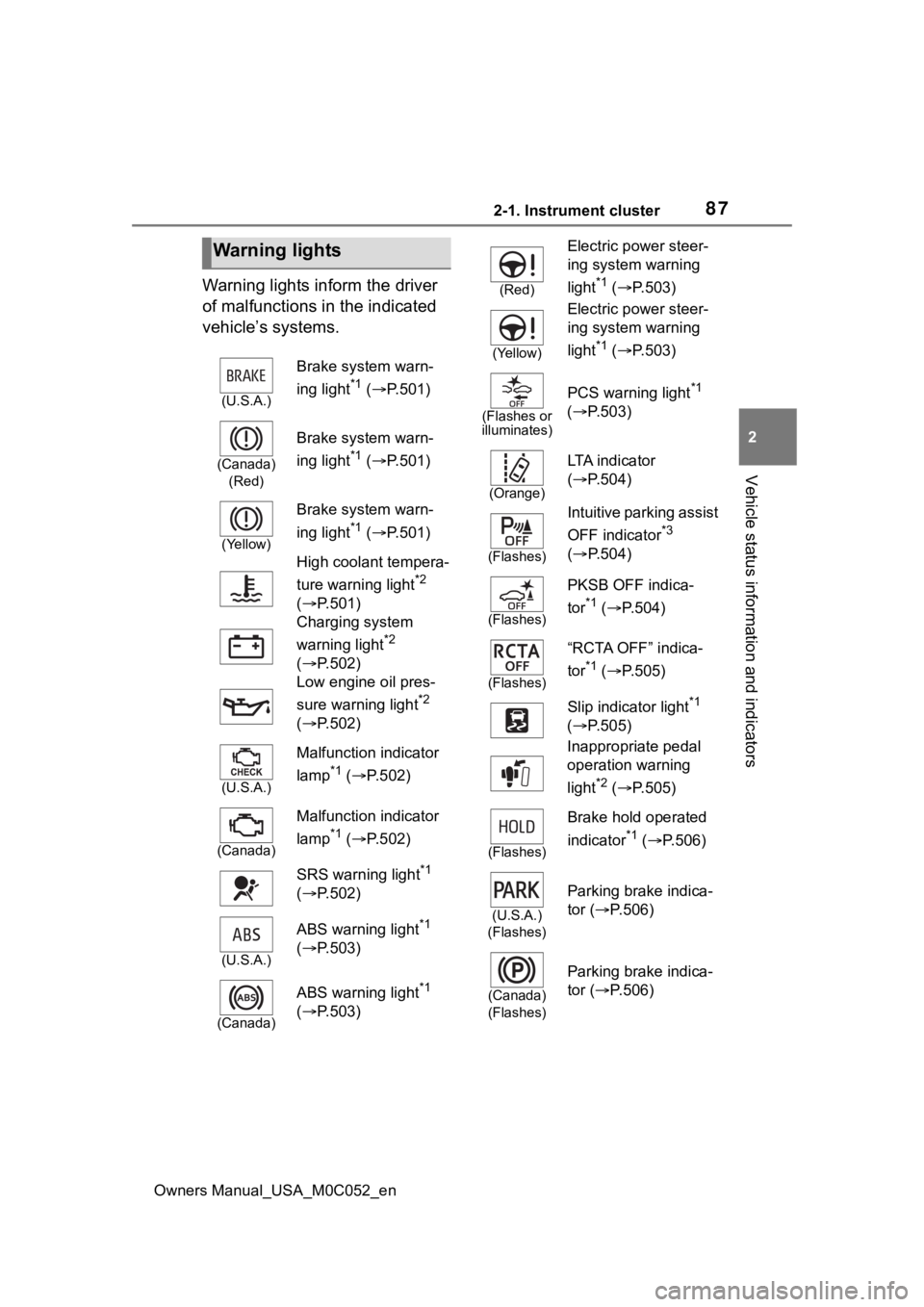
Warning lights inform the driver
of malfunctions in the indicated
vehicle’s systems.
Warning lights
(U.S.A.)
Brake system warn-
ing light
*1 ( P.501)
(Canada)
(Red)
Brake system warn-
ing light
*1 ( P.501)
(Yellow)
Brake system warn-
ing light
*1 ( P.501)
High coolant tempera-
ture warning light
*2
( P.501)
Charging system
warning light
*2
( P.502)
Low engine oil pres-
sure warning light
*2
( P.502)
(U.S.A.)
Malfunction indicator
lamp
*1 ( P.502)
(Canada)
Malfunction indicator
lamp
*1 ( P.502)
SRS warning light
*1
( P.502)
(U.S.A.)
ABS warning light*1
( P.503)
(Canada)
ABS warning light*1
( P.503)
(Red)
Electric power steer-
ing system warning
light
*1 ( P.503)
(Yellow)
Electric power steer-
ing system warning
light
*1 ( P.503)
(Flashes or
illuminates)
PCS warning light*1
( P.503)
(Orange)
LTA i n d i c a t o r
( P.504)
(Flashes)
Intuitive parking assist
OFF indicator
*3
( P.504)
(Flashes)
PKSB OFF indica-
tor
*1 ( P.504)
(Flashes)
“RCTA OFF” indica-
tor
*1 ( P.505)
Slip indicator light
*1
( P.505)
Inappropriate pedal
operation warning
light
*2 ( P.505)
(Flashes)
Brake hold operated
indicator
*1 ( P.506)
(U.S.A.)
(Flashes)
Parking brake indica-
tor ( P.506)
(Canada)
(Flashes)
Parking brake indica-
tor ( P.506)
Page 88 of 618
882-1. Instrument cluster
Owners Manual_USA_M0C052_en
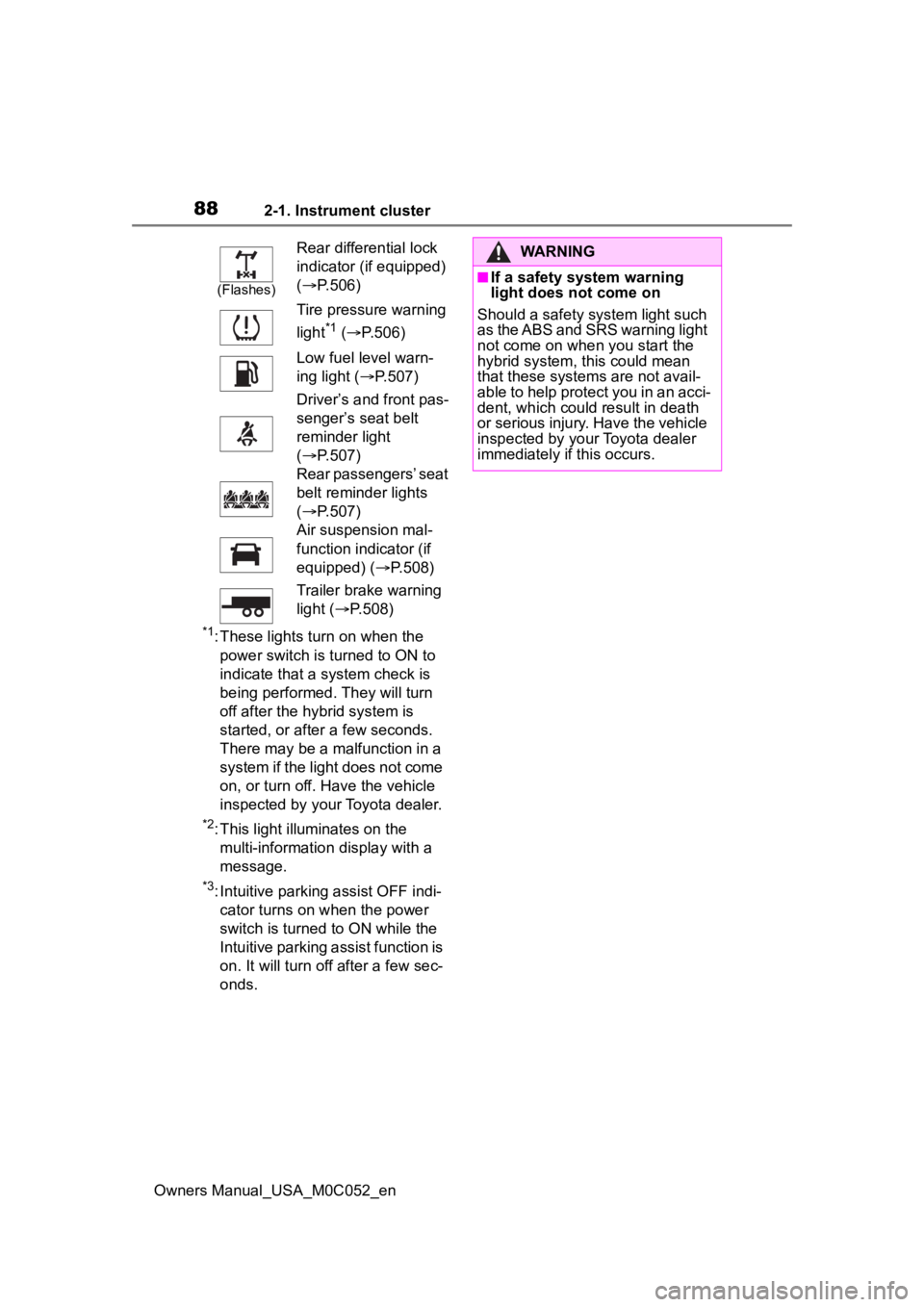
*1: These lights turn on when the power switch is turned to ON to
indicate that a system check is
being performed. They will turn
off after the hybrid system is
started, or after a few seconds.
There may be a malfunction in a
system if the light does not come
on, or turn off. Have the vehicle
inspected by your Toyota dealer.
*2: This light illuminates on the multi-informatio n display with a
message.
*3: Intuitive parking assist OFF indi- cator turns on when the power
switch is turned to ON while the
Intuitive parking assist function is
on. It will turn off after a few sec-
onds.
(Flashes)
Rear differential lock
indicator (if equipped)
( P.506)
Tire pressure warning
light
*1 ( P.506)
Low fuel level warn-
ing light ( P.507)
Driver’s and front pas-
senger’s seat belt
reminder light
( P.507)
Rear passengers’ seat
belt reminder lights
( P.507)
Air suspension mal-
function indicator (if
equipped) ( P.508)
Trailer brake warning
light ( P.508)
WARNING
■If a safety system warning
light does not come on
Should a safety system light such
as the ABS and SRS warning light
not come on when you start the
hybrid system, this could mean
that these system s are not avail-
able to help protect you in an acci-
dent, which could result in death
or serious injury. Have the vehicle
inspected by you r Toyota dealer
immediately if this occurs.
Page 89 of 618
892-1. Instrument cluster
Owners Manual_USA_M0C052_en
2
Vehicle status information and indicators
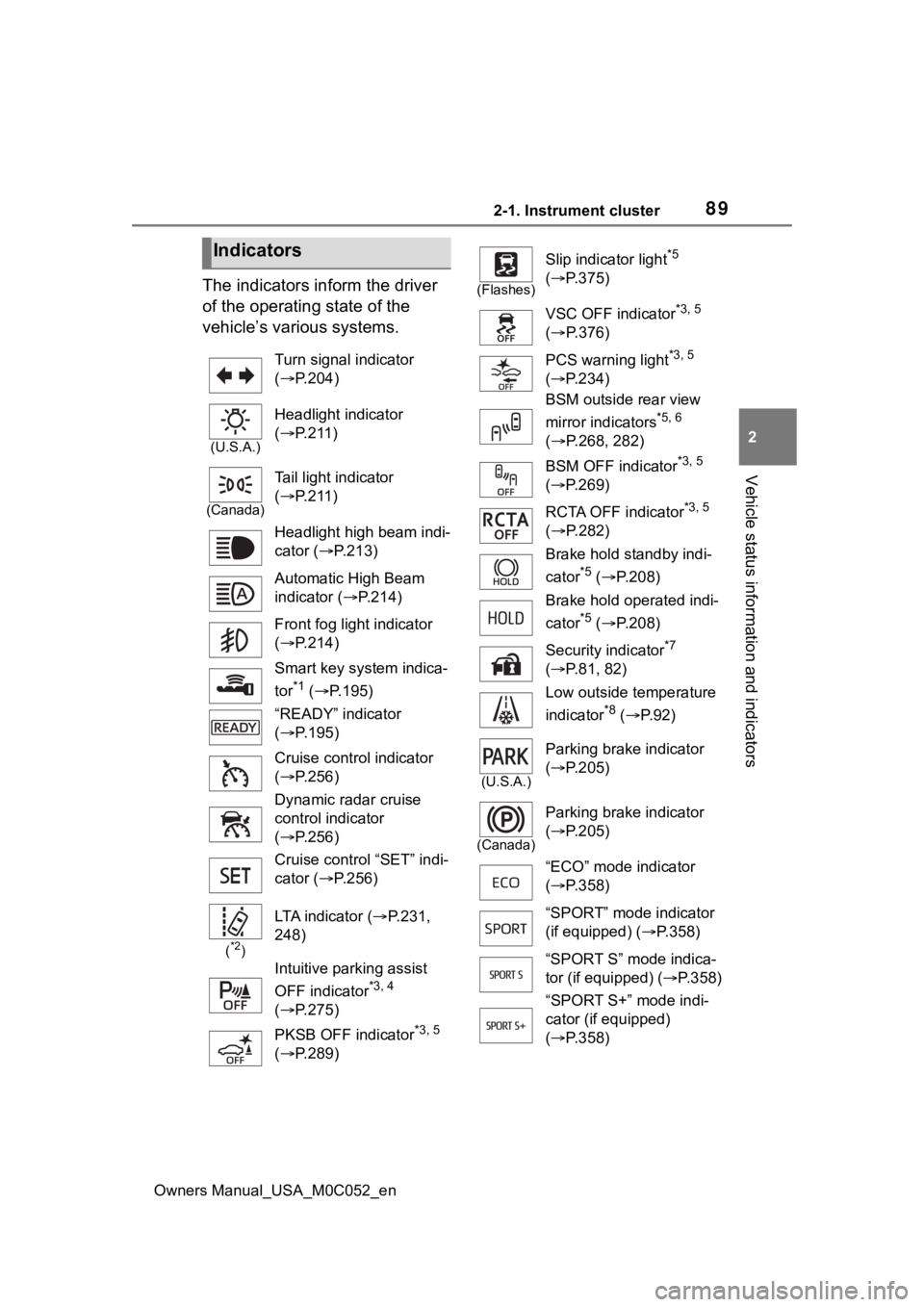
The indicators inform the driver
of the operating state of the
vehicle’s various systems.
Indicators
Turn signal indicator
( P.204)
(U.S.A.)
Headlight indicator
( P.211)
(Canada)
Tail light indicator
( P.211)
Headlight high beam indi-
cator ( P.213)
Automatic High Beam
indicator ( P.214)
Front fog light indicator
( P.214)
Smart key system indica-
tor
*1 ( P.195)
“READY” indicator
( P.195)
Cruise control indicator
( P.256)
Dynamic radar cruise
control indicator
( P.256)
Cruise control “SET” indi-
cator ( P.256)
(*2)
LTA indicator ( P.231,
248)
Intuitive parking assist
OFF indicator
*3, 4
( P.275)
PKSB OFF indicator
*3, 5
( P.289)
(Flashes)
Slip indicator light*5
( P.375)
VSC OFF indicator
*3, 5
( P.376)
PCS warning light
*3, 5
( P.234)
BSM outside rear view
mirror indicators
*5, 6
( P.268, 282)
BSM OFF indicator
*3, 5
( P.269)
RCTA OFF indicator
*3, 5
( P.282)
Brake hold standby indi-
cator
*5 ( P.208)
Brake hold operated indi-
cator
*5 ( P.208)
Security indicator
*7
( P.81, 82)
Low outside temperature
indicator
*8 ( P. 9 2 )
(U.S.A.)
Parking brake indicator
( P.205)
(Canada)
Parking brake indicator
( P.205)
“ECO” mode indicator
( P.358)
“SPORT” mode indicator
(if equipped) ( P.358)
“SPORT S” mode indica-
tor (if equipped) ( P.358)
“SPORT S+” mode indi-
cator (if equipped)
( P.358)
Page 94 of 618
942-1. Instrument cluster
Owners Manual_USA_M0C052_en
■Pop-up display
In some situations the following
will be temporarily displayed:
Distance until next engine oil
change
Displays the distan ce until the next
engine oil change. This display will
be displayed in the following situa-
tions:
When the power switch is
turned to ON.
When a warning message
indicating that oil mainte-
nance should be performed
soon or is required is dis-
played.
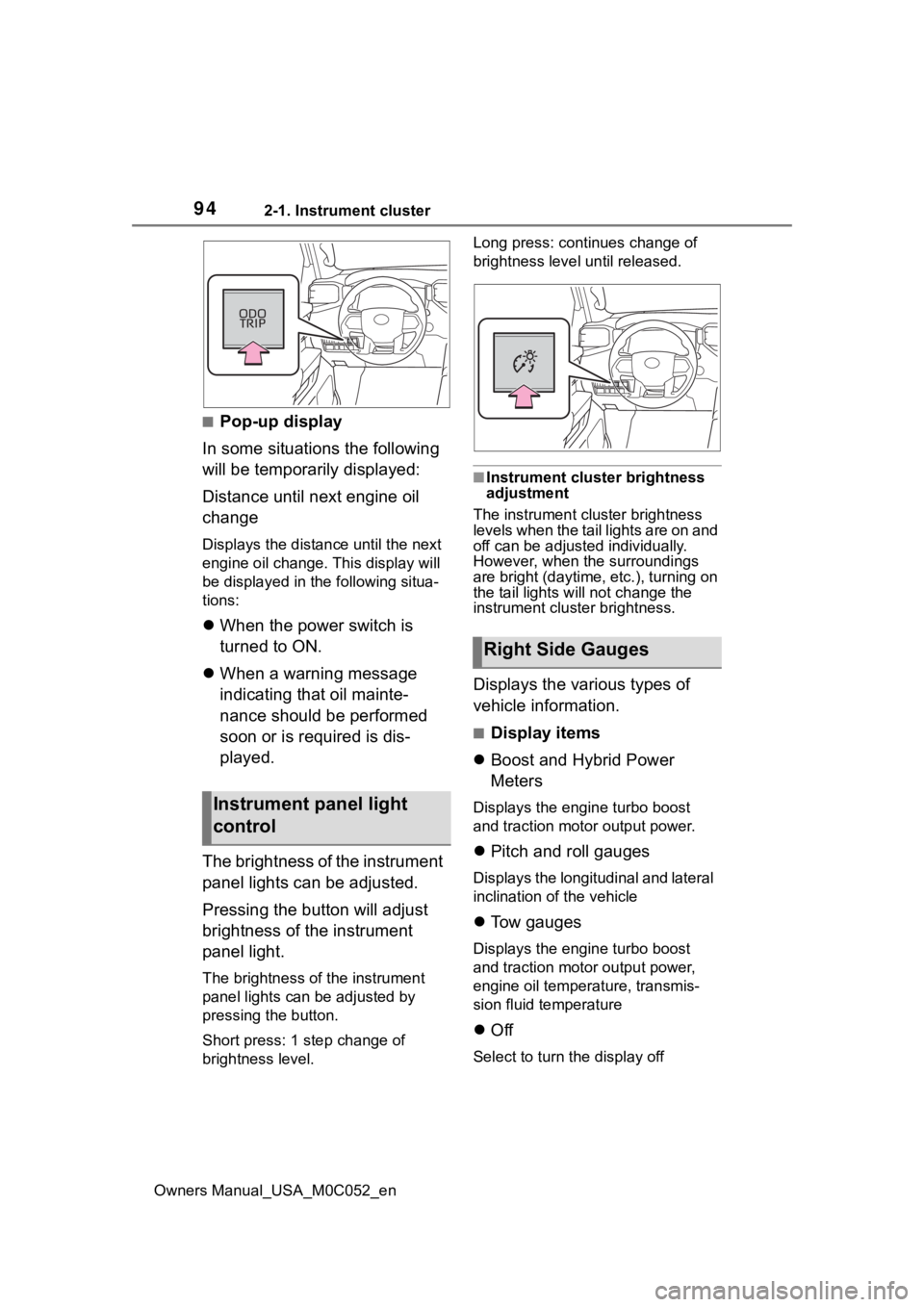
The brightness of the instrument
panel lights can be adjusted.
Pressing the button will adjust
brightness of the instrument
panel light.
The brightness of the instrument
panel lights can be adjusted by
pressing the button.
Short press: 1 s tep change of
brightness level. Long press: continues change of
brightness level until released.
■Instrument cluster brightness
adjustment
The instrument cluster brightness
levels when the tail lights are on and
off can be adjusted individually.
However, when the surroundings
are bright (daytime, etc.), turning on
the tail lights will not change the
instrument cluster brightness.
Displays the various types of
vehicle information.
■Display items
Boost and Hybrid Power
Meters
Displays the engine turbo boost
and traction motor output power.
Pitch and roll gauges
Displays the longitudinal and lateral
inclination of the vehicle
Tow gauges
Displays the engine turbo boost
and traction motor output power,
engine oil temperature, transmis-
sion fluid temperature
Off
Select to turn the display off
Instrument panel light
control
Right Side Gauges
Page 96 of 618
962-1. Instrument cluster
Owners Manual_USA_M0C052_en• Dynamic radar cruise control with
full-speed range ( P.256)
• RSA (Road Sign Assist) (if equipped) ( P.253)
■Menu icons
The menu icons will be dis-
played by pressing the or
meter control switch.
■Liquid crystal display
Small spots or light spots may
appear on the display. This phenom-
enon is characteristi c of liquid crys-
tal displays, and there is no problem
continuing to use the display.
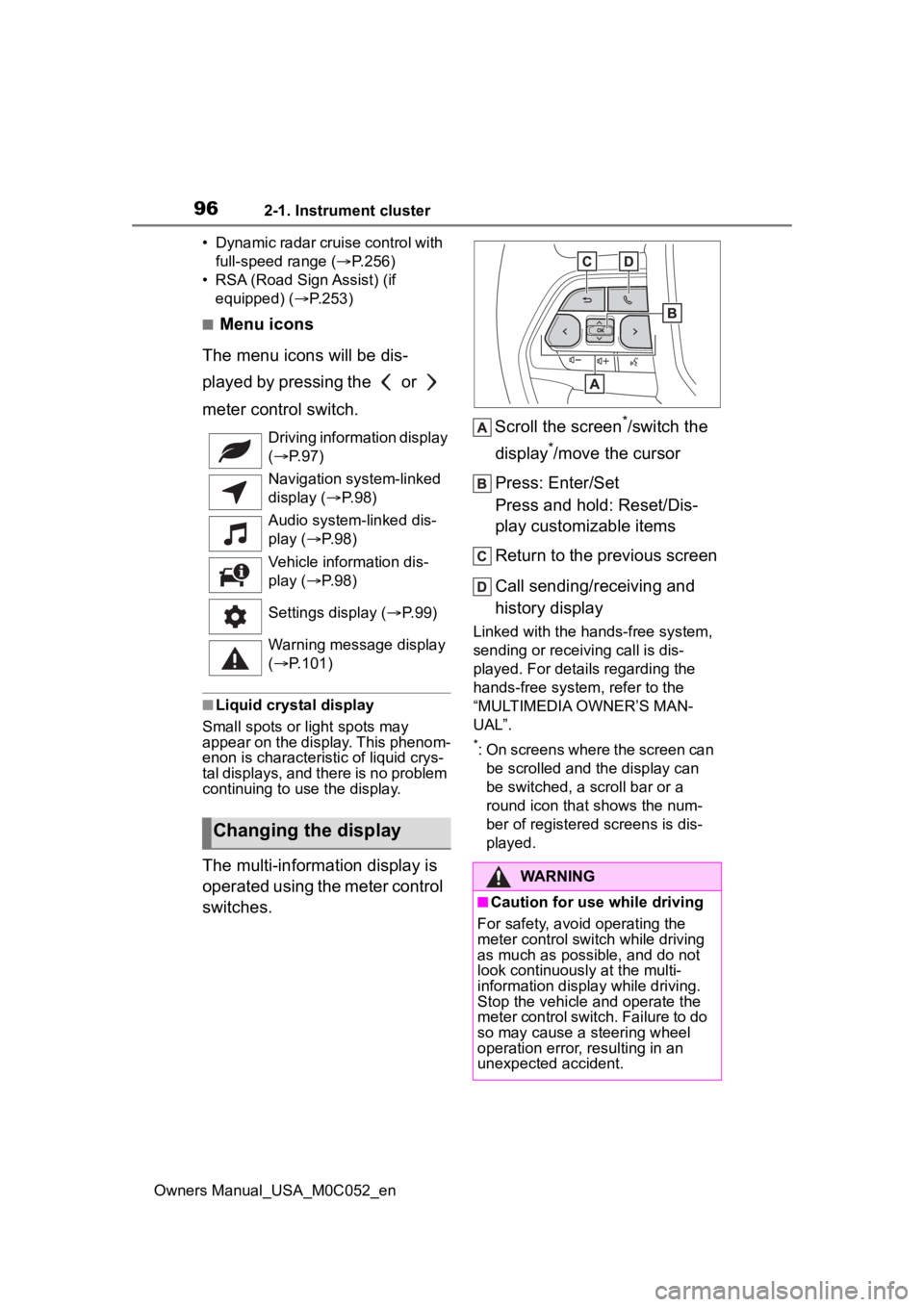
The multi-information display is
operated using the meter control
switches. Scroll the screen
*/switch the
display
*/move the cursor
Press: Enter/Set
Press and hold: Reset/Dis-
play customizable items
Return to the previous screen
Call sending/receiving and
history display
Linked with the hands-free system,
sending or receiving call is dis-
played. For details regarding the
hands-free system, refer to the
“MULTIMEDIA OWNER’S MAN-
UAL”.
*: On screens where the screen can be scrolled and the display can
be switched, a scroll bar or a
round icon that shows the num-
ber of registered screens is dis-
played.
Driving information display
(
P. 9 7 )
Navigation system-linked
display ( P. 9 8 )
Audio system-linked dis-
play ( P. 9 8 )
Vehicle information dis-
play ( P. 9 8 )
Settings display ( P. 9 9 )
Warning message display
( P.101)
Changing the display
WARNING
■Caution for use while driving
For safety, avoid operating the
meter control switch while driving
as much as possible, and do not
look continuously at the multi-
information display while driving.
Stop the vehicle and operate the
meter control switch. Failure to do
so may cause a steering wheel
operation error, resulting in an
unexpected accident.
Page 135 of 618
1353-3. Adjusting the seats
Owners Manual_USA_M0C052_en
3
Before driving
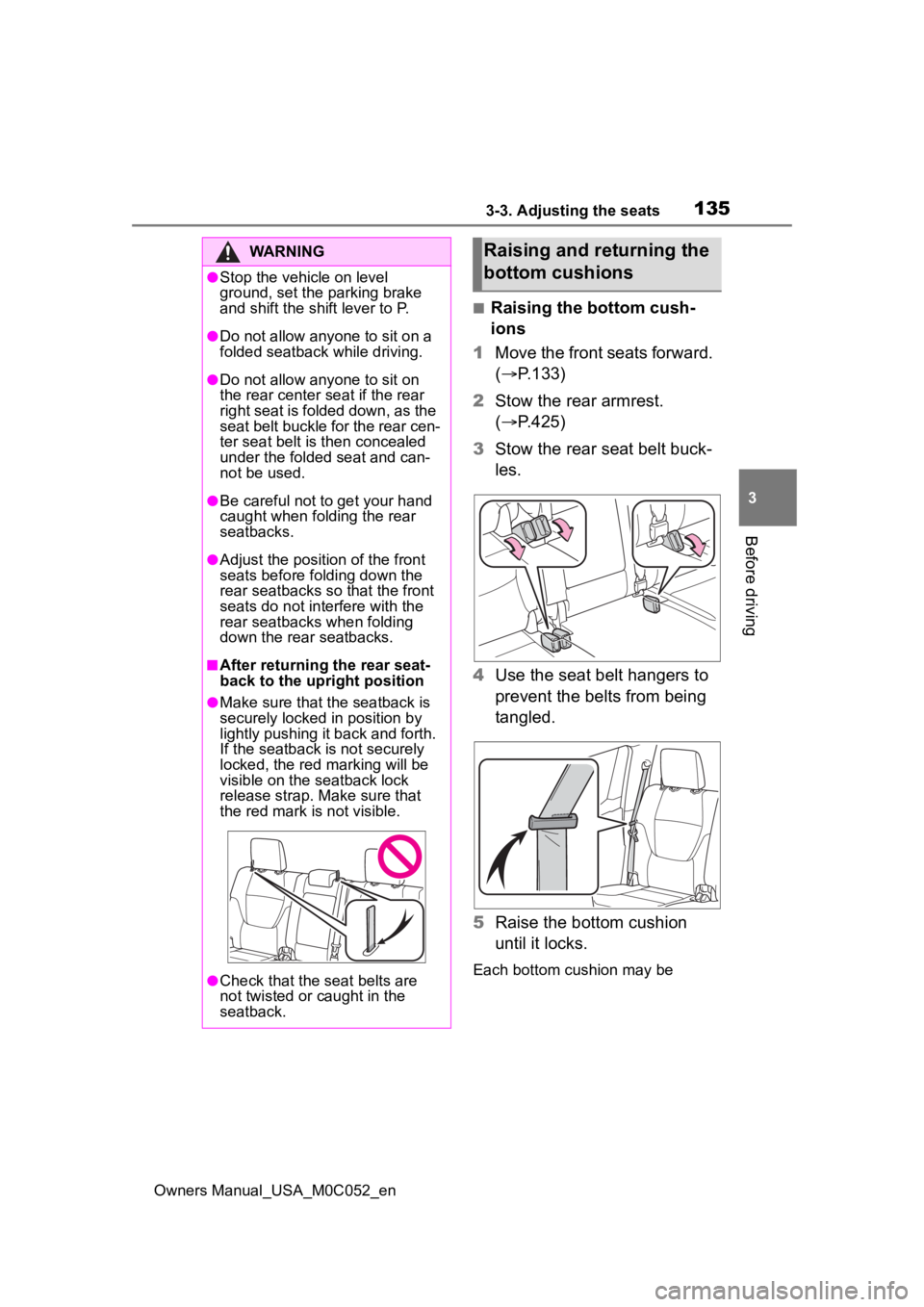
■Raising the bottom cush-
ions
1 Move the front seats forward.
( P.133)
2 Stow the rear armrest.
( P.425)
3 Stow the rear seat belt buck-
les.
4 Use the seat belt hangers to
prevent the belts from being
tangled.
5 Raise the bottom cushion
until it locks.
Each bottom cushion may be
WARNING
●Stop the vehicle on level
ground, set the parking brake
and shift the shift lever to P.
●Do not allow anyo ne to sit on a
folded seatback while driving.
●Do not allow any one to sit on
the rear center seat if the rear
right seat is folded down, as the
seat belt buckle for the rear cen-
ter seat belt is then concealed
under the folded seat and can-
not be used.
●Be careful not to get your hand
caught when folding the rear
seatbacks.
●Adjust the position of the front
seats before folding down the
rear seatbacks so that the front
seats do not interfere with the
rear seatbacks when folding
down the rear seatbacks.
■After returning the rear seat-
back to the upright position
●Make sure that the seatback is
securely locked in position by
lightly pushing it back and forth.
If the seatback is not securely
locked, the red marking will be
visible on the seatback lock
release strap. Make sure that
the red mark is not visible.
●Check that the seat belts are
not twisted or caught in the
seatback.
Raising and returning the
bottom cushions
Page 139 of 618
1393-3. Adjusting the seats
Owners Manual_USA_M0C052_en
3
Before driving
ota dealer.
■Registering procedure
Record your driving position to
button “1” or “2” before perform-
ing the following:
Carry only the key you want to
register, and then close the
driver’s door.
If 2 or more keys are in the vehi-
cle, the driving position cannot
be recorded properly.
1 Check that the shift lever is in
P.
2 Turn the power switch to ON.
3 Recall the driving position
that you want to record.
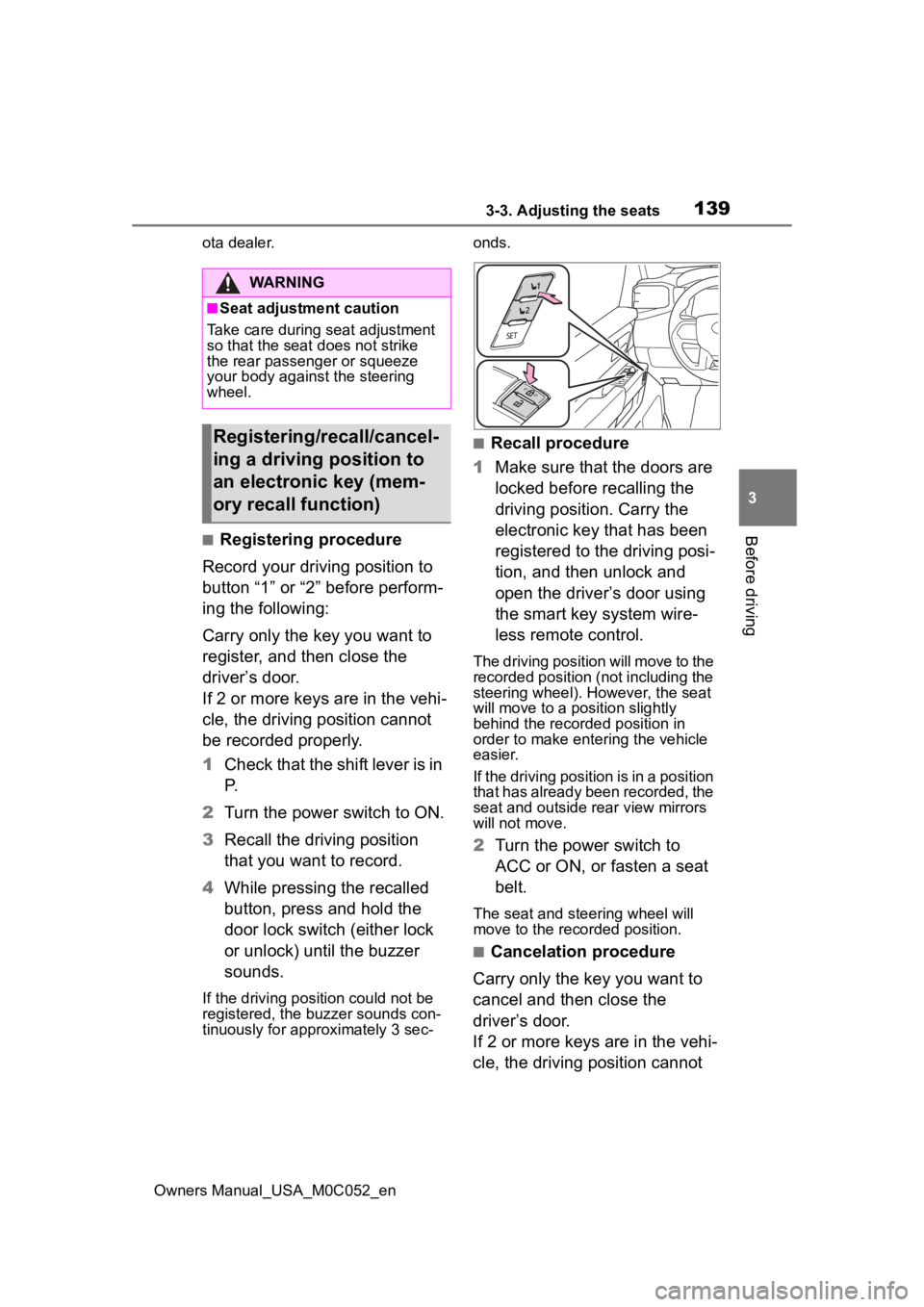
4 While pressing the recalled
button, press and hold the
door lock switch (either lock
or unlock) until the buzzer
sounds.
If the driving position could not be
registered, the buzzer sounds con-
tinuously for approximately 3 sec- onds.
■Recall procedure
1 Make sure that the doors are
locked before recalling the
driving position. Carry the
electronic key that has been
registered to the driving posi-
tion, and then unlock and
open the driver’s door using
the smart key system wire-
less remote control.
The driving position will move to the
recorded position (not including the
steering wheel). However, the seat
will move to a position slightly
behind the recorded position in
order to make entering the vehicle
easier.
If the driving position is in a position
that has already been recorded, the
seat and outside rear view mirrors
will not move.
2Turn the power switch to
ACC or ON, or fasten a seat
belt.
The seat and steering wheel will
move to the recorded position.
■Cancelation procedure
Carry only the key you want to
cancel and then close the
driver’s door.
If 2 or more keys are in the vehi-
cle, the driving position cannot
WARNING
■Seat adjustment caution
Take care during seat adjustment
so that the seat d oes not strike
the rear passenger or squeeze
your body again st the steering
wheel.
Registering/recall/cancel-
ing a driving position to
an electronic key (mem-
ory recall function)
Page 145 of 618
1453-4. Adjusting the steering wheel and mirrors
Owners Manual_USA_M0C052_en
3
Before driving
*: If equipped
The height of the rear view mir-
ror can be adjusted to suit your
driving posture.
Adjust the height of the rear
view mirror by moving it up and
down.
Responding to the level of
brightness of the headlights of vehicles behind, the reflected
light is automatically reduced.
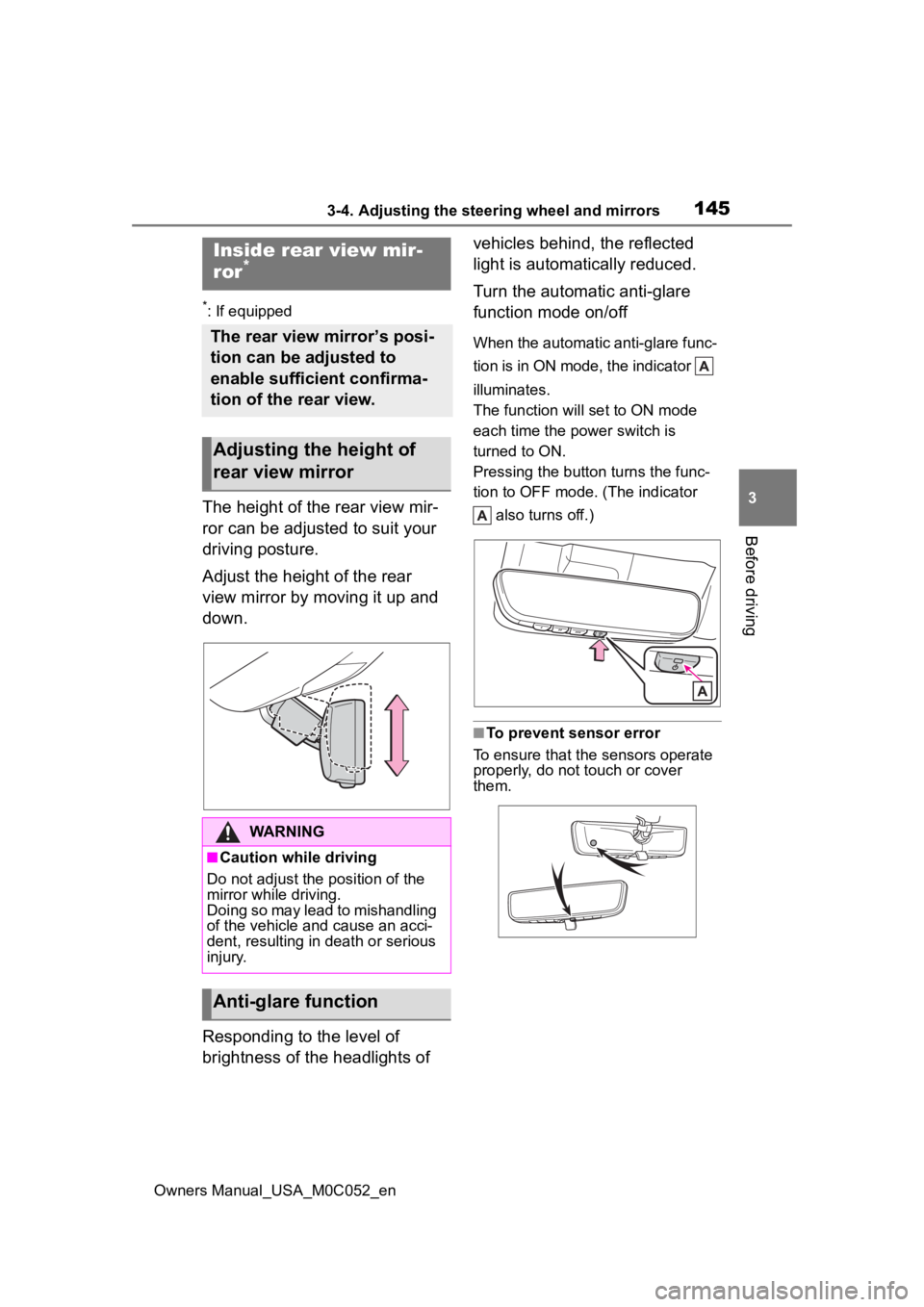
Turn the automatic anti-glare
function mode on/off
When the automatic anti-glare func-
tion is in ON mode, the indicator
illuminates.
The function will set to ON mode
each time the power switch is
turned to ON.
Pressing the button turns the func-
tion to OFF mode. (The indicator
also turns off.)
■To prevent sensor error
To ensure that the sensors operate
properly, do not touch or cover
them.
Inside rear view mir-
ror*
The rear view mirror’s posi-
tion can be adjusted to
enable sufficient confirma-
tion of the rear view.
Adjusting the height of
rear view mirror
WARNING
■Caution while driving
Do not adjust the position of the
mirror while driving.
Doing so may lead to mishandling
of the vehicle and cause an acci-
dent, resulting in death or serious
injury.
Anti-glare function
Page 149 of 618
1493-4. Adjusting the steering wheel and mirrors
Owners Manual_USA_M0C052_en
3
Before driving
can also be changed while using
the digital mirror mode.
■Enabling/disabling the
automatic anti-glare func-
tion (optical mirror mode)
The automatic anti-glare func-
tion in the optical mirror mode
can be enabled/disabled. The
setting can be changed in both
the digital mirror mode and the
optical mirror mode.
When using the digital mirror
mode
P.148
When using the optical mirror
mode
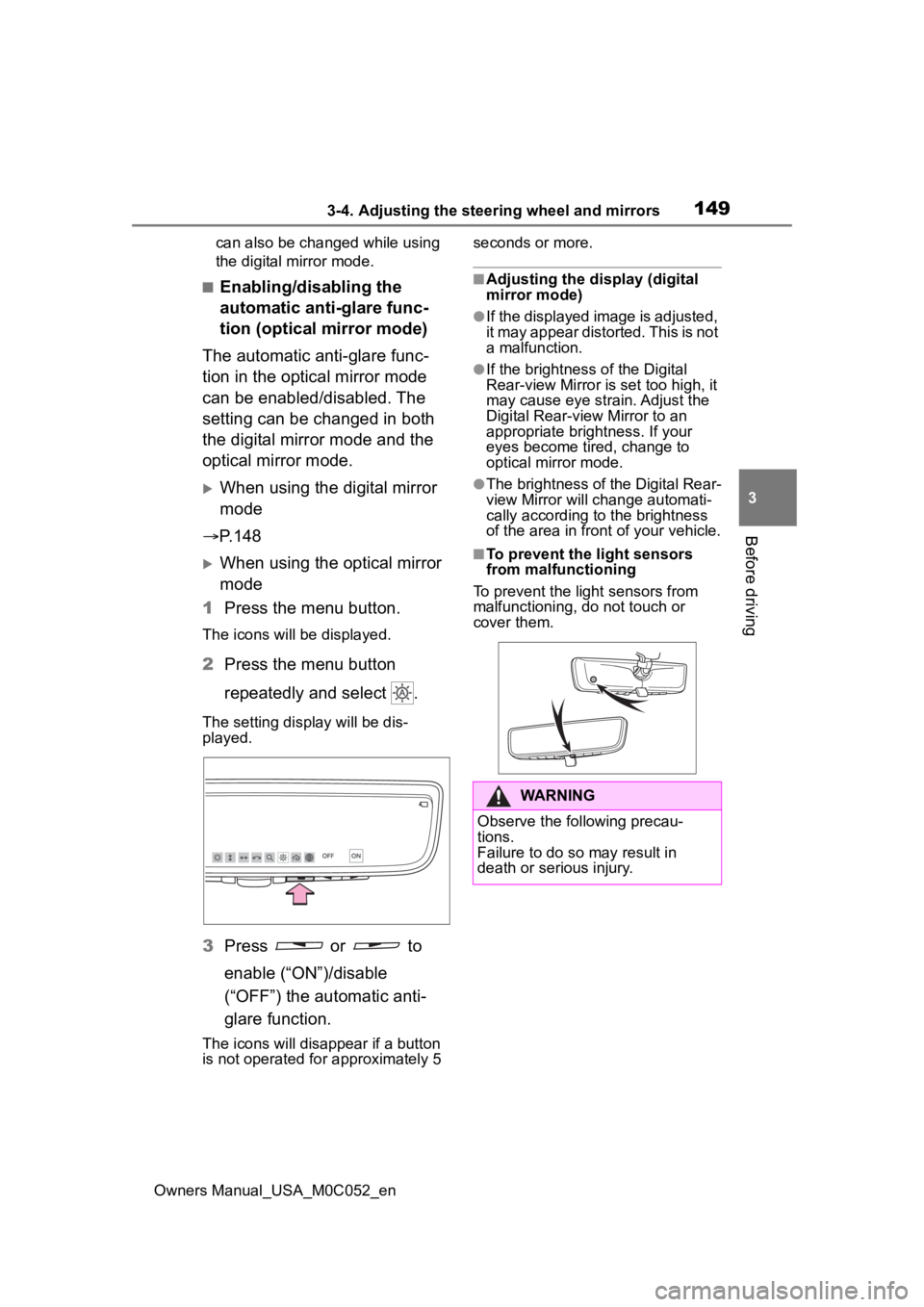
1 Press the menu button.
The icons will be displayed.
2Press the menu button
repeatedly and select .
The setting display will be dis-
played.
3Press or to
enable (“ON”)/disable
(“OFF”) the automatic anti-
glare function.
The icons will disappear if a button
is not operated fo r approximately 5 seconds or more.
■Adjusting the display (digital
mirror mode)
●If the displayed image is adjusted,
it may appear distorted. This is not
a malfunction.
●If the brightness of the Digital
Rear-view Mirror is set too high, it
may cause eye strain. Adjust the
Digital Rear-view Mirror to an
appropriate brightness. If your
eyes become tired, change to
optical mirror mode.
●The brightness of the Digital Rear-
view Mirror will change automati-
cally according to
the brightness
of the area in front of your vehicle.
■To prevent the light sensors
from malfunctioning
To prevent the light sensors from
malfunctioning, do not touch or
cover them.
WARNING
Observe the following precau-
tions.
Failure to do so may result in
death or serious injury.
Page 150 of 618
1503-4. Adjusting the steering wheel and mirrors
Owners Manual_USA_M0C052_en
■Cleaning the mirror surface
If the mirror surface is dirty, the
image on the display may be dif-
ficult to see.
Clean the mirror surface gently using a soft dry cloth.
■Cleaning the camera
If the camera lens is dirty or cov-
ered with foreign matter, such as
water droplets, snow, mud, etc.,
the displayed image may not be
clear. In this case, rinse the
camera lens with a large quan-
tity of water and then wipe it
clean with a soft cloth damp-
ened with water.
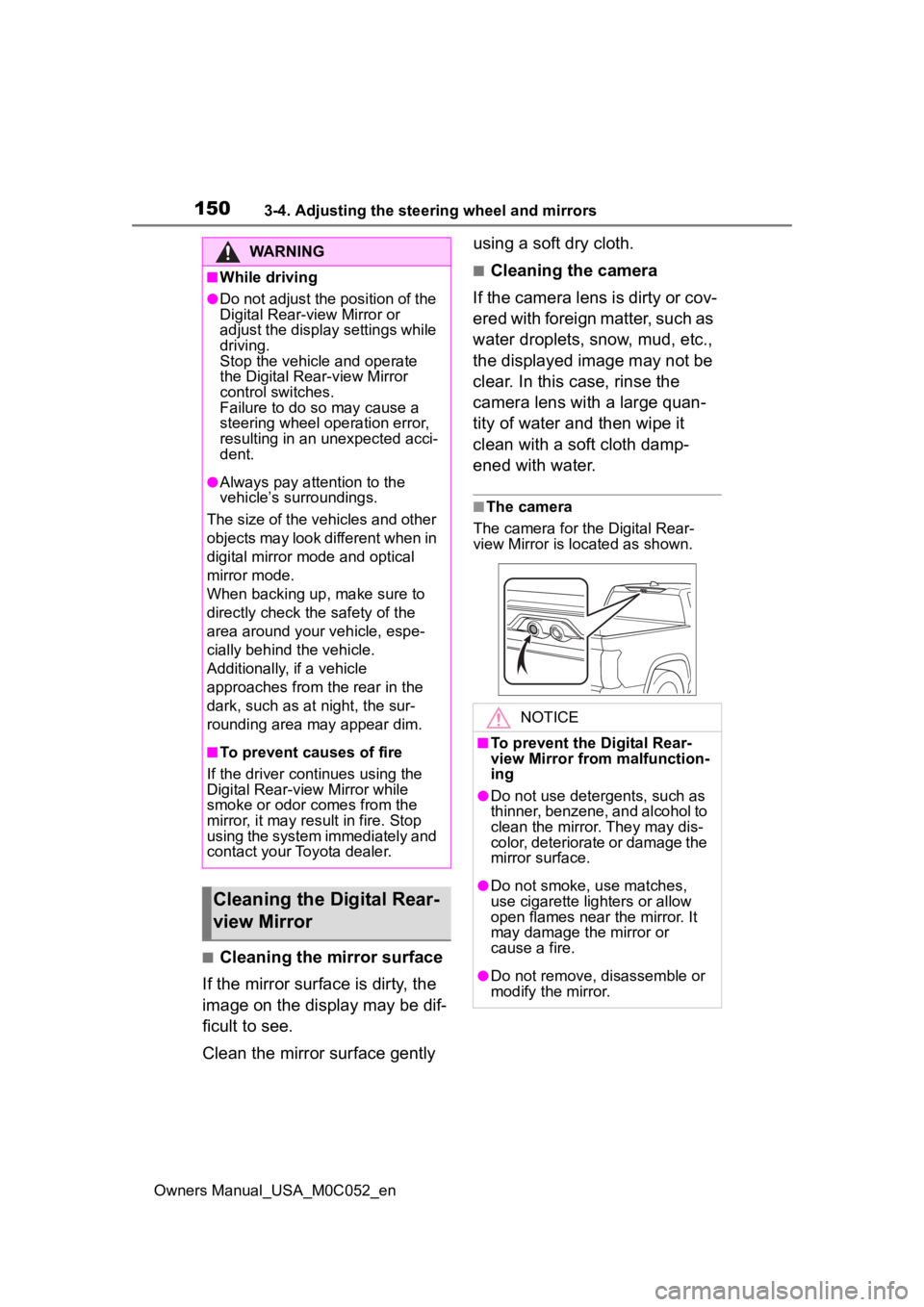
■The camera
The camera for the Digital Rear-
view Mirror is located as shown.
WARNING
■While driving
●Do not adjust the position of the
Digital Rear-v iew Mirror or
adjust the display settings while
driving.
Stop the vehicle and operate
the Digital Rear -view Mirror
control switches.
Failure to do so may cause a
steering wheel operation error,
resulting in an unexpected acci-
dent.
●Always pay attention to the
vehicle’s surroundings.
The size of the vehicles and other
objects may look different when in
digital mirror mode and optical
mirror mode.
When backing up, make sure to
directly check the safety of the
area around your vehicle, espe-
cially behind the vehicle.
Additionally, if a vehicle
approaches from the rear in the
dark, such as at night, the sur-
rounding area may appear dim.
■To prevent causes of fire
If the driver continues using the
Digital Rear-view Mirror while
smoke or odor comes from the
mirror, it may res ult in fire. Stop
using the system immediately and
contact your Toyota dealer.
Cleaning the D igital Rear-
view Mirror
NOTICE
■To prevent the Digital Rear-
view Mirror from malfunction-
ing
●Do not use detergents, such as
thinner, benzene, and alcohol to
clean the mirror. They may dis-
color, deteriorate or damage the
mirror surface.
●Do not smoke, use matches,
use cigarette lighters or allow
open flames near the mirror. It
may damage the mirror or
cause a fire.
●Do not remove, d isassemble or
modify the mirror.